

Pinterest Scraper | Pins, Boards, Profiles & Trends
Pricing
from $1.36 / 1,000 results
Pinterest Scraper | Pins, Boards, Profiles & Trends
Get Pinterest pins with title, image URL, alt text, outbound link, saves and reactions; boards with pin and follower counts; profiles with followers and monthly views; Pinterest Trends keywords with change and 53-week history. Mix searches, URLs and Trends in one run, no login.
Pricing
from $1.36 / 1,000 results
Rating
0.0
(0)
Developer

Flowo
Maintained by CommunityActor stats
0
Bookmarked
2
Total users
1
Monthly active users
7 days ago
Last modified
Categories
Features
Share
Get public Pinterest data in one run: pins with title, description, image URL, alt text, outbound link, saves and reactions; boards with pin and follower counts; profiles with followers, monthly views and website; and Pinterest Trends keywords with search volume index, weekly/monthly/yearly change and a 53-week history. Mix keyword searches, profile, board and pin URLs and Trends in one input. No login or API key.
What does Pinterest Scraper do?
You give it search terms, Pinterest URLs (profiles, boards, pins, searches) and/or Pinterest Trends options. It returns one dataset row per pin, board, user (profile) or trend keyword, each marked with type (pin, board, user, trend) and sourceType, so a mixed run stays easy to filter. It is built for marketers and e-commerce teams doing content and trend research, agencies auditing creators and brand profiles, data teams collecting images with alt text and outbound links, and AI agents that need Pinterest data from a single tool.
How to scrape Pinterest pins, boards, profiles and trends
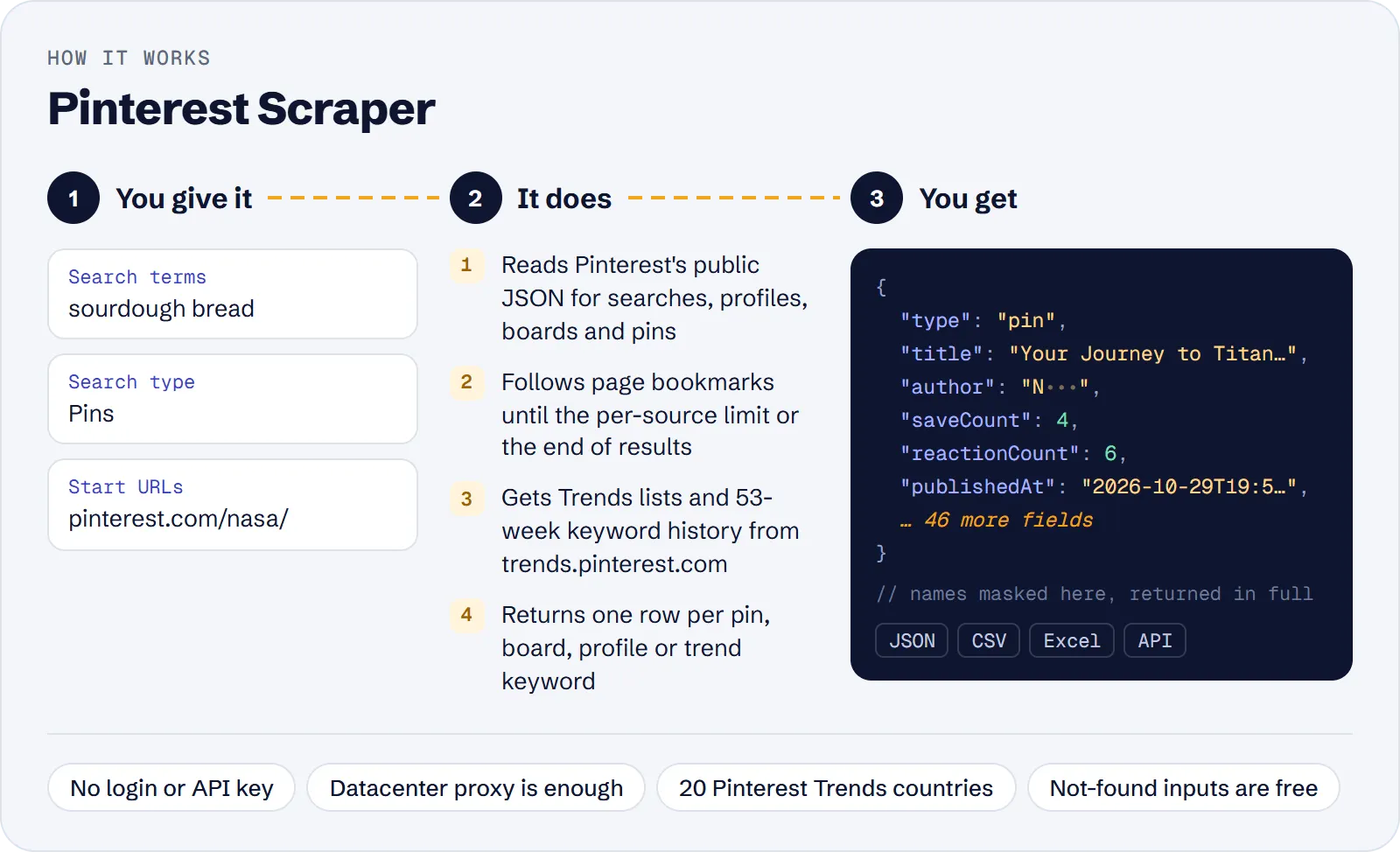
- Open the actor in Apify Console.
- Enter Search terms (e.g.
sourdough bread) and pick a Search type: pins, videos only, boards or users. - Optionally add Start URLs: profiles (
https://www.pinterest.com/nasa/), boards (https://www.pinterest.com/nasa/learn-with-nasa/), pins (https://www.pinterest.com/pin/142567144449081155/) or search URLs. A bare username likenasaor@nasaalso works. - Optionally turn on Trending keywords (growing, top monthly, top yearly or seasonal) and/or add Trend history keywords, and pick a Trends country.
- Set Max results per source, click Start, and download the results as JSON, CSV or Excel.
How much does it cost to scrape Pinterest?
Price per event by Apify plan:
| Event | Free | Bronze | Silver | Gold and above |
|---|---|---|---|---|
| Result | $1.60 per 1,000 | $1.52 per 1,000 | $1.44 per 1,000 | $1.36 per 1,000 |
| Actor start | $0.00005 | $0.00005 | $0.00005 | $0.00005 |
A test run with the API example input below returned 76 rows in 8 s.
You pay per row saved to the dataset (event result): one pin, board, profile or Trends keyword is one event. A Trends keyword row with its 53-week history is still one row. Not-found profiles, boards and pins, untracked trend keywords and failed requests produce no rows and cost nothing. Each run also has a small apify-actor-start event (one per GB of memory, minimum one; the default memory is 256 MB, so one per run).
| Scenario | Events | Cost on the Free plan |
|---|---|---|
| Default Console run: 1 search term + the NASA profile, 50 per source | ≈ 150 rows + 1 start | ≈ $0.24 |
| 1,000 search pins (e.g. 2 terms × 500) | 1,000 rows + 1 start | ≈ $1.60 |
| 10 profiles with 50 created pins and 50 boards each | 1,010 rows + 1 start | ≈ $1.62 |
| Trends: one list of 100 keywords + history for 20 keywords | 120 rows + 1 start | ≈ $0.19 |
Input
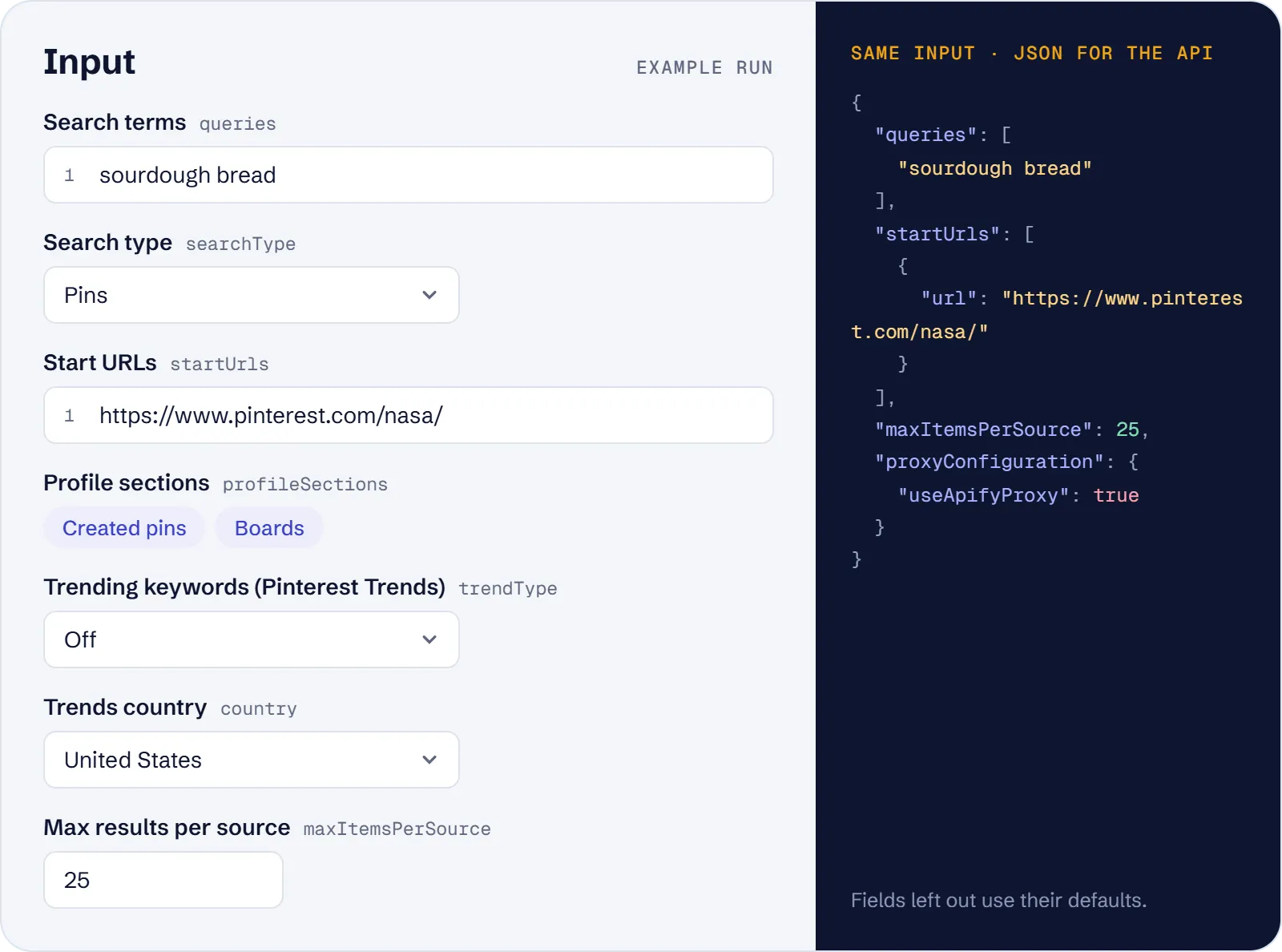
| Field | What it does |
|---|---|
queries | Search terms, one per line. Each term returns up to maxItemsPerSource rows of the chosen searchType. |
searchType | pins (default; images and videos), videos, boards or users. Applies to every search term; search URLs in startUrls keep their own type. |
startUrls | Profile, board, pin or search URLs (/search/pins/, /search/videos/, /search/boards/, /search/users/ with ?q=). Any Pinterest country domain works (de.pinterest.com, pinterest.co.uk, pinterest.fr). A bare username or @handle is a profile. pin.it short links are not supported. |
profileSections | For each profile: pins (created pins), boards, both (default) or an empty list for the profile row only. |
trendType | off (default), growing, topMonthly, topYearly or seasonal: adds one Pinterest Trends list of up to 100 keywords. |
trendKeywords | Keywords to look up in Pinterest Trends: one row each with the current search volume index and 53 weeks of history. |
country | Trends country, one of 20: US, GB, CA, AU, DE, FR, IT, ES, BR, MX, JP, IN, ID, KR, TR, AR, CO, MY, PH, TH (default US). Used only by Trends. |
maxItemsPerSource | 1–1000, default 50. Most rows from each list: each search term, each profile's pins, each profile's boards, each board's pins, each Trends list. The profile row and the board row are extra. |
maxItems | Optional total row limit for the whole run. |
proxyConfiguration | Apify Proxy (datacenter) by default; residential is used automatically only for a request that ends blocked. |
Example input:
What data can you extract from Pinterest?
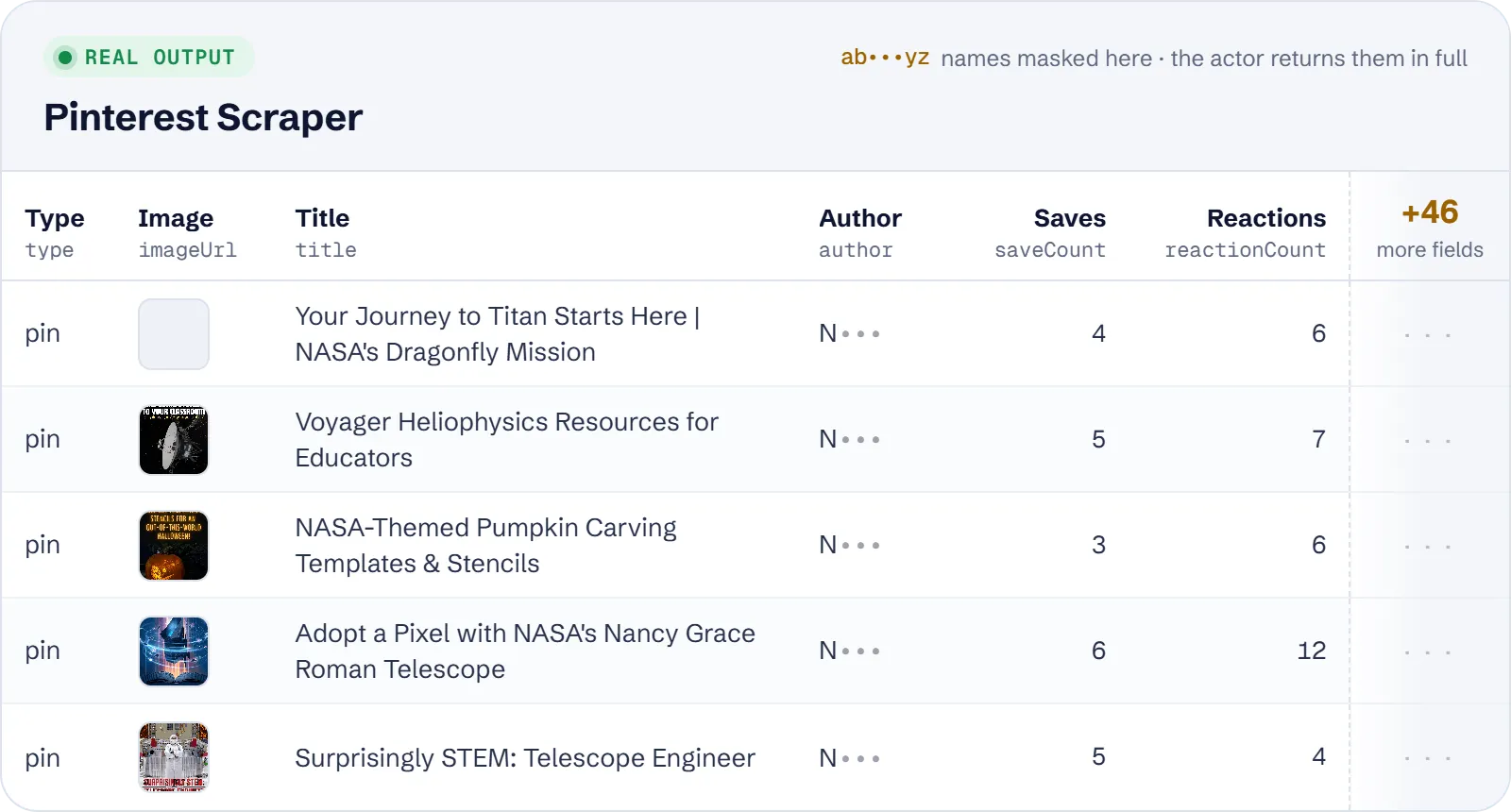
Every row has type, sourceType, id, url and scrapedAt. Fields that do not apply to a row type are null (e.g. saveCount on a board).
| Row type | Fields |
|---|---|
| All rows | type, sourceType (search, profile, profilePins, profileBoards, board, boardPins, pin, trendList, trendKeyword), query, startUrl, position, id, url, title, scrapedAt |
| Pin | description, imageUrl, imageWidth, imageHeight, dominantColor, altText, publishedAt, outboundUrl, outboundDomain, isVideo, videoUrl, saveCount, repinCount, commentCount, shareCount, reactionCount, isPromoted, tags, category, author, authorUsername, authorUrl, authorFollowerCount, boardTitle, boardUrl |
| Board | description, imageUrl, publishedAt, category, author, authorUsername, authorUrl, followerCount, pinCount, sectionCount |
| User (profile) | username, description, imageUrl, publishedAt, followerCount, followingCount, pinCount, boardCount, monthlyViews, websiteUrl, isVerified |
| Trend | searchVolumeIndex, weeklyChangePct, monthlyChangePct, yearlyChangePct, seasonalityScore, country, trendType (growing, topMonthly, topYearly, seasonal, keyword), trendsDate, weeklyHistory ([{date, searchVolumeIndex}], keyword rows only) |
A pin from a profile (real output, description shortened, null fields left out):
The profile row of the same run: username nasa, followerCount 556669, followingCount 5, pinCount 10554, boardCount 82, monthlyViews 2534571, websiteUrl http://www.nasa.gov/, isVerified true.
Use cases
- Keyword and content research: search terms in any language (e.g.
sourdough bread,рецепты торта) and see which pins rank, with their titles, outbound links, domains and reactions. - Find creators and boards for a topic:
searchType: "users"or"boards"returns profiles with followers, pins and boards, or boards with pin counts. - Audit profiles and boards: followers, following, monthly views, website and verified flag per profile, plus its created pins with saves, repins and comments, and its boards with counts.
- Trend planning: Pinterest Trends growing, top monthly, top yearly or seasonal lists for 20 countries, and a 53-week history for your own keywords; add the same keywords as search terms to get their pins in the same run.
- Image datasets: original image URLs with width, height, dominant color and alt text.
Limitations
- Pins from search results and board feeds have Pinterest's internal
e1_…ids that have no public pin page. Theirurlis the board page (or the search page), and search pins have nosaveCount,repinCountorcommentCount. Pins from profiles and pin URLs have numeric ids,/pin/<id>/URLs and saves/repins. shareCountandtagscome only from pin URLs;commentCountis empty in search and board feeds;authorFollowerCountis filled for search and pin-URL pins only.followingCount,monthlyViewsandwebsiteUrlare filled on profile rows only, not on users from search. Boards from search have nofollowerCount.- Pinterest search ends at about 580 pins per term, whatever
maxItemsPerSourceis. - Trends lists have at most 100 keywords. Trend history keywords are compared in groups of 10: the search volume index (100 = the most searched keyword of the group) is relative within each group. Keywords Pinterest does not track give no row.
- Board section URLs scrape the whole board.
pin.itshort links,/ideas/,/today/and/explore/pages are skipped with a warning. - Only public data visible without login.
Tips and troubleshooting
- Profile rows only: set
profileSectionsto an empty list to get one row per profile and skip its pins and boards. - Videos:
searchType: "videos"returns only video pins withvideoUrl(an HLS stream). - Fewer rows than expected? Check the run log: not-found profiles, boards and pins, untracked trend keywords and skipped URLs each get a warning, are free, and the run still succeeds.
- Same pin twice: the same pin found by two inputs (e.g. a search and a board) gives two rows; rows are deduplicated within each input.
- Country:
countryaffects only Trends. Pinterest search results do not depend on it, and any country domain instartUrlsis read aswww.pinterest.com. - Proxy: the default datacenter proxy is enough. Without a proxy the run works, but Pinterest Trends may rate-limit sooner, because the actor cannot switch IPs.
API, MCP and integrations
Run the actor from your code with the same JSON input as in Console. Your API token is in Console → Settings → API & Integrations.
Python (pip install apify-client):
Node.js (npm install apify-client):
HTTP — one request runs the actor and returns the results (runs up to 5 minutes; longer ones: run asynchronously):
AI agents (MCP). Add the actor as a tool of the Apify MCP server. Claude Code:
Claude Desktop, Cursor or VS Code: {"mcpServers": {"apify": {"url": "https://mcp.apify.com?tools=genial_candlestand/pinterest-scraper"}}}. Then ask, for example:
- "Get 100 Pinterest pins for sourdough bread with outbound links and reactions"
- "Show followers, monthly views and boards of the Pinterest profile nasa"
- "List the top 50 growing Pinterest Trends keywords in Germany with weekly change"
Integrations. Run it on a schedule with Apify Schedules and send the results to Google Sheets, Slack, Zapier, Make, n8n or your webhook — see Apify integrations.
FAQ
Do I need a Pinterest account or API key?
No. The actor reads the public data Pinterest shows to logged-out visitors.
Can I scrape searches, profiles, boards, pins and Trends in one run?
Yes. Put any mix of queries, startUrls, trendType and trendKeywords into one input; every row says what it is in type and where it came from in sourceType.
Which countries does Pinterest Trends support here?
20: United States, United Kingdom, Canada, Australia, Germany, France, Italy, Spain, Brazil, Mexico, Japan, India, Indonesia, South Korea, Türkiye, Argentina, Colombia, Malaysia, Philippines and Thailand.
Why do search pins link to a board instead of a pin page?
Logged-out Pinterest search and board feeds give pins an internal e1_… id with no public page, so the actor links the pin's board instead of returning a broken pin link. Use a profile or a pin URL to get numeric pin ids and pin page URLs.
How is it different from other Pinterest actors?
It returns pins, boards, profiles and Trends keywords from one actor and one input, with board rows (pin, follower and section counts) and profile rows (followers, following, monthly views, website, verified). Board and user search and Pinterest Trends for 20 countries are included. It costs $1.60 per 1,000 rows on the Free plan, and the datacenter proxy is enough.
Is it legal to scrape Pinterest?
The actor collects only publicly available data that Pinterest shows without login. You are responsible for how you use it: follow Pinterest's terms, copyright of images, and data protection laws such as GDPR when you process data about people.
Also useful
- Pinterest Search Scraper — search pins by keyword with link, ads and reactions filters for keyword-only pin research
- Google Trends Scraper — compare your Pinterest Trends keywords with Google interest over time, regions and related queries
- Google Images Scraper — add Google image results with sizes and source pages to your Pinterest image dataset
- Etsy Search Scraper — check prices, shops and rankings of products for the trends you found on Pinterest
- Instagram Profile Scraper — audit the same creators on Instagram: followers, bio, links and latest posts


