

Video to Text — Transcribe Any Video, $0.009/min
Pricing
from $6.30 / 1,000 minute transcribeds
Video to Text — Transcribe Any Video, $0.009/min
[$0.009/min] Turn any video into text: YouTube, TikTok, Instagram, X or Vimeo links, or MP4, MOV and WEBM files. Timed transcript in 90+ languages, optional translation to English, speaker labels and SRT subtitles. No API key, no per-run fee.
Pricing
from $6.30 / 1,000 minute transcribeds
Rating
0.0
(0)
Developer

Matvey
Maintained by CommunityActor stats
0
Bookmarked
22
Total users
12
Monthly active users
10 days ago
Last modified
Categories
Security
Limited permissionsShare
Video to Text turns a video into a written transcript. Paste a link from YouTube, TikTok, Instagram, Facebook, X, Vimeo and other video sites, or a direct MP4, MOV or WEBM file, and get the spoken words back as text, with every passage tied to the second it was said. 90+ languages, videos of any length, no API key and no fee per run.
It is the Speech to Text engine with the form set up for video; anything that works there works here, at the same price.
Tested head-to-head — 9 October 2026
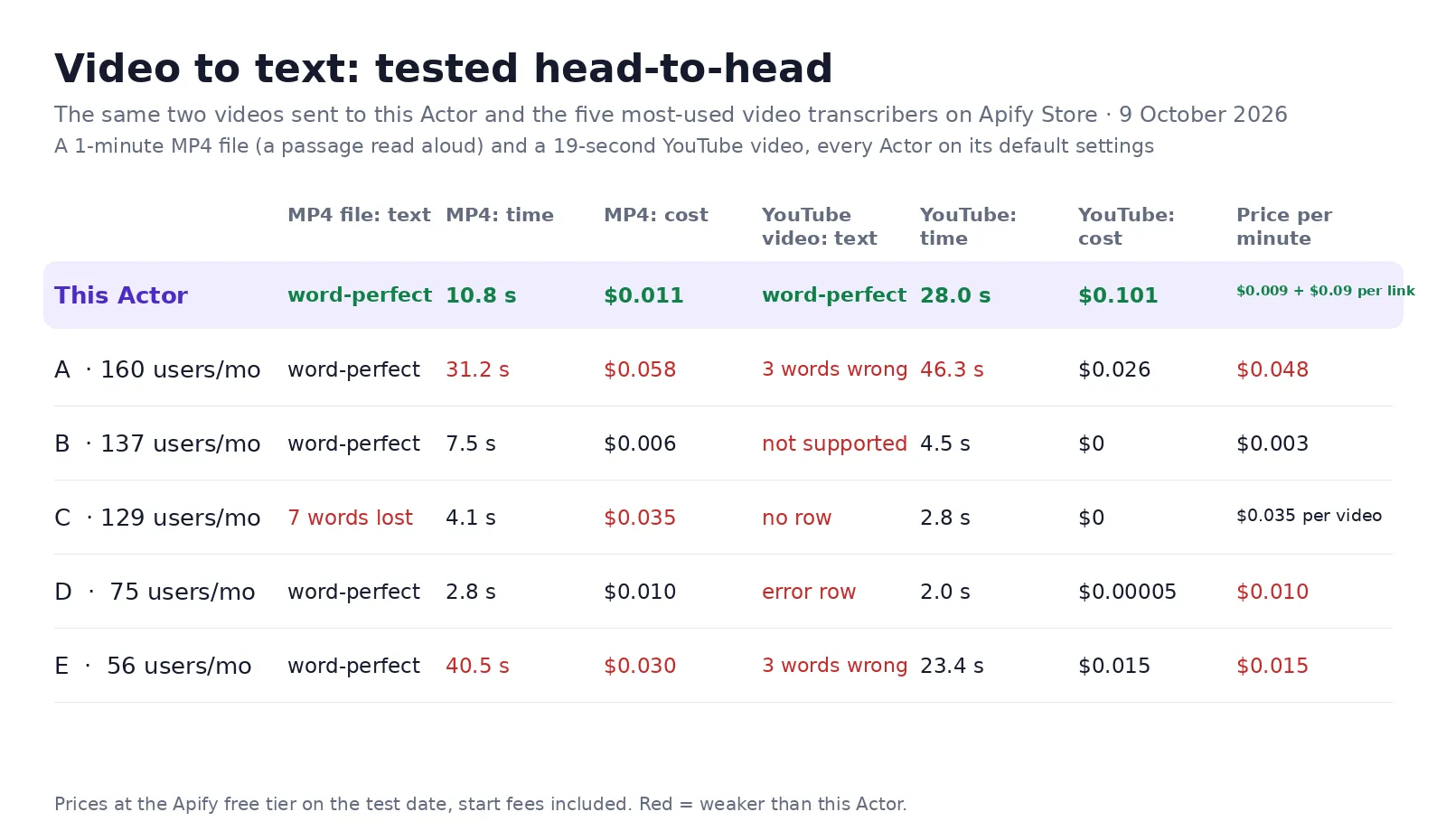
The same two videos — a 1-minute MP4 file (a passage read aloud) and a 19-second YouTube video — sent to this Actor and to the five most-used video transcribers on the Apify Store (A–E, by monthly users), every Actor on its default settings.
| This Actor | The five others | |
|---|---|---|
| MP4 file: text | Word-perfect | 4 of 5 word-perfect; one lost 7 words |
| YouTube video: text | Word-perfect | 2 of 5 returned text, each with 3 words wrong; 3 returned nothing or an error |
| MP4 file: cost | $0.011 | $0.006–$0.058 |
| YouTube video: cost | $0.101 (incl. $0.09 per video link) | $0.015–$0.026 from the two that returned text |
| Time per run | 10.8 s (file), 28.0 s (YouTube) | 2.8–40.5 s (file), 23.4–46.3 s (YouTube, the two that returned text) |
A video page costs more here because its audio is pulled through a residential exit node; a direct file link never pays that fee.
What it is for
Repurposing videos into articles and posts, searchable archives of webinars and lectures, quotes from interviews, subtitles, competitor and creator research, and AI agents that need to "watch" a video as text.
| What you give it | What you get back |
|---|---|
| A YouTube, TikTok, Instagram, X or Vimeo link | Transcript with timed passages |
| An MP4, MOV or WEBM file | The audio track is pulled out; the picture is discarded |
| A two-hour webinar | One transcript, timings continuous across parts |
| A video in any language | Text in that language, or translated to English |
subtitleFormat: "srt" | A ready SRT file alongside the text |
chunkForRag: true | Chunks with timecodes, ready to embed |
Video pages (YouTube, TikTok and the rest) cost an extra $0.09 per link because their audio is fetched through a residential exit node; a direct file link never pays it.
What data does it return?
| Field | Example |
|---|---|
source, fileName | https://example.com/episode-12.mp3 · episode-12.mp3 |
durationSeconds, durationMinutes | 461.05 · 7.68 |
language, model, translatedToEnglish | English · fast · false |
transcript, wordCount, charCount | the full text · 1665 · 9218 |
segments | [{"start": 0, "duration": 4.56, "text": "…", "speaker": "Speaker 1"}] |
speakerCount, speakers | 3 · ["Speaker 1", "Speaker 2", "Speaker 3"] |
chunks | [{"index": 0, "startTimecode": "00:00:00", "text": "…"}] |
subtitles | a complete SRT or WebVTT file |
status, errorCode, errorMessage | ok, or why a file failed |
How much does it cost?
| Event | Price | When it is charged |
|---|---|---|
| Minute transcribed | $0.009 | Per started minute, using the built-in key |
| Minute with your own key | $0.004 | Per started minute when you supply a Groq key |
| Add-on: Speaker labels | $0.006 | Per started minute, only when speaker labels are on |
| File processed | $0.002 | Per file downloaded and prepared |
| Video link resolved | $0.09 | Per YouTube, TikTok, Instagram, X, Vimeo or other video page whose audio has to be pulled through a residential exit node. Direct file links never pay it |
A failed file comes back as an error row and is never charged. Larger monthly plans get 10–30 % off.
Bulk export
This Actor is built for bulk jobs — put hundreds of links into one run, or call it from the API on a schedule. There is no fee per run: you pay per started minute of audio plus $0.002 per file, and $0.09 only for a video page (not a direct file link) whose audio has to be fetched through a residential exit node. Files that fail are returned as error rows and are free.
⬇️ Input
Speaker labels for a two-person interview:
Every input field
| Field | What it does |
|---|---|
urls | Public links to audio or video files. Several at a time is fine. |
file | An uploaded file instead of a link. |
quality | fast for speed, accurate for difficult audio and non-English speech. |
language | Name the spoken language instead of letting the model guess — faster and safer on short clips. |
translateToEnglish | Write the text in English whatever was spoken. |
diarize, speakerCount | Split the transcript by speaker. Give the count when you know it. |
vocabularyHint | Names, brands and jargon, so they come out spelled your way. |
includeSegments | Time-stamped passages alongside the full text. |
subtitleFormat | srt or vtt to get a ready subtitle file. |
apiKey | Your own Groq key — cuts the per-minute price by more than half. |
maxConcurrency | Files processed in parallel. |
maxFileSizeMb, timeoutPerFileSecs | Guard rails for very large or very slow downloads. |
⬆️ Output
Use cases
Podcasts and shows
A transcript to pull quotes from, plus show notes and a searchable archive of every past episode.
Meetings and calls
Minutes that cite the minute something was said, and speaker labels so the actions land on the right person.
Lectures and webinars
Hours of talk turned into text you can search, instead of scrubbing a video for one sentence.
Compliance and records
A written record of calls kept alongside the audio, with timings that point back into the file.
Feeding audio into RAG
chunkForRag returns overlapping chunks with timecodes, sized for embeddings — no post-processing needed.
🤖 For AI agents and LLM apps
Compact reference for agents calling this Actor through the Apify MCP server or the Apify API (lergassy/video-to-text).
Purpose: turn a recording into text with time-stamped passages, optionally split by speaker.
Minimal input:
Behaviours an agent should know:
- Billing is per started minute of audio, not per row. A 40-minute file costs the same whether you keep the segments or not.
durationMinuteson the row tells you what the run actually cost.- Speaker labels are an extra per-minute charge. Turn
diarizeon only when who-said-what matters. - Passing
speakerCountwhen you know it makes the split noticeably cleaner. languageis detected automatically, but naming it removes the guess on short or noisy clips.- A file that cannot be downloaded or decoded returns a
status: "error"row with the reason, free of charge — checkstatusbefore readingtranscript. - Video files work: the audio track is extracted and the picture discarded.
Use via API
Run this Actor from your own code or pipeline. Get your token in Apify Console → Settings → API & Integrations. Every input field below has the same name as in the JSON tab of the input form.
Python
JavaScript
cURL (runs the Actor and returns the results in one call)
Limitations, stated plainly
- Audio quality decides accuracy. Overlapping speech, heavy accents and phone-line compression cost accuracy no model recovers fully.
- Speaker labels are labels, not identities. You get "Speaker 1" and "Speaker 2", never names — mapping them to people is your step.
- Timings are passage-level, not word-level.
- Very large files need time. Raise
timeoutPerFileSecsfor multi-hour recordings, and expect a long run. - Links must be public. A file behind a login or an expiring signed URL cannot be fetched.
Integrations
Runs from the Apify API and the Python and JavaScript clients, and from n8n, Make or Zapier through the Apify app. Point a webhook at the dataset to push transcripts into Notion, Google Docs or your own database, or let an agent call it through the Apify MCP server.
❓ FAQ
Do I need an API key or an account anywhere?
No. Recognition runs with a built-in key. Supply your own Groq key only if you want the cheaper per-minute rate.
Which languages are supported?
Around 90, including Russian, Indonesian, Spanish, German, French, Japanese and Chinese. Use accurate for non-English audio.
Can it handle a three-hour file?
Yes. Long files are processed in parts and the timings stay continuous across them.
Does it work with video?
Yes. Give it an MP4, MOV or WEBM link and the audio track is pulled out for you.
What happens if a file is unreachable?
You get an error row with the reason and no charge for that file. The other files in the run are still transcribed.
How accurate is it?
It runs Whisper large v3. On clean speech it is close to a careful human first pass; on overlapping or noisy audio it is not.
Can I get speaker names?
No — you get "Speaker 1", "Speaker 2" and so on. Naming them is your step.
How do I make it spell product names correctly?
Put them in vocabularyHint. The hint is given to the model before it starts.
You might also like
| Actor | What it does |
|---|---|
| Speech to Text | The main Actor: the same engine, framed as a speech-to-text API |
| Audio Transcriber | The same engine for podcasts, calls and meetings |
| SRT Subtitle Generator | Ready subtitle files from audio or video |
| YouTube Transcript Scraper | Captions straight from YouTube, no transcription needed |
| Document Text Extractor | The same idea for PDFs and Word files |
Also known as
People look for this Actor as video to text, video transcription, transcribe video to text, MP4 to text, YouTube video to text, TikTok video to text and a video transcription API.
Notes
Recognition runs on Whisper large v3 with a built-in key, so there is nothing to sign up for. Choose fast (Whisper large v3 turbo, several times quicker) for everyday work, or accurate for accents, noise and translation; both cost the same per minute. A vocabulary hint helps with names and jargon.


