
WTA Tennis Scraper — Matches, Rankings & Prize Money
Pricing
from $2.80 / 1,000 matches
WTA Tennis Scraper — Matches, Rankings & Prize Money
Extract official WTA tour data by player name: match history with scores, ranking points and prize money, live ranking tables, player profiles and the tournament calendar. Export scraped data, run the scraper via API, schedule and monitor runs, or integrate with other tools and AI workflows.
Pricing
from $2.80 / 1,000 matches
Rating
5.0
(2)
Developer

Matvey
Maintained by CommunityActor stats
0
Bookmarked
33
Total users
22
Monthly active users
11 days ago
Last modified
Categories
Share
WTA Tennis Scraper extracts official WTA tour data — match histories, ranking tables, player profiles and the tournament calendar — straight from the women's tour's own public data service. You look players up by name, not by numeric ID, and every row comes back flat and ready for a spreadsheet, a database or an AI agent. No login, no API key, no official API needed.
Most tennis scrapers read a third-party score aggregator. This one reads what the tour itself publishes, so each match row carries the things aggregators do not have: the ranking points earned, the prize money won, the seeding, the entry type, the draw size and the official tournament tier.
Tested head-to-head — 24 September 2026
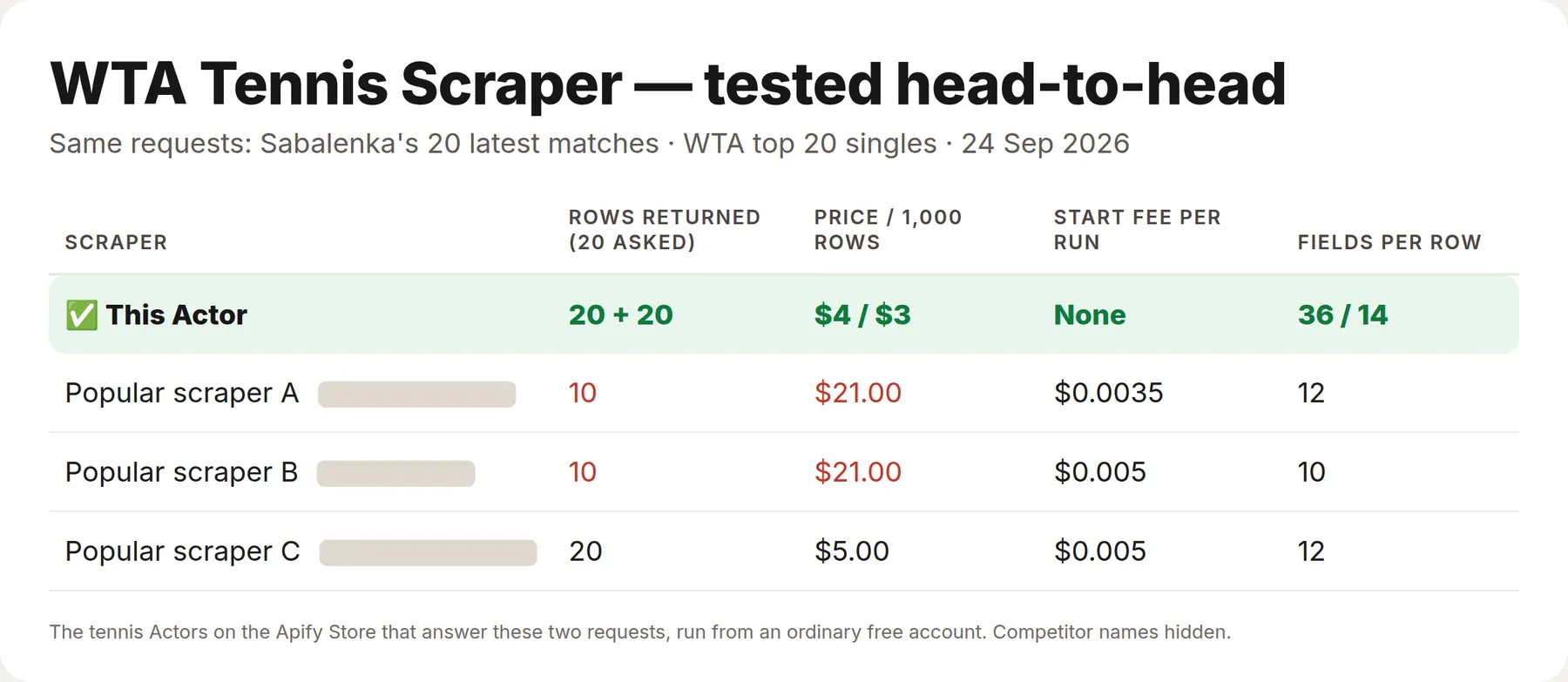
Two requests went to this Actor and to the other tennis Actors that answer them, on the Apify Store on the same afternoon, from a fresh free account: Aryna Sabalenka's 20 most recent matches, and the top 20 of the WTA singles ranking. The results agreed — same matches, same scores, same ranking points; the bill and the depth of each row did not.
| This Actor | The 3 others | |
|---|---|---|
| Price per 1,000 rows | $3 – $4 | $5 – $21 |
| Fields per row | 14 – 36 | 10 – 12 |
What is WTA Tennis Scraper?
It is a WTA tennis data API for people who need the women's tour as a table rather than a web page: betting and prediction models, sports media, player and agency analytics, research projects, and AI agents that get asked "how has Sabalenka done this season" or "who is number one right now". The WTA publishes no public API of its own, licensed tennis feeds cost hundreds of dollars a month, and the free aggregators drop exactly the fields that make a tour row valuable.
Three things set it apart from a general tennis scraper:
- It reads the tour's own data service, not a third-party aggregator, so every match row carries ranking points, prize money, seeding, entry type, draw size and the official tournament tier.
- You search by name. Type
swiatekand the Actor resolves it against the tour's index of 36,000+ current and historical players, then logs which player it picked. - Nothing to configure. No login, no API key, no cookies, no proxy — a run of fifty matches finishes in a few seconds.
What data can WTA Tennis Scraper extract?
Four datasets, chosen with the What to collect input.
| Mode | One row is | Typical use |
|---|---|---|
| 🎾 Player matches | One match a player played | Form guides, head-to-head research, model training data |
| 🏆 Rankings | One player in the current ranking table | Ranking snapshots, movement tracking |
| 👤 Players | One player profile | Building a player reference table |
| 📅 Tournaments | One tournament edition | Calendars, prize-money analysis, surface breakdowns |
Match fields
| Field | Example |
|---|---|
date | 2026-08-13 |
tournamentName / tournamentTitle | CINCINNATI / Cincinnati Open |
level | Grand Slam, WTA 1000, WTA 500, WTA 250, WTA 125, ITF |
surface / indoorOutdoor | HARD / outdoor |
round | F, SF, QF, R16, R32, R64, R128, Q |
playerName / playerRank / playerSeed / playerEntry | Aryna Sabalenka / 1 / 1 / Q |
opponentName / opponentRank / opponentSeed | Rebeka Masarova / 112 / — |
score | 6-2 7-6(6) — as published, from the winner's side |
won / winnerName / loserName | true / Aryna Sabalenka / Rebeka Masarova |
outcome | completed, retired, walkover, defaulted, bye |
rankingPoints | 195 |
prizeWon / tournamentPrizeMoney | 59100 / 1064510 |
discipline / partnerName | singles or doubles, with the partner on doubles rows |
Ranking fields
rank, points, tournamentsPlayed, movement (places gained or lost since the previous table), rankedAt (the date the table was published), plus the full player profile.
Tournament fields
tournamentName, title, year, level, startDate, endDate, surface, indoorOutdoor, city, country, singlesDrawSize, doublesDrawSize, prizeMoney, prizeMoneyCurrency.
How to scrape WTA tennis data
- Click Try for free and open the input form.
- Leave What to collect on Player matches.
- Type one or more players into Player names — partial names work,
swiatekfinds Iga Swiatek. - Set Maximum rows to something small like 50 for the first run.
- Click Start, then open the Output tab and export to CSV, Excel or JSON.
There is nothing else to configure. No proxy, no cookies, no account.
⬇️ Input
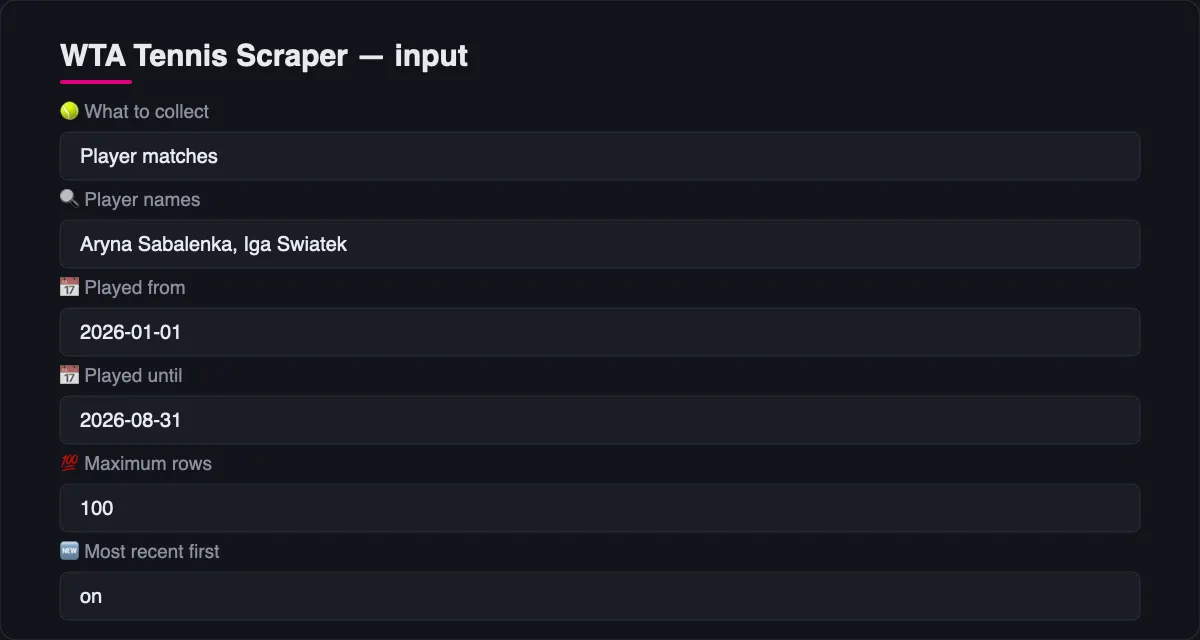
Matches inside a date window
Played from and Played until keep only the matches played in that window, in
YYYY-MM-DD. Either one works on its own: set only Played from for "everything since
the Australian Open", only Played until for form before a given tournament. The window
is applied to each player separately, so a request for two players returns both of their
seasons, cut the same way. A season number in Season still works and is faster when a
whole calendar year is what you want.
Searching by name instead of ID
Many other tennis Actors ask for a numeric player ID or a site-specific slug and leave you to find it yourself. Here you type the name. The Actor resolves it against the tour's player index (36,000+ players, current and historical) and logs which player it picked when a name is ambiguous, so you can tighten the spelling if needed. IDs still work if you already have them — put them in Player IDs.
Filtering one season
Ranking table
⬆️ Output
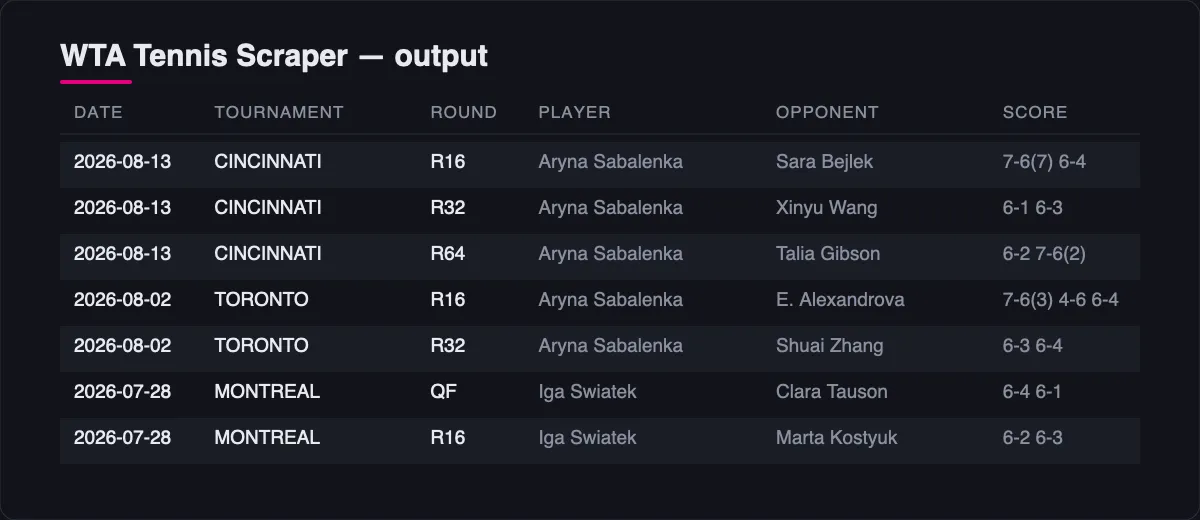
One flat row per match. No nested objects, so CSV and Google Sheets exports stay readable.
The tour publishes a score from the winner's side, so score alone does not say who won. The row states it outright: won is about the player you asked for, and winnerName and loserName name both sides.
How much does it cost to scrape WTA data?
Pay per row, with no charge for a run that returns nothing.
| Event | Price per 1,000 |
|---|---|
| Match | $4.00 |
| Ranking row | $3.00 |
| Player profile | $2.00 |
| Tournament | $2.00 |
The Apify free plan includes $5 of monthly usage, which is roughly 1,200 match rows a month at no cost — enough to pull the full recent history of a dozen players. Paid Apify plans get tiered discounts down to $2.80 per 1,000 matches.
This Actor talks to a public JSON service over plain HTTP. It runs no browser and needs no residential proxies, which is why it is priced below scrapers that do.
Bulk export: what 50,000 matches actually cost
This Actor is built for bulk jobs — put hundreds of inputs into one run, or call it from the API on a schedule. There is no fee per run, no fee per page and no proxy charge: you pay for the rows you keep, and error rows are free. That is what decides the bill once you pull a whole market rather than a single tournament.
| Job | This Actor | Most-used Actor in this category |
|---|---|---|
| 50,000 matches across 100 runs | $200 | $400 |
Checked on the Apify Store on 24 September 2026 against the Actor with the most monthly users in this category ($0.008 per result, no start fee). Some Actors here ask less per row — this table compares against the one buyers actually use most.
Use cases for WTA data
Betting and prediction models
Ranking at the time of the match, seeding, surface, round and result in one row — the feature set a match-outcome model actually needs, with a career of history behind it.
Sports media and content
Head-to-head records, career win-loss on a surface, prize money earned in a season. Pull the rows, publish the story.
Player and agency analytics
Ranking points and prize money per tournament, entry type (qualifier, wild card, lucky loser), and how far a player went in each draw.
AI agents and RAG pipelines
Flat, literal field names and a small input schema mean an agent can call this Actor correctly without reading the docs. It works through the Apify MCP server like any other tool.
Integrations and WTA tennis API
Run it from the Apify API, the Python or JavaScript client, the CLI, or a scheduled task. Connect it to n8n, Make, Zapier, Google Sheets or Slack through the Apify integrations, or wire it to your own service with a webhook that fires when a run finishes.
Error rows
When a player name matches nothing, or the data service fails on one request, the Actor writes an error row instead of stopping the run:
Error rows are never charged. The rest of the run continues, so one bad spelling in a list of forty players does not cost you the run.
🤖 For AI Agents & LLM Apps
Compact reference for agents calling this Actor through the Apify MCP server
or the Apify API (lergassy/wta-tennis-scraper).
Purpose: official WTA tour data — a player's match history, the current ranking table, player profiles and the tournament calendar. Use it to answer "how has X played this season", "what did X win at that tournament", "who is ranked number one", "how many ranking points does X have" and "when and where is that tournament played".
Minimal input:
Output: one row per match — date, tournamentName, tournamentTitle, level, surface,
indoorOutdoor, round, playerName, playerRank, playerSeed, playerEntry,
opponentName, opponentRank, opponentSeed, score, won, winnerName, loserName,
outcome, rankingPoints, prizeWon, tournamentPrizeMoney, discipline, partnerName.
The other modes return rankings, players and tournaments rows with the fields listed
above.
Behaviors an agent should know:
- Pick the mode first:
player-matches,rankings,players,tournaments. Everything else is a filter on it. - Names are resolved, not matched exactly. Partial spellings work; when a name is
ambiguous the Actor logs which player it chose. If the answer looks like the wrong player,
re-run with a fuller spelling or pass a numeric id in
playerIds. dateFromanddateToareYYYY-MM-DDand each works on its own;yearis faster when a whole calendar year is wanted. The window is applied per player, so two players come back cut the same way.scoreis written from the winner's side, so readwon,winnerNameandloserNamerather than inferring the result from the score string.outcomedistinguishescompletedfromretired,walkover,defaultedandbye— abyerow is a round a player advanced through without playing, and counting it as a win is the usual mistake.- Doubles rows carry
discipline: "doubles"and apartnerName; filter ondisciplinewhen the question is about singles. - Rankings are the official weekly table;
rankedAtsays which week it is, andmovementis places gained or lost since the previous one. - A name that matches nothing produces an
errorrow, never a failed run, and error rows are never charged.
❓ FAQ
Is it legal to scrape WTA tennis data?
This Actor reads the public data service behind wtatennis.com. That site's robots.txt allows all crawlers on all paths, the data is published for public viewing, and match results are facts rather than creative work. No login is used and no personal data beyond what the tour publishes about professional players — name, country, date of birth, results — is collected. If your use case is commercial and unusual, check with your own lawyer.
How fresh is the data?
Rankings update weekly, on the tour's own schedule, and the rankedAt field tells you exactly which table you got. Match results lag the live schedule: a tournament that finished in the last week or two may not have landed yet. This Actor is for history and analysis, not live scores. If you need a match in progress, you need a live-scoring feed, not this.
Does it cover ATP or men's tennis?
No. This is the WTA tour: women's singles and doubles, including WTA 125 and the ITF events that count toward WTA rankings. Men's tennis is a separate source with a separate access story.
How far back does the history go?
The tournament calendar reaches back to 1960. Match histories go back to the start of each player's professional record — 988 matches for Aryna Sabalenka, 1,221 for Venus Williams, all reachable in one run.
Can I use it with the Apify API?
Yes. Every Actor on Apify is an API endpoint. See the API tab for ready-made calls in curl, Python, JavaScript and the CLI.
Can I use it through an MCP server?
Yes. It is exposed through the Apify MCP server, so Claude, ChatGPT, Cursor and other MCP clients can call it as a tool. The input schema is small and literal on purpose.
Is one row one match?
Yes — one row per match, per player you asked for. If you request two players who met each other, that match appears twice, once from each player's point of view.
Why is a name matched to the wrong player?
Common surnames can collide. The run log prints every alternative it found, so you can switch to the full name or drop the exact ID into Player IDs.
Your feedback
Found a missing field, a wrong mapping, or a player the search cannot find? Open an issue on the Issues tab or leave a review — both get answered.
You might also like
| Actor | What it does |
|---|---|
| Agoda Reviews Scraper | Hotel reviews and ratings from Agoda |
| Trip.com Scraper | Hotels, prices and reviews from Trip.com |
| Google Flights Scraper | Flight itineraries, prices and booking links |
| Trustpilot Reviews API | Company reviews and ratings from Trustpilot |
| Document Text Extractor | Text and OCR from PDFs and documents |


