

AI Visibility Tracker: Brand in ChatGPT, Gemini & Perplexity
Pricing
from $8.80 / 1,000 check (one question answered by one ai assistant)s
AI Visibility Tracker: Brand in ChatGPT, Gemini & Perplexity
No-code AI brand visibility tracker: ask ChatGPT, Gemini, Perplexity & Claude your buyers' questions with your own API keys. See if your brand is mentioned, its rank, share of voice vs competitors and cited sources. Excel export.
Pricing
from $8.80 / 1,000 check (one question answered by one ai assistant)s
Rating
0.0
(0)
Developer

Alpine Data Labs
Maintained by CommunityActor stats
0
Bookmarked
2
Total users
1
Monthly active users
4 days ago
Last modified
Categories
Share
AI Visibility Tracker: Brand Mentions in ChatGPT, Gemini & Perplexity
An AI visibility tracker for marketers, SEO/GEO teams and founders: ask ChatGPT, Google Gemini, Perplexity and Claude the questions your buyers ask, and see whether your brand is mentioned, in which position, how often, in what tone and next to which competitors. You get AI share of voice per brand, the sources Perplexity cites, and a change vs. your last run. It uses the official APIs with your own API keys, so there is no hidden markup on AI costs. Export as Excel, CSV or JSON.
How to use it (no code needed)
Everything works in the Apify input form. You never need to write code or JSON.
- Fill in the form: your brand, your competitors (one per line) and 3–20 questions your customers would ask an AI assistant ("What is the best CRM for a small business?"). The form is pre-filled with a working example.
- Paste at least one API key (OpenAI, Google Gemini, Perplexity and/or Anthropic) into its field. Only assistants with a key are asked. Then click Start. No key yet? Just click Start: without any API key the Actor runs a free demo with sample answers it generates itself, so you can see the output format. Demo rows show DEMO in the model column and are marked as demo, they are not real AI answers and nothing is charged.
- Get the results: open the Output tab (Checks, Brand summary (share of voice), Question summary) and click Export to download Excel, CSV or JSON, or open the ready-made Excel report (
REPORT.xlsx, 3 sheets) under Storage → Key-value store. - Optional, track it over time: click Schedule (e.g. weekly). Each run then shows the change vs. the last run. Under Integrations you can send results to Google Sheets, Slack, email, Make, Zapier or n8n without code.
What you get: brand mentions, rank and AI share of voice
Check rows (one per question × AI assistant):
| Question | AI assistant | Your brand mentioned? | Position | Mentions | Share of voice % | Tone (hint) | First brand named | Cited sources |
|---|---|---|---|---|---|---|---|---|
| What is the best CRM for a small business? | ChatGPT | yes | 2 | 2 | 33.3 | positive | Freshsales | |
| What is the best CRM for a small business? | Gemini | no | 0 | 0.0 | Salesforce | |||
| What is the best CRM for a small business? | Perplexity | yes | 4 | 2 | 22.2 | neutral | Zoho CRM | zoho.com, salesforce.com, zapier.com, reddit.com, techradar.com |
Brand summary rows (per brand, for all assistants together and per assistant):
| Brand | Visibility rank | Answers mentioning | Mention rate % | Avg. position | Named first | Share of voice % | Cited in % of answers |
|---|---|---|---|---|---|---|---|
| HubSpot (you) | 1 | 10 of 12 | 83.3 | 3.0 | 1 | 23.5 | 0.0 |
| Salesforce | 2 | 10 of 12 | 83.3 | 2.6 | 2 | 21.6 | 8.3 |
| Zoho CRM | 3 | 9 of 12 | 75.0 | 2.11 | 4 | 19.6 | 16.7 |
(EXAMPLE DATA: illustrative rows from the Actor's built-in mock mode with simulated answers, 23 Oct 2026. They show the format, not real AI opinions about these brands. Your numbers come from the live AI answers. See the full example report below.)
Each check row also includes the context snippet around your brand, all brands named in order ("Freshsales (1st, 2x); HubSpot (2nd, 2x); …"), competitors not mentioned, cited URLs, links in the answer, the full answer text, the exact model version, and the response time. Question summary rows show which assistants mention you for each question and which brand was most visible.
Monitor your AI visibility over time: click Schedule and run the same questions weekly. With Show change vs. the last run (on by default) every brand row gets
mentionRateChangeandshareOfVoiceChangein percentage points. Send results to Google Sheets, Slack, email, Make, Zapier or n8n under Integrations.
Use cases
- GEO / AEO (generative engine / answer engine optimization): measure whether content and PR work changes how often AI assistants recommend you.
- Competitor benchmarking: AI share of voice vs. your top 5–30 competitors, per assistant.
- Track brand mentions in ChatGPT and Perplexity for product categories, "best X for Y" and "X alternatives" questions.
- Agencies: a repeatable AI visibility report for clients, as an Excel file.
- Source research: which websites Perplexity cites for your category, so you know where to get mentioned.
Input fields in plain words
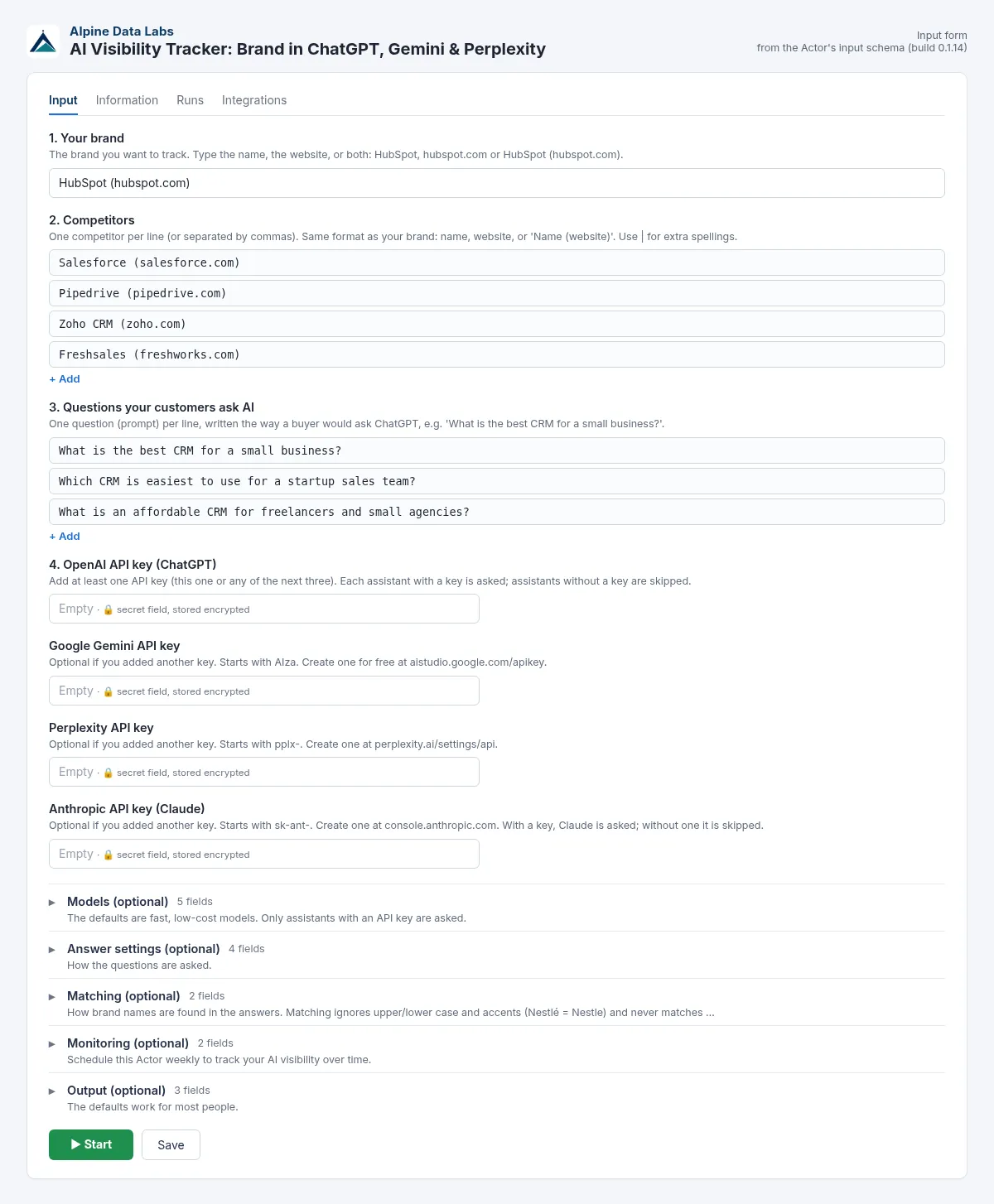
| Field | What it does | Example |
|---|---|---|
| 1. Your brand | Brand name, optionally with domain. The domain helps detect citations of your site. | HubSpot (hubspot.com) |
| 2. Competitors | One per line, same format. Up to 30. | Pipedrive (pipedrive.com) |
| 3. Questions | One per line. Numbering and bullets are removed. Up to 500. | Which CRM is easiest for a startup? |
| 4. API keys | Add at least one API key. Each assistant with a key is asked. OpenAI (sk-…), Gemini (AIza…), Perplexity (pplx-…), Anthropic (sk-ant-…). A key pasted into the wrong field is moved to the right one. | |
| Models: Which AI assistants / model per assistant | Dropdowns with current models; you can also type any model ID your key can use. | gpt-6-luna, gemini-3.8-flash, sonar, claude-haiku-5-5 |
| Answer settings: Let ChatGPT, Gemini and Claude search the web | Turns on the providers' web search tools (closer to the consumer apps, costs more on your API bill). Perplexity always searches. | off |
| Answer settings: Add to every question | Extra context, e.g. "I am in Austria" or "Answer in German". | Answer for a company in Germany. |
| Answer settings: Ask each question how many times | 1–5 samples. AI answers vary; 3 samples give a steadier mention rate. | 1 |
| Answer settings: Max checks per run | Hard cost limit. Pre-filled with 20; default 100. | 100 |
| Matching: Other spellings of your brand | Aliases such as Hubspot CRM, HubSpot's. Matching ignores case and accents and never matches inside other words. | |
| Monitoring: Show change vs. last run / Monitor name | Run-over-run deltas; the name keeps separate projects apart. | crm-weekly |
| Output: Include full answer text / summary rows / system prompt | Self-explanatory. | on / on / empty |
Perplexity note: Perplexity ended support for Sonar Chat Completions on 27 Sep 2026. If a Sonar model is refused, the Actor automatically asks the same question through Perplexity's Agent API with the documented equivalent (perplexity/sonar with web search). You can also type an Agent API model such as perplexity/sonar.
Methodology: how mentions, position, share of voice and citations are measured
Every check sends one question to one AI assistant through its official API and analyses the answer text. No other AI judges the answer, so the results are reproducible from the stored answerText.
- Brand matching (mentions).
- Each brand is searched for by its name, your other spellings (aliases) and its domain (
hubspot.com). - Matching ignores case and accents (
Zürich=zurich,ß=ss). It only matches whole words, soAsananever matches insideAsanasorPasana. Spaces and hyphens are interchangeable (Zoho CRM=Zoho-CRM). - When two names overlap, the longer one wins. "Zoho CRM" counts once for Zoho CRM, not also for a brand called "Zoho".
brandMentionCountis the number of separate mentions in one answer.
- Each brand is searched for by its name, your other spellings (aliases) and its domain (
- Position (rank).
brandRankis the order in which the tracked brands are first named in the answer (1 = named first). Only brands you track count.- If the mention sits in a numbered or bulleted list,
brandListPositiongives the list item number as the AI wrote it. - Avg. position in the summary is the mean
brandRankover the answers that mention the brand. Answers without the brand are not counted as a low rank. Read it together with the mention rate.
- Mention rate. The answers mentioning the brand, divided by all answered checks, in % (for all assistants together and per assistant).
- Share of voice (SOV).
- SOV is a brand's mentions divided by the mentions of all tracked brands (yours plus your competitors), in %.
- It is calculated per answer (
brandShareOfVoice) and over the whole run (summary). It depends on the competitor list: adding a competitor lowers everyone else's share.
- Visibility rank. Brands are sorted by mention rate, then share of voice, then average position.
- Citations.
- A brand counts as cited when one of its domains (or subdomains) appears in the sources the provider returns, or in a link inside the answer.
- If you give no domain, a source counts when its domain name equals the brand name (
acme.comfor "Acme"), for names with 4 or more letters. brandCitationPositionis the brand's place in the source list. Perplexity always returns sources; ChatGPT, Gemini and Claude only do so with web search on.
- Tone (hint). A word list (e.g. "best", "recommended" vs. "expensive", "lacks") is applied to the sentences around the first 5 mentions. The result is positive, negative, mixed or neutral. It is a hint, not a human judgment.
- Change vs. last run. The summary of the previous run with the same brand, competitors, questions and monitor name is stored in a named key-value store. The next run adds
mentionRateChangeandshareOfVoiceChangein percentage points.
Limits of the method:
- Text matching cannot tell "we do not recommend X" from a recommendation. It also cannot resolve brand names that are common words (
Notion,Apple). Use domains and aliases, and readbrandSnippet. - AI answers are random to some degree. Use 3 samples per question for steadier rates, and compare trends rather than single runs.
- API answers are a proxy for the consumer apps (no personalization, memory or location). See Limits below.
Example report (example data from a mock run)
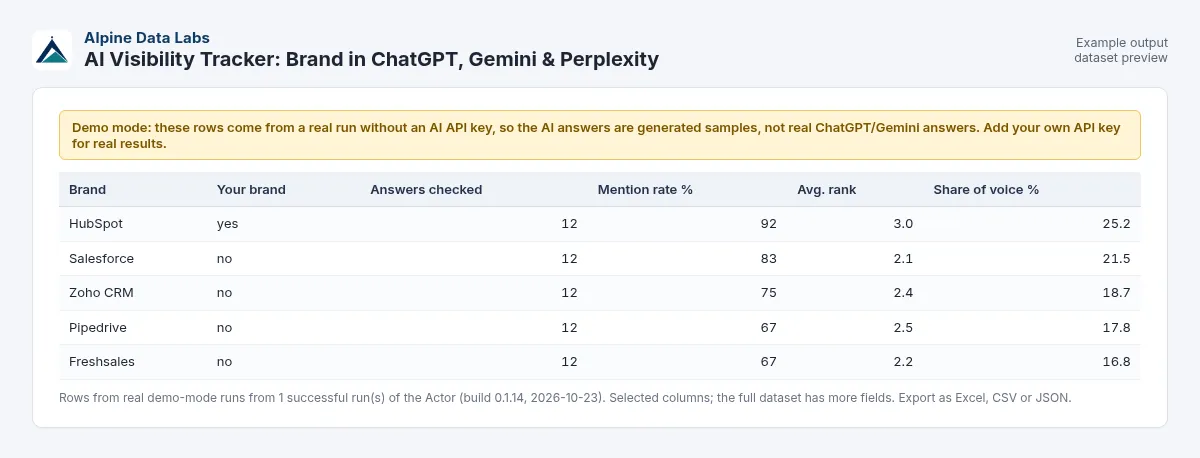
Demo output (no API key). Sample answers generated by the Actor's demo mode, not real ChatGPT, Gemini, Perplexity or Claude answers. They show the report format only and say nothing about these brands.
EXAMPLE DATA. These rows come from the Actor's built-in mock mode (simulated answers, generated locally on 23 Oct 2026) with the pre-filled input: brand HubSpot, 4 competitors, 3 questions, 4 assistants = 12 checks. They show the format of the report only. They are not real AI answers and say nothing about these brands.
Brand summary, all assistants (sheet "Brands" in REPORT.xlsx):
| Visibility rank | Brand | Answers mentioning | Mention rate % | Avg. position | Named first | Share of voice % | Cited in % |
|---|---|---|---|---|---|---|---|
| 1 | HubSpot (you) | 10 of 12 | 83.3 | 3.0 | 1 | 23.5 | 0.0 |
| 2 | Salesforce | 10 of 12 | 83.3 | 2.6 | 2 | 21.6 | 8.3 |
| 3 | Zoho CRM | 9 of 12 | 75.0 | 2.11 | 4 | 19.6 | 16.7 |
| 4 | Pipedrive | 8 of 12 | 66.7 | 2.38 | 1 | 17.6 | 8.3 |
| 5 | Freshsales | 7 of 12 | 58.3 | 1.57 | 4 | 17.6 | 8.3 |
Your brand per assistant:
| Assistant (model) | Mention rate % | Share of voice % | Avg. position |
|---|---|---|---|
| ChatGPT (gpt-6-luna) | 66.7 | 17.4 | 2.5 |
| Gemini (gemini-3.8-flash) | 66.7 | 22.2 | 3.5 |
| Perplexity (sonar) | 100.0 | 28.0 | 3.33 |
| Claude (claude-haiku-5-5) | 100.0 | 25.9 | 2.67 |
Question summary (sheet "Questions"):
| # | Question | Mentioned by | Not mentioned by | Most visible brand |
|---|---|---|---|---|
| 1 | What is the best CRM for a small business? | ChatGPT, Claude, Perplexity | Gemini | Zoho CRM |
| 2 | Which CRM is easiest to use for a startup sales team? | Claude, Gemini, Perplexity | ChatGPT | Freshsales |
| 3 | What is an affordable CRM for freelancers and small agencies? | all 4 | – | HubSpot |
How to read it:
- In this example the brand is often named (83%) but rarely first (avg. position 3.0, named first only once).
- It is never cited as a source.
- Gemini and ChatGPT mention it least.
A typical next step is content and PR for the questions where it is missing (questions 1 and 2), then a weekly re-run to track the change.
GEO glossary
- GEO (generative engine optimization) / AEO (answer engine optimization): work that makes AI assistants mention and cite your brand. It is the AI-era counterpart of SEO.
- AI visibility: how often and how prominently a brand appears in AI answers. This Actor measures it as mention rate, position and share of voice.
- Mention rate: % of answers that name the brand.
- AI share of voice: a brand's share of all tracked brand mentions.
- Citation rate: % of answers whose sources or links include the brand's website.
- Sample: one repeat of the same question. More samples give a steadier rate.
Pricing
- $0.011 per check. One check = one question answered by one AI assistant. That is $11 per 1,000 checks. You bring your own AI API key, so there is no hidden AI markup in this price.
- Cheaper on bigger Apify plans: Scale plan users pay 10% less ($0.0099 per check, $9.90 per 1,000) and Business plan users (and above) pay 20% less ($0.0088 per check, $8.80 per 1,000). Free and Starter plans pay the standard $0.011. Apify applies the discount automatically.
- Example: 10 questions × 3 assistants = 30 checks = $0.33, plus your own AI API cost (paid directly to OpenAI/Google/Perplexity/Anthropic; for short answers from small models usually well under one cent per question, more with web search or large models — see their price pages).
- The pre-filled example (3 questions) costs $0.033 per assistant with a key, e.g. $0.132 with all 4 keys, plus your own AI API cost. Without any key it is a free demo (sample answers, marked as demo, $0). With the pre-filled Max checks per run of 20: at most 20 × $0.011 = $0.22 (less on Scale/Business) plus your AI API cost.
- Free: demo runs without an API key (sample answers, clearly marked, never saved as trend history), brand and question summary rows, the Excel report, invalid input, and any check that failed (wrong key, no credit, timeout, empty answer). Failed checks are listed in the key-value store record
FAILED_CHECKSand in the status message. - Max checks per run and Apify's maximum cost per run both cap the run before any AI API is called, so you never pay your AI provider for checks that cannot be delivered.
FAQ
How do I track brand mentions in ChatGPT? Put your brand, competitors and the questions your buyers ask into this Actor, add an OpenAI API key and run it. Each answer is checked for your brand and competitors. Schedule it weekly to see the trend.
How to measure AI search visibility / KI-Sichtbarkeit messen? The usual metrics are mention rate (in how many answers you appear), average position, share of voice vs. competitors and citation rate. This Actor reports all four per assistant. German questions work fine: just write them in German (and optionally add "Antworte auf Deutsch" under Add to every question).
What is AI share of voice? Your brand's mentions divided by the mentions of all tracked brands (yours + competitors), in percent. It depends on which competitors you list.
Why do I need my own API keys? The Actor only uses the official APIs. With your own keys you pay the providers' list price and keep control of usage. Keys are secret inputs, encrypted by Apify and never written to the results.
Are API answers the same as in the ChatGPT or Gemini app? No, not exactly. The apps add personalization, memory, location and their own search settings. API answers are a consistent, reproducible proxy. Turn on web search to get closer to the app experience.
Why do I get different results each run? AI answers are non-deterministic. Use 3 samples per question and track trends over several runs instead of single answers.
Is "rank" a real ranking? It is the order in which brands are first named in the answer (1 = first). If the answer is a numbered list, brandListPosition gives the list item number.
How reliable is the tone (sentiment)? It is a simple word-list hint (positive/negative/mixed/neutral) on the sentence around your brand, not a human judgment. Read the snippet for context.
Common mistakes: pasting an incomplete key (copy it again), using a model your key has no access to (pick another in the dropdown), listing your own brand as a competitor (removed automatically), very generic brand names like "Apple" (add the domain and aliases; the Actor only counts whole-word matches).
Limits
- AI answers are non-deterministic and change with model versions, region, time and settings; results are a snapshot, not a fixed ranking.
- API answers can differ from what users see in the ChatGPT, Gemini, Perplexity or Claude apps.
- Citations come only where the provider returns them (always Perplexity; ChatGPT, Gemini and Claude only with web search on).
- Brand detection is text matching on names, aliases and domains. Brands with very common words as names can produce false positives; check the snippets.
- Up to 500 questions and 30 competitors per run; up to 5 samples per question.
- Speed and rate limits depend on your API account tier; failed checks are retried up to 3 times and then skipped (not charged).
Data source and legal notes
Answers come only from the official APIs of OpenAI, Google (Gemini API), Perplexity and Anthropic, called with your own keys and subject to their terms. No websites or consumer apps are scraped and no personal data is collected. All trademarks belong to their owners; this Actor is not affiliated with or endorsed by OpenAI, Google, Perplexity, Anthropic or any brand shown in the examples.
Related tools from Alpine Data Labs
- Career Page Job Scraper: see who your competitors are hiring, from Greenhouse, Lever, Workday and other career pages.
- EU Tenders (TED): Tender Alerts: public procurement leads from the EU's TED database.
- Zefix Swiss Company Register: company lists from the Swiss commercial register.
- More from us: Honeypot & Rug Checker and Crypto Arbitrage Scanner.
- All tools from Alpine Data Labs: no-code data tools for public data, business research and monitoring.
Support
Found a problem or need another AI provider or metric? Open an issue in the Issues tab. Built and maintained by Alpine Data Labs.
For developers / API & integrations (optional)
You do not need anything in this section to use the Actor: the form does everything. It is for developers who want to start runs from their own code, website or workflow. The input is the same JSON that the form creates. Every field name in the form is also the API field name, and the form never changes them, so existing API calls, tasks, schedules and integrations keep working. Replace <YOUR_APIFY_TOKEN> with your own token from Apify Console → Settings → API & Integrations, and never put it in public code.
Cost cap via the API: if you leave out
maxChecks, the default is 100 checks, which can cost up to 100 × $0.011 = $1.10 per run (less on Apify Scale/Business plans), plus your own AI API cost. Always setmaxChecksin API calls, as in the example below. In the form it is pre-filled with 20.
Example input (JSON):
cURL: run it and get the results in one call (for small runs; each check takes a few seconds to about a minute, so use the asynchronous /runs endpoint for many checks):
JavaScript (apify-client):
Python (apify-client):
Where the results are: the dataset holds the check rows plus summary rows (field recordType = check, brand_summary or question_summary). The key-value store holds REPORT.xlsx, BRAND_SUMMARY and, if any check failed, FAILED_CHECKS. Your AI keys are secret inputs: Apify stores them encrypted and they never appear in the results or the log.
Example output (one check row, JSON, shortened):
Integrations without code:
- Schedules: run it daily or weekly (Console → Schedules).
- Webhooks: call your URL when a run finishes (event
ACTOR.RUN.SUCCEEDED). The payload contains the run ID and thedefaultDatasetId. - Make, Zapier, n8n: use the official Apify app or node: "Run Actor", then "Get dataset items".
- Google Sheets, Slack, email: these are under the Integrations tab.
- AI agents: the Actor can be called through the Apify MCP server.


