

Flipkart Product Scraper: Prices, Reviews & Seller Leads
Pricing
from $0.68 / 1,000 products
Flipkart Product Scraper: Prices, Reviews & Seller Leads
Scrape Flipkart products, prices, ratings and reviews from searches, categories or product links. Track prices, study competitors and find sellers to contact.
Pricing
from $0.68 / 1,000 products
Rating
0.0
(0)
Developer

Cliqto Media
Maintained by CommunityActor stats
0
Bookmarked
3
Total users
2
Monthly active users
8 days ago
Last modified
Categories
Features
Share
Flipkart Product Scraper collects products, prices, ratings, public reviews and seller details from Flipkart India. You start from search words, category links, product links or a file of links.
It is for sellers, brands, price trackers and market researchers. The smallest run is one search word with 10 products: it takes about 1 minute and costs about $0.014.
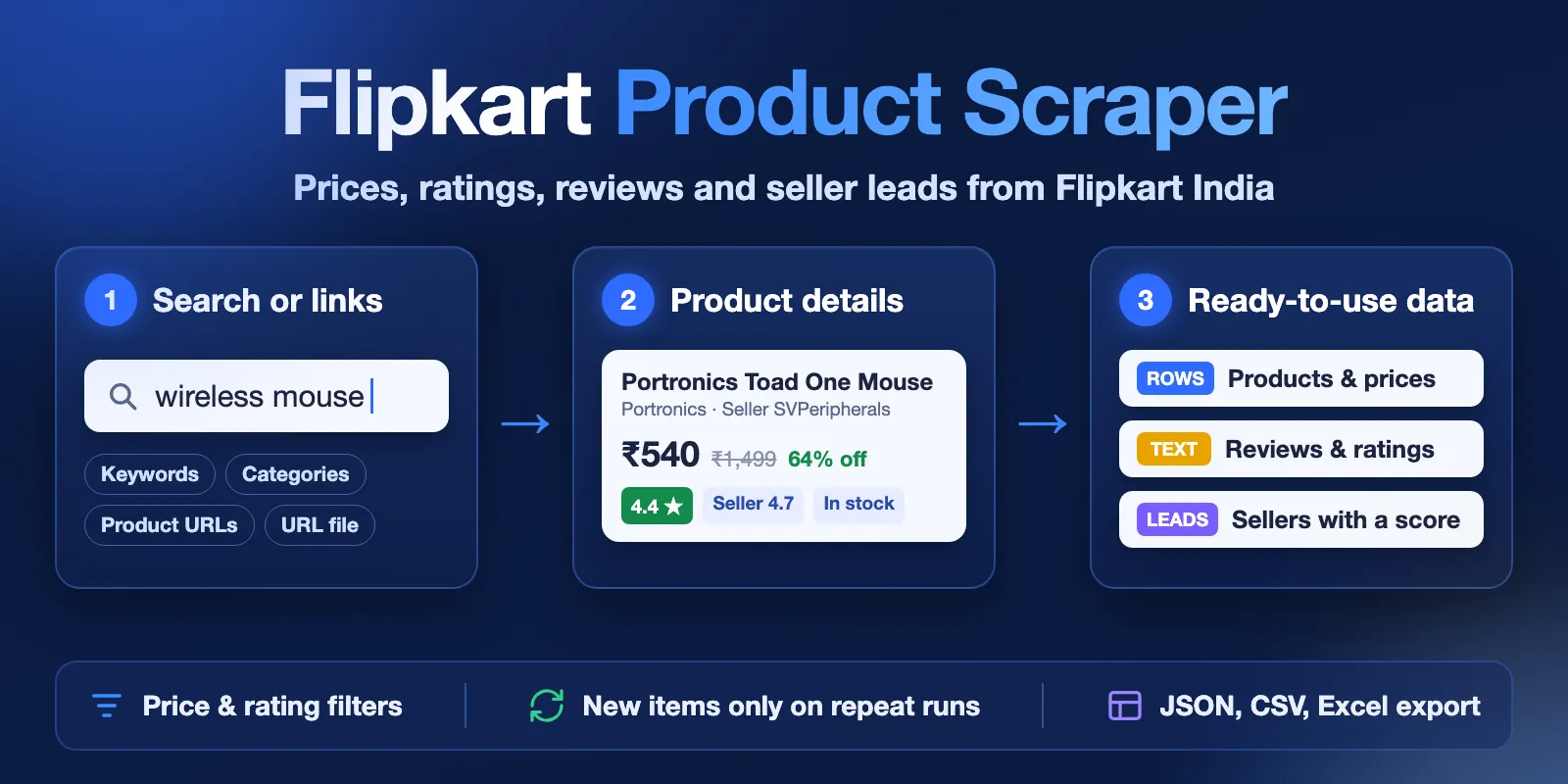
Table of contents
- What it does
- How it works
- Quick start
- Use cases
- Input
- Output
- Pricing
- Limits
- API, export and integrations
- Troubleshooting
- FAQ
- Related Actors
- Support
What it does
The Actor reads public Flipkart pages and saves one row for each product, review or seller. A product row has the price, MRP, discount, rating, number of ratings and reviews, seller, stock and product link. With Open each product page on, it also adds the seller ID and rating, the description, more images and specifications.
It works only with public pages on flipkart.com. It does not log in and does not read buyer names.
Good fit
- Track prices. Run the same search every day and compare
price,mrpanddiscountPercent. - Study competitors. Collect all products of a brand or category with ratings and review counts.
- Read customer opinions. Export public review text, rating, date and "helpful" votes for your products or for other brands.
- Find sellers to contact. Get one row per seller with rating, years on Flipkart, quality and speed scores, brands seen and a simple lead score.
- Watch for new products. With Only new products, a repeated run returns only products it has not saved before.
How it works
- You choose what to collect: products from a search, products from links, or reviews for product links.
- The Actor opens Flipkart search pages, category pages or product pages, applies your price, rating and brand filters, and skips repeated products.
- It saves product, review and seller rows to the dataset and writes a short run summary (
RUN_SUMMARY) with counts, stop reason and error codes.
If Flipkart slows down or blocks a request, the Actor tries again through other connections. Pages that still fail are counted in the summary; the rows it already saved stay in the dataset.
Quick start
-
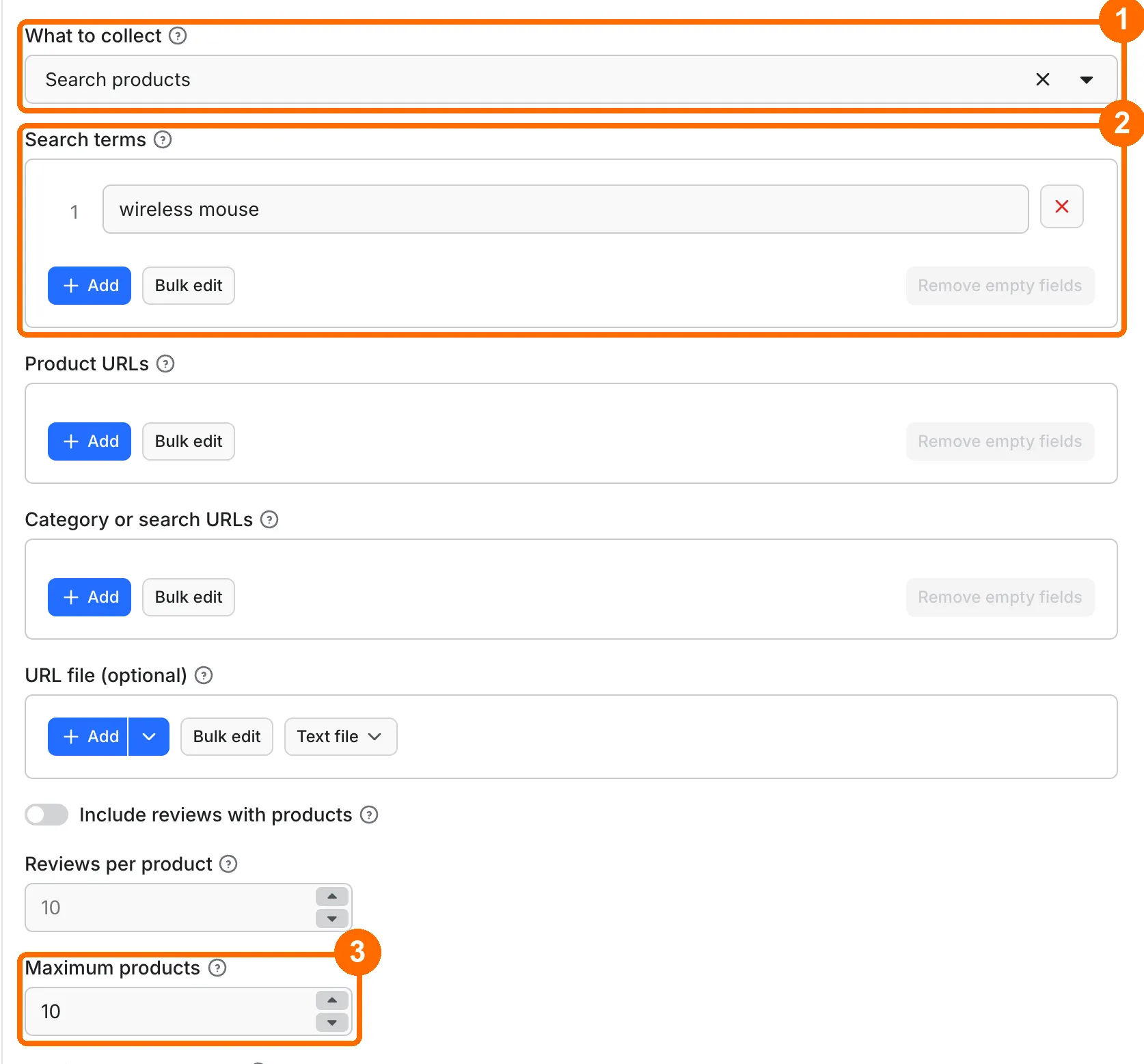
Open the Input tab. What to collect is already set to Search products (box 1 in the picture).
-
In Search terms (
searchQueries), keepwireless mouseor type your own words (box 2). -
Keep Maximum products (
maxItems) at 10 for a first test, or set a bigger number (box 3). -
Click Start.
-
When the run ends, open the Output tab. In the Products and reviews table, check the product title, price, MRP and rating columns (box 5).
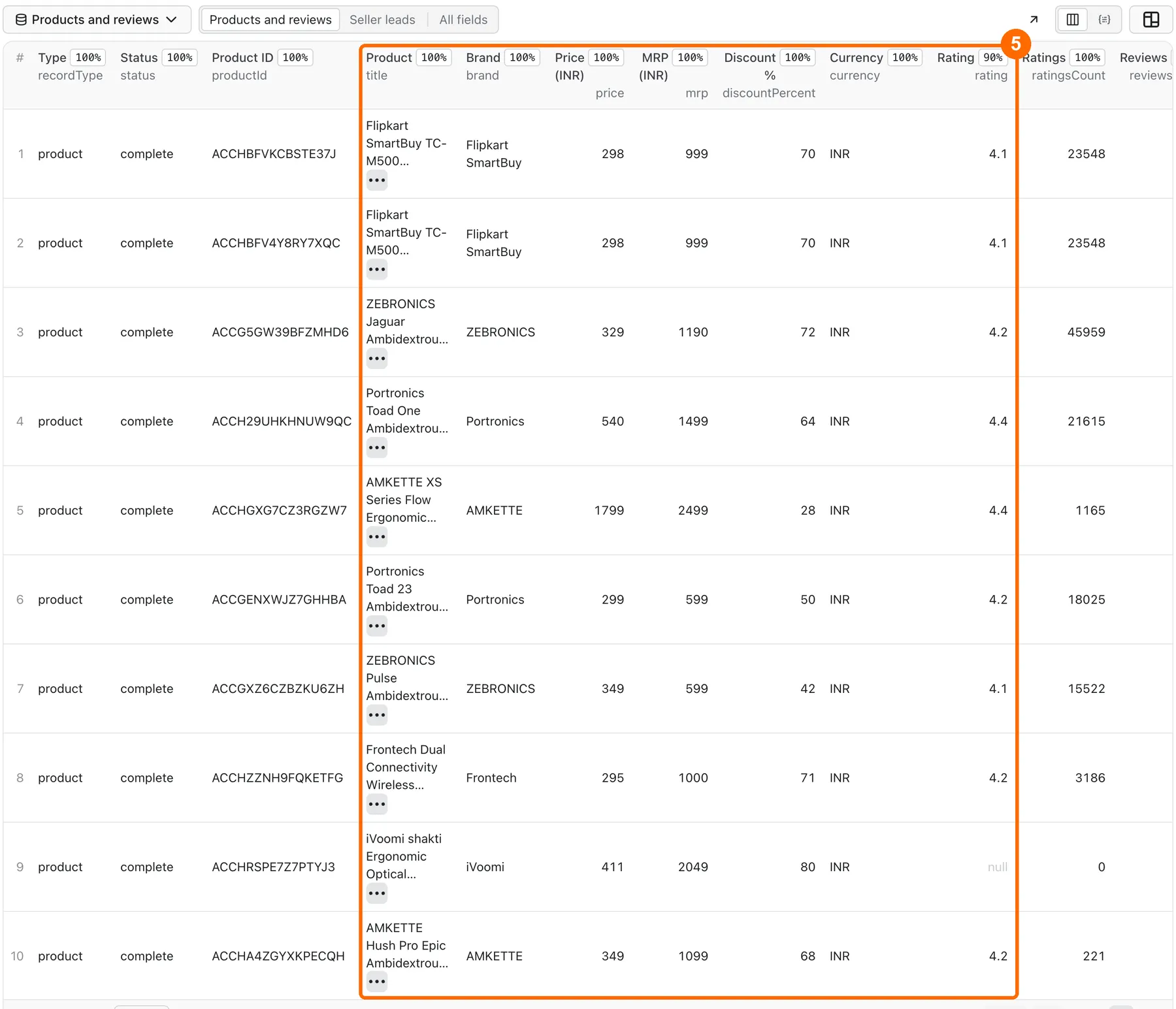
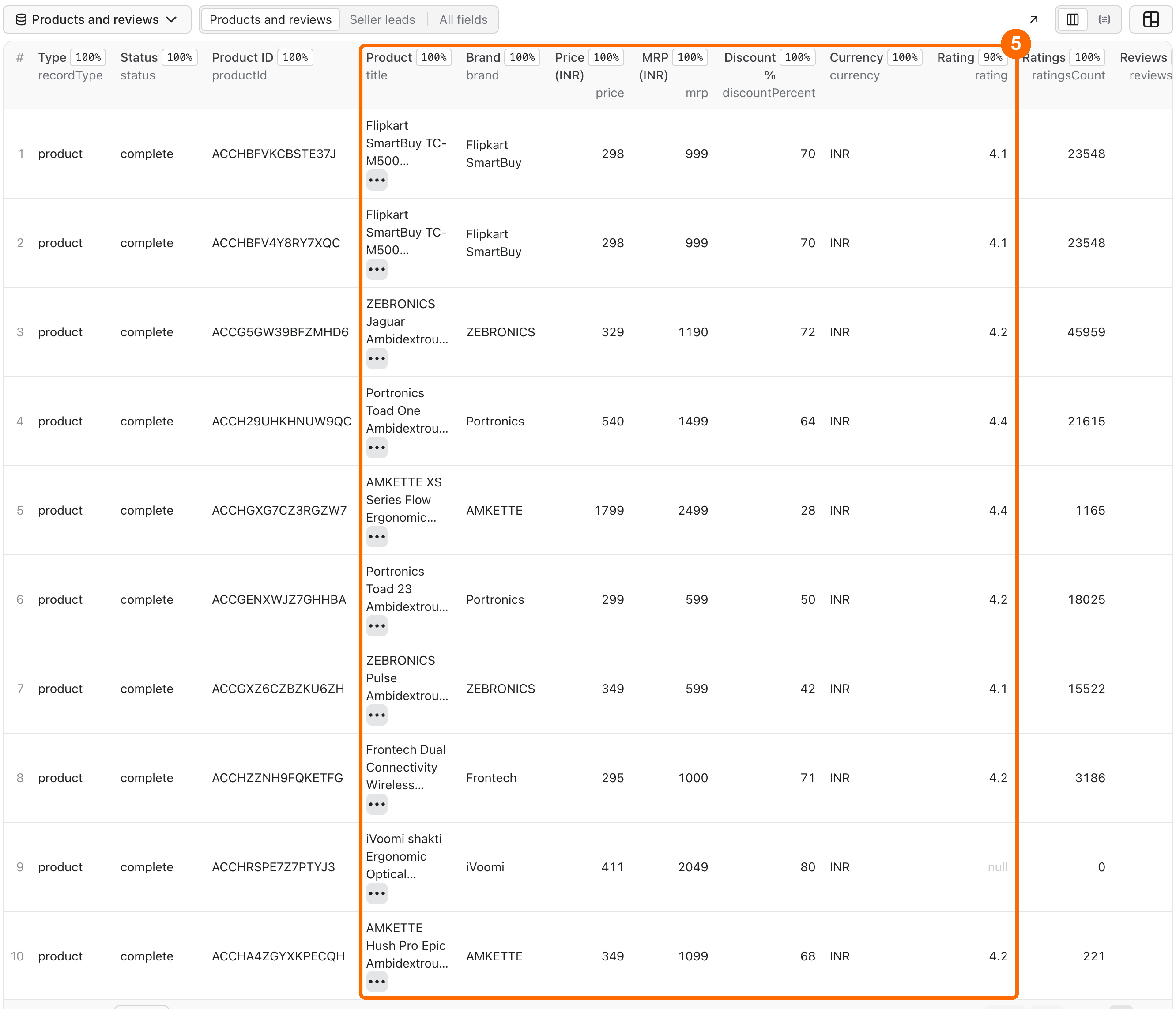
Expected result: 10 product rows for "wireless mouse" with price, MRP, discount, rating, seller and link, in about 1 minute.
Use cases
| Buyer job | Input path | Output entity | Key fields | Next integration |
|---|---|---|---|---|
| Daily price check for a product type | mode=search, searchQueries, sort | Product | price, mrp, discountPercent, inStock | Schedule + Google Sheets or Slack |
| Compare one brand with its rivals | searchQueries, brand, minRating | Product | brand, rating, ratingsCount, seller | CSV / Excel export |
| Read reviews of your products | mode=reviews, productUrls, reviewSort | Review | reviewRating, reviewText, reviewDate, helpfulCount | Notion or a text-analysis tool |
| Build a list of sellers in a category | searchQueries, includeSellerLeads | Seller | sellerName, sellerRating, yearsOnFlipkart, leadScore | CRM import via CSV |
| Alert on new listings | onlyNew, monitorName | Product | productId, title, price, url | Slack or Notion delivery |
Input
Input fields
| Field | Plain name | Type | Required | Default / prefill | Allowed values | Effect | Example | Recommendation |
|---|---|---|---|---|---|---|---|---|
mode | What to collect | text | yes | search (default and prefill) | search, product, reviews | Search products, open product links, or collect reviews | search | Use reviews only with product links |
searchQueries | Search terms | list of text | in search mode, one of the three sources | prefill ["wireless mouse"] | any words | One Flipkart search per line | ["running shoes"] | Short, specific words work best |
productUrls | Product URLs | list of links | in product and reviews modes | empty | flipkart.com links with /p/itm… | Opens these product pages | https://www.flipkart.com/…/p/itm6ac6485515ae4 | Up to 1,000 links |
categoryUrls | Category or search URLs | list of links | no | empty | flipkart.com category or search links | Reads products from these listing pages | a Flipkart category link with filters | Set filters on Flipkart, then copy the link |
urlsFile | URL file | file or link | no | empty | .txt or .csv, up to 2 MB | Product links go to productUrls, other links to categoryUrls | a .txt file with one link per line | Use for long lists |
maxItems | Maximum products | number | no | 10 (default and prefill) | 1–10,000 | Stops after this many product rows | 500 | Raise Timeout for big numbers |
maxPagesPerSearch | Maximum search pages | number | no | 5 | 1–50 | Stops each search after this many pages | 20 | A page has about 24–40 products |
sort | Search order | text | no | relevance | relevance, price_asc, price_desc, recency_desc, popularity, rating_desc | Flipkart sort for search words | price_asc | Applies only to search words |
minPrice / maxPrice | Price range (INR) | number | no | empty | 0 and up | Keeps products inside the range | 500 / 2000 | minPrice must not be above maxPrice |
minRating | Minimum rating | number | no | empty | 0–5 | Keeps products with this rating or higher | 4 | Unrated products do not match |
brand | Brand | text | no | empty | a brand name | Keeps only this brand in keyword searches | Logitech | Leave empty for all brands |
includeDetails | Open each product page | yes/no | no | on (default and prefill) | on / off | Adds seller ID and rating, description, images, specifications | on | Turn off for fast, cheap price lists |
includeReviews | Include reviews with products | yes/no | no | off | on / off | Adds review rows for each product found | on | Use with maxReviewsPerProduct |
maxReviewsPerProduct | Reviews per product | number | no | 10 | 1–500 | Review rows per product | 100 | Flipkart shows about 400–600 unique reviews per product |
maxReviews | Maximum reviews | number | no | 100 | 1–10,000 | Review rows for the whole run | 1000 | Large totals need several products |
reviewSort | Review order | text | no | MOST_HELPFUL | MOST_HELPFUL, MOST_RECENT, POSITIVE_FIRST, NEGATIVE_FIRST | Which reviews come first | MOST_RECENT | When one order ends, the Actor goes on with the others |
includeSellerLeads | Add seller leads | yes/no | no | off | on / off | Adds one row per seller | on | Turns on product pages too |
onlyNew | Only new products | yes/no | no | off | on / off | Returns only products not saved by earlier runs; remembers the last 10,000 product IDs per monitorName | on | Use with a schedule |
monitorName | Monitor name | text | no | default | short name | Keeps saved product IDs apart for each search | mouse-daily | One name per watch list |
deliveryConnector | Send results to | connector | no | empty | your Slack, Notion or other MCP connector | Posts a short summary after the run | Slack | See "Send results to Slack or Notion" |
deliveryTarget | Notion page or channel | text | no | empty | Notion page link or Slack channel ID | Where the summary goes | C0123456789 | Notion needs a page link |
Empty input is not allowed: in Search products mode give at least one search word, category link, product link or file. Repeated links and products are saved once. Up to 1,000 search words and links in total.
Interacting settings
| When | Input A | Input B | Effective behavior | Example | Cost/result effect |
|---|---|---|---|---|---|
| Seller leads on | includeSellerLeads | includeDetails | Product pages are opened even if includeDetails is off | leads on, details off | Slower run: about 15 products per minute |
| Reviews with products | includeReviews | maxReviewsPerProduct, maxReviews | Each product gets up to maxReviewsPerProduct reviews, the run stops at maxReviews | 10 products × 20 reviews | Adds review events and review pages |
| Many products | maxItems | maxPagesPerSearch | The run stops at whichever limit comes first | 500 products, 5 pages | 5 pages give only about 120–200 products |
| Filters | minPrice, maxPrice, minRating, brand | maxItems | Filtered-out products are not saved and not charged | minRating=4.5 | Fewer rows; checked pages are still charged |
Input examples
Price list of a product type
Expected behavior: one search, 10 products, each product page opened.
Expected output: product rows with title, price, mrp, rating, seller.
Limit or cost note: about $0.014 on the Free plan.
Reviews for two products
Expected behavior: reads public reviews in all four orders and skips repeats.
Expected output: review rows with reviewRating, reviewTitle, reviewText, reviewDate.
Limit or cost note: our test gave 716 unique reviews in about 3 minutes for about $0.86 on the Free plan.
Seller leads in a category
Expected behavior: opens 200 product pages and groups them by seller. Expected output: 200 product rows and one seller row per seller (50 in our test). Limit or cost note: about 14 minutes and $0.57 on the Free plan in our test.
Output
Output fields
| Field | Meaning | Type | Can be empty? | Example / enum | Source / notes |
|---|---|---|---|---|---|
recordType | Row type | text | no | product, review, seller, status | status rows explain wrong input |
status | Row quality | text | product and review rows | complete, partial, invalid_input | partial: the product page failed, search card data kept |
productId | Flipkart product ID | text | rarely | ACCHGXG7CZ3RGZW7 | Also on review rows |
title | Product name | text | no | AMKETTE XS Series Flow Ergonomic Optical Mouse… | |
brand | Brand | text | yes | AMKETTE | |
price | Selling price | number | yes | 1799 | INR |
mrp | MRP (list price) | number | yes | 2499 | INR |
discountPercent | Discount from MRP | number | yes | 28 | |
rating | Average rating | number | yes | 4.4 | 1–5 |
ratingsCount / reviewsCount | Number of ratings / reviews | number | yes | 1165 / 179 | |
ratingBreakdown | Ratings from 1 to 5 stars | list | yes | [45, 19, 66, 289, 746] | 1★ first |
seller / sellerId / sellerRating | Main seller | text / text / number | yes | MPDSLERetail, 92fa2eec41634a72, 4.6 | ID and rating need product pages |
inStock | Can be bought now | yes/no | yes | true | |
flipkartAssured | Flipkart Assured badge | yes/no | yes | true | |
keySpecs / specifications | Short and full specs | list / object | yes | ["Wireless", "Optical Mouse"] | Full specs need product pages |
description / images | Text and image links | text / list | yes | Need product pages for the full set | |
url | Product or review link | link | no | https://www.flipkart.com/…/p/itm07845789d6bdd?pid=… | |
reviewRating / reviewTitle / reviewText | Review content | number / text / text | text can be empty | 5, Simply awesome | Buyer names are not saved |
reviewDate | When the review was written | text | yes | Jun, 2025 | As Flipkart shows it; no exact day |
verifiedPurchase / helpfulCount | Certified buyer, helpful votes | yes/no / number | yes | true, 367 | |
sellerName / yearsOnFlipkart / productsSold | Seller facts | text / number / text | yes | RetailNet, 10, 82.7L+ | Seller rows |
qualityScorePercent / speedScorePercent | Flipkart seller scores | number | yes | 88, 98 | Seller rows |
leadScore | Our simple seller score, 0–100 | number | yes | 93 | 40% rating, 20% quality, 20% speed, 20% years (10+ = full) |
productsSeen / brandsSeen | What this run saw from the seller | number / list | no | 51, ["Portronics", "Logitech"] | Seller rows |
fetchedAt | Time the row was saved | date-time | no | 2026-11-14T10:55:02.876Z | UTC |
Output entities and surfaces
| Situation | Dataset/API/KVS/live view | Result shape | User action |
|---|---|---|---|
| Normal item | Dataset, view Products and reviews; sellers in view Seller leads | one row per product, review or seller | Open, filter or export |
| Domain-empty result | Dataset is empty; RUN_SUMMARY shows NOT_FOUND or filtered | no rows | Check search words or relax filters |
| Partial result | Dataset rows with status=partial; RUN_SUMMARY.status is PARTIAL | search card fields filled, page fields empty | Run those product links again later |
| Technical failure or retry | RUN_SUMMARY.errorCodes, run log, status message | e.g. SOURCE_HTTP_429, SOURCE_BLOCKED | Run again later; report with the run ID if it repeats |
Output example
This example is trimmed (no specifications, images or description) and shows one product from the "wireless mouse" search. null means Flipkart did not show this value on the page, for example no warranty text. We do not promise that every field is filled for every product.
Send results to Slack or Notion
Pick your connector in the optional deliveryConnector field. After the run saves its data, the Actor posts a short summary (up to 25 rows and a link to the full dataset) there. Put a Notion page link or a Slack channel ID in deliveryTarget: in Notion every run is added on top of that one page, so your workspace does not fill up with new pages. Without a page link, Notion delivery is skipped and the log says so. A delivery error never fails the run and costs nothing extra. Connect a service once in Apify Console → MCP connectors.
Use case → fields
| Buyer job | Input path | Output entity | Key fields | Next integration |
|---|---|---|---|---|
| Price tracking | searchQueries, onlyNew | Product | price, mrp, discountPercent | Schedule + Sheets |
| Review analysis | mode=reviews, productUrls | Review | reviewRating, reviewText | Notion, BI tool |
| Seller outreach | includeSellerLeads | Seller | sellerName, leadScore, sampleProductUrls | CRM via CSV |
Pricing
Pricing unit
You pay per event. Platform usage (compute, proxy) is included; you pay only the events below.
| Event | When it is charged | Free plan | Gold plan and higher |
|---|---|---|---|
| Actor start | Once per run (256 MB) | $0.004 | $0.004 |
| Source page | One search page, product link or review page checked, also when it has no matching results or Flipkart refused it | $0.0003 | $0.0003 |
| Product | One unique product saved | $0.000985 | $0.00068 |
| Review | One public review saved | $0.00115 | $0.0008 |
| Seller lead | One unique seller saved (only with Add seller leads) | $0.00735 | $0.00514 |
Bronze and Silver plans get 10% and 20% off the Free price for products, reviews and seller leads.
The Actor start fee is charged once per GB of run memory (at least once). With the default 256 MB it is one start fee; if you raise memory to 2 GB, it is two.
A run with no results (for example, a filter with no matches) costs the start fee and the pages checked, for example about $0.0055 for 5 empty pages. A repeated run with Only new products and no new products costs about $0.0043. Products that do not pass your filters, failed pages and rows that were not saved are never charged as products or reviews. If you set a maximum cost per run, the Actor stops before it goes over and keeps the rows it saved.
Cost examples
These are measured runs on the Free plan.
| Scenario | Input scope | Expected item/event count | Base charge | Optional charge | Stop/cap behavior |
|---|---|---|---|---|---|
| First test | 1 search word, 10 products with details | 1 page, 10 products | $0.014 | none | stops at maxItems |
| Fast price list | 2 search words, no product pages | 45 pages, 1,487 products | $1.48 | none | stopped at a 5-minute timeout |
| Products and sellers | 1 search word, 200 products | 7 pages, 200 products | $0.20 | 50 sellers: $0.37 | full run, about 14 minutes |
| Reviews | 2 products, maxReviews=900 | 100 pages, 716 reviews | $0.86 | none | all unique reviews Flipkart showed |
| No matches | filter with no match, 5 pages | 5 pages, 0 products | $0.0055 | none | stops at maxPagesPerSearch |
Limits
- Only public pages of flipkart.com (India). No login, no cart, no checkout data, no buyer names.
- Up to 10,000 products and 10,000 reviews per run, 50 pages per search, 500 reviews per product, 1,000 search words and links.
- Speed: about 15 products per minute with product pages, about 300 per minute without them, about 230 reviews per minute. The default Timeout is 1 hour; for more than about 800 products with product pages, raise Timeout in the run options.
- Flipkart shows about 20 review pages for each review order. Across all four orders a product usually gives 400–600 unique reviews, not every review ever written.
reviewDateis the month and year that Flipkart shows, such asJun, 2025.- Seller GSTIN, CIN and PIN code are filled only when Flipkart shows them on the page; often they are empty.
- Prices and stock can change at any time. A row shows what Flipkart showed at
fetchedAt. - Flipkart sometimes limits requests. The Actor retries, but some pages can still fail; they are listed in
RUN_SUMMARY.errorCodes.
API, export and integrations
- API: start the Actor with
POST https://api.apify.com/v2/acts/cliqtomedia~flipkart-scraper/runsand the same JSON as the input form. Read rows from the run's dataset. - Export: download the dataset as JSON, CSV, Excel, XML or HTML from the Output tab or the API. Use
?view=sellersfor seller rows only. - Scheduling: create a schedule in Apify Console with Only new products on to get new listings every day. The monitor remembers the last 10,000 product IDs; an older product that drops out of that list can come back as new.
- Webhooks / no-code: use Apify integrations (Make, Zapier, n8n, Google Sheets, webhooks) on the "run succeeded" event and read the default dataset.
- SDK / MCP / agent: call the Actor from the Apify JavaScript or Python client, or from an AI agent through Apify MCP (below).
Use with AI agents (MCP)
- MCP server URL with only this Actor:
https://mcp.apify.com?tools=cliqtomedia/flipkart-scraper. - Smallest useful input:
{"mode": "search", "searchQueries": ["wireless mouse"], "maxItems": 10, "includeDetails": true}. - Key output fields:
title(product name),priceandmrp(INR),rating(1–5),seller(main seller),url(product link). - A 10-product run takes about 1 minute and costs about $0.014 on the Free plan. Keep
maxItemssmall for quick answers; product pages take about 4 seconds each.
Troubleshooting
The run has fewer products than I asked for
Symptom: maxItems is 500, but the dataset has 150 rows.
Likely reason: maxPagesPerSearch stopped the search first, Flipkart has fewer results, or filters removed products.
Check: RUN_SUMMARY fields limitReached, stopReason and filtered.
Action: raise maxPagesPerSearch, add more search words, or relax the filters.
The run stopped with "Stopped at the run timeout"
Symptom: the status message says the run stopped at the timeout; RUN_SUMMARY.status is PARTIAL.
Likely reason: product pages take time (about 15 per minute).
Check: the number of saved rows and the Timeout in run options.
Action: raise Timeout, or turn off Open each product page for a fast price list.
Some rows have status: partial
Symptom: product rows without seller ID, description or specifications.
Likely reason: Flipkart did not open that product page in time; the search card data was kept.
Check: RUN_SUMMARY.errorCodes, for example SOURCE_HTTP_429.
Action: run these product links again in product mode later.
The run failed with a source error
Symptom: run status FAILED, RUN_SUMMARY.stopReason is SOURCE_FAILURES, errorCodes such as SOURCE_BLOCKED or SOURCE_HTTP_429. Rows saved before the stop stay in the dataset.
Likely reason: Flipkart blocked all tries for a while. This is a technical failure, not "no products". When the very first page fails after all retries, a page fails and no page worked for 2 minutes, or several pages in a row fail, the Actor stops early so a blocked run costs little. Refused pages are still charged as source pages, so a blocked run costs the start fee plus a few cents of pages at most.
Check: the run log and RUN_SUMMARY.
Action: try again in a few minutes. If it repeats, open an issue with the run ID.
The run stopped with WRITE_FAILED
Symptom: run status FAILED, RUN_SUMMARY.stopReason is WRITE_FAILED.
Likely reason: Apify could not save a row to the dataset. The row was not saved and not charged; rows saved before it stay.
Check: the run log line Dataset write failed.
Action: run again. If it repeats, open an issue with the run ID.
I see a row with recordType: status
Symptom: a row with status: invalid_input and an error text.
Likely reason: a link is not a flipkart.com product or category link.
Check: the error text.
Action: fix the link. Product links look like https://www.flipkart.com/…/p/itm….
FAQ
Do I need a Flipkart account or cookies?
No. The Actor reads only public pages and needs no login, cookies or API key.
Why did my run with no results still cost money?
The start fee and each checked page are charged, because the Actor did the work. For example, 5 empty search pages cost about $0.0055. Products that were not saved are never charged.
Are prices and reviews complete and up to date?
They are what Flipkart showed at the time of the run (fetchedAt). Some fields can be null when Flipkart does not show them. Reviews are limited to what Flipkart shows: usually 400–600 unique reviews per product.
Can I get reviews and products in one run?
Yes. Turn on Include reviews with products and set Reviews per product. Or use mode=reviews with product links for reviews only.
How is the seller lead score calculated?
leadScore is 0–100: 40% seller rating, 20% quality score, 20% speed score and 20% years on Flipkart (10 years or more gives the full part). Missing parts count as 0.
Related Actors
- Amazon Product Scraper — the same product, price and review data from Amazon.
- Google Shopping Scraper — compare one product's offers across many shops.
- Shopee Products Scraper — products, prices and reviews from another Asian marketplace.
- Walmart Products & Reviews Scraper — products and reviews from Walmart.
- Marketplace Fee Calculator — work out your payout after marketplace fees.
Support
For a bug, question or feature request, open the Actor's Issues tab on Apify. Include the run ID, the mode you used and the error text from the status message or RUN_SUMMARY. Never send tokens, cookies or private data.
⭐ Found it useful? Rate this Actor. Something wrong? Report a problem — we fix reported problems.


