

X Account Change Monitor
Pricing
from $2.50 / 1,000 account checks
X Account Change Monitor
Monitor public X (Twitter) accounts on a schedule. Get one row per change to bio, handle, display name, website, verification badge or follower counts, with previous and current values. No login, no cookies. Pay per account checked and per change found.
Pricing
from $2.50 / 1,000 account checks
Rating
0.0
(0)
Developer

Delowar Munna
Maintained by CommunityActor stats
0
Bookmarked
2
Total users
1
Monthly active users
4 days ago
Last modified
Categories
Features
Share
X (Twitter) Account Change Monitor
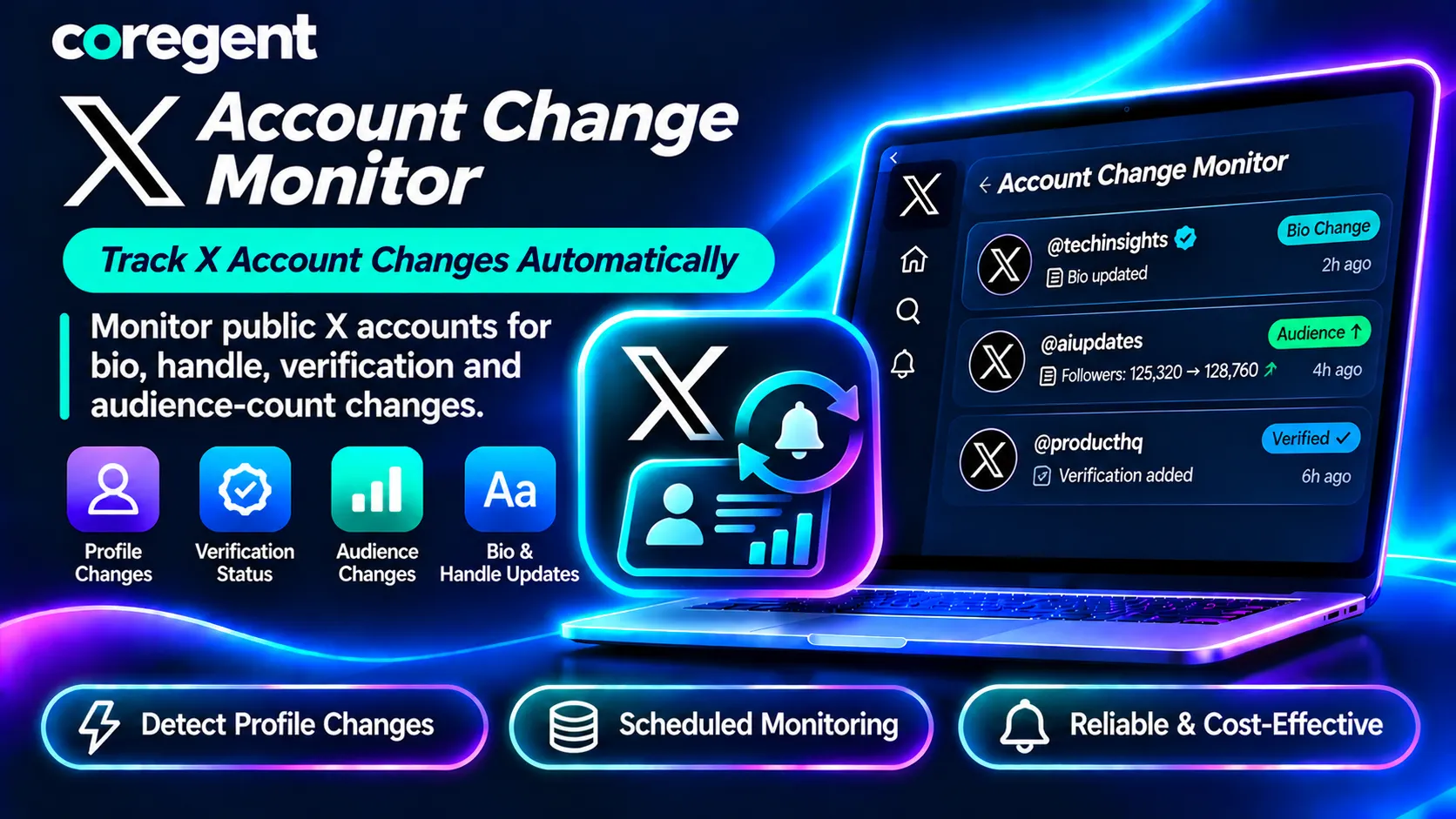
Know when a public X account changes its bio, handle, display name, website, verification badge or audience size. Run this Actor on a schedule: the first run records each account's profile as a baseline, and every later run returns one row per change, with the value before, the value now, the size of the move and when it was seen.
- Watch competitors, clients, journalists, politicians or portfolio companies, up to 1,000 accounts per run.
- Follows each account by its permanent ID, so a handle change is reported, not lost.
- Follower moves are filtered by thresholds you set, so you get real shifts, not daily noise.
- Your monitoring state stays in your own Apify account.
- No X login, no cookies, no browser. Export as JSON, CSV or Excel, or send changes to Slack, email or a webhook.
What can you do with it?
- Competitor intelligence: see when a rival rebrands, changes its tagline, adds a launch link or gets a business badge.
- Agencies and PR: get told when a client's or an influencer's profile changes, or when an account goes private.
- Journalism and research: keep an observed record of when officials or organisations change their public profiles.
- Investor research: follow companies' audience growth and messaging changes over time.
How to use it
- Add the accounts to watch: X handles (
apify,@NASA), profile URLs (https://x.com/nasa) or numeric user IDs. - Pick the fields to watch and, for follower counts, the thresholds.
- Run it once. That run records the baseline: you get a snapshot row per account and no change rows yet.
- Save the input as a task and schedule it (for example daily). Every scheduled run compares with the previous one and saves the changes.
What it watches
| Field | Reported when |
|---|---|
bio | The bio text changes, is added or is cleared |
username | The account changes its @handle |
displayName | The display name changes |
website | The profile link changes, is added or is removed |
verified | The badge changes (e.g. Business, Government, blue, none) |
followersCount | The move reaches your follower thresholds |
followingCount | The move reaches your following thresholds |
postsCount, location, isProtected, profileImageUrl, bannerImageUrl | Optional; pick them in Fields to watch |
Count thresholds
A follower, following or post count change is reported when it reaches both its absolute and its percent threshold. The default for followers is 100 followers and 1%. Set one of a pair to 0 to use only the other.
The change is measured from the value at the last reported change (or the baseline), not from the last run. So an account gaining 60 followers a day isn't missed: with the default 100-follower threshold, it's reported on the second day with a change of 120.
Monitoring state
Runs with the same State key compare with each other. Use a separate key per watch list, for example competitors and clients. The snapshots are stored in a key-value store named x-account-change-monitor-state in your own Apify account. To start a list over, use a new state key.
Changes are found by comparing snapshots, so observedAt is when this monitor saw the change, not the exact moment it happened on X. Every change row also has previousObservedAt: the change happened between those two times.
Accounts that disappear
A lookup can fail for reasons that have nothing to do with the account: a temporary error, a rate limit. So by default a missing account is not reported as deleted. It's listed in FAILED_TARGETS and its last snapshot is kept. Turn on Report accounts that become unavailable to get an accountStatus change row (with confidence: "uncertain") after a set number of failed checks in a row, and another when the account comes back.
Monitor on a schedule
- Run the Actor once with your accounts and save the input as a task.
- In the task, open Schedules and pick how often to check (daily works well for most lists).
- Add an integration to get the changes where you work: Slack, email, Google Sheets, Make, Zapier or a webhook. Turn off Save a snapshot row per account if you only want change rows in your alerts.
Input examples
Watch a competitor list daily
Only handle, badge and big audience moves
Ten news and tech accounts, every count move reported
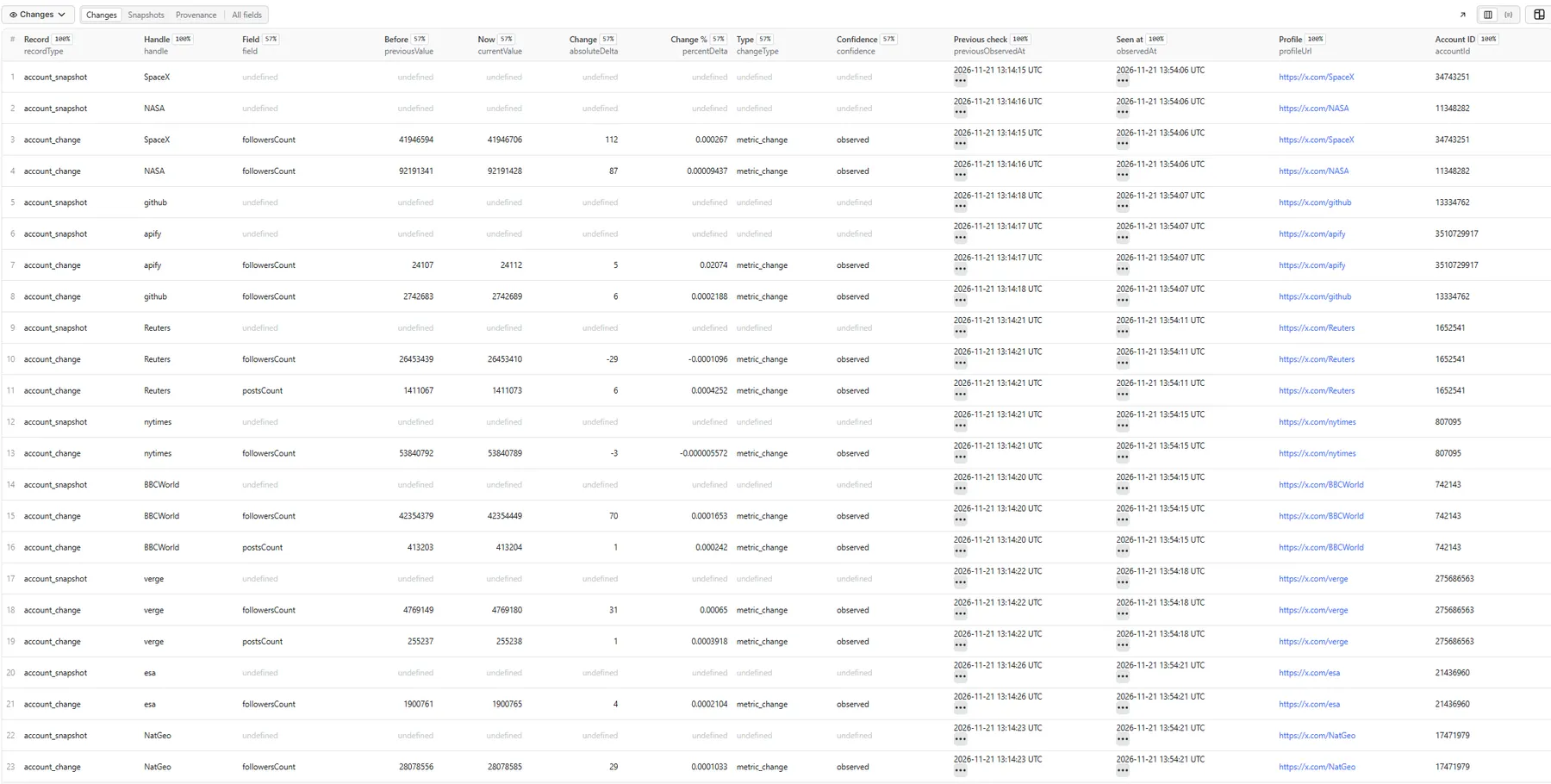
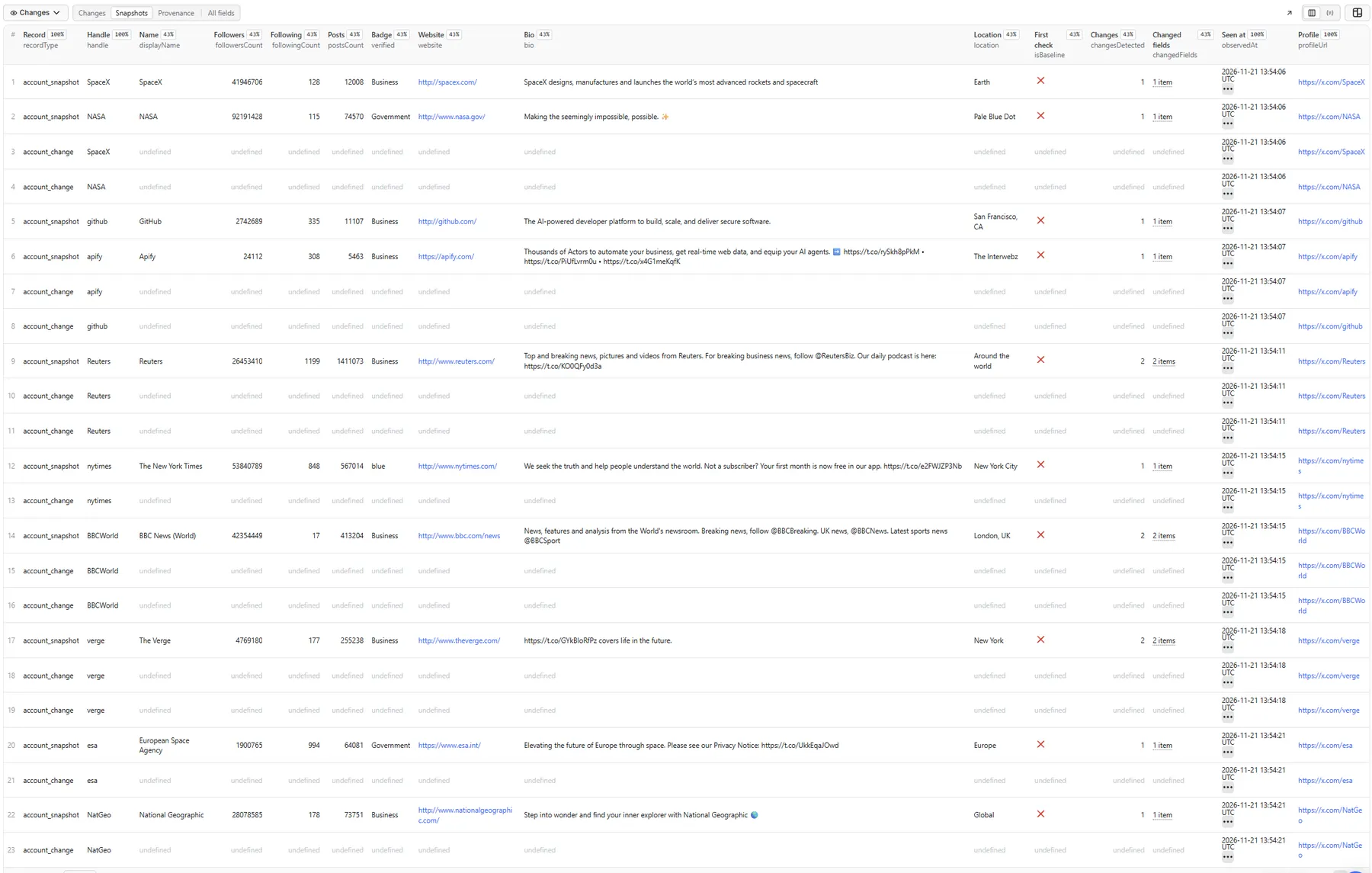
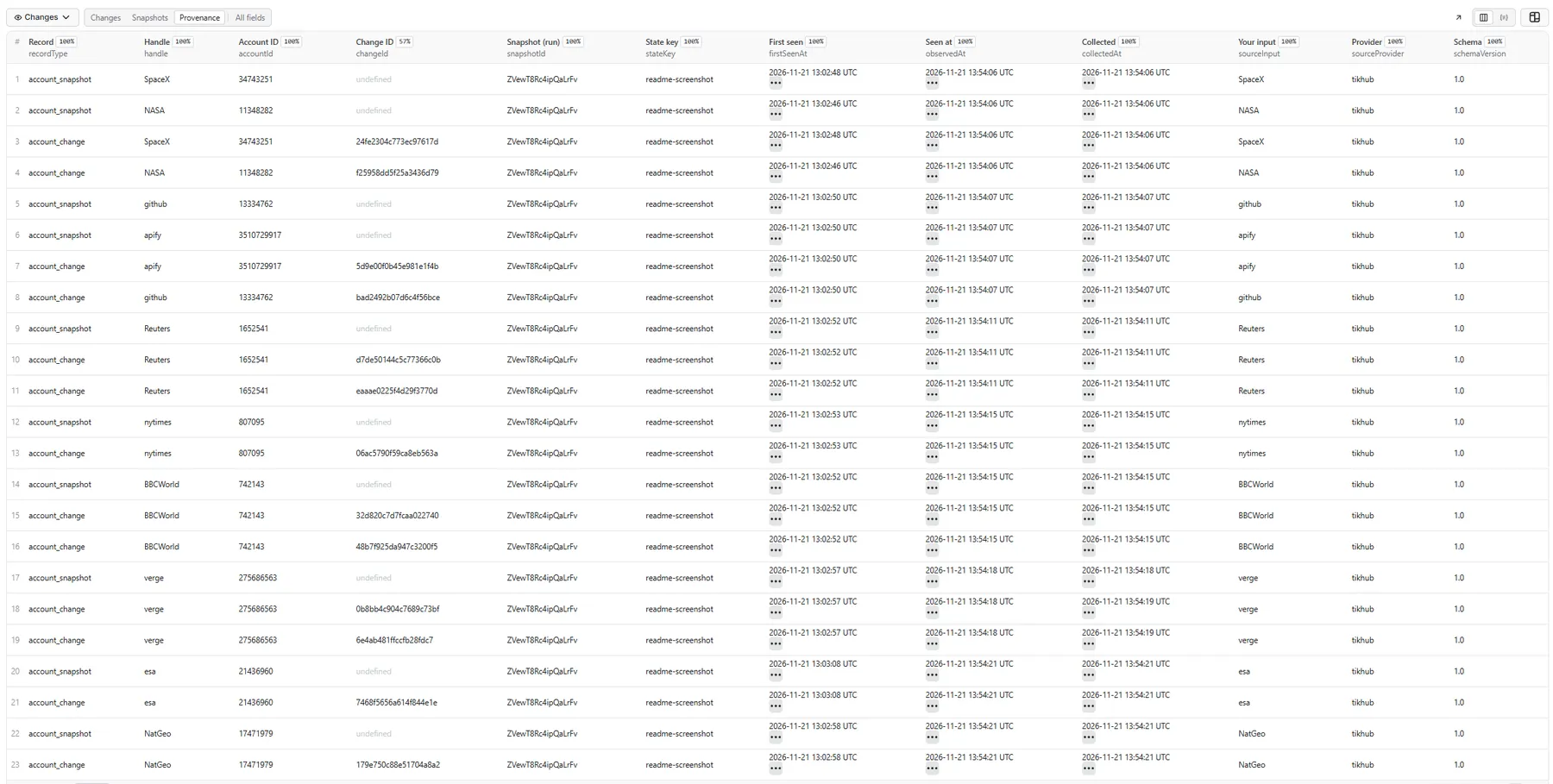
This is the input behind the screenshots and sample rows below. The count thresholds are set to 1 so every follower and post move is reported, which suits a demo; for real monitoring, keep the defaults or higher.
Track accounts by ID and report ones that vanish
Output
Each run saves two kinds of rows to the dataset (recordType):
account_change: one per detected change.account_snapshot: one per checked account, with its profile now and how many changes were found (unless you turn snapshots off).
The Changes, Snapshots and Provenance tabs show them. Both kinds share one dataset, so each tab also lists the other kind's rows, with that tab's columns empty: in the Changes tab, account_snapshot rows have no change values, and in the Snapshots tab, account_change rows have no profile values. That's layout, not missing data. To get one kind only, filter on recordType in your export or integration, or turn off Save a snapshot row per account for change rows only. A run summary (RUN_SUMMARY) and the accounts that couldn't be checked (FAILED_TARGETS) are saved in the key-value store.
Changes
Snapshots
Provenance
Change row (JSON)
A real row from the run above: Reuters lost 29 followers between two checks 40 minutes apart.
changeType is created (a field that was empty now has a value), updated, removed (a value was cleared) or metric_change (counts). Count rows carry absoluteDelta and percentDelta (4 significant digits, so small moves on large accounts don't read as 0); other rows have null there. For counts, previousValue is the value at the last reported change.
Snapshot row (JSON)
The same account's snapshot from that run, with the two fields that changed:
Links in bios stay as X's short t.co links, as X returns them.
null always means "not available", never zero or false.
Pricing
This Actor uses pay-per-event pricing:
account-check: one per account successfully checked and compared with its last snapshot. The first check, which records the baseline, counts too.account-change: one per change row saved.
Nothing else is charged: accounts that aren't found or are suspended, duplicates, unchanged fields, moves below your thresholds, the run summary, and runs that check nothing.
The prices are on the Actor's Pricing tab in the Apify Console, and they can differ by Apify plan. This README deliberately doesn't quote figures, so it never goes out of date. Set a maximum cost per run in the run options: the Actor stops before it would exceed it, and changes it couldn't report within the limit are kept and reported on the next run.
Limits and good to know
- Changes are observations between two runs. A bio changed and changed back between runs isn't seen.
- Follow and unfollow lists (who followed or unfollowed whom) aren't tracked, only the counts.
- Coverage depends on what X and the data provider return for an account. Protected accounts show their public profile fields only.
- One-off profile lookups without monitoring? Use X (Twitter) Profile Scraper.
FAQ
Is monitoring X accounts legal? This Actor collects publicly available profile data only. It isn't affiliated with or endorsed by X Corp. or Apify. You're responsible for how you use the data: follow X's terms and data-protection laws such as GDPR, and don't monitor people without a lawful reason.
Why did my first run return no changes? The first run for a state key records the baseline. Changes appear from the second run on.
What happens when an account changes its handle? It's still found by its permanent ID, and you get a username change row. Later runs use the new handle.
Can I add or remove accounts later? Yes. New accounts get a baseline on their first check; removed accounts are simply no longer checked.
Can I use it from code or an AI agent? Yes. Call it through the Apify API, the Apify client libraries or the Apify MCP server, and read the dataset as JSON.
Feedback
Found a problem or need a field that's missing? Open an issue on the Actor's Issues tab and include the run link.


