

X Article Scraper
Pricing
from $3.00 / 1,000 article results
X Article Scraper
Extract public long-form X (Twitter) Articles with the full body text, title, author, publish date, cover image, engagement and a completeness flag. Paste post URLs or IDs, or scan author handles. No login, no cookies. Pay only for Articles saved.
Pricing
from $3.00 / 1,000 article results
Rating
0.0
(0)
Developer

Delowar Munna
Maintained by CommunityActor stats
0
Bookmarked
2
Total users
1
Monthly active users
3 days ago
Last modified
Categories
Features
Share
X Article Scraper — X (Twitter) Articles to Markdown & Text
X Article Scraper turns public long-form X Articles into clean, exportable records. Give it Article post URLs, post IDs or author handles, set one overall limit, and get a consistent JSON / CSV row per Article: title, author, publish date, cover image, the full body text (as Markdown-ready text and as plain text), word count, engagement and a completeness flag. No X account, login, cookies or credentials needed.
Coverage depends on what X and our licensed data provider make available. The Actor never guesses: a field it can't get is null, never an invented value.
✨ What you get
- The whole Article body, paragraph by paragraph, ready for search indexes, NLP or LLM context windows. Today our data provider returns the text without heading, bold, link or inline-image formatting, so
bodyMarkdownis clean paragraph text. If the provider starts returning the rich format, the Actor converts it to full Markdown (headings, lists, quotes, code, links, images) automatically, andcontentSourcechanges torich_text. - Title, preview, cover image, word and character counts for every Article.
- Provenance on every row: post ID, Article ID, canonical post URL, which of your inputs matched it, provider, schema version and collection time.
- A completeness flag (
complete/partial/unknown) andcontentSource(rich_text,plain_textorpreview) so you know how much of the Article came back. - Only Articles: ordinary posts are skipped and never charged.
- Batch-ready: URLs, IDs and author handles in one run, de-duplicated, with one global cap that is never multiplied by the number of inputs.
- Engagement counts (likes, reposts, replies, quotes, bookmarks, views) when X shows them.
🎯 Use cases
- RAG and AI pipelines: feed long-form posts into vector stores as Markdown chunks with source links.
- Knowledge management: archive Articles from experts you follow into Notion, Obsidian or a wiki.
- Content analysis and journalism: track what founders, researchers and analysts publish as Articles.
- Monitoring: schedule the Actor on a list of authors and collect only new Articles (see below).
🚀 Quick start
- Paste one or more Article post URLs (the post that published the Article, e.g.
https://x.com/karpathy/status/2002118205729562949), or add author handles. - Set Maximum Articles.
- Click Start. Results appear in the dataset as each Article is saved.
Running with the pre-filled form returns the 2 example Articles.
📥 Input
| Field | What it does |
|---|---|
articleUrls | X post URLs that published an Article. twitter.com, mobile and /i/status/ links work. |
postIds | Numeric post IDs, as an alternative to URLs. |
authorHandles | Handles or profile URLs. The author's recent posts are scanned and only the author's own Article posts are returned (reposts of other people's Articles are skipped). |
maxResults | Maximum Articles saved in the whole run (default 10). |
publishedAfter | Only Articles published on or after a date, or within a period such as 30 days. |
includeMarkdown, includePlainText, includeImages, includeReferencedLinks | Turn the body formats, image list and link list on or off (all on by default). Links are filled only when the provider returns them (rare today). |
maxPostsScannedPerAuthor | Advanced: how many recent posts per author are checked for Articles (default 100). |
maxArticleCharacters | Advanced: cut the bodies at this length (0 = no limit). |
skipIds | Advanced: post IDs or URLs to leave out, e.g. Articles collected in an earlier run. |
Tip:
x.com/i/article/…links carry the Article's own ID, which can't be looked up. Paste the URL of the post that shared the Article (…/status/<id>) instead. The Actor tells you when it skips one.
Example: specific Articles
Example: recent Articles from a few authors, Markdown only
Example: known Articles plus author scans (the run behind the screenshots below)
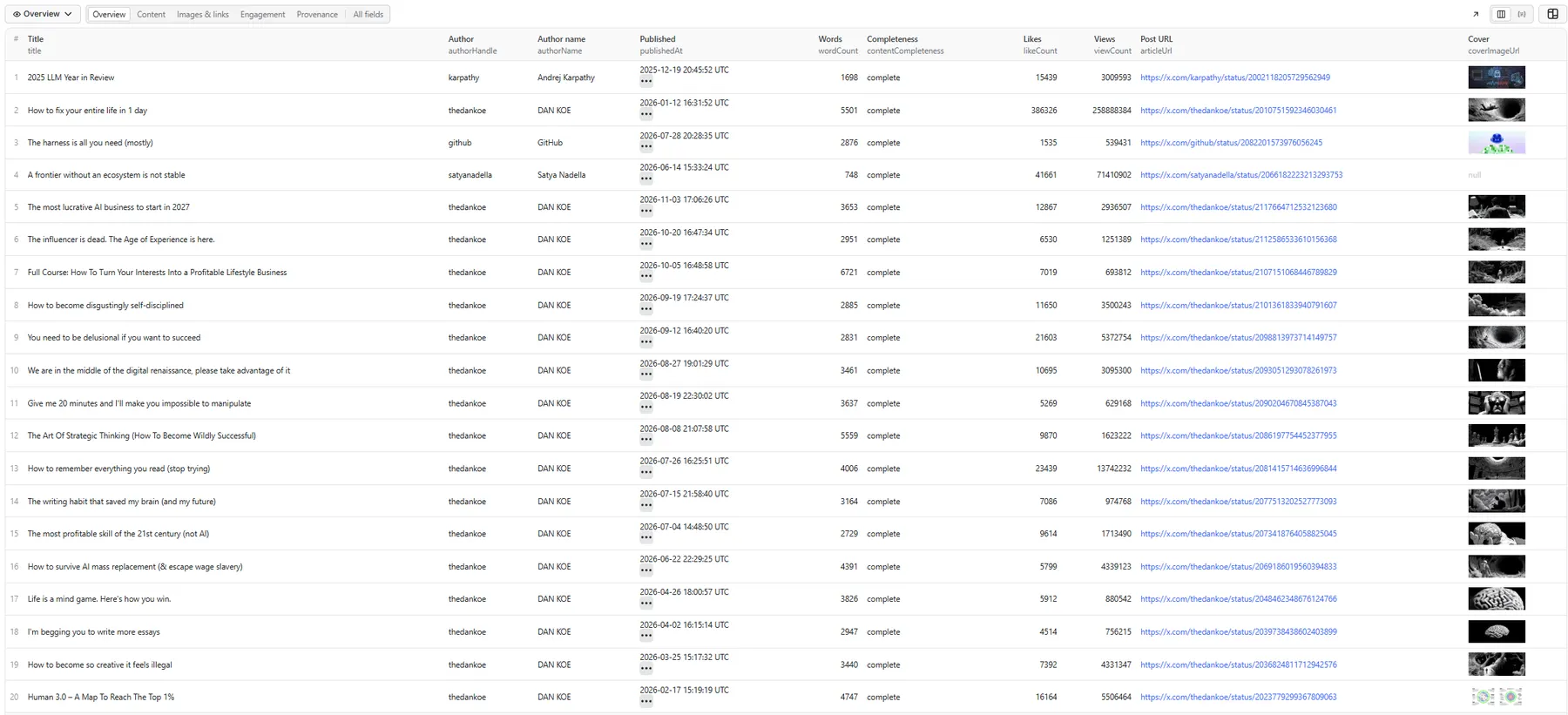
This returned 20 Articles in about 40 seconds: the 4 linked Articles, then 16 more found by scanning @thedankoe's recent posts. The run stopped at 20 before reaching the other handles, because inputs are processed in order and maxResults is one cap for the whole run.
📤 Output
One row per unique Article (recordType: "x_article"). The dataset has five tabs, all views of the same rows. Export in JSON, CSV, Excel, XML or HTML. The screenshots and samples below come from the screenshot run above; long text is shortened with "…".
Overview
Title, author, publish date, length, completeness, likes, views, post link and cover image.
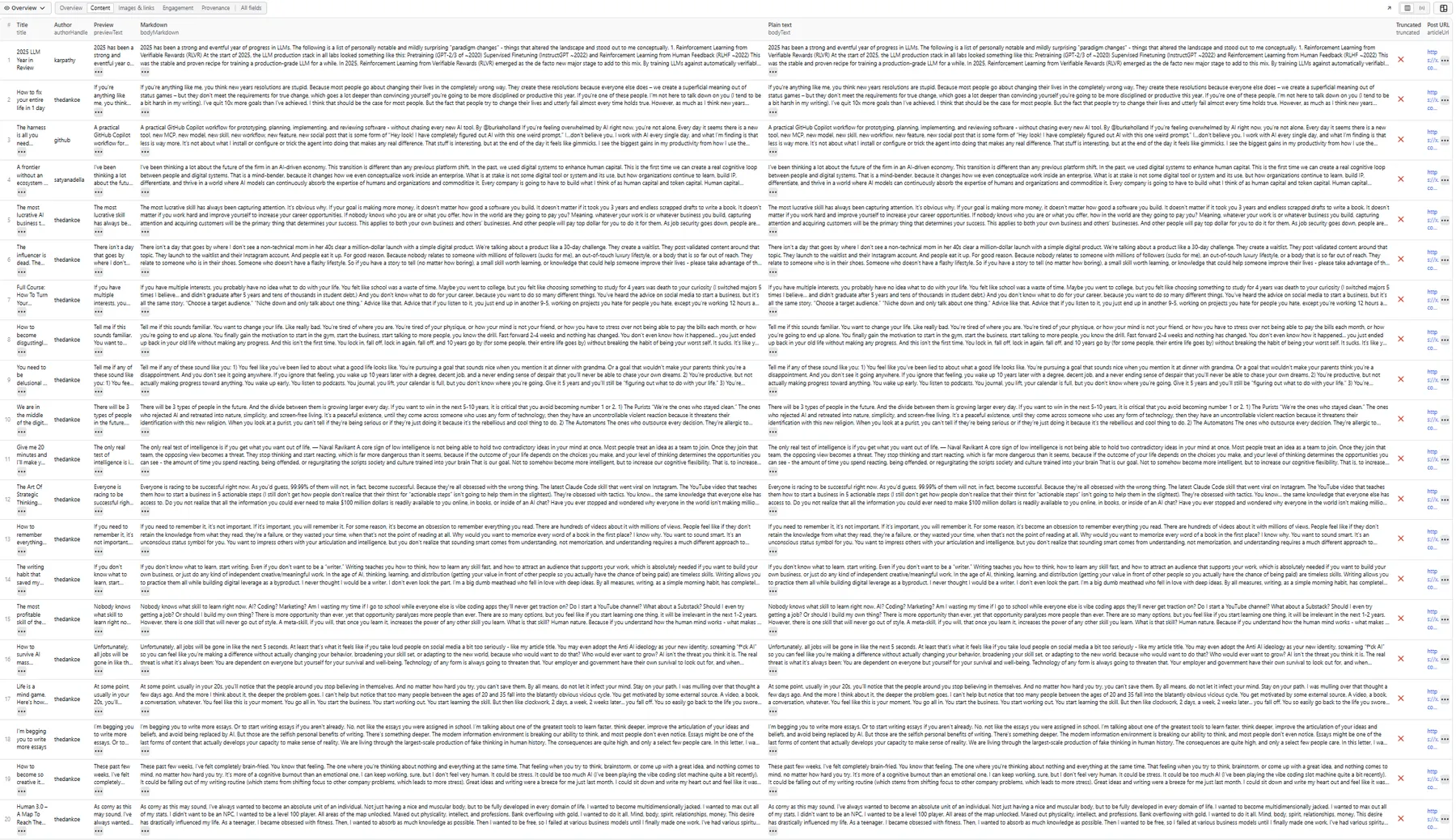
Content
The preview and the whole body, as Markdown-ready text and as plain text.
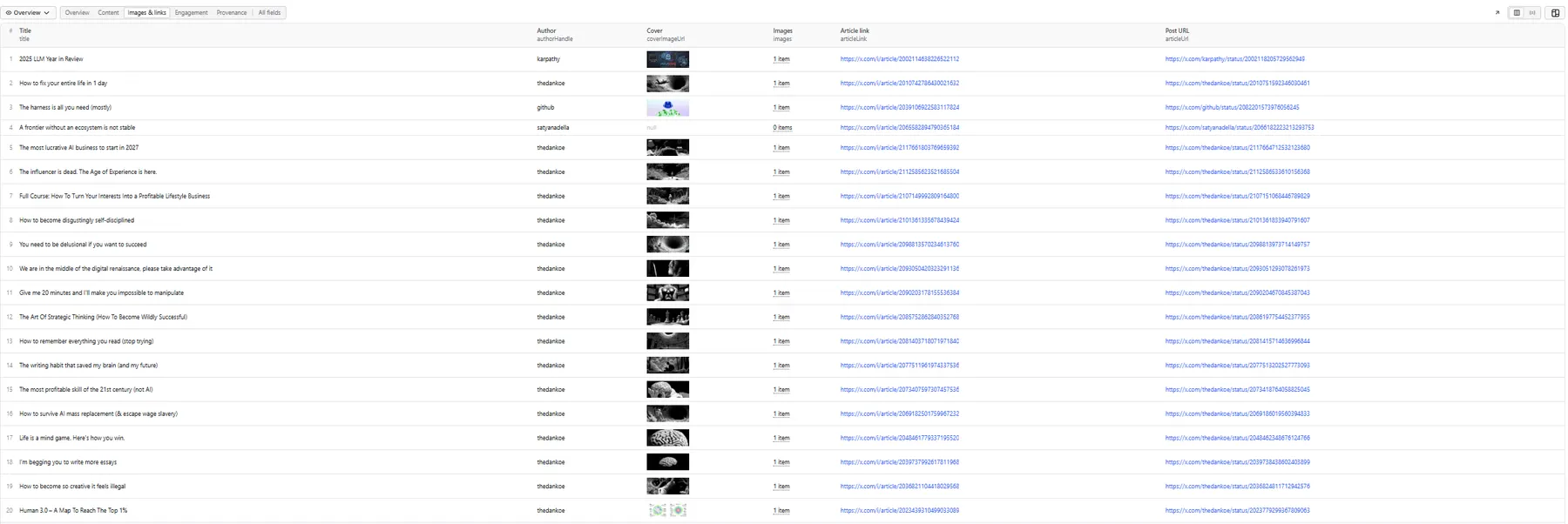
Images & links
The cover image, the image list, and both links: the post that published the Article and the Article itself.
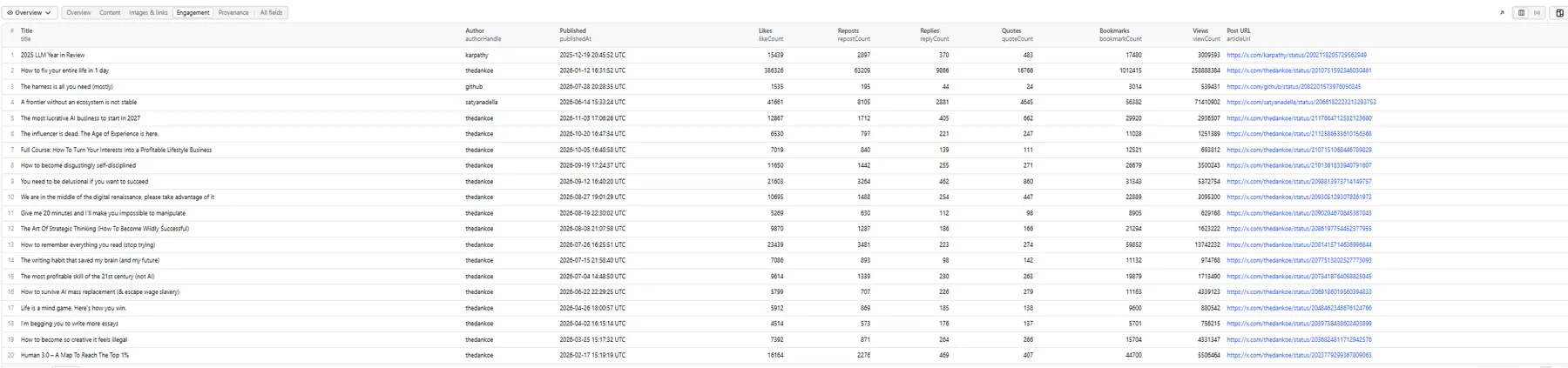
Engagement
The post's likes, reposts, replies, quotes, bookmarks and views when it was collected.
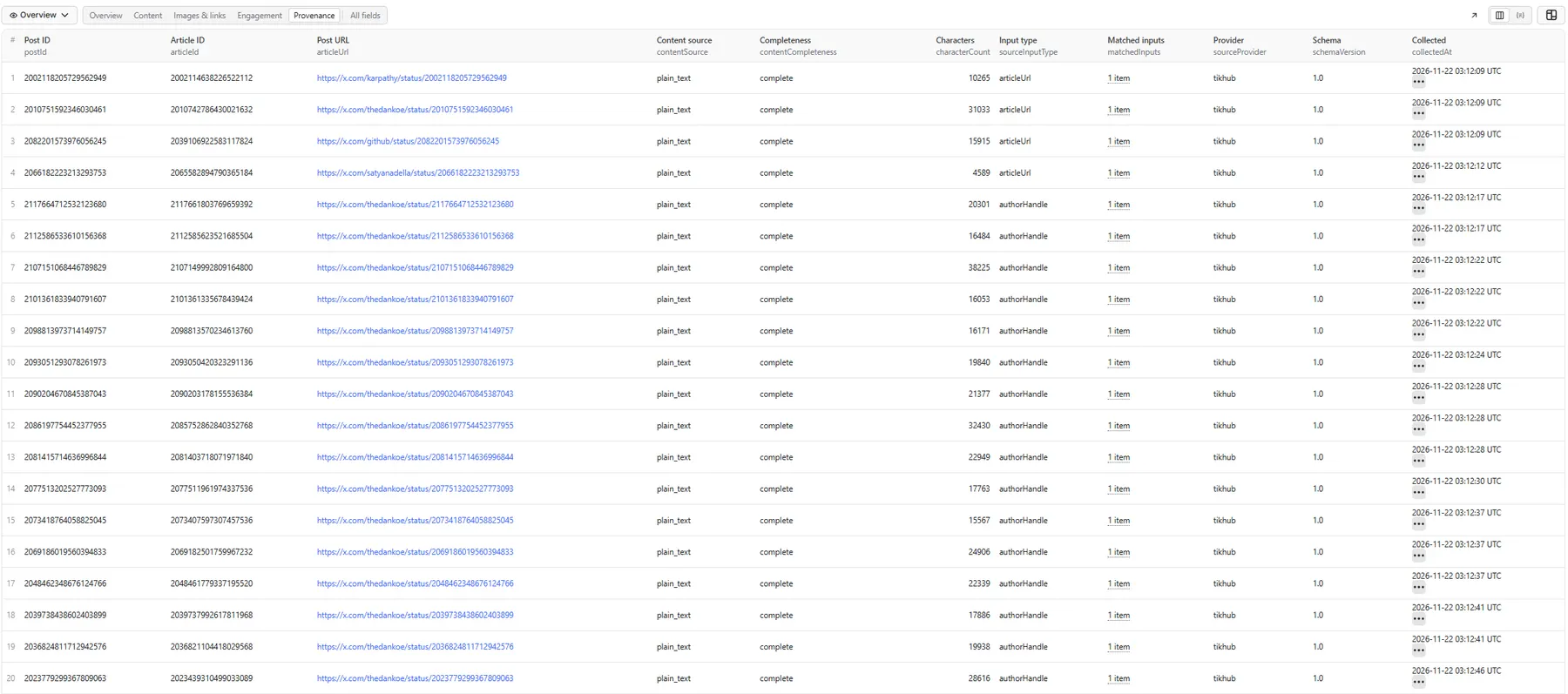
Provenance
IDs, body format and completeness, size, which of your inputs found the Article, provider, schema version and collection time.
Full record
Every row also has recordType, authorId, outboundLinks, wordCount and the other fields shown above. One complete row (bodies shortened):
| Field | Notes |
|---|---|
contentCompleteness | complete: the whole body text came back. partial: only the preview (the first lines) did. unknown: only the title did. |
contentSource | The body's format: rich_text (with formatting, links and images), plain_text (the whole text, without formatting; the usual case today), preview or none. |
images | The cover image; inline images too when the rich format is returned. |
outboundLinks | Links inside the Article, when the provider returns them (usually empty today). |
wordCount, characterCount | Always describe the full Article, even when maxArticleCharacters cut the bodies. |
publishedAt | The Article's first-published time, or the time of the post that published it. |
| Engagement counts | The post's counts at collection time; null when not shown. |
Run summary: each run writes RUN_SUMMARY to the key-value store: targets requested / succeeded / failed, posts scanned, non-Article posts skipped, duplicates, rows saved and charged, completeness counts, the stop reason, and a failures list with codes such as NOT_AN_ARTICLE, CONTENT_UNAVAILABLE, SOURCE_UNAVAILABLE and RATE_LIMITED. Failures never appear as dataset rows.
💳 Pricing
Pay per event: you're charged once per Article saved to the dataset. These are always free:
- ordinary posts that turn out not to be Articles;
- duplicates (the same Article given twice, or found again through an author);
- Articles dropped by your filters or listed in Skip IDs;
- failed inputs, timeline scanning for author handles, and the run summary.
The Actor also respects the maximum cost per run you set in Apify. See the Pricing tab for the current rates; this README deliberately doesn't quote figures, because rates can change.
🔁 Monitor authors on a schedule
To collect new Articles from a set of authors:
- Save your input as a Task with
authorHandlesandpublishedAfterset to a period slightly longer than your schedule (e.g.8 daysfor a weekly run). - Add a Schedule for the Task.
- Optionally, put the post IDs you already have into
skipIdsso they're never fetched again.
Connect the dataset to Make, Zapier, n8n, Google Sheets or a webhook to send each new Article where you need it.
🔌 API
Run it from code with the Apify API or the Apify client:
It also works from AI agents through Apify's MCP server.
🛠 Troubleshooting
- "not an X Article": the post is an ordinary post, a thread or a long post, not an Article. It wasn't charged.
- "this post is a repost": you pasted someone's repost of an Article. Use the original post; the message gives its ID. It wasn't charged.
- "links carry the Article ID": you pasted an
x.com/i/article/…link. Paste the URL of the post that shared it. - "Article content was not returned": the post links an Article, but the body was unavailable (for example, Articles limited to subscribers, unpublished or being edited). It wasn't charged.
- An author returned nothing: they may have no Articles among their recent posts. Raise Posts scanned per author, or check the handle.
- An empty result never proves something doesn't exist on X; it means it wasn't available to this run.
🔒 Privacy and disclaimer
This Actor collects only publicly available X Articles and the public author details shown with them. It doesn't log in, recover protected posts or get around access controls. You are responsible for using the data lawfully, including copyright in the Article text and applicable privacy laws. This is an independent tool, not affiliated with or endorsed by X Corp.
Related: for ordinary posts by keyword or profile, use X Tweet Scraper.


