
App Store & Google Play Search Rank + Top Charts (ASO)
Pricing
from $0.35 / 1,000 app results
App Store & Google Play Search Rank + Top Charts (ASO)
Keyword search ranks and top charts (free, paid, grossing) by category and country for the Apple App Store and Google Play. Track your app's position for ASO. One row per app.
Pricing
from $0.35 / 1,000 app results
Rating
0.0
(0)
Developer
Mivah
Maintained by CommunityActor stats
0
Bookmarked
2
Total users
1
Monthly active users
a day ago
Last modified
Categories
Features
Share
An App Store and Google Play keyword rank tracker and top charts scraper for ASO. Check where apps rank for a keyword and who is in the top charts on the Apple App Store and Google Play, in any country, in one run. Get keyword search ranks (the ranked list of apps each store returns for a search term) and top free / top paid / top grossing charts by category. Every row has the store, rank, app ID, title, developer, rating, price and link, ready for CSV, Excel, JSON or the API.
Built for ASO specialists, app marketers, indie developers, mobile agencies, investors and AI agents who want to track keyword positions, watch competitors, spot rising apps or build a market map without paying for an ASO suite.
What you get
- 🔎 Keyword search ranks on both stores: the top 1–200 apps for each keyword, per country
- 📈 Top charts: top free, top paid and top grossing, overall or by category (Games, Health & Fitness, Finance, Productivity and 18 more)
- 🍎🤖 App Store and Google Play in one dataset with the same fields, so you can compare iOS and Android side by side
- 🌍 Many countries per run:
us,gb,dk,de… rankings differ a lot per market - 🎯 Track your apps: add your app (and competitors) and every matching row is flagged
tracked: true. With Only output tracked apps you get just your positions, plus a free "not ranked" row when an app drops out of the results - ⭐ Ratings and rating counts for App Store results; Google Play rating counts and exact installs are optional
- 🧾 Official sources where they exist: Apple's iTunes Search API, iTunes RSS charts and lookup API
Need the reviews behind the rankings? Feed the app IDs into our App Store Reviews & App Data Scraper (fjordlabs/app-store-reviews) and Google Play Reviews & App Data Scraper (fjordlabs/google-play-reviews), which use the same app IDs.
Input example
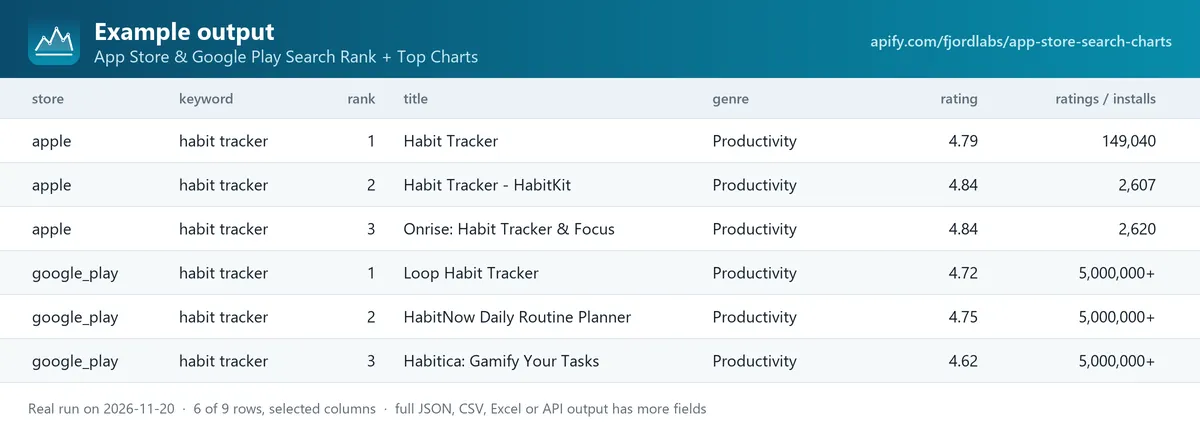
Output example
One row per app result:
mode is search (then keyword is set) or charts (then chart = top_free / top_paid / top_grossing and category are set). appId is the numeric App Store ID or the Google Play package name. A run summary is saved as SUMMARY in the key-value store. Schedule the Actor daily to build your own rank history.
Pricing
Pay only for results:
| Event | Price |
|---|---|
| Actor start | $0.00005 |
| App result (one ranked app row) | $0.0005 ($0.50 per 1,000) |
Examples: the top 50 apps for one keyword on both stores in one country = 100 rows ≈ $0.05. A top-100 chart = $0.05. With Only output tracked apps you pay only for your own apps' rows, so a daily check of 10 keywords × 2 stores for one app costs about $0.01. Failed requests and "not ranked" rows are never charged, and an app listed twice in one search or chart is only charged once. Use the limits in the input or the run's max charge to control spend.
Notes and limits
- Apple search ranks come from Apple's official iTunes Search API. Its order is very close to, but not always identical with, what the App Store app shows on a phone (which can be personalised and include ads).
- Apple charts stop at 100 apps; Google Play charts go up to 200.
- Google Play search returns at most about 30 apps per keyword (fewer for niche terms, e.g. 10–20), including Play's featured top result when it shows one. Play search and chart results mostly don't include the number of ratings; turn on Add Google Play rating counts for
ratingsCountand exact installs (one extra request per app, slower). - Some small paid charts don't exist on Google Play in every country (e.g. top paid Health & Fitness in Japan): you get one free error row saying so, and the rest of the run carries on.
- Category All apps is Apple's overall chart; on Google Play it is the overall apps chart (games have their own Games chart).
- Requests are spaced out politely (Apple: about 20 per minute, as Apple asks) and retried automatically. A big run with many keywords and countries therefore takes a few minutes.
- Google Play search uses the Play website; if Google changes the page and only app IDs can be read, those rows have the rank and
appIdbut no title or rating. Google Play charts use the same request the Play website makes; if Google changes it, chart requests come back as free error rows until we update the Actor. - Countries must be two-letter store codes (
us,gb,dk). Usegbfor the UK (ukis accepted too). A code that isn't a real country ends the run with one free error row before anything is fetched or charged (Google Play would otherwise quietly answer with a default store). A country without an App Store gives a free error row. - Only public store data is collected (app listings and positions). Developer names are the publisher names shown on the store pages; no user data or reviews are collected.
Changelog
- 2026-11-19: Public on the Apify Store.
- 2026-11-10: Invalid input now ends as a successful run with one free error row that says what to fix, instead of a failed run.
- 2026-11-08: Reliability review before the wave-2 launch, with more tests.
How to use App Store & Google Play Search Rank + Top Charts (ASO)
- Pick a mode: keyword search ranks, top charts, or both.
- Add keywords and/or choose charts (top free, paid, grossing) and categories.
- Choose stores (App Store, Google Play) and countries (us, gb, dk…). Optionally add your apps under Track my apps.
- Click Start, then export the ranks as CSV/Excel or schedule the run daily to build a rank history.
Use it from code (API)
Run it from Python with the official client (pip install apify-client):
Or with one HTTP call that returns the results directly:
It also works with Make, Zapier, n8n, Google Sheets and webhooks through Apify's integrations.
Use with AI agents (MCP)
Agents can call this Actor as a tool through Apify's MCP server (mcp.apify.com). Add fjordlabs/app-store-search-charts to the server's Actors. Results are clean JSON with a small default size, so they fit well in an agent's context.
FAQ
Are these the exact positions people see on their phones? Apple ranks come from Apple's official Search API and Google Play ranks from the Play website. They are very close to what users see, but stores personalise results and show ads, so treat them as the organic, non-personalised ranking.
How deep do charts go? Apple's charts stop at 100 apps; Google Play's go up to 200, per category and country.
Can I only pay for my own app's positions? Yes. Add your app under Track my apps and turn on Only output tracked apps. If your app isn't in the results you get a free 'not ranked' row.
Do I get reviews too? No, this Actor is about ranks. Send the app IDs to our App Store Reviews and Google Play Reviews Actors for reviews and full app details.
Am I charged for errors? No. Rows that fail are never charged; you only pay for results.
More from fjordlabs
- Google Trends Scraper
- Google Trends Trending Now
- Google News Scraper
- Google Play Reviews & App Data Scraper
- App Store Reviews & App Data Scraper (iOS)
- Bulk PageSpeed & Core Web Vitals Audit
- Google Autocomplete Keyword Expander
- SEO & AI-Search Readiness Audit
- Website Tech Stack Detector
- Steam Reviews & Game Data Scraper
- Chrome Web Store Extension Details Scraper
- Google Ads Transparency Center Scraper
- Hacker News Scraper
- Shopify Store Products Scraper
- Sitemap URL Extractor
- EU Public Tenders Scraper (TED)
- Domain Intel: WHOIS/RDAP, DNS, SSL, SPF/DMARC
- App Store & Google Play App Details + Developer Portfolio
- Website Screenshot API: Full Page, Mobile, PDF
- Wayback Machine Site History


