
App Store & Google Play App Details + Developer Portfolio
Pricing
from $0.35 / 1,000 app details
App Store & Google Play App Details + Developer Portfolio
Full app details from the Apple App Store and Google Play: rating, rating counts, installs, price, version, release dates, size, screenshots. Or list every app of a developer. One row per app.
Pricing
from $0.35 / 1,000 app details
Rating
0.0
(0)
Developer
Mivah
Maintained by CommunityActor stats
0
Bookmarked
2
Total users
1
Monthly active users
a day ago
Last modified
Categories
Features
Share
An App Store and Google Play app details scraper and developer portfolio lookup. Paste app links or IDs from the Apple App Store and Google Play and get the full public store listing for each app: rating, number of ratings, Google Play's star histogram and installs, price, in-app purchase range, version, last update, release date, size, content rating, category, icon and screenshots. Or paste a developer and get every app they publish, with the same details. Both stores share one set of fields, so iOS and Android sit side by side in CSV, Excel, JSON or the API.
Built for app marketers, ASO specialists, mobile agencies, investors and M&A scouts, market researchers, indie developers watching competitors, and AI agents that need clean app metadata, without paying for an app intelligence suite.
What you get
- 📱 Full app details from both stores in one dataset: title, developer, category, price, rating, rating count, version, updated, released, content rating, icon, screenshots, store URL
- 🤖 Google Play extras: exact star histogram (1–5★), install bracket plus Play's own install count, review count, contains ads, in-app purchase price range, header image, privacy policy link
- 🍎 App Store extras: app size in bytes, minimum iOS version, bundle ID, all genres, iPad screenshots
- 👩💻 Developer portfolio mode: a developer's URL, ID or (Google Play) exact name lists all their apps (Apple up to 200, Google Play up to 500), each with full details. Great for competitor maps and publisher research
- 🌍 Many countries per run: prices, ratings and availability differ per market (
us,gb,dk,de…) - 📝 Description and release notes are optional (off by default) to keep the dataset small
- 🔒 No contact data: developer emails, phone numbers and postal addresses are never output
- 🧾 Official source where one exists: Apple's iTunes lookup API
Need the reviews or the rankings too? Use the same app IDs with our App Store Reviews (fjordlabs/app-store-reviews), Google Play Reviews (fjordlabs/google-play-reviews) and App Store & Google Play Search Rank + Top Charts (fjordlabs/app-store-search-charts) Actors.
Input example
- Apps: App Store URL or numeric ID (
324684580), Google Play URL or package name (com.spotify.music). - Developers: App Store developer URL or numeric ID (
324684583); Google Play developer URL (…/developer?id=Spotify+ABor…/dev?id=5700313618786177705), the long numeric ID, or the developer name exactly as on Play (Spotify AB). - A developer link pasted under Apps is moved to Developers automatically.
ukis read asgb.
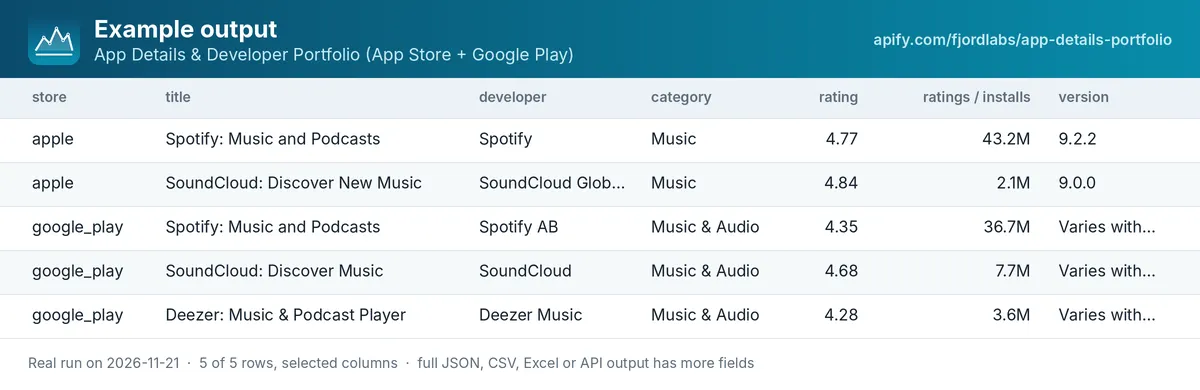
Output example
One row per app and country (Google Play row, shortened):
App Store rows have the same fields, plus sizeBytes, minOsVersion and bundleId; Play-only fields (histogram, installs, reviewsCount, containsAds…) are null there. Rows from developer mode carry the developer you entered in sourceDeveloper. A run summary is saved as SUMMARY in the key-value store.
Pricing
Pay only for results:
| Event | Price |
|---|---|
| Actor start | $0.00005 |
| App details (one app row) | $0.0005 ($0.50 per 1,000 apps) |
Examples: 2 apps (one per store) = $0.001. A developer with 40 apps on both stores = 80 rows ≈ $0.04. 1,000 competitor apps checked weekly ≈ $2/month. Apps that are not found, failed requests and other error rows are never charged, and an app that appears twice in one run (for example under Apps and in a developer's portfolio) is charged once per country. Use Max apps per developer or the run's max charge to control spend.
Notes and limits
- App Store data comes from Apple's official iTunes lookup API. Apple returns at most 200 apps per developer.
- Google Play data comes from the public app pages. Google Play no longer shows app size, so
sizeBytesisnullfor Play apps; Play shows "Varies with device" as the version for many big apps. - Google Play portfolios are read from Play's public developer page; if Google changes that page, the run still returns the apps it can see (at least the first ~20) and logs a warning.
- Google Play developer names must match exactly (
Spotify AB, notspotify); the developer URL or numeric ID always works. - An app that isn't sold in a country (or doesn't exist) becomes a free row with an
errormessage; see the Errors (not charged) view. A line under Apps or Developers that can't be read (a typo, a link to another site) also becomes a free error row and the rest of the run continues; only if nothing at all can be read does the run stop, with the reason as its status message. - Google Play ratings counts and installs are worldwide, so they are the same in every country; the average rating, price and texts are per country. With a non-English Language, Play's installs text is localized (
1.000.000+); useminInstallsfor a number. - Dates are
YYYY-MM-DD. With a non-English Language, Google Play's release date is kept as the text Play shows. - Requests are spaced out politely (Apple: about 20 per minute, as Apple asks; Google Play: about one per second) and retried automatically, so large developer portfolios take a few minutes.
- Only public store-listing data is collected. Developer names are the publisher names shown on the store; developer emails, phone numbers and addresses are never output, and no user data or reviews are collected.
Changelog
- 2026-11-21: Public on the Apify Store.
- 2026-11-10: Invalid input now ends as a successful run with one free error row that says what to fix, instead of a failed run.
- 2026-11-08: Built, reviewed and tested on Apify before launch.
How to use App Store & Google Play App Details + Developer Portfolio
- Add apps: App Store URLs/IDs and Google Play URLs/package names, one per line.
- Optionally add developers (App Store developer URL/ID, Google Play developer URL, ID or exact name) to list all their apps.
- Choose countries (us, gb, dk…) and, if you need long texts, turn on Include description and release notes.
- Click Start, then export the app details as CSV/Excel or schedule the run weekly to track competitors.
Use it from code (API)
Run it from Python with the official client (pip install apify-client):
Or with one HTTP call that returns the results directly:
It also works with Make, Zapier, n8n, Google Sheets and webhooks through Apify's integrations.
Use with AI agents (MCP)
Agents can call this Actor as a tool through Apify's MCP server (mcp.apify.com). Add fjordlabs/app-details-portfolio to the server's Actors. Results are clean JSON with a small default size, so they fit well in an agent's context.
FAQ
Which fields do I get? Title, developer, category, price, rating, rating count, version, last update, release date, content rating, icon, screenshots and the store URL for both stores. Google Play adds the 1–5 star histogram, installs, review count and ads/in-app purchase info; the App Store adds size, minimum iOS version and bundle ID.
How do I get all apps of a developer? Put the developer's store URL (or App Store developer ID, Google Play developer ID or exact Google Play developer name) under Developers. Apple returns up to 200 apps per developer, Google Play up to 500 here.
Do you return developer emails or addresses? No. Contact details of developers are never output; you get the public publisher name, website and (Google Play) privacy policy link.
Do I get reviews or rankings too? No, this Actor is about store listings. Use the same app IDs with our App Store Reviews, Google Play Reviews and Search Rank + Top Charts Actors.
Am I charged for errors? No. Rows that fail are never charged; you only pay for results.
More from fjordlabs
- Google Trends Scraper
- Google Trends Trending Now
- Google News Scraper
- Google Play Reviews & App Data Scraper
- App Store Reviews & App Data Scraper (iOS)
- Bulk PageSpeed & Core Web Vitals Audit
- Google Autocomplete Keyword Expander
- App Store & Google Play Search Rank + Top Charts (ASO)
- SEO & AI-Search Readiness Audit
- Website Tech Stack Detector
- Steam Reviews & Game Data Scraper
- Chrome Web Store Extension Details Scraper
- Google Ads Transparency Center Scraper
- Hacker News Scraper
- Shopify Store Products Scraper
- Sitemap URL Extractor
- EU Public Tenders Scraper (TED)
- Domain Intel: WHOIS/RDAP, DNS, SSL, SPF/DMARC
- Website Screenshot API: Full Page, Mobile, PDF
- Wayback Machine Site History


