
Domain Intel: WHOIS/RDAP, DNS, SSL, SPF/DMARC, Availability
Pricing
from $0.70 / 1,000 domain checkeds
Domain Intel: WHOIS/RDAP, DNS, SSL, SPF/DMARC, Availability
Bulk domain lookup: registrar, creation and expiry dates (RDAP, the official WHOIS successor), DNS records, SPF/DMARC/DKIM, SSL certificate expiry, redirects and an availability check. One row per domain; failed domains are free.
Pricing
from $0.70 / 1,000 domain checkeds
Rating
0.0
(0)
Developer

Mivah
Maintained by CommunityActor stats
0
Bookmarked
2
Total users
1
Monthly active users
a day ago
Last modified
Categories
Features
Share
Domain Intel: WHOIS/RDAP, DNS, SSL, SPF/DMARC and Availability
Get everything public about a domain in one row: who it's registered with and when it expires, its DNS records, how its email is protected (SPF, DMARC, DKIM), its SSL certificate and days until it expires, where the homepage redirects to, and whether the domain looks available to register. Paste a list of domains and get a clean table back, at $1 per 1,000 domains.
Registration data comes from RDAP, the official, structured successor of WHOIS run by the registries themselves (no fragile WHOIS text parsing, no third-party WHOIS API). DNS is read over DNS-over-HTTPS from public resolvers, and the SSL check is a single TLS handshake. No API key, no proxy, nothing to install.
Who it's for
- Domain investors and brand managers: check availability and expiry dates for a list of names, find domains about to expire.
- IT, security and MSP teams: audit a client portfolio for expiring SSL certificates, missing DMARC/SPF, weak
+allSPF records or domains without DNSSEC. Schedule it weekly to catch problems before they bite. - Email deliverability people: see SPF lookups, DMARC policy (
none/quarantine/reject), DKIM selectors and the mail provider (Google Workspace, Microsoft 365 …) for every sending domain. - Sales and lead-gen teams: enrich a company list with domain age, registrar, mail provider and final website URL.
- AI agents: one call per domain list returns compact JSON that answers "is this domain free?", "when does it expire?" or "is email spoofing protected?".
How it works
- Add domains, one per line (
apify.com,https://www.example.dk/pageandinfo@company.comwork too). - Keep all checks on, or switch off the ones you don't need (fewer checks = faster run).
- Click Start and export the results as CSV, Excel or JSON, or send them to Google Sheets.
Input example
Output example
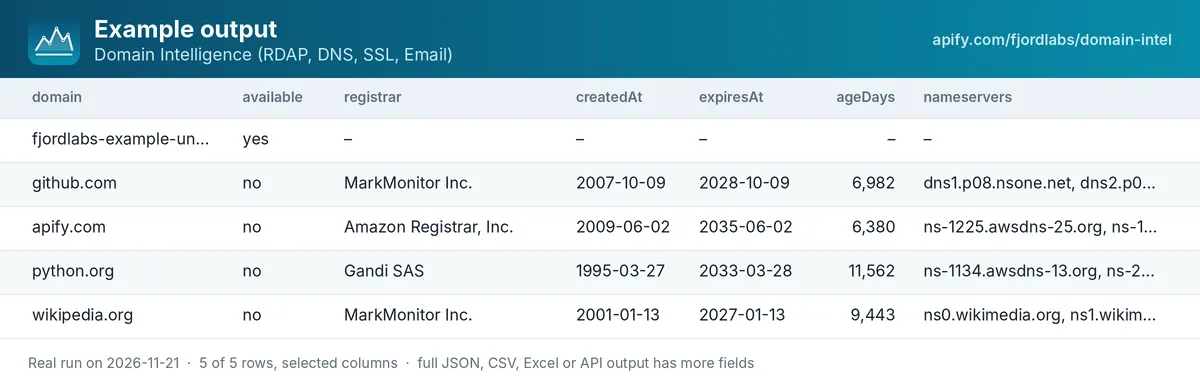
One row per domain (shortened):
An unregistered domain comes back as "available": true with "dnsStatus": "NXDOMAIN" (SSL, email and redirect checks are skipped for it; if a name still resolves in DNS, those checks run anyway). A domain that resolves but has no website (no public A/AAAA record, e.g. mail-only domains) gets a note instead of SSL/redirect data, and that isn't counted as an error. Five table views are ready in the Console: Overview, Registration, DNS records, Email security, and SSL and redirects.
Availability is a well-founded guess, not a registrar quote: available: true means the registry's RDAP has no record of the domain (or, for TLDs without RDAP, the domain has no DNS delegation). Premium, reserved or blocked names can still be unavailable at a registrar.
Pricing
| Event | Price |
|---|---|
| Actor start | $0.00005 |
| Domain checked (row) | $0.001 ($1 per 1,000) |
You pay one event per domain row, whatever checks you enable.
- Errors are free: invalid names, public suffixes (like
co.uk) and domains where every check failed become rows with anerrorfield and are not charged. - If one check fails (say the site has no HTTPS) but others work, you get the row with the reason in
checkErrors, charged as normal. - Duplicates in your list are checked once. Use Max charge per run in the run options to cap your spend.
Limits and good to know
- No personal data: registrant, admin and tech contacts are never read or stored (most registries redact them under GDPR anyway). You get the registrar, its IANA ID and its public abuse address.
dmarcReportDomainslists only the domains of DMARC report addresses (the rawdmarcRecordis returned exactly as published in public DNS). - RDAP coverage: all gTLDs (.com, .net, .org, .app …) and many ccTLDs (.uk, .fr, .nl, .no, .io …) have RDAP. Some ccTLDs (for example .dk, .de, .se, .eu) don't offer a public RDAP service; for them you get DNS-based availability and nameservers, but no registrar or dates (
rdapServer: null, explained innotes). - Subdomains: DNS, email, SSL and redirect checks use the name you entered (
www.bbc.co.uk); registration data uses the registrable domain (bbc.co.uk, via the Public Suffix List). - DKIM: keys can only be looked up by selector name, so
dkimSelectorsFoundlists which of your DKIM selectors to try exist (Google, Microsoft 365 and common defaults are pre-filled). An empty list doesn't prove DKIM is missing. Revoked keys (v=DKIM1; p=with an empty key, which some domains publish for every selector) are not counted. - Polite by design: at most 2 parallel requests per registry RDAP server, retries with backoff on 429/5xx, the redirect check only reads response headers and respects
robots.txt(RFC 9309 rules), and private/internal IP addresses are never contacted. Some big sites (for example facebook.com) block all unknown bots inrobots.txt; thencheckErrors.httpsays so and there's no redirect data. If only a later hop is blocked (say a cookie-consent page on another host), you get the chain up to that hop withhttpStatus: null. - Timeouts: a single request that doesn't answer gives up after Request timeout (15 s by default), and a whole check after 6 × that (retries included), so one slow server never stalls the run; the row keeps the other checks and names the slow one in
checkErrors. - Run size: up to 100,000 domains per run (Max domains, default 1,000). Very large .com runs may slow down if a registry throttles RDAP from shared cloud IPs.
- Speed: most domains take under a second with all checks on (5 in parallel by default; 80 domains took about 40 s with 10 in parallel in our test). Slow or unreachable web servers can take 15–30 s for their row.
Changelog
- 2026-11-21: Public on the Apify Store.
- 2026-11-10: Invalid input now ends as a successful run with one free error row that says what to fix, instead of a failed run.
- 2026-11-08: Built, reviewed and tested on Apify before launch.
How to use Domain Intel: WHOIS/RDAP, DNS, SSL, SPF/DMARC
- Add domains, one per line (URLs and email addresses work too).
- Keep all checks on, or switch off the ones you don't need: registration, DNS, email security, SSL, redirects.
- Click Start; each domain gets one row with every enabled check.
- Filter by
available,daysUntilExpiry,sslDaysLeftordmarcPolicyand export to CSV/Excel or Google Sheets.
Use it from code (API)
Run it from Python with the official client (pip install apify-client):
Or with one HTTP call that returns the results directly:
It also works with Make, Zapier, n8n, Google Sheets and webhooks through Apify's integrations.
Use with AI agents (MCP)
Agents can call this Actor as a tool through Apify's MCP server (mcp.apify.com). Add fjordlabs/domain-intel to the server's Actors. Results are clean JSON with a small default size, so they fit well in an agent's context.
FAQ
Where does the WHOIS data come from? From RDAP, the official structured successor of WHOIS, queried directly at each registry. Registrant personal data is never collected.
How reliable is the availability check?
available: true means the registry has no record of the domain (or, without RDAP, no DNS delegation). Premium or reserved names can still be unavailable at a registrar, so treat it as a strong hint.
Why is there no registrar for .dk or .de domains? Some country registries don't offer public RDAP. You still get DNS-based availability, nameservers, DNS, email security, SSL and redirects.
Can it find every DKIM key? No. DKIM keys can only be looked up by selector name. It tries common selectors (Google, Microsoft 365 and more) and any you add.
Am I charged for errors? No. Rows that fail are never charged; you only pay for results.
More from fjordlabs
- Google Trends Scraper
- Google Trends Trending Now
- Google News Scraper
- Google Play Reviews & App Data Scraper
- App Store Reviews & App Data Scraper (iOS)
- Bulk PageSpeed & Core Web Vitals Audit
- Google Autocomplete Keyword Expander
- App Store & Google Play Search Rank + Top Charts (ASO)
- SEO & AI-Search Readiness Audit
- Website Tech Stack Detector
- Steam Reviews & Game Data Scraper
- Chrome Web Store Extension Details Scraper
- Google Ads Transparency Center Scraper
- Hacker News Scraper
- Shopify Store Products Scraper
- Sitemap URL Extractor
- EU Public Tenders Scraper (TED)
- App Store & Google Play App Details + Developer Portfolio
- Website Screenshot API: Full Page, Mobile, PDF
- Wayback Machine Site History


