

Chrome Web Store Extension Details Scraper
Pricing
from $1.40 / 1,000 extension details
Chrome Web Store Extension Details Scraper
Get Chrome extension data from the Chrome Web Store: users, rating, rating count, version, last update, size, developer, permissions and related extensions. Paste IDs or URLs, or take the top extensions of a category.
Pricing
from $1.40 / 1,000 extension details
Rating
0.0
(0)
Developer

Mivah
Maintained by CommunityActor stats
0
Bookmarked
2
Total users
1
Monthly active users
2 days ago
Last modified
Categories
Features
Share
Chrome Web Store Extension Details Scraper — Users, Ratings, Permissions
Get structured data for any Chrome extension straight from the public Chrome Web Store: users, rating, rating count, version, last update, size, category, developer, trader status, badges and the full list of permissions from the extension's manifest. Paste extension IDs or store URLs, or take the top extensions of a category. Each row also lists the store's related extensions, so one run maps a whole competitor set.
Built for extension developers tracking competitors, SaaS and growth teams watching their own listing, investors and analysts sizing a niche, security and IT teams auditing what extensions are allowed to do, and AI agents that need clean extension facts.
What you get
- 👥 Users, rating and rating count, the numbers the store shows on the listing
- 🏷️ Version, last updated and first published dates, size, languages, category
- 🧑💻 Developer name and website, EU trader status, Featured and established publisher badges, verified-website flag
- 🔐 Permissions:
permissions,hostPermissions,optionalPermissionsand content-script URL patterns, plus manifest version and minimum Chrome version - 🧭 Related extensions (ID, name, rating, users) for competitor discovery, included at no extra cost
- 📂 Category mode: the top ~30 extensions of any store category (Developer Tools, Shopping, Privacy & Security…)
- 🌍 Any store language (
en,da,de,fr,pt-BR…) for localised names and descriptions - 🛡️ GDPR-friendly: developer email, address and phone are off by default
- ⚡ Fast: about one second per extension, one page request each
Make mobile apps too? Our App Store Reviews & App Data Scraper (fjordlabs/app-store-reviews) and Google Play Reviews & App Data Scraper (fjordlabs/google-play-reviews) give the same view of iOS and Android apps.
Input example
Output example
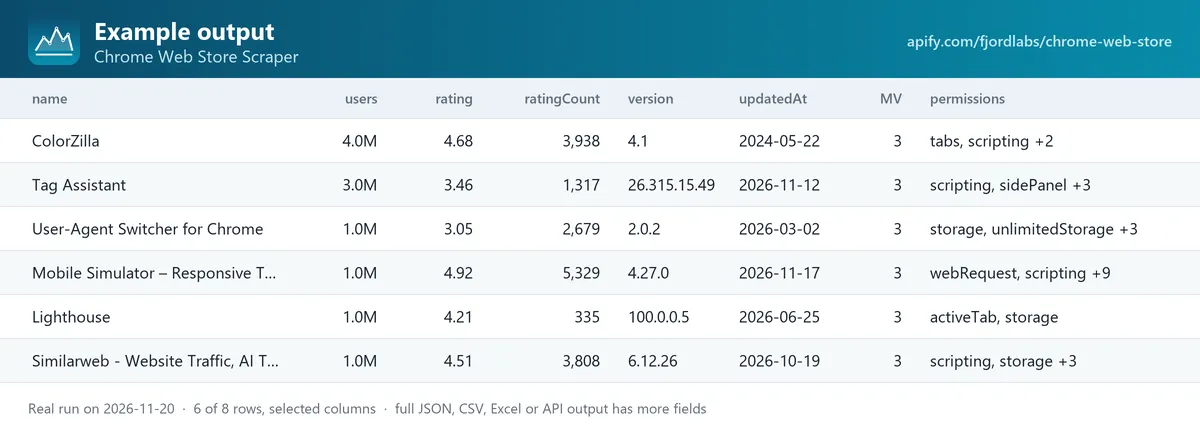
One row per extension (shortened):
Rows also carry description, languages, languageCodes, developerWebsite, establishedPublisher, websiteOwnerVerified, optionalPermissions, contentScriptMatches, supportUrl, privacyPolicyUrl, iconUrl and screenshots. Extensions that can't be loaded (wrong ID, removed) become rows with "type": "error" and are not charged. A run summary is saved as SUMMARY in the key-value store.
Pricing
Pay only for results:
| Event | Price |
|---|---|
| Actor start | $0.00005 |
| Extension detail (one row) | $0.002 ($2 per 1,000 extensions) |
Tracking 20 competitors daily costs about $1.20 a month. Error rows are never charged, and if you set a maximum charge per run, the Actor stops before loading pages it can't charge for.
Notes and limits
- Data comes from the public extension and category pages of chromewebstore.google.com, the same numbers anyone sees in the browser. User counts are the store's rounded figures (e.g. 22,000,000), and the store says ratings are updated daily.
- No reviews and no keyword search. The Chrome Web Store's robots.txt disallows automated access to review pages (
/detail/*/reviews) and search (/search), and we respect that. Use extension IDs/URLs or categories instead; the related-extensions list helps you find competitors. - Category mode reads the first page of a category (about 30 top extensions); it doesn't scroll further, so
maxExtensionsPerCategoryabove ~30 returns no more. If a category page can't be read, you get one uncharged error row for it. - Themes and Chrome apps aren't covered by category mode, but theme IDs work as normal input.
- Requests are polite (2 at a time, about one second apart, automatic retries on rate limits and server errors). If the store ever rate-limits a run, enable Apify Proxy in the input.
- Developer contact details are personal data for individual (non-trader) developers. They're off by default; only turn them on with a lawful reason.
Changelog
- 2026-11-20: Public on the Apify Store.
- 2026-11-15: Pre-launch stress test across our Actors; clearer error messages where a run's outcome was confusing.
- 2026-11-10: Invalid input now ends as a successful run with one free error row that says what to fix, instead of a failed run.
How to use Chrome Web Store Extension Details Scraper
- Paste Chrome Web Store URLs or 32-letter extension IDs (one per line).
- Optionally add categories (like Developer Tools or productivity/workflow) to take their top extensions.
- Pick the store language and whether to include descriptions and related extensions.
- Click Start, then export users, ratings, versions and permissions as JSON, CSV or Excel.
Use it from code (API)
Run it from Python with the official client (pip install apify-client):
Or with one HTTP call that returns the results directly:
It also works with Make, Zapier, n8n, Google Sheets and webhooks through Apify's integrations.
Use with AI agents (MCP)
Agents can call this Actor as a tool through Apify's MCP server (mcp.apify.com). Add fjordlabs/chrome-web-store to the server's Actors. Results are clean JSON with a small default size, so they fit well in an agent's context.
FAQ
Does it scrape reviews or search results? No. The Chrome Web Store's robots.txt disallows automated access to review pages and search, and we respect it. You get the average rating and rating count, and you can find extensions through categories and each listing's related extensions.
How fresh is the data? It's read live from the store on every run. The store rounds user counts and updates ratings daily.
Can I audit extension permissions? Yes. Every row has the manifest's permissions, host permissions, optional permissions and content-script URL patterns, plus the manifest version.
Is personal data collected? Developer contact details (email, address, phone) are off by default, because for individual developers they're personal data. No reviewer data is collected.
Do I pay for failed extensions? No. Wrong or removed IDs and failed requests become error rows that are never charged.
Am I charged for errors? No. Rows that fail are never charged; you only pay for results.
More from fjordlabs
- Google Trends Scraper
- Google Trends Trending Now
- Google News Scraper
- Google Play Reviews & App Data Scraper
- App Store Reviews & App Data Scraper (iOS)
- Bulk PageSpeed & Core Web Vitals Audit
- Google Autocomplete Keyword Expander
- App Store & Google Play Search Rank + Top Charts (ASO)
- SEO & AI-Search Readiness Audit
- Website Tech Stack Detector
- Steam Reviews & Game Data Scraper
- Google Ads Transparency Center Scraper
- Hacker News Scraper
- Shopify Store Products Scraper
- Sitemap URL Extractor
- EU Public Tenders Scraper (TED)
- Domain Intel: WHOIS/RDAP, DNS, SSL, SPF/DMARC
- App Store & Google Play App Details + Developer Portfolio
- Website Screenshot API: Full Page, Mobile, PDF
- Wayback Machine Site History


