

Google Ads Transparency Center Scraper: Competitor Ads
Pricing
from $0.70 / 1,000 ads
Google Ads Transparency Center Scraper: Competitor Ads
See every Google ad a competitor runs: search the Google Ads Transparency Center by advertiser name, advertiser ID or website domain, per country. Format, first/last shown dates, image and preview links. No login.
Pricing
from $0.70 / 1,000 ads
Rating
0.0
(0)
Developer
Mivah
Maintained by CommunityActor stats
0
Bookmarked
2
Total users
1
Monthly active users
2 days ago
Last modified
Categories
Features
Share
Google Ads Transparency Center Scraper — Competitor Ads by Advertiser or Domain
See every Google ad a competitor runs: search ads, display banners and YouTube videos. Give it advertiser names, Google advertiser IDs or website domains and pick a country. You get one row per ad creative, with its format, first and last shown dates, the banner image, a preview link and a direct link to the ad in Google's Ads Transparency Center.
Built for PPC managers, agencies, brand-protection teams, market researchers and AI agents that want to know what a brand is advertising, where and since when, without clicking through the Transparency Center by hand. The data is public: Google publishes it under the EU Digital Services Act and its own ads-transparency policy. No login or Google account needed.
What you get
- 🔎 Three ways to search: advertiser name (
LEGO System A/S), advertiser ID (AR…from the Transparency Center URL) or domain (lego.com, also catches resellers advertising that site) - 🌍 Per country:
DK,US,DE,GB… (230+ regions) oranywhere - 🖼️ Image URL for display and most text ads (Google archives text ads as images; previewed in the dataset table) and a preview link for video ads
- 📅 First and last shown timestamps: see which ads are running now and how long a campaign has been live
- 🎯 Filters: ad format (text, image, video) and a date range; you pay only for ads that match
- 🔗 Direct link to each ad's page in the Transparency Center
- 🛡️ Reliable: polite request pacing, automatic retries, new proxy IP when Google blocks one, failed queries never charged
Tracking a market, not just ads? Pair it with our Google Trends Scraper (fjordlabs/google-trends) and Google News Scraper (fjordlabs/google-news).
Input example
Output example
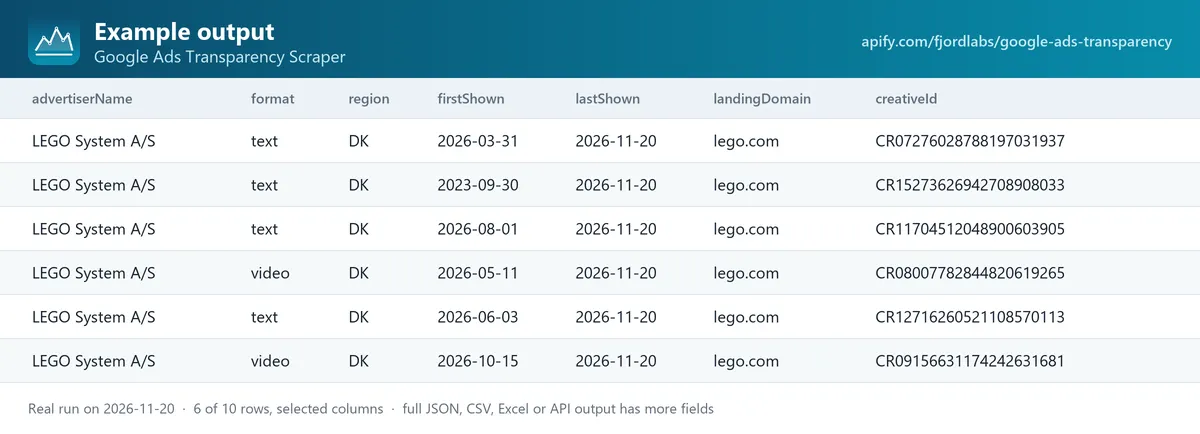
One row per ad creative:
format is text, image or video. imageUrl is set for image ads and usually for text ads (Google renders them as images); previewUrl is Google's preview script for ads without an image, mostly videos. landingDomain is the domain you searched for, so it is filled only for domain queries (null for name and ID queries). Each ad appears once per run: if two of your queries return the same ad, it is kept under the first query and charged once. A query that fails, finds no advertiser or finds no ads (in that region, with those filters) gives one row with an error field that explains why; it is not charged. A run summary is saved as SUMMARY in the key-value store.
Pricing
Pay only for results:
| Event | Price |
|---|---|
| Actor start | $0.00005 |
| Ad (one creative row) | $0.001 ($1 per 1,000 ads) |
Error rows are never charged. Use Max ads per advertiser or the run's max charge to control spend: 100 ads from one advertiser cost $0.10.
Notes and limits
- The data is what Google shows in the Ads Transparency Center: verified advertisers' ads from roughly the last years, per region. Google does not publish spend or impressions for normal (non-political) ads, so neither can we.
- Date and format filters are applied to the ads as they come in. With narrow filters the Actor may scan several pages to find matches; Max pages per advertiser caps that.
- Names are matched with Google's own advertiser search: among advertisers whose name equals or starts with your text, the one with the most ads wins (
Nike→Nike, Inc.), otherwise Google's top suggestion. Google's search box returns only about 10 advertisers, so for some brands the big one isn't among them (Legogives the SpanishLEGO.S.A, notLEGO System A/S). The log shows the picked advertiser and the other matches with their IDs. For big brands, use the domain or the advertiser ID; they are exact. - A domain search returns every ad that points to that site, including ads from resellers and agencies, just like the website does.
- Google may block datacenter IPs on this site. Apify Proxy is on by default and the Actor switches IP when it sees Google's "unusual traffic" page. If a run still reports
blocked by Google, choose the RESIDENTIAL proxy group. - Ad text, landing URLs and the full list of regions per ad aren't extracted yet; open
imageUrloradUrlto see the ad. - Only ad and advertiser data that Google publishes is collected; no personal data about people.
Changelog
- 2026-11-20: Public on the Apify Store.
- 2026-11-10: Invalid input now ends as a successful run with one free error row that says what to fix, instead of a failed run.
- 2026-11-08: Reliability review before the wave-2 launch, with more tests.
How to use Google Ads Transparency Center Scraper
- Add advertisers: names, Google advertiser IDs (AR…) or website domains, one per line.
- Pick a region (DK, US, DE… or anywhere).
- Optionally filter by ad format and date range, and set Max ads per advertiser.
- Click Start, then export the ads as CSV/Excel or send them to Google Sheets.
Use it from code (API)
Run it from Python with the official client (pip install apify-client):
Or with one HTTP call that returns the results directly:
It also works with Make, Zapier, n8n, Google Sheets and webhooks through Apify's integrations.
Use with AI agents (MCP)
Agents can call this Actor as a tool through Apify's MCP server (mcp.apify.com). Add fjordlabs/google-ads-transparency to the server's Actors. Results are clean JSON with a small default size, so they fit well in an agent's context.
FAQ
Is this legal? The Ads Transparency Center is a public Google site that publishes ads under the EU Digital Services Act. The Actor reads only that public data, with no login.
How do I find an advertiser ID? Open the advertiser in adstransparency.google.com; the ID is the AR… part of the URL. A domain or the advertiser name works too.
Do I get ad spend or impressions? No. Google publishes those only for political ads, not for regular advertisers.
Do I pay for failed searches?
No. Failed or empty searches give one row with an error field that is never charged, and an ad found by several of your queries is charged once.
Am I charged for errors? No. Rows that fail are never charged; you only pay for results.
More from fjordlabs
- Google Trends Scraper
- Google Trends Trending Now
- Google News Scraper
- Google Play Reviews & App Data Scraper
- App Store Reviews & App Data Scraper (iOS)
- Bulk PageSpeed & Core Web Vitals Audit
- Google Autocomplete Keyword Expander
- App Store & Google Play Search Rank + Top Charts (ASO)
- SEO & AI-Search Readiness Audit
- Website Tech Stack Detector
- Steam Reviews & Game Data Scraper
- Chrome Web Store Extension Details Scraper
- Hacker News Scraper
- Shopify Store Products Scraper
- Sitemap URL Extractor
- EU Public Tenders Scraper (TED)
- Domain Intel: WHOIS/RDAP, DNS, SSL, SPF/DMARC
- App Store & Google Play App Details + Developer Portfolio
- Website Screenshot API: Full Page, Mobile, PDF
- Wayback Machine Site History


