
Website Screenshot API: Full Page, Mobile, PDF
Pricing
from $1.40 / 1,000 screenshots
Website Screenshot API: Full Page, Mobile, PDF
Screenshot any list of URLs as PNG, JPEG or PDF: full page or viewport, desktop/tablet/mobile presets, dark mode, element screenshots, cookie banners hidden. Files are stored with a direct link. Failed URLs are free.
Pricing
from $1.40 / 1,000 screenshots
Rating
0.0
(0)
Developer

Mivah
Maintained by CommunityActor stats
0
Bookmarked
2
Total users
1
Monthly active users
a day ago
Last modified
Categories
Features
Share
Website Screenshot API: Full Page, Mobile, Dark Mode & PDF
Take screenshots of any list of URLs in one run: PNG, JPEG or PDF, the visible window or the full page, on desktop, laptop, tablet or mobile, in dark mode, or just one element (a pricing table, a chart, a header). Cookie banners are hidden automatically, and you can block ads and trackers. Every file is saved with a direct link, and you get one clean dataset row per URL with the size, title, HTTP status and timing.
Built for marketers and SEO agencies (SERP and landing-page snapshots, client reports), developers (visual checks after a release, link previews, thumbnails), researchers and archivists (dated evidence of what a page showed), e-commerce teams (competitor price pages) and AI agents that need to "see" a web page. No login, no API key, no browser to install.
What you get
- 📸 PNG, JPEG or PDF. JPEG quality and PDF paper size (A4, Letter, …) are adjustable.
- 📜 Full-page screenshots with lazy-loaded images scrolled into view first. Very long pages are cut at a height you choose, and the row tells you the real page height.
- 📱 Device presets: desktop 1920×1080, laptop 1366×768, tablet 820×1180 (retina, touch) and mobile 412×915 (retina, phone browser), or any custom viewport with 1×–3× pixel density.
- 🌙 Dark mode (
prefers-color-scheme: dark) for sites that have a dark theme. - 🎯 Element screenshots with a CSS selector, and wait for an element (e.g. a chart) before capturing.
- 🍪 Cookie banners hidden (OneTrust, Cookiebot, Usercentrics, Didomi, Quantcast, Sourcepoint, TrustArc, CookieYes, Complianz and many more, plus their dark overlays). Nothing is clicked or accepted.
- 🚫 Ad and tracker blocking (optional) for cleaner, faster captures.
- ⏱️ Wait options:
load,domcontentloadedornetworkidle, plus an extra delay for animations. - 🔗 Direct file links in every row (
screenshotUrl), so you can drop them into a spreadsheet, a report or an agent's context.
Why this one?
- Failed URLs are free. 404s, timeouts, pages that never show your element, typos and blocked pages come back as rows with an
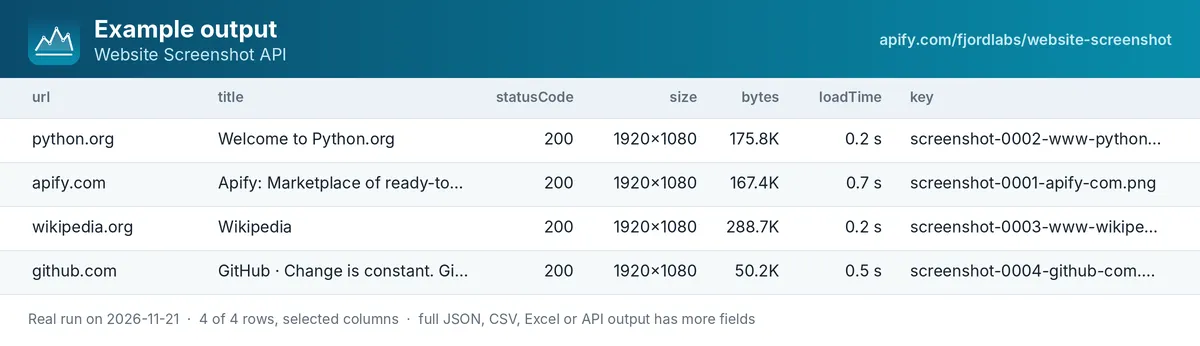
errorTypeanderror, and aren't charged. - Clean rows, not just files. Title, final URL after redirects, HTTP status, width × height, bytes, PDF page count, load time.
- Polite and safe. It follows each site's robots.txt, opens at most one page per second per site, retries 429/5xx with backoff, and refuses local/private network addresses.
- Cheap and predictable. One flat price per screenshot, whatever the options (see Pricing).
Input example
Element screenshot: add "selector": ".pricing-table". Wait for a chart: "waitForSelector": "#chart canvas". PDF: "format": "pdf", "pdfFormat": "A4".
Output example (one row)
Failed URLs look like {"url": "https://example.com/nope", "statusCode": 404, "errorType": "http-status", "error": "Page returned HTTP 404."}. Error types: http-status, timeout, network, wait-timeout, selector-not-found, blocked-by-robots, robots-unreachable, bot-challenge, private-address, invalid-url, too-large, internal.
The files are in the run's key-value store (Storage tab → Key-value store), named screenshot-<position>-<site-and-path>.<png|jpg|pdf>. A SUMMARY record counts captured and failed URLs.
Pricing
| Event | Price |
|---|---|
| Actor start | $0.00005 |
| Screenshot (PNG, JPEG, PDF, full page or element) | $0.002 ($2 per 1,000) |
Failed URLs are free. Platform usage is included. Store discount tiers lower the price further.
Examples: 100 landing pages on mobile and desktop = 200 screenshots = $0.40. A daily full-page snapshot of 20 competitor pages ≈ $1.20 per month.
Limits
- Default memory is 1 GB (a real Chromium browser needs it). Up to 5 pages in parallel; give the run 2–4 GB for 4–5. Full-page captures run one at a time below 2 GB, so long pages never run out of memory.
- Full-page height is capped by
maxFullPageHeight(default 10,000 px, max 16,000) and by Chromium's limit of about 16,000 device pixels (so 8,000 px tall on 2× mobile). The row showspageHeightandtruncated: truewhen the page was cut. - Sites with strong bot protection (Cloudflare challenges, some news sites) may answer 403 to cloud servers or to our identified browser, or show a "Just a moment..." check page; those URLs come back as free errors. A proxy can help for country-specific pages.
- robots.txt is respected. Pages that a site's robots.txt closes to crawlers (our user agent token is
FjordlabsScreenshot) are not opened and come back as freeblocked-by-robotsrows. - No logins. Only public pages; pages behind a login show the login screen.
- Cookie banners are hidden by a list of known consent tools plus a generic check; a rare custom banner can still show. Hiding never clicks "accept".
- Links to the files work for anyone who has the link (the store ID is random). Files are kept as long as your Apify plan keeps run storage; download them if you need them longer.
Changelog
- 2026-11-21: Public on the Apify Store.
- 2026-11-15: A domain that doesn't exist now gets a clear "site not found" message instead of a robots.txt one.
- 2026-11-10: Invalid input now ends as a successful run with one free error row that says what to fix, instead of a failed run.
- 2026-11-08: Built, reviewed and tested on Apify before launch.
How to use Website Screenshot API: Full Page, Mobile, PDF
- Paste the page URLs (one per line).
- Pick a format (PNG, JPEG or PDF), a device (desktop, laptop, tablet, mobile or custom) and turn on fullPage if you want the whole page.
- Optional: darkMode, an element selector, waitForSelector for late content, blockAds. Cookie banners are hidden by default.
- Click Start; each row has a screenshotUrl link to the file in the run's key-value store.
Use it from code (API)
Run it from Python with the official client (pip install apify-client):
Or with one HTTP call that returns the results directly:
It also works with Make, Zapier, n8n, Google Sheets and webhooks through Apify's integrations.
Use with AI agents (MCP)
Agents can call this Actor as a tool through Apify's MCP server (mcp.apify.com). Add fjordlabs/website-screenshot to the server's Actors. Results are clean JSON with a small default size, so they fit well in an agent's context.
FAQ
Where are the screenshots? In the run's key-value store. Every dataset row has a direct screenshotUrl link and the record key, so you can download them via the API or open them in a browser.
Does it hide cookie banners? Yes, by default. It hides the pop-ups of common consent tools and their dark overlays with CSS. It never clicks accept, so no consent is given on your behalf.
How long can a full-page screenshot be? Up to maxFullPageHeight (default 10,000 px, max 16,000), and at most about 16,000 device pixels because of a Chromium limit. Longer pages are cut and marked truncated, with the real pageHeight.
Why did a site return 403? Some sites block cloud servers or automated browsers. Those URLs are free error rows; a proxy in the input can help for country-specific pages.
Does it respect robots.txt? Yes. It identifies itself as FjordlabsScreenshot, follows each site's robots.txt and opens at most one page per second per site. Disallowed pages are free error rows.
Am I charged for errors? No. Rows that fail are never charged; you only pay for results.
More from fjordlabs
- Google Trends Scraper
- Google Trends Trending Now
- Google News Scraper
- Google Play Reviews & App Data Scraper
- App Store Reviews & App Data Scraper (iOS)
- Bulk PageSpeed & Core Web Vitals Audit
- Google Autocomplete Keyword Expander
- App Store & Google Play Search Rank + Top Charts (ASO)
- SEO & AI-Search Readiness Audit
- Website Tech Stack Detector
- Steam Reviews & Game Data Scraper
- Chrome Web Store Extension Details Scraper
- Google Ads Transparency Center Scraper
- Hacker News Scraper
- Shopify Store Products Scraper
- Sitemap URL Extractor
- EU Public Tenders Scraper (TED)
- Domain Intel: WHOIS/RDAP, DNS, SSL, SPF/DMARC
- App Store & Google Play App Details + Developer Portfolio
- Wayback Machine Site History


