

Website Tech Stack Detector: CMS, Analytics, Frameworks
Pricing
from $1.40 / 1,000 domain scanneds
Website Tech Stack Detector: CMS, Analytics, Frameworks
Find out what any website is built with: CMS, ecommerce platform, analytics, tag managers, JavaScript frameworks, CDN and hosting for a list of domains. 3,500+ open-source fingerprints, versions and confidence. Failed sites are free.
Pricing
from $1.40 / 1,000 domain scanneds
Rating
0.0
(0)
Developer

Mivah
Maintained by CommunityActor stats
0
Bookmarked
2
Total users
1
Monthly active users
2 days ago
Last modified
Categories
Features
Share
Website Tech Stack Detector: CMS, Analytics, Frameworks, Hosting
Find out what any website is built with. Give it a list of domains and get, for each site, its CMS, ecommerce platform, analytics and tag managers, JavaScript and web frameworks, CDN, hosting, web server, payment and cookie-consent tools, with versions where the site shows them. It works like the Wappalyzer browser extension, but for thousands of domains at once, and at $2 per 1,000 sites.
Detection uses 3,500+ open-source technology fingerprints (the MIT-licensed Wappalyzer database) and checks the homepage HTML, HTTP headers, cookies, <meta> tags and <script> tags. One polite request per site, nothing to install, no API key.
Who it's for
- Sales and lead-gen teams: qualify a lead list by platform ("all Shopify stores", "sites still on WordPress", "uses HubSpot").
- Agencies and freelancers: find prospects on an outdated CMS or without analytics, and prepare pitches.
- SaaS and market researchers: measure technology adoption across a market, or watch competitors' stacks change by scheduling the Actor.
- SEO and web-performance people: know the stack before an audit (pairs well with our Bulk PageSpeed Audit).
- AI agents: a single-purpose tool with clean JSON (
domain→cms,ecommerce,technologies[]) that's easy to call over MCP.
How it works
- Add domains or URLs, one per line (
shopify.com,https://example.dk/shop). Bare domains scan the homepage. - Click Start. Each site gets one homepage request (redirects followed) and a
robots.txtcheck. - Export the results as CSV, Excel or JSON, send them to Google Sheets, or call the Actor from the API.
Input example
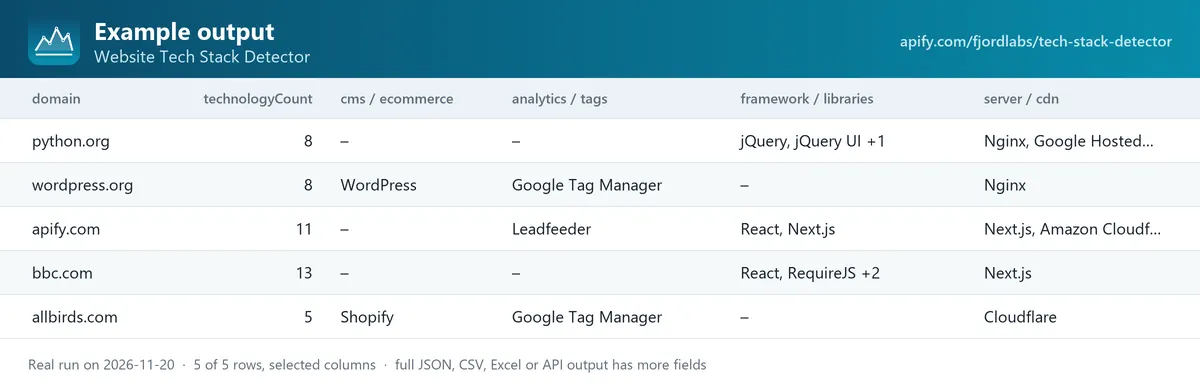
Output example
One row per website:
The flat list fields are cms, ecommerce, analytics, tagManagers, advertising, marketing, javascriptFrameworks, webFrameworks, uiFrameworks, javascriptLibraries, programmingLanguages, webServers, cdn, hosting, security, paymentProcessors and cookieConsent, so you can filter in a spreadsheet without unpacking JSON. technologies holds the full list with categories, version and confidence (0–100).
Sites that can't be scanned (invalid input, DNS error, timeout, HTTP 4xx/5xx, a bot-check page instead of the site, blocked by robots.txt) get a row with an error message, and are not charged, e.g.
{"input": "down.example", "url": "https://down.example/", "domain": "down.example", "statusCode": 503, "technologyCount": 0, "error": "HTTP 503 (bot protection or login wall?)"}. A run summary is saved as SUMMARY in the key-value store.
Pricing
Pay only for results:
| Event | Price |
|---|---|
| Actor start | $0.00005 |
| Domain scanned (one result row) | $0.002 ($2 per 1,000 sites); Apify Store discounts lower it to $0.0018 (Bronze), $0.0016 (Silver) and $0.0014 (Gold and up) |
1,000 domains cost about $2, with a tiny start fee and no monthly subscription. Failed sites are logged and never charged. Use Max sites or the run's max charge to control spend.
Notes and limits
- Static scan, no browser. Fast and cheap, but technologies that only reveal themselves through JavaScript running in a browser (some single-page apps, tools loaded late by a tag manager) can be missed. Server-rendered sites, CMSs, shops, CDNs and hosting are detected well. A few common frameworks (Next.js, Gatsby, Angular, Svelte, Astro, Remix) get extra static markers.
- One page per site: the homepage, or the exact URL you give. Technologies used only on inner pages (e.g. checkout) may not show.
- Polite by design:
robots.txtis respected (user agentFjordlabsTechStackDetector), one page request per site, a few sites at a time, retries with backoff on 429/5xx. - Some big sites block bots. Sites behind strong bot protection answer HTTP 403/429 or a JavaScript challenge page (Cloudflare, AWS WAF). Those rows are free. In our test of 40 large consumer brands (news, retail, travel), about a third were blocked or disallowed by
robots.txt; ordinary company, shop and agency sites are rarely blocked. Enabling Apify Proxy can help with some of them. - Fast: in our tests a list of 40 sites finished in under 30 seconds at default settings (256 MB).
- Duplicates are removed before scanning (
apify.com,https://apify.comandAPIFY.COM/are one site). Different inputs that redirect to the same site (apify.comandwww.apify.com) are scanned and charged separately. - Only public websites:
localhost, private and link-local IP addresses (and redirects to them), URLs with a user name/password and non-web links such asmailto:are refused as invalid (free error rows). An empty list fails the run with a clear message. - Each request has a time limit (Page timeout, default 20 s, up to 3 tries), so one slow site can't hold up the run.
- The fingerprint database is a fixed MIT-licensed snapshot (Wappalyzer 6.10.54, January 2023), so products launched since then may be missing. Versions are reported only when a site exposes them.
- No personal data is collected: only technology names, page title and HTTP status.
Changelog
- 2026-11-19: Public on the Apify Store.
- 2026-11-15: Pre-launch stress test across our Actors; clearer error messages where a run's outcome was confusing.
- 2026-11-10: Invalid input now ends as a successful run with one free error row that says what to fix, instead of a failed run.
How to use Website Tech Stack Detector
- Add domains or URLs, one per line (bare domains scan the homepage).
- Optionally set minConfidence or raise Parallel sites for big lists.
- Click Start; each site is checked with one polite request.
- Filter by
cms,ecommerce,analytics,cdn… and export to CSV/Excel or Google Sheets.
Use it from code (API)
Run it from Python with the official client (pip install apify-client):
Or with one HTTP call that returns the results directly:
It also works with Make, Zapier, n8n, Google Sheets and webhooks through Apify's integrations.
Use with AI agents (MCP)
Agents can call this Actor as a tool through Apify's MCP server (mcp.apify.com). Add fjordlabs/tech-stack-detector to the server's Actors. Results are clean JSON with a small default size, so they fit well in an agent's context.
FAQ
How does it detect technologies? It matches the homepage HTML, HTTP headers, cookies, meta and script tags against 3,500+ open-source (MIT) Wappalyzer fingerprints.
Does it run a browser? No. It's a fast static scan, so a few tools that only appear after JavaScript runs can be missed. Server-side tech, CMSs, shops, CDNs and hosting are detected well.
Do I pay for sites that fail? No. Unreachable sites, HTTP errors, bot-protection pages and sites whose robots.txt disallows us become free error rows.
Can I find all Shopify or WordPress sites on the web? No. It checks the domains you give it. Combine it with your own lead list, or a Google Search or Maps scraper, to find candidates.
Am I charged for errors? No. Rows that fail are never charged; you only pay for results.
More from fjordlabs
- Google Trends Scraper
- Google Trends Trending Now
- Google News Scraper
- Google Play Reviews & App Data Scraper
- App Store Reviews & App Data Scraper (iOS)
- Bulk PageSpeed & Core Web Vitals Audit
- Google Autocomplete Keyword Expander
- App Store & Google Play Search Rank + Top Charts (ASO)
- SEO & AI-Search Readiness Audit
- Steam Reviews & Game Data Scraper
- Chrome Web Store Extension Details Scraper
- Google Ads Transparency Center Scraper
- Hacker News Scraper
- Shopify Store Products Scraper
- Sitemap URL Extractor
- EU Public Tenders Scraper (TED)
- Domain Intel: WHOIS/RDAP, DNS, SSL, SPF/DMARC
- App Store & Google Play App Details + Developer Portfolio
- Website Screenshot API: Full Page, Mobile, PDF
- Wayback Machine Site History


