

Wayback Machine Site History: Snapshots & First Seen
Pricing
from $0.35 / 1,000 snapshots
Wayback Machine Site History: Snapshots & First Seen
Look up any domain or URL in the Internet Archive's Wayback Machine via the official CDX API. Get every archived snapshot (date, status, MIME type, digest, archive link) or a history summary: first and last seen, snapshot count, pages, versions, captures per year. Errors are free.
Pricing
from $0.35 / 1,000 snapshots
Rating
0.0
(0)
Developer

Mivah
Maintained by CommunityActor stats
0
Bookmarked
2
Total users
1
Monthly active users
a day ago
Last modified
Categories
Features
Share
Wayback Machine Site History: Snapshots, First Seen, Yearly Counts
See the full archive history of any website or page from the Internet Archive's Wayback Machine, as a clean table. Enter domains or URLs and get either every archived snapshot (capture date, original URL, HTTP status, MIME type, content digest, size, and links to the archived copy) or a history summary per site: first seen, last seen, number of snapshots, distinct pages, distinct content versions and captures per year. Or ask for the snapshot closest to a date ("what did this page look like on 1 January 2020?").
It uses the Wayback Machine's official, keyless CDX API, so there's no login, no browser and no proxy: fast, cheap and reliable. $0.50 per 1,000 snapshots, $0.004 per site summary. Errors and sites that were never archived are free.
Who it's for
- Domain investors and buyers: check a domain's age and past use before you buy it: when it was first archived, how active it was each year, which pages it had, and whether it was parked or redirected (status codes).
- SEO specialists and agencies: recover old URLs of a site after a migration (match type host + collapse one per URL), find lost pages for redirects, see how often a page's content changed.
- Researchers, journalists and OSINT analysts: build timelines of a website, prove what a page said at a given date, and get stable
web.archive.orglinks for citations. - Competitor and brand monitoring: how often did a competitor's pricing page change (collapse content changes)? When did their site launch a section?
- Data and scraping pipelines: a list of archived URLs with
rawUrllinks (the original archived bytes without the Wayback toolbar) to feed into another scraper. - AI agents: a single-purpose tool over MCP: domain in, clean JSON history out.
How it works
- Add domains or URLs, one per line:
apify.com,https://apify.com/store,example.com/blog/*(everything under a folder) or*.example.com(all subdomains). - Choose the output: snapshots, summary, both, or the closest snapshot to a date.
- Optionally narrow it down: match type (exact URL, prefix, host, domain), from/to dates (
2015,2020-06-01or5 years), collapse (content changes only, one per day/month/year, or one row per distinct URL), HTTP status (200, 2xx, 3xx, 4xx, 5xx) and content type (HTML, PDF, images, …). Advanced users can add raw CDX filters such as!statuscode:404. - Click Start and export to CSV, Excel or JSON, or call the Actor from the API.
Input example
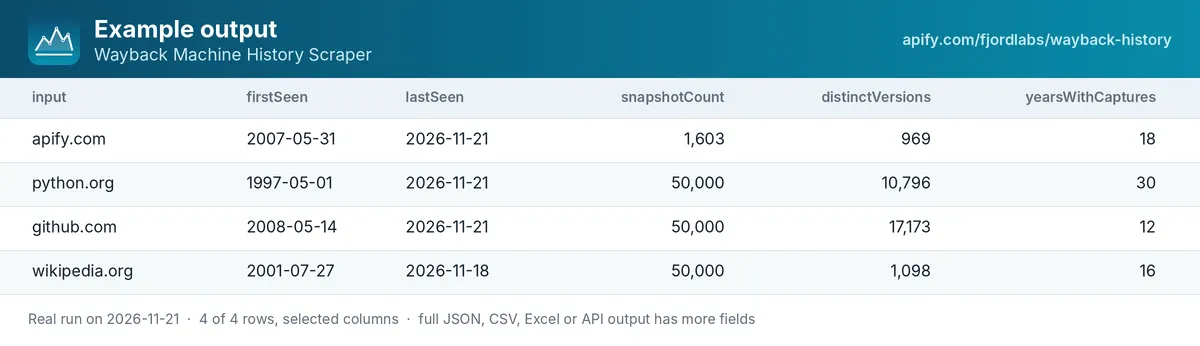
Output example
One row per snapshot:
And one summary row per input (real run, captures with status 200 since 2018, content changes only):
statusCode is null for warc/revisit records (a capture whose content equals an earlier one; isRevisit: true). Choose HTTP status Any except revisits or 2xx to drop them. In Closest mode each row also has closestTo.
Inputs that can't be queried (invalid URL, site excluded from the archive, archive.org errors) and inputs with no captures get a row with an error message and are not charged. A run summary is saved as SUMMARY in the key-value store.
Pricing
Pay only for results:
| Event | Price |
|---|---|
| Actor start | $0.00005 |
| Snapshot (one snapshot row, also in Closest mode) | $0.0005 ($0.50 per 1,000 snapshots) |
| Site summary (one summary row per input) | $0.004 |
A history summary of 100 domains costs $0.40. 10,000 snapshots cost $5. Counting captures for a summary is included in its price, however many there are. Error rows and inputs without captures are never charged. Use Max snapshots or the run's max charge to control spend; the Actor stops when the limit is reached.
Notes and limits
- Data source: the Internet Archive's public Wayback CDX server and availability API. The Actor lists captures and links to them; it doesn't download the archived pages (open
archiveUrlorrawUrlfor that). - Polite by design: at most one request every 1.5 seconds per run (slower after a 429), up to 3 inputs in parallel, retries with backoff on 429/5xx, and a clear user agent. archive.org is a non-profit; please don't run thousands of domain-wide queries at once.
- Speed: archive.org answers simple queries in 1–5 s, but host/domain queries on big sites, or with filters across many years, can take up to a minute per request, and occasionally time out. Narrow them with dates, filters or prefix match. A request that keeps failing becomes a free error row.
- Large histories: a summary counts up to Max captures counted per summary (50,000 by default, up to 1 million). Beyond that it's marked
complete: falsewith a note; counts are lower bounds, and for an exact URLlastSeenis still exact. Popular homepages have hundreds of thousands of captures; use collapse (e.g. content changes or one per day) to make the counts meaningful and fast. - Collapse works on neighbouring results, as the CDX API does: "content changes only" drops a capture whose digest equals the previous capture of the same URL.
- Excluded sites: site owners can ask the Internet Archive to hide their site; those queries return a free error row.
- Personal data: the Actor returns URLs and capture metadata only, no page content. Archived URLs can occasionally contain e-mail addresses or names in query strings; handle the output under your own GDPR obligations.
Changelog
- 2026-11-21: Public on the Apify Store.
- 2026-11-10: Invalid input now ends as a successful run with one free error row that says what to fix, instead of a failed run.
- 2026-11-08: Built, reviewed and tested on Apify before launch.
How to use Wayback Machine Site History
- Add domains or URLs, one per line (
apify.com,example.com/blog/*,*.example.com). - Pick the output: snapshots, a history summary per site, both, or the closest snapshot to a date.
- Optionally set dates, collapse (content changes, one per day/month/year, one per URL) and status/content type filters.
- Click Start and export the history to CSV/Excel or Google Sheets.
Use it from code (API)
Run it from Python with the official client (pip install apify-client):
Or with one HTTP call that returns the results directly:
It also works with Make, Zapier, n8n, Google Sheets and webhooks through Apify's integrations.
Use with AI agents (MCP)
Agents can call this Actor as a tool through Apify's MCP server (mcp.apify.com). Add fjordlabs/wayback-history to the server's Actors. Results are clean JSON with a small default size, so they fit well in an agent's context.
FAQ
Where does the data come from? From the Internet Archive's official, keyless Wayback CDX API and availability API. No login, browser or proxy is used.
How do I check how old a domain is? Use mode Summary: firstSeen is the first capture in the Wayback Machine, and yearlyCounts shows how active the site was each year.
Does it download the archived pages? No. It lists captures with links: archiveUrl opens the archived page and rawUrl gives the original archived bytes without the Wayback toolbar.
Do I pay for sites that were never archived? No. Inputs without captures, sites excluded from the archive and archive.org errors become free rows.
Am I charged for errors? No. Rows that fail are never charged; you only pay for results.
More from fjordlabs
- Google Trends Scraper
- Google Trends Trending Now
- Google News Scraper
- Google Play Reviews & App Data Scraper
- App Store Reviews & App Data Scraper (iOS)
- Bulk PageSpeed & Core Web Vitals Audit
- Google Autocomplete Keyword Expander
- App Store & Google Play Search Rank + Top Charts (ASO)
- SEO & AI-Search Readiness Audit
- Website Tech Stack Detector
- Steam Reviews & Game Data Scraper
- Chrome Web Store Extension Details Scraper
- Google Ads Transparency Center Scraper
- Hacker News Scraper
- Shopify Store Products Scraper
- Sitemap URL Extractor
- EU Public Tenders Scraper (TED)
- Domain Intel: WHOIS/RDAP, DNS, SSL, SPF/DMARC
- App Store & Google Play App Details + Developer Portfolio
- Website Screenshot API: Full Page, Mobile, PDF


