

Sitemap URL Extractor: All Page URLs, Lastmod, Images, News
Pricing
from $0.14 / 1,000 url extracteds
Sitemap URL Extractor: All Page URLs, Lastmod, Images, News
Get every URL a website lists in its XML sitemaps. Finds sitemaps via robots.txt, follows sitemap indexes and .gz files, and returns lastmod, changefreq, priority, images, news, video and hreflang. Filters, optional status check. Failed sitemaps are free.
Pricing
from $0.14 / 1,000 url extracteds
Rating
0.0
(0)
Developer

Mivah
Maintained by CommunityActor stats
0
Bookmarked
2
Total users
1
Monthly active users
2 days ago
Last modified
Categories
Features
Share
Get every URL a website lists in its XML sitemaps, as a clean table: a sitemap scraper, sitemap parser and sitemap-to-CSV tool in one. Enter a domain and the Actor finds the sitemaps itself (via robots.txt, then common paths like /sitemap.xml), follows sitemap indexes and .xml.gz files, removes duplicates and returns one row per URL with lastmod, changefreq, priority, the sitemap it came from and, when present, images, Google News, video and hreflang data. Optionally it checks the HTTP status of each URL to find broken or redirected pages.
Fast and cheap: no browser, one request per sitemap file, $0.20 per 1,000 URLs. Failed sitemaps are free.
Who it's for
- SEO specialists and agencies: audit a site's sitemap, find 404s and redirects in it, compare sitemap coverage with crawled pages, check hreflang alternates.
- Content and competitor monitoring: "what did this competitor publish this week?" with Modified since = 7 days, scheduled daily, with results sent to Slack or Google Sheets.
- Scraping pipelines: a fast, complete list of product, article or listing URLs to feed into another scraper, filtered with regex (
/products/,/blog/). - News and media watchers: read Google News sitemaps (title, publication, language, date) without crawling.
- AI agents: a single-purpose tool over MCP: domain in, clean JSON list of URLs out.
How it works
- Add websites or sitemap URLs, one per line (
apify.com,https://example.com/sitemap_index.xml,https://example.com/sitemap.xml.gz). - Optionally filter: Only URLs matching / Skip URLs matching (regex), Modified since (
2026-10-01or7 days), and set Max URLs. - Click Start. Export the results as CSV, Excel or JSON, or call the Actor from the API.
Supported formats: XML urlset and sitemapindex (nested up to 4 levels), gzip, plain-text sitemaps (one URL per line), RSS and Atom feeds, and Google's image, news, video and xhtml:link hreflang extensions.
Input example
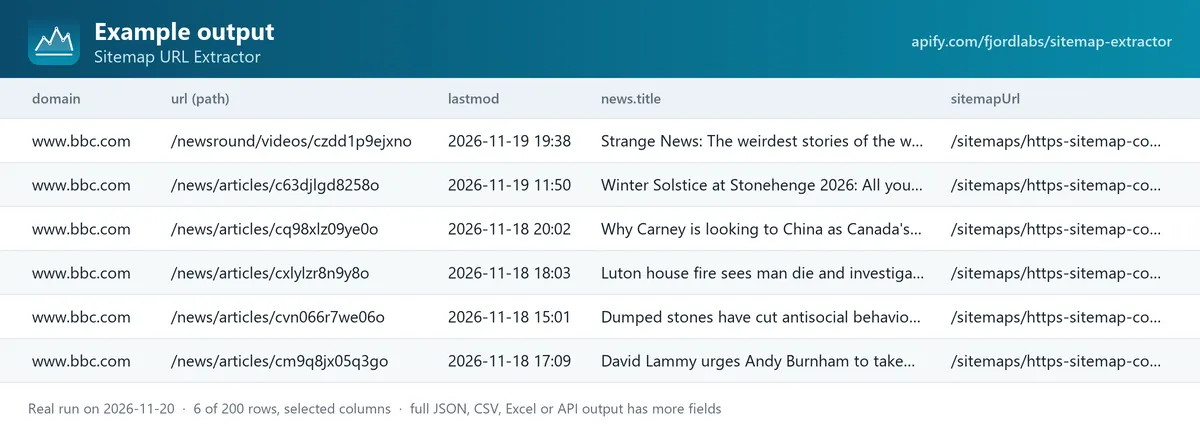
Output example
One row per URL:
A Google News sitemap row has "news": {"title": "...", "publicationDate": "2026-11-07T16:53:04Z", "publicationName": "BBC Persian", "language": "fa", "keywords": null}. Video rows list videos[] with title, description, thumbnailUrl, contentUrl, playerUrl, durationSecs, publicationDate; hreflang gives alternates: [{"hreflang": "de", "url": "..."}]. Turn Include images, news, video and hreflang off for just the core columns.
With Check HTTP status on, each row also gets statusCode (e.g. 200, 301, 404), redirectUrl and statusError.
Sitemaps that can't be read (HTTP errors, not a sitemap, blocked by robots.txt) and websites without any sitemap get a row with an error message, and are not charged. A run summary (URLs, sitemaps read, filtered, duplicates, errors) is saved as SUMMARY in the key-value store.
Pricing
Pay only for results:
| Event | Price |
|---|---|
| Actor start | $0.00005 |
| URL extracted (one result row) | $0.0002 ($0.20 per 1,000 URLs) |
10,000 URLs cost about $2 (plus the tiny start fee), with no subscription. Status checks are included in the URL price. Error rows are never charged. Use Max URLs or the run's max charge to control spend; the Actor stops when the limit is reached.
Notes and limits
- Only what the site lists. The Actor reads sitemaps; it doesn't crawl pages. Pages missing from a site's sitemap won't appear. If a site has no sitemap at
robots.txtor a common path, enter its sitemap URL directly. - Modified since relies on the site's own
lastmodvalues, which some sites set to "now" on every page or leave out. URLs withoutlastmodare dropped when filtering by date unless you turn on Keep URLs without lastmod. Child sitemaps whose ownlastmodis older than the date are skipped without downloading. - Polite by design:
robots.txtis respected (user agentFjordlabsSitemapExtractor; sitemaps a site advertises in itsrobots.txtare always allowed), sitemaps of one site are read one after another, and requests are retried with backoff on 429/5xx. - Limits per run: 200 sitemap files by default (Max sitemap files), 60 MB per file, status checks capped by Max status checks (500 by default, up to 10,000; set 0 for none).
- Very large sites: up to about 1 million URLs fit the default 256 MB memory. For more, raise the run's memory to 1 GB.
- Status check sends a
HEADrequest without following redirects, sostatusCodeis what the URL itself answers (a 301 shows as 301 withredirectUrl). Some servers answerHEADdifferently from a normal page view. - If a site's
robots.txtreturns a server error, the site is treated as "disallow all" (RFC 9309) and you get a free error row; try again later or enter the sitemap URL directly. - Sites behind strong bot protection may answer 403; those become free error rows.
- No personal data is collected: only URLs and the metadata a site publishes in its sitemaps.
Changelog
- 2026-11-20: Public on the Apify Store.
- 2026-11-15: Pre-launch stress test across our Actors; clearer error messages where a run's outcome was confusing.
- 2026-11-10: Unreachable sites get a clear "could not be reached" error instead of "no sitemap found". Invalid input now ends as a successful run with one free error row that says what to fix, instead of a failed run.
How to use Sitemap URL Extractor
- Add websites or sitemap URLs, one per line (
apify.comfinds the sitemaps via robots.txt). - Optionally filter with Only URLs matching / Skip URLs matching (regex) or Modified since (
7 days). - Set Max URLs and click Start; turn on Check HTTP status to find 404s and redirects.
- Export the URL list to CSV/Excel or Google Sheets, or feed it into another scraper.
Use it from code (API)
Run it from Python with the official client (pip install apify-client):
Or with one HTTP call that returns the results directly:
It also works with Make, Zapier, n8n, Google Sheets and webhooks through Apify's integrations.
Use with AI agents (MCP)
Agents can call this Actor as a tool through Apify's MCP server (mcp.apify.com). Add fjordlabs/sitemap-extractor to the server's Actors. Results are clean JSON with a small default size, so they fit well in an agent's context.
FAQ
How does it find the sitemap? It reads the Sitemap lines in the site's robots.txt, then tries common paths like /sitemap.xml and /sitemap_index.xml. You can also enter any sitemap URL directly, including .xml.gz, .txt and RSS/Atom feeds.
Does it crawl the website? No. It only reads the sitemaps the site publishes, so it's fast and cheap. Pages missing from the sitemap won't appear.
How do I get only new or changed pages? Set Modified since to a date or a period like 7 days and schedule the Actor. It uses the site's lastmod values and skips whole sitemap files that haven't changed.
Do I pay for sitemaps that fail? No. Unreadable sitemaps, sites without a sitemap and pages blocked by robots.txt become free error rows.
Am I charged for errors? No. Rows that fail are never charged; you only pay for results.
More from fjordlabs
- Google Trends Scraper
- Google Trends Trending Now
- Google News Scraper
- Google Play Reviews & App Data Scraper
- App Store Reviews & App Data Scraper (iOS)
- Bulk PageSpeed & Core Web Vitals Audit
- Google Autocomplete Keyword Expander
- App Store & Google Play Search Rank + Top Charts (ASO)
- SEO & AI-Search Readiness Audit
- Website Tech Stack Detector
- Steam Reviews & Game Data Scraper
- Chrome Web Store Extension Details Scraper
- Google Ads Transparency Center Scraper
- Hacker News Scraper
- Shopify Store Products Scraper
- EU Public Tenders Scraper (TED)
- Domain Intel: WHOIS/RDAP, DNS, SSL, SPF/DMARC
- App Store & Google Play App Details + Developer Portfolio
- Website Screenshot API: Full Page, Mobile, PDF
- Wayback Machine Site History


