

Shopify Store Products Scraper
Pricing
from $0.35 / 1,000 products
Shopify Store Products Scraper
Scrape all products from any Shopify store: titles, prices, sale prices, currency, stock, variants, SKUs, images, tags. Collections, incremental mode, robots.txt-aware. No login.
Pricing
from $0.35 / 1,000 products
Rating
0.0
(0)
Developer

Mivah
Maintained by CommunityActor stats
0
Bookmarked
2
Total users
1
Monthly active users
2 days ago
Last modified
Categories
Features
Share
Shopify Store Products Scraper: prices, stock, variants, SKUs
Scrape the full product catalogue of any Shopify store in one run. Give it store domains (or collection URLs) and get clean rows with title, vendor, product type, tags, price and compare-at (sale) price ranges, currency, stock status, variants with SKUs, options and images, plus created, updated and published dates. A simple Shopify scraper and Shopify product API alternative: many stores per run, no login, no API key, no browser, export to JSON, CSV or Excel.
Built for e-commerce teams watching competitors' prices and new launches, brands checking resellers, dropshippers and product researchers, agencies auditing client stores, data teams building price-history datasets, and AI agents that answer "what does this store sell and at what price?".
What you get
- 🛍️ Products: title, handle, URL, vendor, product type, tags, plain-text description (HTML optional), featured image and all image URLs
- 💰 Prices: min/max price, min/max compare-at price,
onSaleflag and the biggest discount in %, in the store's currency (USD, EUR, GBP, DKK…) - 📦 Stock: available yes/no, number of variants and of variants in stock
- 🎨 Variants: every size/colour with SKU, price, compare-at price, availability, option values and weight; or turn on One row per variant for a flat SKU-level table
- 🗂️ Collections: scrape only certain collections (
sale,new-arrivals…) or list all collections with their product counts - 🔁 Incremental monitoring:
updatedSince: "7 days"returns only new and changed products, so a daily schedule pays only for what changed - 🏬 Many stores per run, a few in parallel, with a run summary per store (name, currency, product count)
- 🤝 Polite by design: each store's robots.txt is checked first and its Crawl-delay respected; requests to one store are sequential (1 per second by default) with retries and backoff
- 🧩 Headless stores too (opt-in): turn on headlessFallback to read Shopify Hydrogen storefronts that hide
products.jsonthrough the store's own*.myshopify.comaddress (off by default)
Input example
Output example
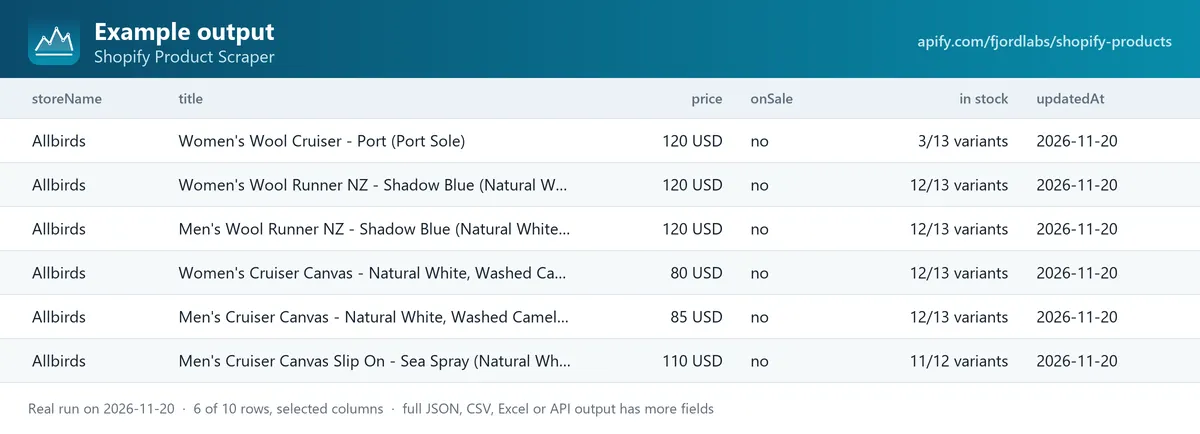
One row per product:
With One row per variant on, each row is one SKU:
Filter on type (product, variant, collection, error) or use the Products, Variants, Collections and Errors dataset views. A run summary per store is saved as SUMMARY in the key-value store.
Pricing
Pay only for results:
| Event | Price |
|---|---|
| Actor start | $0.00005 |
| Product (one product row) | $0.0005 ($0.50 per 1,000) |
| Variant (one SKU row, only with One row per variant) | $0.0002 |
| Collection (row, only with Also list the store's collections) | $0.0002 |
Example: a store with 1,000 products costs about $0.50. A daily "changed in the last 24 hours" check on 10 stores usually costs a few cents, because only changed products are charged. With One row per variant, every variant row counts as one result, so a product with 6 sizes is 6 results. Errors and skipped stores are never charged. Set a maximum cost per run in Apify and the Actor stops cleanly when it is reached.
Notes and limits
- Data comes from each store's public Shopify JSON (
/products.json,/collections.json,/meta.json): the same catalogue anyone sees on the storefront. No login, no cookies, no checkout or cart endpoints. - robots.txt is respected. If a store's robots.txt disallows
/products.json(or the collection path) for us, the store is skipped with an unchargederrorrow (stage: "skipped"). A Crawl-delay above 30 seconds also skips the store. - Shopify lists at most 25,000 products per listing. For bigger stores, add their collections (
collectionsinput or collection URLs) to reach the rest; duplicates are removed per run. - Some stores turn the JSON off, are password-protected, or aren't Shopify: they get an uncharged
errorrow, and the other stores go on. - Stock is yes/no per variant (Shopify's public
availableflag). Exact inventory counts are not public. - Incremental mode scans the catalogue and keeps only products whose
updated_atis on or after your date (Shopify usually bumps it when a price, variant or stock status changes). Only kept products are charged. - Currency comes from the store's
/meta.json; stores selling in several currencies show their default (shop) currency. maxProductsPerStorecounts products. With One row per variant, each product gives one row per variant, so the number of rows (and results charged) can be several times higher.- The same store listed twice (for example
allbirds.comandwww.allbirds.com) is not charged twice: each product is output once per run. - Product URLs, prices and stock are those of the store's default market; localised prices for other countries are not fetched.
- Product data only: no customer, order or personal data is collected.
Changelog
- 2026-11-20: Public on the Apify Store.
- 2026-11-15: Pre-launch stress test across our Actors; clearer error messages where a run's outcome was confusing.
- 2026-11-10: One row per variant uses a cheaper
variantevent ($0.0002 per row);headlessFallbackfor Hydrogen storefronts is opt-in. Invalid input now ends as a successful run with one free error row that says what to fix, instead of a failed run.
How to use Shopify Store Products Scraper
- Add Shopify store domains (for example
www.allbirds.com) or collection URLs. - Set max products per store, and optionally One row per variant, only in stock or collections.
- Use updatedSince (for example
24 hours) on a schedule to get only new and changed products. - Click Start, then export products as JSON, CSV or Excel.
Use it from code (API)
Run it from Python with the official client (pip install apify-client):
Or with one HTTP call that returns the results directly:
It also works with Make, Zapier, n8n, Google Sheets and webhooks through Apify's integrations.
Use with AI agents (MCP)
Agents can call this Actor as a tool through Apify's MCP server (mcp.apify.com). Add fjordlabs/shopify-products to the server's Actors. Results are clean JSON with a small default size, so they fit well in an agent's context.
FAQ
Which stores work? Any Shopify store that serves its public products.json, which is most of them, including headless (Hydrogen) storefronts via their myshopify.com address. Stores that turned it off, are password-protected or disallow it in robots.txt get a free error row. A store listed twice is charged once.
How many products can I get? All of them up to Shopify's limit of 25,000 per listing. For bigger stores, add collections to reach the rest.
Can I track price changes?
Yes. Schedule the Actor with updatedSince (for example 24 hours) and compare priceMin, compareAtPriceMax and available between runs.
Do you get exact stock levels? No. Shopify only publishes whether each variant is available. Exact inventory counts are private.
Is personal data collected? No. Only the public product catalogue: no customers, orders or reviews.
Am I charged for errors? No. Rows that fail are never charged; you only pay for results.
More from fjordlabs
- Google Trends Scraper
- Google Trends Trending Now
- Google News Scraper
- Google Play Reviews & App Data Scraper
- App Store Reviews & App Data Scraper (iOS)
- Bulk PageSpeed & Core Web Vitals Audit
- Google Autocomplete Keyword Expander
- App Store & Google Play Search Rank + Top Charts (ASO)
- SEO & AI-Search Readiness Audit
- Website Tech Stack Detector
- Steam Reviews & Game Data Scraper
- Chrome Web Store Extension Details Scraper
- Google Ads Transparency Center Scraper
- Hacker News Scraper
- Sitemap URL Extractor
- EU Public Tenders Scraper (TED)
- Domain Intel: WHOIS/RDAP, DNS, SSL, SPF/DMARC
- App Store & Google Play App Details + Developer Portfolio
- Website Screenshot API: Full Page, Mobile, PDF
- Wayback Machine Site History


