

SEO & AI-Search Readiness Audit
Pricing
from $2.10 / 1,000 page audits
SEO & AI-Search Readiness Audit
Audit URLs or a whole sitemap for on-page SEO (titles, meta, canonical, headings, alt text, schema.org, Open Graph, broken links) and AI-search readiness (GPTBot, ClaudeBot, PerplexityBot rules in robots.txt, llms.txt). Scores + issues per page. Failed pages are free.
Pricing
from $2.10 / 1,000 page audits
Rating
0.0
(0)
Developer

Mivah
Maintained by CommunityActor stats
0
Bookmarked
2
Total users
1
Monthly active users
2 days ago
Last modified
Categories
Features
Share
SEO & AI-Search Readiness Audit: On-Page SEO, robots.txt AI Bots, llms.txt
Audit a list of pages, or a whole sitemap, for on-page SEO and for AI-search readiness: can ChatGPT, Claude, Perplexity and Google's AI Overviews actually reach and understand your pages? Each page gets an SEO score, an AI readiness score (GEO / AEO) and a plain-English list of issues to fix, ranked by severity. Think of it as a website SEO checker and an AI crawler / llms.txt checker in one run.
Built for SEO agencies, site owners, content teams, developers checking a release, and AI agents that need a quick, structured site check. No browser, no login, no API key.
What it checks
On-page SEO (per page)
- 🏷️ Title and meta description: present, length (too short / too long)
- 🔗 Canonical (missing or pointing elsewhere), robots meta and X-Robots-Tag (noindex, nofollow, nosnippet)
- 🌍 hreflang alternates and the page's
lang - 📑 Headings: all H1s and H2s, counts per level, skipped levels (H2 → H4)
- 📝 Word count of the visible text (thin content)
- 🖼️ Images missing alt text (and decorative empty alts, counted separately)
- 🧩 Schema.org structured data: JSON-LD types (incl.
@graph), invalid JSON-LD, microdata types - 📣 Open Graph (title, description, image, type, url) and Twitter card
- ↔️ Internal / external / nofollow link counts, links without anchor text
- 💔 Broken links (optional): light HEAD requests, capped per page, each link checked once per run
- 📱 Mobile viewport, HTTPS, status code, redirects and response time
AI-search readiness (per page and site)
- 🤖 robots.txt rules for 18 AI and search crawlers: GPTBot, OAI-SearchBot, ChatGPT-User, ClaudeBot, Claude-SearchBot, Claude-User, Google-Extended, Googlebot, Bingbot, PerplexityBot, Perplexity-User, Applebot-Extended, CCBot, Meta-ExternalAgent, Bytespider, Amazonbot, DuckAssistBot, cohere-ai. Each is evaluated for that exact page with Google's matching rules (most specific group, longest rule wins, wildcards), not just "is the bot named".
- 🔎 Two simple verdicts:
aiSearchAllowed(can AI search engines cite the page?) andaiTrainingAllowed - 📄 llms.txt and llms-full.txt: present, size, title, number of links
- 🚦 Cloudflare Content-Signal lines (
search=yes, ai-train=no…) and sitemaps declared in robots.txt - ⚠️ AI-relevant page signals:
nosnippet/max-snippet:0(keeps you out of AI Overviews),noai, missing JSON-LD, too little text without JavaScript
Why this one?
- Two audits in one run. Classic on-page SEO plus the new "is my site visible to AI search?" question.
- Correct robots.txt logic. Path-level answers per bot, so
Disallow: /blog/for GPTBot shows up only on blog pages. - Whole sites from a sitemap. Sitemap indexes are followed, or let it find the sitemap in robots.txt.
- Polite and compliant. It obeys the audited site's robots.txt and Crawl-delay, paces requests per site and retries on 429/5xx with backoff.
- Failed pages are free. 404s, non-HTML files, pages blocked by robots.txt, timeouts and mistyped URLs come back with an
errorTypeanderrorand aren't charged. - Cheap. A fraction of what other SEO audit Actors charge per page (see Pricing).
Input example
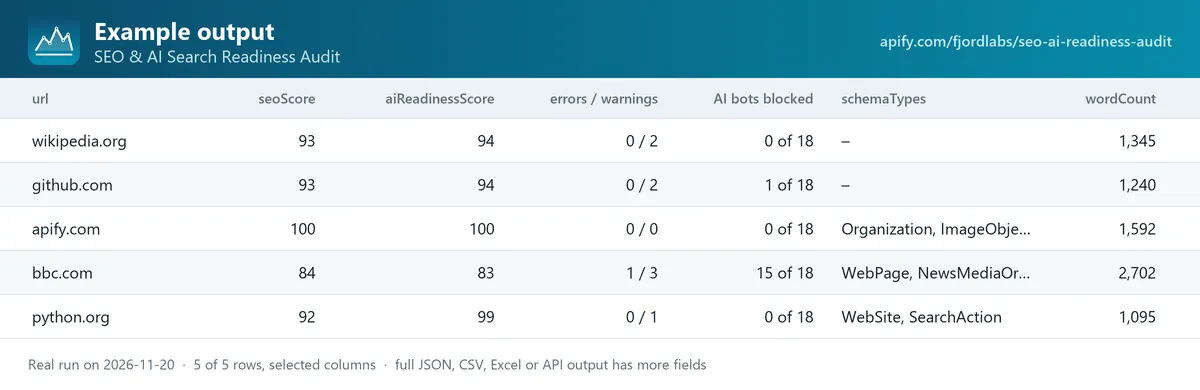
Output example (one page, shortened)
The dataset has three views: Overview (scores per page), Issues (one line per issue, easy to filter and sort in a spreadsheet) and AI search readiness. A SUMMARY record holds the run totals.
Pricing
| Event | Price |
|---|---|
| Actor start | $0.00005 |
| Page audit (one page) | $0.003 |
| Failed page (404, blocked, not HTML, timeout, invalid URL) | free |
A 200-page site costs $0.60. Broken-link checking and the AI checks are included in the page price.
Use cases
- SEO agencies: a quick on-page audit of a client's whole site, exported to Sheets or CSV.
- "Can ChatGPT see us?": find out which AI crawlers your robots.txt (or your CDN's managed robots.txt) blocks, page by page.
- Release checks: catch a stray
noindex, missing titles or broken links after a deploy; run it on a schedule. - Competitor research: compare schema.org usage, llms.txt adoption and AI-bot policies across competitors.
- AI agents: callable through the Apify MCP server; rows are compact JSON with clear issue codes.
Pair it with our Bulk PageSpeed & Core Web Vitals Audit (fjordlabs/pagespeed-audit) for speed scores on the same URLs.
Limits
- Up to 5,000 pages per run (
maxUrls, default 50). Sitemap indexes are followed two levels deep; child sitemaps that robots.txt disallows are skipped. - Pages are fetched as plain HTML, without running JavaScript. That is also how most AI crawlers see your site, so content that only appears after JavaScript runs is reported as missing.
- It respects each site's robots.txt for its own crawler (
FjordlabsSEOAudit). Pages that robots.txt disallows for this crawler (or for all bots) are returned as free error rows. If robots.txt itself answers with a server error, the site is treated as closed, as the robots.txt standard requires. - When a page redirects to another site (for example
example.com→www.example.com), the target site's robots.txt, AI-crawler rules and llms.txt are used. - Word counts for Chinese and Japanese count each character as one word (those languages don't use spaces).
- A site whose robots.txt doesn't answer within 30 s (tried twice) is treated as closed: its pages come back as free
robots-unreachablerows. - Sites behind strong bot protection (some news and retail sites) may answer HTTP 403 to cloud servers. Those pages come back as free
http-statuserror rows; you can try a proxy in the input. - robots.txt tells you what a site asks crawlers to do. Firewalls or CDNs that block bots by IP or user agent aren't visible from outside.
- Scores are simple, transparent penalties per issue (error −15, warning −5, notice −1), meant for comparing pages and tracking progress, not a Google ranking factor.
- No personal data is collected: only page structure, tags and link status.
Changelog
- 2026-11-19: Public on the Apify Store.
- 2026-11-15: Pre-launch stress test across our Actors; clearer error messages where a run's outcome was confusing.
- 2026-11-08: Reliability review before the wave-2 launch, with more tests.
How to use SEO & AI-Search Readiness Audit
- Add page URLs, a sitemap, or turn on discoverSitemaps to audit a whole site.
- Keep AI-search readiness checks on to test GPTBot, ClaudeBot, PerplexityBot and more against robots.txt and look for llms.txt.
- Optionally turn on checkBrokenLinks (internal links; add external links if you like).
- Click Start, then sort pages by score or open the Issues view to get a fix list.
Use it from code (API)
Run it from Python with the official client (pip install apify-client):
Or with one HTTP call that returns the results directly:
It also works with Make, Zapier, n8n, Google Sheets and webhooks through Apify's integrations.
Use with AI agents (MCP)
Agents can call this Actor as a tool through Apify's MCP server (mcp.apify.com). Add fjordlabs/seo-ai-readiness-audit to the server's Actors. Results are clean JSON with a small default size, so they fit well in an agent's context.
FAQ
Does it run JavaScript? No. It reads the HTML your server sends, which is also what most AI crawlers see. Content added later by JavaScript is reported as missing.
How do you decide if GPTBot or ClaudeBot is blocked? With the same rules Google uses for robots.txt (most specific group, longest matching rule), evaluated for each page, so path-level rules are handled correctly. After a cross-site redirect, the target site's robots.txt decides.
Does it respect my robots.txt? Yes. It crawls as FjordlabsSEOAudit, follows robots.txt and Crawl-delay, and paces requests per site. Disallowed pages come back as free error rows.
What is llms.txt? A proposed plain-text file at /llms.txt that gives AI tools a short map of your site. The Actor reports whether you have one, its size and how many links it lists.
Am I charged for errors? No. Rows that fail are never charged; you only pay for results.
More from fjordlabs
- Google Trends Scraper
- Google Trends Trending Now
- Google News Scraper
- Google Play Reviews & App Data Scraper
- App Store Reviews & App Data Scraper (iOS)
- Bulk PageSpeed & Core Web Vitals Audit
- Google Autocomplete Keyword Expander
- App Store & Google Play Search Rank + Top Charts (ASO)
- Website Tech Stack Detector
- Steam Reviews & Game Data Scraper
- Chrome Web Store Extension Details Scraper
- Google Ads Transparency Center Scraper
- Hacker News Scraper
- Shopify Store Products Scraper
- Sitemap URL Extractor
- EU Public Tenders Scraper (TED)
- Domain Intel: WHOIS/RDAP, DNS, SSL, SPF/DMARC
- App Store & Google Play App Details + Developer Portfolio
- Website Screenshot API: Full Page, Mobile, PDF
- Wayback Machine Site History


