

Indeed Jobs Scraper — Indeed API Alternative, Salary, Vacancies
Pricing
from $1.50 / 1,000 job listings
Indeed Jobs Scraper — Indeed API Alternative, Salary, Vacancies
Indeed API alternative: Indeed jobs by keyword or search URL — title, company, location, salary, posted date and apply link on every row, exact-country results (UK means UK). From $1.50 per 1,000 job listings. A row cap and a deadline stop the run exactly there. Never pay for an undelivered job.
Pricing
from $1.50 / 1,000 job listings
Rating
0.0
(0)
Developer

Steadyfetch Team
Maintained by CommunityActor stats
0
Bookmarked
1
Total users
0
Monthly active users
4 days ago
Last modified
Categories
Share
Indeed jobs as rows — from $1.50 per 1,000 listings, and no Indeed API key to obtain. One row per posting: title, company, location, salary, posted date and the apply link. Exact-country search: UK means UK.
Never pay for a job we didn't deliver. Set a row cap and a deadline and the run stops exactly there — no runaway bills.
Using an AI agent? Pin this actor in Apify's MCP server with one link: https://mcp.apify.com?tools=steadyfetch/indeed-jobs-scraper
- Actor id:
steadyfetch/indeed-jobs-scraper - Input:
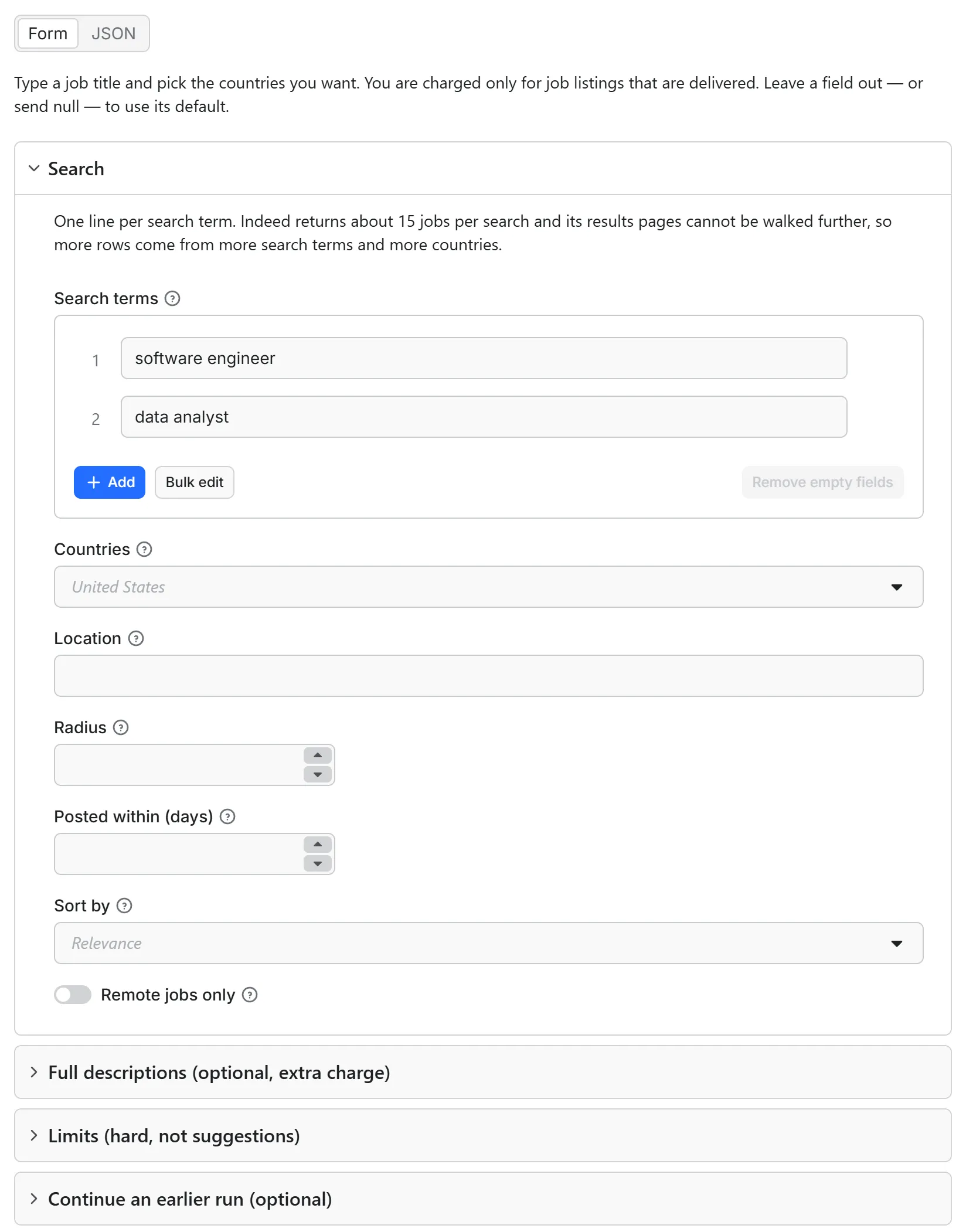
{ "queries": ["software engineer"] }— the one field to set. - Cap the bill: set
maxTotalChargeUsdon the run (a run option, not Actor input), e.g.0.50— the run stops when it reaches it.
From $1.50 per 1,000 job listings — all-inclusive pay per event, nothing charged for starting a run, charged only on delivery.
One more charge exists, and it is opt-in. Turn on includeDescription and each job's full
description is fetched too — charged as a second event per job, and only when the description
actually arrives. It is off by default, so a run you start without it is the per-listing price and
nothing else. The per-description price is on the Pricing tab, as the Full description charge.
Just want to see it work? Run it with no input at all ({} from the API or an AI agent) and
you get a real 5-listing sample — "software engineer" on Indeed US — charged like any run, a few
cents at most. Set only the filters — a country, a sort order, a row cap — and no search terms,
and that same sample runs under them, charged like any run; a limit larger than the sample's own
is capped at it, and one extra uncharged row names which settings were yours. In the console,
Start with the example search terms already in the form and you get those searches for real, up to
your row cap.
Running the same search again? A listing already delivered to your account is never charged a second time — see Never pay for the same listing twice (a run started with a scoped API token needs key-value store permission for that check to work).
Unofficial. This actor is not affiliated with, endorsed by, or sponsored by Indeed. "Indeed" and all related marks are trademarks of Indeed, Inc. It reads only the public search pages an ordinary browser sees.
Every row carries charged and missReason, so you can reconcile the invoice from the
dataset itself without opening the console. Only rows with charged: true were billed.
Output — a real row
Five US "software engineer" listings from a real run, in the Apify console's dataset table — salary, posted date, the search summary and the description, one row per job:
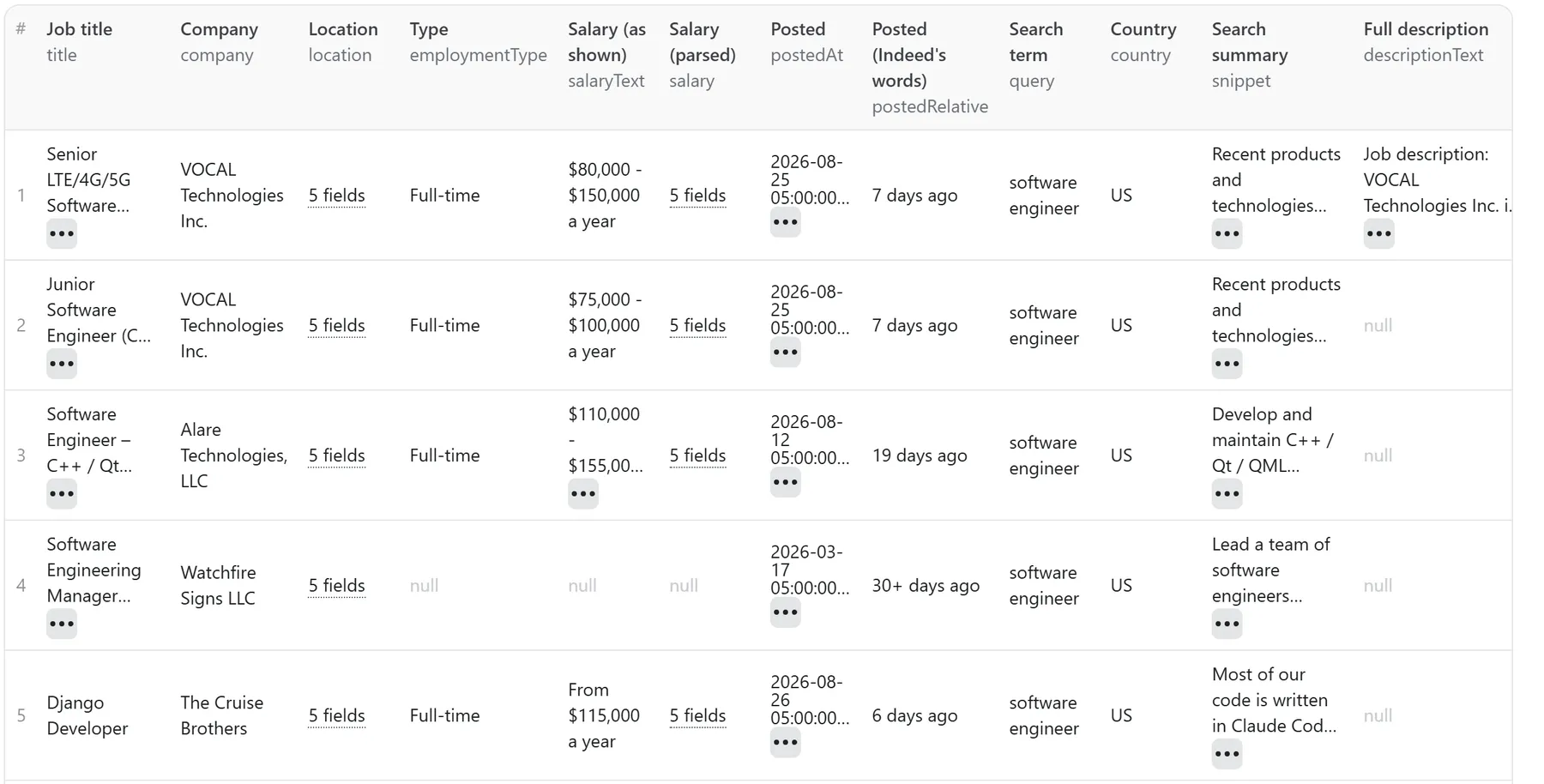
And one delivered row in full:
Browse the full live example dataset → — one real run, unedited: five delivered US listings capped at maxItems: 5, the search row that reconciles them, and the run's own summary row last. Five listings delivered, five charged.
Plus one search row per search term and country — query, country, delivered,
outcome — and one summary row with delivered, stoppedBy, resumeCursor, datasetId
(paste it into resumeFromDatasetId to continue this run later), carriedOver and chargedEvents.
jobUrl is the canonical Indeed link built from the job's own key: identical across runs,
with no ad or tracking token in it, so it is safe to use as a join key.
About location. Indeed prints one location line per listing, and we parse it:
location.raw is exactly what Indeed printed, and location.city, location.region,
location.postcode and location.country are what it means. location.country is a real
ISO-2 country code or null — never a state and never a postcode. "Kemmerer, WY 83101"
ships as city Kemmerer, region WY, postcode 83101, country "US"; "Los Angeles, CA"
under a US search is region "CA" with country "US" (California, not Canada); "Glasgow G2"
is city Glasgow, postcode G2, country "GB". When the line names no country we can prove
and the search gives no context, country is null rather than a guess — the full line is
always in location.raw, so nothing is lost. The row's own top-level country field is the
country of the SEARCH ("US", "GB", …). Anything Indeed itself lists under a different
country ships as an uncharged GEO_MISMATCH row instead of being sold to you as a match.
Agent / API paste-block
Use it as an API endpoint (Standby)
You can also call this actor like an API: send a job title and get the listings back in the same response, with no run to start and no dataset to read. The address is https://steadyfetch--indeed-jobs-scraper.apify.actor, and the actor's Endpoints tab lets you try it from the browser.
Or POST the same input a run takes:
The answer is JSON: rows (one per listing, with the same fields as a row in a run's dataset, plus the same uncharged rows a run writes for a search that found nothing or a setting that needs a word), receipt (the run's closing summary row), delivered, charged, and notes for anything you should know, in plain words. You are charged exactly as in a run — per job listing delivered, plus each full description that comes back when includeDescription is on — and a search that matches nothing is never charged. If the charge for a request cannot be completed, its listings are not sent.
Good to know: one request takes up to 3 searches and 45 listings (1 search and 15 listings on the Apify free plan) — one search is one term in one country — and has about three minutes to answer. The endpoint has no account memory: it does not skip listings your account already has, and it does not take resumeFromDatasetId or includeSeen, so every request is answered and charged on its own. For a long list of searches, or a weekly pull that skips repeats uncharged, run the actor on a Schedule as usual.
How many jobs one search returns
About 15. Indeed's results page holds roughly 15 listings and its "next page" no longer
returns results — asking for page two lands on a sign-in wall. So a bigger maxItems does
not produce more rows on its own: more rows come from more search terms and more
countries. Two terms across three countries is six searches, or roughly 90 listings.
We say this plainly because the alternative is you paying for a run that quietly returns 15 rows when you asked for 500. The summary row repeats it every run.
Descriptions: what is included, and what the option adds
Every search ships two things at no extra cost:
- a short plain-text summary for every listing (
snippet, measured 121–163 characters), and - the complete description for exactly one listing per search — the job Indeed pre-opens
in its side panel, marked
descriptionSource: "search-page". It is one real job description, so its length is whatever the employer wrote: 2,900–7,000 characters across the runs we measured.
"Fetch the full description for every job" (includeDescription, off by default) is
available now: it fetches each remaining listing's complete description from Indeed's own
job panel, marked descriptionSource: "job-panel". The honesty rules are the same as
everywhere else here:
- a description is charged only when it actually comes back — every row carries
chargedDescription, so the invoice reconciles from the dataset; - a description we could not fetch is reported on its own row, uncharged, and the listing itself is unaffected;
- we verify each description belongs to the exact job on the row before delivering it — a wrong or blocked answer becomes an uncharged miss, never someone else's text;
- if the option is ever not active on a run, that run tells you once in its log and charges nothing extra.
The per-description price is on the Pricing tab, as the Full description charge.
Countries
countries picks Indeed's own country sites. United States, United Kingdom and Germany
are verified end to end. Other countries use the same mechanism, and every listing's
country is checked against what you asked for: anything that comes back outside it is
reported as an uncharged GEO_MISMATCH row instead of being sold to you as a match.
What you are never charged for
| situation | missReason | run status |
|---|---|---|
| Indeed answered with an access check | CHALLENGED | SUCCEEDED — re-runnable, and the row says so |
| Indeed rate-limited us | THROTTLED | SUCCEEDED — re-runnable |
| Indeed returned a page we could not read | SOURCE_UNAVAILABLE | SUCCEEDED — re-runnable |
| The search ran and matched nothing | CLEAN_EMPTY | SUCCEEDED — a real answer |
| A listing outside the country you asked for | GEO_MISMATCH | SUCCEEDED — reported, not sold |
| A listing your account already has from an earlier run | — | skipped, never charged twice (the check needs key-value store permission) |
| A search term or URL we could not read | USER_INPUT | SUCCEEDED — the row names the fix |
| A full description that could not be fetched | (reported on its job row) | SUCCEEDED — the listing still ships; no Full description charge |
Your own maxItems / maxRunSeconds / cost cap | STOPPED_AT_LIMIT | SUCCEEDED — summary row with resumeCursor and the datasetId to continue from |
We never guess. An access check is reported as an access check, not as "no jobs found" — a temporary problem is never dressed up as a permanent verdict, and it is never charged.
This actor may fail when Indeed changes things. The two you are most likely to see are
CHALLENGED (Indeed answered with an access check) and THROTTLED (Indeed rate-limited
us). Both ship as a row with charged: false, the run still SUCCEEDS, and the row says
re-running can help. Before it hands that row back, a run that still has real time left waits a
minute and a half to three and tries the search again on fresh routes — up to three passes — so a
wall that lifts within minutes delivers listings instead of a re-run request; the row then says
how long the run waited and how many minutes were left. A short run makes its one pass as before.
Never pay for the same listing twice
Every run remembers the listings it delivered for your account, in a key-value store called
indeed-watch-account in your own Apify account. Run the same searches again and what you already
have is skipped before it takes a row slot: no row, no charge, and no bite out of your row cap.
The status line says how many (18 already in your account, skipped, not charged) and
OUTPUT.skippedSeen holds the number. That also means no second Full description fetch and no
second description charge for a listing you already own the text of.
The memory is a key-value store in your own Apify account, so a run started with a scoped API token in restricted-access mode needs key-value store Read, Write and Create permission (or Actor runs set to Full access) under Settings → API & Integrations; without it the run says so on its status line and on an uncharged row at the top of your dataset, and cannot skip what you already have (Write is what lets the run remember what it delivered; without it every run pays again — twice per listing here, because the full description is fetched and charged again too).
Want one complete dataset per run instead of only what changed? Turn on Include listings you
already have (includeSeen: true) and those rows come back anyway — marked repeat: true with
firstSeenAt and firstSeenRunId naming the run that first delivered them, charged: false. A
handed-back row carries no full description: that text was delivered with it in the earlier run and
is not fetched (or charged) a second time, and the row says so.
- The store lives in your account, one record (
SEEN). Open it in Storage → Key-value stores to see everything the actor has delivered you, or delete the record to start over. This actor runs with limited permissions and touches nothing else in your account. A run started with an API token whose permissions are limited to this Actor's scope can only open it if that token has key-value store Read, Write and Create — the store is created on your first run, so Create matters too. - Entries older than 90 days count as new again, so a listing you collected last quarter is collected (and charged) again if it is still live.
- Only delivered rows are remembered. A blocked page, an off-country listing or a search that matched nothing leaves nothing behind, so the next run tries it again.
- If the store cannot be read on some run, the run still runs: it delivers and charges as usual and the status line says the repeat check was unavailable, so you know a repeat may have been charged that once. If the reason is the token's permissions, the status line says that instead, and names the permission to grant.
Limits are hard limits
maxItems and maxRunSeconds stop the run exactly where you set them. Ask for more
than this actor can do and the run still starts. One run delivers up to 10,000 listings
and runs 30 to 3,600 seconds; radiusKm reaches 160 km and postedWithinDays 30 days,
both of them Indeed's own ceilings rather than ours. A larger (or smaller) number is not
an error: the run continues at the nearest limit and writes one extra uncharged row saying
what you asked for and what bound it — you are never left with no run at all.
The run still
finishes successfully, the summary row names which limit bound, and resumeCursor lists
the searches that were not reached. A time limit ends the collecting, never the delivering:
a result page already fetched when the clock runs out is still delivered in full, so a run
never pays for listings it does not hand you. To collect the rest without paying again for what you already have, re-run the same input
with a higher cap and resumeFromDatasetId set to that run's dataset ID (it is on the
summary row as datasetId): every listing already in that dataset is skipped — never
fetched, never charged — and the new summary's carriedOver says how many. A dataset ID
that cannot be read stops the run before it fetches anything, uncharged.
They are limits on the run, not on a container. If Apify moves your run to another server
part-way through, or you resurrect a finished run, it picks up from what is already in your
dataset: the same job is never delivered twice and never charged twice, and maxItems still
means what you typed.
FAQ
Why did I get 15 rows when I asked for 100? Because you gave one search term in one country. See "How many jobs one search returns" — add terms or countries, not a bigger cap.
Can I paste an Indeed search URL?
Yes. A pasted search keeps its own country, location and filters, and is not crossed with
your countries list. A link to a single job posting is refused with a guidance row.
Why is salary empty on so many rows?
Because Indeed did not show one. salaryText is the exact string Indeed printed, and
salary is our parse of it; when there is no salary on the listing both stay null rather
than being estimated.
Does {} charge anything?
Yes — like any run, and a few cents at most. With no input at all the run is a real 5-listing
sample ("software engineer" on Indeed US) and you pay for the listings it delivers. Set only
filters and no search terms and the same sample runs under them, charged the same way. If Indeed
cannot be read at that moment you get one uncharged row saying so, never an empty result.
Run it from an AI agent (MCP)
Works out of the box from any MCP client (Claude, Cursor, …) via Apify's MCP server — ask for "the newest remote data engineer jobs on Indeed in Canada" and point it at this actor.
The one-link pin is at the top of this page.
Steadyfetch jobs suite
One actor per source, one job each, the same row shape — so a pipeline built on one source takes the next without a rewrite. All-inclusive pay per event, nothing charged for starting a run, charged only on delivery. Google Jobs adds one search fee of $0.004 per search that returns listings; a search that returns nothing pays nothing.
| Source | Actor |
|---|---|
| Indeed | this actor |
| A company's own career site (paste a domain) | Career Page Scraper — Company Jobs by Domain, 9 ATS Boards |
| Glassdoor, with the employer rating | Glassdoor Jobs Scraper — Glassdoor API Alternative + Ratings |
| Several boards at once, de-duplicated | Multi Job Board Scraper — Career Pages, Listings Aggregator |
| Google Jobs, with the full panel and apply links | Google Jobs Scraper — Google for Jobs Listings, Apply Links |
The rest of the steadyfetch shelf — same contract everywhere: all-inclusive pay per event, nothing charged for starting a run, charged only on delivery (three actors add a small delivery-conditional fee: keyword volume's fresh lookup, profile posts' profile lookup, Google Jobs' search fee — each README states it).
| Family | Actors |
|---|---|
| Ad creative intelligence | Facebook · Google Ads video · TikTok · LinkedIn · Google Ads text & OCR |
| Trends & keywords | Google Trends · Trends Now · Breakout keywords · Autocomplete keywords · Keyword volume & CPC · Social trends |
| YouTube transcripts | YouTube videos · YouTube channels |
| Reel transcripts · Profile posts | |
| Jobs | Indeed · Career sites by domain · Glassdoor · Multi-board · Google Jobs |
| Amazon | Products · Search · Bestsellers · Sellers |
| Any media file | Speech to Text · any link or file |
Feedback & support
Found an issue? Open it on the Issues tab — we usually reply within a couple of hours, always within a day. Feature requests welcome.
If it earned its keep, a rating helps other buyers find it, and saving the actor keeps it one click away.


