

Instagram Profile Posts Scraper — Instagram User Posts, Reels
Pricing
from $1.20 / 1,000 posts
Instagram Profile Posts Scraper — Instagram User Posts, Reels
Instagram user posts: posts and reels from any public Instagram profile — captions, hashtags, engagement, media links — by handle or URL, no login. From $1.20 per 1,000 posts. Plus $0.003 per profile that delivers posts, $0.005 per profile checked with nothing new. Set 30, get 30.
Pricing
from $1.20 / 1,000 posts
Rating
0.0
(0)
Developer

Steadyfetch Team
Maintained by CommunityActor stats
0
Bookmarked
126
Total users
51
Monthly active users
6 hours ago
Last modified
Categories
Share
Your result limit is the law. Set it to 30 and you get 30 — not 31, not 240 because the page size said so. Every post and reel from any public Instagram profile, no login and no cookies, and a post we could not deliver is never charged.
Using an AI agent? Pin this actor in Apify's MCP server with one link: https://mcp.apify.com?tools=steadyfetch/instagram-profile-posts
- Actor id:
steadyfetch/instagram-profile-posts - Input:
{ "profiles": ["nasa"] }— the one field you have to set. - Cap the bill: set
maxTotalChargeUsdon the run (a run option, not Actor input), e.g.0.50— the run stops when it reaches it. - How often it changes: a profile changes only when its owner posts, so the pace is theirs: a daily check fits most profiles, a weekly one fits a quiet account.
- Run it on a schedule: save your input as a Task (Actor page → Save as a new task) and add it to an Apify Schedule (Console → Schedules → Create, pick the task, a cron such as
0 7 * * *for daily or0 7 * * 1for weekly), rerunning the same profiles. A post already delivered to your account in the last 90 days is skipped and not charged again, and a profile the run reads with nothing new pays one $0.005 check instead, so each run is charged for the posts that are new plus that one small fee per quiet profile.
Paste a handle. Get the posts — the newest page or the full archive back to the feed's start, in one run.
Just want to see it work? Click Start with nothing set and the run collects the 5 newest posts of one public profile (bbcnews), charged like any run — about a cent — so the first thing you see is real rows in the exact schema. Press it again and the same posts come back uncharged. Set only the filters — a post type, a date, a limit — and no profiles, and the same sample runs under your settings, charged like any run; a limit larger than the sample's own is capped at it. Add your own handles for your own run.
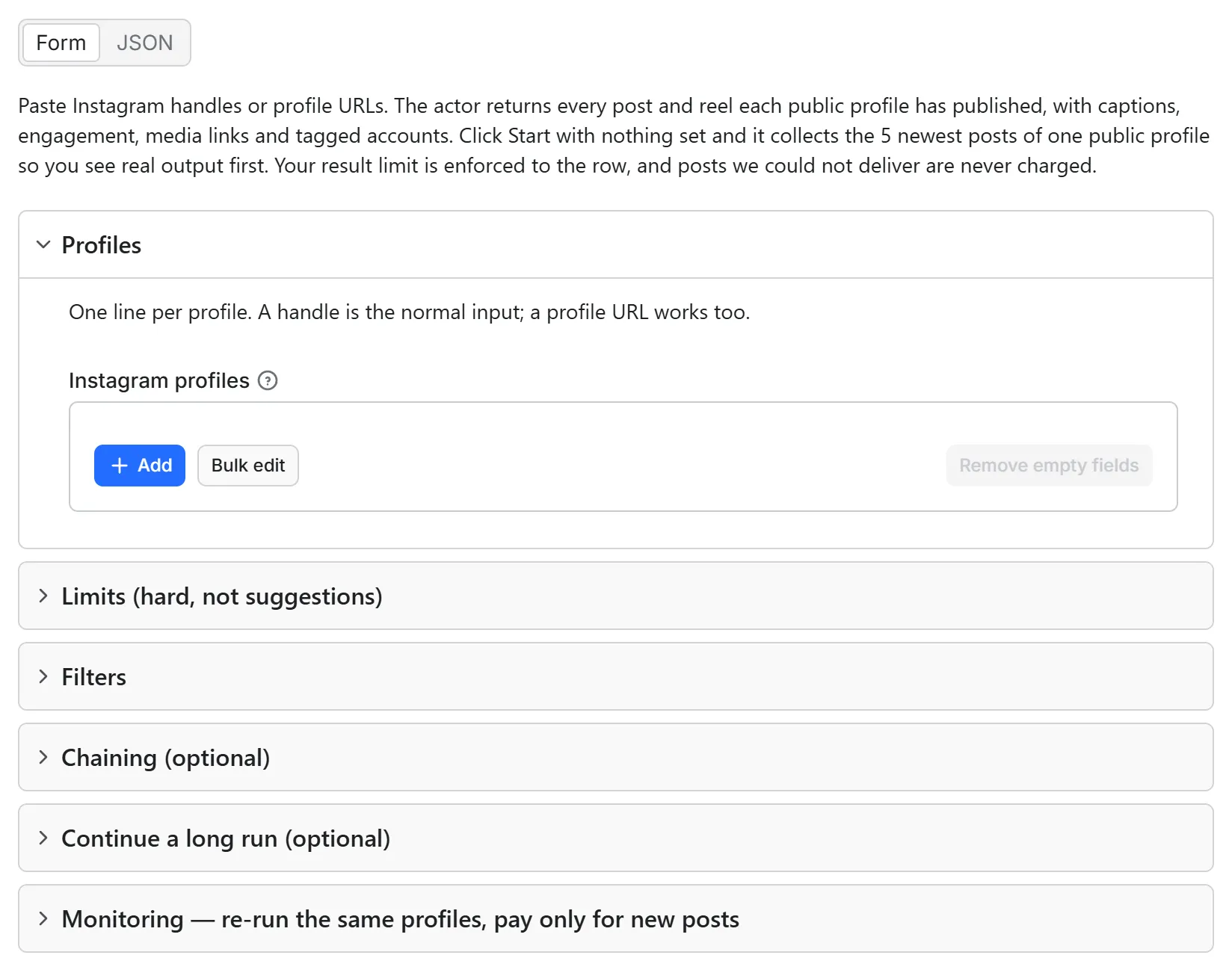
Running the same profiles again? A post already delivered to your account is never charged a second time — it is skipped, with the count on the status line, or handed back uncharged if you ask for it (a scoped API token needs key-value store Read, Write and Create permission for that check to run — see Never pay for the same post twice).
Unofficial. Not affiliated with, endorsed by, or sponsored by Instagram or Meta Platforms, Inc. This actor reads publicly available profile pages; Instagram is a trademark of Meta Platforms, Inc.
Output
One row per post, one row per profile, and every row carries charged and status — so your
invoice reconciles from the dataset itself. A profile row that paid a check says charged: true. Real rows below, taken from a verified run against
nasa (captions trimmed with … for the page):
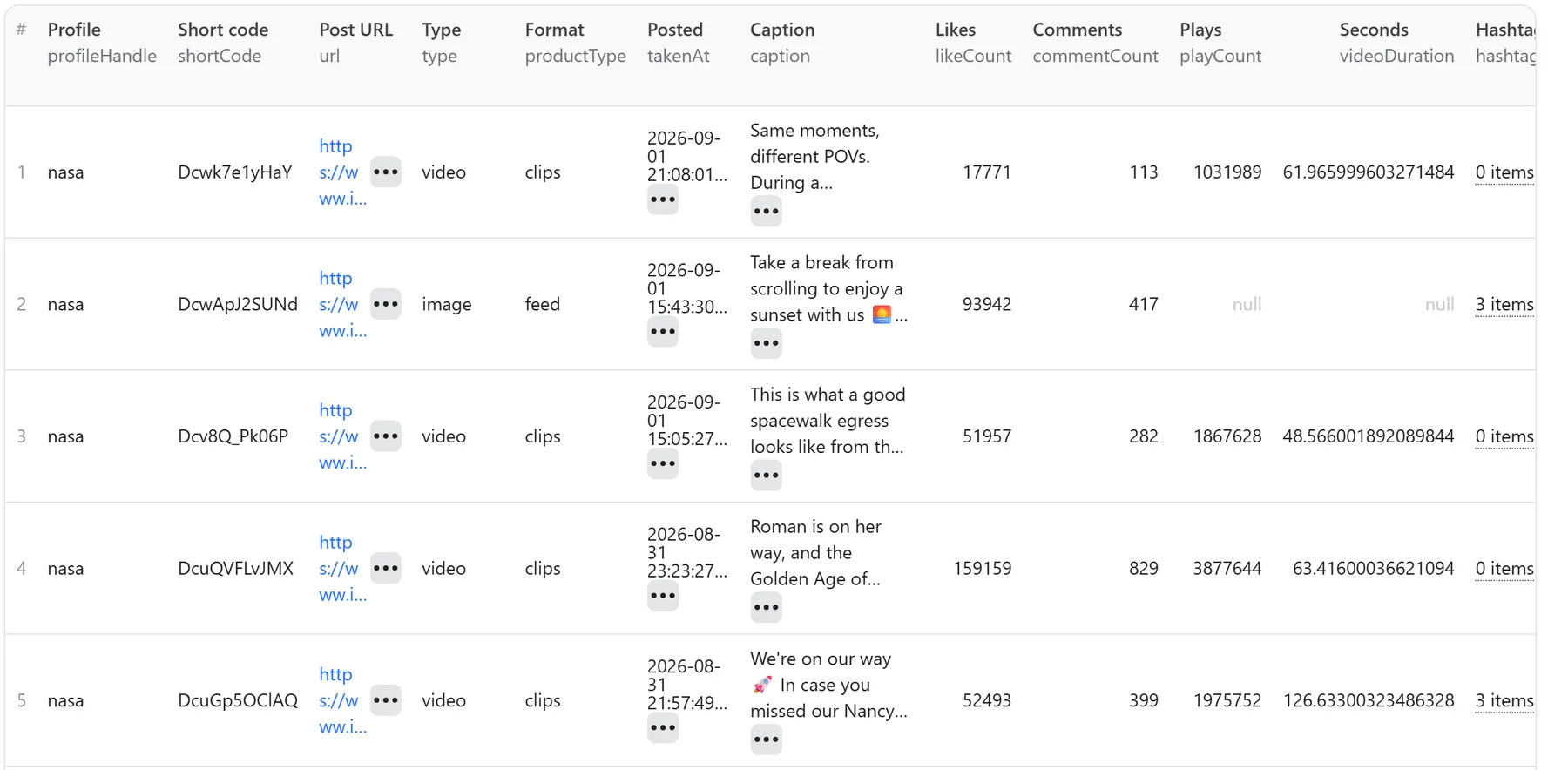
| shortCode | type | takenAt | caption | likeCount | commentCount | playCount | videoDuration |
|---|---|---|---|---|---|---|---|
DchLnq8E21N | carousel | 2026-08-26T21:30:18Z | How it started 👉 how it's going. On Aug. 30, our Nancy Grace Roman Space Telescope will lift off to space… | 19,990 | 140 | — | — |
Dcg_WJpGXfh | image | 2026-08-26T19:43:06Z | A shining star. NASA honors the memory of Dolly Parton, who passed away on Aug. 25, 2026… | 127,200 | 308 | — | — |
Dcea3BiPTBm | video | 2026-08-25T19:55:51Z | Teamwork makes the dream work! High fives and cheers rang out both in space and on Earth during today's spacewalk… | 45,078 | 367 | 3,430,678 | 41.1 |
Newest first means newest by date. Instagram's own grid leads with the posts the owner pinned
to the top, so "the latest 3" on a public API is usually three pinned posts and none of the three
newest. Rows here are ordered by takenAt, so your limit buys the most recent posts — pinned
posts still ship, in their real date position, flagged with isPinned so you can filter them.
The first row above in full, exactly as it lands in the dataset (caption and signed URL trimmed with … for the page):
And one profile row per handle you asked about — uncharged, unless the profile was read with
nothing new for you and paid its one check (that row says charged: true):
Every field is always present (explicit null over silent omission), so a row from the profile
route and a row from the depth route are the same shape.
With a watchlist name set, every post row also carries the two fields the list adds —
"isNew": true"isNew": false for one it had, and
"firstSeenAt", the moment it was first delivered (this run's clock for a new post, the original
sighting for an old one). Without a watchlist both read null.
Agent / API paste-block
Use it as an API endpoint (Standby)
You can also call this actor like an API: send one to three Instagram profiles and get their newest posts back in the same response, with no run to start and no dataset to read. The address is https://steadyfetch--instagram-profile-posts.apify.actor (also on the actor's Endpoints tab, where you can try it from the browser).
| Setting | What it does |
|---|---|
profiles | Handles or profile links, comma separated (or a JSON list in a POST body). At most 3 per request, 1 on the Apify free plan. |
resultsLimit | Posts per profile, newest first. 30 if you leave it out; at most 100 per request (12 on the Apify free plan). |
maxItems, mediaType, resultsType, postedAfter, postedBefore | The same settings as a run, read the same way. |
The answer is JSON: posts (each with the same fields as a post row in a run's dataset), profiles (one row per profile, as a run writes it), summary, delivered, charged (per event) and notes for anything that was not returned, in plain words. A request is charged exactly what a run with the same input is charged, per post, per profile lookup and per check, at the same prices. A request that returns nothing charges nothing, and if the charge for a request cannot be completed, nothing is sent.
Good to know: the endpoint has no memory of posts your account already has, so every request returns, and charges for, the posts it reads. For many profiles, deep archives, a watchlist or skipping posts you already collected, run the actor as usual.
Input
Handles (nasa), or profile URLs (https://www.instagram.com/nasa/). Capital letters, a
leading @ and a trailing slash are all fine. You can also chain a Dataset ID from a
previous run and this actor will find the profiles in it.
Coming from another Instagram actor? Instagram links or handles pasted into Instagram links
or handles (startUrls, or urls) are sorted and served here too — plain links, or the
[{"url": "..."}] shape — at the same limit and the same price as the ones you type into
Instagram profiles, and a handle in both lists is collected once. A post or reel link
names one post rather than a profile, so its row is uncharged and points you at our reel
transcript actor. This actor returns posts, not transcripts, so there is no language setting.
Handles sent as instagramUsernames, usernames or handles are read as Instagram profiles,
with one uncharged row naming the field that was read.
Optional: what to collect (the profile's own posts, or the posts that tag it — see Posts that TAG a profile), max posts per profile, max posts for the whole run, post type, posted-after and posted-before dates, max run seconds.
A date takes 2026-08-01 (or a full 2026-08-01T09:30:00Z), 1 Aug 2026, or a span back from the run's start like 7 days, 2 weeks, 3 months or yesterday. A date the actor cannot read stops the run before any profile is looked up: every profile gets its own row saying so, and nothing is charged. A date like 10/05/2026, which could be 5 October or 10 May, is read month first as earlier builds read it, and one uncharged note row names the day used; write the year first (2026-10-05) to remove the doubt.
Every one of those optional fields accepts null, meaning "use the default" — so a template
or an agent that renders one request body per run can send null for whatever it left unset
instead of building a different body each time. profiles is the one field that needs a real
value.
Leave the input empty and the run is the default sample: the 5 newest posts of bbcnews, charged like any run, so you see the exact schema on real data. The status line says it was the sample and how to run your own handles. Set only filters and no Instagram profiles and that sample runs under them — your settings are kept, everything you did not set takes the sample's own value, and one uncharged row names which was which.
Posts that TAG a profile
Set What to collect (resultsType) to tagged and the run collects the posts other
accounts published that tag your handles — Instagram's Tagged tab — instead of the
profiles' own grid. Everything else is the same: same handles, same Max posts per profile,
same filters, same charged unit, same price. One charged unit is one post delivered, on
either door.
What changes is whose posts come back, and the rows say so:
| column | on the profile's own posts | on the posts that tag it |
|---|---|---|
profileHandle ("Profile") | the profile you asked for | the profile you asked for |
ownerUsername ("Posted by") | the same profile (or a co-author) | another account, every time |
postSource ("Read from") | feed or profile-page | tagged |
Every other column is the one you already get: caption, hashtags, mentions, taggedUsers,
likes, comments, plays, media links, location, isSponsored. A tagged post that is a reel
chains into the reel transcript actor exactly like any other.
Two things this door will not pretend to know. Nothing Instagram publishes counts the posts
that tag a profile — the profile's own postCount is its own grid and says nothing about this
tab — and the tab can be curated, so an account really can have nothing in it. When a grid comes
back unreadable this actor therefore says that, uncharged, and asks you to re-run: it will not
tell you a tab is empty when it cannot prove it. And a profile that could not be read at all is
uncharged on this door exactly as it is on the other.
How often this changes: as often as other people post about you, which for most accounts is daily and for a busy brand is hourly — measured 2026-09-14, gopro's newest tagged post was minutes old and a page of 21 spanned about twenty minutes, while a quiet account's newest was years old. A daily schedule catches a busy handle; weekly is plenty for a quiet one. Repeat memory applies here too, so a re-run delivers and charges only what is new.
Never pay for the same post twice
Every run remembers the posts it delivered for your account — in a key-value store called
ig-posts-watch-account in your own Apify account, under every identity the post has (its short
code and its numeric id). Run the same profiles again, at any depth, and the posts you already
have are skipped before they take a row slot: not delivered again, not charged, and not
counted against your limits — the run keeps reading until it has filled Max posts per profile
with posts you do not already have. The status line says how many (4 already in your account,
skipped, not charged) and OUTPUT.skippedSeen holds the number. The memory is a key-value store in your own
Apify account, so a run started with a scoped API token in restricted-access mode needs key-value
store Read, Write and Create permission (Write is what lets the run remember what it delivered; without it every run pays again) — or Actor runs set to Full access — under Settings →
API & Integrations; without it the run says so on its status line and in one uncharged row, and it
cannot skip what you already have.
Want one complete dataset per run instead of only what changed? Turn on Include posts you
already have (includeSeen: true) and those posts come back anyway — marked repeat: true
with firstSeenAt and firstSeenRunId naming the run that first delivered them,
charged: falseDelete that store to forget everything; entries older than 90 days count as new again. If the store cannot be read on some run, the run still runs — it delivers and charges as usual and the status line says the repeat check was unavailable, so you know a repeat may have been charged that once.
Watch profiles on a schedule
Following a profile is rarely a one-off: the question is usually what did they post since last week? A watchlist keeps a separate list per profile set, on top of the account-wide memory above.
- Put the profiles in Instagram profiles (a chained dataset works too).
- Give the run a Watchlist name, e.g.
acme-brands, and turn on New posts only. - Save the input as a Task, put the Task on an Apify Schedule (daily fits most profiles), and add an integration or a webhook on run succeeded — a Google Sheet, Slack, n8n, Make, or your own endpoint.
Put every profile in ONE scheduled run, not one run each. It finishes sooner — a run starts once and reads profiles side by side — and it costs you exactly the same: the post fee is charged per delivered post and the profile fee once per profile, whichever way the profiles are split across runs. A profile with nothing new charges neither: each profile a run reads that has nothing new pays one $0.005 check instead, once per profile however the profiles are split across runs, so one run still costs exactly the same as one run each.
On the Apify free plan, a profile is read at most once an hour under the same settings. A run inside that hour reads nothing for that profile and answers from the last check: its row says when the check was made ("checked at 06:10 UTC, nothing new since"), the posts that check delivered are not sent again, and nothing is charged, not even the check. A check your result limit filled, or that the run's own time, budget or item limit cut short, does not count, so the next run reads on. On a paid plan every run reads the profile.
Each scheduled run then delivers only the posts that are new, each with isNew: true and its
firstSeenAt. Posts you already have are skipped before they take a row — not delivered again and
not charged — and the run's status line says exactly what happened, for example: 4 already in your
account, skipped, not charged. The same numbers sit in the run's OUTPUT record under
watchlist, newItems, skippedSeen and repeatMemory. With New posts only on, a post you
already have still holds its place in the window the run reads, which is what keeps a daily
monitoring run reading the newest Max posts per profile rather than walking into the archive
to replace it. Leave New posts only off and the opposite holds: a post you already have costs
you nothing at all, so the run keeps reading until it has filled your limit with posts you lack.
Some details worth knowing:
- The list lives in your account, in a named key-value store called (one record,ig-posts-watch-<your name>
SEEN). Open it in Storage → Key-value stores to see every post the actor has delivered under that name, or delete the record to start the list over. This actor runs with limited permissions and touches nothing else in your account. - Only delivered posts go on the list. A profile Instagram would not serve this minute, a private account or a wrong handle leaves nothing behind, so the next run tries it again.
- What "new" compares against. The actor reads each profile's most recent posts (up to Max posts per profile) and checks those against the list — so a daily run with the default 30 catches anything posted since, and a profile that posts more than that a day just needs a higher number.
- Leave New posts only off and posts you already have are still never charged twice — the account memory above does that on its own. Turn Include posts you already have on to get them back in every run's dataset, uncharged.
- New posts only makes the rail fail-closed. With it on, a run that can read neither your watchlist nor your account's memory ships one uncharged row and stops, rather than risk charging you for posts you may already have. A named watchlist it cannot open stops the run the same way, before any spend. A scoped API token without key-value store Read, Write and Create permission is the usual reason both fail at once — the run then names the permissions to grant instead of asking you to re-run.
- The listing itself is one request per profile page whatever it holds; what the filter saves is the rows, the charges and your limits. One post, one sighting, however it arrives.
Deep archives: ask once, get the archive
Set a date window or a deep result limit and the run walks the profile's feed to wherever your ask ends — verified live on a 718-post profile: the full feed, back to its first post from December 2011, in a single ~9-minute run. A 1,000-post archive takes about 13 minutes; leave "Max run seconds" at 1800, or raise it to 3600 for the biggest profiles.
Sizing it, and you do not have to guess. Measured across this actor's own time-limit-cut runs,
throughput runs from about half a post a minute to about 34 a minute, with the middle of the band
around 2 — it swings that far because a profile Instagram makes us retry costs minutes while an
open one costs seconds, and a filtered walk keeps reading past every post it excludes. So rather
than asking you to guess where in that band your own list sits, a run our time limit cuts measures
its own rate and says what fits: "This run collected 0.23 rows/s, so the whole ask needs about
1,400 s — raise "Max run seconds" to 1,500." When the whole ask is past the one-hour ceiling it
says how many runs to split it into instead of naming a setting that cannot go that far. The same
numbers ride the run summary as rowsPerSecond, suggestedMaxRunSeconds and suggestedSplit.
A date window that sits far back is read to a bounded depth rather than to the end of the archive
— about forty pages past what your own "Max posts per profile" needs — and if the window is still
further down, the run says how many pages it reached, charges nothing for them, and the
resumeCursor below continues from exactly there.
Two honest numbers ride every finished archive:
- The depth meter. Instagram's public feed exposes slightly fewer posts than the profile's own counter for many accounts (a profile counting 718 serves 693 — no login changes that). When the feed genuinely ends, the profile row says exactly that: "Instagram's feed exposes 693 of the 718 posts the profile counts." Complete archive, gap named, nothing silently missing.
- The resume point. If an archive outruns your time or cost limit, the final summary
row carries a
resumeCursor. Pass it back as input —{"resumeCursor": …}— and the next run continues exactly where the last one stopped: completed profiles skipped, no post read twice, nothing already delivered charged again. For agents: re-run with the summary'sresumeCursoruntil it comes backnull— the archive is then complete. On a date window that is already in the past you do not even have to pass it back: the next run with the same input continues from where the last one stopped by itself. That holds when your dates move, too: a window whose "Posted before" is older than every post your account's last run of that profile passed continues from that run's deepest point instead of the newest post. When a run stops short of a window and delivered nothing, its stop row also says how fast the profile posts (postsPerDay), about how many posts down the window starts (windowStartsPostsDeep), how far back this run got (scannedBackTo) and about how many more runs reach it (runsToWindow).
The limits are hard, and they name themselves
Three things can stop a run: your result limit, your maximum cost per run, or your time
limit. Whichever binds, the run still finishes successfully, the last row tells you
which one it was and what is still pending — including the exact resumeCursor to continue
— and nothing undelivered was charged. You will never have to guess which knob to raise.
A scheduled list your maximum cost per run cannot cover takes turns. The run page says how many
of the list your maximum covered and what checking the whole list costs, and the next run of the
same list starts with the first profile this one did not check, so every profile gets its turn
across your runs. A run you continue with resumeCursor continues exactly where it stopped.
The result limit is exact under concurrency too: two profiles are read in parallel, and a whole-run cap of 1 still delivers exactly one row, charged once for that post and once for the profile it came from.
And a limit set too high is never a refused run. This actor delivers up to 5,000 posts per profile and up to 100,000 posts per run, and its clock runs between 30 seconds and 1 hour. Ask for more than that — or for a shorter clock — and the run still starts: it continues at the nearest limit and leaves one uncharged row naming what you asked for and what bound it.
On the Apify free plan this actor makes at most 80 fallback reads per account in any 24
hours (one read looks up a profile Instagram walls or reads one page of 12 of its posts; Instagram's
own pages are not counted), and accounts on the free plan share one daily allowance on this actor.
Past either, the run keeps everything it already delivered and still reads what Instagram serves
directly, ships one uncharged row saying when the allowance resets (UTC), and charges nothing past
it. Paid Apify plans carry no daily allowance — the first is Bronze (Apify's Starter plan). That row, the summary
row and the run's OUTPUT also carry reason (free_plan_allowance) and retryAfter (when this account can run
again, UTC), so a script or an agent can wait for it instead of re-running; a run your own maximum cost per run
stopped carries reason (max_total_charge) on its summary row.
What it costs
One result = one delivered post or reel, with everything Instagram publishes about it in the same row. There is no second charge for "details" — no per-field, per-comment or per-image top-up. Nothing is charged for starting a run, no subscription, no third-party API key to buy.
from $1.20/1,000 posts — $0.0024 each on the free plan, falling to $0.0012 on the top Apify plan tier: $1.60 per 1,000 on Bronze, $1.45 on Silver and $1.20 on Gold and above, against $2.40 on the free plan. Platform usage (compute + transfer) is included in the event price, so the per-post price you see is the whole price.
Each profile that delivers posts adds one profile lookup of $0.003 (flat, the same on every plan). A profile that delivers nothing — private, removed, unreachable, or nothing new on a watched list — pays no lookup. It covers the extra connections a walled profile needs to be read at all.
Each profile a run reads that has nothing new for you pays one check of $0.005 (flat, the same on every plan): a scheduled check that finds nothing new pays this one small fee per profile. A profile that delivers pays the post fee and the lookup instead, never the check, and a profile that could not be read, a profile the run stopped before finishing, a profile the Apify free plan answered from its last check within the hour, and the sample run you get by pressing Start with no input are not charged it. Posts you already have are still never charged again.
What can fail, and it carries no result fee when it does. These rows ship with charged: false, always:
| status | when |
|---|---|
not_found | no public profile at that handle — wrong, renamed or deleted |
private_account | the account is private, so its posts are not publicly readable |
no_posts | a real public profile with nothing on it |
rate_wall / rate_limited | Instagram asked us to wait, and was still asking after retries |
unavailable_schema | Instagram's own profile service is erroring for that handle |
empty_response / source_unavailable | Instagram answered, but with nothing readable |
feed_unavailable | the "Tagged" tab could not be read — a fallback route is its only source, and it did not answer readably |
input_error | that input could not be used — a handle that is not a profile, or a Dataset ID that does not exist — the row names the fix |
sample_settings_kept | you set filters and no profiles, so the sample ran under your settings — the row names which settings were yours |
undeclared_field | your links arrived under another actor's field name, and were read here anyway — the row names the field this form carries |
None of these rows carries the profile lookup or the check either: the lookup is charged only on a profile that delivered at least one post, and the check only on a profile that was read. Posts your filters excluded are also never delivered and never charged; the profile row counts them. Cap any run with Maximum cost per run (any amount from $0.05 up) and it stops cleanly before your ceiling.
A profile Instagram will not serve is retried through a fallback route, at the same price. When Instagram refuses a profile on every connection, or stops serving its post feed part-way through, the run collects the same posts from a fallback route instead — same columns, same result limit, same per-post price, no extra fee. If that cannot answer either you get exactly what you got before: an uncharged row saying what happened, and the resume point on the summary row.
If Instagram walled the same profile on your account's last two checks of it within a day, the next check reads that profile through the fallback route first rather than pausing on Instagram again — the same page the run was going to read anyway, at the same per-post price, with nothing extra charged. On a dated check one such refusal within the last week is enough, because a check that runs once a day can never have two inside a day. Either way it counts only where Instagram refused to look the profile up at all: where Instagram served the profile and walled only its post feed, the profile itself is still read from Instagram, because reading it through the fallback route would cost a read the run does not otherwise need. That memory expires so that Instagram's own surface is re-tested — a day after the refusals for the two-check reading, and on a dated check six and a half days after Instagram last refused the profile. The checks that rely on it never renew it, so a daily dated check asks Instagram again once a week, and one check Instagram serves clears it at once.
On a scheduled check that one page answers, Instagram is still asked first — and when it refuses, the run takes the fallback route rather than retrying on further connections, because those connections cost more than the one page they are trying to save. A request deeper than one page tries further connections first; once Instagram has refused the post feed on two connections in a row and no more than 48 posts are still wanted from that profile, the run takes the fallback route instead of trying more. A larger request keeps every connection it takes today.
On a dated check, a profile whose post feed walled on your account within the last 36 hours skips that first connection too and takes the fallback route straight away — a feed that has stopped answering costs more in run time than the one page it could save, and that page is the one the run was going to read anyway. The run's log says when it takes that door. A request with no date window, a request deeper than one page, and a profile with nothing remembered all ask Instagram first exactly as before.
A small ask is never asked to overpay for a hard profile. When Instagram walls a profile, the run tries further connections only while what you asked for can cover them. If it cannot — a very small result limit on a plan's lowest per-post price — the profile row says so and names the fix: ask for more posts per profile. Nothing is charged for a profile that stops there.
Honesty contract
A profile that returns nothing still gets a row, and the row says why — uncharged, every time:
| status | what it means | can a re-run help? |
|---|---|---|
not_found | no public profile at that handle — wrong, renamed or deleted | no |
private_account | the account is private, so its posts are not publicly readable | no |
no_posts | a real public profile with nothing on it — a definitive answer | no |
unavailable_schema | Instagram's own profile service is erroring for that handle | no, it is on their side |
rate_wall / rate_limited | Instagram asked us to wait, and was still asking after retries | yes |
empty_response | Instagram answered but sent an empty body | yes |
source_unavailable | Instagram did not return readable data on this run | yes |
feed_unavailable | the "Tagged" tab's only source did not return readable data on this run | yes |
input_error | that input could not be used — a handle that is not an Instagram profile, or a Dataset ID that does not exist — the row names the fix | fix and re-run |
undeclared_field | your links arrived under another actor's field name; they were read anyway and the row names the field this form carries | nothing to fix |
stopped_at_limit | on the Apify free plan, the daily allowance of fallback reads was reached — one row for the run says when it resets (UTC) | yes, after it resets (retryAfter), or on a paid Apify plan such as Bronze (Starter) |
A post that appears on two profiles you asked for (a co-authored post) is one row and one charge, not two. In the rare case Instagram stops serving a profile past every recovery, the profile row says so, is marked worth re-running, and the summary carries the exact resume point — a partial answer never reads like a complete one, and never makes you start over. When Instagram stops serving a profile's post feed part-way, you get the pages it did serve plus that resume point, and the run stops waiting on that feed after three tries that recovered nothing — so your run is not buying compute against a wall that is not lifting.
This actor may fail when the platform changes things — failed items are never charged.
Freshness
Post data is read live on every run, so it is as current as Instagram's own public profile
page. The videoUrl and image links are signed by Instagram and expire in roughly 1–3
days — the videoUrlExpiresAt column tells you exactly when, so download or transcribe
soon after the run rather than months later. The permalink in url never expires.
Works with
Chain this actor's output straight into the transcript actors, or feed it from any actor that emits Instagram handles.
| Chain | How |
|---|---|
| Profiles → reel transcripts | run this actor, then pass its Dataset ID to Instagram Reels Transcript Scraper — Instagram Transcript API — it reads the videoUrl column |
| Any list of handles → posts | pass a Dataset ID here; rows need a username / ownerUsername field or an instagram.com profile URL |
| Paste rows directly | use Dataset items instead of a dataset ID |
A Dataset ID that does not exist is answered as a wrong ID, on one uncharged row naming it — never as "your rows carried no profiles", and no empty dataset is created under the typo. A chained dataset holding more than 5,000 rows is read to that limit and one uncharged row says how many rows it holds and how many were read, so a chained run never comes back quietly short.
Steadyfetch Instagram suite
Handle in, structured rows out. All-inclusive pay per event, nothing charged for starting a run, charged only on delivery. Profile posts adds one profile lookup of $0.003 per profile that delivers posts, and one $0.005 check per profile a run reads with nothing new; a profile that could not be read pays nothing.
| What you want | Actor |
|---|---|
| Reels turned into text, with the 3-second hook | Instagram Reels Transcript Scraper — Instagram Transcript API |
| A profile's recent posts, capped where you say | this actor |
The rest of the steadyfetch shelf — same contract everywhere: all-inclusive pay per event, nothing charged for starting a run, charged only on delivery (three actors add a small delivery-conditional fee: keyword volume's fresh lookup, profile posts' profile lookup, Google Jobs' search fee — each README states it).
| Family | Actors |
|---|---|
| Ad creative intelligence | Facebook · Google Ads video · TikTok · LinkedIn · Google Ads text & OCR |
| Trends & keywords | Google Trends · Trends Now · Breakout keywords · Autocomplete keywords · Keyword volume & CPC · Social trends |
| YouTube transcripts | YouTube videos · YouTube channels |
| Reel transcripts · Profile posts | |
| Jobs | Indeed · Career sites by domain · Glassdoor · Multi-board · Google Jobs |
| Amazon | Products · Search · Bestsellers · Sellers |
| Any media file | Speech to Text · any link or file |
Feedback & support
Found an issue? Open it on the Issues tab — we usually reply within a couple of hours, always within a day. Include the input you used. Bugs on our side are fixed; misses on Instagram's side are documented in the row you already have.
If it earned its keep, a rating helps other buyers find it, and saving the actor keeps it one click away.


![Instagram Posts, Reels & Comments Scraper [NO LOGIN] ✅ avatar](https://images.apifyusercontent.com/er0jo10t-xngWvDQkGqKsV6CP0at0xdHMoAPoVPSoEc/rs:fill:76:76/cb:1/aHR0cHM6Ly9hcGlmeS1pbWFnZS11cGxvYWRzLXByb2QuczMudXMtZWFzdC0xLmFtYXpvbmF3cy5jb20vc0NDU2R3bm1LTUoxUTJzVG4tYWN0b3ItOHFQZmVmQXltZkl3cmdrTVgtSWZDaHhpbFBtci1pbnN0YWdyYW0tdmVjdG9yLWxvZ28taWNvbi1zb2NpYWwtbWVkaWEtbG9nb3R5cGVfOTAxNDA4LTM5Mi5wbmc.webp)


