

TikTok Ads Scraper — Creative Center TikTok Top Ads Transcripts
Pricing
from $8.00 / 1,000 ad video transcripts
TikTok Ads Scraper — Creative Center TikTok Top Ads Transcripts
TikTok Creative Center Top Ads as transcripts with the first-3s hook, CTR and brand metadata, one row per ad. Pick a region, no ad IDs needed; or paste ad links or chain any scraper. From $8.00 per 1,000 ad video transcripts, 3 min included. Expired links and music-only ads are never charged.
Pricing
from $8.00 / 1,000 ad video transcripts
Rating
0.0
(0)
Developer

Steadyfetch Team
Maintained by CommunityActor stats
0
Bookmarked
5
Total users
3
Monthly active users
4 days ago
Last modified
Categories
Share
A TikTok ads scraper for the Creative Center: pick a region and get TikTok's current Top Ads back as text — no ad IDs needed. Every ad comes back with its full transcript, the first-3-seconds hook, and the CTR, brand and objective metadata Creative Center publishes, one JSON row per ad, any video length. From $8.00 per 1,000 ad video transcripts on the Business plan ($20.00 on the free plan), platform usage included, no start fee. You are charged only when a transcript lands in your dataset: finding the ads is never charged, and expired links, music-only creatives and ads that dropped out of Top Ads cost $0.
See a real run before you spend anything: sample dataset — real ads from one verified run: two transcripts charged, and one ad with no speech delivered uncharged. Unedited.
Using an AI agent? Pin this actor in Apify's MCP server with one link: https://mcp.apify.com?tools=steadyfetch/tiktok-ads-transcript-scraper
- Actor id:
steadyfetch/tiktok-ads-transcript-scraper - Input:
{ "discoverRegion": "US" }— the one field you have to set. - Cap the bill: set
maxTotalChargeUsdon the run (a run option, not Actor input), e.g.0.50— the run stops when it reaches it.
Just want to see it work? Click Start with nothing set and the run is a 3-ad sample of current US Top Ads (all industries, short ads), transcribed and charged like any run — about $0.06 on the free plan, $0.024 on Business. Already have ads? Chain it straight after any Creative Center / Top Ads scraper run (dataset ID, pasted rows, or video URLs), or pass Top Ads material IDs and it fetches a fresh video link itself. Running the same ads again? An ad already delivered to your account is handed back from that run and not charged a second time — automatically, whatever mode found it. Watching a market over time? Name a watchlist and re-run on a schedule: with New ads only you get only what is new (see Watch a market on a schedule).
That input alone returns 20 transcribed Beauty & Personal Care ads running in the US right now.
| You give it | You get back |
|---|---|
| Just a region — optionally an industry, a time window and a ranking (no ad IDs, no prior scrape) | transcript — full speech-to-text, any length (first 3 minutes included, then a small per-minute surcharge) |
…or ad video URLs (videoUrl / videoUrl720p / video_url from any Creative Center scraper) | hook3s — the ad's opening line, plus hookStartSeconds |
| …or your scraper run's dataset ID (one-click chaining) | brandName, adTitle, ctr, cost, likes, industryKey, objectiveKey, materialId |
| …or Top Ads material IDs / ad page links you copied browsing Creative Center (fresh links fetched for you) | language, durationSeconds, timestamped segments, urlExpiresAt |
| …or pasted dataset rows (any scraper's shape) | — combine any of these in one run |
| …plus a watchlist name (optional) | a separate list per market — and, with New ads only, nothing you already paid for |
| …the same ads again, in any mode | ads already delivered to your account come back from that run, repeat: true, not charged |
Find ads for me (cold start)
Set Region and the actor pulls current Top Ads itself, then transcribes them. Nothing else is required.
| Field | What it does |
|---|---|
| Region | The ad market to pull from — 28 markets, from the United States and United Kingdom to Japan, Brazil, Saudi Arabia and Indonesia. Setting it is what turns discovery on. |
| Industry (optional) | Narrow to one of 21 categories (Beauty & Personal Care, Games, Food & Beverage, Financial Services…). Leave on All industries for the strongest ads regardless of category. |
| Time window | Last 7, 30 (default) or 180 days. |
| Rank ads by | TikTok's recommended order (default), highest click-through rate, or most liked. |
| How many ads to find | Default 20. This is your cost dial for a discovery run — every delivered transcript is charged, so start small. |
Nothing set at all? That is the default sample: 3 current US Top Ads, all industries, short ads only, charged like any run. The status line and every row say so, and the run tells you how to switch to your own search. Discovery carries no result fee: you pay for transcripts, not for the search. If a search matches nothing, you get one uncharged no_ads_match row telling you so, rather than an empty dataset. If TikTok does not serve its listing to a run — or the run's own time limit stops the search before it is finished — you get one uncharged discovery_unavailable row saying which of the two it was and asking you to re-run; and if the search found some ads but ran out of time before it found all you asked for, an uncharged search_note row says so beside them. A limit of this run's own is never reported as TikTok's answer — never a charge, and never a silent empty result. Set only filters — a time window, a sort order, an industry, a cap — and name no ads? Those settings are applied to the same sample and the run goes ahead, charged like any run, with one uncharged sample_note row saying which settings were yours and how to run your own search; a cap smaller than the sample is honoured exactly, a bigger one never grows it.
Output
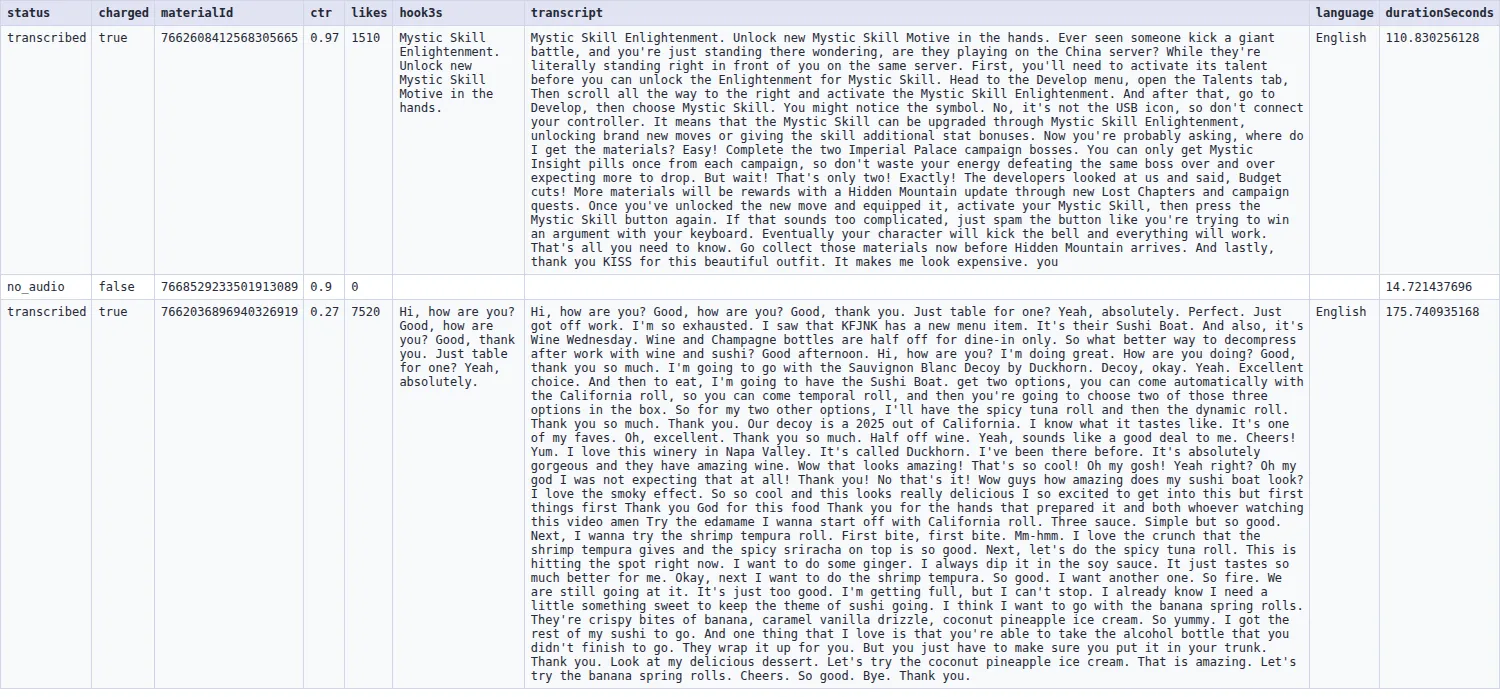
One JSON row per ad. Delivered rows carry the transcript and charged: true; anything that could not be delivered carries a status saying why, and charged: false. One case delivers uncharged: if your maximum cost is reached while an ad is already being transcribed, that ad still ships in full with charged: false and a statusReason naming the cap — your cap is never exceeded, and work already done is never thrown away. Real rows from the live example run below (long text trimmed with … for the page):
| status | charged | materialId | ctr | likes | hook3s | hookStartSeconds | transcript | language | durationSeconds |
|---|---|---|---|---|---|---|---|---|---|
transcribed | true | 7662608412568305665 | 0.97 | 1510 | Mystic Skill Enlightenment. Unlock new Mystic Skill Motive in the hands. | 0 | Mystic Skill Enlightenment. Unlock new Mystic Skill Motive in the hands. Ever seen someone kick a giant battle, and you're just standing there wondering… | English | 110.83 |
no_audio | false | 7668529233501913089 | 0.9 | 0 | null | null | null | null | 14.72 |
transcribed | true | 7662036896940326919 | 0.27 | 7520 | Hi, how are you? Good, how are you? Good, thank you. Just table for one? Yeah, absolutely. | 0 | Hi, how are you? Good, how are you? Good, thank you. Just table for one? Yeah, absolutely. Perfect. Just got off work. I'm so exhausted… | English | 175.74 |
The middle row is a music-only creative: it is delivered with its Top Ads metadata and not charged.
Full row, as JSON:
Browse the full live example dataset → — real output from a verified run, including the uncharged rows.
Every field is always present (explicit null over silent omission). Non-delivered rows carry status + statusReason instead — unavailable_expired (dead link, expiry time stated), no_audio (music-only or voice-less creative), no_audio_stream (the file has no audio track), no_onscreen_text (a silent ad with no readable on-screen copy either — see below), no_creative_found (no video link or material ID in the row, or the ad left Top Ads), input_error (guidance on what to pass instead), no_ads_match (your discovery search returned no ads — TikTok's own answer), discovery_unavailable (TikTok did not serve its Top Ads listing to this run, or this run's own time limit ended the search before it found anything — please re-run), search_note (an uncharged note: the search found fewer ads than you asked for because this run's own time limit ended it, not because TikTok had no more), asr_unavailable (our speech service refused us mid-run — please re-run), skipped_budget (your "Maximum cost per run" was reached before this ad was started at all — raise it and re-run; an ad already being transcribed when the cap was reached is delivered in full instead, uncharged), skipped_deadline (the run's time limit was reached before this ad was started — raise the run timeout, or split the batch), or failed_* (also listed in the run's ERRORS record). None of them are charged.
Every ad you send gets exactly one row, including the ones a cost cap or time limit stopped the run before reaching — so the dataset is the full ledger, and the run's status line counts each ad exactly once. Rows a re-run can still deliver carry retryable: true; filter on it to feed the next run.
Every row carries "isNew": true for an ad your account had never answered before, "isNew": false for one it had, and "firstSeenAt", the moment it was first answered (this run's clock for a new ad, the original sighting for an old one). An ad you already had comes back with "repeat": true and "firstSeenRunId" naming the run that first delivered it, "charged": false, and its statusReason saying so.
Silent ads: read the on-screen text instead (optional)
A good share of Top Ads carry no speech at all — music-only creatives and kinetic-typography ads whose whole message is on the screen. By default those ship as uncharged no_audio / no_audio_stream rows and every run tells you how many it saw.
Turn on Read on-screen text on silent video ads (includeOnScreenText, off by default) and each silent ad's on-screen copy is read straight off the video instead:
- A delivered
onScreenTextrow is charged like a transcript — same event, same price, never the "Extra video minute" surcharge. - Ads with no readable on-screen copy stay uncharged either way: b-roll whose only visible text is a logo or a placard comes back as
no_onscreen_text, not as a charged row of noise. - An ad packed with text still comes back. A few kinetic-typography ads carry more copy than one read returns. Those used to come back as a silent row with nothing on it; now the text ships cut short at about 3,500 characters with
"truncated": trueon the row, so you can see which ones to look at by eye.truncatedis on everyonScreenTextrow —falsewhen the whole thing came back. - The frames come from the video this actor already downloaded, so nothing is fetched twice.
brandNamealways comes from TikTok's own Top Ads metadata, never from reading a video frame.
Watch a market on a schedule — pay only for new ads
You never pay for the same ad twice. Every run remembers the ads it answered for your account — in a key-value store called tiktok-ads-watch-account in your own Apify account — under every identity the ad has (its Top Ads material ID and its video file). The memory is a key-value store in your own Apify account, so a run started with a scoped API token in restricted-access mode needs key-value store Read, Write and Create permission (or Actor runs set to Full access) (Write is what lets the run remember what it delivered; without it every run pays again); without it the run says so on its status line and cannot skip what you already have. Run the same material IDs, video URLs, chained rows or discovery again and the ads you already have come back from the run that delivered them: repeat: true, firstSeenRunId, not downloaded, not transcribed, not charged. The status line counts them (2 of these you already had: handed back, not charged) and OUTPUT.repeats holds the number. Delete that store to forget everything; entries older than 90 days are no longer treated as repeats.
Competitor research is rarely a one-off: the question is usually what did they launch since last week? A watchlist answers that with only the new ads.
- Pick a Region (and an industry, window and ranking if you like) — or put the material IDs, ad page links or scraper rows you want to follow in the fields below.
- Give the run a Watchlist name, e.g.
acme-competitors, and turn on New ads only. - Save the input as a Task, put the Task on an Apify Schedule (daily works well for active advertisers), and add an integration or a webhook on run succeeded — a Google Sheet, Slack, n8n, Make, or your own endpoint.
Each scheduled run then delivers only the ads the list has not answered before, each with isNew: true and its firstSeenAt. Ads already on the list are skipped before anything is fetched — not downloaded, not transcribed, not charged — and the run's status line says exactly what happened, for example: watchlist "beauty-us": 6 new ads this run, 44 already on the list were skipped (not fetched, not charged); 50 on the list now. The same numbers sit in the run's OUTPUT record under watchlist, newAds and skippedSeen.
Some details worth knowing:
- The list lives in your account, in a named key-value store called
tiktok-ads-watch-<your name>(one record,SEEN). Open it in Storage → Key-value stores to see every ad the actor has answered under that name, or delete the record to start the list over. This actor runs with limited permissions and touches nothing else in your account. - Only answered ads go on the list. A delivered transcript counts, and so does a final uncharged verdict such as no speech. A failed download, a page that could not be fetched this minute, or an ad your cost cap left out is not remembered, so the next run tries it again.
- Leave New ads only off and every ad runs as usual — you still get
isNew/firstSeenAton each row, which is the way to build a full "what is running now" picture while still knowing what is fresh. - New ads only without a watchlist name compares against your account's memory instead: ads already delivered to your account are skipped before download. Only when neither a list nor the memory can be read does the run stop with one uncharged row, instead of charging you for ads you may already have. When the reason is the token's own scope — a restricted-access token with no key-value store permission — the row says that, and which permission to grant, instead of asking you to re-run. A named watchlist it cannot open stops the run the same way, before any spend.
- If your account's memory cannot be read, the run still runs: it delivers and charges as usual, and the status line and the charged rows say the repeat check was unavailable (
repeatCheck: "unavailable"). The most common cause is a scoped API token: give it key-value store Read, Write and Create permission (or set its Actor runs to Full access) under Settings → API & Integrations, or start the run from the console. A run that hits this ships one unchargedmemory_noterow, first in the results, saying exactly that. - One ad, one sighting, however it arrives — the same ad found by discovery, pasted as a material ID, or chained from a scraper row is one entry and one charge, and a freshly minted CDN link for a file the list already knows is recognised as the same ad.
For AI agents & LLMs — copy this block
Why this TikTok ads transcript scraper?
- Charged only on delivery. A transcript either lands in your dataset or the row carries no result fee. Expired link → uncharged row that says so, with the exact expiry time. Music-only ad → uncharged row that says so. No start fee, no per-run fee.
- Built for TikTok's 6-hour links. Creative Center video links are signed and expire about 6 hours after your scraper minted them (not the 24–48 hours some listings claim). This actor decodes the expiry before downloading, skips dead links at zero cost, and — if your rows carry the ad's material ID — fetches a fresh link from the Top Ads detail page and transcribes anyway. Old datasets become usable again.
- Any video length. Top Ads run 5 seconds to 5 minutes; all of it transcribes. Videos past 3 minutes add a small per-started-minute surcharge instead of failing or being cut.
- Hook as data, and never blank.
hook3sis the ad's first 3 seconds of speech — the line media buyers study — as its own field, with full segment timestamps beside it. Top Ads that open on a music or logo sting are common, so when nothing is said in the first 3 seconds you get the first 3 seconds of speech from wherever speech actually begins, andhookStartSecondstells you which second that is (0when the ad opens speaking). An ad with no speech at all leaves bothnull— this field is never an empty string, so "the ad opens silent" and "the ad opened talking, we lost it" can't be confused. Sort byhookStartSecondsto see which competitors make you wait for the pitch. - Works with any scraper's output. The input deep-scans your rows for the TikTok CDN video link and the ad metadata — no field mapping, no glue code.
- Priced for bulk. The first 3 minutes of every ad are included, and the per-transcript price falls with volume — see the pricing tab.
This actor may fail when the platform changes things — failed items are never charged.
How to transcribe TikTok Top Ads (no code)
- Run any TikTok Creative Center / Top Ads scraper (see Works with below) — pick your region, industry, and period as usual.
- Open this actor and paste the scraper run's dataset ID into Dataset ID (or use Apify's Connect Actor integration so it chains automatically the moment the scraper finishes — the best way to beat the 6-hour link expiry).
- Click Start. Each ad comes back as one JSON row: transcript + hook + CTR/brand metadata.
- Export as JSON/CSV, or read it via API.
Prefer URLs? Paste the videoUrl / videoUrl720p / video_url values into Ad video URLs. Browsing Creative Center and found an ad you want transcribed? Copy its page link (ads.tiktok.com/business/creativecenter/topads/<id>, with or without the trailing /pc/en and tracking parameters) and paste it into either field — same for material IDs. The actor fetches a fresh video link for each. Holding a direct audio or video file on some other host — your own storage, a CDN of your own, anywhere? That is a different actor: our media transcriber (apify.com/steadyfetch/media-transcriber) reads a media file from any host, pasted into its Media URLs field. Paste one here and you get an uncharged row that says exactly that.
Why do TikTok Creative Center video links expire?
TikTok's video CDN signs every link with an expiry timestamp — about 6 hours from when the page (or your scraper) minted it. After that the link is dead. This actor handles it honestly:
- A link that is already expired is refused before any download — the row comes back as uncharged
unavailable_expiredwithurlExpiresAtshowing exactly when it died. - If the same row carries the ad's material ID (most scrapers include it), the actor fetches a fresh link from the ad's public Top Ads detail page and transcribes anyway (best effort — if the ad has since dropped out of Top Ads, you get an uncharged
no_creative_foundrow). - If most of a run's links are expired, the run summary says so plainly and suggests the fix: re-run your scraper, or pass material IDs.
Transcribe soon after scraping, or chain automatically — Connect Actor on the scraper run hands this actor the dataset while every link is still fresh.
How much does it cost to transcribe TikTok ads?
One result = one ad's full transcript payload (transcript + hook + metadata + segments). The first 3 minutes of each video are included; longer videos add a small per-started-minute surcharge. No start fee, no subscription, no third-party API key to buy.
| Job | Approx. cost |
|---|---|
| 50 Top Ads from one industry | ≈ $1.00 |
| 500 ads (a serious creative teardown) | ≈ $10 |
| Apify free plan ($5 credit) | ≈ 250 ad transcripts |
Platform usage (compute + transfer) is included in the event price — the per-transcript price you see is the whole price. Expired, music-only, or dropped ads carry no result fee.
How often should you re-run this? Once an ad has been delivered to your account, this actor remembers it for 90 days: re-running the same region, material IDs or ad links hands those ads straight back from the run that first answered them, with no result fee — so a re-run only ever charges for ads it has not answered for you before. Re-running the same input an hour later therefore returns the same ads and adds no result fee. Creative Center re-ranks Top Ads over days, not minutes, and the Time window you pick (7, 30 or 180 days) decides how much can move between runs, so a daily or weekly schedule is what actually surfaces new creatives. Turn on New ads only (newAdsOnly) if you would rather have the ads you already hold skipped as a named count than handed back as rows.
Use it via API, MCP, and integrations
- API: standard Apify run API —
POST .../acts/steadyfetch~tiktok-ads-transcript-scraper/runswith{ "datasetId": "..." }or{ "materialIds": ["..."] }. Python/Node clients work as with any actor. - MCP: one link pins this actor in Claude, Cursor, or any MCP client — the link is at the top of this page — or ask Apify's MCP server for "TikTok ad transcripts".
- n8n: a free ready-made template, no community nodes needed — TikTok Top Ads transcripts (Creative Center industry/region → hooks & transcripts → spreadsheet-shaped rows, 3-minute setup), listed on our profile website (the link on our Apify profile page).
- Make / Zapier: call it as a regular Apify actor step right after your Creative Center scraper node — pass the scraper's default dataset ID.
- Schedules + webhooks: save any input as a Task, schedule it, and use the Task's Integrations tab to push each run's new rows wherever they need to go.
Use it as an API endpoint (Standby)
You can also call this actor like an API: send a Top Ads market or a few ads and get the transcripts back in the same response, with no run to start and no dataset to read. The address is https://steadyfetch--tiktok-ads-transcript-scraper.apify.actor, and the actor's Endpoints tab lets you try it from the browser.
Or POST the same input a run takes:
The answer is JSON: ads (one row per ad, with the same fields as a row in a run's dataset), summary (the run's closing status line and counts), delivered, charged, and notes for anything you should know, in plain words. You are charged exactly as in a run — per ad transcript delivered, plus the long-video minutes past the first 3 — and an expired video link, a music-only or silent ad or a search that matches no ads is never charged. If the charge for a request cannot be completed, its transcripts are not sent.
Good to know: one request transcribes up to 15 ads (3 on the Apify free plan); a bigger ask is cut to fit and a note says so, and an ad the request runs out of time for comes back uncharged. The endpoint keeps no record of the ads your account already has, so an ad you ask for again is transcribed and charged again; and it does not read a datasetId, a watchlistId or newAdsOnly, because those need your Apify account, or includeOnScreenText, which takes longer than one request may. For a watchlist, a chained dataset, on-screen text or a whole market's Top Ads, run the actor as usual.
Works with — Creative Center scrapers you can chain from
This actor reads the video link value in each row (any https://…tiktokcdn…/… video link), not a fixed field name, so it works with any Creative Center scraper that exports direct video links — and it picks up the material ID for the fresh-link fallback. Verified output shapes on this store:
| Scraper | Where the video link lives | Material ID field |
|---|---|---|
| azzouzana/tiktok-creative-center-top-ads-scraper | videoUrl720p / videoUrl540p / videoUrl360p | adId (also detailUrl) |
| doliz/tiktok-creative-center-scraper | video_info.video_url.720p | id |
| datapeak/tiktok-creative-center | videoUrl | adId (also detailsUrl) |
| beyondops/tiktok-ad-library-scraper | videoUrlHd / videoUrl | adId |
| lexis-solutions/tiktok-top-ads-scraper | videoUrls.720p | id |
| dltik/tiktok-creative-center | video_url_720p | ad_id (also detail_url) |
How to chain: run the scraper → copy the run's dataset ID into this actor's Dataset ID field, or use Apify's Connect Actor integration to pass it automatically → Start. Using a scraper that isn't listed? If its rows contain the TikTok CDN video link or the material ID, it works the same way — and if a row has neither, it comes back as an uncharged no_creative_found.
FAQ
How does the watchlist know what I have already seen? Every ad the actor answers under a watchlist name is written to a key-value store in your own account (tiktok-ads-watch-<name>), keyed by the ad's Top Ads material ID (or the video file's own path when there is no ID). The next run with that name reads the list first. Delete the store's SEEN record to start over. Nothing is stored anywhere else.
Does a watchlist run charge for the ads it skips? No. With New ads only on, an ad already on the list is dropped before anything is fetched; the status line and OUTPUT.skippedSeen count them, and no row and no charge is produced for them.
What happens to expired links? They are detected before any download and returned as uncharged unavailable_expired rows with the expiry time. If the row also has a material ID, the actor fetches a fresh link first and only reports expiry when that fails too.
Music-only ads, or ads without a voice-over? Speech-recognition models hallucinate filler on music. The actor detects that (in any language) and returns an honest, uncharged no_audio row instead of selling you a fake transcript. Expect a fair share of these on TikTok — many top ads are music plus on-screen text.
Do I need TikTok cookies or an API key? No. The actor only downloads public ad videos from TikTok's CDN and reads public Top Ads detail pages. No login, no cookies, no third-party ASR key.
Do I need to scrape Creative Center first? No. Set Region (and optionally an industry) and the actor finds the ads itself — that is the fastest way to a first result. Chaining a scraper is for when you already have a specific set of ads you want transcribed.
Can I paste the Creative Center listing page? A listing URL is a list of many ads, not a single ad, so it is not accepted as a video URL — but you do not need it: use Region + Industry to get the same ads directly. A pasted listing URL comes back as an uncharged input_error row pointing you there.
How many ads can discovery return in one run? Up to 100 per region. TikTok serves its Top Ads listing one page deep, so the actor widens coverage by sweeping the time windows and rankings behind your choice rather than by paging; the exact ceiling varies by region and industry, and you are only ever charged for what is actually delivered.
Material IDs — what if I mistype one? Material IDs are long numbers, so a typo can look like a valid ID. Those come back as uncharged no_creative_found rows ("no longer listed in Top Ads"), not as input errors — check the ID against your scraper's row if you see one unexpectedly.
What happens on a failed download? It is retried automatically; if the file still cannot be fetched you get an uncharged failed_download row plus an entry in the run's ERRORS record. You pay no result fee for anything that didn't deliver.
Languages? Whisper-class multilingual ASR — English, Spanish, Japanese, Arabic, Indonesian, and ~90 more transcribe out of the box; the detected language ships on every row.
Why not scrape Top Ads here too? Single-purpose by design: your scraper (whichever you like — region, industry, keyword filters included) finds the ads; this actor turns them into transcript data, reliably. One job, done honestly.
Is this an official TikTok product? No. This is an independent actor from steadyfetch — unofficial, and not affiliated with, endorsed by, or sponsored by ByteDance Ltd. or TikTok. "TikTok" and "TikTok Creative Center" are trademarks of their respective owners, used here only to name the public Top Ads surface this actor reads.
Steadyfetch ad-intelligence suite
One actor per ad surface, one job each, the same contract everywhere: all-inclusive pay-per-event, no start fee, charged only on delivery — and the same row shape, so a workflow built for one platform ports to the next.
Ad creatives → transcripts & on-creative text
| Ad surface | Actor | Free n8n template |
|---|---|---|
| Facebook & Instagram Ad Library | Facebook ad transcripts | Facebook ad transcripts · Competitor ad teardown |
| Google Ads Transparency Center | Google Ads video transcripts | Google Ads video transcripts |
| TikTok Creative Center Top Ads | this actor | TikTok Top Ads transcripts |
| LinkedIn Ad Library | LinkedIn ad transcripts | LinkedIn Ad Library transcripts |
| Instagram Reels (organic posts) | Instagram Reels Transcript Scraper — Instagram Transcript API | Instagram Reel transcripts |
Ad creatives → text (image & text ads, read by OCR)
| Ad surface | Actor |
|---|---|
| Google Ads Transparency Center | Google Ad Copy Scraper — Ads Transparency Center, CTAs & OCR |
Free n8n workflow templates for this actor are listed on our profile website (link on our Apify profile).
The rest of the steadyfetch shelf — same contract everywhere: all-inclusive pay per event, no start fee, charged only on delivery.
| Family | Actors |
|---|---|
| Ad creative intelligence | Facebook · Google Ads video · TikTok · LinkedIn · Google Ads text & OCR |
| Trends & keywords | Google Trends · Trends Now · Breakout keywords · Autocomplete keywords · Keyword volume & CPC · Social trends |
| YouTube transcripts | YouTube videos · YouTube channels |
| Reel transcripts · Profile posts | |
| Jobs | Indeed · Career sites by domain · Glassdoor · Multi-board · Google Jobs |
| Amazon | Products · Search · Bestsellers · Sellers |
| Any media file | Speech to Text · any link or file |
Feedback & support
Found an issue? Open it on the Issues tab — we usually reply within a couple of hours, always within a day. Feature requests welcome.
If it earned its keep, a rating helps other buyers find it, and saving the actor keeps it one click away.


