

Amazon Search Results Scraper — Full Product Row, Flat Fee
Pricing
from $3.00 / 1,000 products
Amazon Search Results Scraper — Full Product Row, Flat Fee
Amazon search: type a keyword and get full product detail for every result — price, buy box, stock, rating, reviews, variants, bestseller ranks, images and specs. From $3.00 per 1,000 products, one flat fee, no add-on events. Blocked or empty searches are never charged.
Pricing
from $3.00 / 1,000 products
Rating
0.0
(0)
Developer

Steadyfetch Team
Maintained by CommunityActor stats
0
Bookmarked
1
Total users
1
Monthly active users
4 days ago
Last modified
Categories
Share
Type an Amazon search keyword and get the full product row for every result — price, buy box, stock, rating, reviews, variants, bestseller ranks, images and the full specifications table, all in one row. One flat fee per product. There is no second event to pay for, and blocked or empty searches are never charged.
Using an AI agent? Pin this actor in Apify's MCP server with one link: https://mcp.apify.com?tools=steadyfetch/amazon-search-scraper
- Actor id:
steadyfetch/amazon-search-scraper - Input:
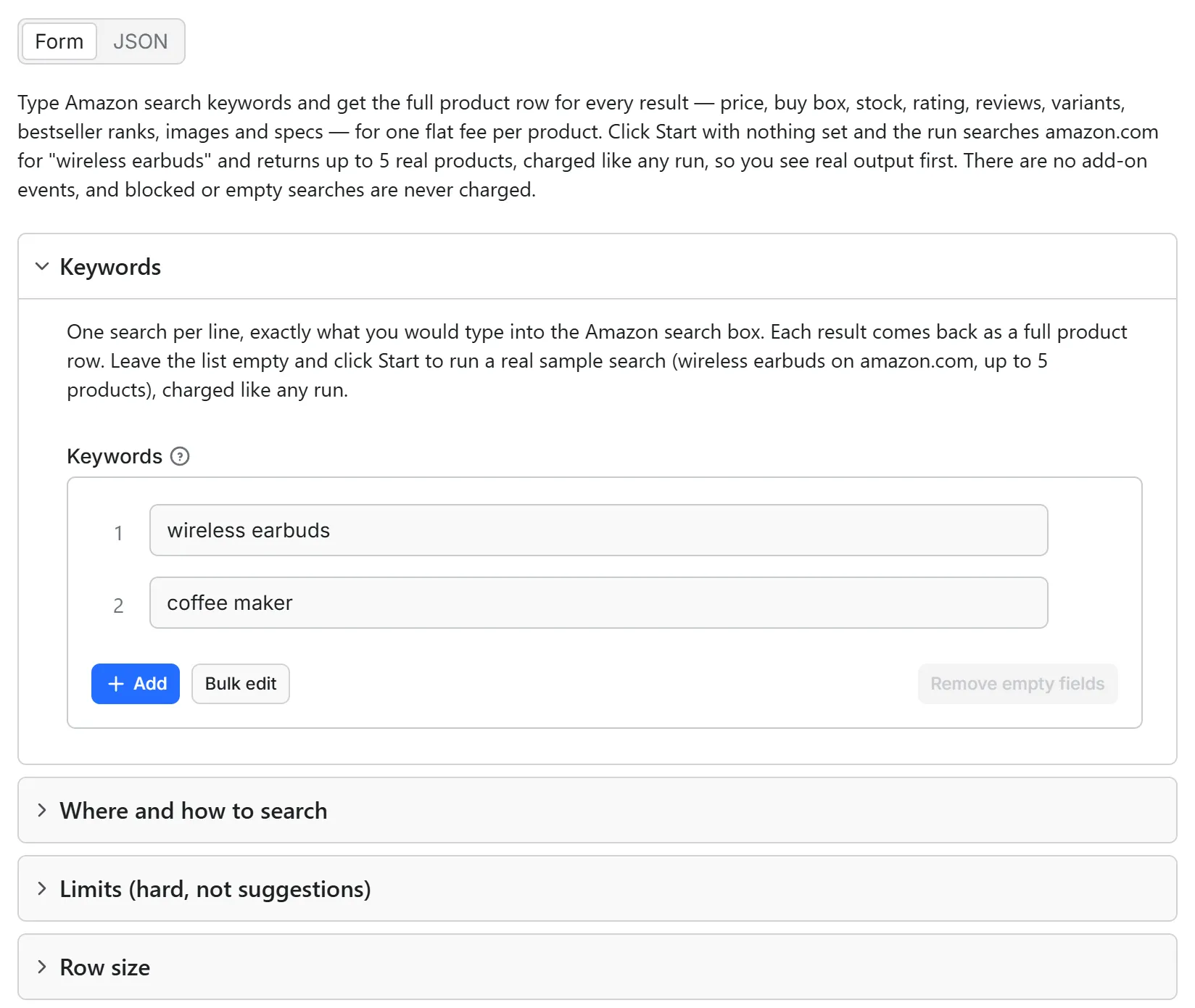
{ "keywords": ["wireless earbuds"] }— the one field to set. - Cap the bill: set
maxTotalChargeUsdon the run (a run option, not Actor input), e.g.0.50— the run stops when it reaches it. - Price: from $3.00 per 1,000 products on Silver and above, $6.00 per 1,000 on the Apify Free plan — one priced event,
Product, and nothing else. A sponsored result costs the same flat fee as any other, and turning sponsored results off means they are never even fetched. No start fee, and a blocked or empty search is never charged. Full ladder below. - How often it changes: a search page reshuffles daily — new sellers enter, prices move, sponsored slots turn over hour to hour — so the same keyword read tomorrow is a different ranking, which is what makes this a scheduled job rather than a one-off. Every run fetches fresh, at the same flat fee per product.
Give it a keyword like wireless earbuds. Get finished product objects back — not a list of links you then have to feed somewhere else.
Just want to see it work? Click Start with nothing set and the run searches amazon.com for wireless earbuds and returns up to 5 real products, charged like any run at your plan's per-product price. Set only settings — a different Marketplace, a Sort by, a Department, a limit — and leave Keywords empty, and that same sample search runs under your settings, charged like any run. Put your own keywords in Keywords for your own run.
Unofficial. This actor is not affiliated with, endorsed by, or sponsored by Amazon. "Amazon" and all related marks are trademarks of Amazon.com, Inc. or its affiliates. It reads only the public search pages an ordinary browser sees, and never signs in.
Output
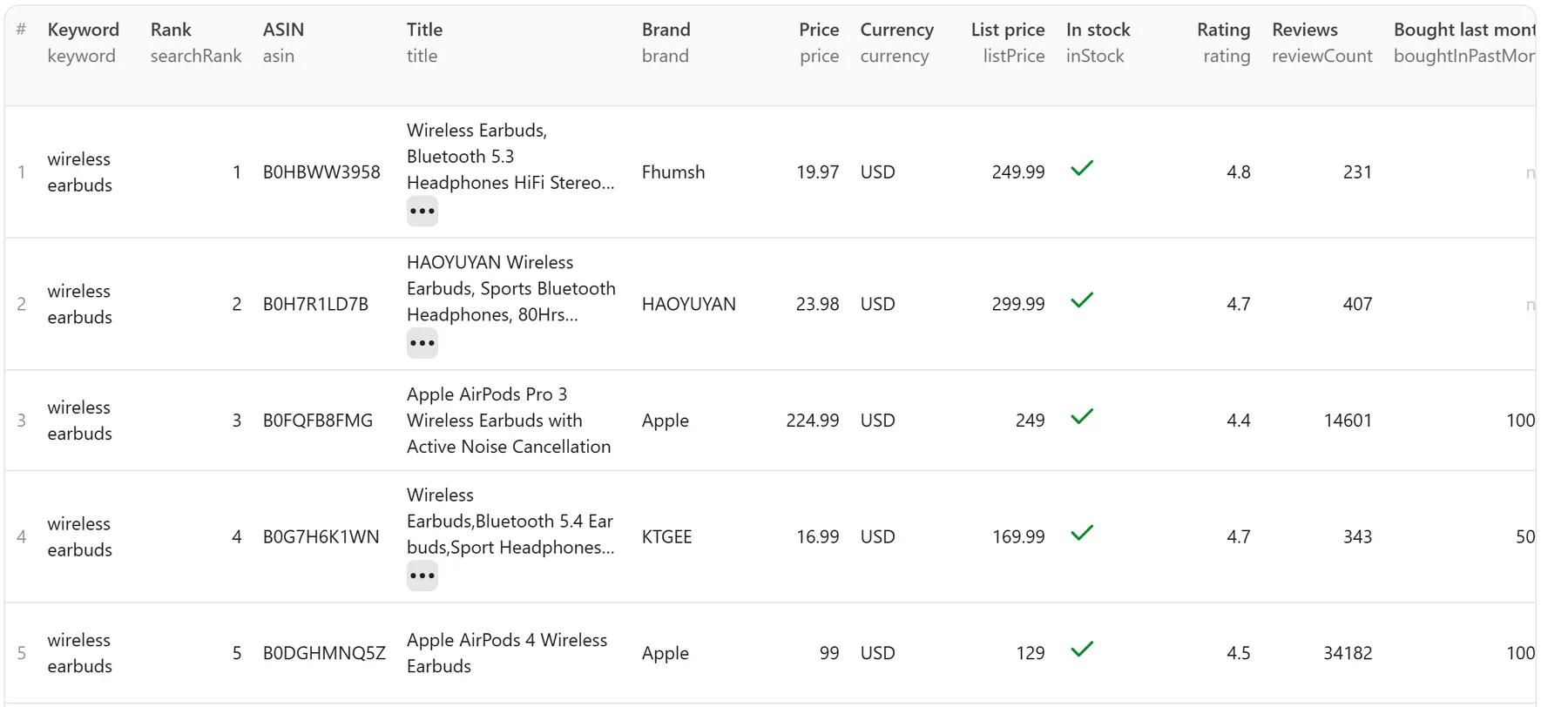
One row per product: every field the product page carries, plus the search context. This is a real row from a verified run, trimmed with … where a field is long:
searchRank is the product's position in Amazon's own result order, counting every result including sponsored ones — so it stays accurate even when you filter sponsored rows out. The rows arrive in that order too, keyword by keyword, with uncharged misses sitting at their own rank rather than at the end. A product that matches several of your keywords is returned once, tagged with the first keyword that surfaced it, and charged once.
Prices and review counts are parsed in the page's own locale, so 4,4 von 5 Sternen is a rating of 4.4 and (4.295) on amazon.de is four thousand reviews, not four. price can legitimately be null — Amazon does not always print one, and that row still carries the title, rating, ranks, images and specs, with priceNote saying what the page showed instead. The Sold-by cluster (buyBoxSeller, buyBoxSellerId, fulfilledByAmazon, soldByAmazon) works the same way: read from whichever layout Amazon serves, and when a served page names no seller at all, those four come back null and buyBoxNote says so on that row.
The last row of every run is a summary carrying keywords, ok, keywordMisses, productMisses, chargedRows and unchargedRows — so the invoice reconciles from the dataset itself, without opening the billing tab.
See a whole real run before you spend anything: sample dataset — coffee maker on amazon.com, capped at two products, plus the summary row it ended with; a verified run of the current code, Sold-by cluster populated on both rows.
Every delivered row also carries two hidden fields, #k and #ce: the product's stable key and the exact events that row was charged. They stay out of the Output tab and out of a clean export; they are there so that if Apify moves your run to another server mid-way, or you resurrect a finished run, the run reads its own dataset back and never delivers or bills the same product twice.
For AI agents & LLMs — copy this block
Works over the Apify API, MCP, n8n and Make. A bare Start with nothing set runs the sample search described at the top of this page, charged like any run, so you can see the exact output shape before wiring your own list — and setting only settings, with no keywords, runs that sample under them, with one uncharged row naming what you set.
MCP: pinned with the one link at the top of this page — or ask Apify's MCP server for "amazon search".
Use it as an API endpoint (Standby)
You can also call this actor like an API: send a keyword and get the full product row for each result back in the same response, with no run to start and no dataset to read. The address is https://steadyfetch--amazon-search-scraper.apify.actor, and the actor's Endpoints tab lets you try it from the browser.
Or POST the same input a run takes:
The answer is JSON: rows (one per product, with the same fields as a row in a run's dataset, keyword and search rank included), receipt (the run's closing summary row), delivered, charged, and notes for anything you should know, in plain words. You are charged exactly as in a run — one Product per delivered product row — and a search with no results, a blocked search or a product that could not be read is never charged. If the charge for a request cannot be completed, its products are not sent.
Good to know: the endpoint answers up to 2 keywords and 10 products per request (1 keyword and 3 products on the Apify free plan). A bigger ask is answered at that cap, and a note in the answer says so; a longer list is a run's job. In a GET, send one keywords= per search (a comma or a space is part of the search). The endpoint keeps no memory between requests, exactly like a run: a search you run again is fetched fresh and charged again. It does not read a datasetId or a resumeFromDatasetId — it cannot see your Apify account. A request that runs out of time sends what it already has, uncharged for anything it did not reach.
What one product costs
One priced event, Product, and nothing else. No start fee, no per-keyword fee, no per-field fee, no "detail" upcharge. A sponsored result costs the same flat fee as any other — and if you turn sponsored results off, they are never even fetched. The store header reads from $3.00/1,000 products.
| Your Apify plan | Price per product | Per 1,000 products |
|---|---|---|
| Apify Free plan | $0.006 | $6.00 |
| Bronze | $0.0035 | $3.50 |
| Silver | $0.003 | $3.00 |
| Gold, Platinum, Diamond | $0.003 | $3.00 |
The header shows the Gold price, which Silver pays too. The whole ladder is printed here because an actor whose promise is billing honesty cannot have an undisclosed tier ladder.
What can fail, and what a failure costs you: nothing. The two misses you will actually see are no_results (the search ran fine and Amazon had nothing for that keyword) and blocked (a robot check in front of every route we tried). Both ship as real rows carrying charged: false, as do not_found, unavailable_in_marketplace, not_a_product, parse_failed, source_unavailable and invalid_input. A row is charged only if it is a product.
Full product detail on every result — on purpose
This actor always returns the full product object for each result: the same row Amazon Product Scraper returns, plus the keyword, the search rank, whether it was sponsored, and the result page it came from. There is deliberately no cheaper "listing rows only" mode — that would need a second price, and this family sells one thing at one price.
What you give it
| Input | Example |
|---|---|
keywords (one per line) | wireless earbuds, coffee maker |
marketplace | amazon.com (default), amazon.co.uk, amazon.de |
maxProductsPerKeyword | 40 (default) — taken in Amazon's own result order, across up to 3 result pages |
includeSponsored | true (default); set false to skip ads — they are never fetched, so they cost nothing |
department | electronics (optional) |
sortBy | Featured (default), price, avg. review, newest |
Marketplaces: amazon.com, amazon.co.uk, amazon.de. Search is verified end to end on amazon.com; amazon.co.uk and amazon.de are best-effort. Only three because only three are tested; other Amazon domains are refused with a clear message rather than half-working.
Error codes — what each uncharged row means
status | What happened | Charged | Worth re-running |
|---|---|---|---|
ok | Complete product row | yes | — |
no_results | The search ran fine but Amazon returned no products for that keyword | no | no |
blocked | Amazon asked us to prove we are not a robot, on every route we tried | no | yes |
not_found | A result's product page — or the search address itself — answered "page not found" | no | no |
unavailable_in_marketplace | A result's id was not served in that country's catalogue | no | no |
not_a_product | A result is one of Amazon's own subscription plans, not a product listing — no price, no seller, no reviews of its own | no | no |
parse_failed | Amazon served a page in a layout we do not recognise. That one is on us | no | no |
source_unavailable | Amazon dropped or throttled the request | no | yes |
invalid_input | A keyword line was blank — the row says so | no | no |
cap_reached / stopped_at_limit | A limit you set stopped the run; earlier rows were delivered normally | no | see resumeCursor |
sample_note | You set settings but no keywords, so the sample search ran under them — the row names what you set | no | — |
input_note | A limit you set was outside what this actor can do in one run, so the run continued at the nearest value it can — the row names your ask and the ceiling | no | — |
Limits are exact
Asking for more than the ceiling is not an error. Max products per keyword goes up to 100 (three result pages), Max products (whole run) up to 5,000, and Max run seconds runs from 60 to 21,600 — ask outside any of them and the run continues at the nearest value it can, with one uncharged input_note row naming what you asked for and what bound. It is never refused and the run never fails to start.
Max products per keyword, Max products (whole run), Max run seconds and the run's own maximum total charge all stop the run cleanly: it still finishes as SUCCEEDED, the summary row names the one setting that stopped it, and resumeCursor lists the keywords still to do. Re-running a search fetches from the top, so raise the limit rather than re-running to page deeper.
FAQ
Is it legal to scrape Amazon search results? Public search pages are public. This actor reads only what an ordinary browser sees, at a polite rate; it never signs in and never touches an account.
Can I scrape Amazon search without an API key? Yes — that is what this is. No Amazon account, no PA-API keys, no seller credentials.
How do I get Amazon search data into n8n or Make? Run this actor and read its dataset. One row per product, stable column names, charged on every row.
What does it cost per 1,000 products? From $3.00/1,000 on Silver and above; see the ladder above. Nothing else is billable.
Why is a price null, or in the wrong currency? Amazon did not print one, or served the page from an unexpected region — priceNote says which. The delivery location is pinned to the marketplace's own country to keep this rare.
Honesty contract
Amazon changes its pages often. When a keyword can't be searched, or an item can't be fetched or parsed, we return it with an honest status and never charge for it.
This actor may fail when the platform changes things — failed items are never charged.
If a field ever comes back empty that should not be, open an issue with the keyword and it gets fixed.
Steadyfetch Amazon suite
One actor per entry point, the same product row underneath. All-inclusive pay per event, no start fee, charged only on delivery.
| What you paste | Actor |
|---|---|
| ASINs or product URLs | Amazon ASIN Scraper — Full Product Row per ASIN, Flat Fee |
| Search keywords | this actor |
| A Best Sellers category | Amazon Best Sellers Scraper — Top 60 Ranks, Full Product Row |
| A seller ID or storefront | Amazon Sellers Scraper — Profile + Live Listings, Flat Fee |
The rest of the steadyfetch shelf — same contract everywhere: all-inclusive pay per event, no start fee, charged only on delivery.
| Family | Actors |
|---|---|
| Ad creative intelligence | Facebook · Google Ads video · TikTok · LinkedIn · Google Ads text & OCR |
| Trends & keywords | Google Trends · Trends Now · Breakout keywords · Autocomplete keywords · Keyword volume & CPC · Social trends |
| YouTube transcripts | YouTube videos · YouTube channels |
| Reel transcripts · Profile posts | |
| Jobs | Indeed · Career sites by domain · Glassdoor · Multi-board · Google Jobs |
| Amazon | Products · Search · Bestsellers · Sellers |
| Any media file | Speech to Text · any link or file |
Feedback & support
Found an issue? Open it on the Issues tab — we usually reply within a couple of hours, always within a day. Include the keyword you used. Fields that come back empty when they should not are treated as bugs, not as expected behaviour. If it earned its keep, a rating helps other buyers find it, and saving the actor keeps it one click away.


