

Agoda & Booking.com Reviews API – Hotel Reviews Scraper + AI
Pricing
from $0.70 / 1,000 reviews
Agoda & Booking.com Reviews API – Hotel Reviews Scraper + AI
Get Agoda hotel reviews, including Booking.com reviews shown on Agoda: scores, text, liked/disliked, traveler type and hotel replies. Optional hotel summaries and AI reports from up to 300 reviews. Review, hotel-summary, AI and Actor Start events have separate charges. · by TubeText
Pricing
from $0.70 / 1,000 reviews
Rating
0.0
(0)
Developer

TubeText Labs
Maintained by CommunityActor stats
0
Bookmarked
2
Total users
1
Monthly active users
11 days ago
Last modified
Share
TubeText · E-commerce & travel · Pay per result. No login. Ready for AI agents. All tools
Quick start (no coding)
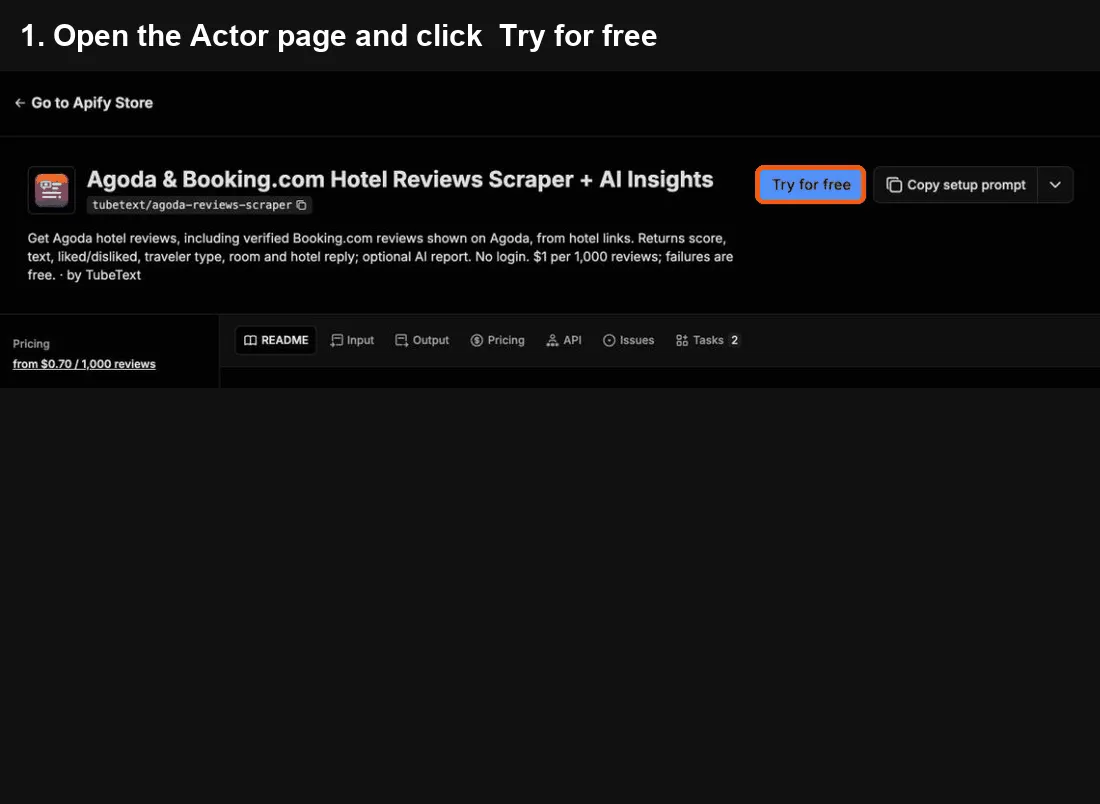
- Click Try for free at the top of this page. A free Apify account is enough – it includes monthly credit.
- In Hotels, paste Agoda hotel links, Agoda hotel IDs or hotel names (like
Marina Bay Sands), one per line. - Click Start. Usually under a minute for a few hundred reviews.
- When it says Succeeded, open the Output tab and click Export → Excel (or CSV). One row per review – Agoda reviews and the Booking.com reviews shown on Agoda – with score, text, liked/disliked, traveler type, room and stay date, plus a hotel summary row.
Cost: $0.001 per review – 1,000 reviews ≈ $1. The AI insights report is $0.05 per hotel.
Common mistakes
- A hotel name finds the wrong property → paste its Agoda link instead.
- Only want new reviews → set Only reviews since and schedule the task.
- Want only Agoda or only Booking.com → change Review sources.
Questions or problems? Open an issue (we read every one). Need a custom version? Ask in an issue or email us – we build it as a private Actor on Apify.
Use from Claude, Cursor or any MCP client
Add https://mcp.apify.com?tools=tubetext/agoda-reviews-scraper as a remote MCP server and sign in to Apify (Claude: Settings → Connectors → Add custom connector). Claude Code:
Then ask, for example: "Get the latest reviews of this hotel and an AI summary of complaints and praise: [Agoda link]" or "Compare guest scores and top complaints for these 3 hotels."
🆓 Free to try: Apify's free plan includes $5 of usage every month, no credit card needed – enough for about 5,000 hotel reviews with this tool.
What you get – real output from a test run, shortened. One row per review – Agoda reviews and the Booking.com reviews shown on Agoda – plus a hotel summary row:
| Hotel | Source | Score /10 | Traveler | Review |
|---|---|---|---|---|
| The Peninsula Bangk… | Agoda | 9.2 | Group | We have visited the Peninsula Bangkok multiple times as it… |
| The Peninsula Bangk… | Agoda | 10 | Couple | We had a wonderful stay at The Peninsula Bangkok. The seafo… |
| The Peninsula Bangk… | Booking.com | 10 | Solo traveler | Complimentary boat ride to ICONSIAM every 30minutes was soo… |
Agoda & Booking.com reviews API for reputation platforms
Call it from your back end with the Apify API. One request runs the Actor and returns the rows as JSON:
- Monitoring: Daily monitoring: schedule the run with
sort: "recent"andstartDateset to your last run, so only new reviews are fetched and billed. Add an Apify webhook to get notified when each run finishes. - Cost at volume: 1,000 hotels × 20 new reviews a day ≈ 20,000 reviews ≈ $20/day at the free-plan price ($0.001/review), less on paid Apify plans.
- Stable output: field names don't change between runs. Failed or empty items come back as status rows that aren't billed, and every row has
charged: true/false. - Why not the official API: Agoda and Booking.com have no public API for review text. This returns both sources in one schema, with Booking.com reviews marked by
source.
What does Agoda Reviews Scraper do?
Scrape Agoda hotel reviews – plus the verified Booking.com guest reviews that Agoda shows for many hotels – with score, title, text, what guests liked and disliked, traveler type, room type, nights stayed, guest country, review date and the hotel's reply. Every hotel also gets a summary row with its overall review score, number of reviews, sub-scores (cleanliness, service, location, rooms, value, facilities), stars and address. Turn on the AI insights report for one English summary per hotel: guest sentiment, top complaints and praise with example quotes, a verdict on rooms, cleanliness, service, breakfast, location and value, how couples, families and business travelers differ, and concrete action items. Built for hotels and hotel groups, reputation-management and guest-experience tools, revenue managers, OTAs and travel researchers. No login. $1 per 1,000 reviews.
What data can you get?
- 🛏️ Review rows – score (out of 10), title, text, liked / disliked, review date, month of stay, nights, traveler type (couple, family, business, solo, group), room type, guest country, helpful votes, hotel reply, original language (guest names are not collected)
- 🏨 Hotel summary row – name, stars, full address, city, country, overall score (e.g. 9.2 Exceptional), number of reviews, sub-scores and review sources
- 🧠 AI insights report (optional) – what guests love, what they complain about and what to fix first, in plain English
- 🔎 Hotels by Agoda link, hotel ID or name
- 📅 Only reviews since a date – for daily or weekly monitoring of new reviews
- ↕️ Sort by most recent, lowest score, highest score or most helpful
Input
Output
Real rows (Oct 2026, text shortened). An Agoda review:
A Booking.com review shown on Agoda:
Hotel summary row: {"type": "hotel", "hotelName": "The Peninsula Bangkok", "starRating": 5, "city": "Bangkok", "country": "Thailand", "reviewScore": 9.2, "reviewScoreText": "Exceptional", "reviewsCount": 5305, "subScores": {"Cleanliness": 9.6, "Service": 9.5, "Facilities": 9.4, "Room comfort and quality": 9.3, "Location": 9.0, "Value for money": 9.0}, "reviewSources": ["Agoda", "Booking.com"]}.
The AI insights row (type: "insights") has summary, sentiment, topComplaints and topPraise (each with issue, approximate share and an example quote), aspects (rooms, cleanliness, service, breakfast, location, value), travelerSegments and actionItems. It reads up to 300 reviews per hotel. Choose the Reviews, Hotels or AI insights view when exporting to Excel/CSV.
How much does it cost?
Pay per event:
- $1.00 per 1,000 reviews (cheaper on higher Apify plans: down to $0.70).
- $0.003 per hotel summary row.
- $0.05 per AI insights report – only when you turn it on and it is delivered.
- Start fee only $0.00005 per run. Hotels that are not found and failed requests are free.
Example: 10 hotels × 200 reviews + AI insights ≈ 2,000 × $0.001 + 10 × $0.003 + 10 × $0.05 ≈ $2.53. Daily monitoring of 50 hotels with ~3 new reviews each ≈ 150 reviews ≈ $0.30 per day.
Tips
- Review monitoring: schedule a daily run with Only reviews since set to yesterday (or keep the newest
reviewIdper hotel) and send new low scores to Slack, email or your CRM via Apify integrations, n8n, Make or Zapier. - Complaint research: sort by Lowest score first and turn on AI insights –
actionItemsis a ready-made fix list. - Competitive set: run your hotel and 5–10 nearby competitors and compare
subScoresandtopComplaints. - API use: call the Actor per hotel from your own app – one small run per hotel is fine: the start fee is only $0.00005.
Ready-made examples
TubeText Labs tools
TubeText Labs builds 35 pay-per-result Apify Actors for video, social and e-commerce data – no login, JSON/CSV/Excel output, and ready for ChatGPT and Claude (Apify MCP), n8n, Make and Zapier. All tools: apify.com/tubetext
Transcripts
- YouTube Transcript Scraper – videos, Shorts, playlists and whole channels to text; Whisper AI when there are no captions
- TikTok Transcript Scraper – TikTok captions plus Whisper AI, SRT and timestamps
- Instagram Reels Transcript – reel links or @usernames to text with Whisper AI
- Podcast & Video Transcript – podcast RSS / Apple Podcasts, X, Facebook, Loom, Twitch and audio files to text
- Facebook Video Transcript – public Facebook videos and Reels to text with Whisper AI
- X (Twitter) Video Transcript – X/Twitter video posts to text with Whisper AI
- Reddit Video Transcript – videos in public Reddit posts (v.redd.it) to text with Whisper AI, with SRT and timestamps
- Bilibili Video Transcript – Bilibili (B站) videos to text with Whisper AI, plus optional English summaries
- Podcast Transcript – podcast RSS feeds and Apple Podcasts episodes to text with Whisper AI
Video & ad analysis
- Video Breakdown AI – hook analysis, shot list, cut pacing, products shown and script of any TikTok, Reel or YouTube video
- Shot-by-Shot Video Analysis Pro – director-level storyboard of any video: framing, camera move, emotion and why each shot works, plus replay peaks, danmaku and comments tied to shots
- YouTube & TikTok Comments API – comments with like-weighted sentiment and themes, plus the moments viewers react to on long YouTube and Bilibili videos
- Video Ad Analyzer – competitors' YouTube video ads by brand or domain (Google Ads Transparency), torn down by AI
- Google Ads Transparency API – any advertiser's YouTube video ads from Google Ads Transparency, with first/last shown dates, days running, views and transcripts
- Meta Ad Library Scraper – Facebook and Instagram ads by brand or keyword: video URLs, images, ad copy, CTA and landing page
Social, apps & trends
- YouTube Channel Analytics – subscribers, recent video performance, Social Blade grade, ranks and estimated earnings
- YouTube Shorts Scraper – every Short of a channel with exact views, likes, comments and publish time, plus transcripts and the opening line
- Bilibili Scraper – Bilibili (B站) keyword search, popular board, top-100 ranking, video stats, danmaku text and creator (UP主) followers – no login
- China Trending Topics – Douyin, Weibo, Baidu, Toutiao and Bilibili hot-search boards in one run, in English – plus an optional AI briefing on why topics trend
- WeChat Article Scraper – WeChat 公众号 articles by keyword or link: full text, English titles and optional English summaries
- Google Play Reviews + AI Insights – Android app reviews by star rating, country and language, plus an AI report of complaints and praise
- Steam Reviews Scraper + AI Insights – Steam game reviews with hours played and votes, review score and current players, plus an AI report of top complaints, praise and feature requests
- Social Blade Scraper – Social Blade stats for YouTube, TikTok, Instagram and Twitch creators – grade, ranks, 2-week growth, daily history, earnings estimates and top-100 lists
- Spotify Play Count Scraper – play counts for every track of an album, artist or playlist (incl. Top 50 charts), plus monthly listeners, followers, world rank and top cities
E-commerce & travel
- TikTok Shop Product Scraper – US TikTok Shop prices, items sold, stock per SKU and shop stats
- AliExpress Search Scraper – AliExpress search results by keyword: price, items sold, rating, shipping, badges
- Google Hotels Scraper – hotel prices for any destination and dates, per booking site and as a 90-day price calendar
- Taobao & Tmall Product Scraper – Taobao/Tmall products by Chinese or English keyword, category or URL: CNY prices, shops and seller scores
- Alibaba & Yiwu Supplier Finder by Image – product photo in, similar Alibaba.com and Yiwu wholesale listings out: price, MOQ, supplier, country and rating
- Amazon Product Search Scraper – Amazon search results, Best Sellers lists and product pages: price, rating, reviews, monthly sales signal, badges and specs
- Google Flights Scraper – flight prices for any route or multi-city trip, a cheapest-day calendar, price insights and booking options per site
- Agoda & Booking.com Hotel Reviews + AI (this tool) – Agoda hotel reviews plus verified Booking.com reviews shown on Agoda, hotel scores and sub-scores, and an AI report of complaints, praise and action items
- Gas Prices Scraper (US & Canada) – live gas station prices by ZIP, city or coordinates – regular, premium, diesel, E85 – with an area summary of the cheapest stations
- Idealo Price Scraper – every shop offer for a product on idealo – price, shipping, delivery, shop rating – in Germany, Austria, France, Italy, Spain and the UK, with a summary per market
Esports & sports data
- Esports Match Timeline – Valorant and CS2 round-by-round scores, winners and VOD timestamps read from broadcast VODs
Questions or problems? Open an issue (we read every one). Need a custom version? Ask in an issue or email us – we build it as a private Actor on Apify.
Found it useful? A short review on this page helps others find it.
Built by TubeText Labs · Pay per result. No login. Ready for AI agents.
FAQ
Which reviews are included? Agoda's own verified guest reviews and, where Agoda shows them, verified Booking.com reviews (Agoda and Booking.com belong to the same group). Some hotels also show Priceline reviews.
Are guest names collected? No. Guest names are left out; you get the review, the traveler type, room, nights and country.
Why do I get fewer reviews than the hotel's review count? The review count includes guests who only gave a score. Only reviews with text are listed – reviewsWithTextCount in the hotel row shows roughly how many there are across sources.
Why is a review's source different from the one I asked for? Agoda sometimes mixes sources in one list. Every row carries its real source, and reviews are never duplicated.
How good are the AI insights? They are written by an AI model from the review texts: great for spotting themes and priorities, but the shares are approximate – check the example quotes and the review rows before quoting numbers.
Is this legal? The Actor only reads public reviews without logging in and does not collect guests' names. You are responsible for how you use the data and for complying with Agoda's terms.
Can I cap what a run costs? Yes – set Maximum cost per run in the run options. The run stops cleanly when the next item would go over it, and you are never charged more.
Support
Found a bug or missing a field? Open an issue – we read every one. Need a custom version? Ask in an issue or email us – we build it as a private Actor on Apify.


![Agoda [Only 💰$1] Reviews Scraper API: Guest Ratings & Comments avatar](https://images.apifyusercontent.com/V5PHxm83P-i51KMNmtBqU2jY3E7dBa3p0jRcJRSxwVA/rs:fill:76:76/cb:1/aHR0cHM6Ly9hcGlmeS1pbWFnZS11cGxvYWRzLXByb2QuczMudXMtZWFzdC0xLmFtYXpvbmF3cy5jb20vbmduOHZSRVNUa3NleVdFNnAtYWN0b3ItT21VcDN5em02dFdCZjVTaG4tTW15Y2hPSWtBNS1hZ29kYS1sb2dvLXBuZ19zZWVrbG9nby0zNzEwMjUucG5n.webp)


