

Video Breakdown AI API – Hook Analysis, Shot List & Script
Pricing
from $22.00 / 1,000 video breakdowns
Video Breakdown AI API – Hook Analysis, Shot List & Script
Turn TikTok, Instagram and YouTube videos into references for your next creative brief. Get the opening hook, script, visual breakdown and pacing in structured output—ready to compare across videos or use with ChatGPT and Claude.
Pricing
from $22.00 / 1,000 video breakdowns
Rating
0.0
(0)
Developer

TubeText Labs
Maintained by CommunityActor stats
0
Bookmarked
106
Total users
63
Monthly active users
6 days ago
Last modified
Categories
Share
TubeText · Video & ad analysis · Pay per result. No login. Ready for AI agents. All tools
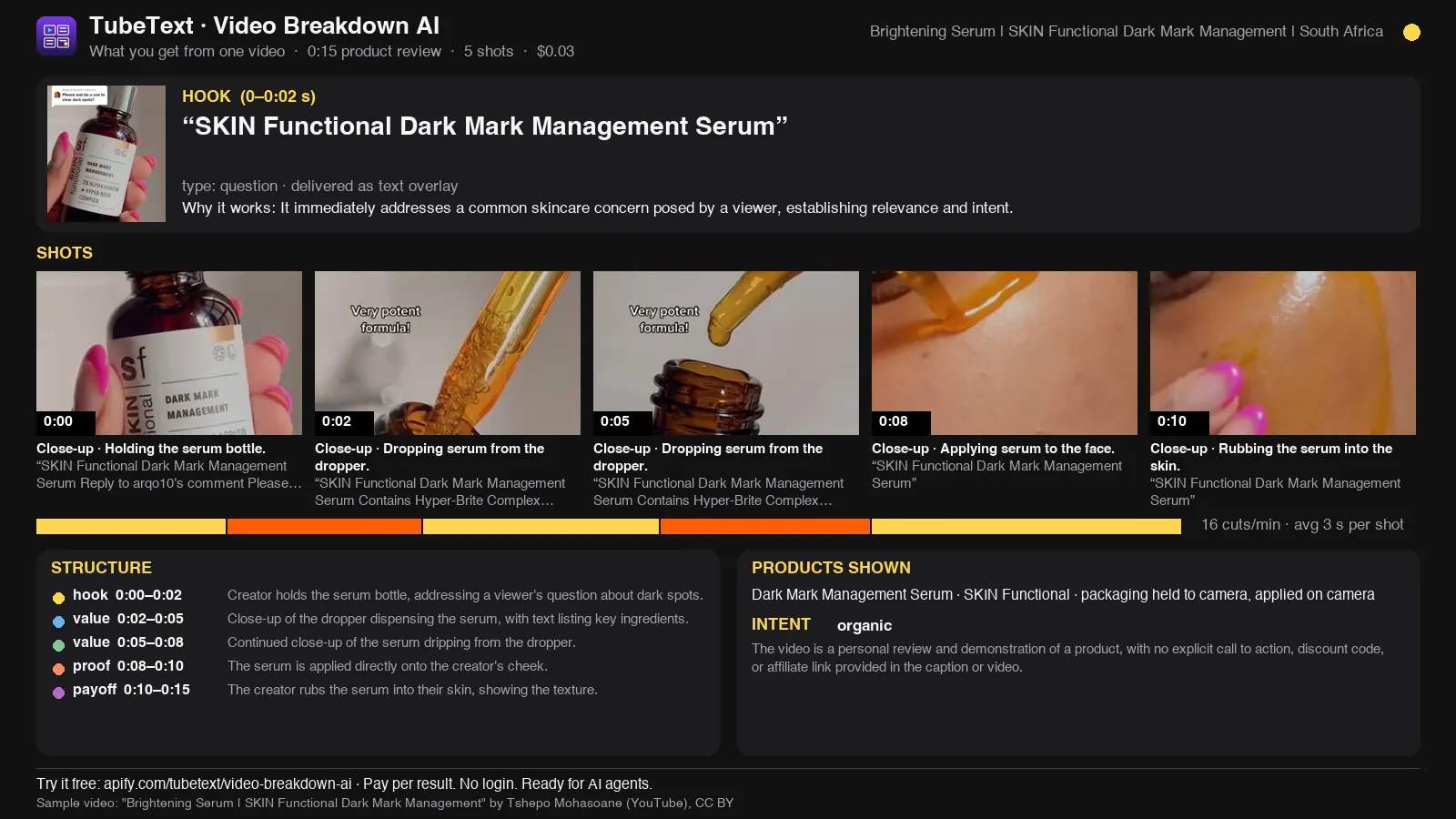
See the opening hook, how the product is introduced, and how the video moves toward its call to action. Use the breakdown to brief your creator or explore new script variations.
Real output for one 15-second product ad ($0.03). Sample video: "Brightening Serum | SKIN Functional Dark Mark Management" by Tshepo Mohasoane (YouTube), CC BY.
Quick start (no coding)
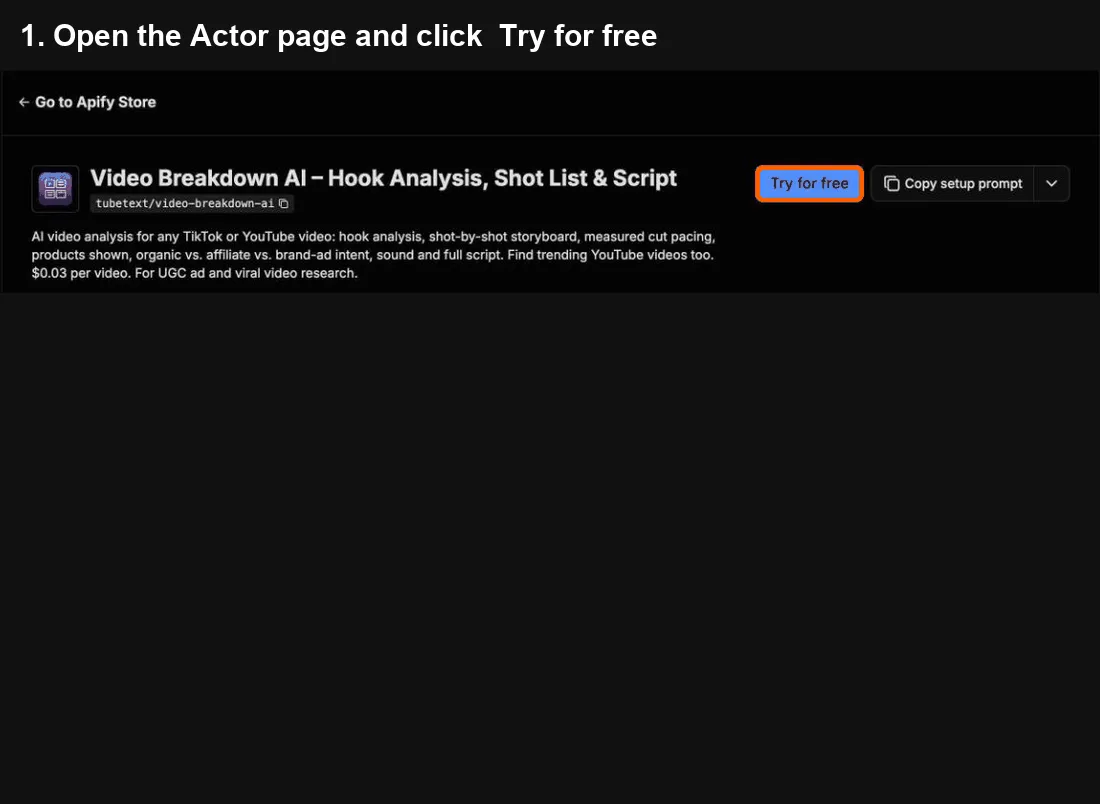
- Click Try for free at the top of this page. A free Apify account is enough – it includes monthly credit.
- In Video URLs, paste one link per line – a TikTok, an Instagram reel or profile, or a YouTube video, Short or channel.
- Click Start. Short videos take about a minute; long YouTube videos 1–2 minutes each.
- When it says Succeeded, open the Output tab and click Export → Excel (or CSV). One row per video: the hook, shot list, pacing, products shown and the full script. Paste a YouTube channel or Instagram profile and you also get a free account summary row: persona, content pillars, hook patterns and a style guide.
Cost: $0.03 per video (first 3 minutes included) – 10 TikToks ≈ $0.30.
Common mistakes
- Pasting a TikTok profile link → paste video links instead (Instagram profiles and YouTube channels do work and give their latest 10 videos).
- Long videos cost more → each extra minute is $0.01, capped at 30 extra minutes.
- Nothing analyzed and the status mentions the cost limit → each analysis costs about $0.03, and new free accounts often have a Maximum cost per run just below that. Set it to $0.05 or more.
- Links copied with the Share button (ending in
?igsh=…or similar) → they work as they are, no need to clean them up.
🎬 Need more than a quick breakdown? Shot-by-Shot Video Analysis Pro analyzes every shot like a director would (framing, camera move, emotion curve, edit rhythm, why each shot works) and ties replay peaks, danmaku bursts and comments to the shots that caused them. $0.20 per video minute, $0.60 minimum. Scan many videos here, then run Pro on the ones worth studying.
💬 Just need what viewers said? YouTube & TikTok Comments API gives up to 1,000 comments with like-weighted sentiment and themes, plus the moments viewers react to on long videos, for $0.30 per video.
Questions or problems? Open an issue (we read every one). Need a custom version? Ask in an issue or email us – we build it as a private Actor on Apify.
Use from Claude, Cursor or any MCP client
Add https://mcp.apify.com?tools=tubetext/video-breakdown-ai as a remote MCP server and sign in to Apify (Claude: Settings → Connectors → Add custom connector). Claude Code:
Then ask, for example: "Break down this TikTok: hook, shot list, cut pacing and products shown: [link]" or "Analyze the latest 10 videos on this YouTube channel and tell me what their best hooks have in common."
🆓 Free to try: Apify's free plan includes $5 of usage every month, no credit card needed – enough for about 160 video breakdowns with this tool.
What you get – real output from a test run, shortened. One row per video (plus shot list and full script in more columns):
| Platform | Format | Hook | Summary |
|---|---|---|---|
| tiktok | skit | First time user here and I've had the 2026 June e… | A father performs a humorous 'product review' of his newborn baby, tr… |
Video analysis API: hooks, shot lists and scripts as JSON
Call it from your back end with the Apify API. One request runs the Actor and returns the rows as JSON:
- Big batches: The sync endpoint waits up to 5 minutes, so keep sync calls small: 5 YouTube Shorts took about 3½ minutes in our test, and Instagram Reels can take up to about 5 minutes each. For channels or big batches, start the run with
POST /v2/acts/tubetext~video-breakdown-ai/runs, add a webhook, and fetch the dataset when it finishes. - Monitoring: Competitor tracking: schedule the run weekly with channel or profile links and keep
maxVideosPerSourceclose to how often they post. Add an Apify webhook to get notified when each run finishes. - Cost at volume: 1,000 short videos a month ≈ $30 at the free-plan price ($0.03 per video, +$0.01 per minute past 3 minutes). Videos that can't be downloaded or analyzed are free.
- Stable output: field names don't change between runs. Failed or empty items come back as status rows that aren't billed, and every row has
charged: true/false. - Why not the official API: Platform APIs return stats, not what's in the video. This returns the hook, every shot, pacing, products shown and the script, in one schema for TikTok, Instagram and YouTube.
What you can do with it
 |  |
|---|---|
 |  |
Find out why a video works in one API call. Paste TikTok, YouTube/Shorts or other public video links and get a structured breakdown: the hook, a shot-by-shot storyboard, measured cut pacing, the products on screen, whether it's organic or an ad/affiliate post, the sound used and the full script.
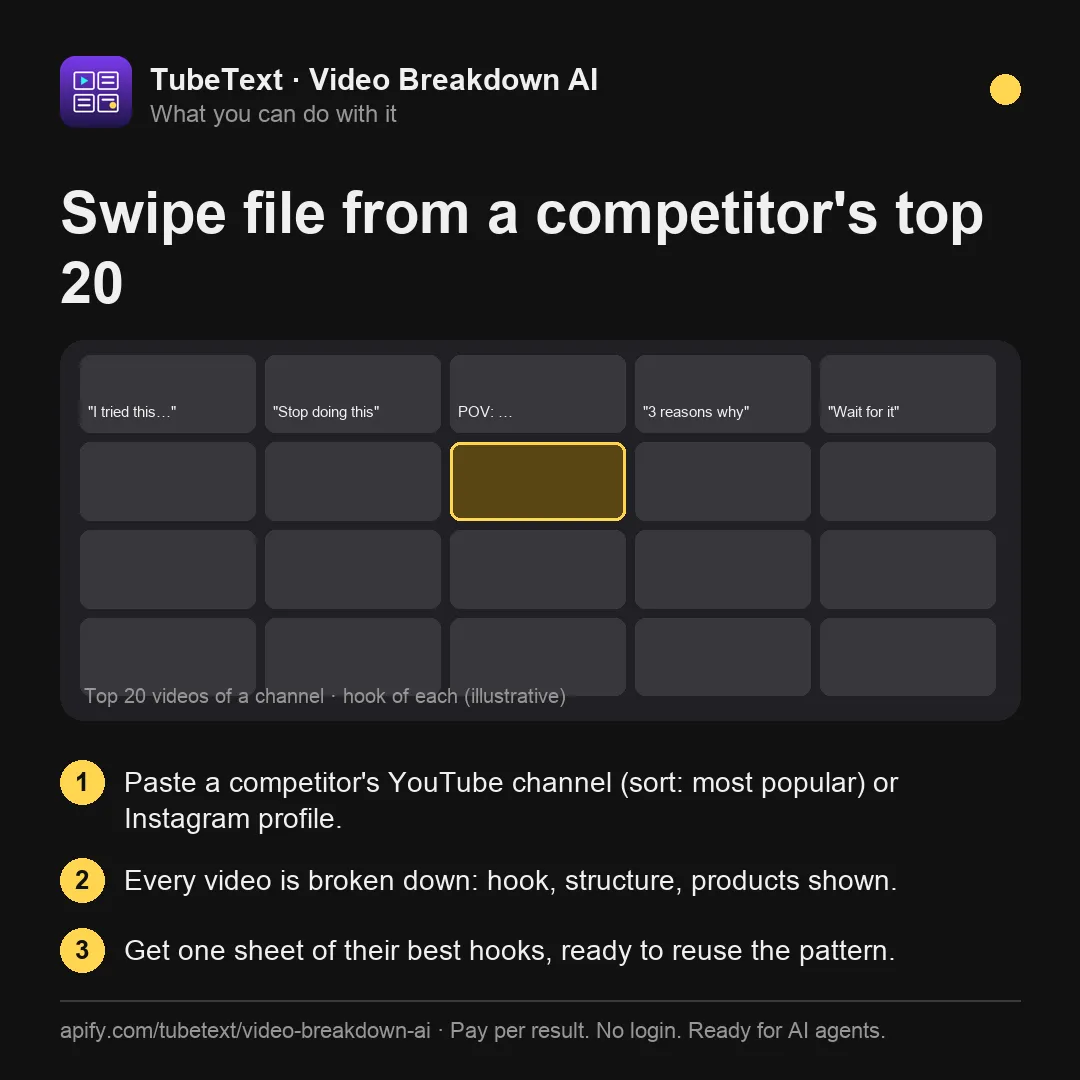
Built for UGC and performance marketers, ad buyers, agencies and creators who build swipe files and briefs from what's already winning.
What you get for each video
- 🎣 Hook – what happens in the first ~3 seconds (sampled densely), hook type and why it works
- 🎬 Shot list – start/end, framing, scene, action, expression, on-screen text, spoken line
- ✂️ Measured pacing – real cut detection that finds ~9 in 10 hard cuts in short videos (TikTok/Reels style), including jump cuts: cut count, average shot length, cuts per minute
- 🛍️ Products shown on screen – name, brand when visible, first appearance time, how it's shown (incidental objects and ingredients are left out)
- 💰 Commercial intent – organic / affiliate & link in bio / TikTok Shop / brand ad / self-promotion, with the evidence quoted (it stays "organic" unless there's explicit evidence)
- ⭐ Key moments – the reveal, the "money shot", the objection handler, with timestamps
- 🧭 Why it worked – a short video-level summary of what makes it work
- 🔈 Audio & hook flags –
hasSpeech,hasVoiceover,hasMusic, and how the hook is delivered (hookDeliveredAs: text overlay / voice / visual / mixed) - 🎵 Sound – title and author from the platform's sound info, plus how the audio is used (voiceover, dialogue, music bed, trending sound), judged from the audio track
- 📈 Engagement rate plus views, likes, comments, shares and saves
- 🚀 Outlier score – is this a breakout for its creator? TikTok: likes vs the creator's average likes per video. YouTube: views vs the median of the channel's ~30 latest uploads.
isOutlieris true at 3× or more. Plus creator stats for TikTok (followers, total likes, video count). - 🧱 Structure, CTA, format, tone, audience and the full transcript (captions or Whisper)
- 🌍 Output in English by default or 18 other languages; quotes can stay original or be translated
Use cases
- Build swipe files of winning UGC ads and viral hooks
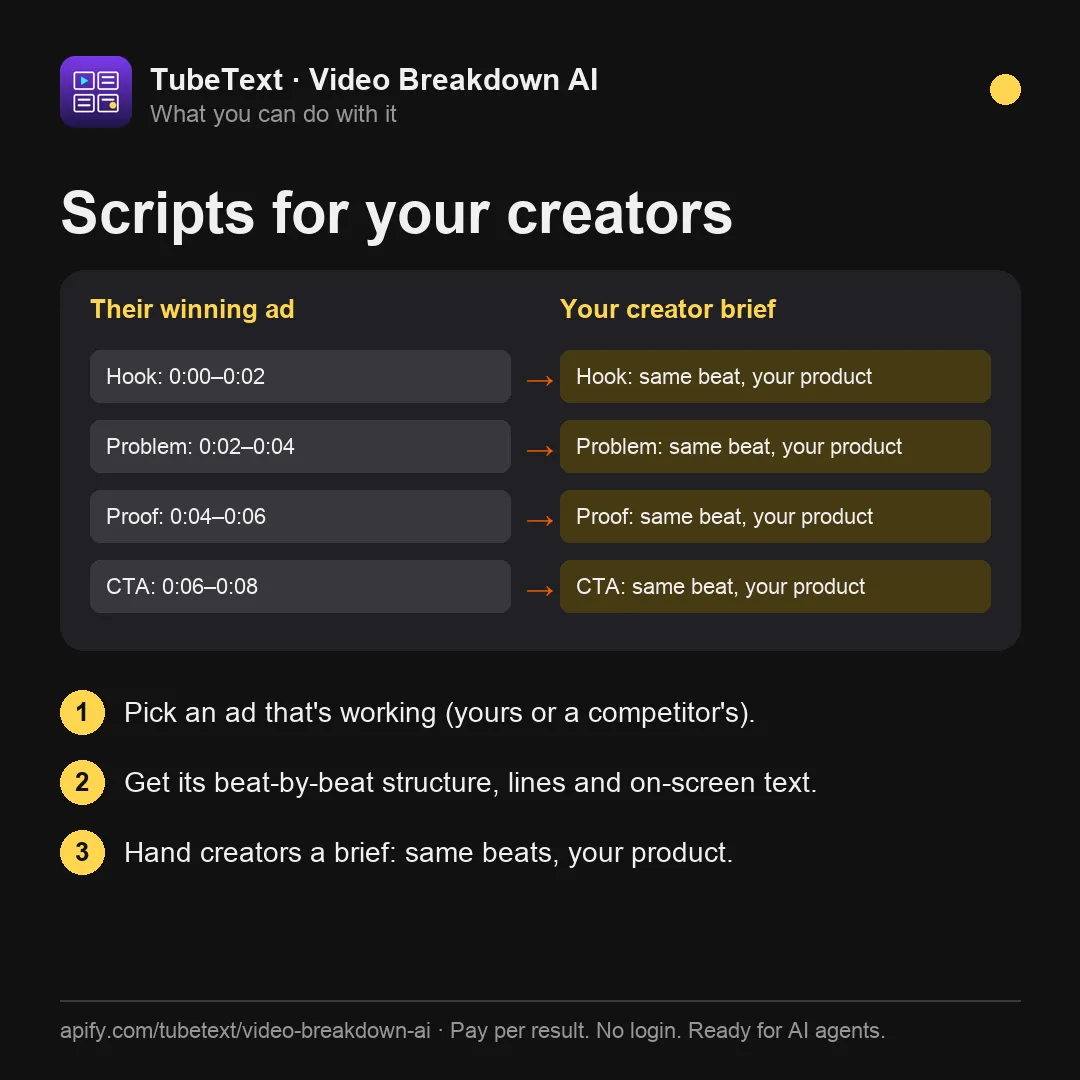
- Turn competitors' best videos into briefs and scripts for your creators
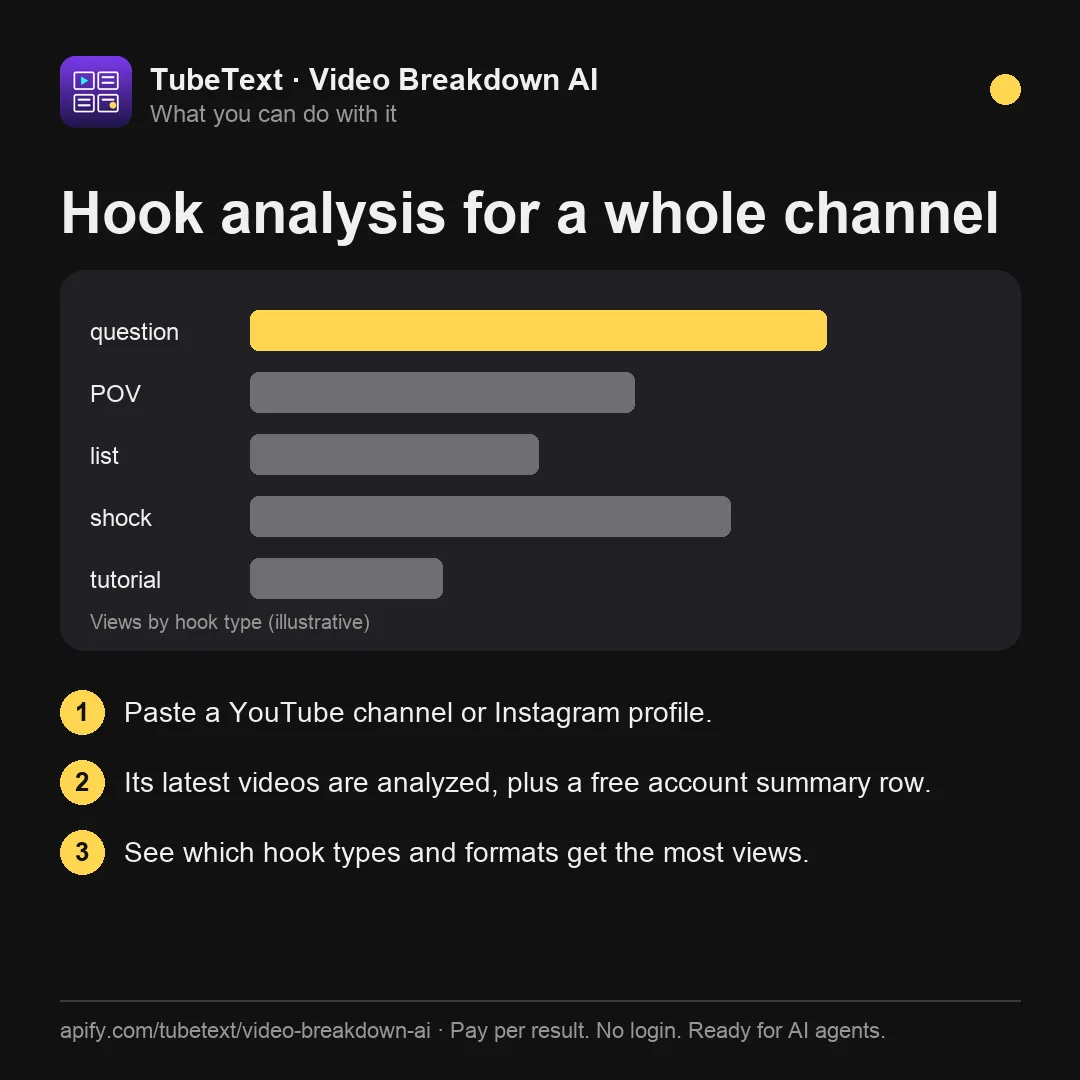
- Analyze hundreds of videos in a niche to see which formats and hooks dominate
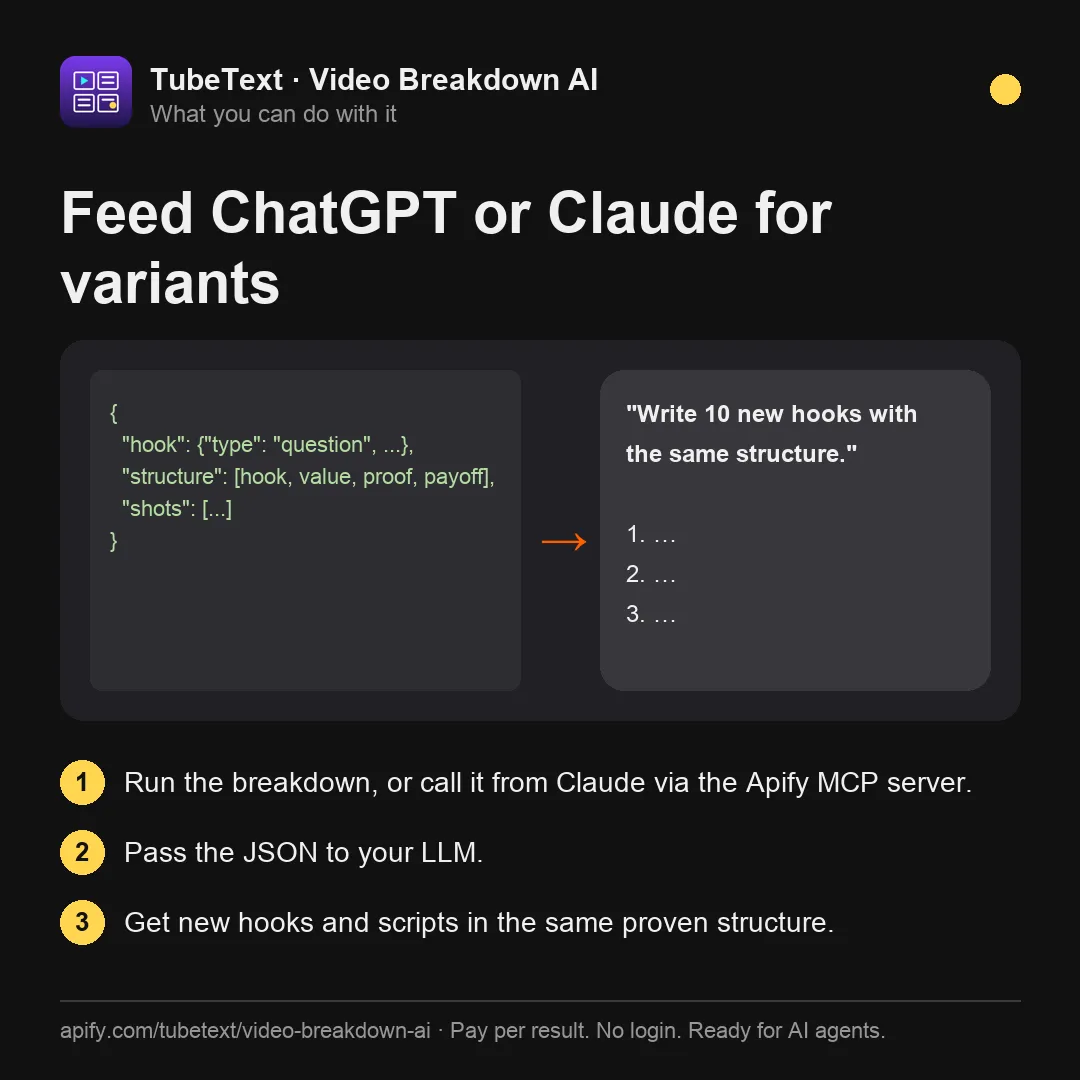
- Feed structured breakdowns into ChatGPT/Claude to generate new script variations
Find videos to analyze (no links needed)
You don't need a list of links. Point the Actor at a source and it picks the videos, then breaks each one down:
- YouTube keyword search –
searchQueries(e.g.["skincare routine"]) withsearchPublishedWithin(hour / today / week / month / year / any; default week) andsearchSortBy(views / relevance / date; default views, re-sorted by actual view count). - Today's trending by country –
trendingCountries(e.g.["us","jp","gb","de","br","in","kr","fr"]), from daily YouTube trending lists (via kworb.net). - A channel's most viewed videos – a channel link plus
channelSort: "popular"(or"newest", the default). Works on/videos,/shortsand/streams. - Top videos from another Actor's results –
datasetId: pick the dataset of any TikTok, Instagram or YouTube scraper run. We read the video links and, by default, take the most viewed (datasetSortBy: "views"). This is the way to analyze top TikToks from a hashtag, trending or profile scraper. - Competitors' Meta ads – run Meta Ad Library Scraper, then pass its dataset ID in
datasetId: datasets with direct video files (.mp4/.mov/.webm) work too, so you get a hook, shot list and script for every ad.
Each source is capped by maxVideosPerSource (default 10). Finding videos is free; each analyzed video is billed as usual.
Example input:
Video to script
Get the full spoken script with timestamps plus the shot-by-shot structure, so you can rewrite a winning video into a new script or brief.
Real example (TikTok UGC ad, 39.5M plays, 76 s) – shortened v1.1 output
More results from the same test (10 viral TikToks, 5.6M–39.5M plays):
| Video type | What the breakdown found |
|---|---|
| GRWM makeup routine (14.9M) | 21 shots for 20 measured cuts, 26.7 cuts/min; trending song identified from sound info; "result first" hook |
| Kids' savings tutorial (9.1M) | Affiliate intent from "Link in my bio"; 3 products with first-seen times; 20 cuts |
| Bizarre beauty product review (8M) | 3 products identified; "I lost my eyebrow!" fail moment at 0:09 |
| Gameplay clip (10.4M) | Format "gameplay clip", game name and meme sound from metadata |
Accuracy, honestly
Latest independent check (Oct 2026, 22 videos across TikTok, Instagram Reels and YouTube): all 22 were analyzed. Measured cuts matched an ffmpeg scene check exactly on 8 of 9 TikToks. Products and commercial intent were right on all 5 shop videos. Commercial intent was wrong on 2 of 12 non-shop videos; it has since been tightened to require explicit evidence. On-screen text was captured on 17 of 22. Cut detection was then calibrated on 30 TikToks with 515 hand-labelled cuts: it finds 91% of real cuts (including jump cuts), and 96% of the cuts it reports are real. Flashes and strobes are ignored. Known limits:
- Details inside one long continuous shot can be merged into a single shot description.
- A short visual moment can be missed.
- Song titles come only from the platform's sound info (the AI does not identify songs by ear). The audio track is used to judge voice, music and sound effects. Speech comes from captions or Whisper. When the audio is music only, song lyrics picked up by captions or Whisper go into a separate
lyricsfield instead of the transcript (hasSpeech: false). - Instagram Reels (beta) are slower, up to about 5 minutes per reel.
Input example
Languages: the analysis is in English by default. Pick another outputLanguage (Spanish, Portuguese, French, German, Japanese, Korean, Chinese and more, or Same as video). Quotes (spoken words, on-screen text) stay in their original language unless you turn on translateQuotes, which is handy for studying foreign-language ads.
Output example (shortened)
Pricing
Pay per event:
- $0.03 per analyzed video (up to 3 minutes; cheaper on higher Apify plans)
- $0.01 per extra started minute for longer videos (a 10-minute YouTube video = $0.10), capped at 30 extra minutes, so the analysis costs at most $0.33 per video however long it is (it samples at most 30 frames); optional residential traffic is billed separately
- Free: invalid links, and deleted, private, unavailable, live or too-long videos. Also free if our own analysis fails. Videos we can't download are free too (the "failed download" line in the price table is never charged and will be removed).
- If YouTube is blocking broadly during a run, the Actor stops retrying and marks the remaining videos
youtube_blocking_now. They are not charged; please try again later.
From Oct 22, 2026 (06:56 UTC):
- Videos that can't be downloaded or analyzed are not charged. The price list shows a $0.005 download fee until about Nov 22, 2026; our code does not apply it.
- Optional residential proxy for YouTube (
proxyMode: "residential"): $0.015 per started MB of residential traffic, charged only if you choose this mode. It's usually 3–10 MB per YouTube video, and it gets through YouTube's bot checks far more often than the default datacenter route. Until Oct 22 this mode falls back to datacenter.
Similar video-analysis Actors on the Store charge $0.04–$0.10 per video (checked Oct 2026).
Account summary (free beta)
Paste a YouTube channel or an Instagram profile (link or @handle) and, besides one row per video, you get one extra row with rowType: "account_summary" that describes the whole account: persona, content pillars, hook patterns, formats, tone and voice, pacing, on-screen text style, CTAs, products and brands, what performs best, posting cadence and a 5–8 rule style guide, plus medians (duration, cuts per minute, views, likes). It needs at least 3 analyzed videos from the same account, is not charged during the beta, and can be turned off with accountSummary: false.
Real output (shortened) for @mkbhd, 4 videos:
When views aren't available (common on Instagram profiles), the summary says so instead of guessing.
Supported links
- YouTube: videos and Shorts (
youtube.com/watch?v=…,youtu.be/…,/shorts/…), plus channels and playlists (youtube.com/@name,@name/shorts,@name/streams,playlist?list=…). Channels and playlists expand to the newest videos, up tomaxVideosPerSource(default 10, max 200). Each video is billed like a single video, and videos longer thanmaxVideoMinutesare skipped and not charged. - TikTok: videos, photo slideshows,
tiktok.com/t/…andvm.tiktok.com/…share links and embed links; different links to the same video count once - Instagram: public Reels (
instagram.com/reel/…), no login needed (beta) - Other sites: public video pages supported by yt-dlp, tested with X/Twitter, Reddit, Bilibili (Chinese titles kept, analysis in your output language), Facebook public videos and Dailymotion, plus direct video file links (.mp4, .mov, .webm)
- Instagram: reel and post (
/p/…) links, or a profile link /@handle– you get its latest reels (up tomaxVideosPerSource, default 10). Tracking parameters in links are cleaned up and duplicates count once. - Not supported: TikTok profile links directly (paste video links, or chain a TikTok profile scraper's dataset via
datasetId), live streams in progress, content behind a login (e.g. private Instagram accounts, Vimeo), private or members-only videos, posts without a video (no_video_in_this_post) and DRM-protected videos (drm_protected). These come back asskippedand are not charged
How it works
For each video the Actor detects every hard cut, then samples frames densely in the first 3 seconds (the hook), right after each cut, and evenly across the rest (up to 30 frames). These frames go to a vision-language model together with the timed transcript and the video's facts (caption, hashtags, sound name, stats, measured cuts), and the model returns a structured breakdown. For videos up to ~50 minutes the audio track is sent too, so the model can judge voiceover, music and sound effects; song titles still come only from the platform's sound info, and speech from captions or Whisper.
Long YouTube videos (over ~2.5 minutes). If the video has captions, the Actor uses a fast mode: frames are sampled evenly across the video (no cut detection, no audio track) and speech comes from the captions. If there are no captions, it downloads the full file to get audio, cut detection and a Whisper transcript; if that download is too slow, it falls back to frames only.
Ready-made examples
- TikTok Hook Analysis
- UGC Ad Analysis
- YouTube Trending Videos Analysis
- Viral Video Analysis by Keyword
- TikTok Shop Video Analysis
TubeText Labs tools
TubeText Labs builds 34 pay-per-result Apify Actors for video, social and e-commerce data – no login, JSON/CSV/Excel output, and ready for ChatGPT and Claude (Apify MCP), n8n, Make and Zapier. All tools: apify.com/tubetext
Transcripts
- YouTube Transcript Scraper – videos, Shorts, playlists and whole channels to text; Whisper AI when there are no captions
- TikTok Transcript Scraper – TikTok captions plus Whisper AI, SRT and timestamps
- Instagram Reels Transcript – reel links or @usernames to text with Whisper AI
- Podcast & Video Transcript – podcast RSS / Apple Podcasts, X, Facebook, Loom, Twitch and audio files to text
- Facebook Video Transcript – public Facebook videos and Reels to text with Whisper AI
- X (Twitter) Video Transcript – X/Twitter video posts to text with Whisper AI
- Reddit Video Transcript – videos in public Reddit posts (v.redd.it) to text with Whisper AI, with SRT and timestamps
- Bilibili Video Transcript – Bilibili (B站) videos to text with Whisper AI, plus optional English summaries
- Podcast Transcript – podcast RSS feeds and Apple Podcasts episodes to text with Whisper AI
Video & ad analysis
- Video Breakdown AI (this tool) – hook analysis, shot list, cut pacing, products shown and script of any TikTok, Reel or YouTube video
- Shot-by-Shot Video Analysis Pro – director-level storyboard of any video: framing, camera move, emotion and why each shot works, plus replay peaks, danmaku and comments tied to shots
- YouTube & TikTok Comments API – comments with like-weighted sentiment and themes, plus the moments viewers react to on long YouTube and Bilibili videos
- Video Ad Analyzer – competitors' YouTube video ads by brand or domain (Google Ads Transparency), torn down by AI
- Meta Ad Library Scraper – Facebook and Instagram ads by brand or keyword: video URLs, images, ad copy, CTA and landing page
Social, apps & trends
- YouTube Channel Analytics – subscribers, recent video performance, Social Blade grade, ranks and estimated earnings
- YouTube Shorts Scraper – every Short of a channel with exact views, likes, comments and publish time, plus transcripts and the opening line
- Bilibili Scraper – Bilibili (B站) keyword search, popular board, top-100 ranking, video stats, danmaku text and creator (UP主) followers – no login
- China Trending Topics – Douyin, Weibo, Baidu, Toutiao and Bilibili hot-search boards in one run, in English – plus an optional AI briefing on why topics trend
- WeChat Article Scraper – WeChat 公众号 articles by keyword or link: full text, English titles and optional English summaries
- Google Play Reviews + AI Insights – Android app reviews by star rating, country and language, plus an AI report of complaints and praise
- Steam Reviews Scraper + AI Insights – Steam game reviews with hours played and votes, review score and current players, plus an AI report of top complaints, praise and feature requests
- Social Blade Scraper – Social Blade stats for YouTube, TikTok, Instagram and Twitch creators – grade, ranks, 2-week growth, daily history, earnings estimates and top-100 lists
- Spotify Play Count Scraper – play counts for every track of an album, artist or playlist (incl. Top 50 charts), plus monthly listeners, followers, world rank and top cities
E-commerce & travel
- TikTok Shop Product Scraper – US TikTok Shop prices, items sold, stock per SKU and shop stats
- AliExpress Search Scraper – AliExpress search results by keyword: price, items sold, rating, shipping, badges
- Google Hotels Scraper – hotel prices for any destination and dates, per booking site and as a 90-day price calendar
- Taobao & Tmall Product Scraper – Taobao/Tmall products by Chinese or English keyword, category or URL: CNY prices, shops and seller scores
- Alibaba & Yiwu Supplier Finder by Image – product photo in, similar Alibaba.com and Yiwu wholesale listings out: price, MOQ, supplier, country and rating
- Amazon Product Search Scraper – Amazon search results, Best Sellers lists and product pages: price, rating, reviews, monthly sales signal, badges and specs
- Google Flights Scraper – flight prices for any route or multi-city trip, a cheapest-day calendar, price insights and booking options per site
- Agoda & Booking.com Hotel Reviews + AI – Agoda hotel reviews plus verified Booking.com reviews shown on Agoda, hotel scores and sub-scores, and an AI report of complaints, praise and action items
- Gas Prices Scraper (US & Canada) – live gas station prices by ZIP, city or coordinates – regular, premium, diesel, E85 – with an area summary of the cheapest stations
- Idealo Price Scraper – every shop offer for a product on idealo – price, shipping, delivery, shop rating – in Germany, Austria, France, Italy, Spain and the UK, with a summary per market
Esports & sports data
- Esports Match Timeline – Valorant and CS2 round-by-round scores, winners and VOD timestamps read from broadcast VODs
Questions or problems? Open an issue (we read every one). Need a custom version? Ask in an issue or email us – we build it as a private Actor on Apify.
Found it useful? A short review on this page helps others find it.
Built by TubeText Labs · Pay per result. No login. Ready for AI agents.
FAQ
Can I paste a channel, profile or playlist? YouTube channels (including the /shorts and /streams tabs) and playlists: yes. You get the newest videos by default, or the most viewed with channelSort: "popular", up to maxVideosPerSource (default 10, max 200), and each video is billed like a single video. Instagram profiles and @handles work directly (latest reels, default 10). For TikTok profiles, run any TikTok profile scraper and pass its dataset in datasetId.
Should I use the residential proxy mode? Only for YouTube, and only if the default mode returns many failed downloads for your videos. TikTok, Instagram and most other sites work fine with the default. From Oct 22, 2026, residential mode costs $0.015 per started MB (usually 3–10 MB per YouTube video) on top of the per-video price.
Why is outlier empty? It needs a creator baseline: it's null for creators with fewer than 5 videos and for sites other than TikTok and YouTube.
Does it work without speech? Yes. Visuals and on-screen text are analyzed even when nobody talks.
Is this legal? The Actor only reads publicly available video pages, without logging in. You are responsible for how you use the data (copyright, privacy and TikTok's terms).
How do I get a clean spreadsheet? In the run's Storage tab choose Export → View: Overview for a short set of readable columns in Excel, CSV or Google Sheets. Use JSON to get every field (for example the full shot list).
Can I cap what a run costs? Yes – set Maximum cost per run in the run options. The run stops cleanly when the next item would go over it: you are never charged more, and you get a clear "stopped at your limit" status message.
What happens if a big run hits the time limit? It stops cleanly shortly before the limit: everything finished so far is delivered, the run ends as succeeded, and the status message says how many items weren't started. Raise the run timeout, or run again with the inputs that were not started.
Cost telemetry: when a run ends unusually (for example it cost more than it earned), the Actor sends us a small anonymous summary via a webhook: run ID, duration, memory, compute and AI cost, whether the account is on a free or paid plan, and counts of free rows. We use it to keep prices fair. Your inputs, links and results are never sent.


