

WeChat Articles Scraper – 公众号 Search, Full Text & Images
Pricing
from $8.00 / 1,000 article with full texts
WeChat Articles Scraper – 公众号 Search, Full Text & Images
Scrape WeChat Official Account (公众号) articles without login: keyword search via Sogou, full article text as Markdown, images, account name and ID, author, publish date, original/repost flag and IP location.
Pricing
from $8.00 / 1,000 article with full texts
Rating
0.0
(0)
Developer

Smoldesk Studios
Maintained by CommunityActor stats
0
Bookmarked
1
Total users
0
Monthly active users
3 hours ago
Last modified
Categories
Security
Limited permissionsShare
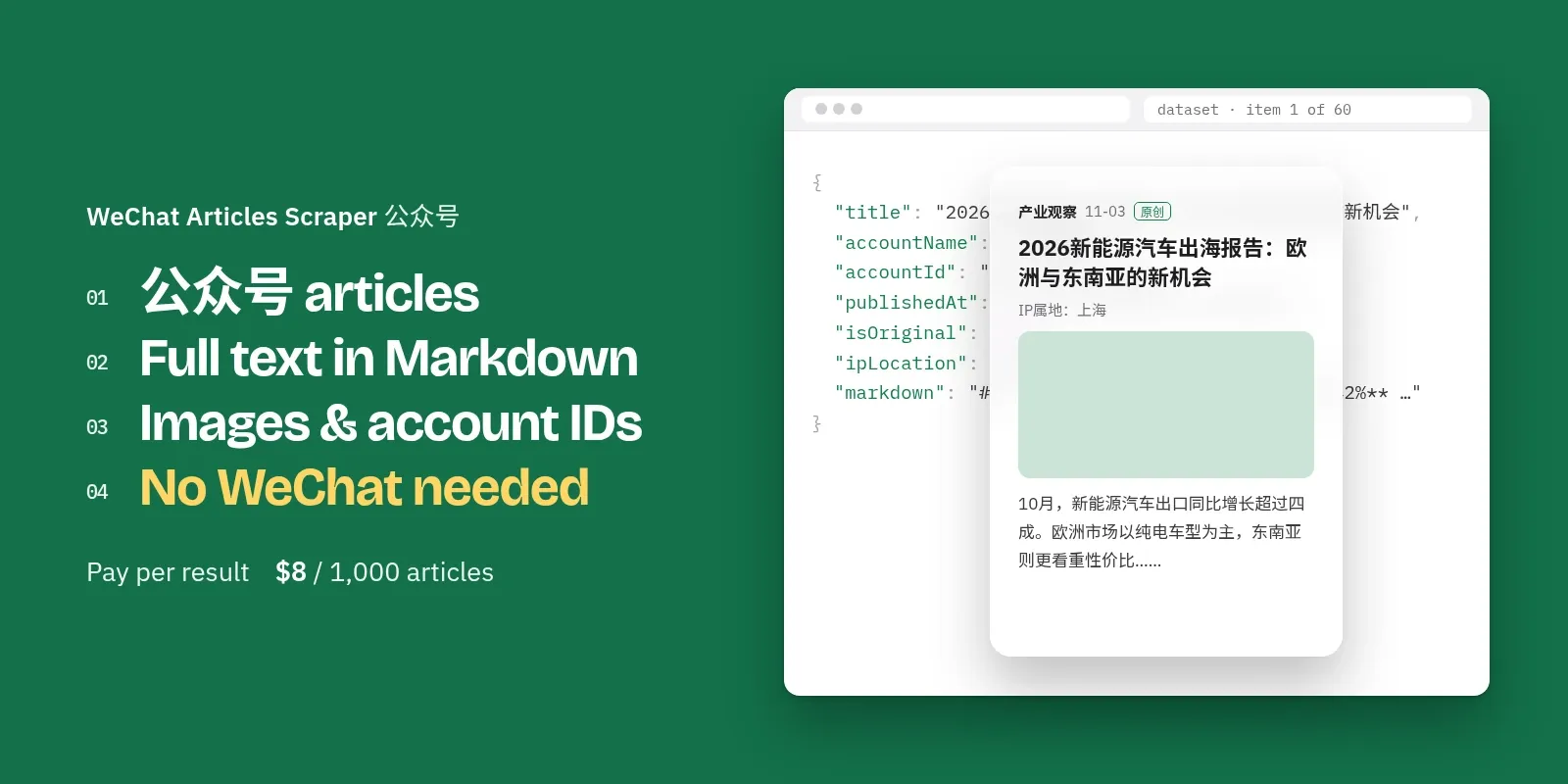
Scrape WeChat Official Account (微信公众号) articles without a WeChat account, login, cookies or API key. Search any keyword and get each article's full text as clean Markdown and plain text, all images, title, summary, publish time, account name and ID (gh_…), author, the original / repost flag (原创), the IP location WeChat shows, the "阅读原文" source link and the cover image. Image posts (图片消息) and video posts are handled too.
Paste article links to get the full text of articles you already have. Turn on Only new articles to monitor keywords on a schedule. $8 per 1,000 articles with full text, $2 per 1,000 if you only need the search cards. No monthly fee, and articles that can't be read are never charged as full articles.
**中文用户:**本页下方有完整的「中文使用说明」。
What you can use it for
- Brand and competitor monitoring in China: every WeChat article that mentions your brand, product or competitor, with the full text, so you can read or score it without a Chinese phone.
- China market research: what industry accounts, media and KOLs write about a market (新能源汽车, 跨境电商, 奶茶…), from which province, and who writes original content.
- Media and KOL discovery: find the 公众号 that cover a niche, with account ID, description and avatar.
- AI / RAG datasets: each article has a
markdownfield (headings, bold, lists, images) and atextfield, ready for LLM summaries, sentiment and translation. - Daily feeds: schedule it with Only new articles and push new articles to Google Sheets, Slack, Notion or your database.
How to use it
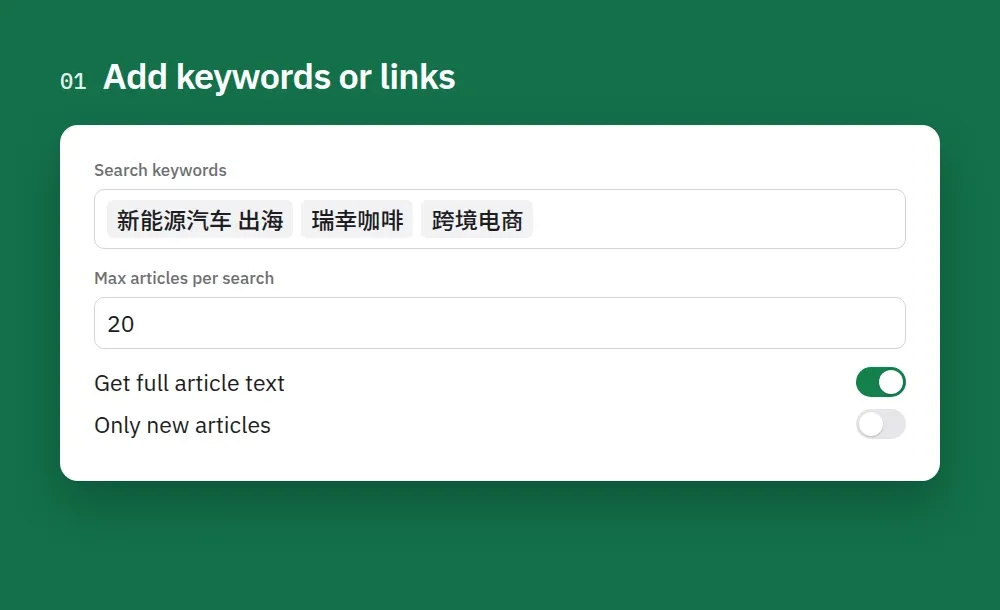
1. Add keywords or links. Type keywords (Chinese works best) or paste article links, and keep full text on for the article body, images and account details.
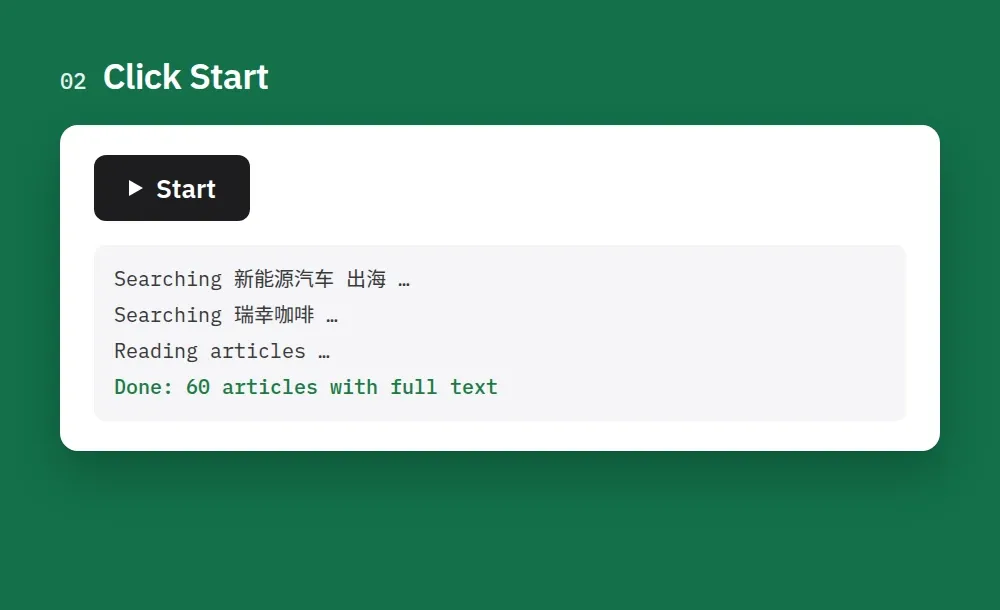
2. Click Start. 10 keywords with 20 articles each take about 10 minutes.
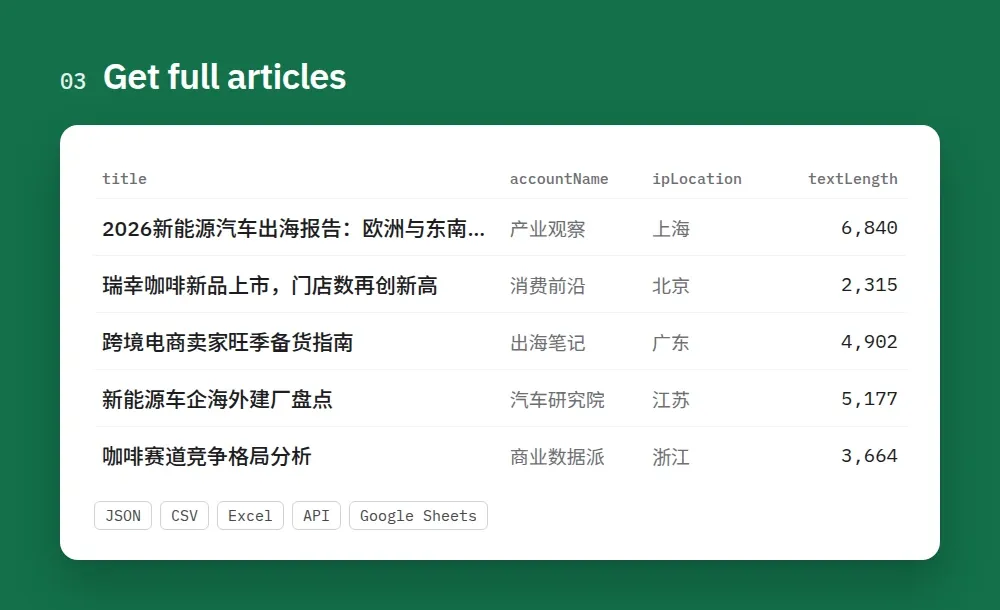
3. Get full articles. Every article comes with title, account, author, publish time, IP location, images and the full text as Markdown. Export it as JSON, CSV or Excel, or send it to your app through the API.
How to scrape WeChat articles
- Create a free Apify account (no credit card needed to start) and open this Actor.
- Add search keywords (Chinese works best: 比亚迪, 新能源汽车, 瑞幸咖啡) and/or article URLs (
mp.weixin.qq.com/s/…). - Set Max articles per search (up to 30 per keyword). Leave Get full article text on for the full body, images and account details, or switch it off for cheaper search cards.
- Click Start. 10 keywords × 20 articles with full text take about 10 minutes. Results appear in the Output tab while it runs.
- Download or connect. Export as JSON, CSV, Excel or HTML, or read the dataset through the API, Make, Zapier, n8n, Google Sheets or a webhook.
- Automate it. Open Schedules, add a daily schedule and turn on Only new articles, so each run returns and charges only articles it hasn't seen before.
Tips
- Want more articles on one topic? Use more keywords, not a bigger number. Sogou (the WeChat search engine this Actor uses) lets visitors without a login open about the first 30 results of a search. Next to 比亚迪, add 比亚迪 海外, 比亚迪 销量, 比亚迪 电池… Each keyword brings its own 30.
- Search results are sorted by relevance. Use Posted after / Posted before to keep only a period; articles outside it are skipped for free.
- The Actor runs at a polite, steady pace. If Sogou ever asks it to slow down, it pauses on its own and continues, or stops early with what it already saved — you never need to handle blocks, proxies or retries yourself.
Schedule it — no cron needed
Each run opens up to about 200 articles (what Sogou allows one visitor in one go — sometimes fewer when Sogou is busy; see Limitations). For daily monitoring that is plenty, and a schedule makes the Actor run on its own:
- Set up your input once (keywords, Only new articles on) and click Save as a new task — or open one of our ready-made tasks below and save it.
- Go to Schedules → Create new.
- In Schedule setup, pick the days and time in the visual picker and choose your timezone. No cron syntax needed.
- Under Add, choose your saved task, then switch the schedule on.
| What you want | Suggested schedule | Per run |
|---|---|---|
| Brand / competitor monitoring | Once a day (e.g. 09:00 your time) | up to 7 keywords × 30, Only new articles on |
| A few keywords, fresher | Every 6 hours | 3–5 keywords × 30, Only new articles on |
| Wide topic coverage (20+ keywords) | Split keywords over 2–3 tasks, each daily at a different hour | ≤ 7 keywords × 30 per task |
| One-off research dump | No schedule — one run per 7 keywords | ≤ 200 articles |
Ready-made tasks you can run, save and schedule in one click: Monitor a brand on WeChat (new articles only) · Full-text articles for market research (China EV).
With Only new articles on, each scheduled run returns and charges only articles it hasn't seen before, so daily runs usually stay well under the limit. Send results on with an Integration (Google Sheets, Slack, email, webhook) on the task.
中文使用说明
无需微信账号、登录、Cookie 或 API 密钥,即可按关键词搜索微信公众号文章,并获取正文全文(Markdown 和纯文本)、全部图片、标题、摘要、发布时间、公众号名称和 ID(gh_…)、作者、原创标记、IP 属地、“阅读原文”链接和封面图。输入表单中的字段名为英文,下文以粗体标出,方便对照。
- 注册免费的 Apify 账号(开始使用无需绑定信用卡),然后打开本 Actor。
- 添加关键词或文章链接:在 Search keywords 中填写关键词(中文效果最好,例如
比亚迪、新能源汽车、瑞幸咖啡),和/或在 Article URLs 中粘贴文章链接(mp.weixin.qq.com/s/…)。 - 设置数量:Max articles per search 是每个关键词返回的文章数量(最多 30 篇)。保持 Get full article text 开启,可获得正文、图片和公众号信息;关闭后只返回价格更低的搜索卡片。可用 Posted after / Posted before 限定发布时间段。
- 点击 Start。10 个关键词、每个 20 篇全文,大约需要 10 分钟。运行期间结果会实时显示在 Output 标签页中。
- 导出或对接数据:可导出为 JSON、CSV、Excel 或 HTML,也可以通过 API、Make、Zapier、n8n、Google Sheets 或 Webhook 获取数据。
- 定时监测:在 Schedules 中添加每天运行的定时任务,并打开 Only new articles (monitor mode)。之后每次运行只返回此前未采集过的文章,也只对这些文章收费。
提示:想获取同一主题的更多文章,请增加关键词,而不是调大数量。搜狗(本 Actor 使用的微信文章搜索引擎)只向未登录访客开放每次搜索的前 30 条左右结果。例如,在“比亚迪”之外再加上“比亚迪 海外”“比亚迪 销量”“比亚迪 电池”,每个关键词都能各自带来约 30 篇文章。
价格(每 1,000 篇):含全文的文章 $8,仅搜索卡片 $2。每篇文章只收费一次,无月费。可在运行选项中设置单次运行的最高费用,达到上限后 Actor 会自动停止。
限制:每个关键词最多 30 篇,每次运行最多约 200 篇。无法获取阅读数、点赞数、“在看”数和留言(这些数据只在微信 App 内向已登录用户显示)。无法搜索公众号,也无法获取某个公众号的全部历史文章。
Output: article
contentType:article,picture(image post — text plus all images),videoortext.contentState:okwhen the full text was read. Otherwise it says why not —deleted,migrated(account moved),account_banned,verify(WeChat asked for a check) ornot_loaded— and the article is charged as a search card only (or not at all, see Pricing).urlis the link Sogou hands out. It opens the article (WeChat may ask a browser outside the WeChat app to tap a quick check first).articleId(biz_mid_idx) is a stable ID — use it to deduplicate. Articles you add by link also get apermanentUrl.isOriginalis WeChat's 原创 flag;ipLocationis the province WeChat shows under the article (articles before 2022 have none).
With Get full article text off you get the search-card fields: title, summary, accountName, publishedAt, coverImageUrl, url, searchQuery, searchRank.
Input
Leave the input empty to get a small sample.
Pricing
You pay per article saved, plus a tiny start fee. No monthly fee. Each article is charged once — either as a full article or as a search card, never both.
| What you get | Price per 1,000 |
|---|---|
| Article with full text (Markdown + text, images, account and author details) | $8.00 |
| Search card only (full text switched off, or the article could not be opened) | $2.00 |
Not charged at all: articles outside your date range, duplicates, articles skipped by Only new articles, and cards saved without a link when a run stops early. Article URLs you paste that can't be read are saved with their contentState for free.
Set the maximum cost per run in the run options and the Actor stops there. Example: 10 keywords × 20 articles with full text ≈ $1.60.
Use with AI agents (Claude, ChatGPT, Cursor, MCP)
Add the Actor as a tool through the Apify MCP server: https://mcp.apify.com?actors=smoldesk/wechat-articles-scraper. Then paste this into your agent's system prompt or tool notes, so it knows when to call it:
Questions an agent can answer with it:
- What are Chinese industry accounts writing about EV exports this month? Give me a summary with links.
- Read these three WeChat article links and translate them into English.
- Which 公众号 write original content about cross-border e-commerce, and from which provinces?
Your agent can pay for its own runs. This Actor is approved for agentic payments on Apify, so an agent with a Skyfire token or an x402 wallet can call it and pay per result without an Apify account. Skyfire: use https://mcp.apify.com?payment=skyfire. x402: buy a prepaid Apify token with USDC. Setup: Apify agentic payments docs.
Use with AI (LangChain / LlamaIndex / CrewAI)
Each article has a markdown field (with images) and a plain text field, ready for LLMs. With LangChain (pip install langchain-apify):
Already have a run? Use ApifyDatasetLoader(dataset_id="<run's dataset ID>", dataset_mapping_function=...). LlamaIndex: ApifyActor from llama-index-readers-apify. CrewAI: use the Apify MCP server above.
Tip: ask an LLM to translate and summarize the text field in English, and to tag sentiment towards your brand.
Limitations
This Actor never logs in and reads only what WeChat and Sogou show any visitor, so:
- Up to 30 articles per keyword, up to about 200 per run. That's what Sogou opens to one visitor without a login. Add more specific keywords to cover a topic more widely, and use a schedule (above) for more per day. When a run reaches the limit it stops cleanly and keeps everything it saved.
- No read counts, likes, "在看" or comments. WeChat only shows these inside the WeChat app to logged-in users.
- No account search or full account history. Sogou has switched off its account search; to follow an account, search its name or the topics it writes about.
- Sogou's date filter needs a login, so the date range is applied by the Actor to the results Sogou returns (sorted by relevance).
- Links from Sogou are temporary-style links (
src=11×tamp&signature); they opened fine 3+ hours later in our tests. KeeparticleIdas your stable key.
FAQ
Does WeChat have a public API for Official Account articles? Not for searching other people's articles. This Actor uses Sogou WeChat search (搜狗微信搜索), the public search engine for 公众号 articles, and the public article pages on mp.weixin.qq.com.
Do I need a WeChat account, a Chinese phone number or cookies? No. Nothing to log in to, nothing to configure.
Do I need a proxy or VPN? No. It works from Apify's servers as is. Residential proxies are not needed.
Will I get blocked? The Actor handles that for you: it keeps a steady, polite pace, waits when Sogou asks it to slow down, and never crashes a run — you get what was saved and a clear status message. In our tests 10 keywords × 20 articles ran with zero slow-downs.
How much memory should I give it? Keep the default 512 MB. The Actor waits on Sogou's pace, not on your machine (CPU use stays under 5%), so 1–4 GB doesn't make it faster — it only raises the small start fee.
How do I get the full text of a WeChat article from a link? Paste mp.weixin.qq.com/s/<id> or mp.weixin.qq.com/s?__biz=…&sn=… links into Article URLs.
Is it legal? It collects only content WeChat and Sogou show publicly to every visitor, with no login. Articles are copyrighted by their authors — respect copyright and privacy laws (e.g. PIPL, GDPR) when you reuse them.
Feedback
Found a bug or missing a field? Open an issue in the Issues tab. If the Actor saved you time, a short review on this page helps other people find it.
More Actors from Smoldesk Studios
- Contact Details Scraper: emails, phone numbers, social profiles and contact forms from any list of websites, with email domains checked and junk removed, charged only when contacts are found
- Google Maps Scraper: places with phones, websites, ratings and hours from any search, plus emails and social profiles from each business website, lead filters and new-place monitoring
- Weibo Scraper: Weibo search with date ranges, posts, comments, profiles and hot search (热搜), no login
- Toutiao Scraper: Toutiao (今日头条) news search with reads, likes and comments, comment threads and the hot board, no login
- Bilibili Scraper: videos, stats, danmaku, comments and creators from China's video site, no login
- YouTube Scraper: videos, Shorts, channels and comments from search, channels and playlists — exact views, likes, publish dates and durations, no API key
- YouTube Comments Scraper: comments and replies from videos, channels, playlists or keyword searches, with likes, pinned/hearted flags and authors
- YouTube Channel Scraper: subscribers, exact total views, join date, country and social links of any channel, plus its latest videos
- Google Ads Transparency Scraper: every ad a competitor runs on Google Search, YouTube and Shopping — creatives, landing pages, countries, EU impressions and new-ad alerts
- Tennis Scraper: ATP, WTA, Challenger and ITF results and fixtures with odds from 15 bookmakers, H2H, players and rankings, back to the 2000s
- Google Hotels Scraper: hotel prices for your dates in any currency, ratings, review aspects and booking-site prices, worldwide
- Google Hotels Price Calendar: the cheapest nightly rate for every check-in date up to a year ahead, for any hotel, with taxes and booking-site prices
- Google Trends Scraper: interest over time, by region and city, related queries and Trending now — no API key
- Telegram Channel Scraper: public channel posts, views, reactions and subscribers
- Substack Scraper: newsletters, subscriber counts and posts
- Shopify Store Analyzer: apps, contacts and products of any Shopify store
- Career Site Jobs Scraper: live jobs from 12,000+ company career sites (Greenhouse, Lever, Workday, Ashby) with salary and seniority
- SEEK, JobStreet & JobsDB Scraper: jobs and salaries across Australia and Southeast Asia


