

AliExpress Scraper | Prices, Units Sold, $1.80/1K
Pricing
from $1.26 / 1,000 product results
AliExpress Scraper | Prices, Units Sold, $1.80/1K
Scrape AliExpress products at $1.80 per 1,000 products, the cheapest we compared ($2.49 and $9.00 elsewhere), with a $0.001 start fee instead of $0.05, sponsored results flagged and a new-products mode. Any keyword, no login: price, discount, rating, units sold; any ship-to country and currency.
Pricing
from $1.26 / 1,000 product results
Rating
0.0
(0)
Developer

Aurelix
Maintained by CommunityActor stats
0
Bookmarked
2
Total users
1
Monthly active users
an hour ago
Last modified
Categories
Share
What is AliExpress Scraper?
Research AliExpress products by keyword (price, discount, rating, units sold, ship-from country) for $1.80 per 1,000 products, no login, with sponsored results flagged.
For dropshippers and product researchers. Pick the ship-to country and currency so products and prices follow your market, and get only new listings on scheduled runs. Your first run with the example input costs about $0.055 (30 products in our test run).
| Search by | Keywords, one search per line |
| Market | Ship-to country (22) and currency (17), or AliExpress's default |
| Sort and filters | Best match, most orders, price low/high; keep or drop sponsored results |
| Output | 23 fields per product; JSON, CSV, Excel, API |
| Automate | Schedules, webhooks, Zapier, Make, n8n, Google Sheets, MCP for AI agents |
| Price | $1.80 per 1,000 products ($1.26 per 1,000 products on paid Apify plans) |
| Login needed | No |
Why AliExpress Scraper users pick this one
- Cheapest we compared. $1.80 per 1,000 products against $2.49 and $9.00; start fee $0.001.
- Demand you can sort. Units sold as a number, plus rating, price and discount.
- Your market's prices. Choose the ship-to country (22) and currency (17).
- Ads kept out. Sponsored results flagged or removed from your research.
- New products only. A mode that returns just listings you have not seen.
Get started in 3 steps
- Type your search keywords into 'Search keywords', one per line (e.g. pet hair remover).
- Optionally pick the ship-to country and currency, how many pages to read (60 products each), the sort order, and whether to keep sponsored results.
- Click Start, then download JSON, CSV or Excel, or schedule it with 'Only new products' and send results to Google Sheets, Zapier, Make or n8n.
▶ Try it with the example input
The form opens with an example input already filled in: that run costs about $0.055 on the free plan.
How much does it cost to scrape AliExpress?
Pay per event: you pay only for what the run returns, plus a small start fee. Bronze, Silver, Gold and higher Apify plans pay less per result.
| Products | Free plan | Paid plans (Bronze, Silver, Gold) |
|---|---|---|
| 100 | $0.18 | $0.13 |
| 1,000 | $1.80 | $1.26 |
| 10,000 | $18.00 | $12.60 |
Totals include the $0.001 start fee per run, rounded to the cent. Apify's free plan includes $5 of credit a month, enough for about 2,700 products.
Products whose titles do not match your search are dropped and not charged; a search AliExpress has no match for costs nothing beyond the start fee.
Billing events
| Event | Free plan | Paid plans (Bronze, Silver, Gold) |
|---|---|---|
product-result | $1.80 per 1,000 products | $1.26 per 1,000 products |
apify-actor-start | $0.001 per run | $0.001 per run |
AliExpress Scraper vs alternatives
| This Actor | kawsar/aliexpress-search-scraper | zen-studio/aliexpress-scraper | |
|---|---|---|---|
| Price per 1,000 products, free plan | $1.80 | $9.00 | $2.49 |
| Price per 1,000 products, paid plans | $1.26 | $8.00 | $2.49 |
| Start fee per run | $0.001 | None | $0.05 (at 1 GB) |
| Platform usage billed on top | No | No | No |
| Ship-to country and currency | ✓ | not stated | ✓ |
| Units sold, discount, ship-from | ✓ | ✓ | ✓ |
| Sponsored results flagged or removed | ✓ | not stated | not stated |
| Only products new since your last run | ✓ | not stated | not stated |
| Variants, reviews, seller details | ✗ | ✗ | ✓ (paid add-ons) |
Prices checked regularly on each Actor's Store page.
Benchmarks: how we compare
| Test | Input | Products returned | Run time |
|---|---|---|---|
| Two searches, 2 pages each | yoga mat, wireless earbuds | 223 | 34 s |
| Three broad searches, 2 pages each | kitchen gadgets, home decor, car accessories | 301 | 57 s |
| Only new products, 5 pages, first run | led strip lights | 248 | 47 s |
| Only new products, same search again | led strip lights | 183 new, 0 repeats | 49 s |
| Non-Latin searches, 1 page each | Chinese, Russian and Japanese phrases | 60 each | 32 s (6 searches) |
| Symbol-only and gibberish searches | ???, !!! ### $$$, xqzvbnmlkj | 0, each named in the run status | same run |
| Sponsored results removed | phone case, most orders, 1 page | 60, 0 sponsored | 9 s |
| Three searches, 2 pages each | 3 searches | 359 | 36 s |
| Spot check vs product pages | 10 random products | price, title, units sold, rating 10/10 | - |
| Prefilled first run | phone case, cap 30 | 30 products, $0.055 charged | - |
Measured on Apify cloud runs at 256 MB with the free datacenter proxy, logged out (one Actor run per row). The spot check compared 10 random products with a later visit to each product page; original_price matched 7 of 10, because AliExpress itself shows the struck-through price on some visits and not on others. In a hand check of 360 products from three broad searches, the title check dropped about 29 real matches (8%).
What data you get
AliExpress Scraper turns AliExpress search results into clean rows: product ID, title, link, images, price and original price, discount, deal badge, rating, units sold as a number, listing date, ship-from country and a sponsored flag. Type any keywords, pick the country you ship to and the currency, and sort by best match, most orders or price, up to 60 pages of 60 products per search. Schedule it with 'Only new products' to get just the listings you have not seen before.
- product_id, title, product_url, image_url, images
- price, original_price, discount_pct, currency, deal (badge such as 'Dollar Express')
- rating, sold_text, sold_count
- listed_date, ship_from, ship_to, sponsored
- query, page, position, new_since_last_run
- source_url, scraped_at in ISO 8601 UTC
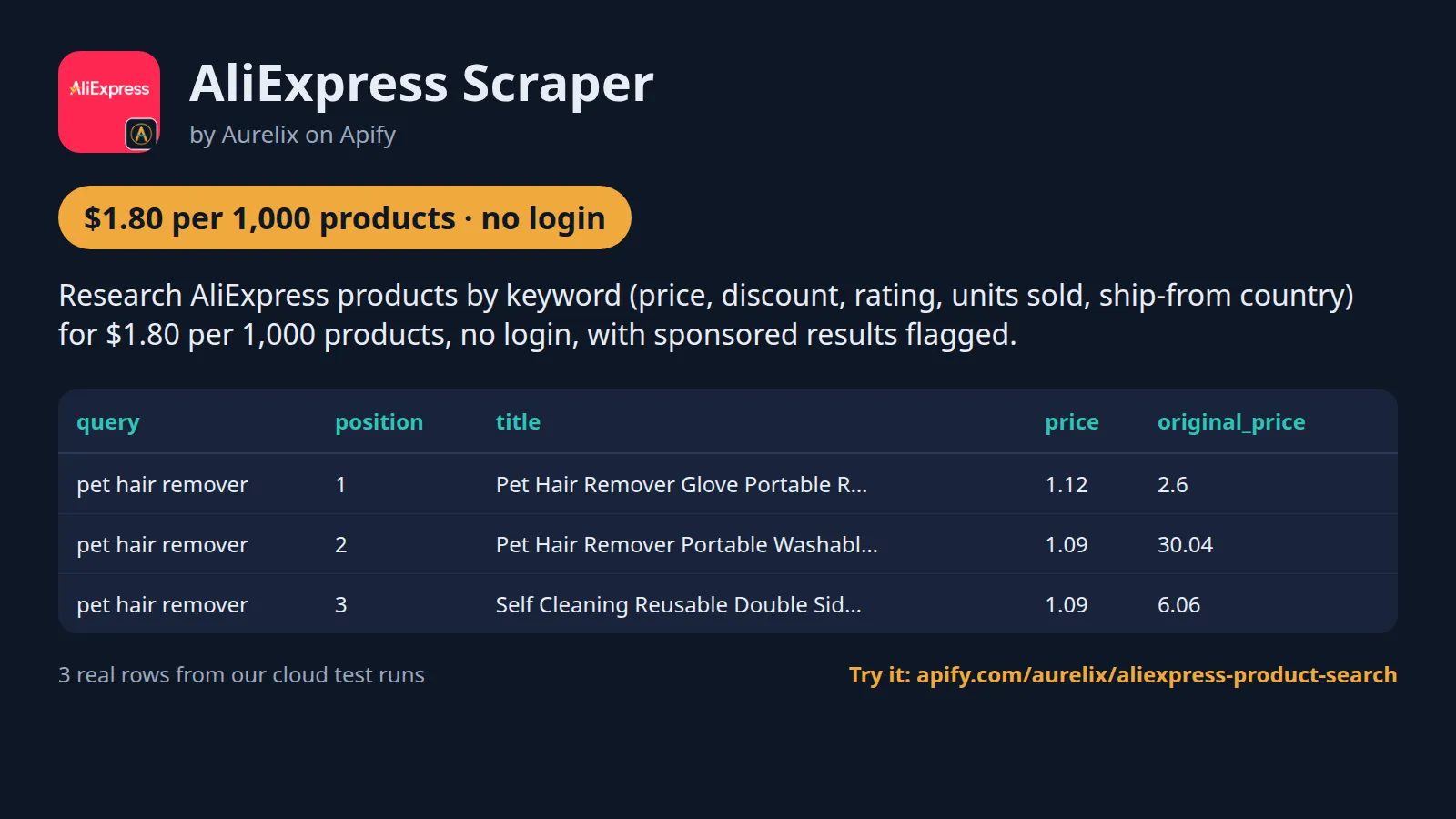
| query | position | title | price | original_price | rating | sold_count | ship_from |
|---|---|---|---|---|---|---|---|
| pet hair remover | 1 | Pet Hair Remover Glove Portable Reusable Lint Brush For C... | 1.12 | 2.6 | 4.9 | 60000 | CN |
| pet hair remover | 2 | Pet Hair Remover Portable Washable Clothes Hair Dehairing... | 1.09 | 30.04 | 4.9 | 60000 | US |
| pet hair remover | 3 | Self Cleaning Reusable Double Sided Lint Roller Static Du... | 1.09 | 6.06 | 4.9 | 40000 | CN |
One full product record, exactly as a real run returned it (long text and lists shortened here). From a real run:
Use cases
- Dropshippers researching which products in a niche sell the most
- E-commerce sellers checking AliExpress prices and discounts before sourcing
- Product researchers watching a niche weekly for new listings
- Analysts comparing prices, ratings and units sold across search terms
Use-case recipes
Rank a niche by demand before you source
For dropshippers choosing what to stock. Put 2 or 3 product ideas in queries and sort by most orders. Sort the output by sold_count, then rating, and shortlist products with high units sold and a rating above 4.5. Shorten the winning titles to a search phrase and feed them to Google Trends to see whether demand is rising.
Find local-warehouse stock for one market
For sellers who want shorter delivery times. Set shipToCountry to your buyers' country and the currency you sell in. In the output, filter ship_from to that country (for example DE): those products ship from a local warehouse, priced as a shopper there sees them.
Watch a niche weekly for new listings
For product researchers. Turn on incremental and give a tracking name, then schedule the task weekly. The first run returns everything; later runs return only products the earlier runs did not return. Use listed_date and sold_count to spot new listings that already sell, and add a Slack or webhook URL to get the top 10 after each run.
Ad-free price floor for a product
For buyers and analysts checking what a product really sells for. Sort by price low to high and turn off sponsored results, so ads do not skew the list. Compare price with original_price and discount_pct, and read the deal column: very low prices are often new-customer deals.
Input
| Field | Type | What it does | Default |
|---|---|---|---|
queries (Search keywords) | array | What to search for, one search per line, e.g. 'phone case', 'led strip lights', 'pet hair remover'. | |
maxPagesPerQuery (Pages per search) | integer | Result pages to read per search; each page has up to 60 products, e.g. 2 = up to 120. | 1 |
maxResultsPerQuery (Max products per search) | integer | Upper limit of products saved per search, across all pages read, e.g. 30. 0 = no limit (only 'maxPagesPerQuery' applies). | 0 |
sort (Sort by) | string | Order of results, as on AliExpress: best match, most orders, or price. | "best-match" |
includeSponsored (Include sponsored results) | boolean | Keep the sponsored (ad) products AliExpress mixes into results. | true |
incremental (Only new products) | boolean | Return only products not returned by a previous run of the same search and sort. | false |
All 12 fields, with examples: see the Input tab.
Switching from kawsar/aliexpress-search-scraper
Already running kawsar/aliexpress-search-scraper? Most of its inputs map one to one; its price, rating and orders filters have no input here, so filter the output instead:
kawsar/aliexpress-search-scraper input | This Actor's input | Notes |
|---|---|---|
keywords | queries | Same idea: one search per line. Identical lines are merged. |
sort | sort | Ours offers best-match, orders (most orders), price-asc and price-desc. There is no sort by rating. |
maxItems | maxResultsPerQuery | Cap per search across all pages read. 0 means no cap; the page limit still applies. |
maxPages | maxPagesPerQuery | Pages of up to 60 products each, 1 to 60. Default 1. |
minPrice / maxPrice | no equivalent | Sort by price, or filter the price column after the run. |
minRating | no equivalent | Filter the rating column after the run. |
minOrders | no equivalent | Sort by orders and filter sold_count, which is units sold as a number. |
requestTimeoutSecs | not needed | Each page load has a fixed 45-second timeout and up to 4 tries, with a fresh proxy session after a slider check. |
| no equivalent | shipToCountry / currency | Search as a shopper in one of 22 countries, with prices in one of 17 currencies. |
| no equivalent | includeSponsored / incremental | Drop ads from the results, and return only products your earlier runs of the same search did not return. |
- Units sold come in
sold_countas a number ('10,000+ sold' becomes 10000) next to the originalsold_text. - Every row says where it came from:
query,pageandpositionon that page, plus asponsoredflag. - A product is returned once per search, by
product_id; the same product found by two different searches appears under each. - Pricing is per product with a $0.001 start fee and no platform usage on top; products dropped by the title check or as sponsored are not charged.
Use with AI agents (Apify MCP server, Claude, ChatGPT, n8n AI agent)
AliExpress Scraper is a ready-made tool for AI agents. Through the Apify MCP server an agent reads this Actor's input schema, fills in the input from your request, starts the run and reads the products back. You pay the same per-result price as a run started by hand, from your own Apify account.
Example prompts
- "Search AliExpress for posture corrector sorted by most orders and give me the top 30 with price, rating and units sold in a table"
- "Find led strip lights on AliExpress that ship to Germany, prices in EUR, and list only the ones shipping from DE"
- "Compare AliExpress prices and units sold for pet hair remover, lint roller and fur brush, 1 page each, without sponsored results"
Claude (claude.ai and Claude Desktop)
Open Settings > Connectors, choose Add custom connector, paste https://mcp.apify.com/?tools=aurelix/aliexpress-product-search and sign in to Apify when asked. Then ask Claude one of the prompts above.
Claude Code, Cursor, VS Code and other MCP clients
Clients configured with JSON take the same URL:
A client without Apify sign-in sends the header Authorization: Bearer <YOUR_APIFY_TOKEN>; to run the server locally instead, use npx -y @apify/actors-mcp-server --actors aurelix/aliexpress-product-search with APIFY_TOKEN set.
ChatGPT
Where your ChatGPT plan offers custom connectors (developer mode), add https://mcp.apify.com/?tools=aurelix/aliexpress-product-search as a connector, sign in to Apify, and ask for the data in plain words.
n8n AI agent
Give an AI Agent node an MCP Client Tool with the endpoint https://mcp.apify.com/?tools=aurelix/aliexpress-product-search and a Bearer credential holding your Apify token. The agent can then call AliExpress Scraper whenever a workflow step needs products; for a fixed, non-agent workflow use Apify's n8n node with Run Actor instead.
Use it from AI agents (MCP), the API or no-code
Copy this to your AI assistant
MCP server URL for this Actor: https://mcp.apify.com/?tools=aurelix/aliexpress-product-search (setup for each client in the section above).
API
Start a run and read the dataset with Apify's REST API or the Python and JavaScript clients:
No-code: schedule it in 3 clicks
Send the results to Google Sheets, Zapier, Make, n8n, Slack or any webhook URL.
- Fill in the input, then click Save as a new task.
- In the task, click Schedule and pick daily or weekly (Apify Schedules).
- Turn on Only new products so each run returns only what is new, and paste a Slack or webhook URL into Slack webhook URL / Webhook URL to get a digest of the new items (count plus the top 10) after every run.
Prefer n8n or Make? Ask in the Issues tab and we will share a ready-made workflow for it.
FAQ
Can I scrape AliExpress without login?
Yes. It never logs in, so you need no AliExpress account, password or cookies; only a free Apify account to run it.
Is there a AliExpress API?
You can use this Actor as one. Start it with Apify's REST API or the Python and JavaScript clients and read the results as JSON (see the code above), or call it from an AI agent through MCP.
How much does it cost to scrape AliExpress?
About $1.80 for 1,000 products on Apify's free plan and $1.26 on paid plans, start fee included. The free $5 monthly credit covers about 2,700 products.
Can I export AliExpress data to Excel or Google Sheets?
Yes. Download the results as Excel, CSV, JSON, XML or HTML from the run's Storage tab, or send them to Google Sheets with Apify's Google Sheets integration or the API.
Is it legal to scrape AliExpress?
It reads only public data any logged-out visitor can see: AliExpress search result pages. It goes at a polite pace, never logs in and never solves CAPTCHAs. It returns product listing fields only (title, price, rating, orders sold, shipping, links); no buyer data or review text. To have a record removed, open an issue on this Actor's Issues tab; if AliExpress formally asks us to stop, this Actor will stop. You are responsible for using the data lawfully, incl. anti-spam and privacy laws; this is not legal advice.
Why are some prices very low?
AliExpress shows logged-out visitors new-customer deals such as 'Dollar Express' or 'Free with any purchase'. The price is exactly what the search page shows; the deal field names the badge. original_price (and discount_pct) is set only when the search page shows a struck-through price; otherwise it is empty.
Which currency are prices in?
The one you pick in 'Currency'; if you leave it empty, the ship-to country's currency, or the one AliExpress picks for the visitor (usually USD) when no country is set. It is in the currency field of every product.
Can I see prices for my country?
Yes. Set 'Ship to country': AliExpress then shows the products, prices (including taxes it applies to that market) and local-warehouse offers a shopper there sees. The country is in each row's ship_to field.
Why does a second run show products the first did not?
AliExpress reorders and varies its results between visits. 'Only new products' returns only products your earlier runs of the same search have not returned, so nothing repeats.
What does sold_count mean?
Units sold as AliExpress shows it, as a number: '100K+ sold' becomes 100000 (a lower bound).
Does it include store or seller names?
No. Only product data from the search results.
What am I charged when a search returns nothing or only part of the results?
Each run pays the $0.001 start fee, and then only for products saved to the dataset. Products dropped by the title check, sponsored products you chose to remove, and repeats skipped by 'Only new products' are not charged. A search with no letters or digits (e.g. '???') or with no matching products returns 0 rows and is named in the run status. If AliExpress blocks a search midway, the products already read are kept and charged, and the status starts with 'Partial'.
How many products can one search return?
Up to 60 pages of up to 60 products, so 3,600 at most, AliExpress' own limit. 'Pages per search' sets how many pages are read, and 'Max products per search' caps the saved products across those pages. The Actor stops early when AliExpress has no more results or a page has no product whose title matches your search.
How are duplicates handled?
Within one search, each product_id is returned once even if AliExpress shows it on two pages. Identical search lines are merged. The same product found by two different searches is returned under each search, with that search in the query field.
How does 'Only new products' remember what I have seen?
It keeps a memory per search text, sort order, ship-to country and tracking name. Currency is not part of it. A product stays remembered for 60 days after the last run that saw it. The first run returns everything; use a different 'Tracking name' to keep separate memories for the same search, e.g. one per client.
Can I search in other languages?
Yes. Searches in Chinese, Russian, Japanese and other scripts work. The title check accepts a product when its title matches your words or AliExpress' own English translation of them. In our test runs, one Chinese, one Russian and one Japanese search each returned 60 matching products.
What do position and page mean?
page is the results page the product was on, and position is its place on that page as AliExpress showed it (1 to 60), counting sponsored products and products dropped by the title check. So positions can skip numbers.
Can I filter by price, rating or number of orders?
Not in the input. Sort by price or by most orders, then filter the price, rating or sold_count columns in the dataset, in Excel or in Google Sheets.
How fast is it?
It pauses about 3 seconds between page loads to stay polite. In our test runs, 2 searches of 2 pages each returned 223 products in 34 seconds, and 3 searches of 2 pages each returned 301 products in 57 seconds.
What happens on empty or partial runs
- A search with no letters or digits, or with no products matching its title words, returns 0 rows; the run still succeeds and the status names that search under 'no results'.
- If AliExpress keeps showing a slider check on the first page of a search, that search is skipped and named under 'not read'; the other searches still run.
- If the check appears after some pages, the products already read are kept and the status starts with 'Partial' and says after which page it stopped.
- Only the $0.001 start fee and the products actually saved are charged, so an empty run costs $0.001.
- When the maximum charge you set for the run is reached, the Actor stops saving products and ends.
Limits (stated honestly)
- Search results only: no product-page details such as full descriptions, variants or shipping cost.
- Up to 60 pages of 60 products per search (AliExpress' own limit).
- Prices are as shown to a logged-out new visitor and can include new-customer deals.
- Results vary between visits, so two runs of the same search are not identical.
- Only products whose title contains at least half the words of your search (or of AliExpress' English translation of a non-English search) are returned and charged. A search AliExpress has no match for returns 0 products and costs nothing beyond the start fee; broad category searches (e.g. 'kitchen gadgets') can miss products whose title names neither word.
- If AliExpress answers with a slider check, the Actor retries with a fresh connection; if it keeps refusing, the products already read are kept and the run status says 'Partial'.
Works great with
- Then: Google Trends Scraper: put product names (shortened to the search phrase) into its
keywordsinput to see whether demand is rising before you stock or list them
Related Aurelix tools
Public Aurelix Actors, grouped by the data they collect. All are pay-per-result and need no login.
E-commerce and product data
- Amazon Best Sellers Scraper: Amazon Best Sellers and New Releases top 100 on 10 marketplaces: rank, ASIN, price, rating, rank change.
Jobs and hiring data
- Greenhouse Jobs Scraper: Live jobs from a company's Greenhouse, Lever, Ashby or SmartRecruiters board, with salary and Canadian province tags.
- LinkedIn Jobs Scraper: Public LinkedIn job postings by keyword and country: title, company, location, seniority, job type, salary text, description.
Leads and company data
- Google Maps Business Scraper: Local business lists from Google Maps: phones, websites, ratings, hours, coordinates; optional website emails and socials.
- Recently Funded Companies: US companies that just filed an SEC Form D: amount raised, industry, state, executives, confirmed website.
Ad intelligence
- Facebook Ad Library Scraper: Facebook and Instagram business ads from the Meta Ad Library: copy, creatives, landing pages, dates, optional EU reach.
Canada and government data
- Canada Building Permits Scraper: Building permits and development applications from 7 Canadian cities: address, type, status, dates, value, contractor company.
AI, content and SEO
- Google Trends Scraper: Google Trends interest over time, by region and rising queries for any number of keywords, plus trending searches.
- Website to Markdown Crawler: Crawls a site and returns one row of clean main-content Markdown per page, with title, headings and links.
Recent changes
- 0.1: Ship-to country (22) and currency (17) inputs; ship_to field on every product.
The full history is on the Changelog tab.
Tested daily
An automated health check runs this Actor every day on a fixed input and checks that at least 40 products come back with product_id, title, product_url, price, currency, source_url filled in; a failed check alerts the maintainer straight away.
Your feedback
Missing a field, found a bug or need another filter? Open an issue on the Issues tab; we aim to answer within a day. If this Actor saved you time, a short review helps other people find it.


