

Competitor Watch | Competitor Monitoring & Ads Tracker
Pricing
from $27.00 / 1,000 competitor checks
Competitor Watch | Competitor Monitoring & Ads Tracker
Extract only what is new about each competitor since your last run: new Meta and TikTok ads, changed web pages, new and re-priced Shopify products and new jobs, in one plain-language report per competitor. A competitor ads tracker and site monitor in one. $30.00 per 1,000 competitor checks.
Pricing
from $27.00 / 1,000 competitor checks
Rating
0.0
(0)
Developer

Aurelix
Maintained by CommunityActor stats
0
Bookmarked
2
Total users
1
Monthly active users
33 minutes ago
Last modified
Categories
Share
What is Competitor Watch?
Get only what is new about each competitor: new Meta and TikTok ads, page edits, new and re-priced products and jobs, $30.00 per 1,000 competitor checks, no login.
For agencies, e-commerce brands and marketers who want a competitor digest, not five scrapers. List competitors once; each scheduled run returns one plain-language report per competitor. Your first run with the example input costs about $0.075 (2 competitor checks in our test run).
| Input | Competitor domains (up to 25 per run), optionally with a Facebook page ID, a TikTok advertiser ID, pages to watch, a Shopify store or a careers page |
| Sources | Meta Ad Library, TikTok Ad Library (EU/EEA, UK, CH, TR), the competitor's own web pages, its Shopify product feed and its public job board |
| What you get | One competitor_report per competitor with a plain-language summary and counts, plus one change row per new ad, page change, new product, price change or new job |
| Memory | Named key-value store per state key: the first run saves a baseline, later runs return only what is new |
| Automate | Schedules, Slack incoming webhook, any webhook (Zapier, Make, n8n, email via those), API, MCP for AI agents |
| Price | $30.00 per 1,000 competitor checks ($27.00 per 1,000 competitor checks on paid Apify plans) |
| Login needed | No |
Why Competitor Watch users pick this one
- One report per competitor. Ads, page changes, products, prices and jobs in one row with a summary.
- Only what is new. Everything is remembered between runs; nothing is reported or charged twice.
- Quiet runs cost almost nothing. $0.03 per competitor when nothing changed, plus the start fee.
- Set up from a domain. Finds the Facebook page, Shopify feed and job board itself.
Get started in 3 steps
- Paste your competitors' website domains into Competitors, one each (allbirds.com, glossier.com), pick what to watch and give the watchlist a state key.
- Run it once to save the baseline, then schedule it daily or weekly with the same state key; add a Slack or webhook URL for the digest.
- Read one competitor_report per competitor (the summary says it in plain words) and the change rows under it, or let your Slack channel do the reading.
▶ Try it with the example input
The form opens with an example input already filled in: that run costs about $0.075 on the free plan.
How much does it cost to monitor competitors?
Pay per event: you pay only for what the run returns, plus a small start fee. Bronze, Silver, Gold and higher Apify plans pay less per result.
| Competitor checks | Free plan | Paid plans (Bronze, Silver, Gold) |
|---|---|---|
| 100 | $3.06 | $2.76 |
| 1,000 | $30.60 | $27.60 |
| 10,000 | $306.00 | $276.00 |
Totals include the $0.015 start fee per run (at least one run per 25 competitor checks, so 40 start fees for 1,000), rounded to the cent. Apify's free plan includes $5 of credit a month, enough for about 160 competitor checks.
You pay $0.03 for each competitor checked in a run, whatever it found, plus $0.001 for each new item reported (a new ad, a changed page, a new product, a price change or a new job). The first run of a watchlist saves the baseline and charges only the per-competitor fee; items already reported are never charged again. A competitor is charged once per run when at least one source was searched, whether or not anything new was found, even when the search found no matching account. A competitor where no source could be searched (no domain or ID, or every source was down or blocked) is reported free. Example: 5 competitors checked daily with 4 new items a day cost 5 × $0.03 + 4 × $0.001 + $0.015 start = $0.169 a day, about $5.07 a month.
Billing events
| Event | Free plan | Paid plans (Bronze, Silver, Gold) |
|---|---|---|
competitor-check | $0.03 per competitor checked | $0.027 per competitor checked |
new-item | $0.001 per new item | $0.001 per new item |
apify-actor-start | $0.015 per run | $0.015 per run |
Competitor Watch vs alternatives
| This Actor | data-done-right/competitor-monitoring | happitap/competitor-ads-monitor | |
|---|---|---|---|
| Price, free plan | $0.03 per competitor checked + $0.001 per new item | $0.025 per competitor report | $0.004 per ad + $0.01 start per GB |
| Meta (Facebook, Instagram) ads | New ads only, from the brand's page | No | Yes |
| TikTok ads | New ads in the TikTok Ad Library (EU/EEA, UK, CH, TR) | No | TikTok Creative Center |
| Google ads | No | Yes (Ads Transparency) | Yes (Ads Transparency) |
| Website | Text changes on the pages you pick, prices called out | New pages from sitemaps | No |
| Shopify products and prices | New products and price changes per variant | No | No |
| Job postings | New postings on 7 job-board systems | New job openings | No |
| News mentions | No | Google News | No |
Benchmarks: how we compare
| Test | Input | Result | Run time |
|---|---|---|---|
| First run of the prefilled input (baseline) | allbirds.com and glossier.com; Meta ads, website, Shopify | 2 of 2 competitors checked: Facebook pages found from the domains, 48 active ads, 2 pages and 484 products saved | 70 s |
| Second run, same state key | the same input | nothing new reported and nothing repeated; only the 2 competitor checks charged | 31 s |
| One large brand, every source on | gymshark.com; Meta, TikTok (GB), website, Shopify, jobs | all 5 sources read: 30 newest of 5,657 active Meta ads, 25 TikTok ads, the home page (7,115 words, reached through its redirect page), 5,000 products, 10 open roles | 61 s |
| Five US brands, TikTok only (GB) | allbirds.com, glossier.com, brooklinen.com, chubbiesshorts.com, bombas.com | 5 searches, no matching UK advertiser: 5 competitor checks charged (status no_match), nothing tracked | 97 s |
Measured on Apify at the 1 GB default memory, with the Actor's own default settings. Run time includes start-up; Meta and TikTok answer more slowly when they throttle.
What data you get
Competitor Watch watches a list of competitors and tells you, per competitor, only what is new since your last run: ads that started on Facebook and Instagram (Meta Ad Library), ads in the TikTok Ad Library, text changes on the pages you choose (pricing, home page, collections), products that appeared or changed price in their Shopify store, and new postings on their job board. List each competitor once, as its website domain such as allbirds.com; the Actor finds the brand's Facebook page and TikTok advertiser (only accounts whose ads link to that domain), its Shopify product feed and its job board itself and remembers everything between runs. Each competitor gets one report with a short summary in plain words, plus one row per new item, and the whole run can be posted to Slack or any webhook. It is a monitor, not a raw scraper: the first run saves a baseline, and every later run returns only the changes.
- competitor_report rows (one per competitor per run): status, baseline flag, a plain-language summary, counts of new Meta ads, new TikTok ads, page changes, new products, price changes and new jobs, up to 5 highlights, what is tracked now (Meta page and number of active ads, pages read, products, open roles) and a status per source
- change rows (one per new item): source (meta_ads, tiktok_ads, website, shopify, jobs), change (new_ad, page_changed, new_product, price_change, new_job), title, one-line summary, link to the ad in its ad library or to the page, product or job, image, price and previous price, start date, and a data object with source-specific fields
- Page changes carry the added and removed text blocks and the prices that appeared or disappeared, so a pricing-page edit reads like '$29 → $35'
- OUTPUT record: a Slack-ready digest with one line per competitor, also sent to your Slack or webhook URL when something is new
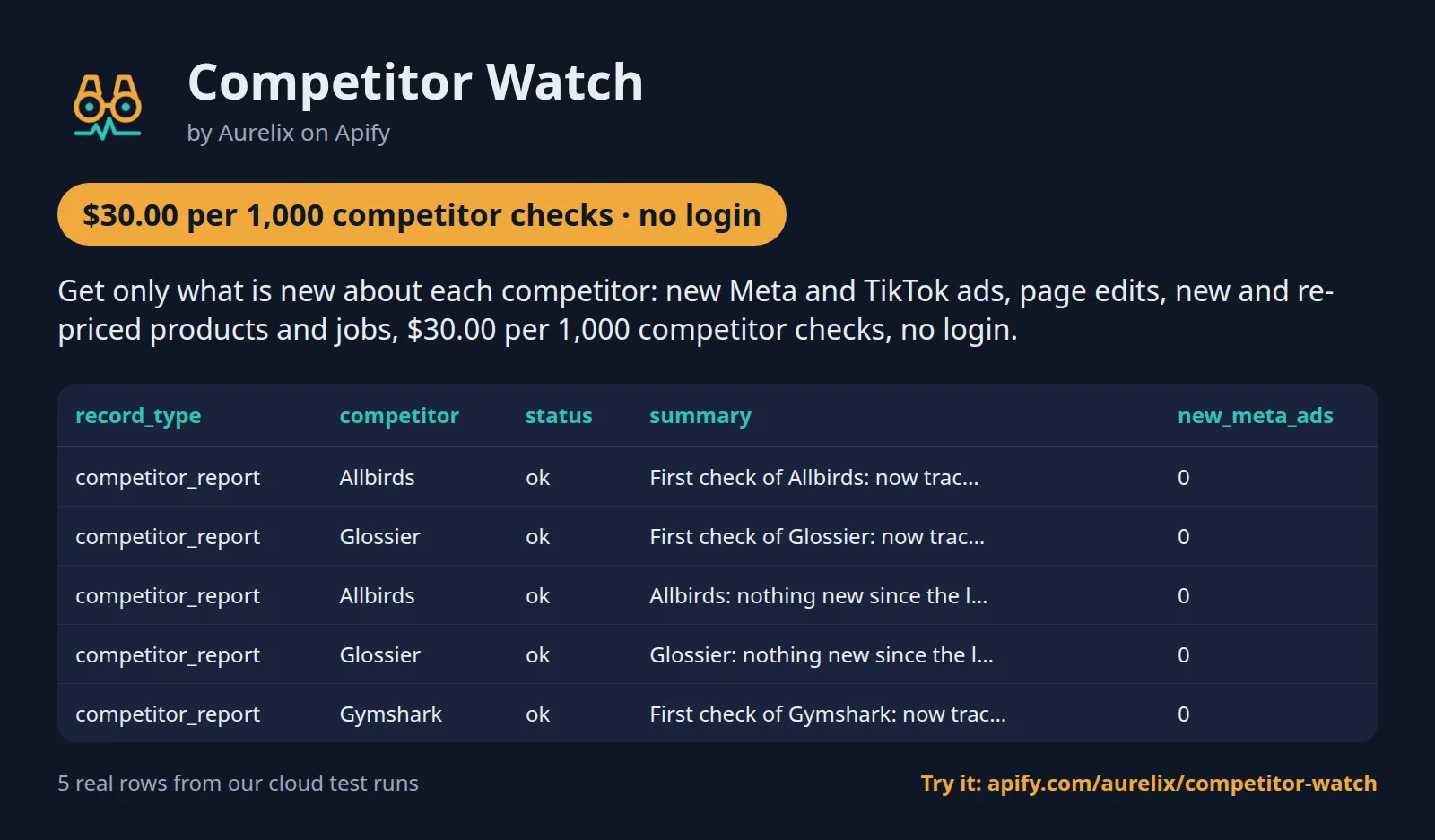
| record_type | competitor | status | summary | new_meta_ads | pages_changed | new_products | price_changes |
|---|---|---|---|---|---|---|---|
| competitor_report | Allbirds | ok | First check of Allbirds: now tracking 24 active Meta ads ... | 0 | 0 | 0 | 0 |
| competitor_report | Glossier | ok | First check of Glossier: now tracking 29 active Meta ads ... | 0 | 0 | 0 | 0 |
| competitor_report | Allbirds | ok | Allbirds: nothing new since the last check. | 0 | 0 | 0 | 0 |
| competitor_report | Glossier | ok | Glossier: nothing new since the last check. | 0 | 0 | 0 | 0 |
| competitor_report | Gymshark | ok | First check of Gymshark: now tracking 30 active Meta ads ... | 0 | 0 | 0 | 0 |
One full competitor_report record (first check of a competitor with all five sources on), exactly as a real run returned it (long text and lists shortened here):
Use cases
- Marketing agencies: a weekly competitor digest per client, one state key per client, posted to the client's Slack channel
- E-commerce and DTC brands: see the day a rival launches a product, cuts a price or starts a sale on its home page
- Performance marketers: a running swipe file of competitors' new Meta and TikTok ad creatives with links to each ad
- Product marketing and sales enablement: alerts when a competitor edits its pricing or features page
- Founders and investors: one daily view of what competitors ship, advertise and hire for
- AI agents: a tool that answers 'what did my competitors do this week?' from fresh public data
Use-case recipes
Agencies: one weekly competitor digest per client
Save one task per client with that client's competitors and a state key named after the client, schedule it weekly and paste the client's Slack incoming-webhook URL. Each Monday the channel gets one line per competitor in plain words, and the dataset holds every new ad and change with links for the account manager's report. The first run per client is the baseline and costs only the per-competitor fee.
E-commerce brands: launches, price cuts and sales at your rivals
List the stores you compete with and watch the home page and the new-arrivals collection. Run it daily: new_product rows tell you what launched, price_change rows show the old and the new price per product, and a page_changed row on the home page usually means a new sale or banner. Filter the change rows by source shopify for a pricing sheet.
Performance marketers: a swipe file of competitors' new ads
Turn on Meta and TikTok ads only and run it daily. Every new ad comes as one row with its text, its image (or the video's cover image for video ads, in image_url), start date and a link to the ad in its library; export the change rows to Google Sheets and you have a dated swipe file. Use the European TikTok country closest to your market.
Product marketing: know when a competitor edits its pricing page
Give each competitor with the pages that hold its pricing and features. A page_changed row lists the added and removed text and the prices that appeared or disappeared (for example $29 → $35), so the summary line is often all you need to update a battlecard.
Input
| Field | Type | What it does | Default |
|---|---|---|---|
competitors (Competitors (domains)) | array | Competitors to watch, up to 25 per run. | |
sources (What to watch) | array | Sources checked for every competitor: 'meta_ads' (new Facebook and Instagram ads in the Meta Ad Library), 'tiktok_ads' (new ads in... | ["meta_ads", "website", "shopify"] |
stateKey (State key) | string | Name of this watchlist's memory, e.g. 'my-competitors' or 'client-acme'. | "default" |
proxyConfiguration (Proxy for the Meta Ad Library) | object | Proxy used only for the Meta Ad Library. | {"useApifyProxy": true} |
watchPaths (Pages to watch (paths on each competitor's site)) | array | Paths checked on every competitor's domain for text changes, e.g. ['/', '/pricing', '/collections/new-arrivals']. | ["/"] |
metaCountry (Meta ads country) | string | Two-letter ISO code of the country whose active Meta ads are checked, e.g. 'US' or 'GB', or 'ALL' for every... | "ALL" |
All 11 fields, with examples: see the Input tab.
Use with AI agents (Apify MCP server, Claude, ChatGPT, n8n AI agent)
Competitor Watch is a ready-made tool for AI agents. Through the Apify MCP server an agent reads this Actor's input schema, fills in the input from your request, starts the run and reads the competitor checks back. You pay the same per-result price as a run started by hand, from your own Apify account.
Example prompts
- "Check my competitors allbirds.com and glossier.com with the state key my-competitors and tell me what is new since last time: new ads, page changes, new products and price changes."
- "Run Competitor Watch on gymshark.com with Meta ads, TikTok ads in GB and Shopify, and summarise each new ad and product in a table."
- "Watch the pricing pages of my three competitors (domains below) every week and tell me in one paragraph per competitor what changed."
Claude (claude.ai and Claude Desktop)
Open Settings > Connectors, choose Add custom connector, paste https://mcp.apify.com/?tools=aurelix/competitor-watch and sign in to Apify when asked. Then ask Claude one of the prompts above.
Claude Code, Cursor, VS Code and other MCP clients
Clients configured with JSON take the same URL:
A client without Apify sign-in sends the header Authorization: Bearer <YOUR_APIFY_TOKEN>; to run the server locally instead, use npx -y @apify/actors-mcp-server --actors aurelix/competitor-watch with APIFY_TOKEN set.
ChatGPT
Where your ChatGPT plan offers custom connectors (developer mode), add https://mcp.apify.com/?tools=aurelix/competitor-watch as a connector, sign in to Apify, and ask for the data in plain words.
n8n AI agent
Give an AI Agent node an MCP Client Tool with the endpoint https://mcp.apify.com/?tools=aurelix/competitor-watch and a Bearer credential holding your Apify token. The agent can then call Competitor Watch whenever a workflow step needs competitor checks; for a fixed, non-agent workflow use Apify's n8n node with Run Actor instead.
Use it from AI agents (MCP), the API or no-code
Copy this to your AI assistant
MCP server URL for this Actor: https://mcp.apify.com/?tools=aurelix/competitor-watch (setup for each client in the section above).
API
Start a run and read the dataset with Apify's REST API or the Python and JavaScript clients:
No-code: schedule it in 3 clicks
Send the results to Google Sheets, Zapier, Make, n8n, Slack or any webhook URL.
- Fill in the input, then click Save as a new task.
- In the task, click Schedule and pick daily or weekly (Apify Schedules).
- Paste a webhook URL into Webhook URL (optional) to get what changed after every run (each run already reports only what is new).
Prefer n8n or Make? Ask in the Issues tab and we will share a ready-made workflow for it.
FAQ
Can I monitor competitors without login?
Yes. It never logs in, so you need no Facebook, TikTok or Shopify account, password or cookies; only a free Apify account to run it.
Is there a competitor monitoring API?
You can use this Actor as one. Start it with Apify's REST API or the Python and JavaScript clients and read the results as JSON (see the code above), or call it from an AI agent through MCP.
How much does it cost to monitor competitors?
About $30.60 for 1,000 competitor checks on Apify's free plan and $27.60 on paid plans, start fee included. The free $5 monthly credit covers about 160 competitor checks.
Can I export competitor changes to Excel or Google Sheets?
Yes. Download the results as Excel, CSV, JSON, XML or HTML from the run's Storage tab, or send them to Google Sheets with Apify's Google Sheets integration or the API.
Is it legal to monitor competitors?
It reads only public data any logged-out visitor can see: ads in the public Meta and TikTok ad libraries, the competitor's own public pages and product feed, and its public job board. It never logs in, obeys robots.txt on websites, skips political and person-named advertisers, and leaves customer reviews and testimonials out of the page text it tracks, so reviewers' names are not returned. Laws and site terms differ by country and use, so check what applies to you; this is not legal advice.
When is a competitor charged?
A competitor is charged once per run when at least one source was searched, whether or not anything new was found. That includes a check where a source was searched but no matching account was found (for example a US brand with no TikTok ads in Europe). A competitor is free only when no source could be searched at all: no domain or ID, or every source was down or blocked. New items add $0.001 each.
What is a competitor check and when am I charged?
One competitor checked in one run is one competitor-check ($0.03). It is charged when at least one source was searched for that competitor, whether or not anything new was found, and also when a search found no matching account (status no_match), because the check was done. Each new item in the report adds $0.001. A competitor where no source could be searched (status not_found or failed: no domain or ID, or every source down or blocked) costs nothing.
Why did my first run return no ads or products?
The first run of a state key is the baseline: it saves every ad, page, product and job it can see, and the report says how many it now tracks. Only the competitor-check fee is charged. From the second run with the same state key you get only what is new.
Can I watch competitors for several clients?
Yes. Use one state key per client (for example client-acme) and one saved task or schedule per key. Each key has its own memory, so runs for one client never use up another client's changes.
How does it make sure an ad is really my competitor's?
A page or advertiser named like your competitor is accepted only when its ads link to the competitor's own domain or a country version of it (a different ending such as .online is treated as another business), and on TikTok every new ad is checked against the accepted advertiser before it is reported. The report's tracking field shows the Facebook page used (meta_page_name, meta_page_id). To choose yourself, give the competitor as an object with facebookPageId (the number in view_all_page_id=...) or tiktokAdvertiser (the advertiser ID from the TikTok Ad Library).
Does TikTok work for US brands?
Only for ads they run in Europe, the UK, Switzerland or Turkey: TikTok's public Ad Library covers those regions only. Pick the country in tiktokCountry. A brand that advertises only in the US shows no TikTok ads.
Which pages should I watch?
The home page, the pricing page and the main collection or 'new arrivals' page tell you the most. Put the paths in Pages to watch (they are used for every competitor) or add pages to a single competitor with the pages field. Up to 10 pages per competitor.
Can I get the digest by email?
The Actor posts to a Slack incoming webhook or to any webhook URL. To get it by email, point the webhook at a Zapier, Make or n8n flow that sends the text as an email.
What if a competitor is not on Shopify?
The Shopify source reports 'not a Shopify store' for it and adds no charge of its own; the other sources still run. Checking the store still counts as a search, so a competitor whose only source was Shopify is charged once (status no_match).
Lawful use
- The Actor reads public, logged-out pages only: the Meta and TikTok ad libraries (public ad transparency data), the competitor's own public web pages and product feed, and public job boards.
- It never logs in, never brings cookies and never solves a CAPTCHA. Websites are read with robots.txt obeyed and a polite rate limit, and a store whose robots.txt disallows its product feed is skipped.
- Ads from political or issue advertisers and from advertisers that look like private persons are skipped (on TikTok with a stricter person-name filter). Job rows hold job titles, departments and locations, never candidate or employee data.
- Use it for your own competitive research and only on sites you have the right to monitor. Comply with the terms that apply to you and with the data-protection law of your country.
- Page text: recognisable reviews and testimonials are left out: sections under a reviews, testimonials or 'N-star' heading, quotations, star ratings, 'verified buyer', review widgets (Yotpo, Okendo, Judge.me, Trustpilot, Stamped, Junip) and credits such as 'Sarah T.'. A credit without quote marks outside a review section can remain; a competitor's own text naming a person is tracked as written.
How it compares with paid competitive-intelligence tools
Competitive-intelligence suites do far more than this Actor: battlecards, win-loss analysis, traffic estimates, keyword data, analyst workflows. If you need those, buy them. If what you need is a reliable feed of what your competitors changed, they are an expensive way to get it. Prices below are the public list prices on each vendor's pricing page when this page was written; check them before you decide.
| Tool | What it watches | Public price |
|---|---|---|
| Competitor Watch (this Actor) | New Meta and TikTok ads, page text changes, new and re-priced Shopify products, new jobs; one report per competitor | $0.03 per competitor per run + $0.001 per new item; 5 competitors daily ≈ $5 a month |
| Semrush | SEO, keywords, ads and traffic research | SEO plan $139 a month, Starter $199, Pro+ $299 (monthly billing) |
| Similarweb | Web traffic and market intelligence | No price on its pricing page; packages through sales |
| Visualping | Visual and text changes on web pages | Personal $14 a month (10 pages) to Business $350 a month (500 pages); free plan 5 pages |
| Klue, Crayon | Competitive-intelligence platforms for sales and product marketing | No public prices; demo or estimate request |
What you give up with this Actor: no traffic or keyword estimates, no Google ads, no news mentions, no battlecards, and no dashboard beyond Apify's dataset views, Slack and whatever you connect through the API.
Why not stitch separate scrapers together?
You can build the same feed from single-source Actors, including our own. Each of them is good at its one job, and this Actor runs the same code in-process. The difference is the plumbing:
| Competitor Watch | Five separate scrapers | |
|---|---|---|
| Runs and schedules to maintain | 1 | 5 (ads, TikTok, page monitor, store monitor, jobs) |
| Start fees per scheduled run | 1 ($0.015 at the 1 GB default) | 5, each with its own fee |
| Setup per competitor | one domain | a Facebook page or search, a TikTok advertiser, page URLs, a store URL and a job-board link, each in a different tool |
| Output | one report per competitor with a summary, plus one row per new item, in one dataset | five datasets with five schemas to join by competitor yourself |
| Memory between runs | one state key for the whole watchlist | one state or watchlist ID per tool |
| Digest | one Slack or webhook message for all competitors | up to five messages, or your own merge step |
| Price when nothing changed | $0.03 per competitor | the start fees of five runs plus each tool's per-store or per-page fees |
If you need every ad, every product or every job each time (not only what is new), or the extra fields a single-source scraper returns (EU reach data, ad targeting, full product descriptions, full job descriptions), use the single-source Actor for that source instead.
How it decides what is new
- Meta ads: the brand's Facebook page is found once from its name and accepted only when its active ads link to the competitor's own domain (or the same name on a country domain, such as allbirds.de for allbirds.com), so a same-name page of another business is never used; it is then remembered. A brand name without a domain needs facebookPageId. Each run reads the page's active ads in the Ad Library, newest first, up to maxAdsPerCompetitor. An ad is new when its ID was never seen before and it started on or after the day of the previous check, so an older ad that only now comes within reach of the list is not reported as new. Each ad whose page categories or page name mark a person, a politician or a political organisation, and each political ad, is skipped, with the same rules as our Facebook Ad Library Scraper.
- TikTok ads: the TikTok Ad Library is searched for the advertiser's name in the country you pick (ads shown in the last 30 days, most recently shown first, at most 30 per run). An advertiser is accepted only when one of its ads links to the competitor's domain or a country version of it (or you give its advertiser ID), and every new ad is checked against that advertiser before it is reported: ads from another business with the same name are skipped and never charged. Legal-entity endings such as Ltd, Limited, GmbH, Inc or B.V. are ignored when names are compared, so 'HUEL LIMITED' is found for huel.com. New means an ad ID not seen before that was first shown on or after the day of the previous check.
- Website: each watched page is read as Markdown and cut into text blocks; dates, copyright lines and 'minutes read' lines are ignored. A page is changed when a block of three words or more was added or removed, or the title changed. Prices that appeared or disappeared in the changed blocks are listed. A page that suddenly loses 90% of its text, shows a bot check or needs JavaScript keeps its previous version and is reported in the note, never as a change.
- Shopify: the public products.json feed is compared product by product and variant by variant. A product is new when it was not in the previous snapshot and was created on or after the day before the previous check; a price change is any variant price that moved, with the old and the new price and the percentage on the product's lowest price.
- Jobs: the company's Greenhouse, Lever, Ashby, SmartRecruiters, Workable, BambooHR or Workday board is found from its careers page or name. A posting is new when its ID was never open before and it is not a repost of a recently removed role.
Limits (stated honestly)
- Ads: at most 30 ads per competitor and ad library per run (Meta: the page's 30 most recent active ads; TikTok: the 30 most recently shown). A brand that launches more than 30 ads between two runs shows only the newest 30; run it more often. Meta can rate-limit; the Actor then retries on residential proxy and marks the source partial if it still stops early.
- Page detection works when the brand's Facebook page is named like the brand or the domain; otherwise give facebookPageId.
- TikTok covers only the EU/EEA, the UK, Switzerland and Turkey, and loads in a real headless browser, which makes it the slowest source; if TikTok times out on long lists, run with 2 GB of memory.
- Website changes are text changes. Images, layout and content that appears only after JavaScript runs are not compared; pages that need JavaScript are reported in the note and not charged.
- Shopify only, and only stores whose public products.json feed is open and allowed by robots.txt; up to 5,000 products per store and run (larger catalogues are compared on their first 5,000 products in the feed's order, so a launch further down the feed can be missed).
- Shopify can rate-limit long catalogue reads from cloud servers; the report then says how many products were compared (status partial), and products not compared that run are compared on a later run.
- Jobs: the seven job-board systems listed above; for companies on other systems the job-board search finds nothing. That search still counts as checking the competitor, so if it is the only source that ran, the competitor is charged once (status no_match), like any other search that finds nothing.
- No Google ads, news mentions, traffic or keyword data.
- Up to 25 competitors per run; use several state keys for longer lists.
- Give competitors as domains. A brand name without a domain cannot be matched safely for ads or pages: it gets ads only with facebookPageId or a TikTok advertiser ID. With 'jobs' on, its job board is still looked up by its name, and that search makes it a charged competitor check.
- If TikTok refuses a search or Meta blocks, that source is skipped for the rest of the run (said in the status and in each report's note) and the competitors are checked again next run. If no source answers for 3 competitors that can be searched, the run stops there and only the start fee is charged; the competitors not reached are checked first in the next run.
- Each competitor's report, charges and memory are saved as soon as it is checked. Competitors are checked three at a time. When your maximum charge is reached, competitors not started yet are not read at all, and the ones already being checked in that group of three are finished but neither reported nor charged. When the run timeout is reached, the ones still being checked are cancelled. Nothing is charged for any of them, and all are checked first in the next run. If no source answers at all within 75 seconds, the run stops there.
- Page text is compared in blocks of three words or more; shorter lines (a lone price or a two-word label) are not tracked on their own.
Works great with
- Then: Facebook Ad Library Search & API: for every ad of a competitor (not only new ones) with EU reach and payer data, search its page ID there
Related Aurelix tools
Public Aurelix Actors, grouped by the data they collect. All are pay-per-result and need no login.
Ad intelligence
- Facebook Ad Library Search & API: Facebook and Instagram business ads from the Meta Ad Library: copy, creatives, landing pages, dates, optional EU reach.
Jobs and hiring data
- Greenhouse Jobs Scraper: Live jobs from a company's Greenhouse, Lever, Ashby or SmartRecruiters board, with salary and Canadian province tags.
- LinkedIn Jobs Country Filter Scraper: Public LinkedIn job postings by keyword and country: title, company, location, seniority, job type, salary text, description.
- Multi Job Board Scraper: LinkedIn, about 50 company career sites, Remote OK and We Work Remotely jobs in one deduplicated list.
E-commerce and product data
- AliExpress Scraper API: AliExpress search results by keyword: price, discount, rating, units sold, ship-from country and sponsored flag.
- Amazon New Releases & Best Sellers: Amazon Best Sellers and New Releases top 100 on 10 marketplaces: rank, ASIN, price, rating, rank change.
Leads and company data
- Funded Companies Hiring: Companies that just raised money (SEC Form D), with their open roles and business contacts, as a new-only monitor.
- Google Maps Phone Scraper: Local business lists from Google Maps: phones, websites, ratings, hours, coordinates; optional website emails and socials.
- Recently Funded Companies API: US companies that just filed an SEC Form D: amount raised, industry, state, executives, confirmed website.
Canada and government data
- Canada Building Permits: Building permits and development applications from 7 Canadian cities: address, type, status, dates, value, contractor company.
AI, content and SEO
- Google Trends by Region: Google Trends interest over time, by region and rising queries for any number of keywords, plus trending searches.
- PDF to Markdown OCR & Table Extraction: Turns linked PDF and Word files into Markdown per page, with tables as JSON rows, RAG chunks and OCR.
- Website to Markdown API: Crawls a site and returns one row of clean main-content Markdown per page, with title, headings and links.
Recent changes
- 0.1: A Shopify store that is rate-limited or down is reported as not answering (free, checked again next run), no longer as 'not a Shopify store'; only headings clearly about reviews hide a section.
The full history is on the Changelog tab.
Tested daily
An automated health check runs this Actor every day on a fixed input and checks that at least 2 competitor checks come back with record_type, competitor, status, summary, tracking, checked_at filled in; a failed check alerts the maintainer straight away.
Your feedback
Missing a field, found a bug or need another filter? Open an issue on the Issues tab; we aim to answer within a day. If this Actor saved you time, a short review helps other people find it.


