
Google Maps Business Scraper | Emails, Phones, $1.50/1K
Pricing
from $1.05 / 1,000 place results
Google Maps Business Scraper | Emails, Phones, $1.50/1K
Scrape Google Maps business leads at $1.50 per 1,000 places, less than half the price of the leading Google Maps scrapers ($4-5), with many locations per run and an only-new-places mode they lack. Phones, websites, ratings, hours, coordinates; optional emails and socials, charged only when found.
Pricing
from $1.05 / 1,000 place results
Rating
0.0
(0)
Developer

Aurelix
Maintained by CommunityActor stats
0
Bookmarked
2
Total users
1
Monthly active users
an hour ago
Last modified
Categories
Share
What is Google Maps Business Scraper?
Turn any "trade + city" search on Google Maps into a ready-to-call lead list (phones, websites, ratings, hours) for $1.50 per 1,000 places, no login.
For agencies, B2B sellers and local SEO teams. Many search terms in many cities in one run, each place returned once; website emails and socials are optional and charged only when found. Your first run with the example input costs about $0.031 (20 places in our test run).
| Search by | Search terms x locations, e.g. dentist in Calgary AB |
| Results | Up to 300 places per term and location; each place once per run |
| Output | 26 fields per place, plus emails, phones and socials from the website when turned on; JSON, CSV, Excel, API |
| Automate | Only new places since last run, schedules, webhooks, Zapier, Make, n8n, MCP for AI agents |
| Price | $1.50 per 1,000 places ($1.05 per 1,000 places on paid Apify plans) |
| Login needed | No |
Why Google Maps Business Scraper users pick this one
- Less than half the usual price. $1.50 per 1,000 places against $4.00-$5.00 for the leading Maps scrapers.
- Emails and socials on demand. Read from each business's own website, charged only when found.
- Only new businesses. Schedule it weekly and get just the places you haven't seen.
- Many cities in one run. Every term in every location; each place returned and charged once.
- Ready-to-dial fields. Phones in E.164, websites without tracking parameters, 7-day opening hours.
Get started in 3 steps
- Enter search terms, e.g. dentist or roofing, and locations, e.g. Calgary AB or Austin, TX.
- Set Max places per search (up to 300) and the language.
- Click Start, then download JSON, CSV or Excel, or send the places to Google Sheets, your CRM, Zapier, Make or n8n through the API.
▶ Try it with the example input
The form opens with an example input already filled in: that run costs about $0.031 on the free plan.
How much does it cost to scrape Google Maps?
Pay per event: you pay only for what the run returns, plus a small start fee. Bronze, Silver, Gold and higher Apify plans pay less per result.
| Places | Free plan | Paid plans (Bronze, Silver, Gold) |
|---|---|---|
| 100 | $0.15 | $0.11 |
| 1,000 | $1.50 | $1.05 |
| 10,000 | $15.00 | $10.50 |
Totals include the $0.001 start fee per run, rounded to the cent. Apify's free plan includes $5 of credit a month, enough for about 3,300 places.
Places already returned in the run, places returned by an earlier run (with 'Only new places since last run'), suppressed places, geographic results (cities, areas) and failed searches are not charged. Website contacts are charged as a contact-result only when at least one email, extra phone or social link was found on the place's website.
Billing events
| Event | Free plan | Paid plans (Bronze, Silver, Gold) |
|---|---|---|
place-result | $1.50 per 1,000 places | $1.05 per 1,000 places |
contact-result | $1.50 per 1,000 places | $1.05 per 1,000 places |
apify-actor-start | $0.001 per run | $0.001 per run |
Google Maps Business Scraper vs alternatives
| This Actor | compass/crawler-google-places | lukaskrivka/google-maps-with-contact-details | |
|---|---|---|---|
| Price per 1,000 places, free plan | $1.50 | $4.00 | $5.00 |
| Price per 1,000 places, paid plans | $1.05 | $3.00 | $4.00 |
| Start fee per run | $0.001 | $0.0002 at 4 GB | $0.00005 at 1 GB |
| Platform usage billed on top | No | No | No |
| Website emails & socials | ✓ optional, $1.50 per 1,000 places, only when found | ✓ add-on, $2.00 per 1,000 places | ✓ built in, $2.50 per 1,000 places |
| Only new places since last run | ✓ | ✗ | ✗ |
| Several locations in one run | ✓ | ✗ (one location per run) | ✗ (one location per run) |
| Review text and images | ✗ (not collected) | ✓ | ✗ |
| Rating, category and website filters | ✗ | ✓ ($1 per 1,000 per filter) | ✓ ($1.50 per 1,000 per filter) |
Prices checked regularly on each Actor's Store page.
Benchmarks: how we compare
| Test | Sample | Result |
|---|---|---|
| Field fill rate | 8 cloud runs, 29 term/location searches in Canada, the US and the UK (English and French), 1,160 places | phone 97.8%, website 91.1%, rating 99.1%, opening hours for all 7 days 97.0%, coordinates 100% |
| Field fill rate, smaller run | 1 run: dentist and roofing in Calgary AB and Austin, TX, 100 places | 100 of 100 with phone, rating, review count, 7-day hours and coordinates; 99 of 100 with a website |
| Speed | the same 100-place run (4 searches); the 8 runs above | 100 places in 25 s; 1,160 places in 201 s of total run time |
| Blocks and CAPTCHAs | 7 audit runs, about 30 result pages, 467 places, Apify's free datacenter proxy | 0 blocks, 0 CAPTCHAs |
| Duplicates charged | the same 7 runs, including 'coffee shop' and 'cafe' in Seattle | 0: places charged equalled unique places in every run; 13 places found by both Seattle searches were returned once |
| Run timeout set to 45 s | 1 run, 16 searches (4 terms in 4 Canadian cities) | finished SUCCEEDED in 31 s with 199 places saved and a note that it stopped early |
| Search with no matches | 2 runs with a search that has no matches | 0 places, finished in under 8 s; only the start fee charged |
| Website contacts | 1 local test run, 3 dentists in Calgary AB | 3 of 3 places had website contacts; 11 s for the whole run |
| First run with the prefilled input | 1 run | 20 places for $0.031 |
Measured on our own Apify runs with the free datacenter proxy. Fill rate is the share of returned places where the field is not empty; it depends on what each business publishes on Google Maps, so expect it to vary by trade and city. The website-contacts figure comes from a 3-place test and is not a fill-rate estimate. Rival run success rates are Apify Store's 30-day figures in the comparison table.
What data you get
Google Maps Business Scraper turns Google Maps searches into one row per business: name, all categories, full and split address, phone in E.164, website, average rating and review count, opening hours for all 7 days, coordinates, time zone, place ID and CID. Give search terms and locations; every term runs in every location, up to 300 places each, and a place found twice is returned once. Turn on 'Add website emails and socials' to read each business's own website for its generic emails (info@, sales@...), extra phones and social profiles, and 'Only new places since last run' to get a scheduled feed of new businesses. Review text and reviewer names are never collected.
- place_id, cid, name, category, categories, google_maps_url
- address, street, neighborhood, city, region, postal_code, country_code, latitude, longitude, timezone
- phone (E.164), phone_display, website
- with 'Add website emails and socials' on: primary_email, emails, website_phones, social_profiles, facebook_url, instagram_url, linkedin_url, x_url, youtube_url (each with its source page; null when off)
- rating (average out of 5), review_count (count only, no review text), hours (Monday to Sunday, as Google shows them)
- search_term, search_location, source_url, scraped_at (ISO 8601 UTC)
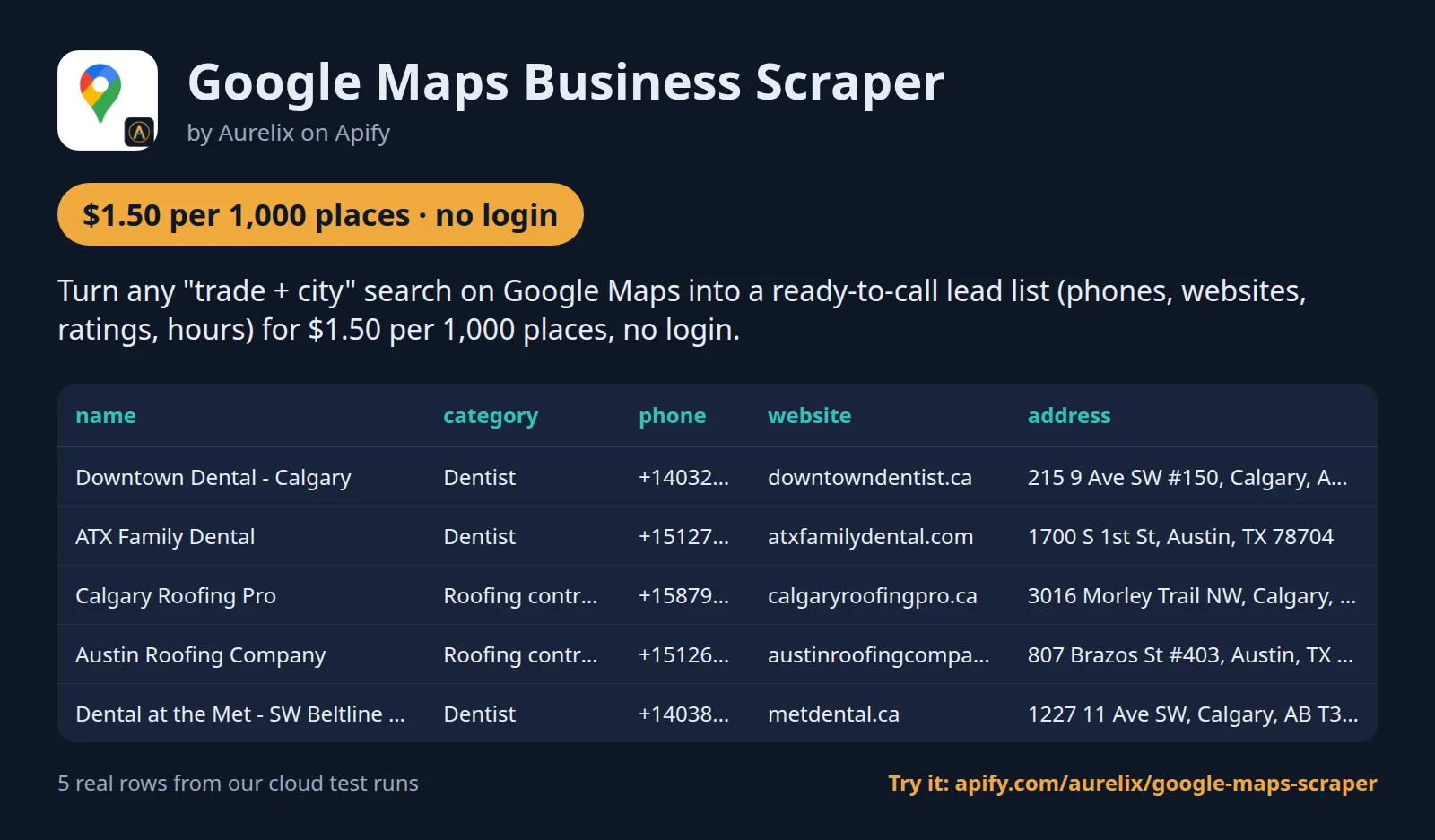
| name | category | phone | website | address |
|---|---|---|---|---|
| Downtown Dental - Calgary | Dentist | +14032641736 | https://www.downtowndentist.ca/ | 215 9 Ave SW #150, Calgary, AB T2P 1K3, Canada |
| ATX Family Dental | Dentist | +15127173147 | https://www.atxfamilydental.com/ | 1700 S 1st St, Austin, TX 78704 |
| Calgary Roofing Pro | Roofing contractor | +15879692720 | https://calgaryroofingpro.ca/ | 3016 Morley Trail NW, Calgary, AB T2M 4H2, Canada |
| Austin Roofing Company | Roofing contractor | +15126402658 | https://austinroofingcompany.com/ | 807 Brazos St #403, Austin, TX 78701 |
| Dental at the Met - SW Beltline Calgary | Dentist | +14038009638 | https://metdental.ca/ | 1227 11 Ave SW, Calgary, AB T3C 0M5, Canada |
One full place record, exactly as a real run returned it (long text and lists shortened here). From a real run:
Use cases
- Agencies and B2B sellers building local lead lists by trade and city
- Franchise and retail teams mapping competitors and locations in a market
- Local SEO consultants comparing ratings, review counts and categories in an area
- Data teams adding coordinates, hours and place IDs to store or prospect lists
Use-case recipes
Call list for a trade in several cities
For agencies and B2B sellers who phone local businesses. Put the trade in searchTerms and every city in locations; one run covers them all and each business appears once. Load phone (E.164) into your dialer, sort by review_count or rating to call the busiest first, and use hours to call while they are open.
Email list from the businesses' own websites
For email outreach to local businesses. Turn on enrichWebsiteContacts; places whose website shows a generic mailbox get primary_email and emails, each with the page it came from, plus facebook_url, instagram_url and other social links. Import primary_email into your CRM. For a deeper crawl of up to 25 pages per site, put the website column into the Company Contact Finder's domains input instead.
Weekly feed of businesses you have not seen
For sales teams who want fresh leads without paying for the same places again. Turn on incremental, give a stateKey, and schedule the task weekly. Each run returns only places not returned before under that name; send the dataset to your CRM, Google Sheets or Slack through Zapier, Make, n8n or a webhook. Use place_id as the record key in your CRM.
Competitor map for a local SEO audit
For local SEO consultants comparing a client with nearby rivals. Search the client's main category in a few neighbourhoods, then compare rating, review_count and categories, and plot latitude and longitude on a map. category is the category Google shows first for that search; the full list is in categories.
Input
| Field | Type | What it does | Default |
|---|---|---|---|
searchTerms (Search terms) | array | What to search for, as you would type it in Google Maps, e.g. ['plumber', 'dentist']. | ["plumber"] |
locations (Locations) | array | Cities or areas, e.g. ['Toronto ON', 'Austin, TX']. | |
maxResultsPerSearch (Max places per search) | integer | Stop each term/location search after this many places, e.g. 60. | 60 |
language (Language) | string | Language of categories and opening hours, e.g. 'en'. | "en" |
enrichWebsiteContacts (Add website emails and socials) | boolean | For each place with a website, read its home page and up to 4 contact or about pages on the... | false |
incremental (Only new places since last run) | boolean | Return only places not returned by a previous run with the same searches; places seen before are skipped and not... | false |
All 8 fields, with examples: see the Input tab.
Switching from compass/crawler-google-places
Already running compass/crawler-google-places? Most of its search inputs have a direct match here. Its filters, reviews and images do not; this Actor collects listing fields only, and you filter the columns afterwards.
compass/crawler-google-places input | This Actor's input | Notes |
|---|---|---|
searchStringsArray | searchTerms | Same idea: one term per entry, typed as you would in Google Maps. |
locationQuery | locations | A list, not one value: every term runs in every location in the same run. Leave it empty when the term already names a place, e.g. 'pizza in Halifax'. |
maxCrawledPlacesPerSearch | maxResultsPerSearch | Per term and location, 1 to 300 (default 60). There is no 'leave empty for all'; 300 is the most one search returns. |
language | language | en, fr, es or de. Sets the language of category names and opening hours. |
scrapeContacts | enrichWebsiteContacts | Reads each business's own website (home page plus up to 4 contact or about pages) for generic emails, extra phones and social links; charged only when something is found. |
scrapeSocialMediaProfiles | enrichWebsiteContacts | Returns Facebook, Instagram, LinkedIn, X and YouTube profile links found on the website, not profile details such as follower counts. |
placeMinimumStars, website, categoryFilterWords | no equivalent | No paid filters. Filter the rating, website and categories columns in your sheet, or use more specific search terms. |
maxReviews, maxImages | no equivalent | Review text, reviewer data and images are never collected. You get rating and review_count only. |
startUrls, placeIds | no equivalent | Search by term and location only; there is no input for Maps URLs or place IDs. |
| no equivalent | incremental, stateKey | Only places not returned by an earlier run with the same state name; repeats are skipped and not charged. |
- One run can replace several: give all your cities in
locationsinstead of one run per location. - Each place is returned once per run, matched by
place_idacross all searches, and charged once. - Field names are ours:
phoneis E.164 (withphone_displayas Google shows it),place_idandcididentify the place, andsearch_term/search_locationtell you which search found it. Map your columns once. - Price is per place returned: $1.50 per 1,000 on the free plan and $1.05 on paid plans, against $4.00 / $3.00 for the rival (comparison table). Website contacts are a separate event, charged only for places where something was found.
Use with AI agents (Apify MCP server, Claude, ChatGPT, n8n AI agent)
Google Maps Business Scraper is a ready-made tool for AI agents. Through the Apify MCP server an agent reads this Actor's input schema, fills in the input from your request, starts the run and reads the places back. You pay the same per-result price as a run started by hand, from your own Apify account.
Example prompts
- "Find 50 dentists in Calgary AB on Google Maps and give me a table with name, phone, website, rating and review count"
- "List roofing contractors in Austin TX and Dallas TX with their phones and websites, and add any business emails and Facebook pages from their own websites"
- "Get only the plumbers in Toronto ON that are new since my last Google Maps run, using the state name toronto-plumbers"
Claude (claude.ai and Claude Desktop)
Open Settings > Connectors, choose Add custom connector, paste https://mcp.apify.com/?tools=aurelix/google-maps-scraper and sign in to Apify when asked. Then ask Claude one of the prompts above.
Claude Code, Cursor, VS Code and other MCP clients
Clients configured with JSON take the same URL:
A client without Apify sign-in sends the header Authorization: Bearer <YOUR_APIFY_TOKEN>; to run the server locally instead, use npx -y @apify/actors-mcp-server --actors aurelix/google-maps-scraper with APIFY_TOKEN set.
ChatGPT
Where your ChatGPT plan offers custom connectors (developer mode), add https://mcp.apify.com/?tools=aurelix/google-maps-scraper as a connector, sign in to Apify, and ask for the data in plain words.
n8n AI agent
Give an AI Agent node an MCP Client Tool with the endpoint https://mcp.apify.com/?tools=aurelix/google-maps-scraper and a Bearer credential holding your Apify token. The agent can then call Google Maps Business Scraper whenever a workflow step needs places; for a fixed, non-agent workflow use Apify's n8n node with Run Actor instead.
Use it from AI agents (MCP), the API or no-code
Copy this to your AI assistant
MCP server URL for this Actor: https://mcp.apify.com/?tools=aurelix/google-maps-scraper (setup for each client in the section above).
API
Start a run and read the dataset with Apify's REST API or the Python and JavaScript clients:
No-code: schedule it in 3 clicks
Send the results to Google Sheets, Zapier, Make, n8n, Slack or any webhook URL.
- Fill in the input, then click Save as a new task.
- In the task, click Schedule and pick daily or weekly (Apify Schedules).
- Turn on Only new places since last run so each run returns only what is new.
Prefer n8n or Make? Ask in the Issues tab and we will share a ready-made workflow for it.
FAQ
Can I scrape Google Maps without login?
Yes. It never logs in, so you need no Google Maps account, password or cookies; only a free Apify account to run it.
Is there a Google Maps API?
You can use this Actor as one. Start it with Apify's REST API or the Python and JavaScript clients and read the results as JSON (see the code above), or call it from an AI agent through MCP.
How much does it cost to scrape Google Maps?
About $1.50 for 1,000 places on Apify's free plan and $1.05 on paid plans, start fee included. The free $5 monthly credit covers about 3,300 places.
Can I export Google Maps data to Excel or Google Sheets?
Yes. Download the results as Excel, CSV, JSON, XML or HTML from the run's Storage tab, or send them to Google Sheets with Apify's Google Sheets integration or the API.
Is it legal to scrape Google Maps?
It reads only public data any logged-out visitor can see: Google Maps search results. It goes at a polite pace, respects robots.txt, never logs in and never solves CAPTCHAs. It returns business listing fields (name, categories, address, phone, website, rating, review count, hours, coordinates); no review text or reviewer data. To have a record removed, open an issue on this Actor's Issues tab; if Google formally asks us to stop, this Actor will stop. You are responsible for using the data lawfully, incl. anti-spam and privacy laws; this is not legal advice.
Will Google block my account?
No. It never uses a Google account, so there is none to block. It reads Google Maps' public search results, with requests spaced two seconds apart.
What is charged?
One place-result ($1.50 per 1,000) per place returned. With 'Add website emails and socials' on, also one contact-result ($1.50 per 1,000) per place whose website gave at least one email, extra phone or social link; nothing for sites with no contacts. Places already returned in the run, places returned by an earlier run when 'Only new places since last run' is on, suppressed places and failed searches are not charged.
Does it find emails?
Yes, optionally. Google Maps does not show emails, so with 'Add website emails and socials' on the Actor reads each business's own website (home page plus up to 4 contact or about pages, robots.txt obeyed) and returns generic business emails such as info@ or sales@, extra phones and social profile links. Emails of named people are not returned.
How do I get only new businesses?
Turn on 'Only new places since last run' and schedule the run. Places returned before are skipped and not charged; give the same 'stateKey' (or the same searches) each time. A place not seen for 60 days is forgotten.
How many places per search?
Up to 300 per search term and location, in Google's ranking order; fewer when Google lists fewer (a broad city search lists about 260 to 290). For more coverage, split large areas into neighbourhoods or use more specific terms, e.g. 'emergency plumber' and 'drain cleaning'.
Are reviews included?
No. Review text, reviewer names and photos are never collected. Only the average rating and the number of reviews are returned.
Does it respect robots.txt?
Yes. Google's robots.txt allows Maps search results (/search?tbm=map), which is the only Google page type this Actor requests. With 'Add website emails and socials' on, it also reads the businesses' own websites, and only the pages their robots.txt allows; a site whose robots.txt disallows us is skipped.
How do I get a business removed?
Open an issue in the Issues tab with the business name or website. It is added to the shared suppression list within 7 days.
What happens when a search finds nothing, or fewer places than I asked for?
The run still finishes normally and returns what Google lists. You pay per place returned plus the $0.001 start fee, so a search with no matches costs only the start fee. The run's status message says how many places came from how many searches and lists anything skipped: places returned by an earlier run, suppressed places, or result pages that failed. If you set a maximum charge, the run stops before the next place would pass it and says so; places already returned are kept. A run that nears its timeout stops early and keeps its results.
How are duplicates handled?
By Google's place ID across the whole run. A place found by two searches, e.g. 'coffee shop' and 'cafe' in the same city, is returned and charged once, with the search_term and search_location of the search that found it first. Across runs, use 'Only new places since last run'.
What counts as new in 'Only new places since last run'?
A place whose ID was not returned by an earlier run under the same state name. It is not the date the business opened: a long-standing business that shows up in Google's results for the first time also counts as new. Places that keep appearing stay remembered; one not seen for 60 days is forgotten and can come back as new. Without a stateKey, the name is derived from your search terms, locations and language, so changing any of them starts a fresh memory. Changing Max places per search does not.
Which countries and languages work?
Any location you can type into Google Maps. Our tests covered the US, Canada, the UK, France, Germany and Spain. The language setting (English, French, Spanish or German) changes category names and the opening-hours text; days are always listed Monday to Sunday. Addresses are split into street, city, region, postal code and country code as Google provides them.
How long does a run take?
Each request to Google returns up to 20 places, and requests are spaced two seconds apart, so a 300-place search needs 15 requests. In our test run, 4 searches returning 100 places took 25 s. Website contacts add time: up to 5 pages per site, at most 45 s per site, 5 sites at a time, and each site is read once per run.
What do place_id, cid and the other fields mean?
place_id is Google's place ID, the best key for matching records over time. cid is Google's numeric customer ID for the listing, and google_maps_url opens the place. phone is E.164 (e.g. +14032641736) and phone_display is the number as Google shows it. rating is null when a place has no reviews. timezone is a name such as America/Toronto. search_term and search_location record which search found the place.
Do I need a proxy, and what if Google blocks a request?
The default Apify datacenter proxy is enough; in our tests no request was blocked or shown a CAPTCHA. If Google answers with something other than a Maps result, that search stops, the places found so far are kept, and the status message counts the failed pages. Nothing is charged for a failed search. Website contact pages are fetched directly, without the proxy.
Lawful use
- B2B use only: the data is business listing information that businesses publish to be found and contacted. Do not use it for consumer marketing.
- No spam: contact businesses only with relevant, individual messages, identify yourself, and honour every opt-out at once.
- You are responsible for complying with the anti-spam and privacy laws that apply to you, including Canada's CASL, the US CAN-SPAM Act and the EU/UK GDPR.
- Listings are as published by the business, including sole proprietors: a sole trader's listing can carry their name, business address and phone exactly as they published them. No review text, no reviewer names or profiles, no sensitive data. When Google hides a business's address (service-area or home-based businesses), its exact coordinates are dropped too.
- Emails of named people are never returned.
Removal requests
Anyone can ask for their name, email or domain to be removed: open an issue in this Actor's Issues tab with the domain, email or name. Requests are honoured within 7 days: the entry is added to the suppression list that every Aurelix contact Actor checks before returning data, so it is dropped from all future runs.
Limits (stated honestly)
- Up to 300 places per search term and location (fewer when Google has fewer).
- Website emails come only from what the business publishes on its own site (at most 5 pages); many small businesses publish none, and sites that block crawlers in robots.txt are skipped.
- Fields are read from Google Maps' search results; Google changes this format from time to time, and the daily health check flags any break.
- Rating, review count, website and hours are null or empty when the business has none on Google Maps.
- Places are listed in Google's order for the search, which depends on relevance and location.
- category is the category Google lists first for your search, usually the one matching your search term (e.g. Piano tuning service for a music store found by 'piano tuner'); the business's other categories, including its main one, are in categories.
- Places whose address Google hides have no address and no coordinates.
- A place whose name contains a name on the suppression list is skipped (titles such as Dr., case and accents ignored).
Related Aurelix tools
Public Aurelix Actors, grouped by the data they collect. All are pay-per-result and need no login.
Leads and company data
- Recently Funded Companies: US companies that just filed an SEC Form D: amount raised, industry, state, executives, confirmed website.
Jobs and hiring data
- Greenhouse Jobs Scraper: Live jobs from a company's Greenhouse, Lever, Ashby or SmartRecruiters board, with salary and Canadian province tags.
- LinkedIn Jobs Scraper: Public LinkedIn job postings by keyword and country: title, company, location, seniority, job type, salary text, description.
E-commerce and product data
- AliExpress Scraper: AliExpress search results by keyword: price, discount, rating, units sold, ship-from country and sponsored flag.
- Amazon Best Sellers Scraper: Amazon Best Sellers and New Releases top 100 on 10 marketplaces: rank, ASIN, price, rating, rank change.
Ad intelligence
- Facebook Ad Library Scraper: Facebook and Instagram business ads from the Meta Ad Library: copy, creatives, landing pages, dates, optional EU reach.
Canada and government data
- Canada Building Permits Scraper: Building permits and development applications from 7 Canadian cities: address, type, status, dates, value, contractor company.
AI, content and SEO
- Google Trends Scraper: Google Trends interest over time, by region and rising queries for any number of keywords, plus trending searches.
- Website to Markdown Crawler: Crawls a site and returns one row of clean main-content Markdown per page, with title, headings and links.
Recent changes
- 0.2: Optional website emails, phones and social links (contact-result, charged only when found), 'Only new places since last run' with a state name, and a Contacts view.
- 0.1: The prefilled first run is capped at 20 places per search, so a first try stays cheap.
The full history is on the Changelog tab.
Tested daily
An automated health check runs this Actor every day on a fixed input and checks that at least 16 places come back with place_id, name, category, address, phone, google_maps_url filled in; a failed check alerts the maintainer straight away.
Your feedback
Missing a field, found a bug or need another filter? Open an issue on the Issues tab; we aim to answer within a day. If this Actor saved you time, a short review helps other people find it.


