

Canada Building Permits Scraper | Development Applications
Pricing
from $2.10 / 1,000 application results
Canada Building Permits Scraper | Development Applications
Scrape Canada building permits at $3.00 per 1,000 records, under the other Canadian permit scrapers ($3.50-$5.00), and the only one with development applications (rezoning, site plan) and a ward filter. Toronto, Calgary, Edmonton, Vancouver, Winnipeg, Kitchener, Montréal; status-change feed.
Pricing
from $2.10 / 1,000 application results
Rating
0.0
(0)
Developer

Aurelix
Maintained by CommunityActor stats
0
Bookmarked
2
Total users
1
Monthly active users
an hour ago
Last modified
Categories
Share
What is Canada Building Permits Scraper?
Find construction projects early: building permits and development applications from 7 Canadian cities in one feed, $3.00 per 1,000 records, no login.
For contractors, suppliers and construction sales teams in Toronto, Calgary, Edmonton, Vancouver, Winnipeg, Kitchener and Montréal. Rezonings and site plans show projects at the planning stage. Your first run with the example input costs about $0.03 (10 applications in our test run).
| Cities | Toronto, Calgary, Edmonton, Vancouver, Winnipeg, Kitchener and Montréal (10 datasets) |
| Filters | Days back (up to 365), application types, statuses, wards, keywords, max results per city |
| Output | 25 fields per application; JSON, CSV, Excel, API |
| Automate | Schedules, webhooks, Zapier, Make, n8n, Google Sheets, MCP for AI agents |
| Price | $3.00 per 1,000 applications ($2.10 per 1,000 applications on paid Apify plans) |
| Login needed | No |
Why Canada Building Permits Scraper users pick this one
- Earlier than permits. Rezonings and site plans, not just issued building permits.
- Status-change alerts. New-or-changed mode with a Slack or webhook digest after every run.
- Licensed for business. Official open data under each city's licence; commercial use allowed.
- Filters that fit sales. Ward, application type, status and keyword.
- Below other permit scrapers. $3.00 per 1,000 records against $3.50-$5.00.
Get started in 3 steps
- Pick the datasets (Toronto, Calgary, Edmonton, Vancouver, Winnipeg, Kitchener, Montréal; development applications or building permits) and how many days back to look; the defaults return Toronto and Calgary applications from the last 60 days.
- Optionally narrow it: application types (e.g. 'zoning', 'site plan'), statuses, wards and keywords; turn on 'Only new or changed since last run' for a weekly feed.
- Click Start, then download JSON, CSV or Excel, or schedule the run and send results to Google Sheets, Zapier, Make or n8n.
▶ Try it with the example input
The form opens with an example input already filled in: that run costs about $0.03 on the free plan.
How much does it cost to scrape Canadian building permits?
Pay per event: you pay only for what the run returns, plus a small start fee. Bronze, Silver, Gold and higher Apify plans pay less per result.
| Applications | Free plan | Paid plans (Bronze, Silver, Gold) |
|---|---|---|
| 100 | $0.30 | $0.21 |
| 1,000 | $3.00 | $2.10 |
| 10,000 | $30.00 | $21.00 |
Totals include the $0.00005 start fee per run, rounded to the cent. Apify's free plan includes $5 of credit a month, enough for about 1,600 applications.
Billing events
| Event | Free plan | Paid plans (Bronze, Silver, Gold) |
|---|---|---|
application-result | $3.00 per 1,000 applications | $2.10 per 1,000 applications |
apify-actor-start | $0.00005 per run | $0.00005 per run |
Canada Building Permits Scraper vs alternatives
| This Actor | truenorthdata/canada-building-permits | openpermits/building-permits-canada-us | |
|---|---|---|---|
| Price per 1,000 records, free plan | $3.00 | $5.00 | $3.50 |
| Price per 1,000 records, paid plans | $2.10 | $5.00 | $3.50 |
| Start fee per run | $0.00005 (changing to $0.012 soon) | $0.02 (at 4 GB) | $0.0002 (at 4 GB) |
| Platform usage billed on top | No | No | No |
| Canadian cities | 7 (10 datasets) | 5 | 4 (+4 US) |
| Development applications (rezoning, site plan) | ✓ Toronto; development permits in 3 more | ✗ (building permits) | ✗ (building permits) |
| Ward filter | ✓ | ✗ | ✗ |
| Re-returns records whose status changed | ✓ | ✗ (new only) | ✓ (since a date you set) |
| Slack or webhook digest after each run | ✓ | not stated | not stated |
Prices checked regularly on each Actor's Store page.
Benchmarks: how we compare
| Dataset (cities value) | Records in 30 days | Coordinates | Project value | Contractor company | Ward | Postal code |
|---|---|---|---|---|---|---|
| Toronto development applications (toronto) | 85 in 120 days | 93% | - | - | 100% | 82% |
| Toronto building permits (toronto-building) | 2,885 | - | 35% | 3% | - | 94% |
| Calgary development permits (calgary) | 452 | 100% | - | - | 100% | - |
| Calgary building permits (calgary-building) | 2,090 | 100% | 93% | 55% | - | - |
| Edmonton development permits (edmonton) | 491 | 100% | - | - | 99% | - |
| Edmonton building permits (edmonton-building) | 1,400 | 63% | 69% | - | - | - |
| Vancouver building permits (vancouver) | 325 | 99% | 100% | - | - | - |
| Winnipeg development permits (winnipeg) | 202 | 99% | - | - | 99% | - |
| Kitchener building permits (kitchener) | 294 | 100% | 93% | 32% | - | - |
| Montréal building permits (montreal) | 1,355 | 100% | - | - | - | - |
One run of all 10 datasets, 30 days back, no cap and no filters: 9,494 records from the cities' live APIs. Toronto development applications returned none in that window because the city adds them about a month after submission, so its row comes from a separate 120-day run (85 records). Percentages are the share of records with a value; a dash means the dataset does not publish that field. Run times in Apify: Toronto and Calgary at 20 per city returned 40 records in 9 s, 7 datasets at 40 each over 10 days returned 239 in 26 s, and all 10 datasets over 365 days with a keyword matching nothing took 338 s, because every row in the window is read.
What data you get
Canada Building Permits Scraper turns 10 official open-data datasets from Toronto, Calgary, Edmonton, Vancouver, Winnipeg, Kitchener and Montréal into one schema: Toronto development applications (rezoning, official plan, site plan, subdivision, condominium, part lot) and building permits, Calgary and Edmonton development and building permits, Winnipeg development permits, and Vancouver, Kitchener and Montréal issued building permits. Each record has the application number, type, category, address, postal code, ward, neighbourhood, coordinates, description, status, submitted, decision and issued dates, project value, builder or contractor company where published, and a link. Filter by dataset, days back, application type, status, ward and keyword. New-or-changed mode returns new applications and those whose status changed, such as Under Review to Approved.
- Application number, type (rezoning, site plan, subdivision, development or building permit) and category
- Street address(es), postal code, ward, neighbourhood, latitude/longitude
- Description of the proposal or work, current status
- Submitted, decision and issued dates (YYYY-MM-DD)
- Declared project value, permit category (Vancouver, Winnipeg), land-use district or zoning (Calgary, Edmonton), current and proposed use (Toronto building permits)
- Builder or contractor company (Toronto and Calgary building permits, Kitchener)
- City record link and a stable app_id for joins and dedupe
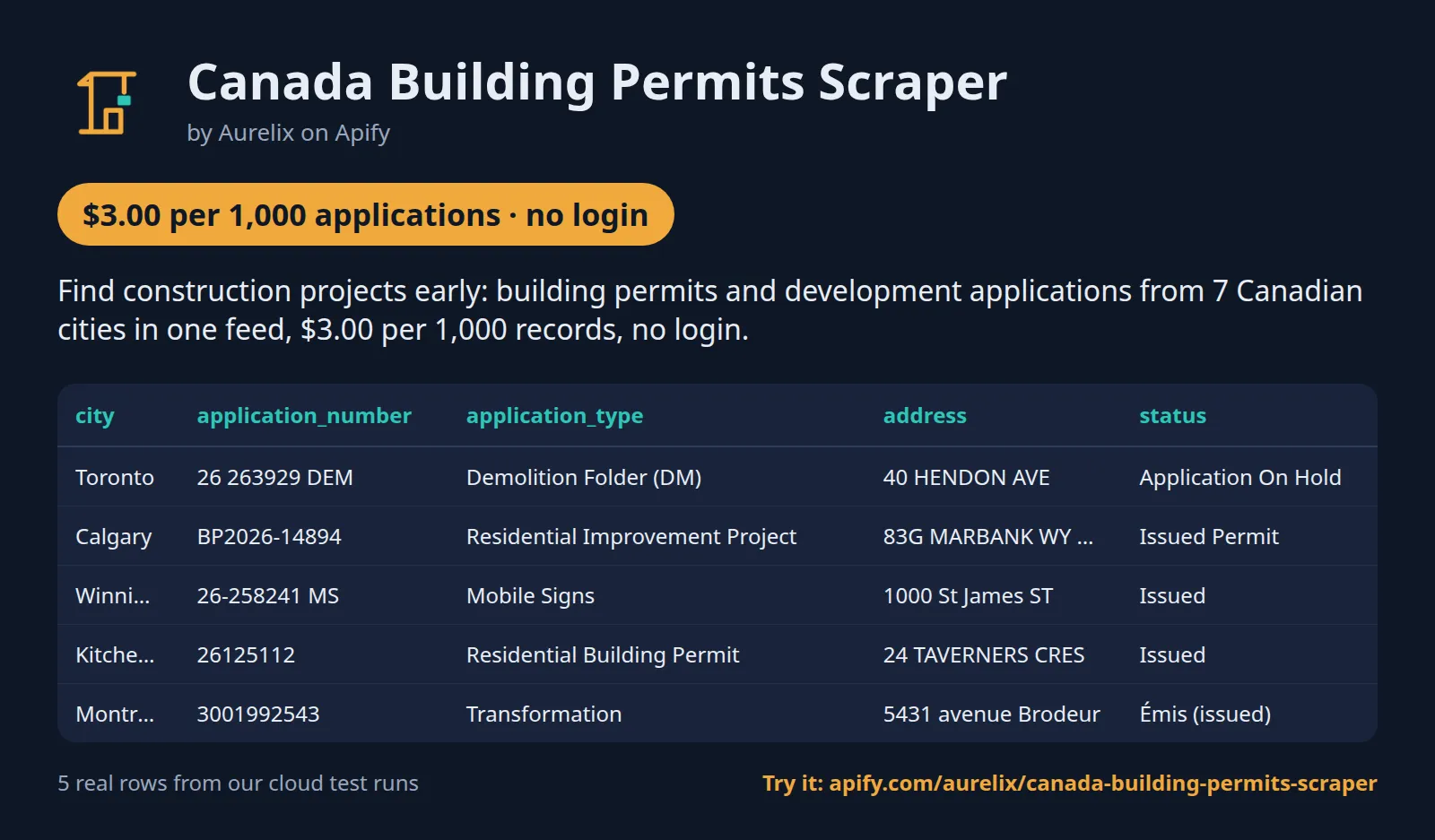
| city | application_number | application_type | address | status | submitted_date | issued_date | contractor_company |
|---|---|---|---|---|---|---|---|
| Toronto | 26 263929 DEM | Demolition Folder (DM) | 40 HENDON AVE | Application On Hold | 2026-11-02 | 40-44-48 HENDON INC AND 42-46 HENDON INC | |
| Calgary | BP2026-14894 | Residential Improvement Project | 83G MARBANK WY NE | Issued Permit | 2026-08-07 | 2026-11-02 | AIM BUILDER & DEVELOPMENT |
| Winnipeg | 26-258241 MS | Mobile Signs | 1000 St James ST | Issued | 2026-10-28 | 2026-10-30 | |
| Kitchener | 26125112 | Residential Building Permit | 24 TAVERNERS CRES | Issued | 2026-10-06 | 2026-10-29 | KITCHENER GREEN DEVELOPMENTS INC |
| Montréal | 3001992543 | Transformation | 5431 avenue Brodeur | Émis (issued) | 2026-10-26 | 2026-10-26 | |
| Edmonton | 1-687004918 | Home Improvement | 9532 - 167 STREET NW | Issued | 2026-11-04 |
One full application record, exactly as a real run returned it (long text and lists shortened here). From a real run:
Use cases
- Builders, trades and suppliers finding new projects from fresh applications and permits
- Real estate investors and brokers watching rezonings and site plans in their area
- Commercial real estate and retail teams spotting new restaurants, shops and changes of use
- Urban planners, journalists and residents tracking development in a ward
Use-case recipes
Weekly rezoning and site plan feed for one Toronto ward
For investors, brokers and residents' groups. Pick toronto, look back 60 days (Toronto adds applications about a month late), filter the types and the ward, and turn on new-or-changed mode with a weekly schedule. Each run returns new applications and those whose status moved; open the url column for the city's file.
New-build leads in Alberta for suppliers and trades
For suppliers and subcontractors. Read the Calgary and Edmonton building-permit datasets for the last week and keep new construction. Sort by project_value, then search the contractor_company names in Google Maps Businesses to get each builder's phone and website.
Spot restaurants and shops before they open
For commercial real estate, food suppliers and retail teams. Search the descriptions of Toronto building permits and Calgary development permits for the uses you care about. In Toronto the land_use column shows the current and proposed use, e.g. a change of use to a restaurant.
Tree-felling permits in Montréal for arborists
For tree-care and landscaping firms. Montréal publishes permits in French; abattage d'arbre is tree felling. Filter the type, then group the neighbourhood column (the borough) to plan crews, and use the address to quote the job.
Input
| Field | Type | What it does | Default |
|---|---|---|---|
cities (Cities) | array | Which city datasets to read: 'toronto' (development applications: rezoning, site plan, subdivision, condo, part lot), 'calgary' (development permits), 'edmonton' (development... | ["toronto", "calgary"] |
daysBack (Dated in the last N days) | integer | Keep applications dated on or after today minus this many days (UTC): submitted date for Toronto (both datasets) and Calgary... | 60 |
maxResultsPerCity (Max results per city) | integer | Upper limit of results per city after filters, newest first. 0 = no limit. | 1000 |
applicationTypes (Application types) | array | Keep applications whose type or category contains one of these (case-insensitive), e.g. ['zoning', 'site plan', 'new', 'commercial']. | |
statuses (Statuses) | array | Keep applications whose status contains one of these (case-insensitive), e.g. ['received', 'under review', 'approved']. | |
wards (Wards) | array | Keep applications in these wards, by number or name, e.g. ['18', 'Willowdale', 'Karhiio']. |
All 11 fields, with examples: see the Input tab.
Switching from truenorthdata/canada-building-permits
Already running truenorthdata/canada-building-permits? Map its input fields to this Actor's like this:
truenorthdata/canada-building-permits input | This Actor's input | Notes |
|---|---|---|
cities | cities | Ours takes dataset names. toronto, calgary and edmonton are development applications and permits; for building permits pick toronto-building, calgary-building and edmonton-building. vancouver and montreal are building permits as before; winnipeg and kitchener are extra. |
issuedWithinDays | daysBack | Maximum 365, and 0 means today only, not no limit. Ours filters on the submitted date for Toronto and Calgary development permits, the decision date for Edmonton development permits and the issue date elsewhere. |
keywords | keywords | Ours matches the description and address. Put type words such as Demolition in applicationTypes instead. |
workTypes | applicationTypes | Case-insensitive text match on the type or category, e.g. new, demolition, site plan. |
minProjectValue | no equivalent | Filter the project_value column after the run; only some datasets publish a value (see Benchmarks). |
onlyNewSinceLastRun | incremental | Ours also returns records whose status changed, e.g. Under Review to Approved. |
maxResults | maxResultsPerCity | Ours caps each dataset, newest first; 0 = no limit. |
includeRawRow | no equivalent | Every record has a url to its row in the city's open-data API instead. |
| no equivalent | wards, statuses | Filter by ward number or name and by status text. |
| no equivalent | slackWebhookUrl, webhookUrl | A digest of each run with the top 10 records and links. |
- One schema for all 10 datasets: app_id (dataset:application number) for joins and dedupe, dates as YYYY-MM-DD, contractor_company only when it reads as a company.
- Calgary and Edmonton mean development permits here. Add calgary-building and edmonton-building to keep getting building permits from those cities.
- New-or-changed memory is kept per set of cities and filters, or per stateKey. Changing the filters starts a fresh feed, so the first run returns everything in the window again.
- Pricing is per record returned: $3.00 per 1,000 on the free plan and $2.10 on paid plans, against $5.00 on both.
Use with AI agents (Apify MCP server, Claude, ChatGPT, n8n AI agent)
Canada Building Permits Scraper is a ready-made tool for AI agents. Through the Apify MCP server an agent reads this Actor's input schema, fills in the input from your request, starts the run and reads the applications back. You pay the same per-result price as a run started by hand, from your own Apify account.
Example prompts
- "Find rezoning and site plan applications filed in Toronto in the last 90 days and list their addresses, wards and statuses"
- "Get building permits issued in Calgary and Edmonton in the last 7 days with the project value and contractor company, as a table"
- "Show tree-felling permits issued in Montréal in the last 30 days with their borough and address"
Claude (claude.ai and Claude Desktop)
Open Settings > Connectors, choose Add custom connector, paste https://mcp.apify.com/?tools=aurelix/canada-building-permits-scraper and sign in to Apify when asked. Then ask Claude one of the prompts above.
Claude Code, Cursor, VS Code and other MCP clients
Clients configured with JSON take the same URL:
A client without Apify sign-in sends the header Authorization: Bearer <YOUR_APIFY_TOKEN>; to run the server locally instead, use npx -y @apify/actors-mcp-server --actors aurelix/canada-building-permits-scraper with APIFY_TOKEN set.
ChatGPT
Where your ChatGPT plan offers custom connectors (developer mode), add https://mcp.apify.com/?tools=aurelix/canada-building-permits-scraper as a connector, sign in to Apify, and ask for the data in plain words.
n8n AI agent
Give an AI Agent node an MCP Client Tool with the endpoint https://mcp.apify.com/?tools=aurelix/canada-building-permits-scraper and a Bearer credential holding your Apify token. The agent can then call Canada Building Permits Scraper whenever a workflow step needs applications; for a fixed, non-agent workflow use Apify's n8n node with Run Actor instead.
Use it from AI agents (MCP), the API or no-code
Copy this to your AI assistant
MCP server URL for this Actor: https://mcp.apify.com/?tools=aurelix/canada-building-permits-scraper (setup for each client in the section above).
API
Start a run and read the dataset with Apify's REST API or the Python and JavaScript clients:
No-code: schedule it in 3 clicks
Send the results to Google Sheets, Zapier, Make, n8n, Slack or any webhook URL.
- Fill in the input, then click Save as a new task.
- In the task, click Schedule and pick daily or weekly (Apify Schedules).
- Turn on Only new or changed since last run so each run returns only what is new, and paste a Slack or webhook URL into Slack webhook URL / Webhook URL to get a digest of the new items (count plus the top 10) after every run.
Prefer n8n or Make? Ask in the Issues tab and we will share a ready-made workflow for it.
FAQ
Can I scrape Canadian building permits without login?
Yes. It never logs in, so you need no city portal account, password or cookies; only a free Apify account to run it.
Is there a Canadian building permits API?
You can use this Actor as one. Start it with Apify's REST API or the Python and JavaScript clients and read the results as JSON (see the code above), or call it from an AI agent through MCP.
How much does it cost to scrape Canadian building permits?
About $3.00 for 1,000 applications on Apify's free plan and $2.10 on paid plans, start fee included. The free $5 monthly credit covers about 1,600 applications.
Can I export Canadian building permits data to Excel or Google Sheets?
Yes. Download the results as Excel, CSV, JSON, XML or HTML from the run's Storage tab, or send them to Google Sheets with Apify's Google Sheets integration or the API.
Is it legal to scrape Canadian building permits?
It reads only public data any logged-out visitor can see: the official open-data portals of Toronto, Calgary, Edmonton, Vancouver, Winnipeg and Kitchener (each city's open government licence) and Montréal (CC BY 4.0). It goes at a polite pace, never logs in and never solves CAPTCHAs. It returns application and permit fields (address, type, status, dates, description, link); owner, applicant and contact names are dropped, and a builder or contractor is kept only as a company. To have a record removed, open an issue on this Actor's Issues tab; if a city formally asks us to stop, this Actor will stop. You are responsible for using the data lawfully, incl. anti-spam and privacy laws; this is not legal advice.
How do I find construction leads before permits are issued?
Use the development applications: rezonings and site plans are filed at the planning stage, before building permits. Filter by ward, type and status, and schedule the run with new-or-changed mode.
Which datasets does it read?
Toronto: Development Applications (OZ rezoning/official plan, SA site plan, SB subdivision, CD condominium, PL part lot) and Building Permits - Active Permits. Calgary: Development Permits and Building Permits. Edmonton: Development Permits and General Building Permits. Winnipeg: Detailed Development Permit Data. Vancouver: Issued building permits (no open development-applications dataset). Kitchener: Building Permits (ArcGIS). Montréal: Permis de construction, transformation et démolition (CKAN). Every record links to its open-data source.
How does 'new or changed since last run' work?
The Actor remembers each application with its status for the same cities and filters (or the state name you set). It returns applications it has not returned before and those whose status changed. Entries are forgotten 400 days after they were last seen.
Which date does 'days back' use?
The submitted date for Toronto (both datasets) and Calgary development permits, the decision date for Edmonton development permits (its only date) and the issue date for every other dataset.
How fresh is it?
Toronto, Calgary, Edmonton, Winnipeg and Vancouver refresh daily, but Toronto development applications appear about a month after submission; Kitchener and Montréal refresh about weekly. In our checks the newest records were 0 to 2 days old for Edmonton and for Toronto and Calgary building permits, about 5 days for Winnipeg, about 6 for Kitchener and about 9 for Montréal. Look back at least 8 days if you rely on Kitchener or Montréal.
Why does Toronto return so few development applications?
Toronto's open data is genuinely thin, not cut short by this Actor: its Development Applications dataset holds about 25 to 40 planning applications a month (28 distinct in a recent 60 days, against 912 Calgary development permits) and adds them about a month after submission. Every page of the dataset is read. Add the Toronto building-permits dataset for volume (5,840 records in the same 60 days).
Can I add another city?
Not from the input: the Actor reads only these 10 datasets. Open an issue to ask for a city that publishes an open-licence dataset.
What is charged when a city returns nothing or fails?
One application-result per record saved. A dataset with no matching records adds nothing, so a run that finds nothing pays only the start fee. Each API call is tried 4 times; if a city still fails (HTTP 429, a server error or no connection), that dataset is skipped, the others are returned, and the status message names it. If every dataset fails, the run fails and no records are charged.
How do the type, status, ward and keyword filters match?
Types and statuses are case-insensitive text matches on the type or category and on the status, so 'issued' matches Issued and Issued Permit. Keywords match the description and the addresses. Wards match the ward number or name, e.g. 18 or Willowdale. A dataset without wards (Vancouver, Kitchener, Montréal and the Toronto, Calgary and Edmonton building permits) returns nothing when you set a ward filter.
How do the per-city cap and new-or-changed mode work together?
Filters run first, then the newest records per dataset up to Max results per city, then new-or-changed mode drops records already returned. With a small cap, a feed sees only the newest records each run, so use 0 (no limit) or a generous cap for a scheduled feed. Records not saved because the maximum charge was reached are not remembered, so they come back next run.
How long does a run take?
Seconds for a normal run: in our Apify test runs Toronto and Calgary at 20 per city took 9 s, 7 datasets over 10 days 26 s, and Montréal over 12 days 4 s. The slowest case is all 10 datasets over 365 days, about 6 minutes, because every row in the window is read before the filters apply.
Are there limits per run?
Up to 365 days back. Each dataset is read newest first up to 50,000 source rows per run, Vancouver up to about 10,000. In our tests 365 days of Montréal returned 20,034 records and 365 days of Vancouver 4,156, both under those caps. Max results per city goes up to 100,000.
What does app_id mean, and how are duplicates handled?
app_id is the dataset plus the city's application or permit number, e.g. calgary-building:BP2026-14894, and each app_id is returned once per run. Toronto development applications have one source row per address; they are merged into one record with all addresses in addresses. Toronto building permits give one record per permit revision, and Kitchener keeps the newest row per permit.
Why are some fields empty?
Each city publishes different fields, and the Actor never fills one in. Postal codes come only from Toronto; project values only from Toronto, Calgary and Edmonton building permits, Vancouver and Kitchener; contractor companies only from Toronto and Calgary building permits and Kitchener, and only when the name reads as a company. Toronto building permits have no coordinates, and in our 30-day test Winnipeg records had no description.
Can I get an alert after each run?
Yes. Paste a Slack webhook URL to post a short digest (how many records, and the top 10 with links), or any webhook URL to receive the same digest as JSON (actor, newOnly, count, items, runUrl, text) for Zapier, Make or n8n. Nothing is sent when the run saved nothing. With new-or-changed mode on, the digest covers only the new and changed records.
Lawful use
- Owner, applicant and planner names are dropped; a builder or contractor is kept only as a company.
Limits (stated honestly)
- Seven cities only. Toronto Committee of Adjustment, Mississauga and Ottawa are not covered (no current open dataset).
- Vancouver, Kitchener and Montréal are issued building permits, Winnipeg issued development permits, not applications; Edmonton development permits publish a decision date only. Toronto building permits include applications not yet issued (issued_date empty) and one record per permit revision.
- Toronto publishes fewer development applications in its open data than Calgary: about 28 distinct applications in 60 days (25 to 40 a month since mid-2025; Calgary development permits: 912 in 60 days), because the dataset holds only planning applications (rezoning, official plan, site plan, subdivision, condominium, part lot), not minor variances or permits. It is also added weeks after submission (about a month in our checks), so short look-backs can return nothing for Toronto. For Toronto volume, add the Toronto building-permits dataset (5,840 records in 60 days).
- Toronto coordinates are converted from the city's MTM grid and are accurate to about 20 m; Toronto links point to the city's Application Information Centre or, where missing, the open-data record.
- Calgary, Edmonton, Vancouver, Winnipeg, Kitchener and Montréal links point to the open-data record, not a city web page. Toronto building permits and Edmonton building permits have no ward; Toronto building permits have no coordinates.
- Look-back is capped at 365 days (Vancouver at about 10,000 permits per run).
- Kitchener lists permit revisions under the same permit number; the newest row per permit is returned.
- Free-text descriptions can mention businesses; personal emails and phone numbers are removed. Vancouver descriptions keep only the work scope: permit-desk notes that name professionals, contractors, applicants or staff are dropped, so a few Vancouver records have no description.
- Montréal records are in French as published (types, borough, description).
Works great with
- Then: Google Maps Business Scraper: search the
contractor_companynames there to get each contractor's website and phone, then pass the websites to Company Contact Finder
Related Aurelix tools
Public Aurelix Actors, grouped by the data they collect. All are pay-per-result and need no login.
Jobs and hiring data
- Greenhouse Jobs Scraper: Live jobs from a company's Greenhouse, Lever, Ashby or SmartRecruiters board, with salary and Canadian province tags.
- LinkedIn Jobs Scraper: Public LinkedIn job postings by keyword and country: title, company, location, seniority, job type, salary text, description.
E-commerce and product data
- AliExpress Scraper: AliExpress search results by keyword: price, discount, rating, units sold, ship-from country and sponsored flag.
- Amazon Best Sellers Scraper: Amazon Best Sellers and New Releases top 100 on 10 marketplaces: rank, ASIN, price, rating, rank change.
Leads and company data
- Google Maps Business Scraper: Local business lists from Google Maps: phones, websites, ratings, hours, coordinates; optional website emails and socials.
- Recently Funded Companies: US companies that just filed an SEC Form D: amount raised, industry, state, executives, confirmed website.
Ad intelligence
- Facebook Ad Library Scraper: Facebook and Instagram business ads from the Meta Ad Library: copy, creatives, landing pages, dates, optional EU reach.
AI, content and SEO
- Google Trends Scraper: Google Trends interest over time, by region and rising queries for any number of keywords, plus trending searches.
- Website to Markdown Crawler: Crawls a site and returns one row of clean main-content Markdown per page, with title, headings and links.
Recent changes
- 0.1: Toronto's low development-application count explained (its open data holds about 25 to 40 a month, about a month late); comparison with other Canadian permit tools.
The full history is on the Changelog tab.
Tested daily
An automated health check runs this Actor every day on a fixed input and checks that at least 9 applications come back with app_id, city, application_number, address, status, url filled in; a failed check alerts the maintainer straight away.
Your feedback
Missing a field, found a bug or need another filter? Open an issue on the Issues tab; we aim to answer within a day. If this Actor saved you time, a short review helps other people find it.


