
Google Autocomplete API | YouTube Keyword Ideas, $0.45/1K
Pricing
from $0.35 / 1,000 keyword results
Google Autocomplete API | YouTube Keyword Ideas, $0.45/1K
Scrape Google autocomplete (autosuggest) keyword ideas at $0.45 per 1,000 keywords, below the most-used autocomplete scrapers ($0.50-$1.00), and unlike them it adds YouTube suggestions, question modifiers in six languages and intent tags. A-Z and 0-9 modifiers, many countries and languages per run.

What is Google Autocomplete API?
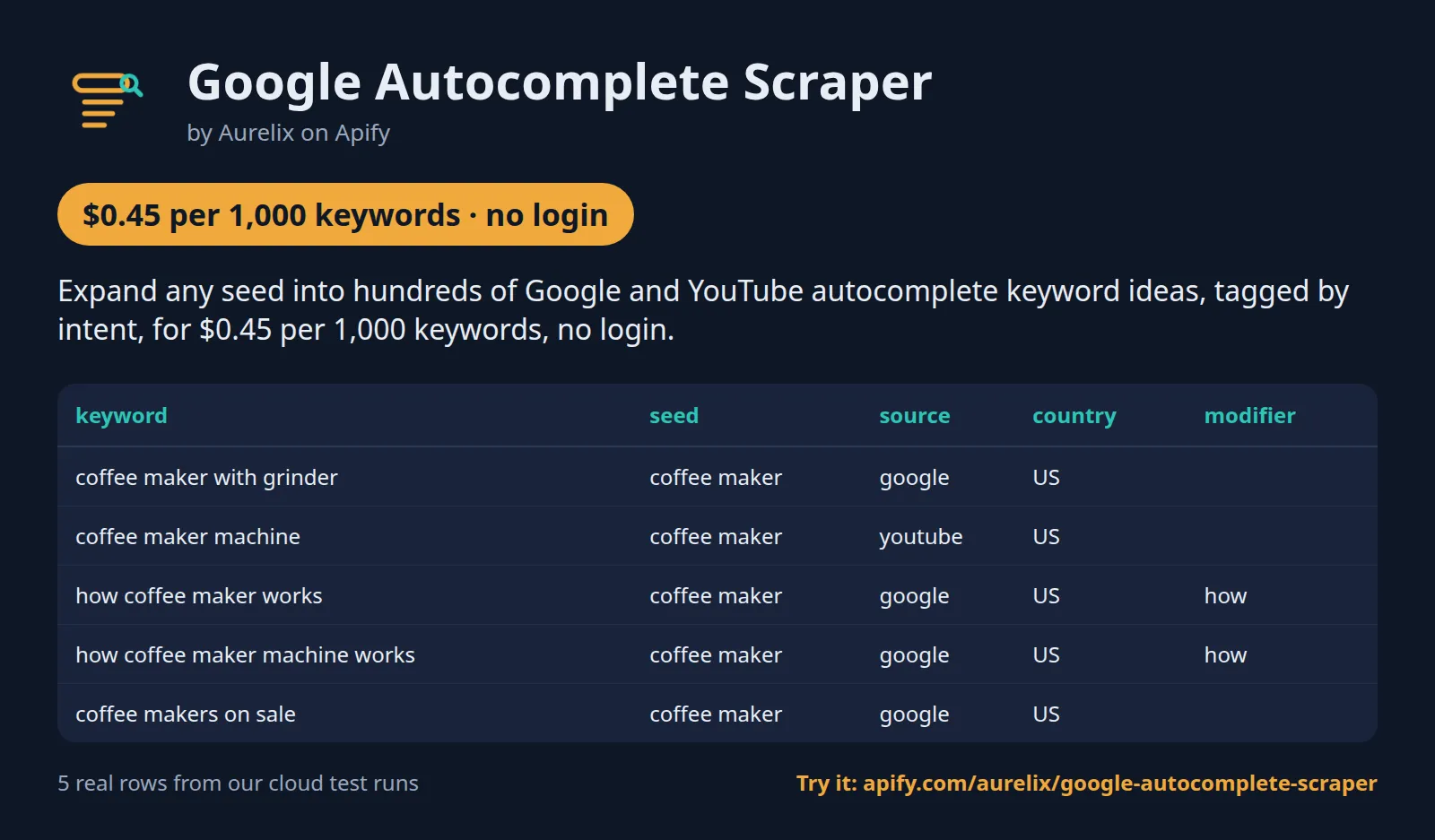
Expand any seed into hundreds of Google and YouTube autocomplete keyword ideas, tagged by intent, for $0.45 per 1,000 keywords, no login.
For SEO and content teams. A-Z, 0-9, question and preposition modifiers in six languages, any country and language grid, and duplicates removed so you pay only for unique keywords. Your first run with the example input costs about $0.045 (100 keywords in our test run).
| Sources | Google Search and YouTube autocomplete |
| Modifiers | A-Z and 0-9, question words, prepositions and comparisons (EN, ES, FR, DE, PT, IT) |
| Markets | Any country (gl) x language (hl) grid, up to 20 combinations per run |
| Output | 13 fields per keyword with intent tags; JSON, CSV, Excel, API |
| Automate | Schedules, webhooks, Zapier, Make, n8n, Google Sheets, MCP for AI agents |
| Price | $0.45 per 1,000 keywords ($0.35 per 1,000 keywords on paid Apify plans) |
| Login needed | No |
Why Google Autocomplete API users pick this one
- Google and YouTube together. Both autocomplete sources in one run, per country and language.
- Six-language modifiers. Question and preposition modifiers in EN, ES, FR, DE, PT, IT.
- Intent on every keyword. Question, commercial, local and comparison tags.
- Unique keywords only. Duplicates per source and market are free.
- Below the most-used. $0.45 per 1,000 keywords against $0.50-$1.00.
Get started in 3 steps
- Enter one or more seed keywords, e.g. 'coffee maker', and pick Google, YouTube or both.
- Optionally set countries and languages (e.g. us, gb with en), the modifiers, depth 2 for a long-tail tree, and Max keywords.
- Click Start, then download JSON, CSV or Excel, or send the keywords to Google Sheets, Zapier, Make or n8n through the API.
▶ Try it with the example input
The form opens with an example input already filled in: that run costs about $0.045 on the free plan.
How much does it cost to scrape Google autocomplete?
Pay per event: you pay only for what the run returns, plus a small start fee. Bronze, Silver, Gold and higher Apify plans pay less per result.
| Keywords | Free plan | Paid plans (Bronze, Silver, Gold) |
|---|---|---|
| 100 | $0.0455 | $0.0355 |
| 1,000 | $0.45 | $0.35 |
| 10,000 | $4.50 | $3.50 |
Totals include the $0.0005 start fee per run, rounded to the cent (amounts under $0.10 to four decimals). Apify's free plan includes $5 of credit a month, enough for about 11,000 keywords.
Only unique keywords are charged: a phrase that repeats in the same source, country and language is skipped for free. A seed with no suggestions of its own is not expanded, so nonsense input costs only the $0.0005 start fee.
Billing events
| Event | Free plan | Paid plans (Bronze, Silver, Gold) |
|---|---|---|
keyword-result | $0.45 per 1,000 keywords | $0.35 per 1,000 keywords |
apify-actor-start | $0.0005 per run | $0.0005 per run |
Google Autocomplete API vs alternatives
| This Actor | automation-lab/google-autocomplete-scraper | memo23/google-suggest-scraper | |
|---|---|---|---|
| Price per 1,000 keywords, free plan | $0.45 | $1.00 | $0.50 |
| Price per 1,000 keywords, paid plans | $0.35 | $0.90 | $0.50 |
| Start fee per run | $0.0005 | $0.005 | $0.005 |
| Platform usage billed on top | No | No | No |
| YouTube autocomplete | ✓ | ✗ (Google only) | ✗ (Google only) |
| A-Z modifiers | ✓ | ✓ | ✓ |
| Question and preposition modifiers | 6 languages | English question words | English question words |
| Several countries and languages in one run | ✓ | ✗ (one each) | ✓ |
| Intent tags (question, commercial, local, comparison) | ✓ | not stated | not stated |
Prices checked regularly on each Actor's Store page.
Benchmarks: how we compare
| Test | Input | Result | Run time |
|---|---|---|---|
| First run (prefilled input) | coffee maker, Max keywords 100 | 100 keywords for $0.045 in total | not recorded |
| One seed, defaults | coffee maker, Google and YouTube, US English, all modifiers | 945 to 949 unique keywords from about 122 to 125 requests (3 runs) | 40 to 56 s |
| German market, depth 2 | laufschuhe, Google and YouTube, Germany/German | 800 keywords from 132 requests | 99 s |
| Several markets, depth 2 | 2 seeds, 4 country and language combinations, questions and prepositions | 1,500 keywords from 232 requests | 365 s |
| Nonsense seed | a random string | 0 keywords from 2 requests; modifiers skipped; only the start fee charged | 4 s |
| Throttled by Google | a test where Google answered with rate limits | 384 keywords kept, run stopped early and said so | not timed |
Apify cloud runs at the default 256 MB through the Apify datacenter proxy, one run per row; the throttling row was a local test run of the same code with rate limits injected. Speed depends on how fast the proxy and Google answer.
What data you get
Google Autocomplete API turns each seed keyword into hundreds of real search phrases from Google Search and YouTube autocomplete. It queries the seed on its own and with every modifier you pick (a to z, 0 to 9, question words such as how, what and why, and prepositions such as for, with, near and vs), for every country and language you list, then removes duplicates and tags each phrase's intent: question, commercial, local or comparison. Depth 2 re-queries each new suggestion for a long-tail tree.
- keyword: the suggested phrase as shown, with seed, source (google or youtube), country and language
- modifier and query: what was added to the seed and the exact text sent
- position: rank in the suggestion box (1 = top); depth: 1 from the seed, 2 from a suggestion
- intents: question, commercial, local, comparison (empty = other); word_count
- source_url and scraped_at (ISO 8601 UTC)
| keyword | seed | source | country | modifier | position | intents |
|---|---|---|---|---|---|---|
| coffee maker with grinder | coffee maker | US | 2 | [] | ||
| coffee maker machine | coffee maker | youtube | US | 3 | [] | |
| how coffee maker works | coffee maker | US | how | 1 | ["question"] | |
| how coffee maker machine works | coffee maker | US | how | 2 | ["question"] | |
| coffee makers on sale | coffee maker | US | 5 | ["commercial"] | ||
| coffee maker vs espresso machine | coffee maker | US | v | 1 | ["comparison"] |
One full keyword record, exactly as a real run returned it (long text and lists shortened here). From a real run:
Use cases
- SEO writers building topic clusters and FAQ sections from real question searches
- YouTube creators finding video titles people actually type
- PPC managers collecting commercial and local long-tail phrases per country
- AI agents that need keyword ideas for a brief through MCP
Use-case recipes
Build a content plan from questions people ask
For bloggers and SEO writers. Use only the questions modifiers on your topic. Filter rows where intents contains question, then group by modifier (how, what, why...) to get FAQ sections and article titles.
Find buyer-intent keywords for ads
For PPC managers. Expand your product with all modifiers and keep rows tagged commercial or comparison. Paste the keyword column into your ad platform's keyword planner to check volume and cost, since autocomplete gives no volume.
Plan YouTube video titles
For creators. Read only YouTube's autocomplete, depth 2 for a long-tail tree. Rows with depth 2 and a high word_count are specific titles with less competition; position 1 to 3 are the most-shown phrasings.
Compare what people search in two markets
For international marketers. List two countries and their languages; each combination is queried and kept apart in the country and language columns. Then send the best phrases to Google Trends to see which are rising in each market.
Input
| Field | Type | What it does | Default |
|---|---|---|---|
keywords (Seed keywords) | array | Keywords to expand, e.g. ['coffee maker', 'espresso machine']. | ["coffee maker"] |
maxResults (Max keywords) | integer | Stop after this many unique keywords are returned (and charged), e.g. 1000. | 1000 |
sources (Autocomplete sources) | array | Which suggestion boxes to read: 'google' (Google Search autocomplete) and/or 'youtube' (YouTube search autocomplete). | ["google", "youtube"] |
expansions (Modifiers) | array | Which modifiers to add to each seed: 'alphabet' (seed + a..z and 0..9, 36 queries), 'questions' (how/what/why/... + seed), 'prepositions'... | ["alphabet", "questions", "prepositions"] |
countries (Countries) | array | Two-letter country codes to localise suggestions (Google's gl parameter), e.g. ['us', 'gb', 'ca']. | ["us"] |
languages (Languages) | array | Interface language codes (Google's hl parameter), e.g. ['en'], ['es'], ['fr', 'en'] or ['pt-BR']. | ["en"] |
All 8 fields, with examples: see the Input tab.
Switching from automation-lab/google-autocomplete-scraper
Already running automation-lab/google-autocomplete-scraper? Map its input fields to this Actor's like this:
automation-lab/google-autocomplete-scraper input | This Actor's input | Notes |
|---|---|---|
keywords | keywords | Same field: seed keywords, one per entry. |
country | countries | A list: every country is combined with every language (at most 20 combinations per run). |
language | languages | A list of interface language codes such as en, fr or pt-BR. |
maxDepth | depth | 1 or 2. Depth 3 is not offered. |
appendAlphabet | expansions with alphabet | On by default here; it also adds 0 to 9 (36 queries per seed). |
expansionPatterns | expansions with questions and prepositions | Question words and prepositions in English, Spanish, French, German, Portuguese and Italian; numbers are part of alphabet. |
maxSuggestionsPerKeyword | not needed | Every suggestion Google returns (up to 10 per query) is kept; cap the whole run with maxResults instead. |
maxRequestRetries | not needed | Each request is retried with backoff and a fresh proxy session; after 8 failed queries in a row the run stops and keeps what it has. |
| no equivalent | sources | New: read YouTube's autocomplete as well as Google's (both by default). |
- Each row adds
source,modifier,query,position,depth,intentsandword_countnext to thekeywordand itsseed. - A phrase is charged once per source, country and language: the same phrase from two seeds or two modifiers in the same market is skipped for free.
- The price is $0.45 per 1,000 keywords with a $0.0005 start fee, against $1.00 and $0.005 (comparison table above).
- Phrases containing a phone number or an email address are dropped before they reach the dataset.
Use with AI agents (Apify MCP server, Claude, ChatGPT, n8n AI agent)
Google Autocomplete API is a ready-made tool for AI agents. Through the Apify MCP server an agent reads this Actor's input schema, fills in the input from your request, starts the run and reads the keywords back. You pay the same per-result price as a run started by hand, from your own Apify account.
Example prompts
- "Give me every Google autocomplete suggestion for coffee maker in the US, grouped by question, commercial and comparison intent"
- "Find long-tail YouTube search phrases for sourdough starter in English, depth 2, at most 300 keywords, and list the 20 longest"
- "Expand running shoes into real searches for the UK and Canada in English and show me which phrases only appear in one country"
Claude (claude.ai and Claude Desktop)
Open Settings > Connectors, choose Add custom connector, paste https://mcp.apify.com/?tools=aurelix/google-autocomplete-scraper and sign in to Apify when asked. Then ask Claude one of the prompts above.
Claude Code, Cursor, VS Code and other MCP clients
Clients configured with JSON take the same URL:
A client without Apify sign-in sends the header Authorization: Bearer <YOUR_APIFY_TOKEN>; to run the server locally instead, use npx -y @apify/actors-mcp-server --actors aurelix/google-autocomplete-scraper with APIFY_TOKEN set.
ChatGPT
Where your ChatGPT plan offers custom connectors (developer mode), add https://mcp.apify.com/?tools=aurelix/google-autocomplete-scraper as a connector, sign in to Apify, and ask for the data in plain words.
n8n AI agent
Give an AI Agent node an MCP Client Tool with the endpoint https://mcp.apify.com/?tools=aurelix/google-autocomplete-scraper and a Bearer credential holding your Apify token. The agent can then call Google Autocomplete API whenever a workflow step needs keywords; for a fixed, non-agent workflow use Apify's n8n node with Run Actor instead.
Use it from AI agents (MCP), the API or no-code
Copy this to your AI assistant
MCP server URL for this Actor: https://mcp.apify.com/?tools=aurelix/google-autocomplete-scraper (setup for each client in the section above).
API
Start a run and read the dataset with Apify's REST API or the Python and JavaScript clients:
No-code: schedule it in 3 clicks
Send the results to Google Sheets, Zapier, Make, n8n, Slack or any webhook URL.
- Fill in the input, then click Save as a new task.
- In the task, click Schedule and pick daily or weekly (Apify Schedules).
- Open the task's Integrations tab to send every run's results to Slack, Google Sheets, email or any webhook.
Prefer n8n or Make? Ask in the Issues tab and we will share a ready-made workflow for it.
FAQ
Can I scrape Google autocomplete without login?
Yes. It never logs in, so you need no Google account, password or cookies; only a free Apify account to run it.
Is there a Google autocomplete API?
You can use this Actor as one. Start it with Apify's REST API or the Python and JavaScript clients and read the results as JSON (see the code above), or call it from an AI agent through MCP.
How much does it cost to scrape Google autocomplete?
About $0.45 for 1,000 keywords on Apify's free plan and $0.35 on paid plans, start fee included. The free $5 monthly credit covers about 11,000 keywords.
Can I export Google autocomplete data to Excel or Google Sheets?
Yes. Download the results as Excel, CSV, JSON, XML or HTML from the run's Storage tab, or send them to Google Sheets with Apify's Google Sheets integration or the API.
Is it legal to scrape Google autocomplete?
It reads only public data any logged-out visitor can see: the autocomplete suggestions Google shows in its search boxes. It goes at a polite pace, checks robots.txt, never logs in and never solves CAPTCHAs. It returns suggested search phrases with their source, market and rank; no personal data is extracted. To have a record removed, open an issue on this Actor's Issues tab; if Google formally asks us to stop, this Actor will stop. You are responsible for using the data lawfully, incl. anti-spam and privacy laws; this is not legal advice.
Where do the keywords come from?
From the public autocomplete endpoint that powers the Google Search and YouTube search boxes (suggestqueries.google.com). Each keyword is a suggestion Google returned for the seed or a seed plus modifier.
Does it give search volume?
No. Search volume needs Google Ads Keyword Planner (a login) or a paid data vendor, both outside this tool. Autocomplete order is a rough popularity signal: position 1 is shown first.
What do the intent tags mean?
Simple word rules: question (starts with how, what, why, can, is...), commercial (best, buy, price, cheap, review, deal...), local (near me, nearby, open now...), comparison (vs, versus, or, alternative, better than...). A keyword can carry several tags or none.
Which languages get question and preposition modifiers?
English, Spanish, French, German, Portuguese and Italian. Other languages get the seed and the A-Z/0-9 modifiers.
What happens if Google slows the requests down?
Each request is retried with backoff and a fresh proxy session. If Google keeps refusing, the run stops early, keeps every keyword collected so far, ends SUCCEEDED and says so in the status message.
What am I charged for a seed with no suggestions?
Only one request is made for it: when the plain seed gets no suggestions, its modifiers are skipped, so a run of nonsense seeds costs only the $0.0005 start fee. The status message counts the seed, source and market combinations that had no suggestions.
How does the de-duplication work?
A phrase is kept once per source, country and language, comparing it without case and extra spaces. The same phrase found from another modifier, another seed or at depth 2 in the same market is skipped and not charged. The same phrase in another market or the other source is a separate row.
How many keywords does one seed give?
Usually 300 to 600 unique phrases per source and market with every modifier on. In our test coffee maker gave about 945 keywords over Google and YouTube in the US. Each query returns at most 10 suggestions, so the modifiers set the ceiling.
How long does a run take?
Requests go out at up to 4 a second with up to 4 in flight. One seed on Google and YouTube with every modifier took 40 to 56 seconds in our tests. Depth 2 and more markets multiply the requests, so expect several minutes.
What happens when Google is down or throttles the run?
If the suggest service does not answer at the start, the run ends at once with nothing queried or charged. During a run, failed requests are retried with backoff on a fresh proxy session; after 8 failures in a row the run stops early, keeps every keyword collected so far and says so in the status message.
What do modifier, query and position mean?
modifier is what was added to the seed (a letter, a number, a question word or a preposition; empty for the seed alone), query is the exact text sent to the suggestion box, and position is the phrase's rank in that box, 1 being the top.
Which countries and languages work?
Any two-letter country code and any interface language code Google accepts, such as us, gb or de and en, fr or pt-BR. Every country is combined with every language, up to 20 combinations per run. Question and preposition modifiers exist in English, Spanish, French, German, Portuguese and Italian.
Limits (stated honestly)
- Phrases that contain a phone number or an email address are dropped and not charged.
- No search volume, CPC or difficulty: autocomplete gives phrases and their order only.
- The suggestion box this Actor reads returns at most 10 suggestions per query (Chrome's address bar can show up to 15 from a different Google client, which is not used), so the yield per seed is bounded by the number of modifiers (about 60 queries per seed, source and market at depth 1).
- Suggestions change over time and Google personalises them by location; the country setting localises them, but results from a datacenter IP can differ slightly from what a signed-in user sees.
- Intent tags come from word rules, not a model; rare phrasings can be missed or mis-tagged.
- At most 20 country x language combinations per run, and depth at most 2.
- Speed: about 1 to 3 requests a second through the proxy, roughly 400 to 1,000 keywords a minute; a seed with every modifier on two sources takes about a minute.
- Google can throttle datacenter IPs; the run then stops early with the keywords collected so far.
Works great with
- Then: Google Trends by Region: put the best
keywordvalues into itskeywordsinput to see which are rising
Related Aurelix tools
Public Aurelix Actors, grouped by the data they collect. All are pay-per-result and need no login.
AI, content and SEO
- Google Trends by Region: Google Trends interest over time, by region and rising queries for any number of keywords, plus trending searches.
- PDF to Markdown OCR & Table Extraction: Turns linked PDF and Word files into Markdown per page, with tables as JSON rows, RAG chunks and OCR.
- Website to Markdown API: Crawls a site and returns one row of clean main-content Markdown per page, with title, headings and links.
Jobs and hiring data
- Greenhouse Jobs Scraper: Live jobs from a company's Greenhouse, Lever, Ashby or SmartRecruiters board, with salary and Canadian province tags.
- LinkedIn Jobs Country Filter Scraper: Public LinkedIn job postings by keyword and country: title, company, location, seniority, job type, salary text, description.
- Multi Job Board Scraper: LinkedIn, about 50 company career sites, Remote OK and We Work Remotely jobs in one deduplicated list.
E-commerce and product data
- AliExpress Scraper API: AliExpress search results by keyword: price, discount, rating, units sold, ship-from country and sponsored flag.
- Amazon New Releases & Best Sellers: Amazon Best Sellers and New Releases top 100 on 10 marketplaces: rank, ASIN, price, rating, rank change.
Leads and company data
- Funded Companies Hiring: Companies that just raised money (SEC Form D), with their open roles and business contacts, as a new-only monitor.
- Google Maps Phone Scraper: Local business lists from Google Maps: phones, websites, ratings, hours, coordinates; optional website emails and socials.
- Recently Funded Companies API: US companies that just filed an SEC Form D: amount raised, industry, state, executives, confirmed website.
Ad intelligence
- Competitor Watch: One report per competitor with only what is new: Meta and TikTok ads, page changes, Shopify products and prices, jobs.
- Facebook Ad Library Search & API: Facebook and Instagram business ads from the Meta Ad Library: copy, creatives, landing pages, dates, optional EU reach.
Canada and government data
- Canada Building Permits: Building permits and development applications from 7 Canadian cities: address, type, status, dates, value, contractor company.
Recent changes
- 0.1: Price $0.45 per 1,000 keywords ($0.35 on paid plans), was $0.60 ($0.42); renamed Google Autocomplete Scraper.
The full history is on the Changelog tab.
Tested daily
An automated health check runs this Actor every day on a fixed input and checks that at least 30 keywords come back with keyword, seed, source, country, language, position filled in; a failed check alerts the maintainer straight away.
Your feedback
Missing a field, found a bug or need another filter? Open an issue on the Issues tab; we aim to answer within a day. If this Actor saved you time, a short review helps other people find it.


