

Broken Link Crawler & SEO Audit | Meta Tags, Sitemaps
Pricing
from $1.75 / 1,000 page audits
Broken Link Crawler & SEO Audit | Meta Tags, Sitemaps
Extract an SEO audit of every page at $2.50 per 1,000 pages, 1/16 the price of the most-used per-page SEO audit Actor ($40), with broken-link checks and an XML sitemap gap check included free. Status, redirects, title and meta length, H1, canonical, noindex, missing alt text, issue summary.
Pricing
from $1.75 / 1,000 page audits
Rating
0.0
(0)
Developer

Aurelix
Maintained by CommunityActor stats
0
Bookmarked
2
Total users
1
Monthly active users
8 minutes ago
Last modified
Categories
Security
Limited permissionsShare
What is Broken Link Crawler & SEO Audit?
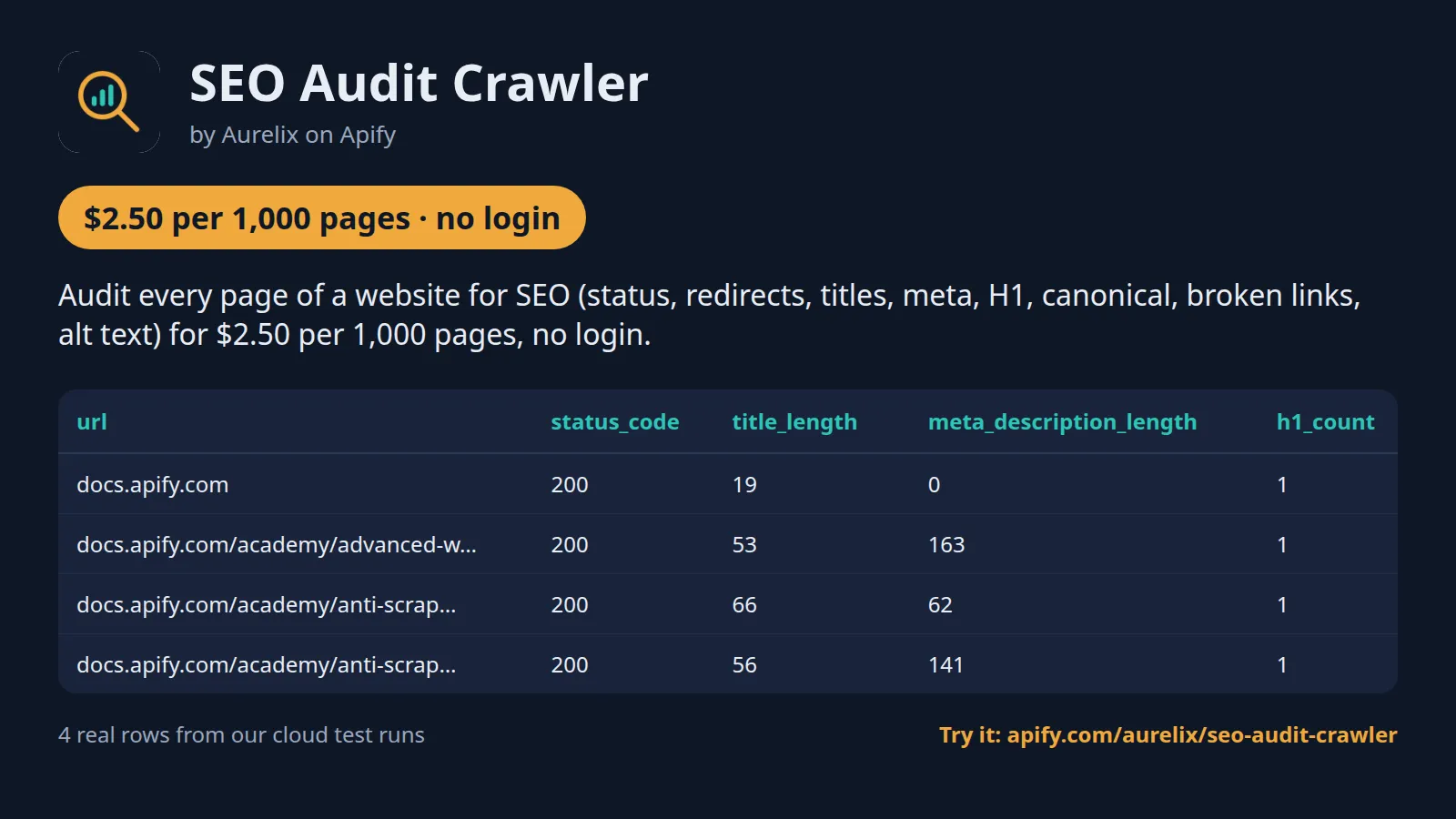
Audit every page of a website for SEO (status, redirects, titles, meta, H1, canonical, broken links, alt text) for $2.50 per 1,000 pages, no login.
For SEO consultants, agencies and site owners. Broken-link checks and an XML sitemap gap check are included free, and a summary row ranks issues by severity with a health score. Your first run with the example input costs about $0.0635 (25 pages in our test run).
| Audit | One site per run, up to 2,000 pages, plus its XML sitemap |
| Checks | Status, redirects, title and meta length, H1, canonical, noindex, broken links, alt text, size, response time |
| Output | 33 fields per page row plus a ranked summary row; JSON, CSV, Excel, API |
| Automate | Schedules, webhooks, Zapier, Make, n8n, Google Sheets, MCP for AI agents |
| Price | $2.50 per 1,000 pages ($1.75 per 1,000 pages on paid Apify plans) |
| Login needed | No |
Why Broken Link Crawler & SEO Audit users pick this one
- 1/16 the per-page leader's price. $2.50 per 1,000 pages against $40.
- Link checks included. Up to 5,000 link checks per run at no charge.
- No false alarms. 401, 403 and 429 answers reported as unverified, not broken.
- Sitemap gaps found. Indexable pages missing from the sitemap, and bad sitemap URLs.
- Ranked summary row. Issues by severity, a health score and example URLs, free.
Get started in 3 steps
- Enter the site URL, e.g. https://www.example.com, and set Max pages.
- Keep 'Read the XML sitemap' and 'Check external links' on for a full audit, or turn them off for a quick on-page check.
- Click Start, open the summary row for the ranked issues, then filter the page rows by issue code. Download JSON, CSV or Excel, or schedule it weekly.
▶ Try it with the example input
The form opens with an example input already filled in: that run costs about $0.0635 on the free plan.
How much does an SEO audit cost?
Pay per event: you pay only for what the run returns, plus a small start fee. Bronze, Silver, Gold and higher Apify plans pay less per result.
| Pages | Free plan | Paid plans (Bronze, Silver, Gold) |
|---|---|---|
| 100 | $0.25 | $0.18 |
| 1,000 | $2.50 | $1.75 |
| 10,000 | $25.00 | $17.50 |
Totals include the $0.001 start fee per run, rounded to the cent. Apify's free plan includes $5 of credit a month, enough for about 2,000 pages.
The summary row, link checks, pages blocked by robots.txt, pages that could not be loaded, throttled (HTTP 429) pages, non-HTML files and pages over 2 MB are not charged.
Billing events
| Event | Free plan | Paid plans (Bronze, Silver, Gold) |
|---|---|---|
page-audit | $2.50 per 1,000 pages | $1.75 per 1,000 pages |
apify-actor-start | $0.001 per run | $0.001 per run |
Broken Link Crawler & SEO Audit vs alternatives
| This Actor | smart-digital/complete-seo-audit-tool | khadinakbar/broken-link-checker | |
|---|---|---|---|
| Price per 1,000, free plan | $2.50 per 1,000 pages | $40 per 1,000 pages | $1 per 1,000 links checked |
| Price per 1,000, paid plans | $1.75 per 1,000 pages | $40 per 1,000 pages | $1 per 1,000 links checked |
| Start fee per run | $0.001 | $0 | $0.00005 |
| Platform usage billed on top | No | No | No |
| Example: 25 pages, 100 link checks | $0.063 | $1.00 | ≈ $0.10, links only |
| On-page audit (title, meta, H1, canonical, noindex) | ✓ | ✓ | ✗ |
| Broken-link checks | ✓ up to 5,000 per run, free | First 10 links per page | ✓ (the product) |
| Indexable pages missing from the XML sitemap | ✓ | not stated | not stated |
| 401/403/429 kept apart from broken links | ✓ (unverified) | not stated | not stated |
| Core Web Vitals, schema, accessibility | ✗ | ✓ | ✗ |
Prices checked regularly on each Actor's Store page.
Benchmarks: how we compare
| Test | Input | Result | Run time | Peak memory |
|---|---|---|---|---|
| First run (prefilled input) | books.toscrape.com, Max pages 25, 100 link checks | 25 pages and 1 free summary row for $0.0635 in total | not recorded | not recorded |
| Docs site with sitemap | docs.apify.com, 25 pages, 7 sitemap files, 100 link checks | 25 pages audited | 69 s | 67 MB |
| Larger site | docs.python.org/3/, Max pages 200, 500 link checks | 200 pages audited; 13 URLs blocked by robots.txt and 1 page over 2 MB skipped, none charged | 636 s | 117 MB |
| Short run timeout | docs.python.org/3/, Max pages 200, run timeout 60 s | 35 pages plus the summary row, run SUCCEEDED and said it stopped early | 54 s | 86 MB |
| Field accuracy | 10 pages checked against an independent parse of the live HTML | 10 of 10 matched on title, title length, meta description, H1 count, canonical and status | ||
| Broken links | a test site with a 404 page, a 500 page and a dead external link | 3 of 3 reported broken; robots-blocked and 429 links reported as unverified | ||
| robots.txt | a test site with disallowed paths | 0 requests to disallowed paths out of 111 |
Apify cloud runs at the default 256 MB with plain HTTP and no proxy, except the broken-link and robots.txt rows, which used a local test site with a request log. About 1,100 pages an hour on the larger site, so a full 2,000-page audit needs a longer run timeout than the default hour.
What data you get
Broken Link Crawler & SEO Audit crawls one website and its XML sitemap and returns one row per page with every on-page check: status code, redirect chain, title and meta description with lengths, H1, canonical, noindex/nofollow, word count, link counts, broken links, images missing alt, page size, response time and the issue codes on that page, most severe first. A free summary row ranks the issues by severity and pages affected, with example URLs and a health score. Broken links count only real 404/410, 5xx and dead hosts; 401, 403 and 429 answers are reported as unverified.
- One 'page' row per audited URL with 30+ fields, including the issue codes on that page, most severe first
- broken_links: [{url, status_code, error}] per page, plus counts of broken and unverified links
- in_sitemap per page and sitemap problems
- One 'summary' row: pages audited, health score, status code counts, average response time, sitemap stats and issues ranked [{issue, severity, description, pages, examples}]
| url | status_code | title_length | meta_description_length | h1_count | word_count | broken_links_count | images_missing_alt_count | response_time_ms | issues |
|---|---|---|---|---|---|---|---|---|---|
| https://docs.apify.com/ | 200 | 19 | 0 | 1 | 628 | 0 | 0 | 16 | ["duplicate_title", "missing_meta_description", "title_to... |
| https://docs.apify.com/academy/advanced-web-scraping | 200 | 53 | 163 | 1 | 415 | 0 | 0 | 3 | ["meta_description_too_long"] |
| https://docs.apify.com/academy/anti-scraping/mitigation/c... | 200 | 66 | 62 | 1 | 684 | 0 | 0 | 100 | ["meta_description_too_short", "title_too_long"] |
| https://docs.apify.com/academy/anti-scraping/mitigation | 200 | 56 | 141 | 1 | 311 | 0 | 0 | 1199 | ["slow_response"] |
One full page record, exactly as a real run returned it (long text and lists shortened here). From a real run:
Use cases
- SEO agencies running a technical audit before a client pitch
- Site owners scheduling a weekly check for broken links and new 404s
- Developers checking redirects, canonicals and noindex after a migration
- Content teams finding missing titles, meta descriptions and H1s
Use-case recipes
Monthly technical SEO check of your own site
For site owners and in-house SEO. Run the full audit with the sitemap on. Open the summary row first: its issues are ranked by severity and pages affected, with example URLs. Then filter the page rows by an issue code to get the fix list for your developer.
Broken-link clean-up
For content teams. Keep external links on and raise maxLinkChecks so every link is tested. Filter page rows where broken_links_count is above 0; each broken_links entry gives the dead URL and its status code, so editors know which link to fix on which page.
Quick on-page check before a launch
For developers checking a staging or new site that is publicly reachable. Turn off the sitemap and external links for a fast pass. Sort by title_length and meta_description_length and look for noindex left on by mistake.
Client audit for an agency
For agencies auditing a client's site with their permission. Use the health_score and the top 3 issues from the summary row in the pitch, and attach the page rows as a spreadsheet. After the fixes go live, track the changed pages with Website Change Tracker on the same site.
Input
| Field | Type | What it does | Default |
|---|---|---|---|
siteUrl (Site URL) | string | Home page or any page of the site to audit, e.g. 'https://books.toscrape.com'. | "https://books.toscrape.com" |
maxPages (Max pages) | integer | Stop after this many pages are audited (and charged), e.g. 100. | 100 |
maxLinkChecks (Max extra link checks) | integer | Upper limit of extra requests for links that were not crawled as pages (external links, files, internal pages past 'Max... | 500 |
useSitemap (Read the XML sitemap) | boolean | Find sitemaps from robots.txt (or /sitemap.xml), crawl the URLs they list, and flag sitemap URLs that redirect, error or are... | true |
checkExternalLinks (Check external links) | boolean | Also check links to other websites for 404/410, 5xx and dead hosts. | true |
All 5 fields, with examples: see the Input tab.
Switching from smart-digital/complete-seo-audit-tool
Already running smart-digital/complete-seo-audit-tool? Map its input fields to this Actor's like this:
smart-digital/complete-seo-audit-tool input | This Actor's input | Notes |
|---|---|---|
startUrls | siteUrl | One site per run, as a single URL. Run once per site, or start several runs through the API. |
crawlPages | not needed | The site is always crawled from siteUrl and its sitemap; set maxPages to 1 to audit only one page. |
maxPages | maxPages | Per run, 1 to 2,000 (default 100). Pages blocked by robots.txt and pages that could not be loaded do not count. |
respectRobotsTxt | not needed | robots.txt is always obeyed, also for external link checks, and cannot be switched off. |
maxConcurrency | no equivalent | At most two requests a second per site, slower when robots.txt sets a Crawl-delay. |
includeSubdomains | no equivalent | One host per run (www. and the bare domain count as one); links to other subdomains are checked as external links. |
excludeUrlPatterns | no equivalent | Every in-scope URL is crawled up to maxPages. |
auditLinks | checkExternalLinks + maxLinkChecks | Every link is checked, not only the first 10 of each page: internal links always, external ones when checkExternalLinks is on, up to 5,000 extra requests per run. |
auditMetaTags / auditHeadings / auditContent | not needed | Title, meta description and their lengths, canonical, noindex/nofollow, H1 count and word count are always checked. Open Graph, Twitter Cards, H2-H6 hierarchy and readability are not. |
auditPerformance / auditSchema / auditAccessibility | no equivalent | No Core Web Vitals, structured data or accessibility checks; each row has the page's download time and size only. |
- Price drops from $40 to $2.50 per 1,000 pages on the free plan (comparison table above), and link checks and the summary row are free.
- Output is one
pagerow per URL with anissueslist (most severe first) and onesummaryrow with the ranked issues, example URLs and a health score; filter byrecord_type. - Links answering 401, 403 or 429 are counted as unverified, not broken, so the broken list holds only 404/410, 5xx and dead hosts.
- Each URL is audited once per run; a redirecting URL and its target are separate rows, because the redirect is a finding too.
Use with AI agents (Apify MCP server, Claude, ChatGPT, n8n AI agent)
Broken Link Crawler & SEO Audit is a ready-made tool for AI agents. Through the Apify MCP server an agent reads this Actor's input schema, fills in the input from your request, starts the run and reads the pages back. You pay the same per-result price as a run started by hand, from your own Apify account.
Example prompts
- "Run an SEO audit of https://books.toscrape.com, up to 100 pages, and list the top issues with the pages affected"
- "Find every broken link on https://example.com, including links to other sites, and give me a table of page, link and status code"
- "Check which indexable pages of https://example.com are missing from its XML sitemap and which sitemap URLs redirect or return errors"
Claude (claude.ai and Claude Desktop)
Open Settings > Connectors, choose Add custom connector, paste https://mcp.apify.com/?tools=aurelix/seo-audit-crawler and sign in to Apify when asked. Then ask Claude one of the prompts above.
Claude Code, Cursor, VS Code and other MCP clients
Clients configured with JSON take the same URL:
A client without Apify sign-in sends the header Authorization: Bearer <YOUR_APIFY_TOKEN>; to run the server locally instead, use npx -y @apify/actors-mcp-server --actors aurelix/seo-audit-crawler with APIFY_TOKEN set.
ChatGPT
Where your ChatGPT plan offers custom connectors (developer mode), add https://mcp.apify.com/?tools=aurelix/seo-audit-crawler as a connector, sign in to Apify, and ask for the data in plain words.
n8n AI agent
Give an AI Agent node an MCP Client Tool with the endpoint https://mcp.apify.com/?tools=aurelix/seo-audit-crawler and a Bearer credential holding your Apify token. The agent can then call Broken Link Crawler & SEO Audit whenever a workflow step needs pages; for a fixed, non-agent workflow use Apify's n8n node with Run Actor instead.
Use it from AI agents (MCP), the API or no-code
Copy this to your AI assistant
MCP server URL for this Actor: https://mcp.apify.com/?tools=aurelix/seo-audit-crawler (setup for each client in the section above).
API
Start a run and read the dataset with Apify's REST API or the Python and JavaScript clients:
No-code: schedule it in 3 clicks
Send the results to Google Sheets, Zapier, Make, n8n, Slack or any webhook URL.
- Fill in the input, then click Save as a new task.
- In the task, click Schedule and pick daily or weekly (Apify Schedules).
- Open the task's Integrations tab to send every run's results to Slack, Google Sheets, email or any webhook.
Prefer n8n or Make? Ask in the Issues tab and we will share a ready-made workflow for it.
FAQ
Can I run an SEO audit without login?
Yes. It never logs in, so you need no website account, password or cookies; only a free Apify account to run it.
Is there an SEO audit API?
You can use this Actor as one. Start it with Apify's REST API or the Python and JavaScript clients and read the results as JSON (see the code above), or call it from an AI agent through MCP.
How much does an SEO audit cost?
About $2.50 for 1,000 pages on Apify's free plan and $1.75 on paid plans, start fee included. The free $5 monthly credit covers about 2,000 pages.
Can I export an SEO audit to Excel or Google Sheets?
Yes. Download the results as Excel, CSV, JSON, XML or HTML from the run's Storage tab, or send them to Google Sheets with Apify's Google Sheets integration or the API.
Is it legal to crawl a website for an SEO audit?
It reads only public data any logged-out visitor can see: the website you choose (crawl only sites you have the right to crawl, such as your own or a client's). It goes at a polite pace, respects robots.txt, never logs in and never solves CAPTCHAs. It returns technical SEO fields per page (status, titles, headings, links, issues); no personal data is extracted. To have a record removed, open an issue on this Actor's Issues tab; if a site owner formally asks us to stop, this Actor will stop. You are responsible for using the data lawfully, incl. anti-spam and privacy laws; this is not legal advice.
What counts as an audited page?
Each crawled HTML page on the site that returned an HTTP status, including redirects and 404s, because those are findings too. Free: URLs blocked by robots.txt, URLs that could not be loaded at all (timeout, dead connection), non-page files such as PDF, image or JSON (listed in the summary), pages the site throttles with HTTP 429 even after retries with backoff (listed in the summary and named in the status message) and pages over 2 MB (skipped with a log line).
Which issues are checked?
High: 5xx, 4xx, unreachable pages, broken links, missing title. Medium: noindex, bad sitemap URLs, missing H1, missing meta description, duplicate titles, redirect chains, responses over 1 s, images without alt. Low: canonical to another URL, duplicate descriptions, title over 60 or under 30 characters, description over 160 or under 70, multiple H1s, missing canonical, under 200 words, HTML over 1 MB, single redirects, indexable pages missing from the sitemap.
Does it respect robots.txt?
Always, and it cannot be switched off. Disallowed pages are not requested and are counted in the summary; external links are checked only where that site's robots.txt allows it.
Why is a link 'unverified' rather than broken?
Many sites answer automated checks with 401, 403 or 429 even when the page works in a browser. Those are counted as unverified so the broken list holds only real 404/410, 5xx and dead-host links.
Does it render JavaScript?
No. It audits the HTML the server sends, which is what search engines index first. Links injected only by JavaScript are not discovered.
What is the health score?
The share of audited pages, from 0 to 100, that have no high or medium issue. Low issues, such as a title a little too long, do not lower it. It is in the summary row and in the run's status message.
What am I charged when the site is down or blocks the crawl?
Only the $0.001 start fee. URLs blocked by robots.txt are counted in the summary, pages that could not be loaded come back as free rows with an error, and the summary row is always free. Only page rows with an HTTP status are charged.
How are pages found?
From the site URL and, with Read the XML sitemap on, from the sitemaps named in robots.txt or at /sitemap.xml (sitemap indexes and .gz files included, up to 25 sitemap files). Links on crawled pages are then followed within the same host until Max pages is reached.
What exactly is response_time_ms?
The time to download the page, headers and body, from Apify's servers. Requests are timed one at a time, and up to 100 rows over 80 ms are re-timed alone after the crawl, so the crawler's own load does not show up as a slow server. A page over 1 second gets the slow_response issue.
What does Max extra link checks cover?
Requests for links that were not crawled as pages: external links, files and internal pages beyond Max pages. Internal links are checked first. Links over the cap are counted in unchecked_links_count, not reported as fine or broken. Set it to 0 to rely only on the status of crawled pages.
How long does an audit take?
About 1,100 pages an hour at two requests a second. If the run timeout comes near, the run stops crawling early, still checks links, saves every page row and the summary, ends SUCCEEDED and says it stopped early.
Can I track progress after fixing issues?
Yes. Save the input as a task, schedule it weekly or monthly, and compare the summary rows: health_score and the pages count of each issue. There is no built-in diff between runs.
Limits (stated honestly)
- One host per run: www. and the bare domain count as one site; other subdomains are not crawled (their links are checked as external).
- At most two requests per second per site, slower with a robots.txt Crawl-delay; up to 2,000 pages per run (about 1,100 pages an hour, so a full 2,000-page audit takes nearly 2 hours; raise the run timeout accordingly).
- No JavaScript rendering and no Core Web Vitals or Lighthouse scores; response time is the time to download the page (headers and body) from Apify's servers, and any page over 80 ms is re-timed alone at the end so the crawler's own load never counts as a slow server.
- Link checks are capped by 'Max extra link checks' (internal links first); links over the cap are counted as not checked.
- Duplicate titles and descriptions are compared only across the pages audited in the run, ignoring noindex pages.
- HTML pages over 2 MB are skipped (not charged) to keep memory low; they are listed in the summary.
Related Aurelix tools
Public Aurelix Actors, grouped by the data they collect. All are pay-per-result and need no login.
AI, content and SEO
- Google Trends by Region: Google Trends interest over time, by region and rising queries for any number of keywords, plus trending searches.
- Google Autocomplete API: Expands seed keywords into hundreds of real Google and YouTube autocomplete phrases, tagged by search intent.
- PDF to Markdown OCR & Table Extraction: Turns linked PDF and Word files into Markdown per page, with tables as JSON rows, RAG chunks and OCR.
- Website to Markdown API: Crawls a site and returns one row of clean main-content Markdown per page, with title, headings and links.
Jobs and hiring data
- Greenhouse Jobs Scraper: Live jobs from a company's Greenhouse, Lever, Ashby or SmartRecruiters board, with salary and Canadian province tags.
- LinkedIn Jobs Country Filter Scraper: Public LinkedIn job postings by keyword and country: title, company, location, seniority, job type, salary text, description.
- Multi Job Board Scraper: LinkedIn, about 50 company career sites, Remote OK and We Work Remotely jobs in one deduplicated list.
E-commerce and product data
- AliExpress Scraper API: AliExpress search results by keyword: price, discount, rating, units sold, ship-from country and sponsored flag.
- Amazon New Releases & Best Sellers: Amazon Best Sellers and New Releases top 100 on 10 marketplaces: rank, ASIN, price, rating, rank change.
- Shopify Product Export Scraper: Every public product of any Shopify store with variants, SKUs, prices, barcodes, stock counts and collections.
Leads and company data
- Funded Companies Hiring: Companies that just raised money (SEC Form D), with their open roles and business contacts, as a new-only monitor.
- Google Maps Phone Scraper: Local business lists from Google Maps: phones, websites, ratings, hours, coordinates; optional website emails and socials.
- Recently Funded Companies API: US companies that just filed an SEC Form D: amount raised, industry, state, executives, confirmed website.
- Tech Stack API: CMS, e-commerce platform, analytics, ad pixels, chat, CDN and email provider for each domain you enter.
Ad intelligence
- Competitor Watch: One report per competitor with only what is new: Meta and TikTok ads, page changes, Shopify products and prices, jobs.
- Facebook Ad Library Search & API: Facebook and Instagram business ads from the Meta Ad Library: copy, creatives, landing pages, dates, optional EU reach.
Canada and government data
- Canada Building Permits: Building permits and development applications from 7 Canadian cities: address, type, status, dates, value, contractor company.
Recent changes
- 0.1: Comparison with other SEO audit and broken-link tools; price units stated (per audited page, link checks free).
The full history is on the Changelog tab.
Tested daily
An automated health check runs this Actor every day on a fixed input and checks that at least 6 pages come back with record_type, url, source_url, scraped_at filled in; a failed check alerts the maintainer straight away.
Your feedback
Missing a field, found a bug or need another filter? Open an issue on the Issues tab; we aim to answer within a day. If this Actor saved you time, a short review helps other people find it.


