

Wellfound Jobs API & Scraper | Salary, Equity, Stage
Pricing
from $0.32 / 1,000 job results
Wellfound Jobs API & Scraper | Salary, Equity, Stage
Scrape Wellfound (AngelList jobs) startup listings at $0.50 per 1,000 jobs on the free plan: Wellfound salary and equity ranges as numbers, remote type, startup stage, size and badges, full description, and a new-jobs feed with Slack digest. No login.
Pricing
from $0.32 / 1,000 job results
Rating
0.0
(0)
Developer

Aurelix
Maintained by CommunityActor stats
0
Bookmarked
2
Total users
1
Monthly active users
2 hours ago
Last modified
Categories
Features
Share
What is Wellfound Jobs API & Scraper?
Get Wellfound startup jobs with salary and equity ranges, company stage and size for $0.50 per 1,000 jobs, no login.
For job seekers, recruiters, startup sales teams and investors. Search by role and city, keep only remote jobs, and get a daily feed of new postings with a Slack digest. Your first run with the example input costs about $0.028 (50 jobs in our test run).
| Search by | Roles (e.g. software-engineer), locations (e.g. new-york) or pasted Wellfound role, location and remote links |
| Filters | Remote only, job types, title keywords, salary published, max jobs, max pages, new jobs only |
| Output | 41 fields per job: salary and equity as numbers, startup stage, size, badges; JSON, CSV, Excel, API |
| Automate | Schedules, Slack digest, webhooks, Zapier, Make, n8n, Google Sheets, MCP for AI agents |
| Price | $0.50 per 1,000 jobs (from $0.32 per 1,000 jobs on paid Apify plans) |
| Free to try | Runs on Apify's free plan: the $5 monthly credit covers about 9,900 jobs |
| Login needed | No |
Daily monitor: only what's new, every morning
Set it once, get only the new jobs every morning. With Only new jobs since last run on, the first run returns everything that matches; each later run skips jobs that earlier runs already returned. Wellfound does not sort its pages by date, so every page is read each day: new jobs cost $0.50 per 1,000 and a page with nothing new costs $0.0004.
- Paste this input into the Input tab (JSON view) and click Save as a new task; it appears under Saved tasks.
- Open the task from Saved tasks and click Schedule.
- Choose Daily, pick the hour, and save.
Cost example: 1 role in 1 city (about 18 results pages), about 15 new jobs a day landing on about 8 of those pages ≈ $0.44/month on the free plan (from $0.35 on paid plans): one run a day for 30 days, start fee included. The first run returns everything that matches, so it costs more.
Add a Slack incoming-webhook URL in slackWebhookUrl (or any URL in webhookUrl) to get a short digest of each run's new jobs; nothing is sent when a run finds nothing.
Why Wellfound Jobs API & Scraper users pick this one
- Cheaper than the leading tools. $0.50 per 1,000 jobs, from $0.32 on paid plans.
- Salary and equity as numbers. Min, max, currency and equity percent ready to sort.
- Startup context, no add-on fee. Size band, stage and badges such as YC Funded.
- Daily new-jobs feed. Only new jobs since last run, plus a Slack digest.
- Contacts as published. Descriptions as published; their emails listed in contact_emails.
Get started in 3 steps
- Type one or more roles (e.g. software-engineer, product manager) and, optionally, locations (e.g. new-york, london), or paste Wellfound role, location or remote links.
- Optionally narrow it: remote only, job types, title keywords, salary published, max jobs; turn on 'Only new jobs since last run' for a daily feed.
- Click Start, then download the jobs as Excel, CSV or JSON, or send them to Google Sheets, Slack or your app.
▶ Try it with the example input
The form opens with an example input already filled in: that run costs about $0.028 on the free plan.
How much does it cost to scrape Wellfound jobs?
Pay per event: you pay only for what the run returns, plus a small start fee. Bronze, Silver, Gold and higher Apify plans pay less per result. Paid plans pay $0.40 (Bronze), $0.36 (Silver) and $0.32 (Gold and higher) per 1,000 jobs.
| Jobs | Free plan | Bronze | Silver | Gold |
|---|---|---|---|---|
| 100 | $0.053 | $0.043 | $0.039 | $0.035 |
| 1,000 | $0.50 | $0.40 | $0.36 | $0.32 |
| 10,000 | $5.00 | $4.00 | $3.60 | $3.20 |
Totals include the $0.003 start fee per run, rounded to the cent (amounts under $0.10 to four decimals). Apify's free plan includes $5 of credit a month, enough for about 9,900 jobs.
Jobs are charged when written to the dataset. A results page that gives no job to return (every job on it filtered out, already returned by another search in the run, or already returned before in only-new mode) costs $0.0004 as empty-page, so a filter that matches nothing, or a quiet day for a monitor, still pays for the pages read; a monitor of one role and city reads about 18 pages a day. A role or location Wellfound does not have, and a page Wellfound refuses, are never charged. The run checks your maximum charge before every page and stops cleanly when the next page could not be paid for. The opt-in residential fallback costs $0.004 per request sent through it, served or refused.
Billing events
| Event | Free plan | Bronze | Silver | Gold |
|---|---|---|---|---|
job-result | $0.50 per 1,000 jobs | $0.40 per 1,000 jobs | $0.36 per 1,000 jobs | $0.32 per 1,000 jobs |
empty-page | $0.0004 per results page read that gave no job to return | $0.0004 per results page read that gave no job to return | $0.0004 per results page read that gave no job to return | $0.0004 per results page read that gave no job to return |
residential-request | $0.004 per residential request (opt-in fallback) | $0.004 per residential request (opt-in fallback) | $0.004 per residential request (opt-in fallback) | $0.004 per residential request (opt-in fallback) |
apify-actor-start | $0.003 per run | $0.003 per run | $0.003 per run | $0.003 per run |
What data you get
Wellfound Jobs API & Scraper reads Wellfound's public role, location and remote job pages and turns every listing into one row: title, role, company, startup stage, size and badges, locations, ISO countries, remote type, job type, salary and equity as numbers, experience, posted time and full description.
- Title, role category, job type, years of experience
- Company, Wellfound page, tagline, size band, stage and badges where shown, logo
- Office and remote locations, ISO countries, remote type
- Salary min/max as numbers with currency and interval; equity min/max in percent
- Posted time (ISO 8601 UTC), job link, full description
- contact_emails: the email addresses written in the description
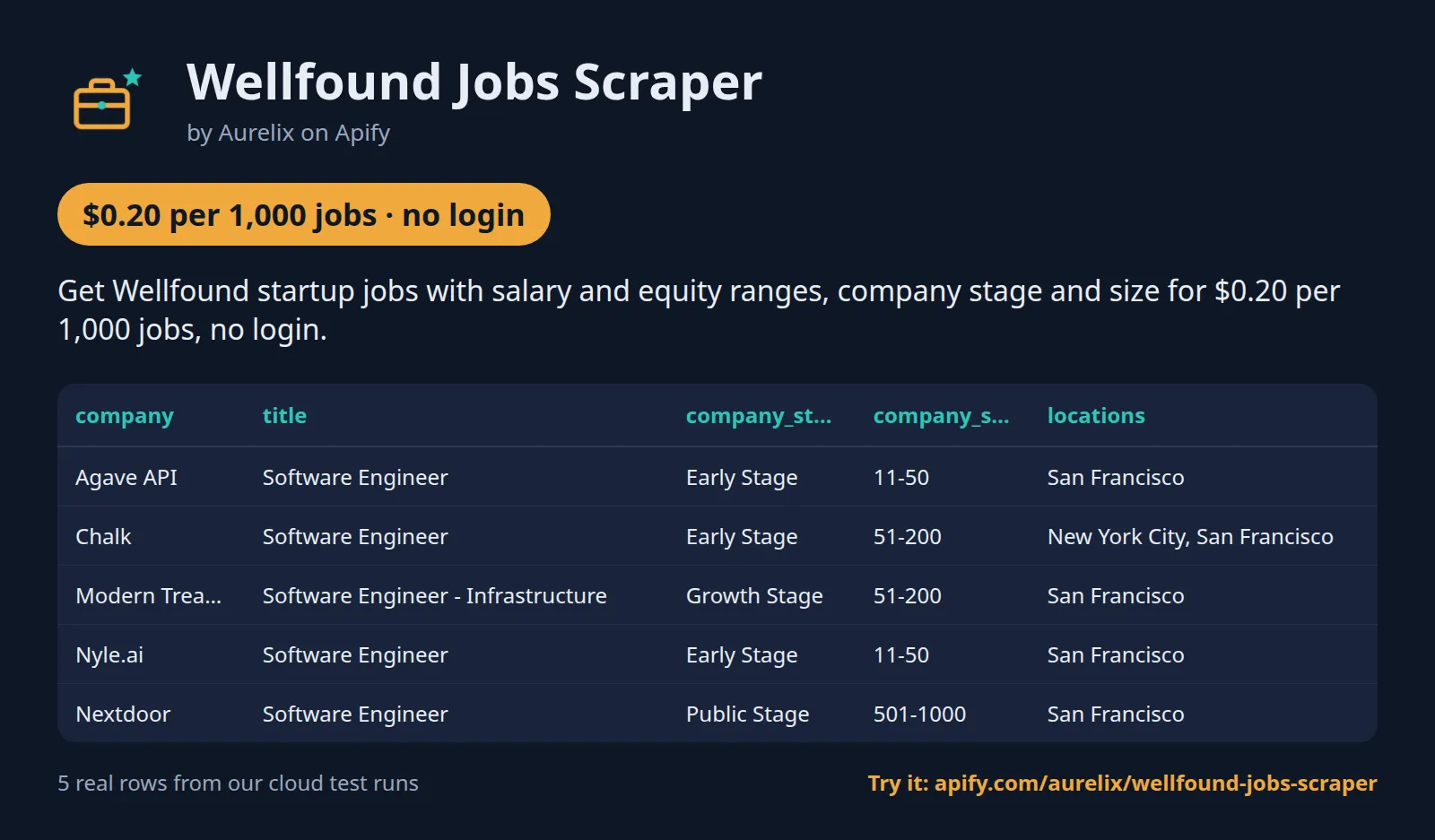
| company | title | company_stage | company_size | locations | workplace_type | salary_text | equity_max_pct |
|---|---|---|---|---|---|---|---|
| Agave API | Software Engineer | Early Stage | 11-50 | ["San Francisco"] | onsite | $130k – $210k | 0.2 |
| Chalk | Software Engineer | Early Stage | 51-200 | ["New York City", "San Francisco"] | onsite | $170k – $250k | |
| Modern Treasury | Software Engineer - Infrastructure | Growth Stage | 51-200 | ["San Francisco"] | remote | $159k – $275k | |
| Nyle.ai | Software Engineer | Early Stage | 11-50 | ["San Francisco"] | onsite_or_remote | $100k – $165k | 3 |
| Nextdoor | Software Engineer | Public Stage | 501-1000 | ["San Francisco"] | onsite | $185k – $210k |
One full job record, exactly as a real run returned it (long text and lists shortened here). From a real run:
Use cases
- Job seekers tracking new startup roles with salary and equity in one sheet
- Recruiters spotting startups actively hiring engineers, designers or sales staff
- Sales teams using startup hiring as a buying signal
- Investors watching hiring and pay bands by stage, role and city
- Job boards and newsletters adding fresh startup jobs daily
Input
| Field | Type | What it does | Default |
|---|---|---|---|
roles (Roles) | array | Wellfound job roles, as words or as the slug in a wellfound.com/role link, e.g. ['software-engineer', 'product manager', 'data scientist']. | |
locations (Locations) | array | Cities or regions as Wellfound names them, e.g. ['new-york', 'san francisco', 'london', 'berlin', 'bangalore']. | |
maxJobs (Max jobs) | integer | Upper limit of jobs returned by the run, after filters. 0 = no limit. | 1000 |
startUrls (Wellfound search links) | array | Wellfound role, role + location, remote-role, location or remote links copied from the browser, e.g. https://wellfound.com/role/l/software-engineer/new-york, https://wellfound.com/role/r/data-scientist, https://wellfound.com/location/london or https://wellfound.com/remote. | |
remoteOnly (Remote only) | boolean | Keep only jobs Wellfound marks as remote (fully remote, or onsite-or-remote). | false |
jobTypes (Job types) | array | Keep only these job types, e.g. ['FULL_TIME', 'CONTRACT']. |
All 15 fields, with examples: see the Input tab.
Use with AI agents (MCP)
MCP (Model Context Protocol) is the open standard that lets AI assistants such as Claude, ChatGPT and Cursor call outside tools. Apify's hosted MCP server at https://mcp.apify.com/?tools=aurelix/wellfound-jobs-scraper gives your assistant this Actor only: it fills in the input from your request, runs it and reads the jobs back, at the same per-result price as a run started by hand.
Example prompts
- "Find remote software engineer jobs at early-stage startups on Wellfound that offer equity, and show salary and equity ranges as a table."
- "List product manager jobs in San Francisco and New York on Wellfound posted in the last week, with company stage and size."
- "Every day, give me only the new Wellfound data scientist jobs in London and post a summary to Slack."
Claude Desktop and claude.ai
Settings > Connectors > Add custom connector, name it Apify, paste https://mcp.apify.com/?tools=aurelix/wellfound-jobs-scraper, keep the detected OAuth settings, select Add and sign in to Apify.
Claude Code
Cursor and VS Code
Add this to ~/.cursor/mcp.json (Cursor); in VS Code's .vscode/mcp.json put the same entry under "servers" with "type": "http". Sign in to Apify when asked.
ChatGPT
Turn on Developer mode, open Settings > Apps & Connectors > Create, paste the URL above as the MCP server URL, choose OAuth and authorize Apify.
Clients without sign-in send Authorization: Bearer <YOUR_APIFY_TOKEN> instead. No Apify account? This Actor supports Apify's agentic payments: an agent can pay per run with a prepaid, spend-capped token, bought with x402 stablecoin payments.
n8n AI agent
Give an AI Agent node an MCP Client Tool with the endpoint https://mcp.apify.com/?tools=aurelix/wellfound-jobs-scraper and a Bearer credential holding your Apify token.
Use it from AI agents (MCP), the API or no-code
Copy this to your AI assistant
MCP server URL for this Actor: https://mcp.apify.com/?tools=aurelix/wellfound-jobs-scraper (setup for each client in the section above).
API
Start a run and read the dataset with Apify's REST API or the Python and JavaScript clients:
No-code: schedule it in 3 clicks
Send the results to Google Sheets, Zapier, Make, n8n, Slack or any webhook URL.
- Fill in the input, then click Save as a new task.
- In the task, click Schedule and pick daily or weekly (Apify Schedules).
- Turn on Only new jobs since last run so each run returns only what is new, and paste a Slack or webhook URL into Slack webhook URL / Webhook URL to get a digest of the new items (count plus the top 10) after every run.
Prefer n8n or Make? Ask in the Issues tab and we will share a ready-made workflow for it.
FAQ
Can I scrape Wellfound jobs without login?
Yes. It never logs in, so you need no Wellfound account, password or cookies; only a free Apify account to run it.
Is there a Wellfound jobs API?
You can use this Actor as one. Start it with Apify's REST API or the Python and JavaScript clients and read the results as JSON (see the code above), or call it from an AI agent through MCP.
How much does it cost to scrape Wellfound jobs?
About $0.50 for 1,000 jobs on Apify's free plan and from $0.32 on paid plans, start fee included. The free $5 monthly credit covers about 9,900 jobs.
Can I export Wellfound jobs to Excel or Google Sheets?
Yes. Download the results as Excel, CSV, JSON, XML or HTML from the run's Storage tab, or send them to Google Sheets with Apify's Google Sheets integration or the API.
Is it legal to scrape Wellfound jobs?
It reads only public data any logged-out visitor can see: Wellfound's public role, location and remote job pages. It goes at a polite pace (one page at a time), obeys robots.txt, never logs in and never solves a security check. It returns job and company fields, with descriptions as published (email addresses in them also listed in contact_emails); no candidate, founder or recruiter profiles are opened. Data is returned as shown publicly on Wellfound. To have a record removed, open an issue on this Actor's Issues tab; if Wellfound formally asks us to stop, this Actor will stop. You are responsible for using the data lawfully, incl. anti-spam and privacy laws; this is not legal advice.
Which roles and locations can I use?
Any role or location page Wellfound has. Type words ('product manager', 'San Francisco') or the slug from a wellfound.com/role or /location link. One Wellfound does not have is named in the run's status and not charged.
Why does Wellfound show more jobs than I get?
Its role and location pages list at most 3 jobs per startup per search. The run's status gives the listings read and Wellfound's total. Narrower searches (role plus city, or remote role pages) surface more of each startup's jobs.
How does the only-new-jobs mode work?
The Actor remembers the job IDs it returned for the same filters (or the same 'Incremental state name') for 90 days, per search, and returns only new ones; adding a search to a feed does not reset the others. Wellfound does not sort its pages by date, so every page is read each run; pages with nothing new cost $0.0004 each. Schedule it daily, and add a Slack webhook for a digest.
How are salary and equity parsed?
'$130k – $210k • 0.05% – 0.2%' becomes salary 130000-210000 USD per year and equity 0.05-0.2%. Currency comes from the symbol ($ USD, € EUR, ₹ INR; k, L and cr multipliers). 'No equity' sets has_equity to false. The original line stays in compensation_text.
What if Wellfound refuses a request?
Pages are read directly from the run's own address. A refused page is tried once more after a pause; nothing is ever solved. If it is still refused, that search is named in the status, nothing is charged for it, and after 2 refused searches in a row the run stops and ends successfully with the jobs already found. With 'Residential fallback' on, a refused page is also tried through at most 2 residential proxy sessions, at $0.004 per request. Wellfound refuses Apify's datacenter proxy, so it is not offered.
Lawful use
- robots.txt is fetched and obeyed on every run; the pace is one page at a time.
- Data is returned as shown publicly on Wellfound: descriptions as published, incl. any contact the employer wrote into them. People can ask for removal by opening an issue on this Actor's Issues tab.
- Names a startup writes into its own job text, such as its founders or the hiring manager, can remain: they are business contact information the company published. No candidate, recruiter or founder profiles are collected, and there is no email enrichment.
Integrations: n8n, Make, Zapier and code
- n8n: Apify node 'Run an Actor and get dataset' with aurelix/wellfound-jobs-scraper, then Google Sheets or Airtable.
- Make: Apify 'Run an Actor', then 'Get dataset items'.
- Zapier: Apify 'Run Actor', or a Catch Hook on the Webhook URL field for new-job digests.
- Code: the Python example above, or POST to https://api.apify.com/v2/acts/aurelix~wellfound-jobs-scraper/run-sync-get-dataset-items with your token.
Limits (stated honestly)
- At most 3 jobs per startup per search page (Wellfound's own limit); company pages are not read.
- No free-text search: roles and locations are Wellfound's own pages; title keywords filter their jobs.
- At most 25 searches per run (roles × locations plus links).
- '$' is read as USD, even for a startup posting in Canadian or Australian dollars.
- Applying needs a Wellfound account; apply_url is the job's Wellfound page.
- Wellfound can change its pages; the daily health run catches breakage within 24 hours.
Works great with
- Then: Recently Funded Companies API: check which of the hiring startups just raised a round, with amount and investors
- Then: Career Page Monitor: track new, removed and reposted roles week by week for the startups you care about
- Before this: Multiple Job Boards Scraper: add LinkedIn, company career sites and remote boards for the same role in one run
- Before this: Greenhouse Jobs Scraper: read a startup's own Greenhouse, Lever or Ashby board for every opening, not only Wellfound's top 3
Related Aurelix tools
Public Aurelix Actors, grouped by the data they collect. All are pay-per-result and need no login.
Jobs and hiring data
- Job Bank Canada Scraper API: Official Job Bank Canada postings by month: NOC and NAICS codes, wages, hours and location.
- Greenhouse Jobs Scraper: Live jobs from a company's Greenhouse, Lever, Ashby or SmartRecruiters board, with salary and Canadian province tags.
- Career Page Monitor: New, removed and reposted roles plus hiring velocity per company, from seven job-board systems including Workday.
- LinkedIn Jobs Country Filter Scraper: Public LinkedIn job postings by keyword and country: title, company, location, seniority, job type, salary text, description.
- Multiple Job Boards Scraper: LinkedIn, about 50 company career sites, Remote OK and We Work Remotely jobs in one deduplicated list.
- Remote Job Board Scraper API: Remote OK and We Work Remotely jobs in one deduplicated list with salary, regions and tags.
- Workday Job Postings Scraper: Jobs from any Workday career site by link or company name, with full descriptions and Canadian province tags.
E-commerce and product data
- AliExpress Scraper API: AliExpress search results by keyword: price, discount, rating, units sold, ship-from country and sponsored flag.
- Amazon Best Sellers & Amazon New Releases: Amazon Best Sellers and New Releases top 100 on 10 marketplaces: rank, ASIN, price, rating, rank change.
- Best Buy Canada Scraper API: Best Buy Canada search results: CAD price, sale savings, rating, reviews and seller, plus optional UPC and specs.
- Shopify Product Export Scraper: Every public product of any Shopify store with variants, SKUs, prices, barcodes, stock counts and collections.
- Shopify Best Sellers Tracker: Competitor Shopify stores' best-sellers, new products, price changes, stock-outs and restocks since your last run, plus catalogue summary.
Leads and company data
- Companies House Scraper: Newly incorporated UK companies from Companies House: SIC codes, region, registered office, directors with roles.
- Contact Page Scraper: Published company emails, phones, addresses, social pages and team members from a list of company websites.
- Decision Maker Finder: Founders, CEOs, VPs and department heads from company team pages, with title, seniority and function.
- Newly Funded Companies Hiring: Companies that just raised money (SEC Form D), with their open roles and business contacts, as a new-only monitor.
- Google Maps Phone Scraper: Local business lists from Google Maps: phones, websites, ratings, hours, coordinates; optional website emails and socials.
- Recently Funded Companies API: US companies that just filed an SEC Form D: amount raised, industry, state, executives, confirmed website.
- Tech Stack API: CMS, e-commerce platform, analytics, ad pixels, chat, CDN and email provider for each domain you enter.
- Yellow Pages Canada Scraper: YellowPages.ca businesses by search term and city: phone, website, address, postal code, hours and rating.
Ad intelligence
- Competitor Watch: One report per competitor with only what is new: Meta and TikTok ads, page changes, Shopify products and prices, jobs.
- Facebook Ad Library Search & API: Facebook and Instagram business ads from the Meta Ad Library: copy, creatives, landing pages, dates, optional EU reach.
- TikTok Ads Library API: TikTok Ads Library ads for Europe, UK, Switzerland and Turkey with targeting, reach, ad text and landing pages.
Canada and government data
- Canada Building Permits: Building permits and development applications from 7 Canadian cities: address, type, status, dates, value, applicant, contractor and Toronto planner contact.
- Government Tenders Scraper: Open tenders from SAM.gov, CanadaBuys and EU TED in one table: buyer, codes, value, deadline, contact and link.
- USPTO Trademark API: US trademark search and watch from USPTO: mark, owner or number lookups, new filings, owner, attorney, goods.
AI, content and SEO
- Google Trends by Region: Google Trends interest over time, by region and rising queries for any number of keywords, plus trending searches.
- Google Autocomplete API: Expands seed keywords into hundreds of real Google and YouTube autocomplete phrases, tagged by search intent.
- PDF Table Extraction & PDF to Markdown OCR: Turns linked PDF and Word files into Markdown per page, with tables as JSON rows, RAG chunks and OCR.
- Broken Link Crawler & SEO Audit: Audits a whole site: one row per page with SEO checks and broken links, plus a ranked issues summary.
- Bulk TikTok Transcripts Scraper: Returns TikTok video transcripts as text, timed segments and SRT, from video links or @profiles' latest videos.
- Website to Markdown API: Crawls a site and returns one row of clean main-content Markdown per page, with title, headings and links.
- YouTube Transcript Scraper: Returns YouTube video transcripts as text, timed segments and AI chunks, from videos, channels, playlists or searches.
- YouTube Video Scraper API: Full details for every YouTube video in a search, channel or playlist: views, likes, comments, tags, publish time.
More data tools
- Agoda API (Unofficial): Scrape Agoda guest reviews at $0.50 per 1,000 with this unofficial Agoda API, cheaper than the leading tools: Agoda and...
- Tennis Betting Odds Scraper: Tennis results and upcoming matches with opening and closing odds per bookmaker and implied probabilities.
Recent changes
- 0.1: Descriptions and taglines are returned as published; new contact_emails field lists the email addresses written in each description.
- 0.2: Price $0.50 per 1,000 jobs ($0.40 on paid plans); empty results pages charged $0.0004; residential proxy is now an opt-in fallback with its own fee; refused pages are retried once, then skipped; the run checks the maximum charge before each page, stops before the run timeout, and remembers each search separately in only-new mode; descriptions also lose company mailboxes, street addresses, personal profile links and @handles.
The full history is on the Changelog tab.
Tested daily
An automated health check runs this Actor every day on a fixed input and checks that at least 15 jobs come back with job_id, title, company, job_url, posted_at, contact_emails filled in; a failed check alerts the maintainer straight away.
Your feedback
Missing a field, found a bug or need another filter? Open an issue on the Issues tab; we aim to answer within a day. If this Actor saved you time, a short review helps other people find it.


