

TikTok Search Scraper: Keywords, Hashtags, Creators
Pricing
from $0.20 / 1,000 tiktok posts
TikTok Search Scraper: Keywords, Hashtags, Creators
Scrape TikTok search results by keyword or hashtag and discover creators. Pay only per result. Views, likes, comments, shares, bookmarks, channel stats, music, subtitles and direct video URLs as JSON. Output compatible with popular TikTok scrapers. No proxies or login needed. Works via API and MCP.
Pricing
from $0.20 / 1,000 tiktok posts
Rating
5.0
(1)
Developer

GoFetch
Maintained by CommunityActor stats
5
Bookmarked
64K
Total users
777
Monthly active users
an hour ago
Last modified
Categories
Share

TikTok Search Scraper is a TikTok search API alternative for marketers, social listening teams, researchers and developers who need TikTok keyword search and hashtag data. Give it a list of search keywords and get the matching TikTok videos (about 200–420 per keyword, see the FAQ) as structured data — views, likes, comments, shares and bookmarks, creator/channel stats, music, subtitles and direct video URLs — as JSON, CSV or Excel. An optional expansion mode harvests TikTok's search suggestions, hashtag feeds and sound feeds to discover roughly 10x more creators per keyword. No login, no cookies, no TikTok account and no proxy setup: you enter keywords, you pay per result.
Who uses TikTok Search Scraper?
- Influencer marketing teams build creator shortlists: a list of niche keywords with
expansion(paid plans) anduniqueAuthorson returns one video per creator, ready to sort bychannel.followersandchannel.verified. Then TikTok Profile Scraper adds bios and recent posts. - Brand and social listening teams schedule a daily run on brand and product keywords
with
sortType: "DATE_POSTED", keep only videos newer than the previous run (uploadedAtFormatted), and send them to Slack or Google Sheets with Apify integrations. - Researchers and data teams compare views, likes and hashtags across topics over time, and use the subtitle tracks for content analysis.
- AI agents call it over MCP for questions like "what are the most-liked TikTok videos about AI tools right now?"
What data does TikTok Search Scraper extract?
One dataset item per video, including:
- Engagement — views, likes, comments, shares, bookmarks
- Post — title/caption, hashtags, upload timestamp (raw + ISO), permanent post URL
- Channel — id, name, username, avatar, verified flag, follower/following counts, total videos and likes
- Video — width, height, ratio, duration, direct video URL, cover and thumbnail images
- Music — song id (plus
song.musicId, the exact id as a string), title, artist, album, duration, cover art - Extras — subtitle/caption tracks with URLs, POI (location) data, collab info, the keyword that found the video, and (in expansion mode) which pool surfaced it
- Add-ons (opt-in, paid per unit) — each video's top comments with reply threads (
commentList) and the creator's profile details (authorProfile), see Add-ons
A run typically finishes in seconds; every field is shown in the output example below.
How to scrape TikTok search results
In the Apify Console
- Open TikTok Search Scraper in Apify Store and click Try for free.
- Enter one or more Search Keywords — a topic, a brand, a hashtag term, a creator niche. Each keyword is searched independently and the results are combined into one dataset.
- Optionally set Maximum number of items (the form prefills 100), a Sort Type, or turn on Expansion Pools for creator discovery. Leave the proxy field empty — proxies are built in.
- Click Start. The run ends when every keyword is exhausted or
maxItemsis reached. - Open the Dataset tab and download the results as JSON, CSV, Excel, XML or RSS, or read them through the API.
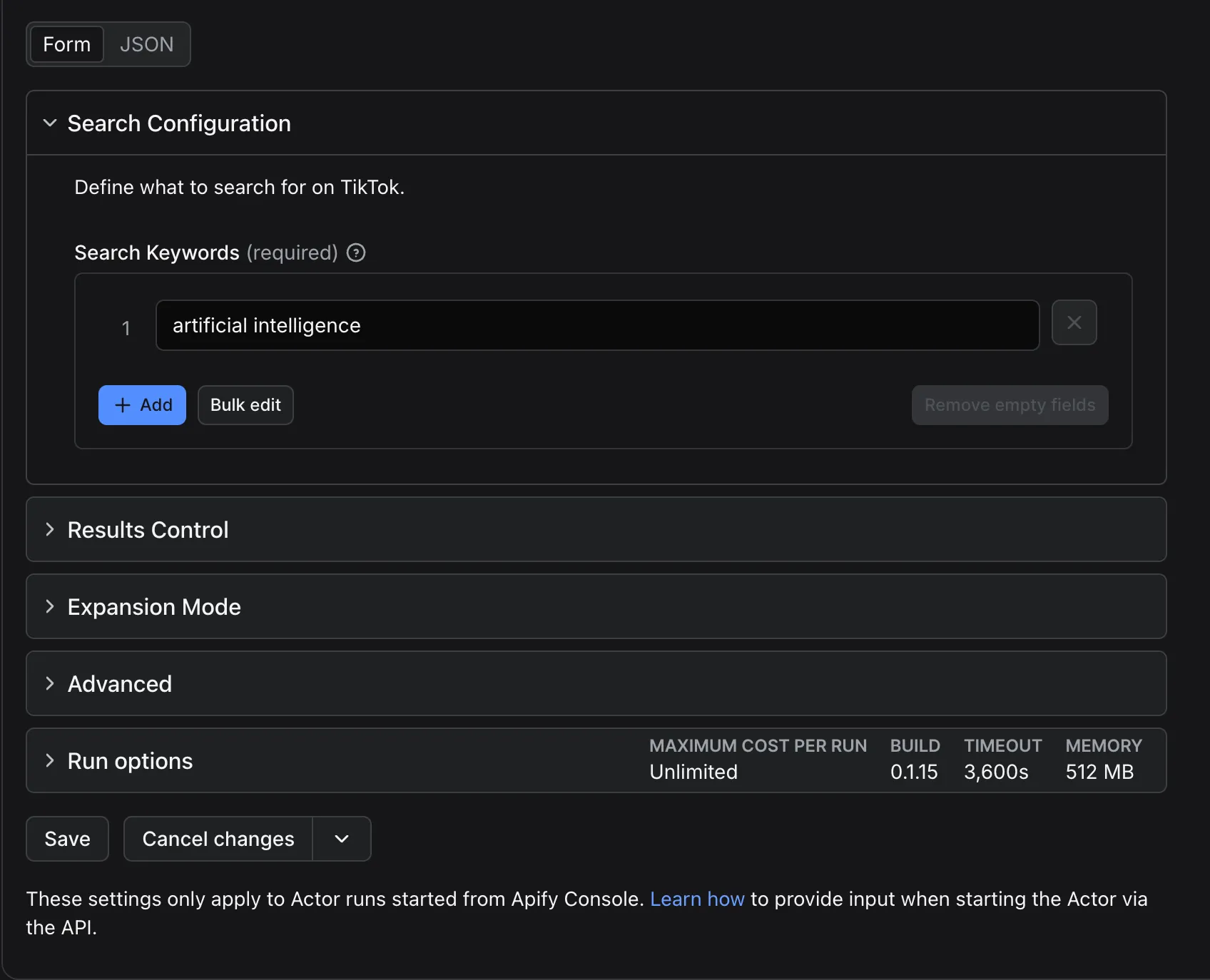
The minimal input is a single keyword:
From the API, CLI or an AI agent
Use it as a TikTok scraper API. A synchronous run returns the items directly:
With the Apify CLI:
AI agents call it by name, xmolodtsov/tiktok-search-scraper, through Apify's MCP server —
see Integrations.
How much does it cost to scrape TikTok?
This Actor is priced pay per result: you are charged only for items actually written to the dataset — not for compute time, not for retries, not for setup, and proxies are included. The price per result depends on your Apify plan:
| Apify plan (discount tier) | Price per 1,000 results |
|---|---|
| Free | $0.30 |
| Starter (Bronze) | $0.25 |
| Scale (Silver) | $0.22 |
| Business (Gold) | $0.20 |
| Platinum (enterprise) | $0.18 ($0.20 from 30 Oct 2026) |
| Diamond (enterprise) | $0.15 ($0.20 from 30 Oct 2026) |
Opt-in add-ons are charged per unit of data they return, on top of the result price. They become available on 30 October 2026; until then a requested add-on is skipped with a log line and nothing extra is charged.
| Add-on (pricing event) | Charged per | Price per 1,000 |
|---|---|---|
Comments (comment) | each comment or reply returned | $1.00 Free · $0.80 Starter · $0.60 Scale · $0.40 Business |
Creator profile (author-profile) | each unique creator returned, once per run | $0.75 Free · $0.70 Starter · $0.65 Scale · $0.60 Business |
Worked example: 5 keywords × ~200 videos each ≈ 1,000 results — $0.25 on Starter, $0.20 on Business. Runs that return zero results, or fail, produce zero billable items and cost you nothing. Batching many keywords into one run is the most cost-efficient way to use the Actor.
Is scraping TikTok free?
You can try it for free: Apify's free plan includes a monthly usage credit, no payment method required. On the free plan this Actor applies the limits below; any paid Apify plan removes them and lowers the price per result.
Free plan limits
On the Apify Free plan, this Actor is limited to:
- 100 results per run (
maxItemsis clamped to 100), - 20 runs per calendar month (the counter resets on the 1st),
- classic keyword search only — expansion pools are disabled,
- Apify Proxy (residential) instead of the Actor's built-in proxy.
These limits are set by the developer, not by Apify — pay-per-result revenue only counts for paid plans. Every free-plan run says so in its log and status message, for example: "Free plan: run 1/20 this month, capped at 100 results (a limit set by the developer, not by Apify)." When the monthly quota is used up, the run ends successfully with an explanatory status message and no results — it does not fail and nothing is charged. Paid users are never limited, on any tier.
Input
| Field | Type | Default | Description |
|---|---|---|---|
keywords | array | — (required) | Search terms, each searched independently; results are combined into one dataset |
maxItems | integer | 1000 via API; the Console form prefills 100 | Global cap on output items across all keywords and expansion pools (100 on the free plan) |
maxItemsPerKeyword | integer | — | Optional cap per single keyword; keywords are processed sequentially against the global maxItems budget |
sortType | enum | RELEVANCE | RELEVANCE, MOST_LIKED, DATE_POSTED. Sorting is applied after fetching, per keyword — TikTok ignores server-side sort parameters |
location | string | US | ISO 3166-1 alpha-2 country code, passed to TikTok as the region parameter. Cosmetic — TikTok keys results off the request's IP address, not off this parameter, so it does not produce a per-country result set |
includeSearchKeywords | boolean | true | Adds keyword + inputSource to each item |
expansion | array | [] (off) | Opt-in harvest pools: suggest, hashtag, music — see Expansion mode. Paid plans only |
relevanceThreshold | number | 0.3 | Music pool only: fraction (0–1) of a sound's first-page captions that must match the keyword or its hashtags before that sound is crawled. Higher = stricter |
uniqueAuthors | boolean | false | Emit at most one item per creator (channel.id) |
maxPostsPerAuthor | integer | — | Cap on items per creator in the classic search results; the expansion pools always emit at most one item per creator regardless of this value (empty = no cap) |
commentsPerPost | integer | 0 (off) | Add-on: up to this many top comments per video in commentList (max 200). Paid plans only |
maxRepliesPerComment | integer | 0 | Add-on: up to this many replies per comment, in each comment's replies (max 10; needs commentsPerPost > 0) |
includeAuthorProfile | boolean | false | Add-on: the creator's profile details in authorProfile, fetched once per creator per run. Paid plans only |
proxyConfiguration | object | — (leave empty) | Not needed — proxies are built in and included in the price. To route through your own proxies, enter their URLs here; the Apify Proxy option is not used on paid plans |
Out-of-range values are clamped (item caps to 1–100,000, relevanceThreshold to 0–1);
an unknown sortType fails the run with a clear message.
Expansion mode and creator discovery
By default the Actor runs the classic keyword search. Set expansion to opt into extra
harvest pools, all seeded from the keyword's own search hits and run after the classic
search for that keyword:
suggest— TikTok's own search suggestions for your keyword; each suggestion is then run through the normal search (up to ~200 items per suggestion).hashtag— the feed of the keyword's own hashtag plus up to five of the tags that appear most on the keyword's search results.music— the feeds of up to five of the sounds those same results use most. Each sound is probed first: if fewer thanrelevanceThresholdof its first-page captions match the keyword or its hashtags, the sound is skipped as off-topic (trending sounds carry every niche).
The pools widen creator coverage: each emits only creators the run has not seen yet, one item per creator, deduplicated across every pool (measured 85–95% disjoint). With all three on, a keyword surfaces roughly 10x more unique creators than plain search.
Each item gains an expansion_source field — relevance (classic search), suggest,
hashtag or music — naming the pool that first surfaced that creator, while keyword
and inputSource keep the original input keyword.
maxItems bounds the total across all pools, and a pool stops for a keyword once two
consecutive suggestions, tags or sounds yield fewer than five new creators. A pool hiccup
never costs the classic-search items already collected. For creator discovery, add
uniqueAuthors:
Add-ons: comments and creator profiles
Two opt-in extras enrich each video row. Both are charged only for the data they actually
return (see pricing), work on paid Apify plans
only, and leave every existing field unchanged: the integer comments field is still the
comment count.
- Comments (
commentsPerPost, plus optionalmaxRepliesPerComment) addcommentList: the video's top comments in TikTok's order, each with its text, time, likes, reply count, author (uniqueId,nickName,uid,secUid,profileUrl,verified, avatar), mentions, language and whether the creator liked or pinned it, plus arepliesarray of the same shape. Each comment and each reply is onecommentevent. A video whose comments could not be fetched ships withoutcommentList(nothing charged). - Creator profile (
includeAuthorProfile) addsauthorProfilewith the profile-page fields search results lack:signature(bio),bioLink,createTime(account creation),language,friends,privateAccount,isOrganization,ttSeller,commerceUser,commerceCategory,secUidandroomId(set while the creator is live). Each creator is fetched and charged once per run; their other videos carry the same profile free. If a profile cannot be fetched,authorProfileisnulland nothing is charged.
If the run reaches your maximum cost per run, the add-on data is cut exactly at the limit
(the last enriched video may carry a shorter commentList) and later videos ship without
add-ons; the search itself continues as usual. Until an add-on's price is live, requesting it
just logs Add-on "…" is not available yet … skipped. and the run returns the usual rows.
Add-ons take time: 50 comments with up to 5 replies each added about one second per
video in our tests.
Output
Output example
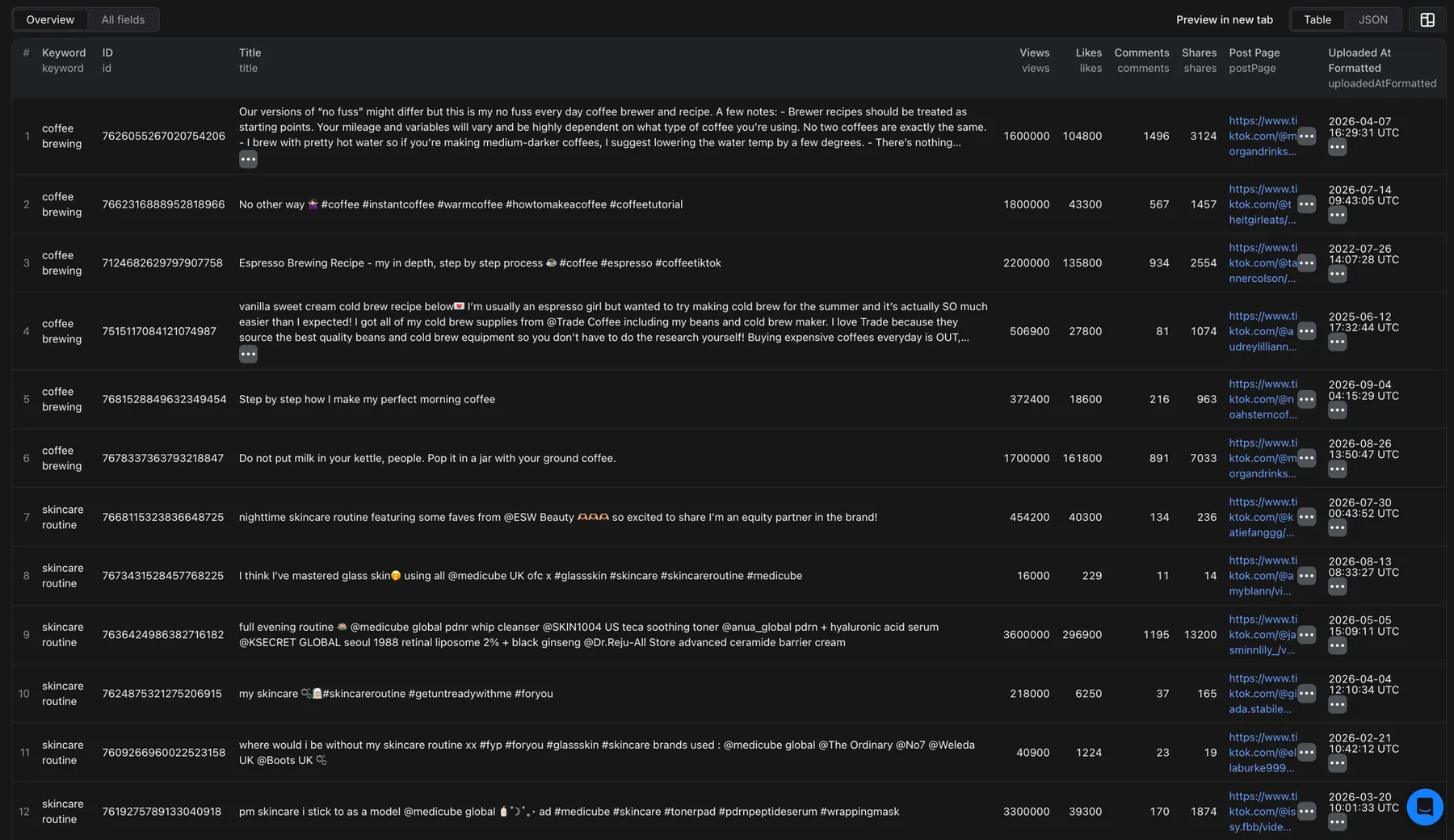
Field notes:
subtitleInformationisnullor an array of caption tracks, each withcaption_format,caption_length,lang,language_code,is_auto_generated,url,url_listandversion.song.idis a number, kept for compatibility. TikTok sound ids have 19 digits, more than a JSON number holds exactly, so it is rounded (7400028146168319000above). Usesong.musicId, the exact id as a string, to look a sound up.poiisnullor an object withpoiName,address,cityCode,cityName,latitude,longitudeandregionCode.- Channel stats TikTok omits for a card are
null(e.g.channel.videos); engagement counters default to0. expansion_sourceappears only whenexpansionis set — see Expansion mode.keywordandinputSourceintentionally carry the same value, for compatibility with pipelines built around the common TikTok scraper output format.
CDN links expire:
video.url,video.coverandvideo.thumbnailare signed, short-lived TikTok CDN links — download or process them promptly after the run.postPageis the permanent link to the video.
Compatible with the common TikTok scraper output format
The output uses the field names, nesting and types popular TikTok search scrapers on
Apify Store already use (views, likes, channel.*, video.*, song.*, …), so
existing pipelines and spreadsheets work unchanged.
Next steps: comments, creators, hashtags and sounds
Need comments or creator details for the videos in the same run? Turn on the add-ons (from 30 October 2026). For bigger jobs, every item carries the values the other TikTok scrapers from this developer take as input:
postPage→ TikTok Comments Scraper (postURLs): the comments and reply threads under the videos you found.channel.username→ TikTok Profile Scraper (profiles): full profiles and each creator's latest posts.hashtags→ TikTok Hashtag Scraper (hashtags): a hashtag's own video feed, beyond what keyword search returns.song.musicId→ TikTok Sound & Music Scraper (musics): the other videos that use the same sound.
Guarantees and failure semantics
- No duplicates: run-global deduplication writes the same video at most once per run, even when it matches several keywords, query passes or expansion pools.
- You pay only for delivered results: empty and failed runs produce zero billable items, and add-on events are charged only for comments, replies and profiles present in the dataset.
- The run SUCCEEDS when it returns at least one item (a keyword that returns nothing
logs a warning), when TikTok answered but genuinely had no results (empty dataset, status
message
empty — search returned no posts), and when a free-plan monthly quota is used up. - The run FAILS on invalid input (no keywords, unknown
sortType), or when it returned zero items and at least one keyword never got a single valid response from TikTok (blocked or network failure). The status message then starts with a machine-readable token —blocked,quota,server,timeoutornetwork— so automation can key retries off it. - Run statistics: every run writes a
STATISTICSrecord to its key-value store — item, request and failed-request counts, duration, a per-keyword (and per-pool) breakdown and the samefailureReasontoken (okwhen items shipped) — for dashboards and alerting. Runs with add-ons also recordaddons: charged comments, replies and profiles, fetch success counts and proxy bytes per add-on.
Integrations, API and MCP
JavaScript and Python clients
Schedules, webhooks and exports
Use schedules for daily keyword monitoring, webhooks to get notified when a run finishes, dataset export to JSON, CSV, Excel, XML or RSS, and integrations like Zapier, Make and Google Sheets.
Use with AI agents (MCP)
Through Apify's MCP server at mcp.apify.com, AI agents that speak
the Model Context Protocol (Claude, ChatGPT and others) can call
xmolodtsov/tiktok-search-scraper with the same input and read the dataset back. To load
just this Actor as a tool, connect your MCP client to
https://mcp.apify.com?tools=xmolodtsov/tiktok-search-scraper. The usual pricing and
free-plan limits apply.
More scrapers from this developer
TikTok: TikTok Profile Scraper (Pay Per Result): profiles, followers and latest posts by username · TikTok Comments Scraper: comments and full reply threads from any video · TikTok Hashtag Scraper: videos for any hashtag, with views, likes and music · TikTok Sound & Music Scraper: videos that use a sound or song · TikTok Top Ads Scraper: public Creative Center ad rankings, engagement, media and landing pages
Social & news: Reddit Search Scraper: posts by keyword, subreddit or author · Google News Scraper: Google News results as clean full-text articles
E-commerce: Prom.ua Product Search Scraper: Prom.ua product search results, no browser needed · Amazon Product Search & Bestsellers Scraper: search results, Best Sellers and product details from Amazon · AliExpress Search Scraper: aliExpress products by keyword with prices, orders and shipping
Maps & leads: Google Maps Scraper: places, leads and emails from Google Maps
Ads: Facebook Ad Library Scraper (Meta Ads Library): ads from the Meta Ad Library, with EU reach and payers · Google Ads Transparency Scraper: Google ad creatives by advertiser or domain, with regional details
Video: YouTube Transcript Scraper: transcripts, subtitles and captions from YouTube videos · YouTube Shorts Scraper: Shorts of any channel with exact views, likes and duration · YouTube Channel Scraper: every video of a channel, with channel stats · YouTube Search Scraper: search results and videos for any keyword · YouTube Comments Scraper: comments, replies and likes from any video · Bilibili Comments Scraper: public hot comments and reply threads by video or keyword
Jobs: SEEK Job Listings Scraper: public AU/NZ job listings, salaries and redacted descriptions
FAQ
Is it legal to scrape TikTok?
The Actor collects only publicly available data — the same information any logged-out visitor sees on TikTok search. It never logs in, never accesses private accounts, and collects no data behind authentication. You are responsible for how you use the data: respect TikTok's terms of service and comply with personal-data laws such as the GDPR and the CCPA.
Creator names, usernames and avatars are personal data under the GDPR, the CCPA and similar laws: collect only what you need and make sure you have a lawful basis for processing it. This is general guidance, not legal advice.
How many results do I get per keyword?
TikTok caps a single query string at ~200 unique results. The Actor adds automatic query passes — accent, casing and spacing variants of your keyword, so results stay on-topic — and stops once they stop returning enough new items. Expect ~200–420 items per keyword in classic mode. To scale, add keywords or turn on expansion.
Why did I get zero results?
Usually an overly narrow keyword or a transient TikTok block — the status message tells them apart (see Guarantees). Zero items cost nothing.
Is search exact-match? Can I filter by date or country?
No. Search is fuzzy, not exact-match — TikTok's search behaves like TikTok's search,
and a nonsense keyword still returns ~30 loosely related videos rather than nothing.
There is no server-side date filter; use sortType: "DATE_POSTED" and filter on
uploadedAtFormatted downstream. location is passed to TikTok but does not partition
results by country (see the input table).
Does it download the videos?
No — it returns direct video URLs and metadata, not video files, which is why runs finish
in seconds. Download the files yourself from video.url if you need them (see the
CDN-expiry note above).
Will I hit rate limits?
Not on your side: the Actor paces its requests and retries transient failures automatically. If TikTok still blocks a keyword, the status message says so (see Guarantees). For very large keyword lists, one batched run beats many small runs.
How do I get full profiles for the creators I find?
Discover creators here (uniqueAuthors plus expansion), then feed channel.username into
TikTok Profile Scraper for full
profile stats and each creator's recent videos. For just the bio, bio link and business
flags inside the same run, turn on the includeAuthorProfile
add-on.
Support
Open the Issues tab on the Actor's page in Apify Console to report a problem or ask for a field or feature. Include the run ID — every run logs its context (plan, origin) so support cases can be diagnosed from the log.


