

Google Maps Scraper: Places, Leads & Email Extractor
Pricing
from $1.40 / 1,000 google maps places
Google Maps Scraper: Places, Leads & Email Extractor
Scrape Google Maps places and business leads by keyword and location: name, category, rating, review count, address, coordinates, phone, website, opening hours and IDs. Covers whole cities with an automatic map grid. Optional add-on finds emails and social links on websites. Pay per place.
Pricing
from $1.40 / 1,000 google maps places
Rating
0.0
(0)
Developer

GoFetch
Maintained by CommunityActor stats
0
Bookmarked
8
Total users
2
Monthly active users
4 days ago
Last modified
Categories
Share

Google Maps Scraper for places, leads and emails: a Google Maps leads extractor with an optional email extractor add-on. Type what you would search on Google Maps ("dentist", "plumber", "coffee shop") and a city, region or country, and get one clean row per place: name, category, rating, review count, full address, coordinates, phone, website, opening hours and Google's place IDs. Turn on the contacts add-on and the actor also visits each business website to extract emails and social media links (Facebook, Instagram, LinkedIn, X/Twitter, YouTube, TikTok and more).
Built for:
- Lead generation and sales prospecting: plumbers, dentists or law firms across a whole city, with phone, website and email, ready for your CRM.
- Web-design and marketing agencies: filter to places without a website and get a list of businesses that need one.
- Local SEO: ratings, review counts, categories and rank for any keyword in any area.
- Market research: count and map competitors, compare categories and price levels across neighborhoods.
Whole cities, not just the first page. Leave the place limit empty and the actor geocodes your location, tiles its map area into a grid and keeps zooming into the tiles that still return new places. In our tests, "dentist" in Houston returned 2,227 places and "restaurant" in Chicago 6,936 places in about 11 minutes. No proxy setup, no browser and no Google account needed.
What data you get from Google Maps
One dataset item per place. The scraper uses the standard Google Maps dataset field names, so existing pipelines keep working.
| Group | Fields | Notes |
|---|---|---|
| Identity | title, placeId, cid, fid, kgmid, url | Google's place ID, CID and Knowledge Graph ID, plus a Google Maps link to the place |
| Category | categoryName, categories | Main category and every category the business lists |
| Reputation | totalScore, reviewsCount, price | Star rating, number of reviews, price range such as $20–30 when Google shows one |
| Address | address, neighborhood, street, city, postalCode, state, countryCode | Full address and its parts |
| Geo | location (lat, lng), timezone | Coordinates for mapping and distance filters |
| Contact | phone, phoneUnformatted, website, reserveTableUrl | Display phone, E.164 phone (+13123724243), website, booking link |
| Details | openingHours, description, imageUrl, imagesCount, additionalInfo | Weekly hours, Google's summary, main photo, photo count, amenities (accessibility, payments, parking, …) |
| Status | permanentlyClosed, temporarilyClosed, claimThisBusiness, isAdvertisement | Closed flags; claimThisBusiness: true marks an unclaimed listing; isAdvertisement is always false, because sponsored results are skipped and the place's organic listing is kept |
| Run context | searchString, rank, searchPageUrl, language, scrapedAt | Which search found the place, its position, and when it was scraped |
| Contacts add-on | emails, phones, facebooks, instagrams, linkedIns, twitters, youtubes, tiktoks, pinterests, discords | Found on the business's own website; each is a list, empty when nothing was found |
Fill rates measured on real datasets: phone ~97%, website 81–87%, rating and review count 93–99%, opening hours 88–96%.
Five fields are kept for compatibility and are always null, because Google shows them only on a place's own page or to
signed-in users: reviewsDistribution, popularTimesHistogram, menu, plusCode and locatedIn.
How to scrape Google Maps places
In the Apify Console
- Enter one or more Search terms (
restaurant,dentist,car repair) and a Location (Austin, TX, USA). - Set Max places per search term, or clear it to tile the whole area until Google Maps returns no new places. Optionally add filters (website, minimum rating, skip closed) and switch on the contacts add-on.
- Click Start. When the run finishes, open the Output tab and export to CSV, Excel or JSON.
Via API
Run synchronously and get the places back in one call:
The synchronous endpoint waits up to 5 minutes. For whole-city runs, use a client's call(), which starts the
run and waits for it to finish.
Node.js (npm install apify-client):
Python (pip install apify-client):
With AI agents (MCP)
Add the actor to any MCP client (Claude, Cursor, VS Code and others) through Apify's MCP server:
Your agent can then call it with the same input, e.g. "find 4-star-plus dentists in Austin without a website".
Pricing
Pay per event: you pay per place saved to your dataset, and there are no platform usage charges on top. The price drops with your Apify plan.
| Free | Bronze | Silver | Gold, Platinum, Diamond | |
|---|---|---|---|---|
| Places, per 1,000 | $3.00 | $2.40 | $1.80 | $1.40 |
| Contacts add-on, per 1,000 places where an email or social link was found | $2.00 | $1.60 | $1.25 | $1.00 |
- Filters cost nothing extra. Places removed by the website, rating or closed filters are never charged and don't count toward your limit.
- The contacts add-on is charged only on a hit. A place whose website has no email or social link, or can't be visited, costs nothing for the add-on.
- Worked example: 1,000 places with the contacts add-on on, where 500 websites yield an email or social link, on Bronze = $2.40 + $0.80 = $3.20.
- To cap your spend, set a maximum cost per run in the run options; the actor stops fetching once it's reached.
Is it free?
You can try it on Apify's Free plan, which includes monthly usage credit. On the Free plan this actor allows 20 runs per month with up to 100 places per run. This is a limit set by the developer, not by Apify, and it resets on the 1st of each month. Any paid Apify plan is unlimited. When the free runs for the month are used up, the run ends successfully with a status message that explains why, and returns no places.
Input
| Field | Default | What it does |
|---|---|---|
searchStringsArray | required | Search terms, one search each. |
locationQuery | — | City, region or country. Needed for whole-area coverage: the map grid tiles this location. |
maxCrawledPlacesPerSearch | empty = no limit | Places per search term. The Console form pre-fills 20; clear it to tile the whole area. |
language | en | Language of categories, opening hours and amenity labels. |
countryCode | — | Two-letter country code (us, de); affects ranking and phone format. |
website | allPlaces | allPlaces, withWebsite or withoutWebsite. |
placeMinimumStars | any | two, twoAndHalf, three, threeAndHalf, four or fourAndHalf. |
skipClosedPlaces | false | Skip places marked permanently or temporarily closed. |
scrapeContacts | false | The contacts add-on: emails and social links from each place's website. |
proxyConfiguration | Apify Proxy | Works out of the box; no setup needed. |
The field names follow the standard Google Maps scraper input, so existing inputs carry over. Fields this actor doesn't use are ignored.
Output
The Overview tab shows the columns below, plus emails when the contacts add-on is on; the JSON, CSV and Excel exports contain every field.
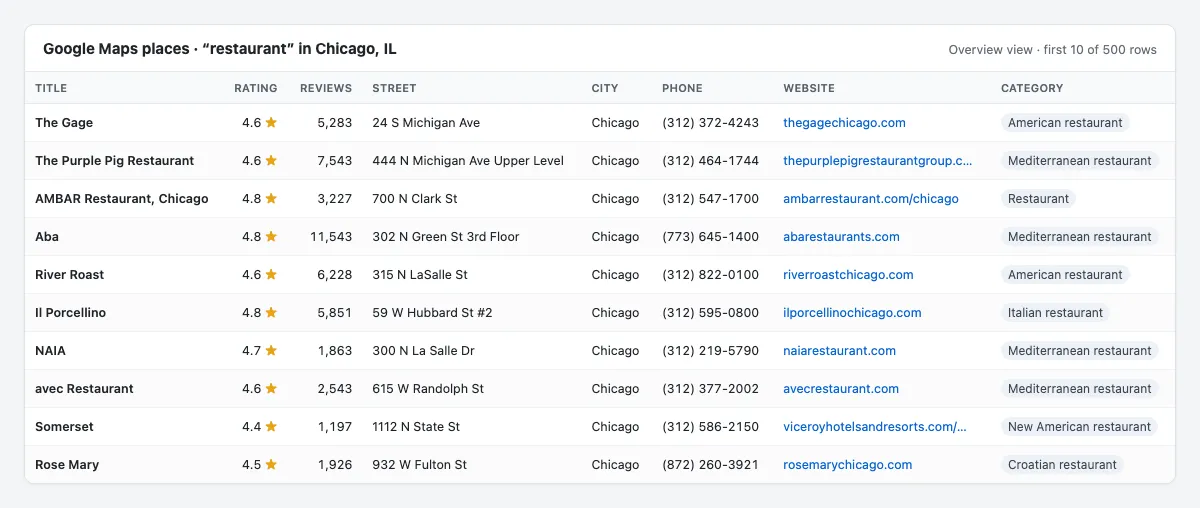
A real item from a "restaurant" search in Chicago (opening hours, amenities and image URL trimmed):
With scrapeContacts: true, each place also carries emails, phones, facebooks, instagrams,
linkedIns, twitters, youtubes, tiktoks, pinterests and discords, each a list of strings.
Guarantees and failure semantics
- Blocked runs fail loudly. If Google never gave a valid answer for a search (blocked, network error,
timeout) and the run saved 0 places, the run ends FAILED. The status message starts with a reason
token, for example
blocked: …, so schedulers and API callers can retry. - Empty is not failed. A search that genuinely has no results ends SUCCEEDED with an empty dataset.
- Partial results are kept. If some searches succeed and others don't, the run succeeds with the places it found, and the status message says how many searches got no valid response from Google.
- Invalid input fails immediately, with a message naming the field to fix.
- The contacts add-on never fails a run. A website that blocks automated visits or times out just leaves that place's contact fields empty.
- Trimmed responses are re-fetched. Google sometimes serves a trimmed response without review counts. The actor detects it from the content and re-fetches on a fresh session; in our test runs no trimmed row reached a dataset.
- No duplicates. Each place is saved once per run, even when several search terms or map tiles return it.
- Long runs finish cleanly. About 90 seconds before the run timeout (1 hour by default) the actor stops starting new pages and ends SUCCEEDED with the places it has; the status message says so. Raise the timeout in the run options for very large jobs.
Integrations
- Export: download any dataset as CSV, Excel, JSON, XML or HTML from the Output tab or the API.
- Google Sheets: send results to a spreadsheet with Apify's Google Sheets integration.
- Make, Zapier and n8n: start runs and pass new places to your CRM, email tool or database.
- Webhooks: get notified when a run succeeds or fails, and trigger your own pipeline.
- Schedules: re-scrape the same searches daily or weekly to catch new and closed businesses.
More scrapers from this developer
TikTok: TikTok Search Scraper: videos and creators for any keyword, pay per result · TikTok Profile Scraper (Pay Per Result): profiles, followers and latest posts by username · TikTok Comments Scraper: comments and full reply threads from any video · TikTok Hashtag Scraper: videos for any hashtag, with views, likes and music · TikTok Sound & Music Scraper: videos that use a sound or song · TikTok Top Ads Scraper: public Creative Center ad rankings, engagement, media and landing pages
Social & news: Reddit Search Scraper: posts by keyword, subreddit or author · Google News Scraper: Google News results as clean full-text articles · Threads Replies Scraper: public post replies, likes, authors and inline nested replies
Instagram: Instagram Reel Scraper: public profile reels, plays, captions, music and media URLs · Instagram Comment Scraper: public post and reel comments, likes, timestamps and usernames
E-commerce: Prom.ua Product Search Scraper: Prom.ua product search results, no browser needed · Amazon Product Search & Bestsellers Scraper: search results, Best Sellers and product details from Amazon · AliExpress Search Scraper: aliExpress products by keyword with prices, orders and shipping · AliExpress Product Reviews Scraper: public product reviews, ratings, buyer photos and follow-up feedback
Ads: Facebook Ad Library Scraper (Meta Ads Library): ads from the Meta Ad Library, with EU reach and payers · Google Ads Transparency Scraper: Google ad creatives by advertiser or domain, with regional details
Video: YouTube Transcript Scraper: transcripts, subtitles and captions from YouTube videos · YouTube Shorts Scraper: Shorts of any channel with exact views, likes and duration · YouTube Channel Scraper: every video of a channel, with channel stats · YouTube Search Scraper: search results and videos for any keyword · YouTube Comments Scraper: comments, replies and likes from any video · Bilibili Comments Scraper: public hot comments and reply threads by video or keyword
Jobs: SEEK Job Listings Scraper: public AU/NZ job listings, salaries and redacted descriptions
FAQ
Is it legal to scrape Google Maps?
The actor collects publicly listed business information, the same data anyone sees on Google Maps without signing in. Some of it can still be personal data, for example an individual's email address or a sole trader's name and phone number, and laws such as the GDPR and CCPA cover it. You are responsible for having a lawful basis for collecting and using it, for how you contact people (anti-spam rules apply to cold email), and for honoring opt-out and deletion requests. This is not legal advice; if in doubt, ask a lawyer.
How many places can I get per search? Can I scrape a whole city?
Yes. Set a Location and leave Max places per search term empty. The actor geocodes the location,
tiles its map area and keeps splitting only the tiles that still return new places, so dense downtowns get
more tiles than empty suburbs. In our tests that gave 2,227 dentists in Houston and 6,936 restaurants in
Chicago. Without a Location (for example the term dentist in Austin alone) you get a single Google result
list, usually a couple of hundred places at most.
Which filters are there, and do they cost extra?
Website (all places, only with a website, only without one), minimum rating (2 to 4.5 stars) and skip closed places. Filters are free: removed places are never charged and don't count toward your limit.
Can I scrape in another language or country?
Yes. language sets the language of category names, opening hours and amenity labels (de, fr, es, …),
and countryCode sets the country Google ranks results for, which also formats local phone numbers.
Why do some places have no phone or website?
Because the business didn't list one on Google Maps. In our datasets about 97% of places have a phone and
81–87% have a website. Service-area businesses such as plumbers often hide their street address, so
street can be empty while city is filled.
How does the contacts add-on work, and what does it cost?
With scrapeContacts: true, the actor visits each place's own website: the homepage plus up to 2
contact or about pages, respecting the site's robots meta tags. It extracts emails, phone links and links to
Facebook, Instagram, LinkedIn, X/Twitter, YouTube, TikTok, Pinterest and Discord. You pay the add-on price
only for places where at least one email or social link was found (a phone alone doesn't count), never on a
miss. Chains that share one website are visited once per run. On 150 real business sites we
found an email for about half of the places with a website (plumbers 60%, dentists 34%) and social links
for ~55%. About 13% of sites block automated visits; those places just get empty contact fields. When the
"website" is a social media page (for example a Facebook page), it isn't visited, and a website that
redirects to a different domain (for example a parked domain) yields no contacts and no charge.
Does it scrape reviews?
No. Review text and reviewer data require signing in to Google, so they aren't included. You do get the star rating and review count for every place. Popular times, menus and photos beyond the main image aren't included either.
Will I get duplicates?
Not within a run: each place is saved once, even when several search terms or map tiles return it. Two
separate runs can return the same place; dedupe across runs on placeId.
Support
Found a bug or need a field that isn't here? Open an issue in the Issues tab on this actor's page and include the run ID so the log can be checked. For custom needs, such as a different input type, an extra field or a recurring large job, describe it in an issue as well.


