

TikTok Hashtag Scraper: Export Hashtag Views & Videos
Pricing
from $0.80 / 1,000 tiktok hashtag video results
TikTok Hashtag Scraper: Export Hashtag Views & Videos
Get TikTok hashtag views, video counts and videos for any hashtag. Each video comes with its caption, views, likes, comments, shares, music, hashtags and creator profile with follower counts. No login. Export JSON, CSV or Excel, or use the API. Pay only per result.
Pricing
from $0.80 / 1,000 tiktok hashtag video results
Rating
0.0
(0)
Developer

GoFetch
Maintained by CommunityActor stats
0
Bookmarked
4
Total users
1
Monthly active users
a day ago
Last modified
Categories
Share

What does TikTok Hashtag Scraper do?
TikTok Hashtag Scraper collects TikTok hashtag views and videos: for any hashtag you get its total views and video count, and each video posted under it as a clean, structured row with the caption, views, likes, comments, shares and saves, the music, the other hashtags used and the creator's profile with follower counts. It is built for marketers tracking a trend, brands and agencies looking for creators in a niche, researchers studying what gets posted under a tag, and developers who need TikTok hashtag data in a spreadsheet, database or pipeline, with no TikTok account, login or cookies.
- Videos by hashtag: enter one or many hashtags, with or without
#, or paste atiktok.com/tag/…link. - Creator stats included: each video carries its creator's followers, following, total likes and video count, so you can rank creators without a second scraper.
- Hashtag stats: every row has
searchHashtagwith the hashtag's name, ID, total views and number of videos on TikTok. - Spreadsheet-ready: counts are plain numbers, not "1.2M" strings, and video, creator and music IDs are kept as exact strings.
- No duplicates: the same hashtag typed twice (
#Cookingandcooking) is scraped once, and each video appears only once per run. - Clear errors: a hashtag that doesn't exist gives one error row instead of disappearing silently.
- No browser: plain HTTP requests, so 100 videos take under 30 seconds.
Use cases
- Brands and agencies finding creators: scrape a few hundred #booktok videos, sort by
authorMeta.fansand keep the creators who already post there. - Marketers running hashtag analytics: set Maximum videos per hashtag to 1 and schedule a daily run. Each row's
searchHashtagholds the tag's total views and video count, so tracking 20 hashtags costs 20 results a day. - Researchers comparing content across tags: pull #skincare, #travel and #fitness in one run and compare captions, languages, music and engagement side by side.
What data does TikTok Hashtag Scraper extract?
One dataset item per video, with these fields:
| Field | Description |
|---|---|
id / webVideoUrl | Video ID (string) and link |
text / textLanguage | Caption and its detected language |
createTime / createTimeISO | When the video was posted (Unix seconds / ISO 8601) |
playCount / diggCount / shareCount / commentCount / collectCount / repostCount | Views, likes, shares, comments, saves and reposts |
authorMeta | Creator's ID, handle, display name, bio, avatar, verified badge, followers (fans), following, total likes (heart) and video count |
musicMeta | Sound name, artist, ID (string), cover and whether it is an original sound |
videoMeta | Duration, width, height, definition, cover image link and, when TikTok lists them, subtitle file links |
hashtags / mentions / detailedMentions | Hashtags and users mentioned in the caption |
effectStickers / isSlideshow / slideshowImageLinks | Effects used, photo-slideshow flag and, for slideshows, the image links |
isAd / isSponsored / isPinned | Ad and pinned flags |
locationMeta | Tagged location, only when the video has one |
searchHashtag | The hashtag the video was found under: name, total views, id and videoCount |
input | The hashtag exactly as you entered it |
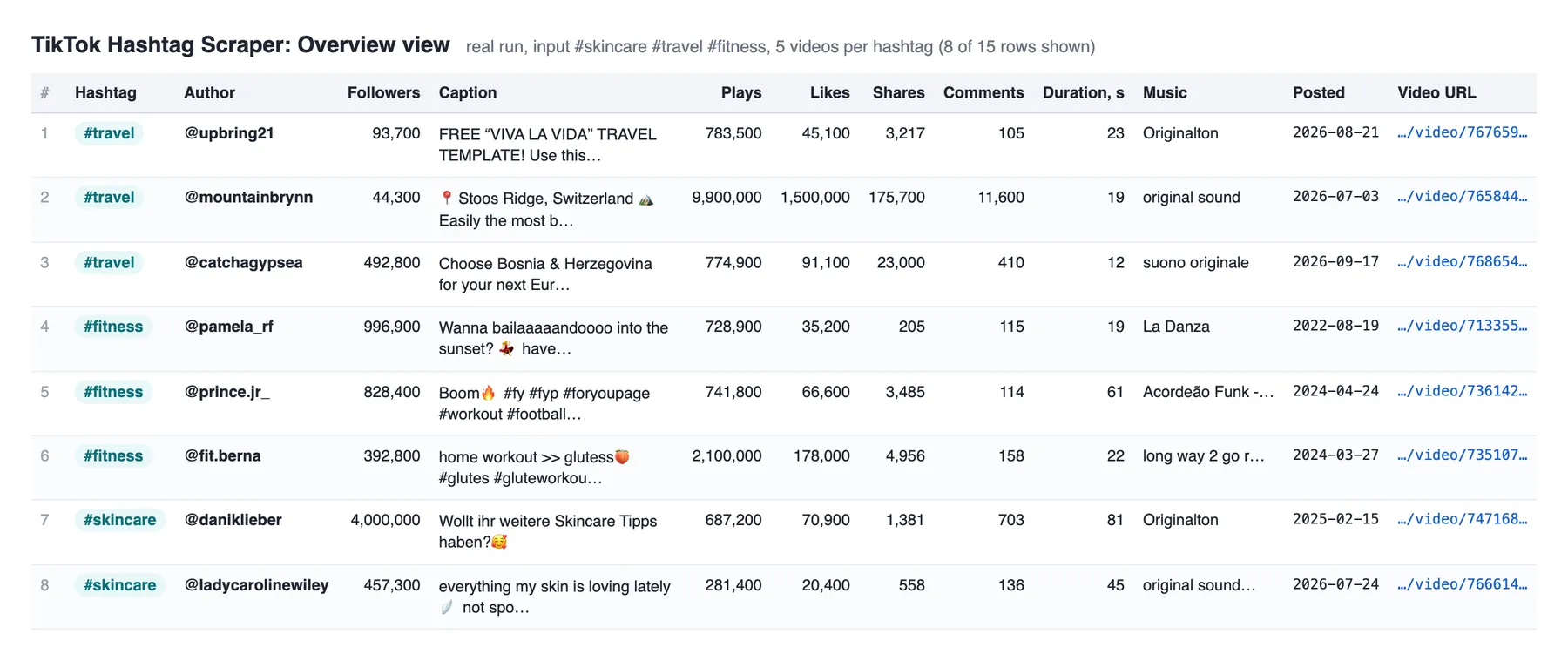
The Overview table in the Output tab shows the hashtag, creator, followers, caption, views, likes, shares, comments, duration, music, date and link side by side.
How to scrape TikTok hashtags
In Apify Console
- Open the Actor in Apify Console and add one or more hashtags to Hashtags, one per line.
- Set Maximum videos per hashtag (100 by default).
- Click Start. When the run finishes, open the Output tab and download the videos as JSON, CSV or Excel.
Through the API
Start a run and get the videos back in one call with run-sync-get-dataset-items:
Or use the JavaScript client (the Python client works the same way):
With AI agents (MCP)
The Actor is available through Apify's MCP server at mcp.apify.com as xmolodtsov/tiktok-hashtag-scraper. Connect an MCP client such as Claude or Cursor to https://mcp.apify.com?tools=xmolodtsov/tiktok-hashtag-scraper and it can call the Actor as a tool with the same input and read the videos back, for example "get 50 #booktok videos and list the creators with the most followers". Pricing and free-plan limits apply as usual.
How much does it cost to scrape TikTok hashtags?
You pay per result: each row written to the dataset is one result. Platform usage, including the residential proxies the Actor uses, is included in the price (pay-per-event), so there are no extra compute or proxy charges on top. The price depends on your Apify plan's tier:
| Apify plan (discount tier) | Price per 1,000 results |
|---|---|
| Free | $2.40 |
| Starter (Bronze) | $1.60 |
| Scale (Silver) | $1.20 |
| Business (Gold) and the Platinum and Diamond tiers | $0.80 |
For example, 500 videos from #sourdough cost $0.80 on Starter, and 10 hashtags × 100 videos cost $0.80 on Business. Set a maximum cost per run in the run options and the Actor stops cleanly when it is reached, keeping everything scraped so far.
Is it free?
You can try it on the Apify free plan, which comes with monthly platform credit. On the free plan this Actor returns up to 100 results per run (error rows included) and allows 20 runs per calendar month; the count resets on the 1st. These limits are set by the developer, not by Apify. Any paid Apify plan removes them.
Input
| Field | Type | Default | Description |
|---|---|---|---|
hashtags | array of strings | (required) | Hashtags to scrape, with or without #, or tiktok.com/tag/… URLs. Matching ignores # and letter case, so repeats are scraped once. A hashtag can't contain spaces. |
resultsPerPage | integer | 100 | Maximum videos per hashtag. A higher number is safe: each hashtag stops when TikTok has no new videos to give (see Limits). |
proxyConfiguration | object | Apify residential | Leave as is. The Actor rotates through European residential exits by default. Change it only to route through your own proxies. |
Output
Each video is one dataset item. This is the Overview table of a real run with the hashtags #skincare, #travel and #fitness:
And this is a full item from the #cooking feed (long media links shortened):
A hashtag that doesn't exist gives one error row instead of videos:
An input that isn't a hashtag at all (for example, text with spaces) gives a similar row with errorCode INVALID_HASHTAG. Error rows are dataset items, so they are billed like results.
Guarantees, limits and run status
When does a run fail?
- FAILED when a hashtag fails and the run returns no videos at all, or when more hashtags fail than the larger of 2 and 20% of your hashtags (with 20 hashtags, the 5th failure fails the run). Retry a failed run as a whole.
- FAILED when the input has no hashtags.
- SUCCEEDED otherwise. Hashtags that don't exist, invalid inputs and repeated hashtags are part of your data, not failures: they never fail the run and the status message counts them (for example "Scraped 120 videos from 3 hashtags (1 not found)").
- A run that stops at your maximum cost per run, or at the free-plan cap, ends SUCCEEDED with a status message saying so. A twenty-first free-plan run in the same calendar month ends SUCCEEDED with no results and a message explaining the limit.
Every run also writes a STATISTICS record to its key-value store with each hashtag's outcome, videos and pages scraped, request counts and the run duration.
Limits
- How deep a hashtag goes: TikTok serves a visitor only part of each hashtag's feed, however many videos the hashtag has. Large hashtags give about 350–550 videos (measured: #sourdough 490–540, #cooking 400+). Very generic tags give far fewer because TikTok serves a small feed for them: #fyp returns about 180.
searchHashtag.videoCountshows the hashtag's full size on TikTok. - Where the videos come from: results come from TikTok's European hashtag feed. The Actor widens it by querying several European regions in turn and stops when a region adds almost no new videos. There is no country filter.
- Speed: 100 videos take under 30 seconds. Each extra region adds fewer new videos than the one before, so asking for the maximum takes a few minutes per hashtag (#sourdough to 489 videos: about 3.5 minutes). Up to 3 hashtags run at the same time.
- Order: videos arrive in the order TikTok's feed serves them, not sorted by date or views. Sort and filter the dataset afterwards.
- Not included: the Actor doesn't download video files or cover images and doesn't fetch subtitle text or transcripts, so
mediaUrlsis empty andtranscriptionLinkisnull. Media links in the output are signed by TikTok and expire after a while.
Integrations
- Exports: download any dataset as JSON, CSV, Excel, XML, JSONL, RSS or HTML from the Output tab or the API.
- Schedules: use Apify schedules to re-scrape the same hashtags daily or weekly and follow a trend over time.
- Webhooks: send finished runs to your own endpoint with webhooks.
- No-code tools: connect the Actor to Make, Zapier, n8n, Google Sheets and more through Apify integrations.
- API clients: the Apify API has JavaScript and Python clients, shown above.
More scrapers from this developer
TikTok: TikTok Search Scraper: videos and creators for any keyword, pay per result · TikTok Profile Scraper (Pay Per Result): profiles, followers and latest posts by username · TikTok Comments Scraper: comments and full reply threads from any video · TikTok Sound & Music Scraper: videos that use a sound or song · TikTok Top Ads Scraper: public Creative Center ad rankings, engagement, media and landing pages
Social & news: Reddit Search Scraper: posts by keyword, subreddit or author · Google News Scraper: Google News results as clean full-text articles · Threads Replies Scraper: public post replies, likes, authors and inline nested replies
Instagram: Instagram Reel Scraper: public profile reels, plays, captions, music and media URLs · Instagram Comment Scraper: public post and reel comments, likes, timestamps and usernames
E-commerce: Prom.ua Product Search Scraper: Prom.ua product search results, no browser needed · Amazon Product Search & Bestsellers Scraper: search results, Best Sellers and product details from Amazon · AliExpress Search Scraper: aliExpress products by keyword with prices, orders and shipping · AliExpress Product Reviews Scraper: public product reviews, ratings, buyer photos and follow-up feedback
Maps & leads: Google Maps Scraper: places, leads and emails from Google Maps
Ads: Facebook Ad Library Scraper (Meta Ads Library): ads from the Meta Ad Library, with EU reach and payers · Google Ads Transparency Scraper: Google ad creatives by advertiser or domain, with regional details
Video: YouTube Transcript Scraper: transcripts, subtitles and captions from YouTube videos · YouTube Shorts Scraper: Shorts of any channel with exact views, likes and duration · YouTube Channel Scraper: every video of a channel, with channel stats · YouTube Search Scraper: search results and videos for any keyword · YouTube Comments Scraper: comments, replies and likes from any video · Bilibili Comments Scraper: public hot comments and reply threads by video or keyword
Jobs: SEEK Job Listings Scraper: public AU/NZ job listings, salaries and redacted descriptions
FAQ
How many videos can I get per hashtag?
About 350–550 for large hashtags, and around 180 for very generic ones such as #fyp. That is how much of each feed TikTok serves to a visitor, so setting a higher limit won't return more.
Why did I get fewer videos than I asked for?
Usually because the hashtag's feed ran out (see Limits). Other reasons: a video that already appeared under another hashtag in the same run isn't repeated, the free plan caps a run at 100 results, the run reached your maximum cost per run, or the hashtag doesn't exist (you get a HASHTAG_NOT_FOUND row instead).
Can I export the data to CSV or Excel?
Yes. Download the dataset as JSON, CSV, Excel, XML or HTML from the Output tab, or fetch it through the API. The Overview table shows the hashtag, creator, followers, caption, counts and link side by side.
How do I find creators for a hashtag?
Every video carries its creator's authorMeta, with followers (fans), total likes (heart), video count, bio and verified badge. Scrape the hashtag, then sort or deduplicate the dataset by authorMeta.name to get a creator list for the niche. To get each creator's latest posts next, paste the handles into TikTok Profile Scraper.
What about private or deleted videos?
Only public videos appear in TikTok's hashtag feed, so videos from private accounts are never returned. A video deleted after your run stays in your dataset, but its link stops working.
Do I need a TikTok account or my own proxies?
No. The Actor never logs in and uses Apify residential proxies by default. Their cost is included in the price per result.
How long does a run take?
About 30 seconds for 100 videos, and a few minutes per hashtag when you ask for the maximum.
Is it legal to scrape TikTok?
This Actor only collects data that TikTok shows publicly to any visitor, without logging in. It never accesses private accounts or anything behind a login. Videos and profiles can still contain personal data (handles, display names, bios, avatars), which laws such as the GDPR in the EU and the CCPA in California protect. Only collect personal data when you have a lawful reason to, keep only what you need, and store it responsibly. You are responsible for how you use the data; if you are unsure, consult a lawyer.
Support
Found a bug or need a field that isn't there? Open an issue in the Issues tab on this Actor's page. Include the run ID so the run's log and STATISTICS record can be checked.


