

YouTube Channel Scraper: YouTube Channel Videos & Stats
Pricing
from $0.50 / 1,000 youtube video results
YouTube Channel Scraper: YouTube Channel Videos & Stats
Scrape every video of any YouTube channel: title, URL, views, duration, publish date and thumbnail, plus channel stats on every row (subscribers, total views, video count, country, joined date, links). Add Shorts and live streams, sort newest or popular. No API key, no login.
Pricing
from $0.50 / 1,000 youtube video results
Rating
0.0
(0)
Developer

GoFetch
Maintained by CommunityActor stats
0
Bookmarked
2
Total users
1
Monthly active users
a day ago
Last modified
Categories
Share
What does YouTube Channel Scraper do?
YouTube Channel Scraper collects the videos of any public YouTube channel together with the channel's stats. Add channel URLs, @handles or channel IDs and get one row per video from the channel's Videos tab, and optionally its Shorts and Live tabs: title, URL, views, duration, publish date and thumbnail, plus the channel's subscribers, total views, video count, location, joined date, description and links on every row.
It uses the same field names as the most widely used YouTube channel scrapers on Apify Store (id, title, viewCount, date, channelName, numberOfSubscribers, channelTotalViews, standardizedUrl and the rest), so an existing pipeline, spreadsheet or dashboard can switch to it without renaming its video and channel columns. On top of that it can fill the fields that listing-only scrapers leave empty: exact view counts, likes, comment counts, the full description, hashtags and the members-only flag. No YouTube API key, no quota, and you pay only per video returned.
Who uses it:
- Marketers and agencies track competitor channels: what they publish, how often, and which videos take off.
- Influencer and partnership teams vet creators by subscribers, total views, posting rhythm and recent performance.
- Analysts and researchers build datasets of a channel's full upload history for trend and engagement studies.
- Content creators study what works in their niche: top videos by views, typical lengths, titles and hashtags.
- Lead generation teams collect channel descriptions, countries and external links (websites, Instagram, TikTok, Discord) at scale.
Highlights:
- Whole channels, three tabs: regular videos, Shorts and live streams (live now, upcoming and past), each with its own cap.
- Channel stats on every row: subscribers, total views, video count, country, joined date, verified badge, avatar, banner, description and links from the About panel.
- Sort and filter like the channel page: newest, popular or oldest first, and an "only videos published after" date filter.
- Optional video details: exact views, likes, comment count, upload day, description and hashtags, from Apify's datacenter proxy.
- Plain HTTP, no browser: a 50-video channel takes a few seconds.
- Honest failure semantics: blocked runs fail loudly so your integration retries; unknown channels are reported, never billed.
What data you get
One dataset item per video. Channel fields repeat on every row, and again nested under aboutChannelInfo, so each row stands on its own in a spreadsheet.
| Field | Example | Description |
|---|---|---|
id, url, standardizedUrl | plN7JMbadRg | Video ID, its URL (/shorts/… for Shorts) and the canonical watch?v= URL for every type |
title | Eat Everything In A Grocery Store, Win $1,000,000 | Video title |
type | video | video, shorts or stream |
duration, durationSeconds | 57:59, 3479 | Length as listed, and in seconds |
date | 12 days ago | As listed on the channel; 2026-10-03 with video details on (see the note under Input) |
viewCount | 262000000 | Views; exact with video details on |
thumbnailUrl | https://i.ytimg.com/vi/…/hq720.jpg | Largest thumbnail |
channelName, channelUsername, channelId, channelUrl | MrBeast, MrBeast, UCX6OQ3D… | Channel name, handle (without @), ID and URL |
numberOfSubscribers | 521000000 | Subscribers (YouTube shows them rounded) |
channelTotalVideos, channelTotalViews | 1006, 142830800258 | Video count and lifetime views |
channelDescription, channelDescriptionLinks | [{"text": "Follow", "url": "https://instagram.com/mrbeast"}] | About text and its links |
channelLocation, channelJoinedDate | United States, Feb 19, 2012 | Country and joined date |
isChannelVerified, isAgeRestricted | true, false | Verified badge; true when YouTube marks the channel not family-safe |
channelAvatarUrl, channelBannerUrl | https://yt3.googleusercontent.com/… | Avatar and banner images |
input, inputChannelUrl, fromYTUrl, fromChannelListPage | @MrBeast, https://www.youtube.com/@MrBeast/videos, videos | Where the row came from |
order | 0 | Position in the channel's tab, starting at 0 |
streamType | ended | For live streams: live, upcoming or ended |
likes, commentsCount | 4028662, 150000 | With video details on |
text, hashtags | "I trapped 4 strangers…", ["#lofi"] | Full description and its hashtags, with video details on |
isMembersOnly | false | Members-only videos (their views are hidden) |
Without video details, numbers come from the channel listing, which YouTube abbreviates: "262M views" becomes 262000000. Turn on Add video details when you need exact counts. A value YouTube doesn't show is null, never a guessed 0.
How to use YouTube Channel Scraper
- Open the Actor in Apify Console and go to the Input tab.
- Add channel URLs to YouTube channels (one per line, or paste many with Bulk edit), and/or @handles and UC… channel IDs to Channel handles or IDs.
- Set Max videos per channel, and Max Shorts per channel or Max live streams per channel if you want those tabs too.
- Optionally pick Sort by, set Only videos published after, or turn on Add video details.
- Click Start. Download the results from the Output tab as JSON, CSV, Excel or HTML, or read them through the API.
Use it as a YouTube channel API
This call runs the Actor and returns the videos. Synchronous calls time out after 5 minutes, so for large channels start a run and read its dataset afterwards.
With the Apify Python client:
Use it from an AI agent (MCP)
Connect your MCP client to https://mcp.apify.com?tools=xmolodtsov/youtube-channel-scraper and the agent can list a channel's videos and stats as a tool call. The usual pricing and free-plan limits apply.
Pricing
Pay per event, all-inclusive: you are charged per video returned, and the proxy and platform usage are included. There are no start fees, no extra charge for video details or date filters, and no separate compute bill.
| Apify plan | Price per video | Price per 1,000 videos |
|---|---|---|
| Free | $0.001 | $1.00 |
| Starter (Bronze) | $0.0006 | $0.60 |
| Scale (Silver) | $0.0005 | $0.50 |
| Business (Gold) | $0.0005 | $0.50 |
Platinum and Diamond plans pay the Gold price. Unknown channels, channels without videos and errors are never charged, because they produce no rows.
How much does it cost to scrape a YouTube channel?
One video is one charge, whatever tab it comes from and whether video details are on.
Example: you add 20 channels and set Max videos per channel to 100 and Max Shorts per channel to 50. Three channels have fewer than 100 videos, so the run returns 2,700 rows. You pay $1.62 on Starter or $1.35 on Business. Duplicate videos are removed across the whole run, so a collaboration that appears on two channels is charged once.
To cap spending, set a maximum cost per run in Console or the API. The Actor stops cleanly at that limit and keeps every video fetched so far.
Is it free?
You can try it on the free Apify plan. Free-plan runs are limited to 10 results per run and 5 runs per calendar month per account. These limits are set by the developer of this Actor, not by Apify, and any paid Apify plan removes them. A capped run still succeeds and says so in its status message. Once the five runs are used, further runs end successfully with an explanation and no results until the 1st of the next month.
Input
| Field | Default | What it does |
|---|---|---|
startUrls | (none) | Channel URLs as [{"url": "…"}]: youtube.com/@handle, /channel/UC…, /c/name or /user/name (a tab suffix such as /videos is fine) |
channels | (none) | Strings: @handle, a handle without the @, a UC… channel ID, or a channel URL. Use it, startUrls or both. |
maxResults | 50 | Videos per channel from the Videos tab; 0 skips it |
maxResultsShorts | 0 | Shorts per channel from the Shorts tab |
maxResultStreams | 0 | Live streams per channel from the Live tab |
sortVideosBy | NEWEST | NEWEST, POPULAR or OLDEST: the channel page's sort buttons |
oldestPostDate | (none) | 2026-01-31 or an age such as 30 days; forces NEWEST |
includeVideoDetails | false | Adds exact views, likes, comment count, upload day, description and hashtags |
proxyConfiguration | Apify Proxy | Datacenter by default; pick residential or your own proxies if you prefer |
Example input:
About the date filter. Channel pages show relative dates such as "3 weeks ago" or "1 year ago". The Actor reads them as the youngest age they can mean and allows one more day, so a borderline video is kept rather than lost, and each tab stops at the first video that is certainly older. The slack therefore follows YouTube's label: without details, a kept video can be older than your date by up to the label's unit (a week, a month, a year). For precise cut-offs, turn on Add video details: the upload day decides, and since YouTube gives it as the US-Pacific calendar day, one day of slack applies.
Date formats. With details on, date is the upload day (2026-10-14). A video whose watch page gives no calendar day, such as a stream that started a few hours ago, keeps the listing's text instead, so a details run can mix both formats for live streams. The Shorts tab shows no dates at all, so Shorts are filtered only with details on. Live streams that are on air or scheduled have no date in the list and are kept.
Output
Example item (video details on, channel links shortened):
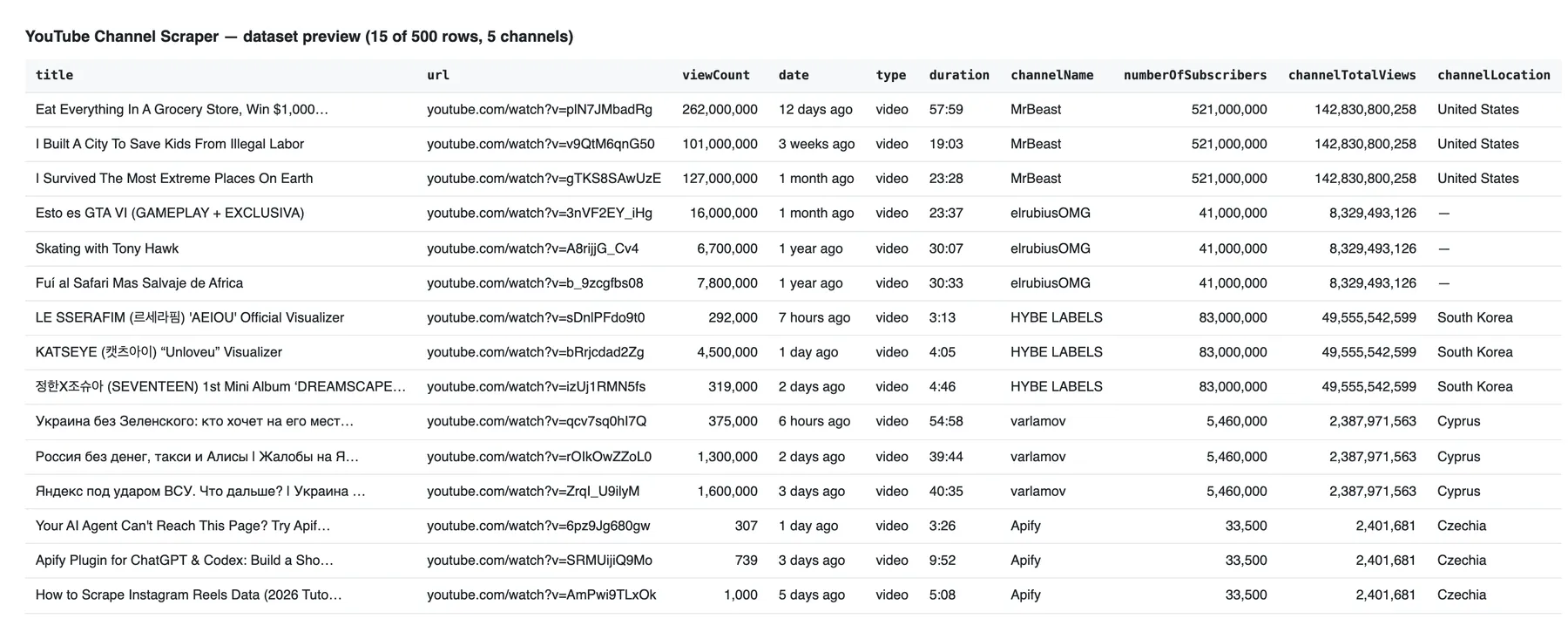
The Overview table in Console shows title, URL, views, date, type, duration, channel and subscribers:
Guarantees and failure semantics
Only real videos are charged. The dataset holds video rows only. A channel that doesn't exist, a line that isn't a channel, or a channel without videos in the tabs you asked for produces no row and no charge; the run's status message names them, for example Scraped 240 videos from 4 of 6 channels (1 not found: @misspelled; 1 with no videos in the requested tabs: @newchannel).
Errors are retried, then reported. Every request gets up to three attempts, each from a fresh IP address of the same proxy type. The Actor never switches you to a pricier proxy behind your back.
When a run fails. A run is marked FAILED, so your integration can retry the batch, when:
- no video was returned and at least one channel got no valid answer from YouTube (blocked, rate-limited or timed out), or
- more than 20% of the channels, and more than two, got no valid answer, or
- a tab the channel has came back as a page the Actor could not read a single video from (
outdated:, a YouTube page change that needs an Actor update), or - the input has no valid channel or an invalid setting.
The status message starts with a reason code (blocked:, quota:, timeout:, network:, server:, outdated: or invalid:). A run where YouTube answered for every channel but there was nothing to return ends SUCCEEDED with zero results. Stopping at your maximum cost per run is a normal SUCCEEDED run.
Duplicates. Two inputs that point to the same channel (an @handle and its UC… ID, say) are scraped once; the second is named as a duplicate. A video seen on two channels (a collaboration) is returned and charged once.
Partial channels. If a channel's later page or its About panel fails after the retries, the videos already fetched stay in the dataset and the status message lists the channel "with errors". A channel that returned nothing and only errors counts as failed. If video details fail for some videos, their rows keep the listing data and the details fields stay null. If details fail for the whole first batch before any worked, the run fails (blocked: or outdated:) instead of returning listing-only rows.
Run statistics. The run's key-value store holds a STATISTICS record: per-channel outcomes and tab counts, requests and failures by reason for each YouTube endpoint, and the bytes transferred.
Integrations
- Apify API and clients: start runs and read results from any language, or with the JavaScript and Python clients.
- Make, Zapier and n8n: run the Actor from a workflow and pass new videos to the next step.
- Google Sheets, Slack and webhooks: send results where your team works, or trigger your own endpoint when a run finishes.
- Schedules: check your watch-list of channels every day with Only videos published after set to
1 dayand get just the new uploads. - Other Actors: feed the video URLs into a transcript or comments scraper for deeper analysis.
More scrapers from this developer
TikTok: TikTok Search Scraper: videos and creators for any keyword, pay per result · TikTok Profile Scraper (Pay Per Result): profiles, followers and latest posts by username · TikTok Comments Scraper: comments and full reply threads from any video · TikTok Hashtag Scraper: videos for any hashtag, with views, likes and music · TikTok Sound & Music Scraper: videos that use a sound or song
Social & news: Reddit Search Scraper: posts by keyword, subreddit or author · Google News Scraper: Google News results as clean full-text articles
E-commerce: Prom.ua Product Search Scraper: Prom.ua product search results, no browser needed · Amazon Product Search & Bestsellers Scraper: search results, Best Sellers and product details from Amazon
Maps & leads: Google Maps Scraper: places, leads and emails from Google Maps
Ads: Facebook Ad Library Scraper (Meta Ads Library): ads from the Meta Ad Library, with EU reach and payers
Video: YouTube Transcript Scraper: transcripts, subtitles and captions from YouTube videos · YouTube Shorts Scraper: Shorts of any channel with exact views, likes and duration · YouTube Search Scraper: search results and videos for any keyword · YouTube Comments Scraper: comments, replies and likes from any video
FAQ
Is it legal to scrape YouTube channels?
This Actor collects only publicly available data: what any visitor sees on a channel page without logging in. It never signs in and cannot see private videos or members-only content beyond the fact that it exists. Channel pages can still contain personal data, such as a creator's name, country and links, which laws such as the GDPR in the EU and the CCPA in California protect. Collect personal data only when you have a legitimate reason, and store and process it responsibly. Check that your use respects YouTube's Terms of Service. This is not legal advice; if you are unsure, consult a lawyer.
Do I need a YouTube API key or an account?
No. The Actor reads the same pages a logged-out browser does, so there is no API key, no daily quota and no Google Cloud project to set up. It also never logs in.
Can I scrape every video of a channel?
Yes. Set Max videos per channel at or above the channel's video count (shown in channelTotalVideos) and the Actor follows the Videos tab to its end. Add Max Shorts per channel and Max live streams per channel for the other tabs, since YouTube keeps Shorts and streams out of the Videos tab.
Why are views rounded?
The channel page itself shows rounded numbers ("1.2M views"), and that is what the listing contains. Turn on Add video details to open each video's page and get the exact count, plus likes and comments. Subscriber counts are always rounded, because YouTube shows them that way everywhere.
How fast is it?
Listing runs on plain HTTP: in our tests a channel's first 50 videos arrive in a few seconds, and several channels are scraped in parallel. Add video details costs one extra request per video, so expect runs roughly ten times slower; the price per result stays the same.
Can I get only new videos since my last run?
Yes. Set Only videos published after to an age such as 1 day or 7 days, keep Sort by on Newest, and schedule the Actor. Each channel stops at the first older video, so a daily run over 100 channels returns only the fresh uploads.
Does it work with channel handles in other languages?
Yes. Any public channel works, whatever its language: the Actor accepts @handles, /c/ and /user/ URLs and channel IDs. Titles and descriptions come back in the channel's own language; dates and labels are read in English.
What about members-only videos and live streams?
Members-only videos are listed with isMembersOnly: true; YouTube hides their views, so viewCount is null. Streams that are live right now have streamType: "live" and no view count (YouTube shows "watching", not views); scheduled streams are upcoming, and finished ones are ended with their duration and views.
Do I need a proxy?
No setup needed: Apify's datacenter proxy is the default and works for YouTube channel pages. You can switch to residential proxies or your own proxies in Proxy configuration; the Actor never changes the proxy type on its own.
Support
Found a bug, a channel that should work but doesn't, or a field you need? Open an issue in the Issues tab on this Actor's page with the run link, and we'll take a look.


