

YouTube Search Scraper: YouTube Search Results & Videos
Pricing
from $0.60 / 1,000 youtube search results
YouTube Search Scraper: YouTube Search Results & Videos
Scrape YouTube search results for any keyword: video title, URL, views, duration, upload date, channel and thumbnail, plus Shorts. Filter by upload date, type or length, sort by popularity, and run many keywords at once. No API key, no login.
Pricing
from $0.60 / 1,000 youtube search results
Rating
0.0
(0)
Developer

GoFetch
Maintained by CommunityActor stats
0
Bookmarked
1
Total users
1
Monthly active users
a day ago
Last modified
Categories
Share
What does YouTube Search Scraper do?
YouTube Search Scraper turns any YouTube search into a clean dataset. Type the keywords you would type into YouTube's search bar and get back every video and Short on the results page: title, URL, view count, upload date, duration, channel name, @handle and channel ID, the description snippet, badges such as 4K or CC, and the rank each result had in the search. It works for any language and any number of searches in one run.
It is built for people who need YouTube search results as data, not as a web page:
- Marketers and SEO teams tracking which videos and channels rank for their keywords, week after week.
- Researchers and analysts collecting videos on a topic, from news events to product launches, with view counts for each.
- Agencies and creators finding channels to partner with, by @handle and channel ID, from the searches their audience runs.
- AI and data teams building video datasets, or giving an agent a YouTube search tool through the Apify API or MCP.
You don't need a YouTube API key, a Google account or quota. You pay only for the results you get, and results are deduplicated across the whole run.
Drop-in output. The rows use the field names that YouTube scrapers commonly use (id, title, url, viewCount, date, duration, channelName, channelUrl, channelUsername, channelId, order, input, fromYTUrl), so existing pipelines keep working. It also fills the fields that listing-level scrapers often leave empty: every Short gets its channel, upload date and exact view count, and every video gets its description snippet, badges, verified-channel flag and channel avatar.
What data you get
One row per video or Short. Field names are case-sensitive.
| Field | Example | Notes |
|---|---|---|
id | xP2rh160e_A | YouTube video ID |
title | Peppa's NEW Electric Car… | As YouTube lists it for an English-language viewer in the US |
url | https://www.youtube.com/watch?v=xP2rh160e_A | Shorts use /shorts/<id> |
type | video | video, stream (live now or a past stream) or shorts |
duration | 00:31:28 | HH:MM:SS; empty for live streams and Shorts |
date | 11 months ago | Upload date as listed ("Streamed 2 days ago" for past streams) |
viewCount | 9890936 | A number. Exact for Shorts; for live streams, the people watching now |
thumbnailUrl | https://i.ytimg.com/vi/…/hq720.jpg | Largest thumbnail in the listing |
channelName | Peppa Pig - Official Channel | For collaborations, the uploading channel |
channelUrl | https://www.youtube.com/@PeppaPigOfficial | /channel/<id> when YouTube shows no handle |
channelUsername | PeppaPigOfficial | The @handle without "@", when YouTube shows one |
channelId | UCAOtE1V7Ots4DjM8JLlrYgg | Stable channel ID |
order | 3 | Position in YouTube's results for this search (videos and Shorts together), counted before any filtering |
input | electric cars | The search term the row came from |
fromYTUrl | https://www.youtube.com/results?search_query=electric%20cars&sp=CAM%3D | The YouTube results page with your filters |
durationSeconds | 1888 | Duration as a number |
text | Peppa and George are playing… | Description snippet shown in search |
isChannelVerified | true | Verified badge on the channel |
badges | ["CC"] | Labels on the result: 4K, CC, LIVE, New, 360°, VR180… |
isLive | false | true while the stream is on air |
channelAvatarUrl | https://yt3.ggpht.com/… | Channel profile picture |
How to use YouTube Search Scraper
- Open the Actor in Apify Console and go to the Input tab.
- Type your searches into Search terms, one per line. You can also paste a YouTube results URL such as
https://www.youtube.com/results?search_query=lofi+hip+hop. - Set Max videos per search and, if you want Shorts too, Max Shorts per search.
- Optionally pick filters: Sort by popularity, Upload date, Duration, Videos only, or features such as 4K, Live or Creative Commons.
- Click Start. Download the results from the Output tab as JSON, CSV, Excel or HTML, or read them through the API.
Use it as a YouTube search API
This call runs the Actor and returns the results. Synchronous calls time out after 5 minutes, so for large batches start a run and read its dataset afterwards.
With the Apify Python client:
Use it from an AI agent (MCP)
Connect your MCP client to https://mcp.apify.com?tools=xmolodtsov/youtube-search-scraper and the agent can search YouTube as a tool call. The usual pricing and free-plan limits apply.
Pricing
Pay per result, all-inclusive: you are charged for each video or Short returned, and the proxy and platform usage are included. There are no start fees and no separate compute bill.
| Apify plan | Price per result | Price per 1,000 results |
|---|---|---|
| Free | $0.0011 | $1.10 |
| Starter (Bronze) | $0.0009 | $0.90 |
| Scale (Silver) | $0.00075 | $0.75 |
| Business (Gold) | $0.0006 | $0.60 |
Platinum and Diamond plans pay the Gold price.
How much does it cost to scrape YouTube search results?
Example: you run 20 keywords with Max videos per search at 100 and Max Shorts per search at 20. That is up to 2,400 results. If YouTube lists 2,200 of them, you pay for 2,200: $1.98 on Starter, $1.32 on Business. Results that don't exist cost nothing, errors are never pushed as rows, and a video that shows up for two of your keywords is returned and charged once.
To cap spending, set a maximum cost per run in Console or the API. The Actor stops cleanly at that limit and keeps every result fetched so far.
Is it free?
You can try it on the free Apify plan. Free-plan runs are limited to 10 results per run and 5 runs per calendar month per account. These limits are set by the developer of this Actor, not by Apify, and any paid Apify plan removes them. A capped run still succeeds and says so in its status message. Once the five runs are used, further runs end successfully with an explanation and no results until the 1st of the next month.
Input
| Field | Default | What it does |
|---|---|---|
searchQueries | required* | Search terms, one per entry, or YouTube results URLs (their own filters are kept). |
startUrls | none | YouTube search results URLs as [{"url": …}] or strings, the shape other YouTube scrapers take. *One of the two is required. |
maxResults | 50 | Videos and streams per search. 0 = Shorts only. |
maxResultsShorts | 0 | Shorts per search, on top of the videos. 0 = no Shorts. |
sortingOrder | relevance | relevance or views (YouTube's "Popularity"). |
dateFilter | none | today, week, month or year. |
videoType | none | video = videos only (no Shorts, channels or playlists). |
lengthFilter | none | under4 (under 3 minutes), between420 (3 to 20 minutes), plus20 (over 20 minutes). |
isLive, is4K, isHD, hasSubtitles, hasCC, is360, isVR180, is3D, isHDR, hasLocation | off | YouTube's feature filters. hasCC is Creative Commons; hasSubtitles is subtitles/closed captions. |
proxyConfiguration | Apify datacenter | Change only to use residential or your own proxies. |
How the filters behave. Every filter here was checked against YouTube's own filter panel, which marks the filters it applied, and against the returned videos: badges, durations, upload dates, licence, location tag and stream formats. Some details are worth knowing:
- YouTube removed sorting by upload date and by rating, and the "Last hour" filter. They aren't offered here. To get recent videos, use Upload date.
- YouTube changed its duration buckets to under 3 minutes, 3 to 20 minutes and over 20 minutes. The option names (
under4,between420,plus20) stay the same so inputs from other YouTube scrapers keep working. - YouTube mixes a few older videos into date-filtered results. This Actor drops them using each result's listed upload date, and counts them in the status message.
- With Popularity sorting, YouTube shows no Shorts next to videos, so the Actor doesn't page on looking for them and the status message says why there are none. Set Max videos per search to 0 to get popular Shorts. Videos only excludes Shorts by definition. With Max videos per search at 0 and no date filter, the Actor asks YouTube for Shorts directly and gets full pages of them.
- The Location filter only returns videos for searches that name a place, such as "walking tour new york".
- Filters apply to every search in the run. A pasted results URL keeps the filters in its own
spparameter.
Output
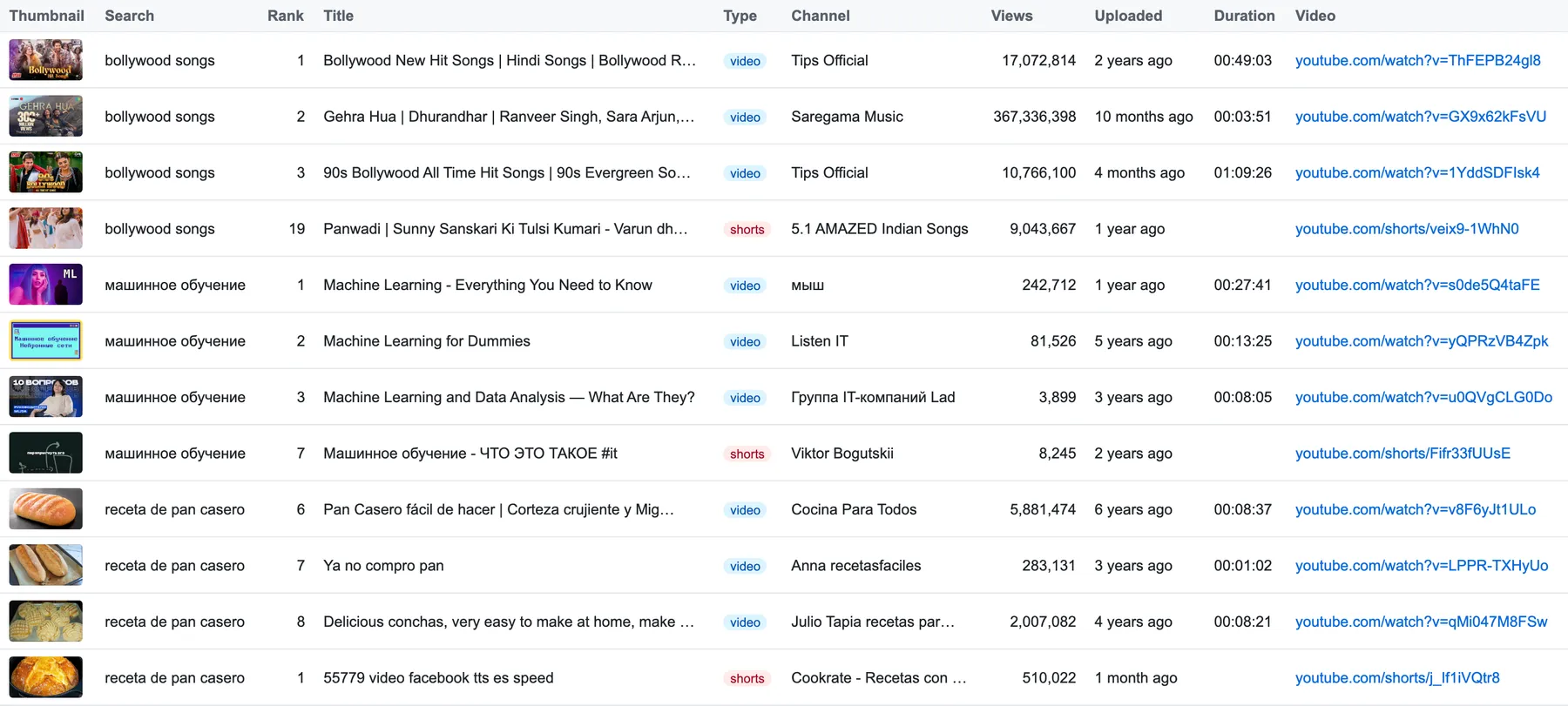
A regular video:
A Short. Search lists Shorts with only a title and a rounded view count; this Actor looks up each one so the row has its channel, upload date and exact views:
Deduplication. Within a search, each video is returned once, even though YouTube repeats its Shorts shelves from page to page. Across searches, a video that matches several of your keywords is returned once, under the search that reached it first. Searches run in parallel, so with overlapping keywords that can be either one. order still shows the video's real position in YouTube's results for the search it is listed under, so a skipped duplicate leaves a gap in the numbers rather than shifting them. The search keeps paging until it reaches your maximum with new videos.
How deep does a search go? YouTube lists a limited number of results per search, usually 200 to 400 for a popular keyword including Shorts, and fewer with narrow filters. The run stops a search when YouTube has no more pages or stops showing new videos, and the log says why for each search.
Guarantees and failure semantics
No error rows, no charge for failures. Only real videos and Shorts are pushed and charged. A Short whose details can't be loaded after retries is skipped and counted in the status message, never pushed with an empty channel.
Errors are retried. Every request gets up to three attempts, each from a fresh IP address on the same proxy type. The Actor never switches you to a pricier proxy behind your back.
When a run fails. A run is marked FAILED, so your integration can retry the batch, when:
- no result was returned and at least one search got no valid answer from YouTube (blocked, rate-limited, timed out, or every Short lookup failed), or
- more than one search, and more than 20% of them, got no valid answer (for example 2 of 3), or
- YouTube changed its search page and the results could no longer be read (status
outdated:), or - the input is invalid, for example an option YouTube no longer supports.
The status message starts with a reason code (for example blocked: or outdated:), followed by a summary. A search that YouTube answers with no results is not a failure: when every search is simply empty, the run ends SUCCEEDED with 0 results and names the searches. Stopping at your maximum cost per run is a normal SUCCEEDED run.
Run statistics. The run's key-value store holds a STATISTICS record: requests and failures per endpoint, results per search and why each search stopped, Shorts lookups, and results dropped by the date window.
In our platform tests on 15 Oct 2026, YouTube answered 386 of 386 search and Shorts requests through Apify's datacenter proxy, across searches in Spanish, Russian, French and English.
Integrations
- Apify API and clients: start runs and read results from any language, or with the JavaScript and Python clients.
- Make, Zapier and n8n: run the Actor from a workflow and pass results to the next step.
- Google Sheets, Slack and webhooks: send results where your team works, or trigger your own endpoint when a run finishes.
- Schedules: re-run your keywords every day or week to track rankings over time;
ordergives each video's rank. - AI agents: use it as a tool through Apify's MCP server, LangChain or LlamaIndex.
More scrapers from this developer
TikTok: TikTok Search Scraper: videos and creators for any keyword, pay per result · TikTok Profile Scraper (Pay Per Result): profiles, followers and latest posts by username · TikTok Comments Scraper: comments and full reply threads from any video · TikTok Hashtag Scraper: videos for any hashtag, with views, likes and music · TikTok Sound & Music Scraper: videos that use a sound or song
Social & news: Reddit Search Scraper: posts by keyword, subreddit or author · Google News Scraper: Google News results as clean full-text articles
E-commerce: Prom.ua Product Search Scraper: Prom.ua product search results, no browser needed · Amazon Product Search & Bestsellers Scraper: search results, Best Sellers and product details from Amazon
Maps & leads: Google Maps Scraper: places, leads and emails from Google Maps
Ads: Facebook Ad Library Scraper (Meta Ads Library): ads from the Meta Ad Library, with EU reach and payers
Video: YouTube Transcript Scraper: transcripts, subtitles and captions from YouTube videos · YouTube Shorts Scraper: Shorts of any channel with exact views, likes and duration · YouTube Channel Scraper: every video of a channel, with channel stats · YouTube Comments Scraper: comments, replies and likes from any video
FAQ
Is it legal to scrape YouTube search results?
This Actor collects only public information that anyone can see on YouTube without signing in: video titles, view counts, upload dates and public channel names. Scraping publicly available data is generally lawful, but your use of it must follow the laws that apply to you, such as the GDPR in the EU and the CCPA in California, and must respect copyright: titles and thumbnails remain their creators' work. Channel names and handles can identify people, so only process them when you have a legitimate reason. If you are unsure, ask a lawyer. Read more in Apify's post on the legality of web scraping.
Do I need a YouTube API key or a Google account?
No. The Actor reads YouTube's public search pages, so there is no API key, no OAuth and no daily quota. You only need an Apify account.
Why are some titles in English when I searched in another language?
The Actor sees YouTube as an English-language viewer in the US. When a creator has added an English title for their video, YouTube shows that version, and so does the dataset. Titles without a translation stay in their original language, and searches work in any language.
Can I sort by upload date?
YouTube removed that option from search. Use Upload date (dateFilter) with today, week, month or year to get recent videos, and combine it with Popularity sorting to see what is trending in that window.
Why do I get fewer results than my maximum?
YouTube lists a limited number of results per search, usually a few hundred, and fewer with narrow filters such as a date window or 4K. The run ends that search when YouTube has no more pages, and the log and STATISTICS say why for each search. Results already returned by an earlier search in the same run aren't repeated.
How do I get only Shorts?
Set Max videos per search to 0 and Max Shorts per search to the number you want. Without a date filter, the Actor asks YouTube for Shorts directly.
Why is duration empty for some rows?
YouTube's search results show no duration for Shorts or for streams that are live now. Everything else has duration and durationSeconds.
How do I track keyword rankings over time?
Schedule the Actor with the same searches daily or weekly. order is each video's position in the results, and input and fromYTUrl say which search and filters produced it.
How fast is it?
A search of 200 results usually takes about 15 to 30 seconds. Shorts take a little longer because each one is looked up, and several searches run in parallel.
Can I scrape channels, comments or transcripts?
This Actor is for search. For a channel's videos, a channel's Shorts, video comments and transcripts, see the YouTube line under "More scrapers from this developer" above.
Support
Found a bug, a search that returns less than YouTube shows, or a field you need? Open an issue in the Issues tab on this Actor's page with the run link, and we'll take a look.


