

Amazon Product Search & Bestsellers Scraper
Pricing
from $2.50 / 1,000 product results
Amazon Product Search & Bestsellers Scraper
Scrape Amazon search results, Best Sellers and New Releases by keyword or URL on 7 marketplaces: ASIN, title, price, list price, rating, reviews, badges, sponsored flag, position, Prime and delivery. On amazon.com: ASIN lookups, product details, ZIP pricing. No browser needed, pay per result.
Pricing
from $2.50 / 1,000 product results
Rating
0.0
(0)
Developer

GoFetch
Maintained by CommunityActor stats
0
Bookmarked
5
Total users
4
Monthly active users
4 days ago
Last modified
Categories
Share
Scrape Amazon search results, Best Sellers and product data
This Amazon scraper turns Amazon search results, Best Sellers and New Releases lists, and product pages into clean, structured data. Give it keywords, Amazon URLs or ASINs and get one row per product: ASIN, title, price and list price, rating, review count, badges, sponsored flag, search position, Prime and delivery info. Export it as JSON, CSV or Excel, or pull it through the API.
It sends plain HTTP requests, with no browser, and retries blocked pages automatically. You don't need a login, cookies or proxy setup. The output is compatible with the common Amazon scraper output format, so existing pipelines keep working when you switch.
Typical runs: about 900 search results for three keywords (up to 300 each) in 2–3 minutes, the top 600 of six Best Sellers lists in under 30 seconds, and product details at roughly 2–3 seconds per product.
Who it's for:
- Amazon sellers and brands: track keyword rankings, competitor prices, coupons and badges.
- Product researchers: size a niche by price, rating, review count and "bought in past month" volume.
- Category and trend watchers: monitor Best Sellers and New Releases on a schedule.
- Developers and analysts: feed Amazon data into dashboards, spreadsheets, databases or AI agents.
What data do you get?
Every search, Best Sellers or New Releases row includes:
| Field | What it contains |
|---|---|
asin, title, url | Amazon product ID, product title and product link |
brand | Brand name, when Amazon shows it on the result card |
price, listPrice | Current price and the struck-through list price as { value, currency } |
pricePerUnit | Unit price, e.g. { "value": 4.5, "currency": "USD", "unit": "count" } |
stars, reviewsCount | Average rating and number of ratings |
badges, isBestSeller, isAmazonChoice, amazonChoiceText | Best Seller, Amazon's Choice / Overall Pick and deal badges |
isSponsored | true for sponsored (ad) placements |
categoryPageData.productPosition, categoryPageData.pageNumber | Position on the results page, and the page number |
organicPosition | Overall organic rank across all pages, not counting ads |
isPrime, delivery, isFreeDelivery | Prime eligibility, delivery text and free-delivery flag |
coupon | Coupon text, e.g. "You pay $48.99 with coupon" |
monthlyPurchaseVolume | Amazon's "bought in past month" label, e.g. "20K+ bought in past month" |
offersCount, offersLowestPrice | Number of other offers and the lowest offer price |
variationsCount, variantAsins | Number of variants (colors, sizes) and their ASINs |
thumbnailImage, highResolutionImages | Thumbnail and full-resolution image URLs |
locationText, loadedCountryCode | Delivery location the prices were loaded for, and the marketplace country |
bestsellerPageData | On Best Sellers / New Releases rows: rank (position), categoryName, categoryFullName, categoryUrl |
searchQuery, input, scrapedAt | The keyword or URL that found the product, and the scrape time |
With Scrape product details on (amazon.com), each product also gets data from its own page: the feature bullets, full description, all images, seller, Best Sellers ranks in every category, stock status, variants and delivery. ASIN lookups always return these details.
How to scrape Amazon
- Enter search keywords, paste Amazon URLs (search, category, Best Sellers, New Releases or product pages), or list ASINs.
- Pick the marketplace and sort order for keywords, and set max results per keyword or URL.
- Click Start, then download the results or open the Overview table.
Example input: two keyword searches on amazon.com plus the top 100 Best Sellers in Electronics.
Run it through the API
Call the Actor from your own code with the official Apify clients.
Use it from an AI agent (MCP)
Connect your MCP client to https://mcp.apify.com?actors=xmolodtsov/amazon-search-scraper and
the agent can search Amazon, read Best Sellers lists or look up ASINs as a tool call. The usual
pricing and free-plan limits apply.
How much does it cost to scrape Amazon?
This Actor is priced pay per result. You pay for products saved to the dataset, plus an optional add-on for each product enriched with its product page. Platform usage is included: there's no separate bill for compute or proxies. The price depends on your Apify plan:
| Apify plan | Per 1,000 results | Product details add-on, per 1,000 products |
|---|---|---|
| Free | $4.00 | $1.00 |
| Starter | $3.50 | $1.00 |
| Scale | $3.00 | $1.00 |
| Business and higher | $2.50 | $0.75 |
Worked examples on the Starter plan:
- 5 keywords × 200 results = 1,000 results → $3.50
- Top 100 Best Sellers in 10 categories = 1,000 results → $3.50
- 1,000 ASINs looked up with full product details → $3.50 + $1.00 = $4.50
Runs that return nothing cost nothing. Setting a delivery ZIP code is free. You can also set a maximum cost per run in the run options, and the Actor stops cleanly when it reaches it.
Is it free?
You can try it for free. Apify's Free plan includes a monthly usage credit that you can spend on pay-per-result Actors like this one, with no payment method required. On the Free plan, this Actor is limited to 100 results per run and 20 runs per calendar month (the counter resets on the 1st). The developer sets these limits, not Apify. Each free run says so in its status message. Once you've used the monthly runs, the next run ends successfully with an explanation and no charge. Any paid Apify plan removes these limits.
Input
| Field | Type | Default | What it does |
|---|---|---|---|
keywords | array of strings | none | Search terms, one per line, searched on marketplace |
categoryOrProductUrls | array of { "url": … } | none | Search (/s?k=…), category (/b?node=…), Best Sellers (/gp/bestsellers/…, /zgbs/…), New Releases and product (/dp/ASIN, amazon.com) URLs; the marketplace comes from each URL |
asins | array of strings | none | ASINs to scrape full product pages for (amazon.com only); each is charged as a result plus the product details add-on |
marketplace | string | amazon.com | Site for keywords and ASINs: amazon.com, amazon.co.uk, amazon.de, amazon.fr, amazon.it, amazon.es or amazon.ca |
sort | string | relevanceblender | Amazon's sort orders: relevanceblender (Featured), price-asc-rank, price-desc-rank, review-rank, date-desc-rank, exact-aware-popularity-rank (Best sellers) |
zipCode | string | none | 5-digit US ZIP code: amazon.com prices and delivery for that location |
maxItemsPerStartUrl | integer | 100 | Max products per keyword or URL (1–10,000); the Free plan caps a whole run at 100 |
maxSearchPagesPerStartUrl | integer | 400 | Max result pages per keyword or URL |
includeSponsored | boolean | true | Keep sponsored cards (always flagged with isSponsored) |
scrapeProductDetails | boolean | false | Open each product page and add its details (amazon.com; charged as the add-on) |
proxyConfiguration | object | automatic | Optional. The Actor picks the right Apify Proxy exit for each marketplace by default |
One run accepts up to 1,000 keywords and URLs, which are scraped in parallel.
Tips for better results
Set a delivery ZIP code. Amazon shows prices, availability and delivery dates for a
specific delivery location. Set zipCode (e.g. 10001) to see amazon.com results the way a
shopper in that area sees them, at no extra cost. If you leave it empty, Amazon picks a US
location itself. The location is recorded in locationText.
Use category URLs to go deeper. Amazon stops a plain keyword search at about 300 results.
If you scope the search to a department, for example
https://www.amazon.com/s?k=lego&i=toys-and-games, Amazon serves up to 400 result pages
instead. Filters you apply on Amazon (price range, brand, rating, Prime) stay in the URL, so
filter on the site, copy the URL and paste it in.
Turn on product details only where you need them. Listing rows already include price, rating, reviews, badges and delivery. Turn on Scrape product details when you need feature bullets, descriptions, all images, the seller or Best Sellers ranks. The add-on applies only to products that were actually enriched.
Batch keywords in one run. Add all your keywords to a single run rather than starting one run per keyword. They're scraped in parallel, and a product found by several keywords is saved only once.
Output
Each product is one item in the dataset. Example item from a keyword search on amazon.com (ZIP code 10001):
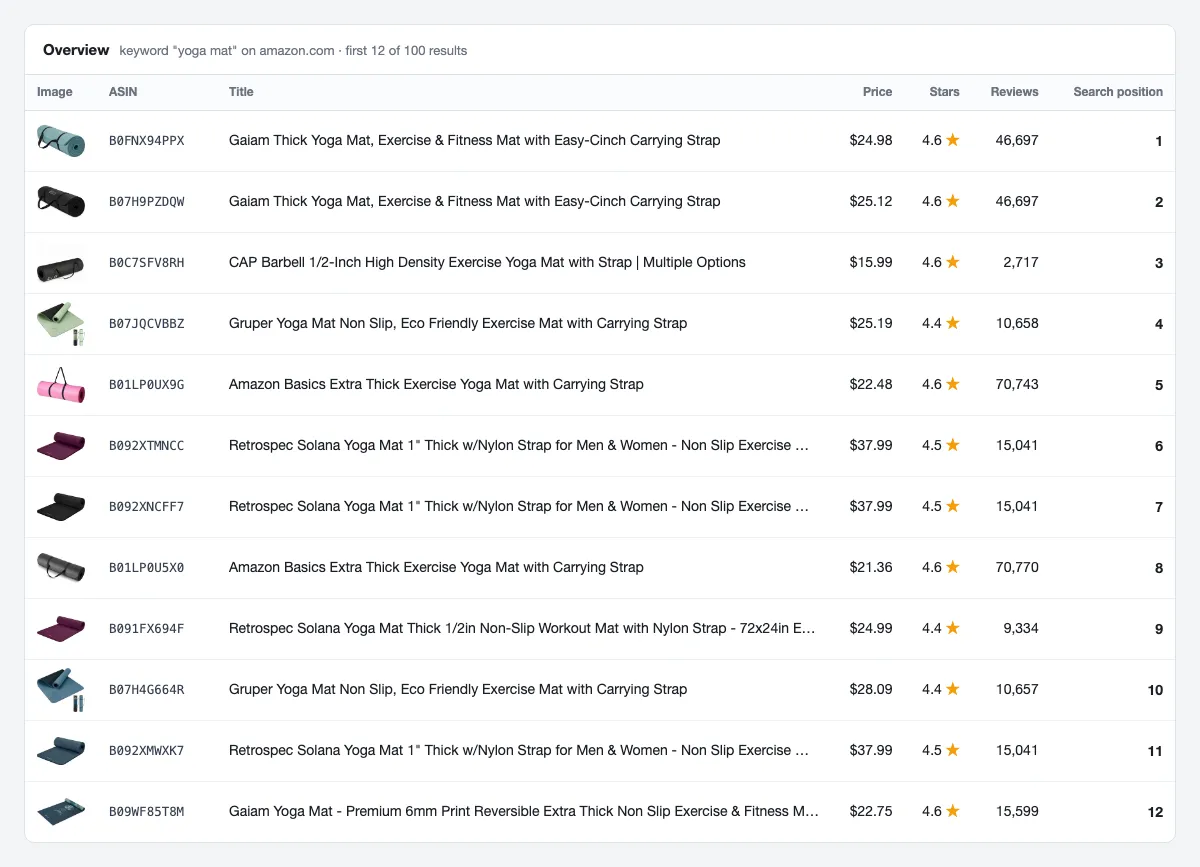
The Overview view in the Output tab shows the key columns. This preview is from a real run for the keyword "yoga mat" on amazon.com:
Guarantees and failure semantics
Blocked pages are retried, then reported. Amazon sometimes blocks a request. The Actor retries blocked pages automatically and reports any keyword or URL that stayed blocked.
When a run fails. A run is marked FAILED, so that your retries and alerts fire, when:
- no products were saved and at least one keyword or URL stayed blocked after retries, or
- more than 20% of the keywords and URLs, and more than two, stayed blocked after retries (the products saved from the others stay in the dataset), or
- the input is invalid (for example an unsupported marketplace, a malformed ASIN or ZIP code), or Amazon rejects the delivery ZIP code.
When blocks fail a run, its status message starts with a reason code such as blocked:,
timeout: or network:, followed by a short summary.
When a run succeeds. If only a few keywords or URLs are blocked, you get the rest, and the status message lists the ones that were blocked and the ones that stopped early after blocks, so you can re-run just those. A run that returns no products because Amazon had none for your search ends SUCCEEDED. Stopping at your maximum cost per run or at the Free plan cap is also a normal SUCCEEDED run.
What you pay for. Only products saved to the dataset, plus the details add-on for products that were actually enriched. A run with no results costs nothing. If a product page stays blocked, the product is still saved with its listing data and no add-on is charged. An ASIN that Amazon doesn't know returns no row and isn't charged.
Run statistics. Each run's key-value store holds a STATISTICS record with item, page,
request and blocked-attempt counts for monitoring.
Integrations
- Apify API and clients: start runs and read results from any language, or with the JavaScript and Python clients.
- Schedules: run daily price, ranking or Best Sellers checks.
- Webhooks: get notified or trigger your own endpoint when a run finishes or fails.
- Exports: download datasets as JSON, CSV, Excel or XML.
- Google Sheets, Zapier, Make and n8n: send products to a spreadsheet or the next step of a workflow.
More scrapers from this developer
TikTok: TikTok Search Scraper: videos and creators for any keyword, pay per result · TikTok Profile Scraper (Pay Per Result): profiles, followers and latest posts by username · TikTok Comments Scraper: comments and full reply threads from any video · TikTok Hashtag Scraper: videos for any hashtag, with views, likes and music · TikTok Sound & Music Scraper: videos that use a sound or song · TikTok Top Ads Scraper: public Creative Center ad rankings, engagement, media and landing pages
Social & news: Reddit Search Scraper: posts by keyword, subreddit or author · Google News Scraper: Google News results as clean full-text articles · Threads Replies Scraper: public post replies, likes, authors and inline nested replies · VK Posts Scraper: public wall posts, engagement counts, repost context and attachment metadata
Instagram: Instagram Reel Scraper: public profile reels, plays, captions, music and media URLs · Instagram Comment Scraper: public post and reel comments, likes, timestamps and usernames
E-commerce: Prom.ua Product Search Scraper: Prom.ua product search results, no browser needed · AliExpress Search Scraper: aliExpress products by keyword with prices, orders and shipping · AliExpress Product Reviews Scraper: public product reviews, ratings, buyer photos and follow-up feedback
Maps & leads: Google Maps Scraper: places, leads and emails from Google Maps
Ads: Facebook Ad Library Scraper (Meta Ads Library): ads from the Meta Ad Library, with EU reach and payers · Google Ads Transparency Scraper: Google ad creatives by advertiser or domain, with regional details
Video: YouTube Transcript Scraper: transcripts, subtitles and captions from YouTube videos · YouTube Shorts Scraper: Shorts of any channel with exact views, likes and duration · YouTube Channel Scraper: every video of a channel, with channel stats · YouTube Search Scraper: search results and videos for any keyword · YouTube Comments Scraper: comments, replies and likes from any video · Bilibili Comments Scraper: public hot comments and reply threads by video or keyword
Jobs: SEEK Job Listings Scraper: public AU/NZ job listings, salaries and redacted descriptions
FAQ
Is it legal to scrape Amazon?
This Actor collects only publicly available product data: what any visitor sees on Amazon without logging in. It never signs in and never touches account or order data. Product listings are generally not personal data, but some fields can be (for example, a seller who trades under their own name). If you process personal data, comply with laws such as the GDPR and CCPA, and use the data only for legitimate purposes. You are responsible for how you use the results. Rules vary by country and use case, so consult your legal counsel if you're unsure. For background, see Apify's guide Is web scraping legal?
How many results can I get per keyword?
A plain keyword search ends at about 300 results. That's Amazon's own limit, not this Actor's. Add a department or category to the search URL to reach up to 400 result pages. Best Sellers and New Releases lists end at rank 100.
Does it include sponsored results?
Yes. Sponsored cards are included and flagged with isSponsored, and organicPosition skips
them. Set includeSponsored to false to drop them. Amazon decides how many ads each visitor
sees, so sponsored counts vary between runs.
Which Amazon marketplaces are supported?
amazon.com, amazon.co.uk, amazon.de, amazon.fr, amazon.it, amazon.es and amazon.ca. Prices come
in each marketplace's currency, as an ISO code such as USD, GBP or EUR. Product details,
ASIN lookups and the ZIP code option are available on amazon.com.
Why aren't Movers & Shakers, Most Wished For and Gift Ideas supported?
Amazon serves those lists empty to visitors who aren't logged in, so there's nothing to scrape. Best Sellers and New Releases lists are fully supported.
Will I get duplicate products?
No. A product found by several keywords or search URLs is saved once per run. Best Sellers and New Releases rows are deduplicated per list, so a product ranked in two lists gets one row in each, with its rank in that list.
Does it work with my existing Amazon data pipeline?
The output is compatible with the common Amazon scraper output format: the same field names
(price, stars, reviewsCount, categoryPageData, bestsellerPageData and so on) and
the same input keys (categoryOrProductUrls, maxItemsPerStartUrl,
maxSearchPagesPerStartUrl, scrapeProductDetails). Most integrations work unchanged.
Support
Found a bug or need a field? Open an issue in the Issues tab.


