

TikTok Profile Scraper (Pay Per Result)
Pricing
from $0.60 / 1,000 tiktok profile results
TikTok Profile Scraper (Pay Per Result)
Rising starGet TikTok user info and profile data by username: followers, likes, bio, link, verified badge, TikTok Shop seller data and latest posts. One row per handle, even for missing accounts; up to 1,000 per run. Input and output compatible with TikTok profile scrapers. No login or proxies. Pay per result.
Pricing
from $0.60 / 1,000 tiktok profile results
Rating
5.0
(1)
Developer

GoFetch
Maintained by CommunityActor stats
2
Bookmarked
249
Total users
86
Monthly active users
3 days ago
Last modified
Categories
Share

TikTok Profile Scraper (Pay Per Result) is a TikTok user info scraper for influencer marketing, creator vetting, lead generation and research: give it a list of usernames and get each profile's follower count, following, total likes, bio and bio link, verified badge, TikTok Shop seller flag and seller category, avatar and account region, plus the latest posts with full metadata (stats, music, hashtags, mentions, subtitles, CDN URLs). Scrape TikTok profiles by username from the Apify Console or the API, with no login, no cookies and no proxy setup. You pay only per result.
One row per requested handle, up to 1,000 handles per run (measured: 264 profiles in 66 seconds). Restricted accounts are usually recovered into a full profile row.
What data does the TikTok Profile Scraper get?
Every item carries the full author block under authorMeta:
- Identity:
id,name(handle),nickName,profileUrl,avatar,verified,privateAccount,region, accountcreateTime. - Bio:
signature(bio text) andbioLink. - Stats:
fans(followers),following,friends,heart(total likes),video(post count),digg. - Commerce:
ttSellerandcommerceUserInfo.category— enough to tell an actual TikTok Shop store from a creator who merely sells something.
With resultsPerPage ≥ 1 you also get the profile's newest posts, one item per post:
caption, createTimeISO, play/like/share/comment/collect/repost counts, hashtags,
mentions, musicMeta, videoMeta (dimensions, duration, cover URL, subtitle links),
isPinned, isSlideshow with slideshowImageLinks, locationMeta when the post is
geotagged, and the permanent webVideoUrl.
| At a glance | TikTok Profile Scraper |
|---|---|
| Proxies needed | None, fully built in |
| Handles that don't resolve | Explicit error row per handle (not_found, suspended, …) |
| Restricted-account recovery | Usually recovered into a full profile row (10 of 10 in a 79-handle production batch) |
| Batch size | Up to 1,000 handles per run |
- Drop-in compatible input & output with the popular TikTok profile scrapers:
profiles,resultsPerPage, download flags — and the sameauthorMetaitem shape. - One item per requested handle — guaranteed. Unresolvable handles produce an
explicit
{"input": "...", "error": "not_found"}item instead of a missing row. - Restricted-account recovery: handles that TikTok withholds profile data for are usually recovered automatically into a full profile row. In one 79-handle production batch, all 10 restricted handles were recovered.
- Profile-only mode: set
resultsPerPage: 0to skip posts entirely and get one compact item per handle with just the author block — the cheapest and fastest way to bulk-resolve profile metadata.
Who uses TikTok Profile Scraper?
- Influencer marketing teams vet a shortlist before outreach: 500 handles in
profile-only mode (
resultsPerPage: 0) return followers, total likes, verified badge and bio link per creator, one billed result per handle. - Agencies track client and competitor accounts: a daily schedule with
resultsPerPage: 5records follower growth and how each new post performs (playCount,diggCount,shareCount). - TikTok Shop and affiliate teams find creators who already sell: filter on
ttSellerandcommerceUserInfo.category, then usebioLinkto reach them. - Data teams enrich creator handles collected elsewhere, for example
channel.usernamefrom TikTok Search Scraper, with one guaranteed row per handle.
How to scrape TikTok profiles
In the Apify Console
- Open the Actor and paste your handles into TikTok profiles — bare handles,
@handleand full profile URLs are all accepted, up to 1,000 handles per run. - Set Posts per profile (
resultsPerPage):0for the cheapest profile-only mode, or1+ to include the latest posts. - Click Start. When the run finishes, open the Output tab and export the dataset as JSON, CSV, Excel or another format.
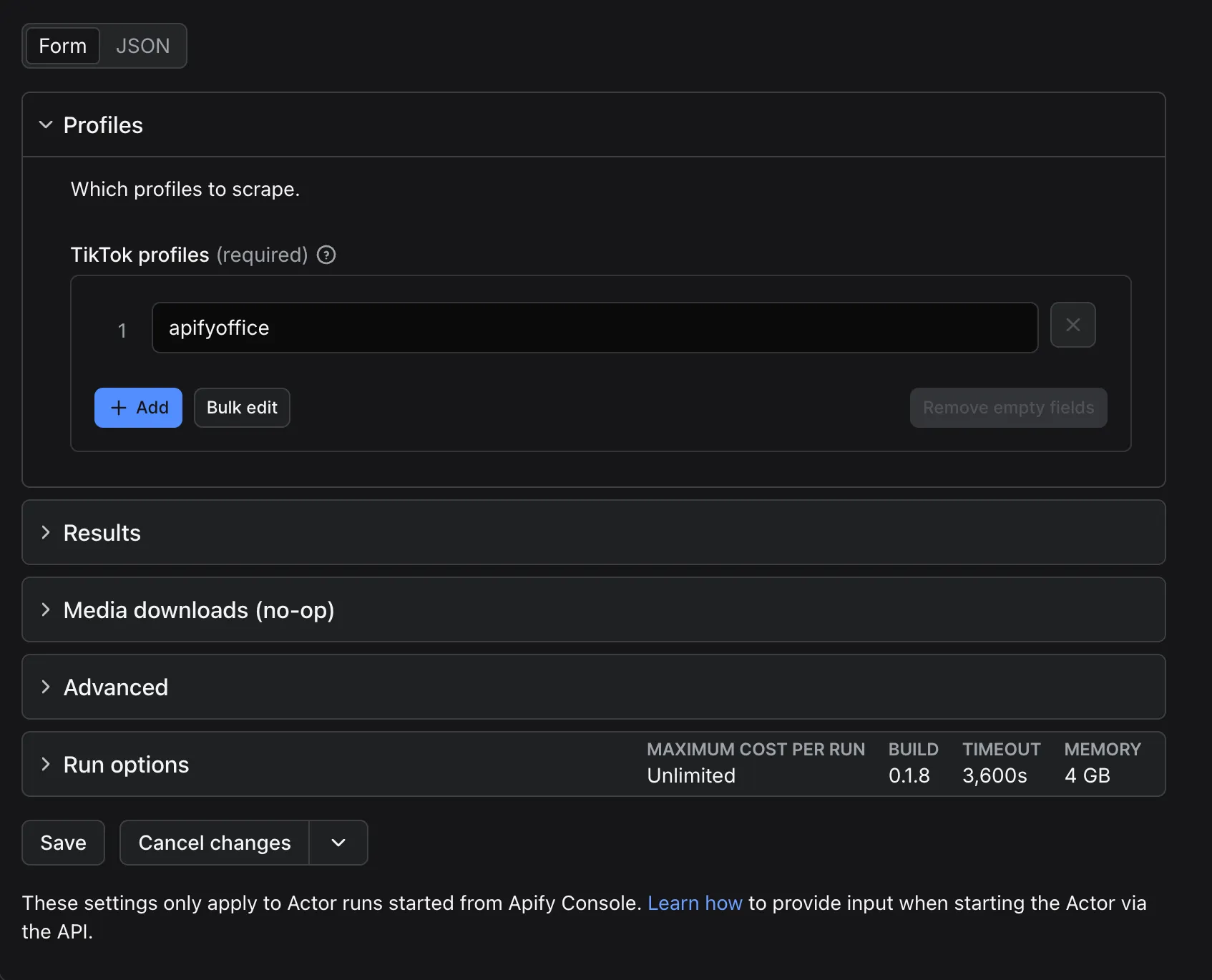
Via API or CLI
Run synchronously and get the items back in one call:
Or with the Apify CLI:
JavaScript and Python client examples are under "Integrations, API & MCP" below.
Accepted handle formats
All three forms mean the same profile:
Duplicates are removed case-insensitively before scraping, so the input above scrapes
nasa exactly once — you are never billed twice for the same handle in one run.
Pricing
How much does it cost to scrape TikTok profiles?
The Actor is pay per result: every item pushed to the dataset is one result. The per-result price depends on your Apify subscription plan and already includes platform usage — there is no separate compute charge.
| Apify plan (discount tier) | Price per 1,000 results |
|---|---|
| Free | $0.75 |
| Starter (Bronze) | $0.70 |
| Scale (Silver) | $0.65 |
| Business (Gold) and the Platinum and Diamond tiers | $0.60 |
Worked examples:
- 1,000 profiles in profile-only mode (
resultsPerPage: 0) = 1,000 results = $0.75 on Free, $0.60 on Business. - 1,000 profiles with
resultsPerPage: 5= up to 5,000 results = $3.75 on Free, $3.00 on Business.
Explicit error rows (not_found, suspended, …) are dataset items too and are billed
like any other result — that is the price of guaranteed one-row-per-handle coverage, and
it is factored into the per-result rate. A profile whose posts are unavailable (private
account, no posts) yields one profile-only item, not zero.
Is scraping TikTok profiles free?
You can try it for free. Apify's Free plan includes free monthly usage credit (currently $5), and no credit card is required; a full free month of this Actor costs at most a few cents of that credit. On the Apify Free plan the Actor:
- scrapes only the first 10 profiles per run (handles beyond the tenth are dropped),
- returns at most 1 post per profile (
resultsPerPageis capped at 1), - allows 5 runs per calendar month, resetting on the 1st (UTC).
This is a limit set by the developer, not by Apify. Any paid Apify plan removes all limits — paid users are never capped, on any tier. When the monthly run quota is used up, the run ends successfully with an explanatory status message and no results; it never fails. Within the quota, each run logs and displays a status message showing how many free runs you have used this month.
Input parameters
| Parameter | Type | Default | Notes |
|---|---|---|---|
profiles | array | required | 1 to 1,000 unique handles per run — the input form enforces the limit; an empty list or a larger input fails validation, and blank entries are skipped. Bare handles, @handle, and full profile URLs all accepted; duplicates removed case-insensitively. |
resultsPerPage | integer | 1 | Latest posts per profile. 0 = profile-only mode (cheapest) — one compact item per handle, no posts fetched. Maximum 3000; out-of-range values are clamped to 0–3000. |
excludePinnedPosts | boolean | false | Filter pinned posts out of the results. |
oldestPostDate | string | — | Only return posts created on/after this ISO date (e.g. 2024-01-01). Invalid values are silently ignored (no filter applied). |
profileScrapeSections | array | ["videos"] | Only ["videos"] is supported; other sections are ignored with a warning. |
profileSorting | string | "latest" | Only "latest" (newest-first) is supported. |
shouldDownloadVideos, shouldDownloadCovers, shouldDownloadSlideshowImages, shouldDownloadAvatars, shouldDownloadMusicCovers, downloadSubtitlesOptions | — | ignored | Accepted for compatibility, not shown in the form. Inputs written for other TikTok profile scrapers work unchanged, but media is never downloaded: cover, slideshow image, music, subtitle and avatar CDN URLs are included, video files are reachable via webVideoUrl (the TikTok post page), and mediaUrls is always []. This is what keeps the per-result price low. |
proxyConfiguration | object | — | Optional override. The Actor uses its own built-in proxy pool by default; leave empty. |
Invalid input (no usable handles, or more than 1,000) fails the run immediately without producing any items.
Output examples
The default dataset view shows one row per item with input, authorMeta.name,
authorMeta.id, authorMeta.nickName, authorMeta.fans, authorMeta.verified, authorMeta.ttSeller,
authorMeta.signature and error; the JSON export contains every field.
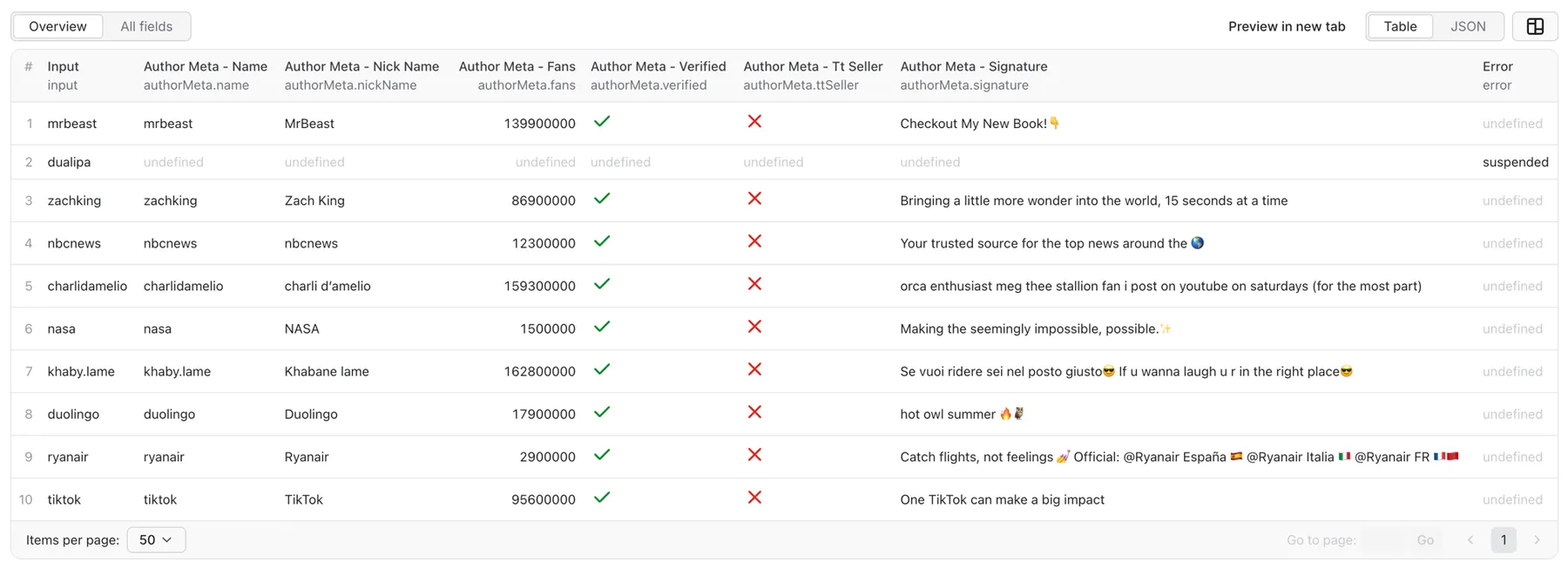
Post item
One dataset item per post, with the author block nested under authorMeta:
Profile-only item
In profile-only mode (resultsPerPage: 0) — and for resolved profiles whose posts are
unavailable (private account, zero posts, post fetch failure) — the item carries the full
author block with id: null. A profileScrapeNote field is added when there is
something worth knowing, e.g. "private account — posts are not accessible",
"profile has no posts", "no posts matched the filters", or
"recovered via TikTok search — bioLink and commerce fields are unavailable for this profile":
Error items
Handles that cannot be resolved still produce exactly one row:
error | Meaning | Should you retry? |
|---|---|---|
not_found | Profile deleted or never existed. | No — terminal. |
suspended | Profile suspended or banned by TikTok. | No — terminal. |
restricted | Profile exists but TikTok withholds its data. | Usually recovered automatically into a real profile row before you ever see this; a remaining restricted row may resolve on a later retry. |
blocked | Temporary fetch block. | Yes — transient, retry the run. |
error | Unexpected technical failure. | Yes — transient, retry the run. |
Notes on fields
authorMeta.regionis currently usuallynull— TikTok rarely exposes it. All other author fields are populated whenever the profile resolves.authorMeta.heartis corrected for TikTok's 32-bit overflow, so accounts with more than ~2.1 billion likes report a positive total instead of a negative one.- Profiles recovered via search carry
bioLink: nulland default commerce fields, flagged byprofileScrapeNote.
Next steps: comments and hashtags
webVideoUrl→ TikTok Comments Scraper (postURLs): the comments and reply threads under each creator's latest posts.hashtags[].name→ TikTok Hashtag Scraper (hashtags): more videos from the hashtags a creator uses.- Need creators to start from? TikTok Search Scraper finds them by keyword; feed its
channel.usernameintoprofiles.
Guarantees and run status
One row per handle
On a SUCCEEDED run you can rely on exactly one row per unique requested handle —
a post item (or several, with resultsPerPage > 1), a profile-only item, or an error
item. Nothing is silently dropped. The only exception is the Free plan, where handles
beyond the first 10 are not processed at all.
not_found, suspended and restricted rows are a normal part of a successful run;
they do not count as failures.
When does the run fail?
- FAILED when hard failures (
blocked/errorrows) exceed 20% of the requested handles, with a minimum of 3 — precisely, when they exceedmax(2, ceil(0.2 × handles)). A 5-handle batch fails on the 3rd hard failure; a 100-handle batch fails on the 21st. - FAILED when zero items were produced at all, or when the input is invalid.
- SUCCEEDED otherwise — including a Free-plan run that hit its monthly quota (no items, explanatory status message).
Automated callers should retry the whole batch on any non-SUCCEEDED status. A
STATISTICS record in the run's key-value store summarises the batch: handles requested,
resolved, recovered, not found, suspended, restricted and failed, posts pushed, and run
duration.
Integrations, API & MCP
JavaScript
Python
Use with AI agents (MCP)
The Actor is available through Apify's MCP server at
https://mcp.apify.com under the name
xmolodtsov/tiktok-profile-scraper. Connect an MCP-capable agent (Claude, Cursor, or any
other MCP client) to https://mcp.apify.com?tools=xmolodtsov/tiktok-profile-scraper and
it can call the Actor as a tool with the same input and output described on this page —
e.g. "get the follower count and bio for these ten TikTok handles".
Exports, schedules and webhooks
Datasets export to JSON, CSV, Excel, XML, JSONL, RSS and HTML from the Console or API. Use Apify Schedules to re-scrape the same handle list hourly or daily, and webhooks to push finished runs into your pipeline.
More scrapers from this developer
TikTok: TikTok Search Scraper: videos and creators for any keyword, pay per result · TikTok Comments Scraper: comments and full reply threads from any video · TikTok Hashtag Scraper: videos for any hashtag, with views, likes and music · TikTok Sound & Music Scraper: videos that use a sound or song · TikTok Top Ads Scraper: public Creative Center ad rankings, engagement, media and landing pages
Social & news: Reddit Search Scraper: posts by keyword, subreddit or author · Google News Scraper: Google News results as clean full-text articles · Threads Replies Scraper: public post replies, likes, authors and inline nested replies
Instagram: Instagram Reel Scraper: public profile reels, plays, captions, music and media URLs · Instagram Comment Scraper: public post and reel comments, likes, timestamps and usernames
E-commerce: Prom.ua Product Search Scraper: Prom.ua product search results, no browser needed · Amazon Product Search & Bestsellers Scraper: search results, Best Sellers and product details from Amazon · AliExpress Search Scraper: aliExpress products by keyword with prices, orders and shipping · AliExpress Product Reviews Scraper: public product reviews, ratings, buyer photos and follow-up feedback
Maps & leads: Google Maps Scraper: places, leads and emails from Google Maps
Ads: Facebook Ad Library Scraper (Meta Ads Library): ads from the Meta Ad Library, with EU reach and payers · Google Ads Transparency Scraper: Google ad creatives by advertiser or domain, with regional details
Video: YouTube Transcript Scraper: transcripts, subtitles and captions from YouTube videos · YouTube Shorts Scraper: Shorts of any channel with exact views, likes and duration · YouTube Channel Scraper: every video of a channel, with channel stats · YouTube Search Scraper: search results and videos for any keyword · YouTube Comments Scraper: comments, replies and likes from any video · Bilibili Comments Scraper: public hot comments and reply threads by video or keyword
Jobs: SEEK Job Listings Scraper: public AU/NZ job listings, salaries and redacted descriptions
FAQ
Do I need proxies?
No. Everything is built in — leave proxyConfiguration empty.
Where is the follower count?
authorMeta.fans. Following is authorMeta.following, total likes authorMeta.heart,
video count authorMeta.video.
What happens with restricted or banned accounts?
Banned/suspended accounts return an explicit suspended row. Restricted accounts
(profile exists but TikTok withholds the data) are usually recovered automatically into
a full profile row without bioLink and commerce fields, flagged in profileScrapeNote.
Can I download the videos?
Not through this Actor — media is never downloaded, which is what keeps the price low.
Every post item carries its permanent webVideoUrl plus cover, music, subtitle and
slideshow image CDN URLs.
Do the CDN links expire?
Yes — avatar and cover URLs are signed and short-lived, so download them promptly.
webVideoUrl and profileUrl are permanent tiktok.com links.
How fast is it?
Measured at ~264 profiles in 66 seconds with the default concurrency — roughly 1,000 profiles in under 5 minutes. Profile-only mode is faster still because no post pages are fetched.
Why did I get fewer posts than resultsPerPage?
The Actor returns at most resultsPerPage of the newest posts that pass your filters. A
profile with fewer posts, a tight oldestPostDate, or excludePinnedPosts on an
account with mostly pinned content will yield fewer items. If no post passes, you still
get one profile-only item with a profileScrapeNote.
Is it legal to scrape TikTok profiles?
The Actor only collects publicly available data — it never logs in and never accesses private content. Whether a given use is lawful depends on where you are and what you do with the data: TikTok's terms of service, and personal-data laws such as the GDPR and CCPA, may apply. Usernames, display names, bios and avatars can be personal data — have a lawful basis for processing them, keep only what you need, and honour deletion requests. You are responsible for compliant use; this is not legal advice.
Support
Report bugs or request features through the Issues tab on this Actor's Store page.
Include the run ID when reporting a problem so the run's log and STATISTICS can be
checked.


