

YouTube Comments Scraper: YouTube Comment Replies & Likes
Pricing
from $0.40 / 1,000 youtube comment results
YouTube Comments Scraper: YouTube Comment Replies & Likes
Scrape comments and replies from YouTube videos and Shorts: comment text, author and channel, likes, reply count, date, pinned and creator-heart flags, plus the video's total comment count. Top or newest first. Export JSON, CSV or Excel. No API key, no login.
Pricing
from $0.40 / 1,000 youtube comment results
Rating
0.0
(0)
Developer

GoFetch
Maintained by CommunityActor stats
0
Bookmarked
2
Total users
1
Monthly active users
a day ago
Last modified
Categories
Share
What does YouTube Comments Scraper do?
YouTube Comments Scraper collects the comments and comment replies of any YouTube video or Short, with the comment text, the author, the likes on every comment, the reply count, pinned and creator-heart flags, and the video's exact total comment count. Paste video or Shorts URLs, pick Top comments or Newest first, and get one clean row per comment and one per reply.
The output uses the field names that most YouTube comment datasets on Apify already use (author, comment, cid,
replyToCid, voteCount, hasCreatorHeart and so on), so an existing pipeline keeps working when you switch. On top
of that, every row carries the fields comment exports often leave out: the author's channel ID, channel URL, avatar,
verified badge, a pinned flag and the like count exactly as YouTube displays it.
Who uses it:
- Brands and marketers read what viewers say about a product launch, an ad or a sponsored video.
- Creators and agencies find the questions, requests and complaints in their own comment sections and their competitors'.
- Researchers and data teams build sentiment, topic and toxicity datasets from public YouTube discussions.
- AI and LLM builders feed real audience language into summaries, classifiers and RAG pipelines.
No YouTube API key, no login, no quota and no proxy setup. Export results as JSON, CSV or Excel, or pull them via API.
What data can you get?
Every comment and every reply is one result. Replies follow the comment they answer.
| Field | Example | Description |
|---|---|---|
author | @candycake9531 | The commenter's handle |
comment | Is everyone going to ignore… | The comment text |
cid | Ugxzbv_ZeZXNRcfwsSF4AaABAg | YouTube's comment ID (replies: <thread id>.<reply id>) |
replyCount | 675 | Replies under the comment (0 for replies) |
replyToCid | null | For a reply: the cid of the comment it answers |
voteCount | 291000 | Likes, as a number |
authorIsChannelOwner | false | The video's creator wrote it |
publishedTimeText | 6 years ago | When it was posted, as YouTube shows it |
type | comment | comment or reply |
hasCreatorHeart | false | The creator gave it a heart |
videoId | dQw4w9WgXcQ | The video's ID |
pageUrl | https://www.youtube.com/watch?v=dQw4w9WgXcQ | The video's URL (Shorts keep their /shorts/ URL) |
commentsCount | 2459315 | The video's exact total number of comments |
title | Rick Astley - Never Gonna Give You Up… | The video's title |
authorChannelId | UCNLgzvqrGzFi5SEAbVkFchg | The commenter's channel ID |
authorUrl | https://www.youtube.com/@candycake9531 | The commenter's channel URL |
authorThumbnailUrl | https://yt3.ggpht.com/… | The commenter's avatar |
authorIsVerified | false | The commenter has a verified badge |
isPinned | false | The creator pinned the comment |
voteCountText | 291K | Likes exactly as YouTube displays them |
About the numbers. YouTube shows comment likes rounded ("291K", "2.3K"), so voteCount is that rounded number
converted to an integer and voteCountText keeps the original text. Below 1,000 likes the number is exact. The same
rounding applies to replyCount once a thread passes 1,000 replies. commentsCount is exact: it comes from the video's
comment header, not from a rounded label.
How to use YouTube Comments Scraper
- Click Try for free and open the Input tab.
- Paste one or more YouTube video URLs or Shorts URLs into YouTube video URLs.
- Set Maximum comments per video, choose Top comments or Newest first, and decide whether to include replies.
- Click Start. Download the comments from the Output tab, or fetch them via API.
Run it from your code
The JavaScript and Python Apify clients work the same way: client.actor("xmolodtsov/youtube-comments-scraper").call(input).
Use it from an AI agent
Connect any MCP client (Claude, Cursor, VS Code and others) to https://mcp.apify.com/?tools=xmolodtsov/youtube-comments-scraper
and ask for the comments of a video in plain language.
Pricing
You pay only for results: $0.50 per 1,000 results on the free plan and less on paid Apify plans. Every comment and every reply is one result. Videos with comments turned off, unavailable videos and retries cost nothing.
| Apify plan | Price per 1,000 results |
|---|---|
| Free | $0.50 |
| Bronze (Starter) | $0.45 |
| Silver (Scale) | $0.40 |
| Gold (Business) | $0.40 |
Platinum and Diamond plans pay the Gold price. Example: 10,000 comments and replies cost $4.50 on Bronze.
Is it free?
Yes, you can try it on the free Apify plan. There it returns up to 10 results per run and allows 5 runs per calendar month. The developer sets this limit, not Apify. It keeps the Actor fast and affordable for paying users. Any paid Apify plan removes all limits.
Input
Configure the run in the Input tab.
| Field | Default | What it does |
|---|---|---|
startUrls | required | Video URLs as { "url": "…" } items: watch?v=, /shorts/, youtu.be/, /live/, /embed/ |
maxComments | 100 | Maximum results per video. Replies count toward it |
sortCommentsBy | TOP_COMMENTS | TOP_COMMENTS or NEWEST_FIRST |
includeReplies | true | Also scrape replies, each as its own row |
maxRepliesPerComment | 10 | At most this many replies per comment; 0 = every reply |
oldestCommentDate | none | Only comments posted on or after a date (2026-01-31) or within an age (7 days, 2 weeks) |
proxyConfiguration | Apify datacenter | Change only to use residential or your own proxies |
Example:
The date filter. YouTube shows comment times only as relative text ("3 days ago", "2 weeks ago"), never as a
timestamp. With oldestCommentDate set, the Actor sorts newest first and stops at the first comment that is clearly
older than your date. The boundary is as precise as YouTube's text: "2 weeks ago" can mean 14 to 20 days, so comments
right at the edge can be slightly older than the date you asked for. A pinned comment is skipped by the filter but never
ends the run early.
Output
Each result is one comment or one reply. A real example from the run above:
A reply has "type": "reply", "replyToCid": "Ugxzbv_ZeZXNRcfwsSF4AaABAg" and "replyCount": 0.
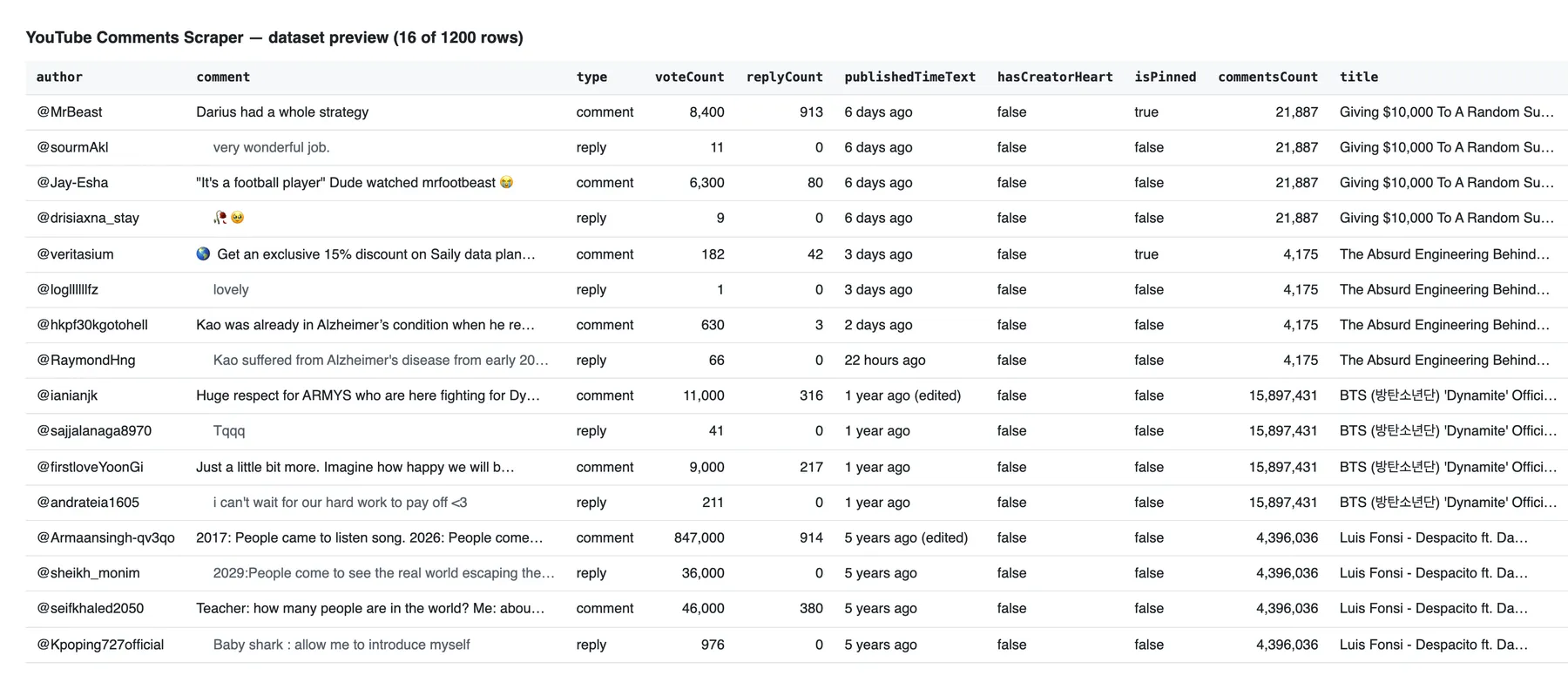
The Overview table in the Output tab shows the key fields at a glance:
Guarantees and failure semantics
- You never pay for errors. The dataset holds only real comments and replies. A video with comments turned off, a deleted or private video, or a wrong ID produces no rows. The run's status message names each of these videos and the run still SUCCEEDS, because YouTube answered.
- Blocked runs fail loudly. Every request is tried up to 3 times; each retry uses a fresh proxy IP of the same kind.
If YouTube gives no valid answer for a video after that and the run has no results at all, it ends FAILED with a
reason code at the start of the status message (
blocked,quota,timeout,network, …), so your integration knows to retry. If other videos returned results, the run succeeds and the status message names the video that failed. - Format changes fail loudly too. If YouTube changes its page format so that a video's comments can no longer be
read while it still reports comments, that video counts as unanswered with the code
outdatedinstead of returning an empty result. - Partial videos are flagged. When a later page or a reply thread fails after retries, you keep everything scraped so far and the status message lists the video as incomplete.
- No duplicates. Each comment is returned once per run, and a video listed twice (for example as a URL and as an ID) is scraped once.
- Your spending limit is respected. With a maximum charge per run set, the Actor stops cleanly when it is reached.
- No silent proxy switches. The Actor uses the proxy you chose for the whole run.
Run statistics (requests, failures by reason, data transfer, per-video counts) are saved in the STATISTICS record of
the run's key-value store.
Integrations
- API: start runs and fetch results from any language with the Apify API or the JavaScript and Python clients.
- AI agents (MCP): connect via the Apify MCP server at
https://mcp.apify.com/?tools=xmolodtsov/youtube-comments-scraper. - n8n, Make, Zapier: use the Apify node or app to run the Actor and pass comments on to a sheet, CRM or Slack.
- Schedules and webhooks: collect new comments every day on a schedule and get notified when results are ready.
- Google Sheets and Excel: export the dataset directly, or sync it with the Apify integration.
More scrapers from this developer
TikTok: TikTok Search Scraper: videos and creators for any keyword, pay per result · TikTok Profile Scraper (Pay Per Result): profiles, followers and latest posts by username · TikTok Comments Scraper: comments and full reply threads from any video · TikTok Hashtag Scraper: videos for any hashtag, with views, likes and music · TikTok Sound & Music Scraper: videos that use a sound or song
Social & news: Reddit Search Scraper: posts by keyword, subreddit or author · Google News Scraper: Google News results as clean full-text articles
E-commerce: Prom.ua Product Search Scraper: Prom.ua product search results, no browser needed · Amazon Product Search & Bestsellers Scraper: search results, Best Sellers and product details from Amazon
Maps & leads: Google Maps Scraper: places, leads and emails from Google Maps
Ads: Facebook Ad Library Scraper (Meta Ads Library): ads from the Meta Ad Library, with EU reach and payers
Video: YouTube Transcript Scraper: transcripts, subtitles and captions from YouTube videos · YouTube Shorts Scraper: Shorts of any channel with exact views, likes and duration · YouTube Channel Scraper: every video of a channel, with channel stats · YouTube Search Scraper: search results and videos for any keyword
FAQ
Do I need a YouTube API key or an account?
No. The Actor reads the same public comment data a logged-out visitor sees on YouTube. There is no API key, no daily quota and no Google Cloud project to set up.
Do I need proxies?
No. The Actor uses Apify's datacenter proxy by default, which works for YouTube comments. You can switch to residential proxies or your own under Advanced; the Actor then uses that choice for the whole run.
Does it scrape YouTube Shorts comments?
Yes. Paste a Shorts URL (https://www.youtube.com/shorts/…). Shorts rows keep the Shorts URL in pageUrl.
Why did I get fewer results than the maximum?
The video has fewer comments than you asked for, the date filter stopped the run, duplicates were removed, or the free
plan capped the run at 10 results. Replies count toward the maximum. The Actor takes at most 10 replies per comment by
default so you get a spread of threads; set Maximum replies per comment to 0 for every reply. YouTube also hides some comments (held for
review or removed as spam), so the rows can be a little fewer than commentsCount.
Why are like counts rounded?
YouTube itself shows comment likes rounded ("12K") and does not publish the exact number. The Actor converts that text
to a number in voteCount and keeps the original in voteCountText, so you can tell exact small numbers from rounded
large ones.
Can I get the exact date of a comment?
YouTube shows only relative times ("3 days ago"), and that is what publishedTimeText holds. Use the
Oldest comment date filter to keep recent comments only; read its note above about precision at the edge.
Can I scrape all comments of a video?
Yes. Set Maximum comments per video to a number above the video's comment count, and set Maximum replies per comment to 0. A video with hundreds of thousands of comments takes a while; with Newest first and a date filter you can collect only what is new since your last run.
Is it legal to scrape YouTube?
This Actor collects only publicly available comments and does not log in or access private information. Scraping public data is generally legal, but comments are personal data (usernames, avatars, opinions), which regulations such as the GDPR and the CCPA protect. Collect only what you need, keep it secure, and do not use it to target individuals. If you are unsure whether your use case is legitimate, consult your lawyers. You are responsible for complying with YouTube's terms and the laws that apply to you.
Support
Found a bug, need a field or have a question? Open an issue in the Issues tab. Please include the run ID; the
STATISTICS record of the run usually tells us what happened.


