

Bilibili Comments Scraper: Hot Comments & Reply Threads
Pricing
from $2.75 / 1,000 result rows
Bilibili Comments Scraper: Hot Comments & Reply Threads
Bilibili Comments Scraper collects public hot or newest video comments and reply threads by video URL or keyword. Export text, authors, likes, timestamps, thread linkage, and optional video details for audience research.
Pricing
from $2.75 / 1,000 result rows
Rating
0.0
(0)
Developer

GoFetch
Maintained by CommunityActor stats
0
Bookmarked
2
Total users
1
Monthly active users
2 hours ago
Last modified
Categories
Share
Bilibili Comments Scraper collects public hot comments and reply threads from Bilibili videos. Start with video URLs or discover videos with Chinese or English keywords, then export structured rows for audience research, content analysis, community monitoring, and reporting.
The Actor works anonymously without a Bilibili account or user-supplied cookies. Choose hot or newest root comments, include replies, and optionally add video metadata and tags. Experimental danmaku collection provides a timeline sample from the available XML pool. This is an independent tool and is not affiliated with Bilibili.
What data you get
All results share one dataset. The type field tells you how to interpret each row, so a spreadsheet or database can retain the relationship between a video and its conversation.
| Row type | What it contains | Useful for |
|---|---|---|
video | Title, description, uploader, publication time, duration, thumbnail, tags, selected part CID, views, likes, coins, favorites, shares, comment and danmaku counts | Adding context to a discussion or comparing video engagement |
comment | Root comment ID, text, author, level, avatar, likes, reply count, publication time, available pictures and uploader-like signal | Reviewing hot opinions or following recent discussion |
reply | The comment fields plus root and parent comment IDs | Rebuilding threads and separating replies from standalone comments |
danmaku | Bullet text, time within the video, send time, display mode, color, and sender hash | Exploring when viewers react during playback |
Every row also includes videoId, videoAid, videoUrl, videoTitle, keyword, and UTC scrapedAt. IDs used for comment and author linkage are strings. Missing source values remain null or are omitted when the field itself has no reliable signal. The Actor does not output sex, IP location, or an inferred pinned flag. Danmaku sender hashes are never resolved into user accounts.
Quick start
In Apify Console
- Open the Actor and select Try for free.
- Keep the prefilled public video or enter your own URLs in Video URLs or IDs. Alternatively, clear the URL list and add search keywords.
- Choose the number of videos and the combined number of comments and replies per video. Start with 20–100 comments while checking whether the source suits your project.
- Keep Apify datacenter proxy selected, then click Start.
- Open the dataset after the run. Use the Overview table for conversation rows, or download JSON, CSV, Excel, or another available export.
For keyword collection, maxVideosPerKeyword controls how many unique videos are selected for each query. A video found through several keywords is collected once. Its rows retain the keyword that first scheduled it; they are not duplicated for every matching query.
Through the API or MCP
Send the same JSON input from your application. The synchronous endpoint is convenient for a small sample; for larger work, start an asynchronous run and read its dataset when it completes.
If you use Apify MCP, select this Actor, provide those input fields, run it, and retrieve the dataset. An agent can use type, rootCommentId, and parentCommentId to group replies before summarizing them. Preserve the original text and video URL in any analysis so findings can be traced to their source. Keep your Apify API token private.
Pricing
One saved dataset row is one result, whether it is a video, comment, reply, or danmaku. Enabling optional row types increases the number of results. Duplicate IDs and unsuccessful requests do not create billable rows.
| Apify plan | Price per 1,000 saved rows |
|---|---|
| Free | $4.50 |
| Bronze | $3.50 |
| Silver | $3.00 |
| Gold, Platinum, Diamond | $2.75 |
For example, 100 rows cost $0.45 at the Free rate. A sample containing 10 video rows and 990 comments or replies is 1,000 results: $3.50 on Bronze or $2.75 on Gold. A 5,000-row research export is $15.00 on Silver. These examples assume the stated row counts are actually saved; selecting an input limit does not guarantee the source has that many accessible results. The Actor's Pricing tab is the current billing reference.
Set a maximum total charge in your run options to bound Actor charges. If the SDK reports that the budget has been reached, the Actor stops collecting and ends successfully with charge_limit in the status message. Download the rows already stored and increase the budget only if you need another sample.
Is it free?
You can use your available Apify credits. On the Free Apify plan, this Actor permits up to 100 results per run and 20 runs per calendar month, measured in UTC. This is a limit set by the developer, not by Apify. All row types and all inputs share the same 100-row run budget.
The monthly allowance is tied to your Apify account. Deleting a dataset or starting several runs at once does not reset it. After the allowance is used, another run ends successfully with a clear quota message and makes no Bilibili requests. The allowance resets on the first day of the next UTC month. Paid Apify plans do not have these developer caps; the requested input limits, accessible source data, and your run budget still apply.
Input
Use at least one video or keyword. The prefill is one public video with a 20-comment limit; defaults used by an API caller can differ from the prefill values shown in Console.
| Field | Default | Meaning |
|---|---|---|
videoUrls | Prefilled example in Console | BV IDs, av IDs, full video URLs, or b23.tv short links |
searchKeywords | None | Chinese or English search terms, up to 100 keywords |
maxVideosPerKeyword | 10 | Unique videos per keyword, 1–1,000 |
searchSort | totalrank | Relevance; also click, pubdate, dm, stow, or scores |
maxCommentsPerVideo | 100; prefill 20 | Combined root-comment and reply rows per video, 1–10,000 |
commentSort | hot | Hot roots or newest roots |
includeReplies | true | Fetch reply pages for selected roots |
maxRepliesPerComment | 20 | Replies per root, subject to the per-video comment budget |
includeVideoDetails | true | Add one billed video row with statistics and tags |
includeDanmaku | false | Add experimental XML timeline rows |
maxDanmakuPerVideo | 200 | Timeline rows per video, 1–5,000 |
proxyConfiguration | Apify datacenter | Optional residential selection or paid-run custom proxies |
A URL containing ?p=2 selects that part's CID for the video row and danmaku. Comments remain attached to the whole video. The same BV video is collected once per run, so use separate runs to compare several parts of one video. Invalid entries are skipped with a warning; if no usable videos or keywords remain, the run fails with invalid:.
For API compatibility, URL aliases urls, videos, and startUrls are accepted; startUrls may contain objects with a url property. Keyword aliases are keywords, queries, and the single-string searchQuery. Aliases take precedence over canonical fields, including schema defaults. Prefer canonical fields in new integrations and avoid mixing several aliases in one request.
Search is bounded to 50 pages per keyword and runs as workers need more videos. Discovery stops when the run reaches its row budget, charge limit, or deadline. Pages 1–2 were verified in the initial probes; deeper discovery is best effort. Comment paging follows Bilibili's continuation cursor rather than guessing page numbers. Root comments are saved before replies from that page, so a small combined limit can be filled entirely by roots. Increase the limit if you want more thread context.
Free runs always use Apify Proxy. Custom proxy URLs or explicit direct access apply only to paid or local runs. The Actor does not silently change proxy classes during a run.
Output example
The following row is taken from a real run; counts describe the time it was collected and will change. Video rows carry descriptive fields, while conversation rows carry text and thread linkage.
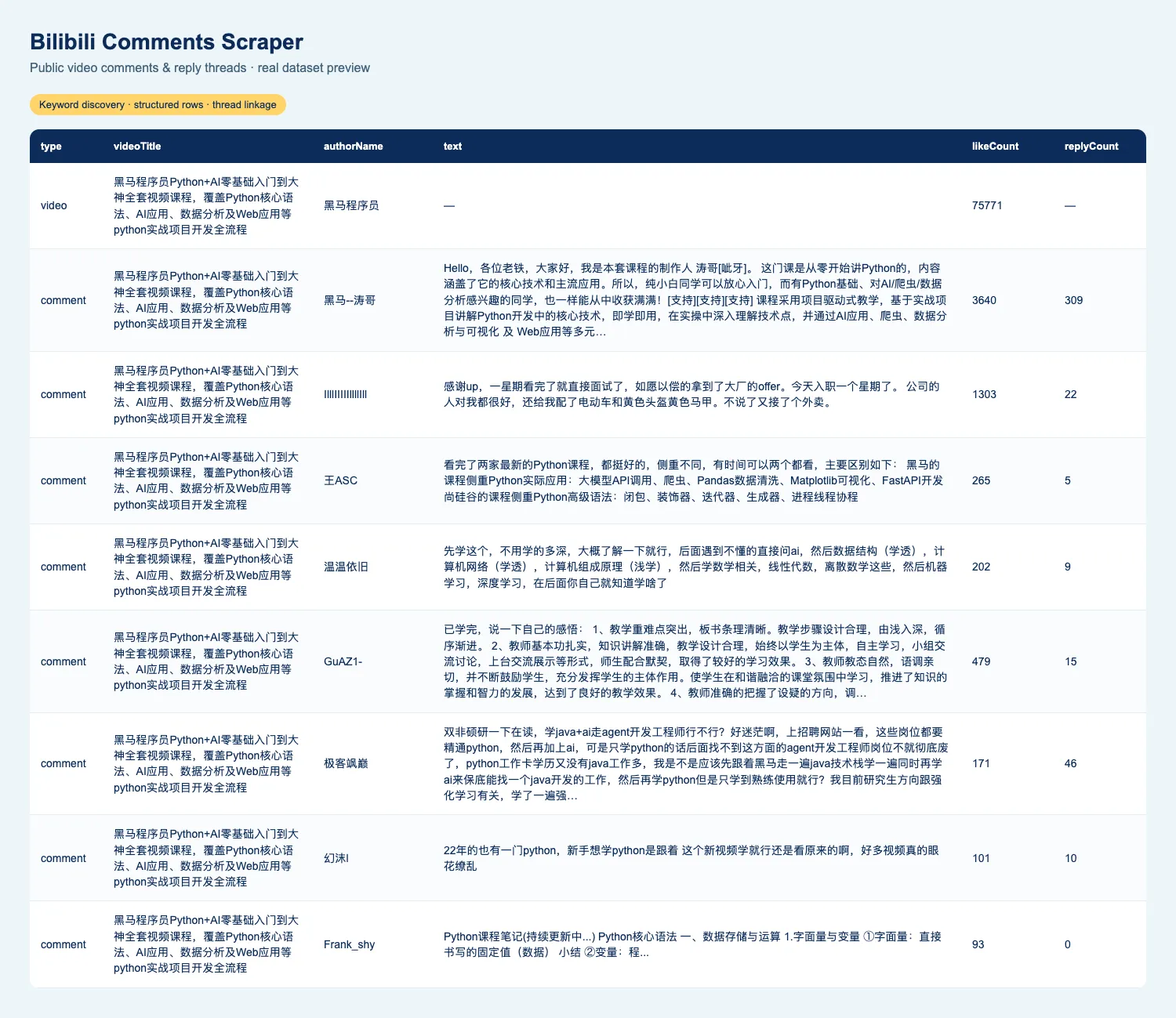
Use the overview dataset view to inspect mixed rows. The videos view emphasizes video metadata columns; when exporting mixed results, filter type to video for a video-only report. To reconstruct a conversation, group by videoId, match replies to rootCommentId, then use parentCommentId for nested relationships. Deduplication applies within a run; merge exports from repeated runs using stable IDs if you want a longitudinal dataset.
Guarantees and failure semantics
A result limit is an upper bound. Bilibili can return fewer comments because a thread is short, comments are closed, a video is unavailable, or an anonymous continuation ends. Initial probes tested to 1,200+ top-level comments per video per sort order on selected videos. This is bounded evidence, not a promise of every comment or a complete historical archive.
Blocked requests are retried up to three attempts using fresh proxy sessions. Risk-control codes are tracked separately from transport errors. Empty search pages are retried once before they are treated as exhaustion. The Actor refreshes anonymous signing keys after a signature rejection; continued rejection is reported as outdated:.
A run fails when every input receives no valid answer. Status prefixes distinguish blocked:, network:, timeout:, invalid:, and outdated:. A closed-comments or deleted-video answer is valid, returns no rows for that video, and is recorded in statistics. If some inputs answer and others fail, the run succeeds and identifies the incomplete inputs. Later-page failures also produce a partial success, so read the status message before treating the output as complete.
An answered empty run succeeds with a “No results” message. The runtime guard stops starting requests before a configured deadline so stored data and statistics can be finalized. A timeout guard reached at zero saved rows fails with timeout:. Dataset and statistics write errors surface as failures. Inspect the STATISTICS record for input outcomes, request counts, blocked attempts by code, transfer bytes, saved row counts, and duration.
Experimental danmaku is sampled evenly by timeline position across the available XML pool when that pool exceeds your limit. The first and last available positions are included for limits greater than one. It is not a random sample, a complete transcript, or a guarantee of every reaction. An empty or unreadable XML decode is reported as an error rather than silently counted as zero.
Integrations
Download a spreadsheet for a small qualitative review, or use Apify's Dataset API for a repeatable pipeline. Connect completed runs to your existing Apify integrations or webhooks to pass rows into a reporting workflow. Filter by type before aggregating likes or counts: video likes and comment likes describe different things.
For sentiment or topic analysis, retain Chinese text without translating away the original, separate root comments from replies, and report the chosen sort order and limits. Hot-comment samples emphasize visible engagement, while newest-comment samples describe a recent slice. Neither alone establishes the opinion of all viewers.
More scrapers from this developer
TikTok: TikTok Search Scraper: videos and creators for any keyword, pay per result · TikTok Profile Scraper (Pay Per Result): profiles, followers and latest posts by username · TikTok Comments Scraper: comments and full reply threads from any video · TikTok Hashtag Scraper: videos for any hashtag, with views, likes and music · TikTok Sound & Music Scraper: videos that use a sound or song · TikTok Top Ads Scraper: public Creative Center ad rankings, engagement, media and landing pages
Social & news: Reddit Search Scraper: posts by keyword, subreddit or author · Google News Scraper: Google News results as clean full-text articles
E-commerce: Prom.ua Product Search Scraper: Prom.ua product search results, no browser needed · Amazon Product Search & Bestsellers Scraper: search results, Best Sellers and product details from Amazon · AliExpress Search Scraper: aliExpress products by keyword with prices, orders and shipping
Maps & leads: Google Maps Scraper: places, leads and emails from Google Maps
Ads: Facebook Ad Library Scraper (Meta Ads Library): ads from the Meta Ad Library, with EU reach and payers · Google Ads Transparency Scraper: Google ad creatives by advertiser or domain, with regional details
Video: YouTube Transcript Scraper: transcripts, subtitles and captions from YouTube videos · YouTube Shorts Scraper: Shorts of any channel with exact views, likes and duration · YouTube Channel Scraper: every video of a channel, with channel stats · YouTube Search Scraper: search results and videos for any keyword · YouTube Comments Scraper: comments, replies and likes from any video
Jobs: SEEK Job Listings Scraper: public AU/NZ job listings, salaries and redacted descriptions
FAQ
Can I collect all comments from a video?
The Actor follows the anonymous source until your limit, source exhaustion, an empty page, or a repeated cursor. It cannot promise all comments. Bilibili's displayed comment count can include replies and content that is not returned in the available anonymous pages.
Why are there fewer replies than expected?
Replies share maxCommentsPerVideo with roots and also have a per-root limit. Some roots have no accessible replies. Increase both relevant limits, and inspect statistics for a source error before assuming the thread has ended.
Does it require login or a Bilibili cookie?
No. Do not supply account credentials. The Actor uses anonymous public endpoints and any visitor cookie needed for search; comment requests do not use that visitor cookie. Access may still change when Bilibili updates its service or applies risk controls.
Is it legal to scrape Bilibili?
This Actor collects publicly accessible data. Public visibility does not establish permission for every collection or reuse. You are responsible for assessing Bilibili's terms, applicable laws, and your intended purpose, including GDPR, CCPA, and China's PIPL where relevant. Minimize retained personal data, limit access, and avoid collecting unnecessary identifiers. Obtain appropriate legal advice for your use case. See Apify's legal documentation and data processing terms for the platform's policies.
Are video files or complete subtitles included?
No. Results contain conversation text, public metadata, and optional timeline bullets. A danmaku sample is audience commentary, not a subtitle track.
Support
Open an issue on this Actor's Apify Issues tab. Include the run ID, a public video URL or keyword, the relevant input limits, and the status message. Do not share API tokens, account cookies, or private content. A reproducible public example helps distinguish source exhaustion from a parser or signing change.


