

YouTube Transcript Scraper: YouTube Captions & Subtitles
Pricing
from $3.00 / 1,000 transcripts
YouTube Transcript Scraper: YouTube Captions & Subtitles
Get YouTube transcripts, subtitles and captions as text with timestamps from video, Shorts, channel or playlist URLs. Pick languages, manual or auto-generated captions. Includes title, channel, views, likes and publish date. Pay only per transcript; videos without captions are free.
Pricing
from $3.00 / 1,000 transcripts
Rating
0.0
(0)
Developer

GoFetch
Maintained by CommunityActor stats
0
Bookmarked
1
Total users
1
Monthly active users
4 days ago
Last modified
Categories
Share

What does YouTube Transcript Scraper do?
YouTube Transcript Scraper downloads YouTube captions and subtitles as clean text with timestamps from any public YouTube video that has captions, for AI and LLM pipelines, content repurposing and research. It reads human-made or auto-generated captions in the languages you choose. Paste video, Shorts, channel or playlist URLs and get one row per video: the full transcript text, timestamped segments, the caption language, and video metadata such as title, channel, views, likes, duration and publish date.
You pay only for transcripts returned. Videos without captions, unavailable videos and errors are free.
Who uses it:
- AI and LLM builders feed transcript text into prompts, RAG pipelines, embeddings and search indexes.
- Content teams repurpose videos into blog posts, newsletters, show notes and social posts.
- Researchers and analysts study what is said across hundreds of videos, channels or playlists.
- SEO specialists publish text versions of videos and learn the words a niche uses.
- Accessibility teams produce readable text for people who can't watch or hear a video.
Highlights:
- Bulk transcripts from videos, Shorts, channels and playlists in one input. A channel URL expands to its latest uploads, a playlist to its videos.
- Language control: list your preferred caption languages in order, choose manual or auto-generated captions, and fall back to the video's own language.
- No setup: a residential proxy is built in and included in the price, so requests don't come from the datacenter IPs YouTube blocks. No YouTube login, API key or cookies.
- Plain HTTP, no browser: in our tests, 200 videos took about 95 seconds.
- Clear outcomes: every video gets a row; videos without a transcript come back free, with a machine-readable reason.
What data you get
One dataset item per video.
| Field | Example | Description |
|---|---|---|
video_id, url | F0OkwXKcPSE | Video ID and watch URL |
title | Hi Me In 10 Years | Video title |
channel_id, channel_name, channel_username | MrBeast, @MrBeast | Channel ID, name and @handle |
view_count, like_count | 69706457, 3832915 | Views and likes |
duration_seconds | 194 | Video length in seconds |
published_at, timestamp | 2025-10-04T09:00:07-07:00 | Publish date, also as a Unix timestamp |
category | Entertainment | YouTube category |
description, keywords | ["Mr.Beast", "mr", "beast"] | Description text and video tags |
thumbnail | https://i.ytimg.com/vi/…/maxresdefault.jpg | Largest thumbnail URL |
language, selected_language | en, English | Code and name of the returned caption track |
available_languages | ["English", "French", …] | Every caption track the video has |
is_auto_generated | false | true when YouTube's speech recognition made the captions |
transcript | [{"text": "…", "start": 0.292, "end": 1.542, "duration": 1.25}] | Timestamped segments, in seconds |
transcript_text | Hi, me in ten years. … | The full transcript as one string |
status, error_code, message | success, null | Outcome, and a reason code when there is no transcript |
input | https://www.youtube.com/@MrBeast | The input line that produced the row |
Likes, publish date, category and @handle are filled when YouTube includes them, which in our tests was almost every video; otherwise they are null, never guessed.
How to use YouTube Transcript Scraper
- Open the Actor in Apify Console and go to the Input tab.
- Paste video, Shorts, channel or playlist URLs (or 11-character video IDs) into YouTube URLs or video IDs, one per line.
- Pick your Preferred languages and Caption type, and set Max videos per channel or playlist if you pasted channels or playlists.
- Click Start. Download the transcripts from the Output tab as JSON, CSV, Excel or HTML, or read them through the API.
Use it as a YouTube transcript API
This call runs the Actor and returns the transcripts. Synchronous calls time out after 5 minutes, so for large batches start a run and read its dataset afterwards.
With the Apify Python client:
Use it from an AI agent (MCP)
Connect your MCP client to https://mcp.apify.com?tools=xmolodtsov/youtube-transcript-scraper and the agent can fetch YouTube transcripts as a tool call. The usual pricing and free-plan limits apply.
Pricing
Pay per event, all-inclusive: you are charged per transcript returned, and the proxy and platform usage are included. There are no start fees and no separate compute bill.
| Apify plan | Price per transcript | Price per 1,000 transcripts |
|---|---|---|
| Free | $0.005 | $5.00 |
| Starter (Bronze) | $0.004 | $4.00 |
| Scale (Silver) | $0.0035 | $3.50 |
| Business (Gold) | $0.003 | $3.00 |
Platinum and Diamond plans pay the Gold price. Rows without a transcript (not_available and error) are never charged.
How much does it cost to scrape YouTube transcripts?
One transcript is one charge, whatever the video's length: a 30-second Short and a three-hour podcast cost the same.
Example: you paste five channel URLs and set Max videos per channel or playlist to 200. That queues 1,000 videos. 950 have captions and 50 don't. You pay for 950 transcripts: $3.80 on Starter, $2.85 on Business. The 50 rows without captions are free. Duplicate videos are removed across the whole run, so a video that appears in two playlists is fetched and charged once.
To cap spending, set a maximum cost per run in Console or the API. The Actor stops cleanly at that limit and keeps every transcript fetched so far.
Is it free?
You can try it on the free Apify plan. Free-plan runs are limited to 100 videos per run and 20 runs per calendar month per account. These limits are set by the developer of this Actor, not by Apify, and any paid Apify plan removes them. A capped run still succeeds and says so in its status message. Once the twenty runs are used, further runs end successfully with an explanation and no results until the 1st of the next month.
Input
| Field | Type | Default | Description |
|---|---|---|---|
urls | array of strings | required (or a drop-in field, below) | Video URLs (watch?v=, youtu.be/, /shorts/, /live/, /embed/), 11-character video IDs, channel URLs or @handles, and playlist URLs, mixed freely. |
maxVideosPerChannel | integer | 10 | Latest videos taken from each channel or playlist (1 to 5,000). Single video URLs are not affected. |
languages | array of strings | ["en"] | Caption language codes in order of preference. en also matches en-GB and other regional variants. |
captionType | string | any | any (human-made first, auto-generated otherwise), manual or auto. |
fallbackToAnyLanguage | boolean | true | When none of your languages exists, return the video's original language instead of a free language_not_found row. |
includeTimestamps | boolean | true | Include the timestamped transcript segments. transcript_text is always included. |
proxyConfiguration | object | built in | Residential proxy is built in and included. Change it only to use your own proxies. |
Example input:
Drop-in field names. The Actor also reads youtube_url, channel_url, videoUrl, startUrls, max_videos and language, so a saved input from another YouTube transcript tool runs as is.
Output
Each video is one item in the dataset. A success row, with the segments and long lists shortened:
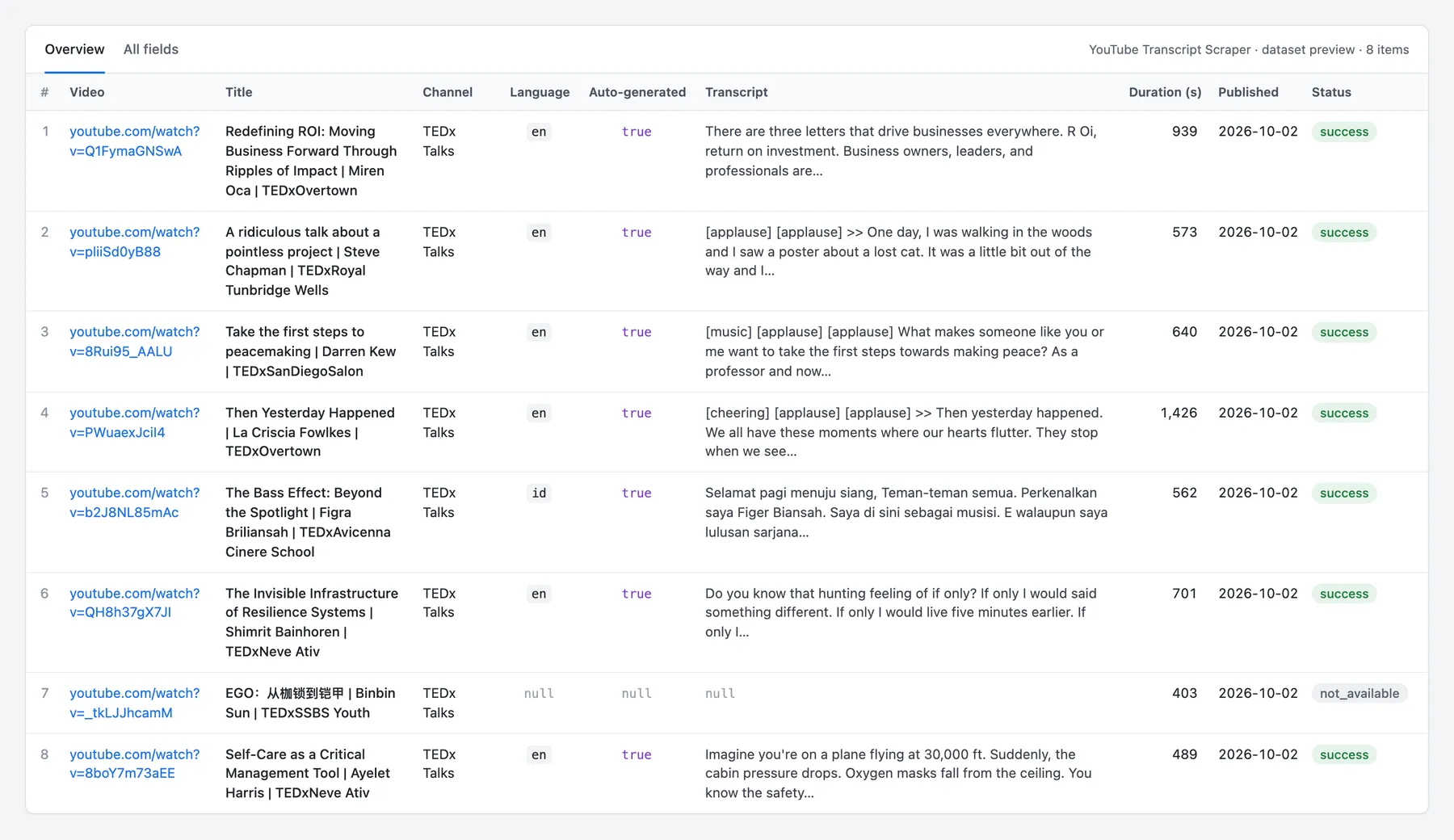
The Overview view in the Output tab shows the key columns. This preview is from a real run on a channel's latest uploads, with one free not_available row:
Guarantees and failure semantics
Every video gets a row. A video without a transcript still returns a row with status: "not_available" and an error_code. Title, channel and views are filled when YouTube returns them. These rows are free and never fail the run; they describe your data.
error_code | What it means |
|---|---|
no_captions | The video has no captions: the creator turned them off, or YouTube never made any. |
language_not_found | Captions exist, but not in your languages or caption type. |
private, members_only, age_restricted | The video needs a sign-in or membership. |
removed, not_found | The video was removed, or no video has this ID. |
upcoming, live_now | A premiere or stream that hasn't started, or one that is live now. Captions appear after it ends. |
live_recording_unavailable, geo_blocked, unplayable | YouTube does not serve the video. |
channel_not_found, playlist_not_found, invalid_input | YouTube doesn't know the channel or playlist, or the line isn't a YouTube URL or video ID. |
Errors are retried, then reported. Each video gets several attempts on different YouTube clients and fresh IP addresses. A video that still fails returns a free row with status: "error" and a code such as blocked, rate_limited, timeout or network.
When a run fails. A run is marked FAILED, so your integration can retry the batch, when:
- no transcript was returned and at least one video errored, or
- more than 20% of the requested videos, and more than two, ended in
errorrows, or - the input contains no valid YouTube URL or video ID.
The status message starts with a reason code (for example blocked:), followed by a summary of transcripts, unavailable videos and errors. A run where every video is simply unavailable ends SUCCEEDED. Stopping at your maximum cost per run is a normal SUCCEEDED run.
Run statistics. The run's key-value store holds a STATISTICS record with counts per outcome and reason.
In our platform tests on 3 Oct 2026, 1,356 of 1,356 captioned videos returned a transcript.
Integrations
- Apify API and clients: start runs and read results from any language, or with the JavaScript and Python clients.
- Make, Zapier and n8n: run the Actor from a workflow and pass transcripts to the next step.
- LangChain and LlamaIndex: load transcripts as documents for RAG and agents through Apify's integrations.
- Google Sheets, Slack and webhooks: send results where your team works, or trigger your own endpoint when a run finishes.
- Schedules: fetch a channel's newest videos every day or week.
More scrapers from this developer
TikTok: TikTok Search Scraper: videos and creators for any keyword, pay per result · TikTok Profile Scraper (Pay Per Result): profiles, followers and latest posts by username · TikTok Comments Scraper: comments and full reply threads from any video · TikTok Hashtag Scraper: videos for any hashtag, with views, likes and music · TikTok Sound & Music Scraper: videos that use a sound or song · TikTok Top Ads Scraper: public Creative Center ad rankings, engagement, media and landing pages
Social & news: Reddit Search Scraper: posts by keyword, subreddit or author · Google News Scraper: Google News results as clean full-text articles · Threads Replies Scraper: public post replies, likes, authors and inline nested replies
Instagram: Instagram Reel Scraper: public profile reels, plays, captions, music and media URLs · Instagram Comment Scraper: public post and reel comments, likes, timestamps and usernames
E-commerce: Prom.ua Product Search Scraper: Prom.ua product search results, no browser needed · Amazon Product Search & Bestsellers Scraper: search results, Best Sellers and product details from Amazon · AliExpress Search Scraper: aliExpress products by keyword with prices, orders and shipping · AliExpress Product Reviews Scraper: public product reviews, ratings, buyer photos and follow-up feedback
Maps & leads: Google Maps Scraper: places, leads and emails from Google Maps
Ads: Facebook Ad Library Scraper (Meta Ads Library): ads from the Meta Ad Library, with EU reach and payers · Google Ads Transparency Scraper: Google ad creatives by advertiser or domain, with regional details
Video: YouTube Shorts Scraper: Shorts of any channel with exact views, likes and duration · YouTube Channel Scraper: every video of a channel, with channel stats · YouTube Search Scraper: search results and videos for any keyword · YouTube Comments Scraper: comments, replies and likes from any video · Bilibili Comments Scraper: public hot comments and reply threads by video or keyword
Jobs: SEEK Job Listings Scraper: public AU/NZ job listings, salaries and redacted descriptions
FAQ
Is it legal to scrape YouTube transcripts?
This Actor collects only publicly available data. It never logs in and does not access private, members-only or age-restricted videos. Transcripts can still contain personal data, such as names and what people say about themselves, which laws such as the GDPR in the EU and the CCPA in California protect. Collect personal data only when you have a legitimate reason, and store and process it responsibly. Transcripts are also the creator's work: check that your use respects copyright and YouTube's Terms of Service, especially before republishing transcript text. This is not legal advice; if you are unsure, consult a lawyer.
Can it translate transcripts into another language?
No. YouTube throttles its translated-caption feature (HTTP 429 "too many requests") too hard for dependable bulk runs, so the Actor doesn't offer translation. Pick a caption language the video already has: available_languages lists them all. With Fall back to the video's own language on, a video without your languages returns its original-language transcript, which you can translate afterwards with any translation tool.
Some videos are auto-dubbed by YouTube into other languages, and each dub has its own auto-generated captions. If you ask for a dub's language (often English), you get the transcript of the AI dub, not the speaker's own words. The fallback always uses the language actually spoken in the video.
What if a video has no captions?
You get a free row with error_code: "no_captions", so you can see the video was checked. The Actor reads YouTube's existing captions and does not run speech-to-text. Recent official music videos often have no captions at all.
Does it work with YouTube Shorts?
Yes. Paste Shorts URLs (youtube.com/shorts/…) or their video IDs. A channel URL lists the channel's Videos tab, so a channel's Shorts tab is not included; paste the Shorts you want directly.
How fast is it?
In our tests, a run of 200 videos took about 95 seconds at the default settings, and 200 long videos (many over three hours) took about 2.5 minutes. Speed depends on video length and YouTube's response times.
How do I get every transcript from a channel or playlist?
Paste the channel URL, @handle or playlist URL and set Max videos per channel or playlist (up to 5,000). Channels return their latest uploads, newest first; duplicates across the run are removed.
Is the text ready for an LLM?
transcript_text is one plain string with the segments joined by spaces. Auto-generated captions keep YouTube's sound tags such as [music] or [applause], which you may want to strip. Use transcript when you need timestamps to cite or chunk by time.
Can I download the subtitles as an SRT file?
The Actor returns JSON, CSV or Excel rather than subtitle files, but with Include timestamped segments on (the default) every segment in transcript has start and end in seconds, so an SRT file is a few lines away:
Does it handle very long videos and livestreams?
Yes. When a multi-day livestream's segments would exceed Apify's 9 MB item limit, the segments are dropped and transcript_text is kept; the row's message says so.
Do I need a proxy, an API key or a YouTube account?
No. A residential proxy is built in and included in the price, and the Actor never logs in. Leave the proxy setting as is unless you want to route through your own proxies.
Support
Found a bug, a video that should work but doesn't, or a field you need? Open an issue in the Issues tab on this Actor's page with the run link, and we'll take a look.


