

Prom.ua Product Search Scraper
Pricing
from $1.70 / 1,000 prom.ua products
Prom.ua Product Search Scraper
Scrape Prom.ua product search results for any keyword: product URL, title, regular and sale price in UAH, image, seller name and store URL, stock status and search rank. Sort by price, filter by price range or review quality. No browser, proxy or login. Pay only per product.
Pricing
from $1.70 / 1,000 prom.ua products
Rating
0.0
(0)
Developer

GoFetch
Maintained by CommunityActor stats
0
Bookmarked
10
Total users
6
Monthly active users
14 days ago
Last modified
Categories
Share

Prom.ua Product Search Scraper returns Prom.ua search results as clean product rows: product URL, title, regular and discounted price in UAH, image, seller name, seller store URL, stock status and search position. Type any keyword, in Ukrainian or English, and get up to 1,000 search results per run from one of Ukraine's largest online marketplaces. No browser, no proxy, no login, and you pay only per product returned (see Pricing).
Works from a plain keyword, so you don't need category or product URLs in advance. Sorting by price and price-range filters are applied by Prom.ua itself across the whole result set.
Use cases
- Repricing for an online store: a Ukrainian electronics shop runs its top keywords every morning with
sort_option: "price_asc"and feeds the cheapest competing offers and their stock status into its repricing sheet. - Brand share of shelf: a brand manager runs the category keyword weekly and tracks how many of the top 100
positions carry the brand's products, and which sellers hold them. - Assortment research before a launch: a seller entering a category pulls 1,000 results for the keyword, groups
them by
seller_nameand price band, and sees who sells what at which price. - Price monitoring: a market analyst schedules the same price-band search daily and matches items on
urlto build regular-price, sale-price and stock history.
What data you get
One dataset item per product, with these 10 fields:
- Product:
url(a working product page link),title(as listed, in its original language),image_url(400×400 image on the Prom.ua CDN). - Price:
regular_price_uah,discounted_price_uah(nullwhen the product isn't on sale) andcurrency(always"UAH"). - Seller:
seller_nameandseller_url(the seller's store page on Prom.ua). - Availability and rank:
in_stockandposition, the 1-based rank in the search results.
Not included
This is a search-results scraper. It reads what the Prom.ua search page carries and does not open individual product pages, so:
- No product descriptions or specifications; those live on the product page.
- No review texts or review counts.
media_onlyandgood_ratings_onlyfilter by review properties, but the reviews themselves are not returned. - No seller phone numbers or contact details.
- One
search_termper run and at most 1,000 products per run.
Use url and seller_url from the output as input to a product-page scraper if you need the deeper fields.
How to scrape Prom.ua
In the Apify Console
- Type your keyword into Search Term, in Ukrainian/Cyrillic or English (
ноутбуки,жіночі сумки,smartphone). - Set Maximum Items, the number of products to collect (1–1,000).
- Optionally pick a Sort Option and a Minimum/Maximum Price (UAH).
- Click Start, then open the Overview table on the Output tab or export the dataset as JSON, CSV, Excel, XML or JSONL.
A price-tracking run, cheapest offers in a price band first:
Via API
With curl, get the products straight back in the response:
With the Apify JavaScript client:
With the Apify Python client:
With AI agents (MCP)
Add the actor to any MCP client (Claude, Cursor, VS Code and others) through Apify's MCP server:
Your agent can then call it with the same input, for example "find the 50 cheapest laptops on Prom.ua between 10,000 and 50,000 UAH".
Pricing
Pay per product: you pay only for products saved to your dataset. Apify platform usage (compute, storage, data transfer) is included, so nothing is billed on top, and there is no monthly fee.
Until 18 October 2026 (15:00 UTC), every Apify plan pays $2.00 per 1,000 products ($0.002 per product). From then on, paid Apify plans get a lower price:
| Apify plan | Price per 1,000 products |
|---|---|
| Free | $2.00 |
| Starter (Bronze) | $1.90 |
| Scale (Silver) | $1.80 |
| Business (Gold) | $1.70 |
| Platinum and Diamond | $1.70 (Gold price) |
| Run size | Free plan | Business (Gold), from 18 October |
|---|---|---|
| 100 products | $0.20 | $0.17 |
| 1,000 products (one full run) | $2.00 | $1.70 |
| 10,000 products (10 keywords × 1,000) | $20.00 | $17.00 |
Only products that reach the dataset are charged. A filtered search that matches nothing costs nothing for results.
Is it free?
You can try it on Apify's Free plan, which includes monthly usage credit; the default input (10 laptops) costs $0.02. The developer sets no extra free-plan limits: Free-plan users get the same inputs and the same 1,000-product maximum per run as paying users, at the Free price in the table above.
Input
| Parameter | Type | Default | Notes |
|---|---|---|---|
search_term | string | required | The keyword to search on Prom.ua, in Ukrainian/Cyrillic or English, e.g. ноутбуки, жіночі сумки, smartphone. One search term per run. |
max_items | integer | 10 | How many products to collect, 1–1000. Pagination is automatic. |
sort_option | string | "default" | default, price_asc (cheapest first), price_desc (most expensive first) or relevance. Applied server-side by Prom.ua. |
min_price | integer | — | Minimum price in UAH. Server-side filter. |
max_price | integer | — | Maximum price in UAH. Server-side filter. |
use_apify_proxy | boolean | false | Optional and normally unnecessary; scraping works without a proxy. |
media_only | boolean | false | Only products whose customer reviews include photos or videos. Narrow filter that can legitimately return few or zero products. |
good_ratings_only | boolean | false | Only products rated 4 stars and above. If media_only is also on, media_only wins. |
debug_mode | boolean | false | Verbose logging for troubleshooting. Leave off for normal runs. |
Output
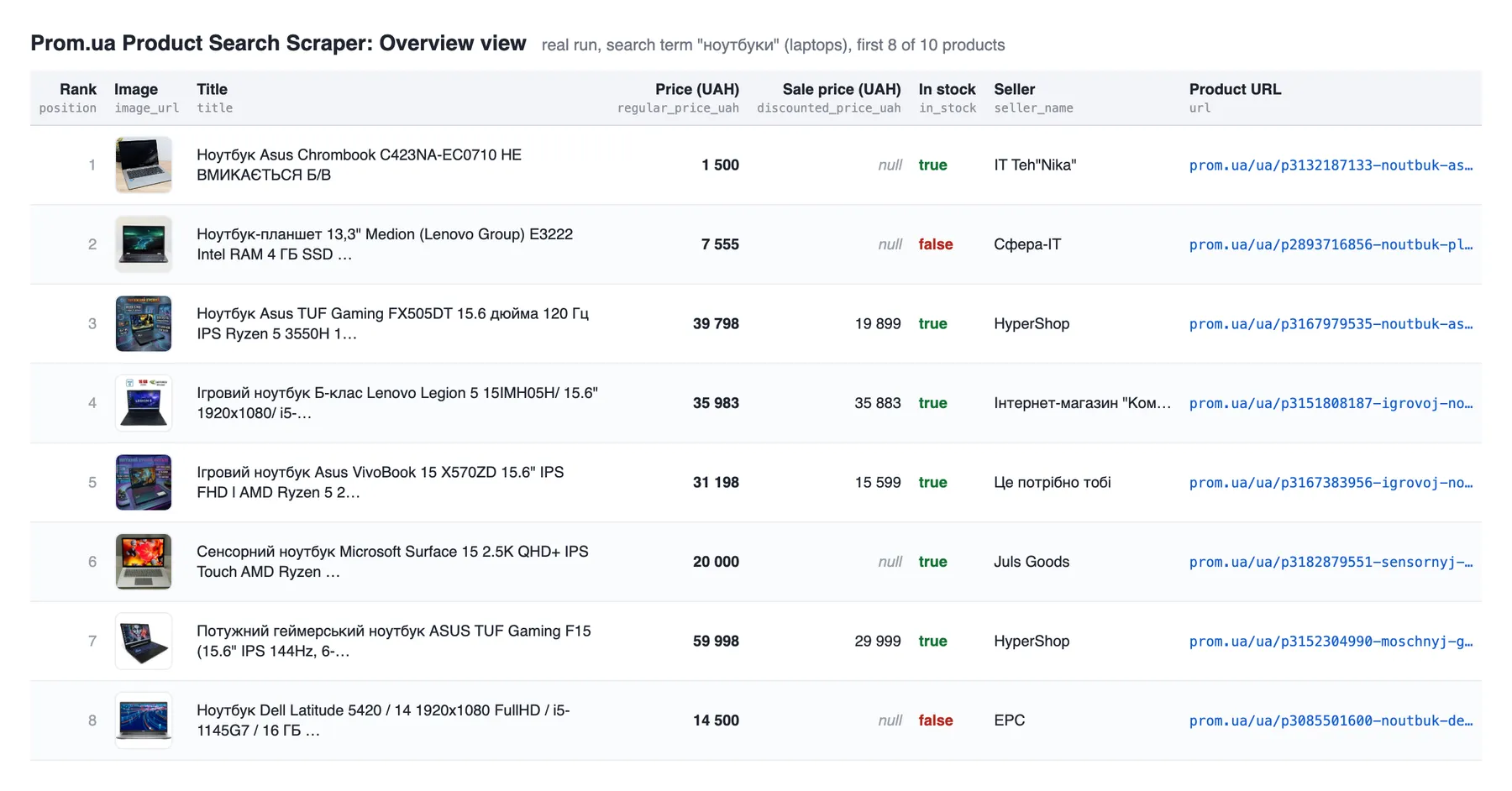
The Overview table on the Output tab shows rank, image, title, prices, stock, seller and product URL.
Here it is for a real run with the default input (ноутбуки, laptops):
One item from the same run, as JSON:
| Field | Type | Description |
|---|---|---|
url | string | Working product page URL (https://prom.ua/ua/p{id}-{slug}.html). |
title | string | Product title as listed, in its original language. |
regular_price_uah | number | List price in Ukrainian hryvnia. |
discounted_price_uah | number | null | Sale price in UAH, or null when the product is not discounted. |
currency | string | Always "UAH". |
image_url | string | Product image on the Prom.ua CDN (400×400). |
seller_name | string | Seller or company name. |
seller_url | string | Working seller store page URL. |
in_stock | boolean | Availability as shown in the search results. |
position | integer | 1-based rank in the search results, the field to diff between runs for ranking and share-of-shelf tracking. |
Every field is present on every item. A product whose URL cannot be built is dropped rather than saved with
an empty url, so every row you are charged for links to a real page.
Guarantees and failure semantics
- Unfiltered searches never go green with nothing. If a search without filters extracts 0 products, the
run ends FAILED with
0 products extractedin the log. That means Prom.ua changed its page or blocked the request, so schedulers and API callers can retry or alert on it. The one exception: when Prom.ua's own page reports 0 results for the keyword, the run SUCCEEDS empty and its status message says so. - Filtered searches may legitimately be empty. With
media_only,good_ratings_only,min_priceormax_priceset, 0 products is a valid SUCCEEDED outcome: the filter matched nothing. - Pages served without content are retried. Prom.ua occasionally serves a search page without its product data; the actor detects it and fetches the page again (up to 5 attempts) instead of reporting an empty result.
- A page that keeps failing fails the run. If a results page still errors after 5 attempts, the products from earlier pages are saved and the run ends FAILED with a status message naming the failed page, instead of returning a shortened list as SUCCEEDED.
- Results stay in search order.
positionkeeps counting across result pages instead of restarting at 1 on each page.
Automated callers can treat SUCCEEDED as "the dataset is complete for this input" and retry on FAILED.
Integrations
- Export: download any dataset as JSON, CSV, Excel, XML, JSONL, RSS or HTML from the Output tab or the API.
- Google Sheets: send results to a spreadsheet with Apify's Google Sheets integration.
- Make, Zapier and n8n: start runs and pass new products into your pricing sheet, CRM or database.
- Schedules: re-run the same keyword daily or weekly with Apify Schedules to build price and stock history.
- Webhooks: get notified when a run succeeds or fails, and trigger your own pipeline.
More scrapers from this developer
TikTok: TikTok Search Scraper: videos and creators for any keyword, pay per result · TikTok Profile Scraper (Pay Per Result): profiles, followers and latest posts by username · TikTok Comments Scraper: comments and full reply threads from any video · TikTok Hashtag Scraper: videos for any hashtag, with views, likes and music · TikTok Sound & Music Scraper: videos that use a sound or song · TikTok Top Ads Scraper: public Creative Center ad rankings, engagement, media and landing pages
Social & news: Reddit Search Scraper: posts by keyword, subreddit or author · Google News Scraper: Google News results as clean full-text articles · Threads Replies Scraper: public post replies, likes, authors and inline nested replies
Instagram: Instagram Reel Scraper: public profile reels, plays, captions, music and media URLs · Instagram Comment Scraper: public post and reel comments, likes, timestamps and usernames
Maps & leads: Google Maps Scraper: places, leads and emails from Google Maps
Ads: Facebook Ad Library Scraper (Meta Ads Library): ads from the Meta Ad Library, with EU reach and payers · Google Ads Transparency Scraper: Google ad creatives by advertiser or domain, with regional details
Video: YouTube Transcript Scraper: transcripts, subtitles and captions from YouTube videos · YouTube Shorts Scraper: Shorts of any channel with exact views, likes and duration · YouTube Channel Scraper: every video of a channel, with channel stats · YouTube Search Scraper: search results and videos for any keyword · YouTube Comments Scraper: comments, replies and likes from any video · Bilibili Comments Scraper: public hot comments and reply threads by video or keyword
E-commerce: Amazon Product Search & Bestsellers Scraper: search results, Best Sellers and product details from Amazon · AliExpress Search Scraper: aliExpress products by keyword with prices, orders and shipping · AliExpress Product Reviews Scraper: public product reviews, ratings, buyer photos and follow-up feedback
Jobs: SEEK Job Listings Scraper: public AU/NZ job listings, salaries and redacted descriptions
FAQ
Is it legal to scrape Prom.ua?
The actor collects only publicly listed marketplace data, the same product listings anyone sees on Prom.ua without signing in. It doesn't log in and doesn't collect private data. Some sellers are individual entrepreneurs, so a seller name can be personal data covered by laws such as the GDPR and CCPA. You are responsible for having a lawful basis for collecting and using the data and for complying with Prom.ua's terms. This is not legal advice; if in doubt, ask a lawyer.
Do I need a proxy?
No. Runs work straight from Apify's datacenter IPs with use_apify_proxy off. The option exists if you want
it, but leaving it off is normal.
Can I scrape several keywords in one run?
No, one search_term per run. Start one run per keyword (schedules, tasks and the API make this easy), which
also keeps each dataset scoped to a single term.
How do I track prices over time?
Schedule the same input daily and match items on url: regular_price_uah, discounted_price_uah and
in_stock give you price and stock history, and position gives you ranking history.
Does sorting really sort the whole result set?
Yes. Sorting and the price filters are applied server-side by Prom.ua before products are collected, not by
re-sorting one page. price_asc returns the cheapest matching offers first across all pages.
Why did my run return 0 products and still succeed?
You used a filter: media_only, good_ratings_only, min_price or max_price. Those can legitimately
match nothing, especially media_only, which requires customer reviews with photos or videos. An unfiltered
search that returns 0 products fails the run instead.
How fast is it?
It runs over plain HTTP, reading the product data embedded in each search page instead of rendering it in a browser. A measured 100-product run took about 35 seconds at the default 256 MB memory, and each search page yields about 29 products.
Where are product descriptions and specifications?
Not included; this scraper reads search results only. See Not included.
Support
Found a bug or need a field that isn't here? Open an issue in the Issues tab on this actor's page and include the run ID so the log can be checked.


