

YouTube Shorts Scraper: YouTube Shorts Views & Data
Pricing
from $0.80 / 1,000 youtube short results
YouTube Shorts Scraper: YouTube Shorts Views & Data
Scrape YouTube Shorts from any channel: exact views, likes, comment count, publish date, duration, description and hashtags, plus the channel's subscribers and stats on every row. Newest or popular first, with a date cut-off. Export JSON, CSV or Excel. No API key, no login.
Pricing
from $0.80 / 1,000 youtube short results
Rating
0.0
(0)
Developer

GoFetch
Maintained by CommunityActor stats
0
Bookmarked
2
Total users
1
Monthly active users
a day ago
Last modified
Categories
Share
YouTube Shorts Scraper collects the Shorts of any YouTube channel and returns one clean row per Short: the exact view count, exact likes, comment count, the exact publish time, the duration, the description, hashtags and links, plus the channel's subscribers, total views, location, joined date and links on every row. Give it channel URLs, @handles, usernames or channel IDs, and it reads each channel's Shorts tab in the order you pick (newest, popular or oldest).
It is built for creators, agencies, brand and influencer marketers, researchers and data teams who track Shorts performance, compare channels, find what format works, or feed Shorts data into a spreadsheet, a dashboard or an LLM. The output uses the same field names as popular Shorts scrapers on the Apify Store, so it drops into an existing pipeline without remapping. No YouTube API key, no login, no quota. You pay only per Short returned.
What data you get
Every row is one Short. The Short's own fields:
| Field | What it holds |
|---|---|
id, url, title, thumbnailUrl | The Short's ID, its https://www.youtube.com/shorts/<id> link, title and thumbnail |
viewCount | Exact views (for example 25,943,820, not "25M") |
likes | Exact likes; null when the creator hides the like count |
commentsCount | Comment count as YouTube shows it (for example "18K" becomes 18000); null when comments are off |
date | Exact publish time in UTC, for example 2026-09-18T16:00:01.000Z. Without the duration lookup: YouTube's publish day (US Pacific time, not UTC), for example 2026-09-18 |
duration, durationSeconds | Length as HH:MM:SS and in seconds |
text | The description (empty string when there is none) |
hashtags | Hashtags from the title and description, for example ["#protip"] |
descriptionLinks | Links in the description, unwrapped from YouTube's redirect, as { url, text } |
commentsTurnedOff, isMembersOnly | Flags |
order | Position of the Short on the channel's Shorts tab (0 = first) |
type, fromChannelListPage, fromYTUrl, input, inputChannelUrl | Where the row came from |
And the channel's fields, repeated on every row (and once more inside aboutChannelInfo, like the original format):
| Field | What it holds |
|---|---|
channelName, channelId, channelUrl, channelUsername | Name, UC… ID, /channel/ URL and @handle without the @ |
numberOfSubscribers | Subscribers as YouTube rounds them (21.4M becomes 21400000) |
channelTotalViews, channelTotalVideos | Exact lifetime views and video count from the About panel |
channelDescription, channelDescriptionLinks | Channel description and its links ({ text, url }) |
channelLocation, channelJoinedDate | Country and joined date ("Mar 21, 2008") |
channelAvatarUrl, channelBannerUrl, isChannelVerified, isAgeRestricted | Images and flags |
The fields translatedTitle, translatedText, location, collaborators, subtitles and isMonetized are part of the original format but stay null here: YouTube does not expose them in the data this Actor reads. Keeping the keys means your existing column mapping still works. For subtitles of the same Shorts, use the YouTube Transcript Scraper linked below.
How to use YouTube Shorts Scraper
- Open the Actor in Apify Console and click Try for free.
- In Channels, add one channel per line:
https://www.youtube.com/@mkbhd,@nasa,MrBeastorUCX6OQ3DkcsbYNE6H8uQQuVAall work. A/shortssuffix on the URL is fine. - Set Maximum Shorts per channel, pick a sort order, and optionally set Only Shorts published on or after.
- Click Start. A channel's first 100 Shorts take about 20 seconds.
- Download the results as JSON, CSV, Excel, XML or HTML, or read them through the API.
Use it as a YouTube Shorts API
Call the Actor from your own code with the Apify API. With the Apify JavaScript client:
Or in one HTTP call that waits for the run and returns the rows:
Use it from an AI agent (MCP)
The Actor is available through the Apify MCP server, so Claude, Cursor or any MCP client can call it as a tool: add xmolodtsov/youtube-shorts-scraper to the Actors of the Apify MCP server and ask, for example, "get the 30 most popular Shorts of @mkbhd with views and likes".
Pricing
You pay per Short in the results. There is no start fee and no charge for channels that don't exist or have no Shorts.
| Apify plan | Price per 1,000 Shorts | Price per Short |
|---|---|---|
| Free | $1.50 | $0.0015 |
| Bronze | $1.20 | $0.0012 |
| Silver | $1.00 | $0.0010 |
| Gold (also Platinum and Diamond) | $0.80 | $0.0008 |
How much does it cost to scrape YouTube Shorts?
Platform usage is included in the price above, and so is the residential lookup behind duration and the exact publish time. Examples on the Bronze plan: the latest 50 Shorts of 10 channels (500 Shorts) cost $0.60; 1,000 Shorts cost $1.20. You can cap any run with Apify's Maximum cost per run setting; the run then stops at your limit and keeps everything scraped so far.
Is it free?
You can try it on the free Apify plan with a limit set by the developer, not by Apify: 10 results per run and 5 runs per calendar month. A sixth run in the same month ends at once with a clear message and costs nothing. Any paid Apify plan removes both limits.
Input
| Field | Type | Default | What it does |
|---|---|---|---|
channels | list of strings | – | Channel URLs (/@handle, /channel/UC…, /c/…, /user/…), @handles, usernames without @, or channel IDs |
maxResultsShorts | integer | 50 | Shorts per channel |
sortChannelShortsBy | NEWEST, POPULAR, OLDEST | NEWEST | The three sort buttons of the channel's Shorts tab |
oldestPostDate | string | – | Only Shorts published on or after a date (2025-06-03) or within an age (7 days, 12 hours, 2 weeks, 3 months). 1 day means today's Shorts (UTC). With includeDuration off, the filter can only use YouTube's US-Pacific publish day, so it also keeps Shorts up to one day older than your date. With a date set, Shorts are read newest first and the Actor stops at the first older Short |
includeDuration | boolean | true | Adds duration, durationSeconds and the exact publish time. Off: date is YouTube's publish day in US Pacific time (2025-06-03), not the UTC day, and the duration fields stay null; the price is the same |
proxyConfiguration | object | Apify datacenter | Change only to route requests through Apify residential IPs or your own proxies |
startUrls | list of URLs | – | Alternative to channels for inputs copied from other YouTube scrapers; used instead of channels when set |
Example input:
Output
Here is a real row from a test run (channel description and avatar shortened):
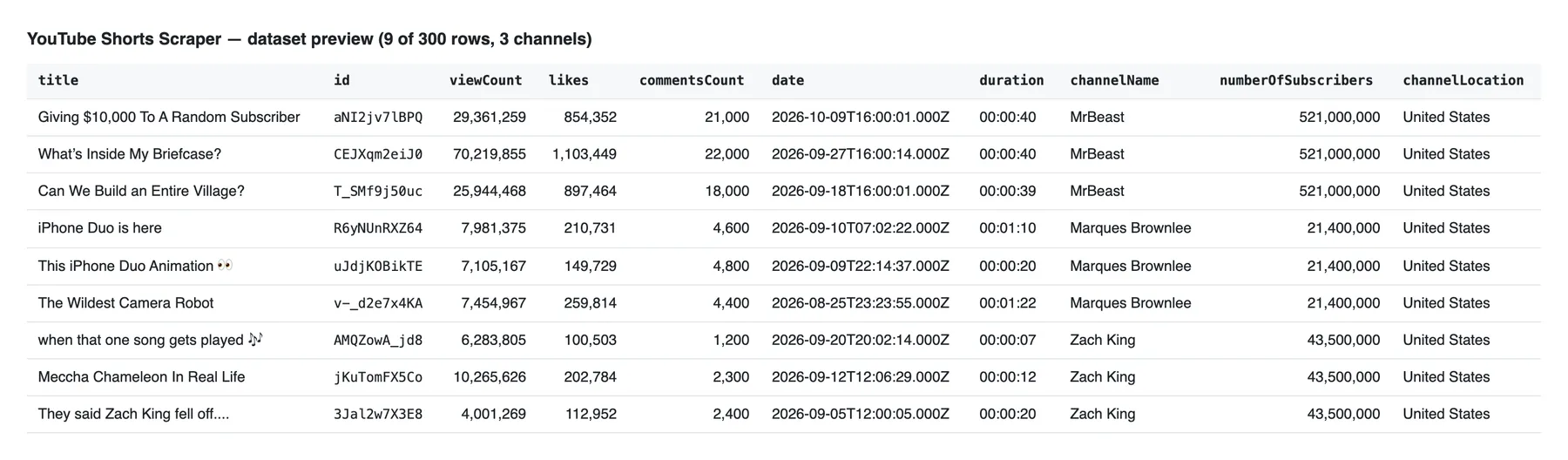
The Overview tab of the dataset shows the main columns at a glance:
Guarantees and failure semantics
- One row per Short, never a duplicate, across the whole run. If two input lines point to the same channel, it is read once.
- No error rows. Every row is a real Short you pay for. Channels that don't exist, channels without Shorts and input lines that are not YouTube channels are named in the run's status message (for example
Scraped 120 Shorts from 3 channels (1 unknown channel: @typo)) and counted in theSTATISTICSrecord of the run's key-value store. They cost nothing. - A run that finds nothing because nothing exists succeeds empty, with a message that says why.
- A run that got no valid answer from YouTube fails with a machine-readable reason first (
blocked: …,quota: …,timeout: …), so your scheduler or integration can retry it. A failed run with 0 results costs nothing. - Retries: every request gets up to 3 tries, each on a fresh IP of the same proxy type. The Actor never switches to a different, pricier proxy behind your back.
- Missing duration never drops a row. If the duration lookup for a Short fails after its retries, the row is kept with
duration: nulland YouTube's (US-Pacific) publish day indate, and the status message counts it. A Short whose main details call fails is skipped (not charged) and counted. - Numbers: views, likes, channel total views and video count are exact. Subscribers and comment counts are rounded the way YouTube displays them.
Integrations
Connect the Actor to the rest of your stack with Apify's integrations: send new Shorts to Google Sheets, Slack, Make, Zapier, n8n, Airbyte or a webhook of your own after every run. Schedule it daily to track how a channel's latest Shorts grow, or chain it with other Actors in an Apify task.
More scrapers from this developer
TikTok: TikTok Search Scraper: videos and creators for any keyword, pay per result · TikTok Profile Scraper (Pay Per Result): profiles, followers and latest posts by username · TikTok Comments Scraper: comments and full reply threads from any video · TikTok Hashtag Scraper: videos for any hashtag, with views, likes and music · TikTok Sound & Music Scraper: videos that use a sound or song
Social & news: Reddit Search Scraper: posts by keyword, subreddit or author · Google News Scraper: Google News results as clean full-text articles
E-commerce: Prom.ua Product Search Scraper: Prom.ua product search results, no browser needed · Amazon Product Search & Bestsellers Scraper: search results, Best Sellers and product details from Amazon
Maps & leads: Google Maps Scraper: places, leads and emails from Google Maps
Ads: Facebook Ad Library Scraper (Meta Ads Library): ads from the Meta Ad Library, with EU reach and payers
Video: YouTube Transcript Scraper: transcripts, subtitles and captions from YouTube videos · YouTube Channel Scraper: every video of a channel, with channel stats · YouTube Search Scraper: search results and videos for any keyword · YouTube Comments Scraper: comments, replies and likes from any video
FAQ
Is it legal to scrape YouTube?
This Actor reads only public data: what any logged-out visitor sees on a channel's Shorts tab and on each Short's page. It does not log in, does not bypass any paywall, and does not download videos. Scraping public data is generally lawful, but the data can include personal data (for example names in descriptions), which laws like the GDPR in the EU and the CCPA in California protect. Collect only what you need, have a legitimate purpose, and check with a lawyer for your case. You are responsible for how you use the results and for respecting YouTube's terms and creators' rights.
Do I need a YouTube API key, an account or a proxy?
No. The Actor needs no API key and no YouTube account, and it has no daily quota. Proxies are included: by default it uses Apify's datacenter proxy for the listing and detail calls, plus one Apify residential lookup per Short for the duration. You can switch everything to residential or to your own proxies in the input.
Why is the comment count rounded?
YouTube shows the exact number of views and likes on a Short's page, but only a rounded comment count ("1.5K"). Getting the exact total would cost an extra request per Short. If you need every comment, use the YouTube Comments Scraper linked above.
Can I scrape only recent Shorts?
Yes. Set oldestPostDate to a date or an age such as 7 days. The Actor reads Shorts newest first and stops at the first older one, so you don't pay for anything outside your window. The exact publish time from the duration lookup decides which Shorts are in the window; with includeDuration off, YouTube only gives the publish day in US Pacific time, so Shorts up to one day before your date can be included.
Can I get the most popular Shorts of a channel?
Yes. Set sortChannelShortsBy to POPULAR: you get the channel's Shorts in the order of the Popular button on YouTube, most viewed first.
What does includeDuration change?
The Shorts tab and the Short's page do not show the length or the exact upload time. One extra lookup per Short fetches both; YouTube answers it only from residential IPs, so it runs through Apify's residential proxy. It is on by default and included in the price. Turn it off if you don't need the duration: the run is faster and date holds the publish day instead of the exact time.
Why is likes null on some Shorts?
The creator has hidden the like count. YouTube shows no number for those Shorts, so the Actor returns null rather than a guess.
Can I scrape Shorts by hashtag or keyword?
This Actor reads Shorts by channel. For keyword search results that include Shorts, use the YouTube Search Scraper linked above.
How many Shorts can I get per channel?
As many as the channel's Shorts tab lists: the Actor pages through the tab 48 Shorts at a time until it reaches your maxResultsShorts or the end of the tab.
Support
Found a bug, a missing field or a channel that doesn't work? Open an issue on the Actor's Issues tab in Apify Console with the run link. Feature requests are welcome there too.


