

Naver Shopping Review Scraper (네이버쇼핑) - Ratings & Photos
Pricing
from $0.99 / 1,000 reviews
Naver Shopping Review Scraper (네이버쇼핑) - Ratings & Photos
Scrape customer reviews from Naver Shopping (네이버 쇼핑) by product link or ID. Get the full review text, star rating, date, purchased option and reviewer photos and videos, up to 50,000 per product. Filter by photos, videos or top-rated. Export to JSON, CSV or Excel.
Pricing
from $0.99 / 1,000 reviews
Rating
0.0
(0)
Developer

Zen Studio
Maintained by CommunityActor stats
0
Bookmarked
36
Total users
15
Monthly active users
5 days ago
Last modified
Categories
Share
Naver Shopping Review Scraper (네이버쇼핑 구매평) | Korean Product Reviews, Photos & Ratings (2026)
From Zen Studio, creators of the Coupang scraper suite and the #1-ranked 1688 scraper on Apify, used by 1,800+ users. Built for Korean marketplace research, from product discovery to detailed seller comparisons.
Why choose this actor?
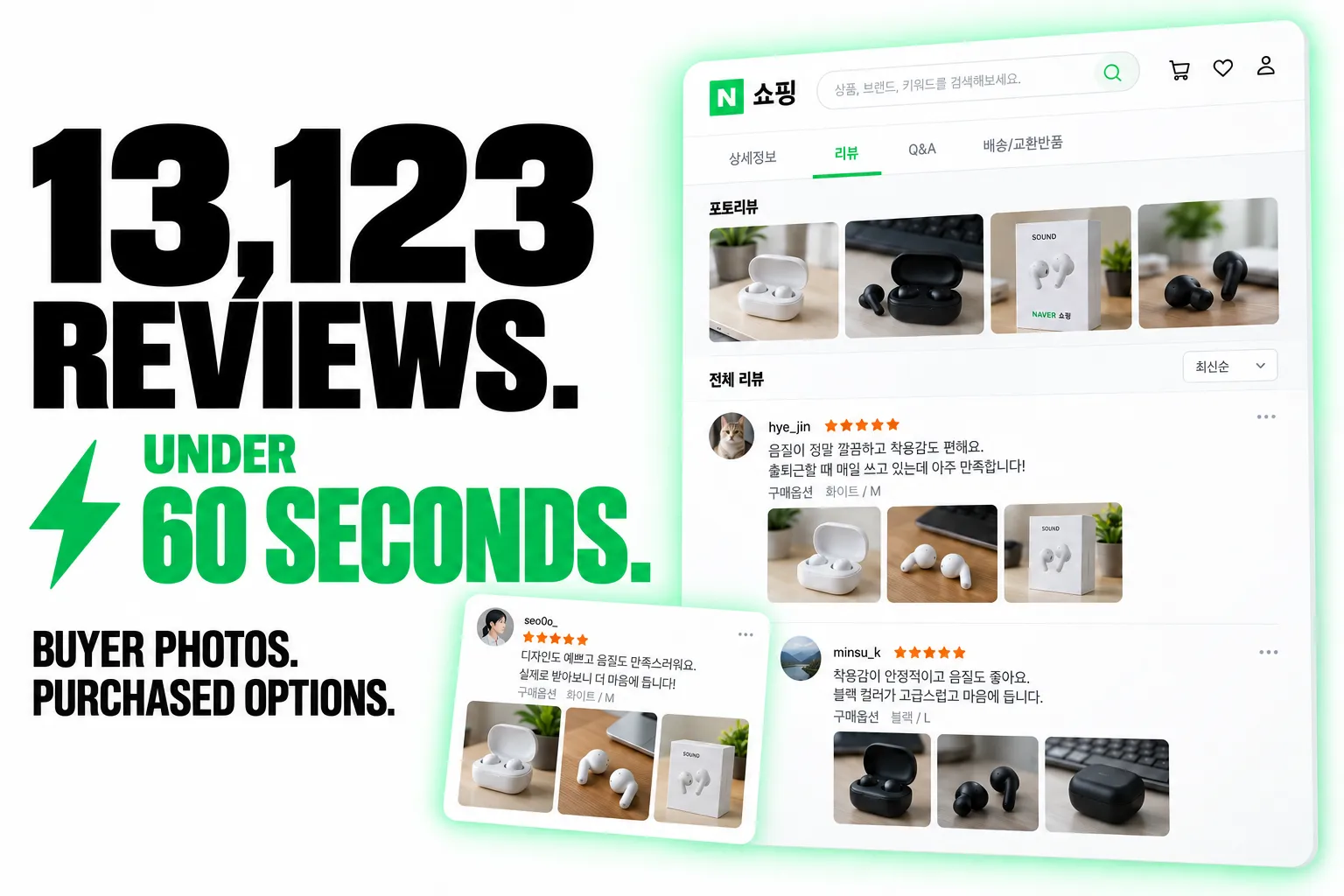
13,123 reviews in under 60 seconds.
Collect buyer feedback in bulk for product research, sentiment analysis and competitor monitoring. Export review text, ratings and dates in a structured dataset.
Buyer photos and the option they purchased.
Connect feedback to the colour, size or bundle the reviewer bought. Keep original photo and video URLs when attached, so you can analyse the evidence alongside the review.
Store reviews and price-comparison reviews.
Paste Naver store or price-comparison links. Choose newest or top-ranked reviews, or filter for photo, video and detailed reviews. Store links are the better route for very deep collections.

Quick start
Start with 30 reviews from one product. Replace the example with a Naver Shopping price-comparison link or a store product link.
Open actor input to paste your products and select review filters. Use reviewType PHOTO for buyer photos, or ALL to include every supported review type. JSON preserves media attachments and other nested details.
Price-comparison listings return up to 10,000 reviews per order. Running both orders can extend coverage; deduplicate when combining exports. Store listings support deeper collections. Set maxReviewsPerProduct to control volume and cost. Photos, videos and purchased-option details depend on what each review contains.
| Zen Studio · Korean Commerce | |||
 Naver Shopping Naver ShoppingProduct search |  Naver Detail Naver DetailProducts & sellers |  Naver Reviews Naver ReviewsYou are here |  Coupang Search Coupang SearchKorean products |
Copy to your AI assistant
Key Features
- Fast enough for bulk work: around 1,000 reviews in under 30 seconds, so a shortlist of products is a coffee break rather than an afternoon.
- Reviews at real depth. Korean marketplace listings are review-heavy in a way most sources are not: a median product carries around 500 reviews, one in ten carries more than 11,000, and the deepest we measured had 572,422. Clear the per-product limit and the Actor takes them all.
- Both kinds of link. A price-comparison link returns the reviews gathered against that listing; a store link returns that seller's own. Whichever you paste is what you get, and
reviewSourcerecords it. - One table, whichever listing answered.
reviewText,reviewRating,reviewDateandreviewerIdread the same on every row, so a mixed dataset sorts and exports as one sheet. The source's own field names are kept alongside them, so nothing is lost. - Photos and videos, with
hasImagesandhasVideosflags and the full attachment URLs. - The purchased option, which is what makes a review usable for product analysis: which colour, size or variant the reviewer actually bought.
- The reviewer's answers and body measurements, readable. Store reviews record fit, coverage or moisture answers and the reviewer's height, weight or skin type as codes; each row carries them decoded (
사이즈: 약간 커요,키: 168 cm), so "how does it fit someone my size" is a filter, not a research project. - Filter by kind: all reviews, photo reviews, video reviews, or detailed reviews: the store's own best-review picks on store links, the reviews Naver scores most useful on price-comparison links.
How to Scrape Naver Shopping Reviews
- Open the Actor and paste your product links into Product links or IDs.
- Adjust Max reviews per product. It starts at 30, one page. Set it to 0 to collect every review.
- Press Start.
- Download the results as JSON, CSV or Excel, or pull them from the API.
Basic: the top reviews for a product
Every review a product has
Photo reviews only, newest first
A shortlist of competing products
An ID from a Naver Open API export
Naver's own product exports hand out a search ID (the productId field) rather than a link.
Most of those IDs are matched on their own, so pasting the bare number is worth trying first.
When a run reports that it could not match one, the export carries the product's name beside it,
and the name is enough. Pair them with a |:
Callers working straight from an export can pass the pair as an object instead, which maps 1:1 onto what the export already holds:
The product is matched on its ID, never on the name alone, so a pair either returns the right product or reports that it could not be found. Listings that are no longer on sale cannot be resolved by any means, and are reported as such.
When the ID belongs to a listing on an outside mall (11번가, G마켓, 올리브영 and the like), the price-comparison record for that product is returned instead, since that mall's own listing is not on Naver to collect.
The products dataset
Alongside one row per review, each run writes a second dataset, products, with one record
per product collected. It answers what a per-review dataset cannot: how the ratings are
distributed. This is a store product's record with includeAiSummary on. Where one item lacks a key that others of its kind carry, the value shown comes from another real item of the same kind, so every key appears.
reviewsCollected is what this run pulled, reviewCountTotal is what the listing has, so the two
together say whether you have all of them. productName, mallName and productPageUrl identify the product even
when you pasted a bare number. searchId is the number Naver's search results and product exports
carry for the listing: it is filled when you pasted one, and with includeAiSummary on it is found
for a store link too, unless the listing does not appear in Naver Shopping search.
The star breakdown is reviewCountByScore, one count per star, with reviewAverageScore. The
counts beside it split the same total two ways: reviewsWithPhotos, reviewsWithVideos and
reviewsWithText (text only) by what a review carries, and reviewsPlain and
reviewsAfterAMonth (한달사용, written after a month of use) by when it was written.
reviewsRatedBest counts the reviews the seller picked as best.
A store product's record also says what its reviews add up to: reviewEvaluationStats, per question Naver asks reviewers of that kind of product (사이즈, 핏, 커버력, 촉촉함, ...), every answer with how many chose it and what share, how many answered, which answer most chose, and the follow-up question and parts an answer leads to, all with Naver's ids (the same ids the review rows carry); reviewTopTags, the 20 topics the reviews mention most, scored; and recentReviewCount / recentReviewAverageScore for the last six months. They come from the summary the review rows were named against, so they cost nothing extra.
Turn on includeAiSummary and the record also carries Naver's own AI digest of the product and
what reviewers agree on: aiTitle, aiSummary, aiRecommendedFor, aiHighlights (a name and a
description per feature) and aiReviewSummary. Naver writes that digest only for listings with
enough reviews, so the ai* keys appear where it exists. The text is generated, so it can change
between runs.
The star breakdown describes a seller's listing. A price-comparison pull carries the identity and the totals without it, rather than reporting a different seller's numbers beside the reviews it collected:
Input Parameters
| Field | Type | Default | Description |
|---|---|---|---|
productUrls | array | required | Naver Shopping product links or bare ID numbers. Price-comparison and store links both work. Max 1,000 per run; duplicates are removed. A search ID from an export needs the product name with it, as `91171893265 |
maxReviewsPerProduct | integer | 30 | How many reviews per product, one page by default. Set 0 for every review available, up to 50,000 per product. |
reviewSort | string | RANKING | RANKING (top ranked) or RECENT (newest first). On price-comparison listings the two orders reach different reviews. |
reviewType | string | ALL | ALL, PHOTO, VIDEO or QUALITY. |
includeAiSummary | boolean | false | Adds Naver's own AI digest of the product and its reviews to the products dataset. Generated text, so it can change between runs. |
What Data Can You Extract from a Naver Shopping Review?
Every review row includes:
- The same four columns whichever listing answered:
reviewText,reviewRating,reviewDate,reviewerId. - Identity and joins:
reviewId,productId,catalogId,reviewSource, andsourceUrl, the exact link you supplied, so a multi-product dataset groups without a lookup.productIdis the product'schannelProductId, the same key its record in the products dataset carries. On a price-comparison review it is the Naver listing search shows for that product, and the seller the review was written for ismallName/mallProductId; it is null only when a price-comparison product has no such listing. - The purchased option:
buyOptionon price-comparison rows,productOptionContenton store rows. - What the reviewer chose, in words (store rows):
reviewEvaluationsanswers Naver's questions for the product's kind (사이즈 → 잘 맞아요, with the part that ran large or small),reviewerProfilewhat the reviewer said about themselves with units (키 168 cm, 피부 타입 지성), andreviewSummaryTagsthe sentences Naver's analysis tagged, each with its topic (소재가 좋아요). The source's numeric codes stay beside them. - Media:
hasImages,hasVideos, and the attachment URLs:imagesandvideoson price-comparison rows,reviewAttacheson store rows. - Signals:
qualityScoreand topic tags with sentiment on price-comparison rows,helpCount, the reviewer's badge,bestReviewand the store's review event (eventTitle) on store rows. - Everything else the source publishes, under its own field names.
reviewSource is catalog for reviews served by a price-comparison listing and store for a seller's own. The two surfaces publish different extras, so a row from one carries fields the other does not; the four unified columns above are always present on both.
Output Example: a price-comparison review
This is a complete row: every key and every value a real result carries, at every level of nesting. Only two things are shortened. Arrays are cut to their first item or two, since a 181-point price history or a 97-field seller teaches nothing after the first. And single values longer than 200 characters are middle-ellipsised, which in practice only affects click-tracking URLs. No key is omitted anywhere. Where one item lacks a key that others of its kind carry, the value shown comes from another real item of the same kind, so every key appears.
Output Example: a store review
This is a complete row: every key and every value a real result carries, at every level of nesting. Only two things are shortened. Arrays are cut to their first item or two, since a 181-point price history or a 97-field seller teaches nothing after the first. And single values longer than 200 characters are middle-ellipsised, which in practice only affects click-tracking URLs. No key is omitted anywhere. Where one item lacks a key that others of its kind carry, the value shown comes from another real item of the same kind, so every key appears.
Advanced Usage
Get past 10,000 reviews on a price-comparison product
A price-comparison listing serves at most 10,000 reviews in any one order, however many it says it has. The two orders reach genuinely different reviews. Measured overlap between Top ranked and Newest first was zero out of 60, so running the same product twice, once in each order, roughly doubles what you can reach. Store listings have no such limit, so a store link is the better route to a very deep pull.
Rating distribution over time
reviewRating and reviewDate are on every row whichever listing answered, so a pivot on month and rating works across a mixed dataset without any cleaning. reviewDate is a calendar date on price-comparison rows and a full timestamp on store rows, as each listing publishes it; both start with the year, so they still sort together.
Which variant disappoints
buyOption and productOptionContent carry the exact variant the reviewer bought. Grouping ratings by option is the fastest way to find the colour, size or bundle that is dragging a product's average down.
Photo and video reviews for creative work
reviewType: "PHOTO" returns reviews with reviewer photos; "VIDEO" returns the ones with video, which are genuinely rare: on a product with 323,490 reviews, only 969 had video. Expect far fewer rows from that filter than from the others.
Feed it from the search Actor
Run the Naver Shopping Scraper on a keyword or category, take the productPageUrl column, and paste it here to collect reviews for a whole shortlist.
How Much Does It Cost to Scrape Naver Shopping Reviews?
Pay per event, so you pay for reviews rather than for run time.
| Event | Price per 1,000 |
|---|---|
| Review | $0.99 |
| Actor start | $0.005 per run, per GB |
| Result (each row stored) | $0.01 |
You pay for the reviews you get back, so a product with twelve of them costs twelve reviews' worth.
Scheduling and Integrations
Run on a schedule from the Apify Console, or trigger it from the API, the Apify MCP server, Zapier, Make, n8n, Airbyte or a webhook. Results export to JSON, CSV, Excel, XML or RSS, and can be pushed straight into Google Sheets or a database.
FAQ
Which links work?
Price-comparison links (search.shopping.naver.com/catalog/…), SmartStore links (smartstore.naver.com/…), brand store links (brand.naver.com/…), mobile versions of any of those, and bare ID numbers.
A price-comparison link and a store link for the same product give different reviews. Which is right? Both. A price-comparison listing has its own review collection; a store listing has the seller's. They are not subsets of one another, and neither is a superset: measured across 32 products that have both, the counts track each other closely and the store side is often the larger. Paste whichever listing you care about.
How many reviews can I get from one product? Store listings: no limit we have found, bounded only by the per-product cap you set, which goes to 50,000. Price-comparison listings: 10,000 per review order, so up to about 20,000 by running both orders.
Why did I get fewer reviews than I asked for?
Either the product has fewer, or you used a filter. VIDEO in particular is very selective. The run log reports what was actually collected.
Are the reviews in a separate dataset?
No. Reviews are this Actor's output, so they go in the default dataset, one row per review. The Naver Shopping Scraper and Naver Shopping Product Detail Scraper put reviews in a separate reviews dataset instead, because products own their default one.
Does it include reviewer personal data?
Reviewer IDs are published by Naver already masked (rmld****). Review text and photos are user-generated content and may contain personal data, so handle them under GDPR, CCPA and Korea's PIPA as applicable.
Is there a free tier? There is no separate free tier. Runs draw on your Apify platform credit like any other Actor, including the free credit every account gets each month.
Can I also get Coupang reviews? Yes, from the Coupang Review Scraper. Naver Shopping and Coupang together cover most of Korean online retail.
Is it legal to scrape Naver Shopping reviews? This Actor collects only publicly visible data, nothing behind a login. You are responsible for complying with Naver's terms of service and with applicable data protection law: GDPR, CCPA, and Korea's Personal Information Protection Act (PIPA). Review content includes personal data such as reviewer names and photos, so treat it accordingly.
More Zen Studio scrapers for Asian platforms
🛒 E-commerce
 TikTok Shop
 Lazada
 Naver Search 네이버 검색
 AliExpress 全球速卖通
 Naver Blog & Cafe 네이버 블로그·카페
 Naver Place 네이버 플레이스
- Naver Shopping 네이버쇼핑
 Coupang 쿠팡
 Taobao 淘宝
 JD.com 京东
 1688 阿里巴巴
 Weidian 微店
 Goofish 闲鱼
 Dewu 得物
🎬 Short-video & social
 Douban 豆瓣
 Weibo 微博
 Kwai (Brazil)
 Kuaishou 快手
 Douyin 抖音
 RedNote 小红书
 Xigua 西瓜视频
 Bilibili 哔哩哔哩
🏠 Real estate & autos
 Naver 부동산
 Anjuke 安居客
 58.com 58同城
 Autohome 汽车之家
Support
Found a bug, or need a field that is not here yet? Open an issue on the Actor's Issues tab. Questions about a specific run are answered fastest with the run ID.
Legal Compliance
This Actor accesses only publicly available product pages. It does not log in, does not bypass access controls, and does not collect private data. You remain responsible for how you use the data, including compliance with Naver's terms of service, GDPR, CCPA and Korea's PIPA. Personal data appearing in reviews should be handled under the applicable regime.
Naver Shopping customer reviews by product link or ID: full text, star ratings, purchased options, reviewer photos and videos, from price-comparison and store listings alike.


