

Shopee Live Scraper: Streams, Streamers & Live-Only Prices
Pricing
from $1.99 / 1,000 live stream snapshots
Shopee Live Scraper: Streams, Streamers & Live-Only Prices
Scrape Shopee Live streams with the live-only price of every product on air next to its normal price, plus the live discount. 45 product fields including voucher codes, stock by location and units sold. Track viewers, peak audience and likes. Verified in Malaysia, Thailand and the Philippines.
Pricing
from $1.99 / 1,000 live stream snapshots
Rating
0.0
(0)
Developer

Zen Studio
Maintained by CommunityActor stats
0
Bookmarked
4
Total users
1
Monthly active users
7 days ago
Last modified
Categories
Share
Shopee Live Scraper | Live Streams, Streamers & Live-Only Prices Across 8 Markets (2026)
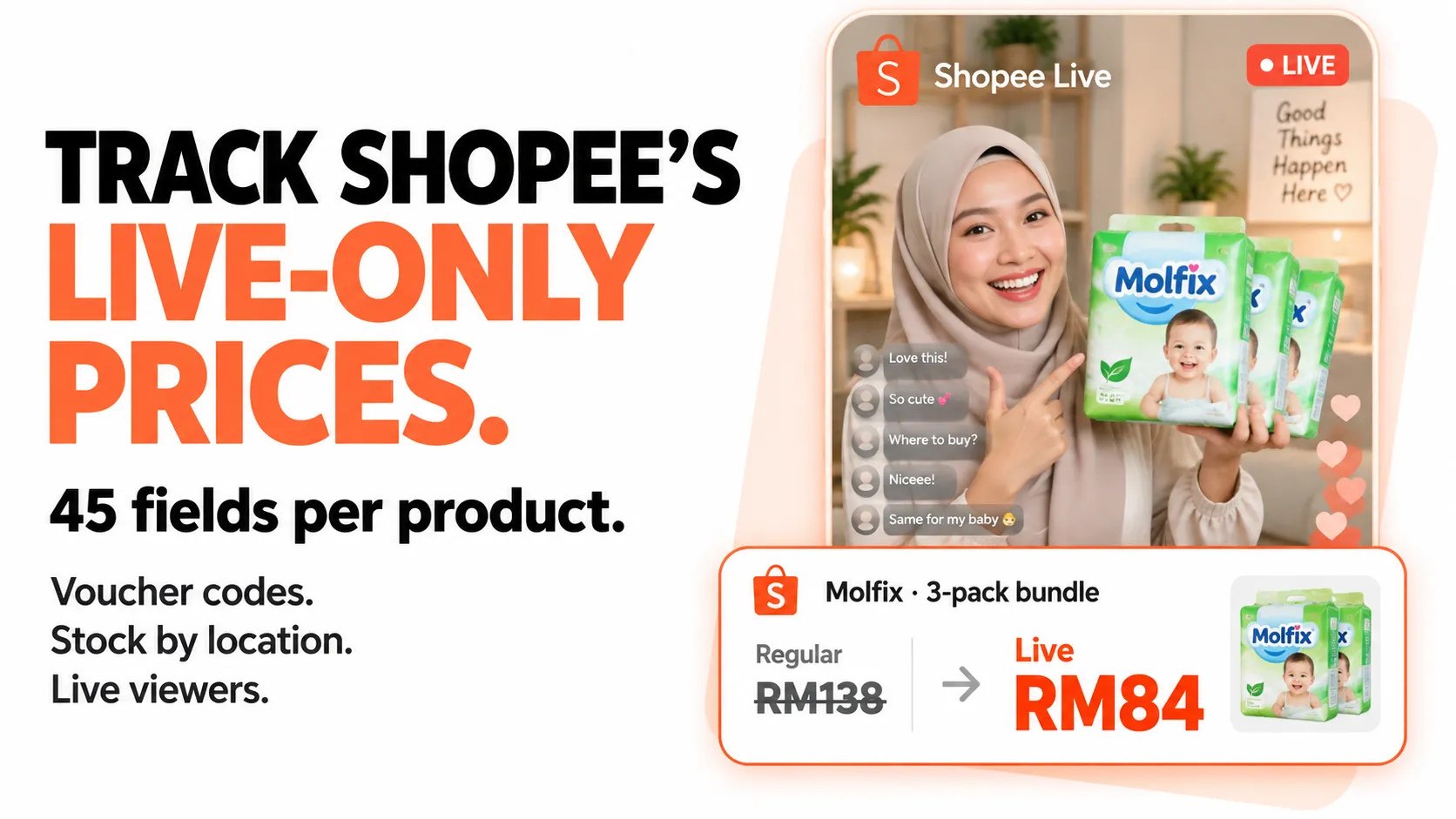
From Zen Studio, with 29,000+ runs across Shopee Search, Detail and Reviews, and creators of the 1688 Wholesale Scraper, used by 2,300+ users.
Why choose this Shopee Live scraper?
- Compare live and regular prices. Get the stream price, the price outside the stream and the calculated live discount together. The pictured bundle’s saved record returned RM84 versus RM138, a 39% difference.
- 45 product fields, including actionable promotion data. Collect shop and platform voucher codes, units sold, total stock and stock by location. Product records link back to their stream and seller; available values vary by item.
- Track the stream as it changes. Capture current viewers, peak audience, likes, shares and streamer profiles. Enable repeat snapshots to follow audience changes, and re-check products to capture changing prices.

Try three live streams
Open actor input and paste the example. It collects up to three Malaysian streams with five products each. Stream snapshots go to the default dataset; products go to a separate products dataset, linked by sessionId. Export either as JSON, CSV or Excel.
To track changes, set pollDurationMinutes and pollIntervalSeconds (minimum 30), then enable trackProductPrices to refresh prices too. Each new stream and product snapshot is billed; time tracking is disabled on the free tier.
Products are available only while a stream is on air. Collection is verified in Malaysia, Thailand and the Philippines; other markets have coverage limits. A seller may leave the live price unset: price: 0 with no live discount means unavailable, not free.
| Zen Studio · Shopee & Wholesale | ||||
 Shopee Live Shopee LiveYou are here | Shopee Search Find products |  Shopee Detail Shopee DetailSpecs & variants |  Shopee Reviews Shopee ReviewsBuyer feedback |  1688 1688Wholesale sourcing |
Copy to your AI assistant
How to Scrape Shopee Live
Browse everything live in a market
Watch one product across every live stream
Find who is livestreaming your SKU, and what they are charging for it:
Track an audience building through a stream
Writes one row per stream per snapshot, for 30 minutes:
Set the run timeout above your tracking window, or the run stops early. Re-sampling the audience is cheap; leave Re-check products each time off unless you specifically need mid-stream price changes.
Follow specific streamers
Use the streamer.uid values from an earlier market run:
Scrape exact streams
Leave What to collect empty and the mode is chosen for you from what you filled in.
Input Parameters
| Parameter | Type | Default | Description |
|---|---|---|---|
market | enum | MY | Which Shopee marketplace to collect from. |
mode | enum | derived | market, streamers or sessions. Derived from your input when left empty. |
categoryTabs | array | all | Limit a market run to these Live categories. |
maxSessions | integer | 100 | How many streams to collect in a market run. |
sessionUrls | array | — | Shopee Live links or stream IDs. |
streamerUids | array | — | Streamer IDs to follow (streamer.uid from a market run). |
includeUpcoming | boolean | true | Also collect scheduled streams when following streamers. |
includeReplays | boolean | false | Also collect finished streams (no product list). |
includeProducts | boolean | true | Collect the products pushed during each stream. |
maxProductsPerSession | integer | 20 | Products per stream; 0 collects everything available. |
filterKeywords | array | — | Keep only streams matching these words in title, streamer or product names. |
filterItemIds | array | — | Keep only streams selling these product IDs. |
minViewers | integer | 0 | Skip streams below this viewer count. Applied to the streams discovered under maxSessions, not a market-wide search. |
pollDurationMinutes | integer | 0 | Keep watching for this many minutes, writing a new row each time. |
pollIntervalSeconds | integer | 60 | Seconds between snapshots (minimum 30). |
followNewSessions | boolean | true | While tracking, pick up streams that start during the window. |
trackProductPrices | boolean | false | Re-collect products on every snapshot to catch mid-stream price changes. |
What Data Can You Extract?
Two datasets. The default dataset holds one row per stream snapshot; the products dataset holds one row per product pushed during a stream. They join on sessionId, and both carry capturedAt.
Live stream row
All 41 stream fields
| Group | Fields |
|---|---|
| Identity | sessionId, roomId, market, shopId, status (live / upcoming / ended), liveType, platform, chatRoomId |
| Titles | title, originalTitle (with the seller's emoji intact), subtitle, description |
| Streamer | streamer.uid, .username, .nickname, .avatar, .isVerified, .isSeller |
| Audience | viewerCount (watching right now), concurrentViewers, memberCount (cumulative joins), maxMemberCount (peak concurrent), likeCount, shareCount |
| Products | itemsCount (what Shopee reports), productCount (what this run actually collected) |
| Timing | startTime, endTime, createdAt, updatedAt, capturedAt, pollIndex (0 for the first snapshot, 1 for the next, …) |
| Media and links | coverImage, coverInfo, playUrl, shareUrl |
| On-air mechanics | hasVouchers, hasStreamingPrice, hasGiveaway, hasLuckyRain, streamingPriceTimer, sessionPromotion |
| Placement | isPinned, recommendationReason, recommendationAlgorithm, isTerminated |
Live product row
All 45 product fields
| Group | Fields |
|---|---|
| Identity | itemId, shopId, sessionId, market, streamerUsername, name, image, itemType, categoryIds, itemTags |
| Live pricing | price (on air), outOfLivePrice (off air), liveDiscountPercent (computed), isFinalPrice, isLiveVoucherFinalPrice, isCheapestPrice |
| Shopee's own pricing | priceBeforeDiscount, originalPrice, discount, discountText, showsDiscountLabel, priceMin, priceMax, priceMinBeforeDiscount, priceMaxBeforeDiscount, currency |
| Stock and sales | stock, sold, isOutOfStock, locationStocks (per warehouse) |
| Flash sales | isFlashSale, flashPriceEndsAt, flashSaleMinStock, flashSaleTotalStock |
| Vouchers and promos | shopVoucher, platformVoucher, promotions, appliedPromotion, labels |
| Affiliate | hasAffiliate |
| Listing state | status, isUnlisted, isProhibited, isDeleted |
| Timing | capturedAt |
Voucher codes come through as Shopee returns them (shopVoucher.voucher_code, discount_value), so they are usable as-is.
On the two discount fields.
liveDiscountPercentis computed frompricevsoutOfLivePrice— the saving you actually get by watching.discountis Shopee's own figure, measured againstpriceBeforeDiscount, which many sellers leave at a placeholder like9999.00. Both are included; the first is the one to trust.
Use Cases
- Live price intelligence — track what competitors charge on air versus their shelf price.
- Brand monitoring — find every stream selling your product, with
filterItemIds. - Creator and KOL discovery — rank streamers by live audience, verified status and category.
- Engagement analytics — capture audience curves through a broadcast for campaign reporting.
- Assortment research — see which categories dominate live selling in each market.
- Affiliate sourcing — surface heavily discounted items with
hasAffiliate.
Advanced Usage
Ready-made configurations for live price intelligence, creator discovery, brand monitoring and engagement reporting.
Live price intelligence: what a market discounts on air
Products only, streams kept cheap. Every row gives you the live price against the shelf price.
Brand monitoring: every stream selling your SKU
filterItemIds needs products collected, so leave Collect products on. Streams that do not carry the item are discarded before they are billed.
Creator discovery: the big rooms only
minViewers is applied to the streams the run discovered, not used to search the market for the
biggest rooms, so set maxSessions generously: it caps discovery, and the filter runs afterwards.
Filtering happens before products are fetched, so a high threshold lowers the bill as well as the
noise. Big rooms are a small share of any market at most hours — a run that returns two streams
out of two hundred is usually the market, not the filter.
Engagement reporting: an audience curve for one campaign
Thirty minutes of snapshots at one-minute resolution. Set the run timeout above the window.
Mid-stream price changes
trackProductPrices re-collects every product on every snapshot, which is the only way to catch a price that moves during the broadcast — and it multiplies the product bill by the number of snapshots. Keep the window short and the product cap low.
Keyword watch across a category
Pricing: Pay Per Event (PPE)
Two things are billed, and only what is actually delivered:
| Event | Price | What it is |
|---|---|---|
| Live stream snapshot | $2.99 per 1,000 (FREE plan) | One stream captured at a point in time. Tracking a stream writes one snapshot per interval. |
| Live product | $3.99 per 1,000 | One product pushed during a stream, with its live-only price, discount, stock and voucher codes. |
Paid Apify plans pay less per stream snapshot: BRONZE $2.79, SILVER $2.49, GOLD and above $1.99 per 1,000. Streams filtered out are not charged, and there is no per-run fee beyond the Apify actor start.
Controlling the bill. Products are the larger part of a typical run, so Max products per stream is the main lever: 20 (the default) covers the pinned and promoted items most buyers want, while 0 collects everything a stream carries (popular streams run to a few hundred). If you only need stream and audience data, switch Collect products off.
Free tier: 20 runs lifetime, no credit card. Each free run returns a sample of up to 10 streams with 5 products each; time tracking is disabled on the free tier.
Good to Know
-
Market coverage is not uniform. Measured 2026-09-26, in each market's own evening:
Market Browse a market Products per stream Malaysia, Thailand, Philippines verified verified Indonesia verified not available Singapore, Brazil reachable, but no live streams found when tested not yet verified Vietnam, Taiwan browsing not available not available Vietnam and Taiwan currently refuse the browse request, so Browse a market returns nothing there; paste stream links or follow streamers instead. Singapore and Brazil answered normally but had no streams on air during testing, so their product support is simply unknown rather than absent. The run tells you when products were unavailable instead of silently returning none.
-
A stream's product list exists only while it is on air. Finished streams and replays return the stream details, viewer and like totals, but no products. This data cannot be back-filled — collect it live.
-
Product limits.
maxProductsPerSession: 0collects all available products up to 500 per stream. Higher product limits take longer and produce more billable rows. -
A live price is not guaranteed on every product. Sellers pin items to a stream without always setting a live price for them. When none is set,
price,priceMinandpriceMaxcome back as0,liveDiscountPercentisnull, andoutOfLivePricestill tells you what the item normally costs. Filter onliveDiscountPercent != nullwhen you only want items that are actually discounted on air. -
Counters are point-in-time.
viewerCountis who is watching at the moment of capture. Run on a schedule and the rows stack into a time series. -
Vietnam, Singapore and Brazil carry fewer Live categories than Malaysia, Indonesia, Thailand or the Philippines, so expect thinner results there.
-
Long tracking windows are not yet field-proven. Tracking is verified on short windows; runs of an hour or more have not been measured end to end. A stream that ends mid-window stops producing rows and is not billed further, and the run still finishes cleanly, but for a first long run watch the log and set the run timeout comfortably above
pollDurationMinutes. -
Viewer counts are what Shopee reports.
memberCountis cumulative joins over the stream,maxMemberCountthe peak concurrent,viewerCountthe current figure.
FAQ
What is Shopee Live? Shopee Live is the livestream shopping feature inside the Shopee app across Southeast Asia, Taiwan and Brazil. Sellers and creators broadcast, pin products to the stream, and offer prices that apply only during the broadcast.
Can I get the reviews or full catalogue of these products?
Yes — pass the itemId and shopId to the Shopee Product Detail or Reviews scrapers listed below.
Why does a replay have no products? Shopee clears a stream's product list when the broadcast ends. Only live and scheduled streams carry one.
How do I build a time series?
Either set pollDurationMinutes to watch within a single run, or schedule the actor to run repeatedly — every row carries capturedAt and sessionId, so snapshots concatenate.
Which markets are supported? Malaysia, Indonesia, Thailand and the Philippines are verified end to end. Singapore and Brazil work but had no streams live when tested. Vietnam and Taiwan currently refuse the browse request, so use stream links or streamer IDs there. See the coverage table above.
Do I need a Shopee account, cookies or a login? No. Pick a market or paste stream links and press Start.
How fast is it? A 50-stream market run with 20 products each completes in well under a minute. Tracking runs take as long as the window you set, by design.
How many streams can one run collect?
maxSessions goes to 5,000. What you actually get is what is on air: a busy market carries a few hundred streams at peak, far fewer at 4am local time. Run in the market's own evening.
Why did I get fewer streams than I asked for?
Because that many were live. The run log reports the figure it found, and filters (minViewers, filterKeywords, filterItemIds) cut further. Filtered-out streams are not billed.
What does maxProductsPerSession: 0 do?
Collects every product a stream carries, up to an internal ceiling of 500 per stream. Popular streams run to a few hundred, so this is the setting that moves the bill most.
Can I combine a market browse with specific streamers? No, one mode runs at a time. Leave What to collect empty and the mode is derived: stream links win, then streamer IDs, otherwise it browses the market.
What happens to a stream that ends while the run is watching it?
It is collected once more with status: ended, then dropped from the rotation. It is not re-billed on later snapshots, and its products are gone at that point — Shopee clears them when the broadcast stops.
How do I export the data?
Open the run's Storage tab and download JSON, CSV, Excel or XML. The products live in a separate products dataset on the same run; join it to the streams on sessionId. JSON preserves the nested voucher, promotion and label objects.
Is it legal to scrape Shopee Live? This actor collects publicly visible livestream data. You are responsible for complying with Shopee's Terms of Service and applicable data protection law. Streams carry personal data — streamer usernames, display names and avatars — so treat those rows as personal data under GDPR, PDPA and LGPD.
Can I try it before paying? Yes. 20 free runs lifetime, no credit card. Each free run returns up to 10 streams with 5 products each; tracking is off on the free tier.
More Zen Studio scrapers
🛒 E-commerce
 TikTok Shop
 Lazada
 Naver Search 네이버 검색
 AliExpress 全球速卖通
- Shopee
 Taobao 淘宝
 JD.com 京东
- 1688 阿里巴巴
 Weidian 微店
 Goofish 闲鱼
 Dewu 得物
 Coupang 쿠팡
 Naver Shopping 네이버쇼핑
🎬 Short-video & social
 Douban 豆瓣
 Zhihu 知乎
 Weibo 微博
 Kwai (Brazil)
 Kuaishou 快手
 Douyin 抖音
 RedNote 小红书
 Xigua 西瓜视频
 Bilibili 哔哩哔哩
 Naver Blog & Cafe 네이버 블로그·카페
🏠 Real estate & autos
 Naver 부동산
 Anjuke 安居客
 58.com 58同城
 Autohome 汽车之家
Support
- Bugs: Issues tab
- Features: Issues tab
Legal Compliance
Extracts publicly available livestream data. Users must comply with Shopee's Terms of Service and applicable data protection regulations (PDPA across Southeast Asia, GDPR, CCPA, and LGPD for Brazil). Streams carry personal data including streamer usernames, display names and avatars.
Shopee Live data: which streams are on air, who is streaming, live audience metrics, and every product pushed on air with its live-only price, across all 8 Shopee markets.


