

TikTok Search Scraper: Keywords, Hashtags, Creators
Pricing
from $0.20 / 1,000 tiktok posts
TikTok Search Scraper: Keywords, Hashtags, Creators
Scrape TikTok search results by keyword or hashtag and discover creators. Pay only per result. Views, likes, comments, shares, bookmarks, channel stats, music, subtitles and direct video URLs as JSON. Output compatible with popular TikTok scrapers. No proxies or login needed. Works via API and MCP.
Pricing
from $0.20 / 1,000 tiktok posts
Rating
5.0
(1)
Developer

GoFetch
Maintained by CommunityActor stats
6
Bookmarked
84K
Total users
1.8K
Monthly active users
10 hours ago
Last modified
Categories
Features
Share

TikTok Search Scraper is a TikTok search API alternative for marketers, social listening teams, researchers and developers who need TikTok keyword search and hashtag data. Give it a list of search keywords and get the matching TikTok videos (about 200–420 per keyword, see the FAQ) as structured data — views, likes, comments, shares and bookmarks, creator/channel stats, music, subtitles and direct video URLs — as JSON, CSV or Excel. An optional expansion mode harvests TikTok's search suggestions, hashtag feeds and sound feeds to discover roughly 10x more creators per keyword. No login, no cookies, no TikTok account and no proxy setup: you enter keywords, you pay per result.
Opt-in searchMode: "CREATORS" searches TikTok's public Users tab and returns creator
profile cards instead of videos. This paid add-on stays dormant until its event is priced;
unpriced or free-plan creator runs finish successfully with zero rows.
Who uses TikTok Search Scraper?
- Influencer marketing teams build creator shortlists: a list of niche keywords with
expansion(paid plans) anduniqueAuthorson returns one video per creator, ready to sort bychannel.followersandchannel.verified. Then TikTok Profile Scraper adds bios and recent posts. - Brand and social listening teams schedule a daily run on brand and product keywords
with
sortType: "DATE_POSTED", keep only videos newer than the previous run (uploadedAtFormatted), and send them to Slack or Google Sheets with Apify integrations. - Researchers and data teams compare views, likes and hashtags across topics over time, and use the subtitle tracks for content analysis.
- AI agents call it over MCP for questions like "what are the most-liked TikTok videos about AI tools right now?"
Creator search (opt-in, paid; dormant until priced)
Each row has type: "creator", id, uniqueId, nickname, verified, signature,
secUid, followerCount, followingCount, heartCount, videoCount, avatarThumb,
avatarMedium, avatarLarger, profileUrl, searchKeyword and rank. Data comes only
from public search cards; missing counts or avatar sizes are null. Bios are returned verbatim
without contact extraction. No profile pages are fetched. Use the dataset's Creators view.
maxItems and maxItemsPerKeyword count delivered creators. Deduplication spans the run:
the first keyword wins. Rank is the position among distinct accounts encountered for that
keyword before run-wide deduplication; gaps can occur when an earlier keyword found an account.
Feed depth varies by keyword and may end before the requested limit.
Two consecutive pages with no new accounts for that keyword stop pagination. Accounts already
found by another keyword still count as progress within the current keyword.
Restarting the same run seeds already delivered creators from its dataset so they are skipped. Billing uses the actor's standard charge-then-push flow in batches of at most 100 creators. An interruption between charging and confirmed delivery can charge that batch again on restart; SDK append retries after a lost response can duplicate items. These are the same recovery limits as the actor's existing paid add-ons. Starting a new run does not recover another run's state.
CREATORS ignores these video-only inputs and logs each supplied option: videoUrls, searchCountry,
serverSideSorting, sortType, dateRange, expansion, commentsPerPost, maxRepliesPerComment,
includeTranscript, transcriptLanguage, downloadVideos, videoQuality,
includeAuthorProfile, uniqueAuthors, maxPostsPerAuthor, includeSlideshowImages,
includeSearchKeywords, relevanceThreshold. Keywords are required in this mode.
Only a paying run with a positive creator-search-result price enables the feature.
When unavailable, it returns zero rows and charges no events; it never switches to videos.
Each delivered creator incurs one add-on event and one normal dataset-item event.
All-in prices per 1,000 creators are $4.80 FREE / $4.00 BRONZE / $3.00 SILVER /
$2.00 GOLD, once activated (FREE is the price tier; free-plan runs cannot use this add-on).
What data does TikTok Search Scraper extract?
One dataset item per video, including:
- Engagement — views, likes, comments, shares, bookmarks
- Post — title/caption, hashtags, upload timestamp (raw + ISO), permanent post URL
- Channel — id, name, username, avatar, verified flag, follower/following counts, total videos and likes
- Video — width, height, ratio, duration, direct video URL, cover and thumbnail images
- Music — song id (plus
song.musicId, the exact id as a string), title, artist, album, duration, cover art - Extras — subtitle/caption tracks with URLs, POI (location) data, collab info, the keyword that found the video, and (in expansion mode) which pool surfaced it
- Add-ons (opt-in, paid per unit) — each video's top comments with reply threads (
commentList), the creator's profile details (authorProfile), native captions (transcript), and stored MP4 files (videoFile), see Add-ons
A run typically finishes in seconds; every field is shown in the output example below.
How to scrape TikTok search results
In the Apify Console
- Open TikTok Search Scraper in Apify Store and click Try for free.
- Enter one or more Search Keywords — a topic, a brand, a hashtag term, a creator niche. Each keyword is searched independently and the results are combined into one dataset.
- Optionally set Maximum number of items (the form prefills 100), a Sort Type, or turn on Expansion Pools for creator discovery. Leave the proxy field empty — proxies are built in.
- Click Start. The run ends when every keyword is exhausted or
maxItemsis reached. - Open the Dataset tab and download the results as JSON, CSV, Excel, XML or RSS, or read them through the API.
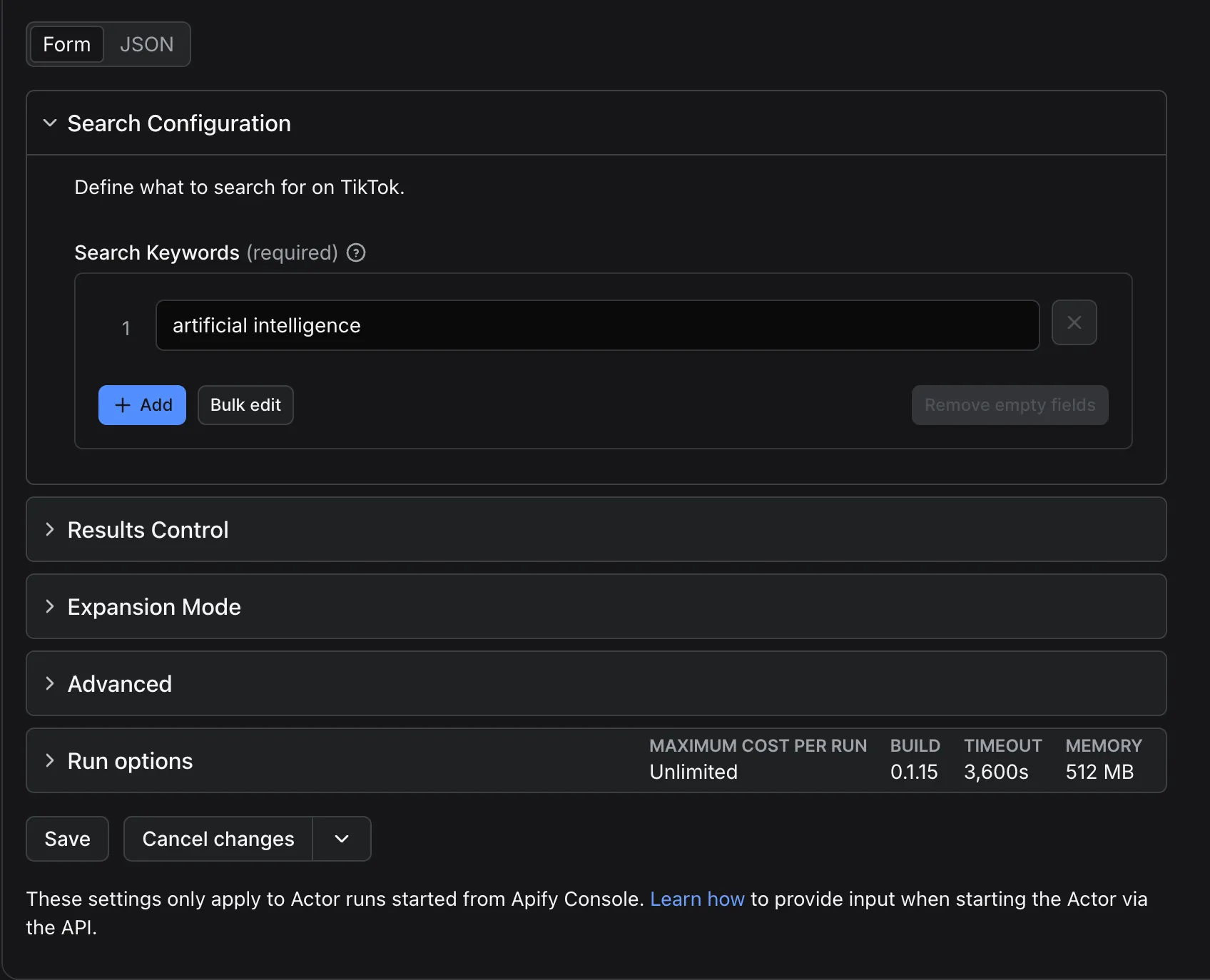
The minimal input is a single keyword:
From the API, CLI or an AI agent
Use it as a TikTok scraper API. A synchronous run returns the items directly:
With the Apify CLI:
AI agents call it by name, xmolodtsov/tiktok-search-scraper, through Apify's MCP server —
see Integrations.
How much does it cost to scrape TikTok?
This Actor is priced pay per result: you are charged only for items actually written to the dataset — not for compute time, not for retries, not for setup, and proxies are included. The price per result depends on your Apify plan:
| Apify plan (discount tier) | Price per 1,000 results |
|---|---|
| Free | $0.30 |
| Starter (Bronze) | $0.25 |
| Scale (Silver) | $0.22 |
| Business (Gold) | $0.20 |
| Platinum (enterprise) | $0.18 ($0.20 from 30 Oct 2026) |
| Diamond (enterprise) | $0.15 ($0.20 from 30 Oct 2026) |
Opt-in add-ons are charged per unit of data they return, on top of the result price. Comments and creator profile add-ons are available from 30 October 2026. Dormant add-ons are skipped with a log line and no extra charge until their pricing event is live.
| Add-on (pricing event) | Charged per | Price per 1,000 |
|---|---|---|
Creator search (creator-search-result, dormant until priced) | Delivered creator row, plus normal item charge | FREE $4.50 · BRONZE $3.75 · SILVER $2.78 · GOLD $1.80 |
Comments (comment) | each comment or reply returned | $1.00 Free · $0.80 Starter · $0.60 Scale · $0.40 Business |
Creator profile (author-profile) | each unique creator returned, once per run | $0.75 Free · $0.70 Starter · $0.65 Scale · $0.60 Business |
Popularity filter (popularity-filter, dormant until priced) | each delivered video passing the requested bounds | $1.04 Free · $0.80 Starter · $0.64 Scale · $0.48 Business |
Server-side sorting (search-sorting, dormant until priced) | each video delivered from a server-sorted keyword feed | $1.04 Free · $0.80 Starter · $0.64 Scale · $0.48 Business |
Country targeting (country-targeting, dormant until priced) | each video delivered from a country-targeted keyword feed | $1.04 Free · $0.80 Starter · $0.64 Scale · $0.48 Business |
Worked example: 5 keywords × ~200 videos each ≈ 1,000 results — $0.25 on Starter, $0.20 on Business. Runs that return zero results, or fail, produce zero billable items and cost you nothing. Batching many keywords into one run is the most cost-efficient way to use the Actor.
Is scraping TikTok free?
You can try it for free: Apify's free plan includes a monthly usage credit, no payment method required. On the free plan this Actor applies the limits below; any paid Apify plan removes them and lowers the price per result.
Free plan limits
On the Apify Free plan, this Actor is limited to:
- 100 results per run (
maxItemsis clamped to 100), - 20 runs per calendar month (the counter resets on the 1st),
- classic keyword search only — expansion pools are disabled,
- Apify Proxy (residential) instead of the Actor's built-in proxy.
These limits are set by the developer, not by Apify — pay-per-result revenue only counts for paid plans. Every free-plan run says so in its log and status message, for example: "Free plan: run 1/20 this month, capped at 100 results (a limit set by the developer, not by Apify)." When the monthly quota is used up, the run ends successfully with an explanatory status message and no results — it does not fail and nothing is charged. Paid users are never limited, on any tier.
Input
| Field | Type | Default | Description |
|---|---|---|---|
keywords | array | — (required unless videoUrls is set) | Search terms, each searched independently |
videoUrls | array | [] (off) | Free, opt-in. Public video/photo URLs; processed before keywords within the same global item cap |
dateRange | enum | ALL (off) | Free, opt-in. Rolling 1/7/30/90/180-day window; see below |
includeSlideshowImages | boolean | false | Free, opt-in. Add image URLs and dimensions as slideshowImages; null for other posts |
maxItems | integer | 1000 via API; the Console form prefills 100 | Global cap on output items across URLs, keywords and expansion pools (100 on the free plan) |
searchMode | string | VIDEOS | Opt-in paid CREATORS: public creator cards; dormant until priced; video-only inputs ignored |
maxItemsPerKeyword | integer | — | Optional cap per single keyword; keywords are processed sequentially against the global maxItems budget |
minLikes / maxLikes | integer | unset (off) | Paid, opt-in inclusive like bounds; 0 means no bound. Dormant until popularity-filter is priced |
minPlays / maxPlays | integer | unset (off) | Paid, opt-in inclusive view bounds; 0 means no bound. Uses the same popularity-filter event |
serverSideSorting | enum | OFF | Paid, opt-in MOST_LIKED keyword feed; dormant until search-sorting is priced. Active runs skip expansion and video URLs; creator mode ignores it |
sortType | enum | RELEVANCE | RELEVANCE, MOST_LIKED, DATE_POSTED. Free client-side sorting of collected results, per keyword |
location | string | US | ISO 3166-1 alpha-2 country code, passed to TikTok as the region parameter. Cosmetic — TikTok keys results off the request's IP address, not off this parameter, so it does not produce a per-country result set |
searchCountry | string | empty (off) | Opt-in paid country targeting: GB, DE, or BR. Keyword searches use residential exits in that country; all expansion pools are skipped. Paid plans only; dormant until country-targeting is priced. |
includeSearchKeywords | boolean | true | Adds keyword + inputSource to each item |
expansion | array | [] (off) | Opt-in harvest pools: suggest, hashtag, music — see Expansion mode. Paid plans only |
relevanceThreshold | number | 0.3 | Music pool only: fraction (0–1) of a sound's first-page captions that must match the keyword or its hashtags before that sound is crawled. Higher = stricter |
uniqueAuthors | boolean | false | Emit at most one item per creator (channel.id) |
maxPostsPerAuthor | integer | — | Cap on items per creator in the classic search results; the expansion pools always emit at most one item per creator regardless of this value (empty = no cap) |
commentsPerPost | integer | 0 (off) | Add-on: up to this many top comments per video in commentList (max 200). Paid plans only |
maxRepliesPerComment | integer | 0 | Add-on: up to this many replies per comment, in each comment's replies (max 10; needs commentsPerPost > 0) |
downloadVideos | boolean | false | Paid add-on: save MP4 files in the run’s key-value store and attach videoFile; charged for the delivered quality only |
videoQuality | string | 540p | Requested class: 540p, 720p, or 1080p; missing classes fall back to the next lower priced class |
includeAuthorProfile | boolean | false | Add-on: the creator's profile details in authorProfile, fetched once per creator per run. Paid plans only |
proxyConfiguration | object | — (leave empty) | Not needed — proxies are built in and included in the price. To route through your own proxies, enter their URLs here; the Apify Proxy option is not used on paid plans |
Out-of-range values are clamped (item caps to 1–100,000, relevanceThreshold to 0–1);
an unknown sortType fails the run with a clear message.
Date window
Set dateRange to YESTERDAY, THIS_WEEK, THIS_MONTH, LAST_3_MONTHS or
LAST_6_MONTHS for the last 1, 7, 30, 90 or 180 days from run start. These are rolling
windows, including YESTERDAY, rather than calendar boundaries. Search applies a server
filter; an exact client cutoff also covers URL inputs and expansion feeds. Recent windows
can return fewer posts. Free, opt-in; ALL keeps the existing unfiltered search.
Direct video URLs
Provide videoUrls: ["https://www.tiktok.com/@username/video/1234567890123456789"]
with real public post URLs. /@user/video/<id> and /@user/photo/<id> accept an empty
username too, on www.tiktok.com, tiktok.com and us.tiktok.com. Also accepted:
m.tiktok.com/v/<id>.html and /share/video/<id>, /embed/v2/<id>, /embed/<id> or
/player/v1/<id> on www.tiktok.com or tiktok.com. These are fetched as HTTPS video pages.
Short links on vm.tiktok.com/<code>, vt.tiktok.com/<code>, and
www.tiktok.com/t/<code>, lite.tiktok.com/t/<code> or tiktok.com/t/<code> are accepted
when one redirect resolves to a public post; bare-host /t/ links start on www.
HTTP links are upgraded to HTTPS; www.tiktok.com/... and vm.tiktok.com/... may omit the scheme.
Profiles, LIVE, locale-prefixed paths and other hosts are rejected.
For URL-only runs, omit keywords or send "keywords": [].
URLs run first and maxItems remains global. Each URL
row has the same search fields, with keyword and inputSource set to the original URL,
even if includeSearchKeywords is false. Deduplication and paid add-ons apply as usual.
Deleted, private and invalid posts are skipped with a warning and STATISTICS.videoUrls.failed;
a URL-only run succeeds with status token deleted only when TikTok reports every requested
post as deleted (statusCode: 10204, statusMsg: status_deleted). Posts TikTok reports as not
existing, private or unavailable, and every other all-failed URL-only run, still fail.
Free, opt-in; delivered rows use the normal item price.
Slideshow image URLs
Set includeSlideshowImages: true to add slideshowImages to every row. Photo posts
contain [{ "url": "…", "width": 1080, "height": 1920 }]; other posts contain null.
URLs come from TikTok's image metadata and can expire. Free, opt-in; images are not fetched.
With the option off, rows have no slideshowImages key.
Expansion mode and creator discovery
By default the Actor runs the classic keyword search. Set expansion to opt into extra
harvest pools, all seeded from the keyword's own search hits and run after the classic
search for that keyword:
suggest— TikTok's own search suggestions for your keyword; each suggestion is then run through the normal search (up to ~200 items per suggestion).hashtag— the feed of the keyword's own hashtag plus up to five of the tags that appear most on the keyword's search results.music— the feeds of up to five of the sounds those same results use most. Each sound is probed first: if fewer thanrelevanceThresholdof its first-page captions match the keyword or its hashtags, the sound is skipped as off-topic (trending sounds carry every niche).
The pools widen creator coverage: each emits only creators the run has not seen yet, one item per creator, deduplicated across every pool (measured 85–95% disjoint). With all three on, a keyword surfaces roughly 10x more unique creators than plain search.
Each item gains an expansion_source field — relevance (classic search), suggest,
hashtag or music — naming the pool that first surfaced that creator, while keyword
and inputSource keep the original input keyword.
maxItems bounds the total across all pools, and a pool stops for a keyword once two
consecutive suggestions, tags or sounds yield fewer than five new creators. A pool hiccup
never costs the classic-search items already collected. For creator discovery, add
uniqueAuthors:
Add-ons: comments and creator profiles
Three opt-in extras enrich each video row. All are charged only for the data they actually
return (see pricing), work on paid Apify plans
only, and leave every existing field unchanged: the integer comments field is still the
comment count.
- Comments (
commentsPerPost, plus optionalmaxRepliesPerComment) addcommentList: the video's top comments in TikTok's order, each with its text, time, likes, reply count, author (uniqueId,nickName,uid,secUid,profileUrl,verified, avatar), mentions, language and whether the creator liked or pinned it, plus arepliesarray of the same shape. Each comment and each reply is onecommentevent. A video whose comments could not be fetched ships withoutcommentList(nothing charged). - Creator profile (
includeAuthorProfile) addsauthorProfilewith the profile-page fields search results lack:signature(bio),bioLink,createTime(account creation),language,friends,privateAccount,isOrganization,ttSeller,commerceUser,commerceCategory,secUidandroomId(set while the creator is live). Each creator is fetched and charged once per run; their other videos carry the same profile free. If a profile cannot be fetched,authorProfileisnulland nothing is charged. - Native transcript —
includeTranscript: trueaddstranscript: {lang, source, text}. Paid add-on, native TikTok captions only (no speech-to-text): about half of posts have them; charged only per transcript delivered as onetranscriptevent. Missing captions or a failed fetch yieldtranscript: null, without a charge.transcriptLanguageoptionally selects an available language code (for exampleen); otherwise creator captions take priority over ASR and machine translation (MT). One track per post, with no translation service. Text joins caption cues with newlines, removes timing and consecutive duplicates, and is capped at 100,000 characters. With the add-on off, rows have notranscriptkey. It stays dormant until the event has a price in the run's pricing.
Server-side sorting — opt in with serverSideSorting: "MOST_LIKED" to
select TikTok's native most-liked keyword feed. OFF is the default. Requires a paid
plan and a positive search-sorting price; free-plan and unpriced runs log that it
is unavailable and keep the existing relevance feed. Creator mode ignores it.
When active, keywords are required and expansion pools and videoUrls are skipped
with one log line. This avoids mixing other feeds into the ranking or charging them
for sorting. Each keyword preserves TikTok's order with the default
sortType: "RELEVANCE"MOST_LIKED or DATE_POSTED still applies the
existing free client-side sort to that keyword's collected rows. There is no global
ranking across keywords. TikTok does not return a reliable newest-first search feed;
use dateRange plus sortType: "DATE_POSTED" for that workflow.
dateRange, popularity bounds, author limits and deduplication apply to the sorted
feed. Active country targeting still selects its exit-country feed and retains its
minimum-budget and yield guards. One sorting event is charged for each delivered
keyword row, alongside the normal item charge and active popularity/country events.
Native sorted feed depth varies and can be shorter than relevance; scanning stops
on feed end, a repeated page, a non-advancing cursor, or 20 pages. A transport failure
stops that keyword without blending a different exit's ranking; rows already collected are still delivered. Delivered IDs are
skipped on restart. Billing uses the existing reserve, charge-before-push and trim
pattern; the same accepted crash/retry limitations as the other add-ons apply.
Popularity bounds — opt in with any of minLikes, maxLikes, minPlays, or
maxPlays (non-negative integers, unset or 0 means no bound). Bounds are inclusive;
a nonzero maximum must be at least its minimum. Likes and views must satisfy every bound.
The add-on requires a paid plan and a positive popularity-filter event price. It remains
dormant until priced: otherwise bounds are ignored, results are unfiltered, and the log
and run status explain why.
Only passing videos reach the dataset or other paid add-ons. Each delivered passing video
adds one popularity-filter event to its normal item charge; rejected videos incur no
charge. This applies to keyword searches, URL lookups, date windows and every expansion
pool, and composes with author limits and the existing free client-side sort.
Search keeps collecting passing rows toward maxItems and maxItemsPerKeyword, bounded
by the feed's end and at most three feed requests per keyword, shared across its
search and expansion pools, including retries within the current process. One response without passing new videos stops scanning earlier.
Strict bounds or author limits can therefore return fewer rows than requested. The run
stops cleanly when another filtered row cannot fit the maximum charge.
Filter and enrichment events use the existing charge-before-push path with item-cost
reservation and prefix trimming. Restarts skip delivered IDs and scan again; scan caps
reset with the process. Creator mode ignores popularity bounds. With active country
targeting, the bounds apply to the country-selected keyword feed and passing keyword
rows incur both events; URL rows incur no country event. Country targeting's existing
minimum budget and low-yield stops still apply. Sparse combinations may stop early.
Country targeting (VIDEOS mode) — opt in with searchCountry: "GB", "DE", or "BR" to search
through residential exits in that country. This selects the search feed seen from that
country; it does not restrict creators to that country or guarantee a particular language.
The existing location parameter keeps its behavior. Empty searchCountry preserves the
existing routing. Free-plan or unpriced requests log one skipped-add-on notice and keep the
existing routing; the feature stays dormant until the country-targeting event is priced.
When active, maxItems and maxItemsPerKeyword (if set) must be at least 160.
Searching stops before another residential request when fewer than 160 rows fit the remaining
item budget or charge limit. Each keyword uses its literal native result window (up to about
200 videos), without duplicate-heavy spelling/case variants. This avoids paying for a full
page to deliver a deliberately tiny per-keyword slice; sparse queries can still return fewer
rows. Free-plan and unpriced requests keep the existing behavior and limits.
Repeated keywords (ignoring case and surrounding spaces) are searched once. Further country
searches stop when cumulative delivered keyword rows fall below 160 per attempted search,
including after date filters and deduplication. This can stop before every keyword is searched.
The search and yield guards apply to the current process.
When country targeting is active, all expansion pools (suggest, hashtag, music)
are skipped with one log line. sortType still sorts the keyword results as requested.
Direct video URLs keep their existing behavior and do not incur a country event.
One country-targeting event is charged per delivered keyword-search result. Country
targeting uses its built-in residential route for keyword searches even when custom proxy
URLs are supplied. A blocked country fails that keyword without switching countries.
At the max-charge limit, only the affordable prefix is delivered and keyword searching
stops. Rows keep the existing output fields.
Country billing uses the same charge-before-push pattern as the other add-ons. A crash between billing and a confirmed dataset push can charge an unfinished batch again after restart; an SDK append retry can also duplicate rows. There is no separate delivery journal.
Video files — downloadVideos: true saves MP4s in the run's default key-value store.
Choose videoQuality: "540p" (default), "720p", or "1080p". Classes use the shorter
dimension; TikTok's 540p is often 576×1024. Each class uses the smallest available file,
which may be HEVC rather than H.264; no transcoding is performed. Missing classes fall
back to the next lower class only when that class is priced. Only a successful store is
charged, as video-download-540p, video-download-720p, or video-download-1080p,
according to the delivered class. These events remain dormant until pricing is live.
Rows carry videoFile: {key, url, quality, requestedQuality, codec, width, height, bytes},
or videoFile: null if no file is delivered (including photos, missing renditions, failed
downloads, or the budget limit). Files above 64 MB are skipped without a charge. Downloads
run with four workers, directly from TikTok's CDN, with a 45-second deadline and one retry.
Files are checked for MP4 format and complete length before storage. The stored URL uses
the Apify API and remains subject to the store's access settings. The run's storage follows
your Apify data retention. With this add-on off there is no videoFile key, CDN request,
or media storage write.
If the run reaches your maximum cost per run, the add-on data is cut exactly at the limit
(the last enriched video may carry a shorter commentList) and later videos ship without
add-ons; the search itself continues as usual. Until an add-on's price is live, requesting it
just logs Add-on "…" is not available yet … skipped. and the run returns the usual rows.
Add-ons take time: 50 comments with up to 5 replies each added about one second per
video in our tests.
Output
Output example
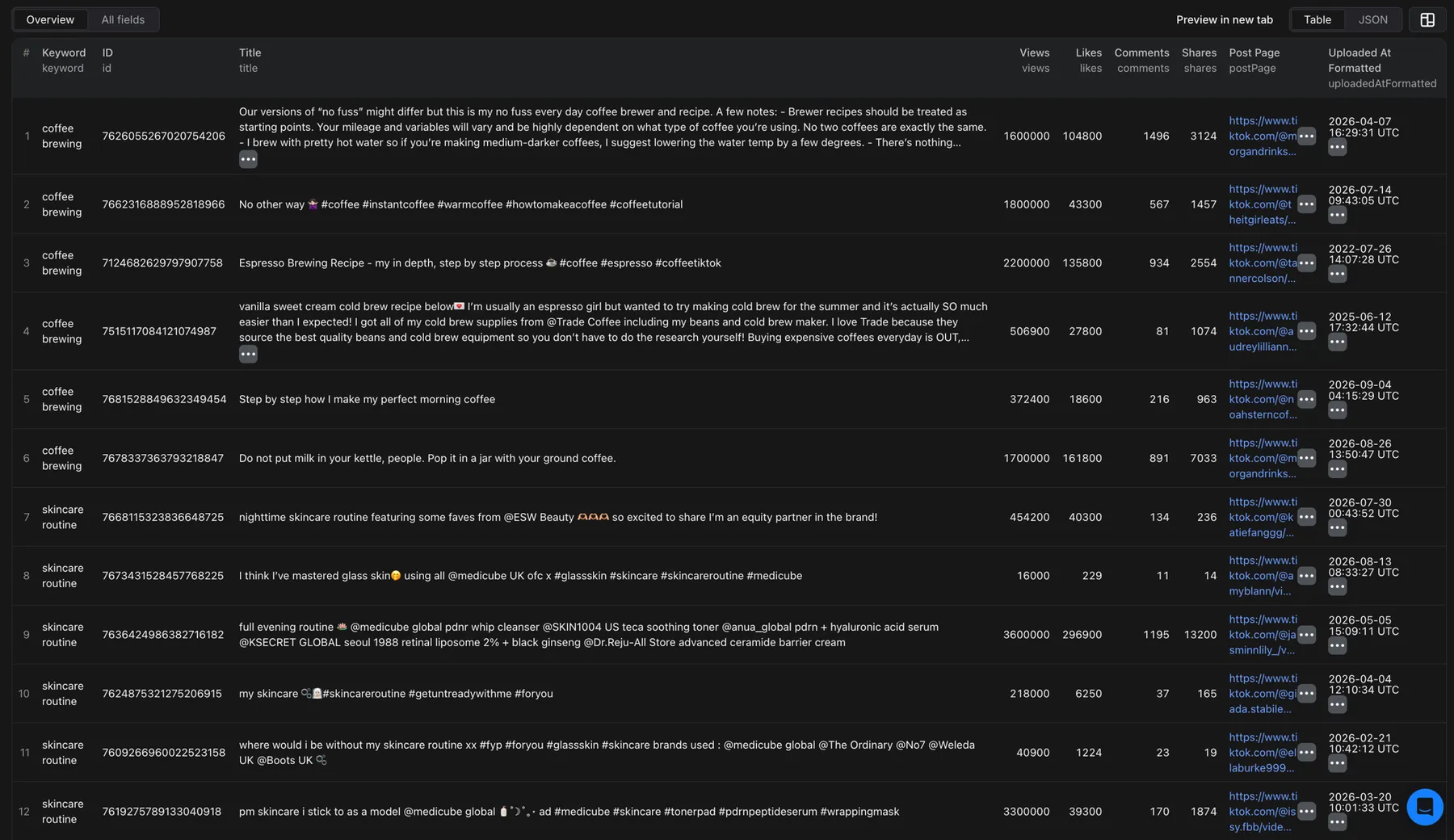
Field notes:
subtitleInformationisnullor an array of caption tracks, each withcaption_format,caption_length,lang,language_code,is_auto_generated,url,url_listandversion.song.idis a number, kept for compatibility. TikTok sound ids have 19 digits, more than a JSON number holds exactly, so it is rounded (7400028146168319000above). Usesong.musicId, the exact id as a string, to look a sound up.poiisnullor an object withpoiName,address,cityCode,cityName,latitude,longitudeandregionCode.- Channel stats TikTok omits for a card are
null(e.g.channel.videos); engagement counters default to0. expansion_sourceappears only whenexpansionis set — see Expansion mode.keywordandinputSourceintentionally carry the same value, for compatibility with pipelines built around the common TikTok scraper output format.
CDN links expire:
video.url,video.coverandvideo.thumbnailare signed, short-lived TikTok CDN links — download or process them promptly after the run.postPageis the permanent link to the video.
Compatible with the common TikTok scraper output format
The output uses the field names, nesting and types popular TikTok search scrapers on
Apify Store already use (views, likes, channel.*, video.*, song.*, …), so
existing pipelines and spreadsheets work unchanged.
Next steps: comments, creators, hashtags and sounds
Need comments or creator details for the videos in the same run? Turn on the add-ons (from 30 October 2026). For bigger jobs, every item carries the values the other TikTok scrapers from this developer take as input:
postPage→ TikTok Comments Scraper (postURLs): the comments and reply threads under the videos you found.channel.username→ TikTok Profile Scraper (profiles): full profiles and each creator's latest posts.hashtags→ TikTok Hashtag Scraper (hashtags): a hashtag's own video feed, beyond what keyword search returns.song.musicId→ TikTok Sound & Music Scraper (musics): the other videos that use the same sound.
Guarantees and failure semantics
Sorted results ship per keyword; near the timeout, sorted runs without paid add-ons may stop before another request, save the collected rows and end SUCCEEDED with a Partial: message and STATISTICS.stoppedAtTimeLimit: true, while short keywords with rows already saved keep their usual flow.
Without paid add-ons, a run that has saved nothing by then FAILS with a reason token instead of timing out.
- No duplicates: run-global deduplication writes the same video at most once per run, even when it matches several keywords, query passes or expansion pools.
- You pay only for delivered results: empty and failed runs produce zero billable items, and add-on events are charged only for comments, replies, profiles, transcripts and video files present in the dataset.
- The run SUCCEEDS when it returns at least one item (a keyword that returns nothing
logs a warning), when TikTok answered but genuinely had no results (empty dataset, status
message
empty — search returned no posts), when a URL-only run gets an explicit TikTok deleted answer (statusCode: 10204,statusMsg: status_deleted) for every post (empty dataset, status tokendeleted), and when a free-plan monthly quota is used up. - The run FAILS on invalid input (neither keywords nor URLs, unknown
sortTypeordateRange), or when it returned zero items and at least one keyword never got a single valid response from TikTok (blocked or network failure). The status message then starts with a machine-readable token —blocked,quota,server,timeoutornetwork— so automation can key retries off it. - Run statistics: every run writes a
STATISTICSrecord to its key-value store — item, request and failed-request counts, duration, a per-keyword (and per-pool) breakdown and the samefailureReasontoken (okwhen items shipped) — for dashboards and alerting. Runs with add-ons also recordaddons: charged comments, replies and profiles and transcripts, fetch success counts, missing transcripts and bytes per add-on.
Integrations, API and MCP
JavaScript and Python clients
Schedules, webhooks and exports
Use schedules for daily keyword monitoring, webhooks to get notified when a run finishes, dataset export to JSON, CSV, Excel, XML or RSS, and integrations like Zapier, Make and Google Sheets.
Run it from a pipeline
Treat a Partial: success as incomplete: inspect STATISTICS.stoppedAtTimeLimit and raise the timeout, lower maxItems or use fewer expansion pools for subsequent runs.
Classic keyword search returns about 200–420 results per keyword (see the
FAQ). Several keywords per run is fine;
for very large jobs, split keyword lists across runs and set maxItems per run.
Paid runs observed in November 2026 had a p99 of 800 results and a largest run of
8,671 results; these are observations, not limits. Each run is capped at 512 MB of memory.
An Apify schedule, or your scheduler, starts the run via API. Configure a webhook
for ACTOR.RUN.SUCCEEDED, ACTOR.RUN.FAILED and ACTOR.RUN.TIMED_OUT; your receiver
reads resource.defaultDatasetId and fetches that dataset's items. For example,
POST this body to /v2/webhooks, using the Actor's internal ID from Console:
See Apify's webhook API and
payload templates.
A timed-out or aborted run keeps the items already saved in its dataset; result fees
apply only to those items. For FAILED runs, inspect the status message token
(blocked, quota, etc.) and STATISTICS in the default key-value store when
available: keywords.<kw>.pushed and keywords.<kw>.error show progress per input.
To resume video search, set includeSearchKeywords: true so keyword and inputSource
identify the input on each row, re-run inputs with no rows, and deduplicate across runs
on id; creator search (searchMode: "CREATORS") rows carry searchKeyword instead. This retries missing inputs; it does not finish an input that already has
partial rows. See Guarantees and failure semantics
and costs.
Use with AI agents (MCP)
Through Apify's MCP server at mcp.apify.com, AI agents that speak
the Model Context Protocol (Claude, ChatGPT and others) can call
xmolodtsov/tiktok-search-scraper with the same input and read the dataset back. To load
just this Actor as a tool, connect your MCP client to
https://mcp.apify.com?tools=xmolodtsov/tiktok-search-scraper. The usual pricing and
free-plan limits apply.
More scrapers from this developer
TikTok: TikTok Profile Scraper (Pay Per Result): profiles, followers and latest posts by username · TikTok Comments Scraper: comments and full reply threads from any video · TikTok Hashtag Scraper: videos for any hashtag, with views, likes and music · TikTok Sound & Music Scraper: videos that use a sound or song · TikTok Top Ads Scraper: public Creative Center ad rankings, engagement, media and landing pages
Social & news: Reddit Search Scraper: posts by keyword, subreddit or author · Google News Scraper: Google News results as clean full-text articles · Threads Replies Scraper: public post replies, likes, authors and inline nested replies
Instagram: Instagram Reel Scraper: public profile reels, plays, captions, music and media URLs · Instagram Comment Scraper: public post and reel comments, likes, timestamps and usernames
E-commerce: Prom.ua Product Search Scraper: Prom.ua product search results, no browser needed · Amazon Product Search & Bestsellers Scraper: search results, Best Sellers and product details from Amazon · AliExpress Search Scraper: aliExpress products by keyword with prices, orders and shipping · AliExpress Product Reviews Scraper: public product reviews, ratings, buyer photos and follow-up feedback
Maps & leads: Google Maps Scraper: places, leads and emails from Google Maps
Ads: Facebook Ad Library Scraper (Meta Ads Library): ads from the Meta Ad Library, with EU reach and payers · Google Ads Transparency Scraper: Google ad creatives by advertiser or domain, with regional details
Video: YouTube Transcript Scraper: transcripts, subtitles and captions from YouTube videos · YouTube Shorts Scraper: Shorts of any channel with exact views, likes and duration · YouTube Channel Scraper: every video of a channel, with channel stats · YouTube Search Scraper: search results and videos for any keyword · YouTube Comments Scraper: comments, replies and likes from any video · Bilibili Comments Scraper: public hot comments and reply threads by video or keyword
Jobs: SEEK Job Listings Scraper: public AU/NZ job listings, salaries and redacted descriptions
FAQ
Is it legal to scrape TikTok?
The Actor collects only publicly available data — the same information any logged-out visitor sees on TikTok search. It never logs in, never accesses private accounts, and collects no data behind authentication. You are responsible for how you use the data: respect TikTok's terms of service and comply with personal-data laws such as the GDPR and the CCPA.
Creator names, usernames and avatars are personal data under the GDPR, the CCPA and similar laws: collect only what you need and make sure you have a lawful basis for processing it. This is general guidance, not legal advice.
How many results do I get per keyword?
TikTok caps a single query string at ~200 unique results. The Actor adds automatic query passes — accent, casing and spacing variants of your keyword, so results stay on-topic — and stops once they stop returning enough new items. Expect ~200–420 items per keyword in classic mode. To scale, add keywords or turn on expansion.
Why did I get zero results?
Usually an overly narrow keyword or a transient TikTok block — the status message tells them apart (see Guarantees). Zero items cost nothing.
Is search exact-match? Can I filter by date or country?
No. Search is fuzzy, not exact-match — TikTok's search behaves like TikTok's search,
and a nonsense keyword still returns ~30 loosely related videos rather than nothing.
Use dateRange for a rolling date window, or sortType: "DATE_POSTED" to sort the
retrieved posts. location is passed to TikTok but does not partition
results by country (see the input table).
Does it download the videos?
No — it returns direct video URLs and metadata, not video files, which is why runs finish
in seconds. Download the files yourself from video.url if you need them (see the
CDN-expiry note above).
Will I hit rate limits?
Not on your side: the Actor paces its requests and retries transient failures automatically. If TikTok still blocks a keyword, the status message says so (see Guarantees). For very large keyword lists, one batched run beats many small runs.
How do I get full profiles for the creators I find?
Discover creators here (uniqueAuthors plus expansion), then feed channel.username into
TikTok Profile Scraper for full
profile stats and each creator's recent videos. For just the bio, bio link and business
flags inside the same run, turn on the includeAuthorProfile
add-on.
Support
Failed-run diagnostics are kept in developer-owned storage: input settings and counts, proxy outcomes, error classes and reason codes, and a salted user hash; no search terms, URLs or free-form error messages. Reporting is best-effort and adds at most three seconds to a failed run, including preprocessing.
Open the Issues tab on the Actor's page in Apify Console to report a problem or ask for a field or feature. Include the run ID — every run logs its context (plan, origin) so support cases can be diagnosed from the log.
Paying runs also send a small internal usage record to a restricted developer dataset, including runs with no add-ons as the baseline. It contains feature flags, event counts, tier, run/build identifiers and a salted user hash; no search text, handles, input URLs or transcript content. Non-paying and free-plan runs send no usage record. Forced termination can bypass reporting.


