

Kick Channels Scraper: Profiles, VODs & Clips
Pricing
from $1.36 / 1,000 items
Kick Channels Scraper: Profiles, VODs & Clips
Scrape kick channels by slug or URL for public profiles, followers, social links and live status. Export channel VODs and clips, or discover live channels, with one saved row per result.
Pricing
from $1.36 / 1,000 items
Rating
0.0
(0)
Developer

GoFetch
Maintained by CommunityActor stats
0
Bookmarked
1
Total users
0
Monthly active users
2 days ago
Last modified
Categories
Features
Share
Kick Channels Scraper: Profiles, VODs & Clips scrapes kick channels from public slugs or URLs into structured dataset rows. Get channel profiles, follower counts, source social links and live status; select VODs or clips for a channel, or discover live channels and export their hydrated profiles. This scraper supports streaming research, content catalogues and repeatable channel snapshots without login.
What data you get
Channel rows include numeric channel and user IDs, normalized slug, public URL, username, display name, biography, followers, verification and banned flags. Profile, banner and offline banner images are included when available without signed query parameters. Recent categories identify what the channel streams.
The livestream object includes title, viewers, category, start time, language, maturity, tags and thumbnail. Offline channels have isLive=false and livestream=null. Affiliate status, VOD availability, subscription availability and public chat settings come from the same response. A banned channel remains a valid row when Kick returns its public record.
Social links remain exactly the strings or nulls supplied by the channel endpoint. Handles are not expanded into URLs. The scraper does not extract emails or phone numbers from biographies, read panels, enrich contacts or download media. Stream playback addresses and signed image tokens are excluded.
VOD rows contain video ID, channel slug, public video URL, title, creation time, durationSeconds, views, category, thumbnail and language. Duration is converted from milliseconds to seconds. The public VOD response is a finite array, rather than an archive of everything ever streamed.
Clip rows contain clip ID, channel ID and slug, public clip URL, title, creation time, duration in seconds, views, category, creator username and thumbnail. The selected clip listing does not supply likes, so no likes field is exported. Every row has type=channel, vod or clip and a fetchedAt timestamp. Entries explicitly marked private, non-public or subscriber-only are skipped before saving and add no result charge. Skips are logged and counted as skippedRestricted in STATISTICS; a terminal response containing only restricted entries succeeds with zero public results.
How to use it
In Apify Console, open this actor, enter channels, choose the result type and set Maximum results. Start the run and open its Dataset tab. Download JSON, CSV, Excel or another supported dataset format. The small prefill requests one xqc channel profile.
Use slugs such as xqc or full channel URLs. Letter case, www.kick.com and trailing paths such as /videos and /clips normalize to the channel slug. Supplying a videos URL still uses the selected mode; choose vods to export videos. Inputs are validated together before monthly quota admission or source requests.
Start a run through the Apify API using your own API token:
Read the returned run's defaultDatasetId through the dataset API after completion. For an AI workflow, use Apify's MCP integration to supply the same input object and retrieve its dataset. Inspect status and STATISTICS before treating an export as complete.
Pricing
One saved dataset row is one result: a channel, VOD or clip. Discovery pages and channel lookups needed for clips do not create extra billed rows. Duplicates within a run's dataset and failed requests add no result charges.
| Apify plan | Price per 1,000 results |
|---|---|
| FREE | $1.94 |
| BRONZE | $1.74 |
| SILVER | $1.55 |
| GOLD | $1.36 |
For example, 100 results cost $0.194 at the FREE rate or $0.136 at the GOLD rate; 1,000 results cost $1.94 or $1.36 respectively. Platinum and Diamond use Gold pricing. There are no extra actor events for discovery or pagination. Use maxItems and your Apify charge limit to bound a run.
Is it free?
The Apify free plan allows 100 results per run and 20 runs per UTC calendar month per user. These are developer limits. The allowance resets on the first day of the month; a refused run succeeds with zero results and zero source requests. An admitted run uses a monthly slot even if the source later fails. Paid plans have no monthly developer quota. The developer owner and Apify TEST runs are exempt. Free runs always use Apify Proxy.
Input
| Field | Meaning |
|---|---|
| mode | channels by default; vods, clips or directory |
| channels | Array of public channel slugs or complete Kick URLs |
| discover | Add live directory discovery to channel mode; default false |
| maxItems | Global saved-row cap; default 100, prefill 1 |
| maxPagesPerChannel | Clip page bound per channel; default 5 |
| maxDiscoveryPages | Live directory page bound; default 5 |
| clipSort | views or date; view is accepted as an alias for views |
| clipTime | day, week, month or all; default week |
| categoryId | Numeric discovery category ID; zero omits the filter |
| language | Optional ISO language code for discovery |
| concurrency | Simultaneous channel workers, 1–4; default 2 |
| proxyConfiguration | Apify datacenter, or paid caller HTTP(S) proxies |
Directory mode discovers live channels and fetches each unique slug's profile. Only channel rows are saved. Combine explicit channels and discovery without saving the same numeric channel ID twice. Discovery has twenty entries per page; its changing live ranking is not a complete directory.
Residential groups and country routing are rejected before quota admission, including SDK group aliases. SOCKS proxies are unsupported. Free runs ignore custom proxy URLs and use Apify Proxy. Each request and retry draws a fresh session. Bounded concurrency is not a sustainable request-rate guarantee.
Output
This projection comes from a real channel response/run. The complete dataset also contains the fields described above:
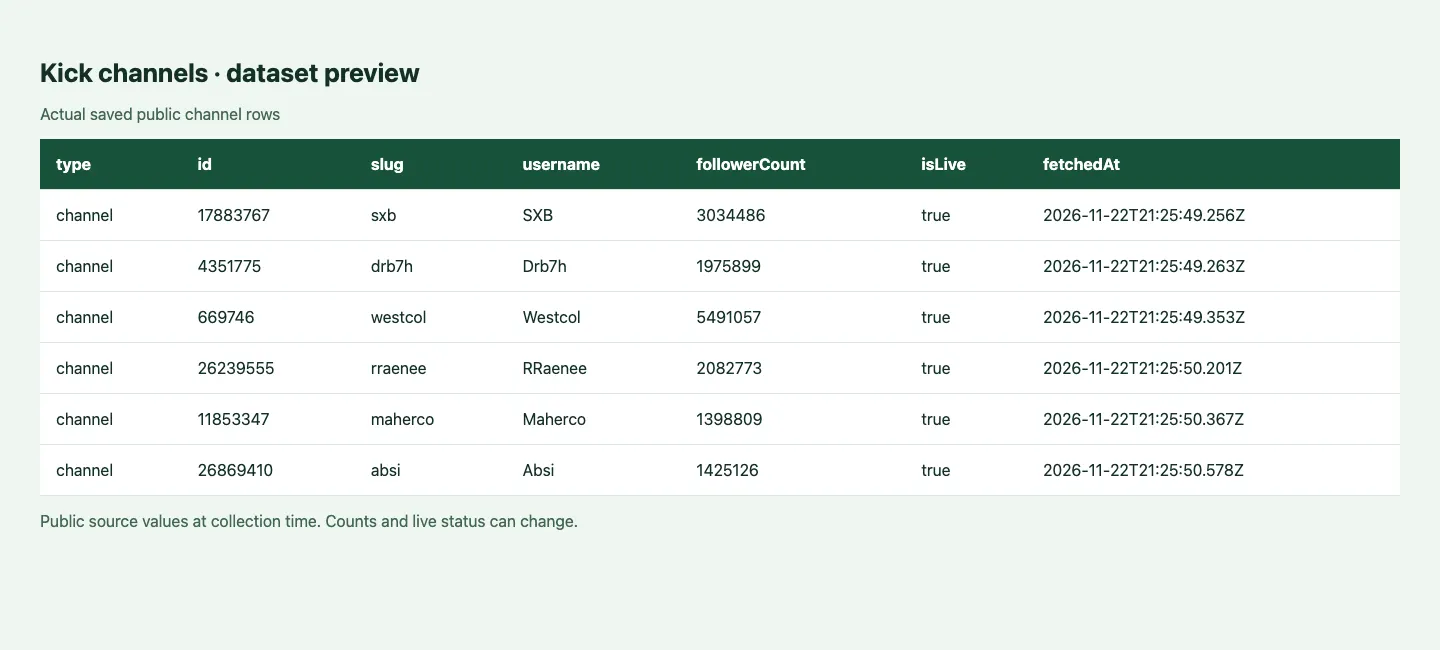
The results link returns complete saved rows for all three types. The Console overview table shows selected channel columns. The preview is rendered from saved dataset rows. Channel IDs are numeric; VOD and clip IDs may be strings. Deduplication uses entity type and source ID. Use a fresh dataset for another snapshot; resuming the same dataset preserves saved identities.
Guarantees and failure semantics
A run with no saved rows is FAILED when required source work fails. Status messages begin with blocked:, network:, timeout:, invalid: or outdated:. Blocks include HTTP 403/429/503, challenge headers/pages and non-JSON responses on JSON routes. Blocks get one retry with a fresh session. Unknown envelopes, renamed required fields, route changes and repeated cursors are outdated.
A missing slug is skipped only after a confirmed JSON not-found answer and a working known-channel route check. It is logged and counted as notFound in STATISTICS. All-confirmed-missing inputs succeed with zero rows. Recognized empty VOD arrays, clip listings and discovery listings also succeed when every required traversal completes without failure. An earlier valid page cannot mask a later timeout or source failure, even if all entries seen so far were restricted or missing.
Saved rows survive later failures as partial success. STATISTICS reports requests, failed attempts, blocks, not-found inputs, completed inputs and stop reasons. Page, item and charge caps mean limited coverage; they never establish history exhaustion. Source work stops with a reserve before the platform deadline. Counts and live state can change during a run.
Dataset appends are serialized and never replayed after uncertain acknowledgement. A durable pending marker stops further work, including after restart. Saved rows yield partial success; zero saved rows with an uncertain append fail. This avoids replaying an append that might already have been charged.
Integrations
Use dataset exports with spreadsheets, dashboards and content pipelines. Apify API clients, schedules, webhooks, Make, n8n and MCP workflows can start the actor and consume its dataset. Automated jobs should inspect status and STATISTICS. Keep repeated snapshots in separate datasets for historical comparisons.
More scrapers from this developer
TikTok: TikTok Search Scraper: Videos and creators for any keyword, pay per result · TikTok Profile Scraper (Pay Per Result): Profiles, followers and latest posts by username · TikTok Comments Scraper: Comments and full reply threads from any video · TikTok Hashtag Scraper: Videos for any hashtag, with views, likes and music · TikTok Sound & Music Scraper: Videos that use a sound or song · TikTok Top Ads Scraper: Public Creative Center ad rankings, engagement, media and landing pages
Social & news: Reddit Search Scraper: Posts by keyword, subreddit or author · Google News Scraper: Google News results as clean full-text articles · Threads Replies Scraper: Public post replies, likes, authors and inline nested replies · Threads Posts Scraper: Public profile timelines with likes, replies and reposts · Pinterest Videos Scraper: Public Pinterest videos by keyword or board, with MP4 links and stats · Pinterest Comments Scraper: Public Pin comments and replies with authors, dates and likes · Telegram Comments Scraper: Public channel post comments with authors, dates and reactions · Telegram Keyword Scraper: Keyword matches in public channels you supply, with views and reactions · Pinterest Trends Scraper: Trending Pinterest keywords by market, with ranks, growth and seasonality · Facebook Marketplace Scraper: Marketplace search and category listings with prices and locations · Pinterest Search Scraper: Scrape pinterest search Pins by keyword · Bluesky Posts Scraper: Public Bluesky posts, profiles, feeds and followers
Instagram: Instagram Reel Scraper: Public profile reels, plays, captions, music and media URLs · Instagram Comment Scraper: Public post and reel comments, likes, timestamps and usernames · Instagram Post Scraper: Public profile posts, likes, captions, locations and media URLs
E-commerce: Prom.ua Product Search Scraper: Prom.ua product search results, no browser needed · AliExpress Search Scraper: AliExpress products by keyword with prices, orders and shipping · AliExpress Product Reviews Scraper: Public product reviews, ratings, buyer photos and follow-up feedback
Ads: Facebook Ad Library Scraper (Meta Ads Library): Ads from the Meta Ad Library, with EU reach and payers · Google Ads Transparency Scraper: Google ad creatives by advertiser or domain, with regional details
Video: YouTube Transcript Scraper: Transcripts, subtitles and captions from YouTube videos · YouTube Shorts Scraper: Shorts of any channel with exact views, likes and duration · YouTube Channel Details Scraper: Every video of a channel, with channel stats · YouTube Search Results Scraper: Search results and videos for any keyword · YouTube Comments Scraper: Comments, replies and likes from any video · Bilibili Comments Scraper: Public hot comments and reply threads by video or keyword
Jobs: SEEK Job Listings Scraper: Public AU/NZ job listings, salaries and redacted descriptions
Travel: Google Hotels Scraper: Scrape Google Hotels property prices
FAQ
Is it legal to scrape kick channels?
This actor accesses public data without login. You are responsible for your purpose, applicable terms and laws, including GDPR and CCPA where relevant. Public accessibility does not establish permission for every reuse. Minimize retained data, limit access and honor applicable deletion requests.
Can I retrieve the entire channel history?
VODs include only the currently exposed array. Clips stop at a terminal cursor or the selected page/result bound. Neither mode promises deleted, private, expired or complete historical content.
Does an offline or banned channel fail?
An offline channel remains a row without a livestream. A returned banned public record also remains a row. Confirmed missing inputs are reported and processing continues.
Will repeated URLs cost another result?
Equivalent slugs and URLs normalize before requests. Channel rows deduplicate on numeric channel ID, VODs on video UUID/ID, clips on clip ID. Restart seeds those same identities. Separate runs with fresh datasets collect separate snapshots.
Support
Report reproducible input, run ID and relevant STATISTICS through the actor's Apify page. Include the failure category and expected behavior. Never include tokens, proxy passwords or private account data.


