

Pinterest Trends Scraper: Trending Keywords by Market
Pricing
from $0.95 / 1,000 items
Pinterest Trends Scraper: Trending Keywords by Market
Scrape pinterest trends by market, trend type and interest. Export trending keywords, ranks, relative search indices, growth percentages and seasonality as structured trend lists.
Pricing
from $0.95 / 1,000 items
Rating
0.0
(0)
Developer

GoFetch
Maintained by CommunityActor stats
0
Bookmarked
1
Total users
0
Monthly active users
4 days ago
Last modified
Categories
Features
Share
Scrape pinterest trends into keyword lists for content planning, seasonal research and market comparisons. This actor returns public trend lists only: one saved row is one trending keyword for one market, trend type and optional interest category. It includes ranks, relative search indices, percentage changes and seasonality, with no account login required.
What data you get
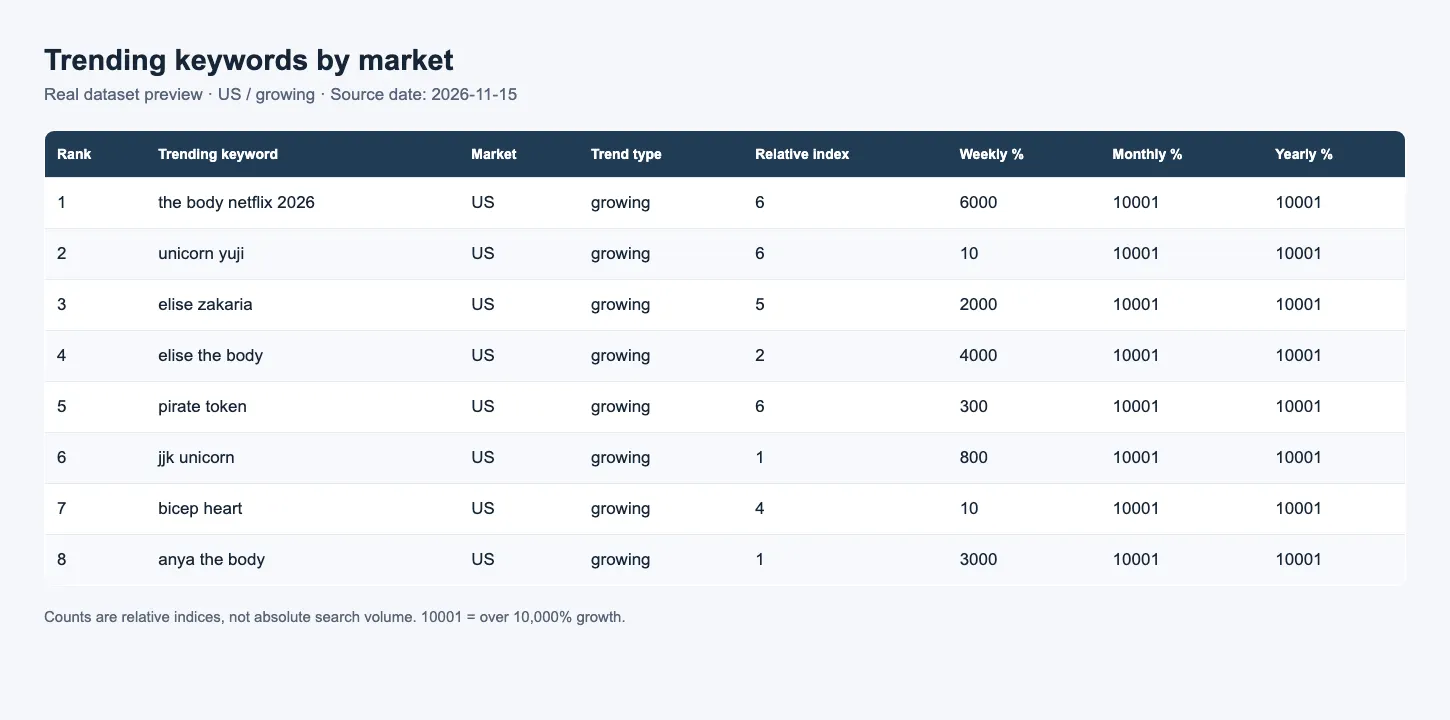
Choose from 29 verified public markets, four trend types and 24 interest categories. Each list contains up to 100 terms. The actor combines your selections, fetches each distinct list once and saves the results in the default dataset. A term appearing in two markets or two categories remains two rows because those contexts are different observations.
Growing, monthly, yearly and seasonal lists are separate source presets. The actor preserves their returned ordering as rank, beginning at 1. It also reports the source's weekly, monthly and yearly change ranks. The country field holds the resolved market code, including grouped markets such as GB+IE or DE+AT+CH. A group is one source market; it is not expanded into individual countries.
Use the data to spot rising topics, compare market-specific interest and prepare a seasonal editorial calendar. Both normalizedCount and searchCount are relative indices, not absolute search volume, people or searches. They should be interpreted in their source list context. The source growth overflow value 10001 means over 10,000%. The dataset keeps that number so your own analysis can distinguish overflow from ordinary changes.
There are no history, forecast, related-keyword or demographics modes, and no research by seed keyword. This actor does not collect Pins, profiles or private audience data. The available data typically lags the current date by a few days; the output endDate identifies the actual date used.
How to use it
In Apify Console, open this actor, keep the prefilled US market and growing type, set maxItems to 10 and click Start. When it finishes, open the Dataset tab. Download JSON, CSV or Excel, or inspect the overview table. For additional lists, select more markets, trend types or categories. Increase the global cap only when you need more saved rows.
You can start a run through the Apify API. Replace the environment variable with your own Apify token; keep credentials out of shared scripts. This synchronous endpoint returns dataset rows when the run finishes:
For automation, use asynchronous runs and read their datasets after completion. The Apify API documentation describes run status, dataset exports and authentication. MCP clients connected to Apify can invoke this actor with the same JSON input and consume the structured results; MCP does not add extra research fields.
Pricing
Result pricing is per 1,000 saved keyword rows, according to your Apify plan. There are no actor start fees, enrichment fees or additional charge events.
| Plan | Price per 1,000 results |
|---|---|
| FREE | $1.36 |
| BRONZE | $1.22 |
| SILVER | $1.09 |
| GOLD | $0.95 |
At the listed rates, 10 saved rows cost $0.0136 at FREE or $0.0095 at GOLD; 200 rows cost $0.272 at FREE or $0.19 at GOLD. These are result-price examples before applicable free allowances. Platinum and Diamond use the Gold rate. Request failures, duplicate rows and empty lists add no result events. The actor stops when the requested result cap or the available result-charge budget is reached. A small remaining budget that cannot cover one row does not permit another row.
Is it free?
On the Apify free plan, this developer allows 100 results per run and 20 runs per month per user, measured by UTC calendar month. These limits are set by the developer. The monthly allowance resets on the first day of the next month. An exhausted allowance ends successfully with zero rows before proxy initialization or source requests. Free runs always use Apify Proxy. Paid plans are exempt from these developer free-plan caps; the requested maxItems and charge limit still apply.
Input
| Field | Meaning |
|---|---|
countries | Verified market codes; default US. The Console selector lists all supported single and grouped markets. Repeated codes are requested once. |
trendTypes | Any of growing, monthly, yearly, seasonal; default growing. |
interests | Readable category names selected in the Console, such as Beauty, Food and drinks or Home decor. Empty selects an unfiltered list. Each selected category is a separate list, without an extra unfiltered list. |
maxItems | Global maximum saved rows, 1–1,000,000. Default 100; the prefilled example uses 10. This is a cap, not a promise that the source has that many terms. |
endDate | Optional real YYYY-MM-DD date. Empty selects the latest source date and pins it across restarts. Future dates are rejected. |
proxyConfiguration | Apify datacenter by default. Residential groups and country routing, including SDK aliases, are rejected. Paid callers can supply http://host:port or https://host:port proxy URLs, optionally with URL-encoded username:password authentication, or explicitly use direct access. SOCKS and other protocols are rejected. |
Use the market, trend type and interest values shown in the selectors. Unsupported values fail input validation before monthly quota admission. Every combination of market, trend type and selected category defines one list. Requests run in selection order until the global cap is reached. For example, US plus CA, two types and three interests means 12 lists with at most 1,200 available rows. Requesting a larger cap cannot paginate beyond those lists: the source has no pagination and at most 100 terms per list.
Output
The following row comes from an actual public-source run, with its list context and stable identity added by the actor:
interest and interestId are null for an unfiltered list. Unavailable numeric values remain null. Change percentages are percentage points in the usual growth convention: 25 means a 25% increase and -10 means a 10% decrease. seasonalityScore is the source's relative seasonality score. trendsUrl opens the corresponding keyword view. id combines market, type, category, end date and exact term; it is the deduplication key across restarts. Repeated terms in different contexts remain distinct.
Guarantees and failure semantics
The actor writes and bills saved rows through the Apify SDK once per distinct identity. It reads existing dataset pages through an empty page after restart and restores physical saved-row counts. If a dataset append has an uncertain acknowledgement, the actor stops further work and retains a pending-write marker. It does not replay that append. Saved rows remain available.
A run is FAILED when no rows were saved and a required list could not be answered. Status messages begin with blocked:, network:, timeout:, invalid: or outdated:. HTTP blocks and actual HTML challenge markers are distinguished from keyword text that merely mentions a challenge. HTTP 400 for a well-formed list is classified as outdated:. An unrecognized source response also fails rather than being called empty.
Zero rows mean “no results” only after a recognized HTTP 200 list confirms no terms. Monthly quota refusal and a result-charge limit are separate successful stop conditions with an explicit status. If some rows were saved before a later failure, the run succeeds as a partial result. Check STATISTICS in the default key-value store for completed lists, limited output, failures and request totals. A result cap does not establish source exhaustion. Network attempts are bounded, retries use fresh datacenter sessions, and work stops with a reserve before the run timeout.
Public endpoints can change. Neither source availability nor a particular keyword is guaranteed. Run a small sample before depending on a new market/category combination, and keep endDate with every export for reproducible comparisons.
Integrations
Use the default dataset with Google Sheets, n8n, Make or your own ETL pipeline through Apify integrations. JSON preserves nulls and numeric growth values; CSV and Excel are convenient for planning sheets. Webhooks can notify your workflow after completion. Inspect run status and statistics before treating a partial export as a complete comparison. When joining observations over time, include market, type and category alongside the term; the same text can have different ranks in different lists.
More scrapers from this developer
TikTok: TikTok Search Scraper: videos and creators for any keyword, pay per result · TikTok Profile Scraper (Pay Per Result): profiles, followers and latest posts by username · TikTok Comments Scraper: comments and full reply threads from any video · TikTok Hashtag Scraper: videos for any hashtag, with views, likes and music · TikTok Sound & Music Scraper: videos that use a sound or song · TikTok Top Ads Scraper: public Creative Center ad rankings, engagement, media and landing pages
Social & news: Reddit Search Scraper: posts by keyword, subreddit or author · Google News Scraper: google News results as clean full-text articles · Threads Replies Scraper: public post replies, likes, authors and inline nested replies · Threads Posts Scraper: public profile timelines with likes, replies and reposts · Pinterest Videos Scraper: public Pinterest videos by keyword or board, with MP4 links and stats
Instagram: Instagram Reel Scraper: public profile reels, plays, captions, music and media URLs · Instagram Comment Scraper: public post and reel comments, likes, timestamps and usernames · Instagram Post Scraper: public profile posts, likes, captions, locations and media URLs
E-commerce: Prom.ua Product Search Scraper: prom.ua product search results, no browser needed · Amazon Product Search & Bestsellers Scraper: search results and product details from Amazon · AliExpress Search Scraper: aliExpress products by keyword with prices, orders and shipping · AliExpress Product Reviews Scraper: public product reviews, ratings, buyer photos and follow-up feedback
Maps & leads: Google Maps Scraper: places, leads and emails from Google Maps
Ads: Facebook Ad Library Scraper (Meta Ads Library): ads from the Meta Ad Library, with EU reach and payers · Google Ads Transparency Scraper: google ad creatives by advertiser or domain, with regional details
Video: YouTube Transcript Scraper: transcripts, subtitles and captions from YouTube videos · YouTube Shorts Scraper: shorts of any channel with exact views, likes and duration · YouTube Channel Scraper: every video of a channel, with channel stats · YouTube Search Scraper: search results and videos for any keyword · YouTube Comments Scraper: comments, replies and likes from any video · Bilibili Comments Scraper: public hot comments and reply threads by video or keyword
Jobs: SEEK Job Listings Scraper: public AU/NZ job listings, salaries and redacted descriptions
FAQ
Why are there fewer rows than requested?
Each list has at most 100 terms and some categories contain fewer. maxItems is a global ceiling. A charge limit, the free-plan cap, a deadline or an unavailable list can also stop collection; see the run message and STATISTICS.
Can I compare the indices with absolute search volume?
No. Counts are relative indices from the source. They do not measure a number of searches or users. Keep list context and source date when interpreting changes. A growth value of 10001 represents over 10,000%, without a more precise value available.
Is it legal to scrape public trend lists?
This actor accesses public data only, without login or account cookies. Your use must comply with applicable terms and laws, including GDPR and CCPA where relevant. Assess your own purpose, retention and downstream use. This tool does not provide legal advice or access private data.
Does it return historical charts or related terms?
No. It returns trend lists only. A past end date selects a dated list when the public endpoint supports it; it does not return a keyword time series. No forecasts, audience demographics or seed-keyword enrichment are included.
Support
Open an issue from the actor's Apify page with the run ID, expected behavior and market/type/category combination. Include the source date and the leading failure token when available. Do not share account tokens, proxy credentials or private information. A small reproducible input helps identify source changes.


