

Y Combinator Jobs Scraper: Startup Roles & Salaries
Pricing
from $1.34 / 1,000 items
Y Combinator Jobs Scraper: Startup Roles & Salaries
Scrape y combinator jobs with salaries, equity, locations, requirements, company facts and full descriptions. Supply job boards, companies or job URLs, or discover hiring YC companies.

Scrape y combinator jobs into one row per public YC startup job posting, with compensation, requirements, location, company facts and full descriptions. Use this scraper for recruiting research, startup hiring analysis, salary comparisons and a watchlist of companies. Supply a YC job board, company URLs or slugs, direct job links, or enable discovery of hiring YC companies. No account credentials are required.
What data you get
Each row contains a numeric job ID, public job URL, title, job type, role and sub-role, location and a remote indicator. Salary and equity ranges retain the source wording, including currency and units; missing amounts stay null. Experience, school-year, visa and skill requirements are separate fields when served.
Company context includes its name, slug, YC URL, batch, one-liner and logo. Detail pages can add team size, website and company location. Industry is populated only when the public directory supplies it during discovery: company tags are not converted into an industry. The default includeDetails: true adds the Markdown job description and interview process. Optional fields absent from the source stay null.
Posting age is returned as postedAgo, such as “3 days”, and activity as companyLastActive. These are the source's relative values, not an ISO posting or update date. fetchedAt records when the row was collected. No founder profiles, hiring-manager records, personal social accounts or contact enrichment are exported. Email addresses and personal social destinations in descriptions are removed.
How to use it
In the Apify Console, open the actor, keep the prefilled board URL and three-result limit, then select Start. The default fetches details. When the run finishes, open the Dataset tab to preview the rows or download JSON, CSV or Excel. Start with this small sample before increasing the limit.
For an API integration, send the same input to the actor's synchronous dataset endpoint. Store your Apify token in an environment variable and keep it out of shared notebooks and source control.
For larger runs, start the actor asynchronously and retrieve its dataset after completion; synchronous HTTP requests have their own time limits. See the Apify API documentation. You can also invoke the actor through Apify MCP from a compatible AI client: send the input JSON, wait for the run, then read the resulting dataset. MCP uses the same input and row format.
Pricing
One saved unique job posting is one result. Details are included in that result when requested. The listed prices are per 1,000 saved job postings, with no separate start or detail event.
| Apify plan | Price per 1,000 results |
|---|---|
| FREE | $1.92 |
| BRONZE | $1.73 |
| SILVER | $1.54 |
| GOLD | $1.34 |
For example, 100 rows cost $0.192 at FREE pricing. A 200-row run costs $0.268 at GOLD pricing. A 1,000-row run costs $1.73 at BRONZE pricing. Platinum and Diamond use the GOLD rate. These examples describe result charges; available platform credits and account settings determine your invoice. Reaching a result or charge limit stops further admission. Repeated URLs and overlapping board/company/job routes produce a single saved row for each numeric job ID within a run.
Is it free?
On the Apify free plan, this developer allows 100 results per run and 20 runs per month, per user and UTC calendar month. Available Apify credits can cover result charges. The quota resets on the first day of the next UTC month. A run after the allowance is used succeeds with zero rows before proxy or source access. A failed admitted run still uses a monthly slot. Paid Apify plans have no developer monthly free-run cap; the owner and Apify TEST runs are exempt. Free runs always use Apify datacenter proxy.
Input
| Field | Default | Purpose |
|---|---|---|
startUrls | YC jobs board prefill | YC boards, company URLs or direct job URLs. API callers can pass a company slug instead. |
maxItems | 10; prefill 3 | Maximum unique saved postings across the run. |
includeDetails | true | Fetch full job descriptions, interview process and company context. |
discoverCompanies | false | Discover hiring YC companies from the public directory in batch partitions. |
role | empty | Case-insensitive substring in role, sub-role or displayed role. |
location | empty | Case-insensitive substring in the job's location. |
remote | all | all, remote or onsite, using the public location wording. |
proxyConfiguration | Apify datacenter | Automatic routing; paid users may use HTTP(S) custom URLs or direct access. |
Supported boards include /jobs, /jobs/role/software_engineer, a role plus location, and /jobs/location/new_york on the main YC host. Company inputs accept /companies/<slug> and /companies/<slug>/jobs; both normalize to the company jobs page. Direct links accept YC's opaque job token or numeric-looking URL segment. Tracking query parameters and trailing slashes are normalized.
Board pages show up to about 50 postings each, with no usable pagination. Changing page does not extend coverage. A recognized location board keeps YC's own selection, including country codes, city-only locations and remote jobs. Some role/location paths return a broader list; when YC does not confirm the requested location, the scraper filters row locations, recognizing country codes as well as names. Requested roles and explicit filters still apply to every row, including after detail fetches and on company and discovery inputs. The explicit location input remains a substring filter. Remote eligibility is based on source text; a remote label does not establish that applicants in every country can apply.
Company discovery gives the broadest coverage. Set startUrls: [] with discoverCompanies: true to use it alone. The scraper reads the current public search configuration at run time, partitions hiring companies by batch to avoid the directory's 1,000-hit window, then visits company job pages. Coverage remains bounded by maxItems, source availability and the run deadline. A limit is reported as limited coverage, never as directory exhaustion. Sparse filters can require many company requests.
Apify residential groups, their groups alias, non-US country routes and unsupported subdivision/tiered options are rejected before any request. Only automatic datacenter or supported datacenter groups are developer-funded. Custom proxy URLs must use HTTP or HTTPS; SOCKS is unsupported. Free runs ignore paid custom routes.
Output
This JSON example shows core fields from a real public posting. The complete dataset also includes the optional company and description fields described above.
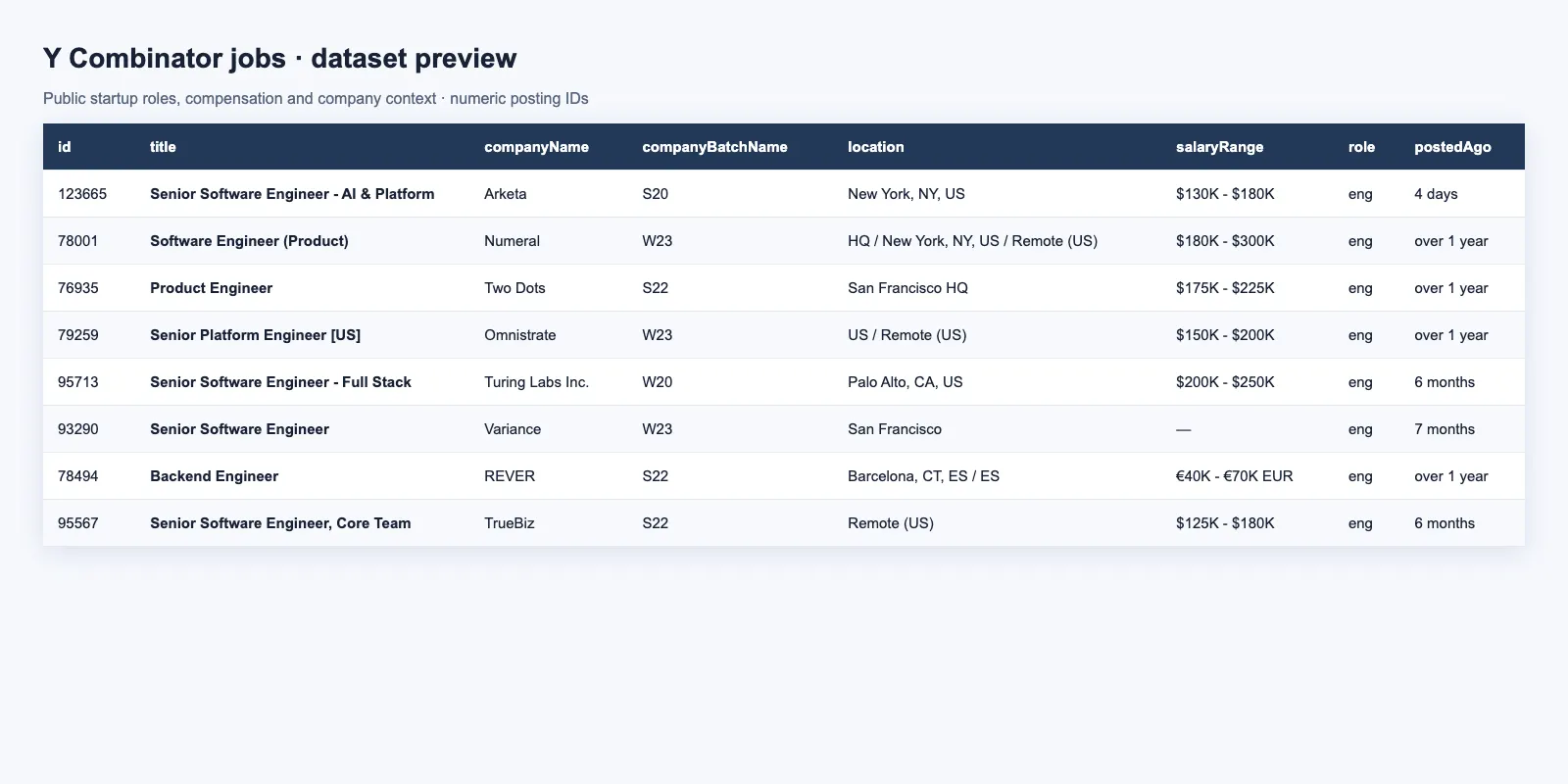
The overview table shows ID, title, public URL, company, batch, location, salary, role and relative posting age. Full JSON exports retain all fields. Use id as the posting identity when combining independent runs; a new run has its own dataset and may legitimately return the same posting again.
Guarantees and failure semantics
Rows are saved and billed once per numeric posting ID within a run. Restart reconciliation reads saved IDs and physical row counts before further work. A pending or uncertain dataset append stops new source work, preserving saved rows for inspection. The scraper does not replay an uncertain append.
A run with saved rows survives later source failures as partial success. Check STATISTICS for completed inputs, limits, requests, failed requests, not-found counts and proxy mode. Result and charge limits count saved rows: missing details and rows excluded by detail-time filters leave room for later candidates. A source unit is complete only after its recognized terminal response and every eligible row has been handled. A board window can be complete without representing all available YC jobs.
With zero saved rows, an unrecognized or unanswered input is FAILED with a leading category such as blocked:, network:, timeout:, invalid: or outdated:. A normal empty run requires recognized empty data from all inputs. Quota refusal and a zero charge allowance are explicit graceful exits. Confirmed company or job 404s are logged as not found and skipped. HTTP 200 without the expected payload is retried as a block, and rate limits retry with backoff on fresh proxy sessions. Saved results remain available even when later inputs fail.
The scraper stops scheduling before the run timeout. Descriptions and compensation reflect the source at collection time; postings can change, close or disappear later. Application and login links are never followed, and Work at a Startup is outside this actor's scope.
Integrations
Connect datasets to Google Sheets, n8n, Make or a data warehouse using Apify integrations and the dataset API. Export numeric IDs with your chosen business columns so downstream jobs can upsert records. Schedule repeated runs for a company watchlist, and use webhooks to process completion or failure. Keep partial-coverage statistics with each snapshot so a smaller result count is not mistaken for hiring decline.
More scrapers from this developer
TikTok: TikTok Search Scraper: Videos and creators for any keyword, pay per result · TikTok Profile Scraper (Pay Per Result): Profiles, followers and latest posts by username · TikTok Comments Scraper: Comments and full reply threads from any video · TikTok Hashtag Scraper: Videos for any hashtag, with views, likes and music · TikTok Sound & Music Scraper: Videos that use a sound or song · TikTok Top Ads Scraper: Public Creative Center ad rankings, engagement, media and landing pages
Social & news: Reddit Search Scraper: Posts by keyword, subreddit or author · Google News Scraper: Google News results as clean full-text articles · Threads Replies Scraper: Public post replies, likes, authors and inline nested replies · Threads Posts Scraper: Public profile timelines with likes, replies and reposts · Pinterest Videos Scraper: Public Pinterest videos by keyword or board, with MP4 links and stats · Pinterest Comments Scraper: Public Pin comments and replies with authors, dates and likes · Telegram Comments Scraper: Public channel post comments with authors, dates and reactions · Telegram Keyword Scraper: Keyword matches in public channels you supply, with views and reactions · Pinterest Trends Scraper: Trending Pinterest keywords by market, with ranks, growth and seasonality · Facebook Marketplace Scraper: Marketplace search and category listings with prices and locations · Pinterest Search Scraper: Scrape pinterest search Pins by keyword · Bluesky Posts Scraper: Public Bluesky posts, profiles, feeds and followers
Instagram: Instagram Reel Scraper: Public profile reels, plays, captions, music and media URLs · Instagram Comment Scraper: Public post and reel comments, likes, timestamps and usernames · Instagram Post Scraper: Public profile posts, likes, captions, locations and media URLs
E-commerce: Prom.ua Product Search Scraper: Prom.ua product search results, no browser needed
Maps & leads: Google Maps Scraper: Places, leads and emails from Google Maps
Ads: Facebook Ad Library Scraper (Meta Ads Library): Ads from the Meta Ad Library, with EU reach and payers · Google Ads Transparency Scraper: Google ad creatives by advertiser or domain, with regional details
Video: YouTube Transcript Scraper: Transcripts, subtitles and captions from YouTube videos · YouTube Shorts Scraper: Shorts of any channel with exact views, likes and duration · YouTube Channel Details Scraper: Every video of a channel, with channel stats · YouTube Search Results Scraper: Search results and videos for any keyword · YouTube Comments Scraper: Comments, replies and likes from any video · Bilibili Comments Scraper: Public hot comments and reply threads by video or keyword
E-commerce: Amazon Product Search & Bestsellers Scraper: Search results, marketplace listings and product details from Amazon · AliExpress Search Scraper: AliExpress products by keyword with prices, orders and shipping · AliExpress Product Reviews Scraper: Public product reviews, ratings, buyer photos and follow-up feedback
Jobs: SEEK Job Listings Scraper: Public AU/NZ job listings, salaries and redacted descriptions
Travel: Google Hotels Scraper: Scrape Google Hotels property prices
FAQ
Does discovery include every job?
Discovery visits public hiring company pages and gives broader coverage than fixed board windows. It does not promise an exact total: input filters, source changes, job closures, result caps and deadlines affect the snapshot. Increase the run limit deliberately and inspect completion statistics.
Why is there no posting date?
The source serves relative ages. Converting “3 days” into a precise timestamp would add precision the source does not provide. The scraper preserves the age and provides a separate collection timestamp.
Is it legal to scrape y combinator jobs?
This actor collects public data: job postings and company facts without login or personal-contact enrichment. Your use must respect applicable terms, intellectual-property rights and privacy rules, including GDPR and CCPA where applicable. Minimize retained data, restrict access and honor applicable removal obligations. Public availability alone does not settle every legal question; assess your intended use.
Support
Use the actor's Apify page to report a problem. Include the run ID, input type, expected behavior and the failure category from STATISTICS. Avoid sending tokens, account credentials or personal information. A reproducible public URL and a short description of the affected fields help diagnose source changes.


